All case studies

DEV3 Technologies · own product

DEV3 Launchpad: a SaaS and startup WordPress theme with live product UI, pricing, docs and a 3D app cube

Our own WordPress theme for SaaS products and startups: a hero with a live HTML product mockup, a feature tour, pricing with a monthly / yearly toggle and a comparison matrix, integrations, customer stories, a changelog and a docs / help centre, with rich motion and one small 3D app cube.

Industry
SaaS and startups (WordPress theme)

Live project preview

Client systems are private — screenshots shown where permitted.

DEV3 Technologies · own product — screenshots
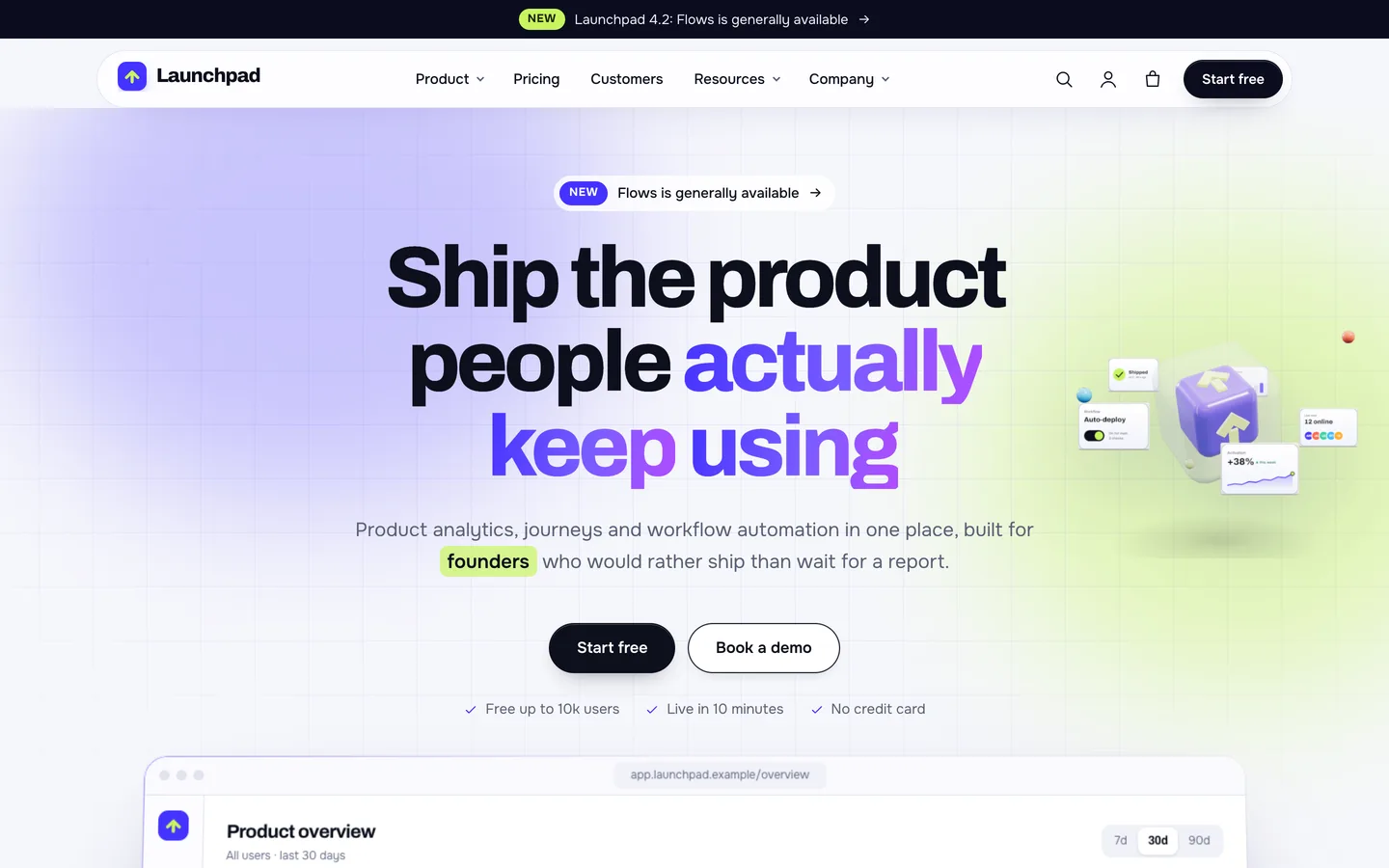
Product-led hero — an announcement bar, a floating pill header, a gradient headline with a word highlight, two buttons and a small 3D glass app cube orbited by UI tiles.

Product-led hero — an announcement bar, a floating pill header, a gradient headline with a word highlight, two buttons and a small 3D glass app cube orbited by UI tiles.

The challenge

A SaaS website does more than sell. It has to show the product working, explain pricing plan by plan, prove that the tool fits the stack a buyer already uses, and then keep serving the same people after they sign up, through release notes and documentation. Most WordPress SaaS themes stop at the landing page: a screenshot in a laptop frame, three pricing cards and a contact form, with the docs and changelog living on a separate tool. We wanted one theme that covers the whole journey, from the first visit to the hundredth help-centre search, with product screens that move like the real thing, a pricing page that handles billing periods and a full feature matrix, and a 3D detail small enough that it never slows the headline down. The demo also had to be safe to ship: no real logos, no stock photos and no figures that look like claims.

Our solution

Launchpad is a classic PHP theme with theme.json, built on DEV3's shared theme core and the DEV3 Theme Toolkit plugin. The theme owns presentation, the docs, changelog and customer story templates, the product UI layer and its 3D preset. The toolkit owns functionality: the features, customer stories, docs, changelog, team and quote post types, the Pricing Table, Feature Comparison, Logo Wall, Docs and Changelog widgets with block twins, the request form, the DEV3 Motion controls, WooCommerce extras and the demo importer.

Key design decisions

  • Product screens in HTML, not images. The hero mockup, the tour screens and the bento mini UIs are HTML and SVG, so the KPIs count up, the chart draws, events stream and every label is editable text. The demo's covers, logos and integration icons are rendered from the same code.
  • Pricing as two widgets. The Pricing Table carries a second price and period per plan behind a monthly / yearly switch. The Feature Comparison is separate, with group rows, a highlighted column and sticky headings, and it shows one plan column at a time on phones instead of scrolling sideways.
  • Docs inside WordPress. Docs are a hierarchical post type with categories and an audience field. Doc pages get sidebar navigation with a filter, a breadcrumb and an on-this-page contents list, and searches from the help centre land on a dedicated docs results layout. The help page lives at /help/ so the docs post type can own /docs/.
  • A changelog that tags itself. Release notes are written as a plain list; lines that start with New, Improved, Fixed, Security or Deprecated get coloured tags and become filters.
  • Motion that respects the visitor. The product tour advances once and stops as soon as someone interacts, tabs work with arrow keys, Home and End, and reduced motion shows every section in its final state.
  • A small 3D app cube. A glass cube with 2–6 UI tiles in orbit sits beside the headline on wide screens and above the mockup on smaller ones. It loads lazily, pauses offscreen and falls back to a poster without WebGL.
  • Honest sample content. Every brand is fictional and drawn for the demo, quotes are badged "Sample review" and figures say "Sample data".
Results

Launchpad ships as a complete theme with a one-click demo of a fictional product analytics company: 8 pages, 8 blog posts, 6 features, 6 customer stories, 8 changelog entries, 18 docs in 6 categories, 8 team members, 6 customer quotes and 10 WooCommerce products, plus 23 block patterns.

  • Theme Check: 0 required-level failures in the WordPress Theme Check plugin.
  • Coding standards: phpcs with WPCS 3 and PHPCompatibilityWP 7.4+ at 0 errors and 0 warnings.
  • Flows tested: a WooCommerce flow from the variable sweatshirt through the mini cart and checkout to the order-received page, and an Elementor editor test where the app cube's colour control updates the 3D accent live.
  • Browser QA: all 22 demo pages at 1440 px and 390 px with 0 console errors and about 60 fps, a tablet pass at 820 px and a reduced-motion pass.
  • Loading: three.js loads only when the cube nears the viewport; fonts are self-hosted.

Launchpad is on the DEV3 marketplace. Watch its video tour there.

Setup guide

Requirements

  • WordPress 6.0 or newer and PHP 7.4 or newer
  • The DEV3 Theme Toolkit plugin (included and required)
  • Recommended: Elementor (free), WooCommerce (store for add-ons, templates and merch) and Contact Form 7. Elementor Pro is supported but not required.

What's in the download

Unzip the download from your DEV3 account first. Do not upload the download itself to WordPress.

  • dev3-launchpad.zip: the theme. Install this one.
  • dev3-launchpad-child.zip: an optional child theme for your own CSS and PHP.
  • dev3-theme-toolkit.zip: the companion plugin (features, customer stories, docs, changelog, team and quotes post types, Elementor widgets and blocks, motion controls, WooCommerce extras, demo importer).
  • dev3-launchpad-demo-content.zip: the demo package for reference. The importer already has a copy inside the theme.
  • Documentation/index.html: the full guide. Open it in a browser.

Install the theme

  1. Go to Appearance → Themes → Add New → Upload Theme, choose dev3-launchpad.zip, click Install Now, then Activate.
  2. The theme shows a notice until the DEV3 Theme Toolkit is active. Go to Plugins → Add New → Upload Plugin, choose dev3-theme-toolkit.zip and activate it.
  3. Install and activate Elementor, WooCommerce and Contact Form 7 from the notice.
  4. Go to Settings → Permalinks and choose Post name. The docs, changelog and customer story addresses need it.
  5. Optional: if you plan to change code, upload dev3-launchpad-child.zip the same way and activate DEV3 Launchpad Child. The parent theme must stay installed.

Import the demo

  1. Make sure you are logged in as an administrator. Elementor keeps every widget setting only when an administrator runs the import.
  2. Go to Appearance → DEV3 Demo and click Import demo.
  3. The import adds:
    • the Home, Platform, Pricing, Integrations, Help centre, About, Careers and Book a demo pages, and sets the front page
    • the Blog with 8 posts, 6 features, 6 customer stories, 8 changelog entries, 18 docs in 6 categories, 8 team members and 6 customer quotes
    • 10 products (plan add-ons, templates and merch), menus, footer widgets and all images, with Cash on delivery enabled for testing
  4. Open the home page and scroll down to see the product mockup and tour.

Imported items are tagged, so Reset on the same screen removes only them. With WP-CLI you can run wp dev3tk demo import --user=admin.

After the import

  • Replace the sample product screens, logos, quotes and figures with your own. The Launchpad brand, its customers, integrations and numbers are fictional.
  • Set up your real payment methods in WooCommerce → Settings → Payments and turn off Cash on delivery.
  • Edit the announcement bar in Appearance → Customize → Launchpad: announcement & header.

Updates

Download the new version from your DEV3 account and upload dev3-launchpad.zip again. WordPress offers to replace the installed version. Changes you made in the child theme, the Customizer and your pages are kept.

How to use

Edit the hero and product screens

  1. Open the home page with Edit with Elementor.
  2. The headline, buttons and trust line are ordinary widgets. The release pill and the announcement bar link to your latest news; the bar is edited in Customizer → Launchpad: announcement & header.
  3. The product mockup and the product tour are HTML widgets. Edit the text in place and keep the class names so the counters, chart and event feed keep animating.
  4. Tour tabs need matching id / aria-controls pairs. Copy an existing tab to add one.

Set up pricing

  1. On the Pricing page, select the Pricing Table widget and turn on Billing toggle.
  2. For each plan, fill the monthly price and period, the yearly price and period, a badge (for example "Most popular"), small print, the feature list and the button. Tick Featured for the ink card.
  3. Below it, the Feature Comparison widget takes plan names as columns. Each row is a feature with values separated by | (yes, no or text). A row with only a section heading becomes a group row. Choose which column to highlight.
  4. Update the pricing teaser on Home the same way.

Write docs and run the help centre

  1. Go to Docs → Add New. Write the article with H2 and H3 headings; they become the on-this-page contents list.
  2. Choose a Docs category and an Audience, and set a Parent to nest the article under another.
  3. The Help centre page uses the Docs / Help Centre widget in its search and category index layouts. Doc pages show the sidebar navigation, breadcrumb, contents list and "Was this helpful?" automatically.
  4. The help page is at /help/; the docs themselves live under /docs/.

Publish release notes

  1. Go to Changelog → Add New. Set the Version, Released date and Tags.
  2. Write the notes as a list. Lines starting with New:, Improved:, Fixed:, Security: or Deprecated: are tagged and coloured automatically.
  3. The changelog page lists releases newest first with tag filters. The Changelog widget can also show entries on any page.

Features, customer stories and integrations

  • Features: a status pill (New, Beta), the plan it is on, a docs or demo link and a screenshot as the featured image.
  • Customer stories: customer, industry, year, company size, products used and results, one per line as value | label (for example +18% | trial-to-paid). The values count up on the story page.
  • Integrations: the Logo Wall / Integrations widget in the integration cards layout gives search and category filters. Leave a logo empty and it draws a monogram.

Book a demo and newsletter

  • The Request Form widget in the "Consultation / appointment" kind takes its topic list from your Features. Requests are stored under Requests and emailed to the admin.
  • The Newsletter Signup widget stores subscribers on the site, posts to Mailchimp or Brevo, or uses a form shortcode. It is also in the footer.

Change the 3D app cube

  1. Open the home page with Edit with Elementor and select the 3D Scene widget.
  2. It uses the preset Launchpad app cube in Accent object mode.
  3. Set the cube colour, mark colour, the number of UI tiles in orbit (2–6), orbit speed, cube spin and turn while scrolling. Changes show live in the editor.
  4. To remove the 3D, delete the widget. Nothing else depends on it.

Motion and styling

  • Select any widget or container and open Advanced → DEV3 Motion: reveal, stagger, split headings, mask, parallax, counter, marquee, tilt, sticky stack and progress.
  • Appearance → Customize → Launchpad Options: colours, fonts, header button, search, smooth scrolling, 3D quality, footer text and newsletter, shop columns.
  • Without Elementor, insert patterns from Patterns → DEV3 Launchpad (23 of them) and use block styles such as Glass panel, Ink panel, Gradient text and Browser frame.

Related case studies

DEV3 Technologies · own product · Legal services (WordPress theme)

DEV3 Lexora: a law firm WordPress theme with an attorney directory, case results and brass 3D scales

Our own WordPress theme for law firms and attorneys: practice-area pages that build themselves from short fields, a filterable attorney directory with vCards, case results that always carry their disclaimer, and consultation booking, with rich motion and one small 3D accent of brass scales.

DEV3 Technologies · own product · News and publishing (WordPress theme)

DEV3 Gazette: a magazine and news WordPress theme with live blogs, dark mode and a 3D globe

Our own WordPress theme for newspapers, magazines and news blogs: a classic masthead, breaking-news ticker, lead-story mosaics and section blocks, most read by real views, live blogs, reading tools, true dark mode, subscriptions, newsletters and ad slots, with reading-first motion and one small 3D globe.