All case studies

DEV3 Technologies · own product

DEV3 Forgeline: a construction company WordPress theme with project facts and a 3D steel node

Our own WordPress theme for contractors, engineers and industrial builders: filterable projects with full facts, services, process, safety and careers, a project brief with file upload, a PPE and hire shop, rich scroll motion and a small 3D steel node that bolts itself together.

Industry
Construction (WordPress theme)

Live project preview

Client systems are private — screenshots shown where permitted.

DEV3 Technologies · own product — screenshots
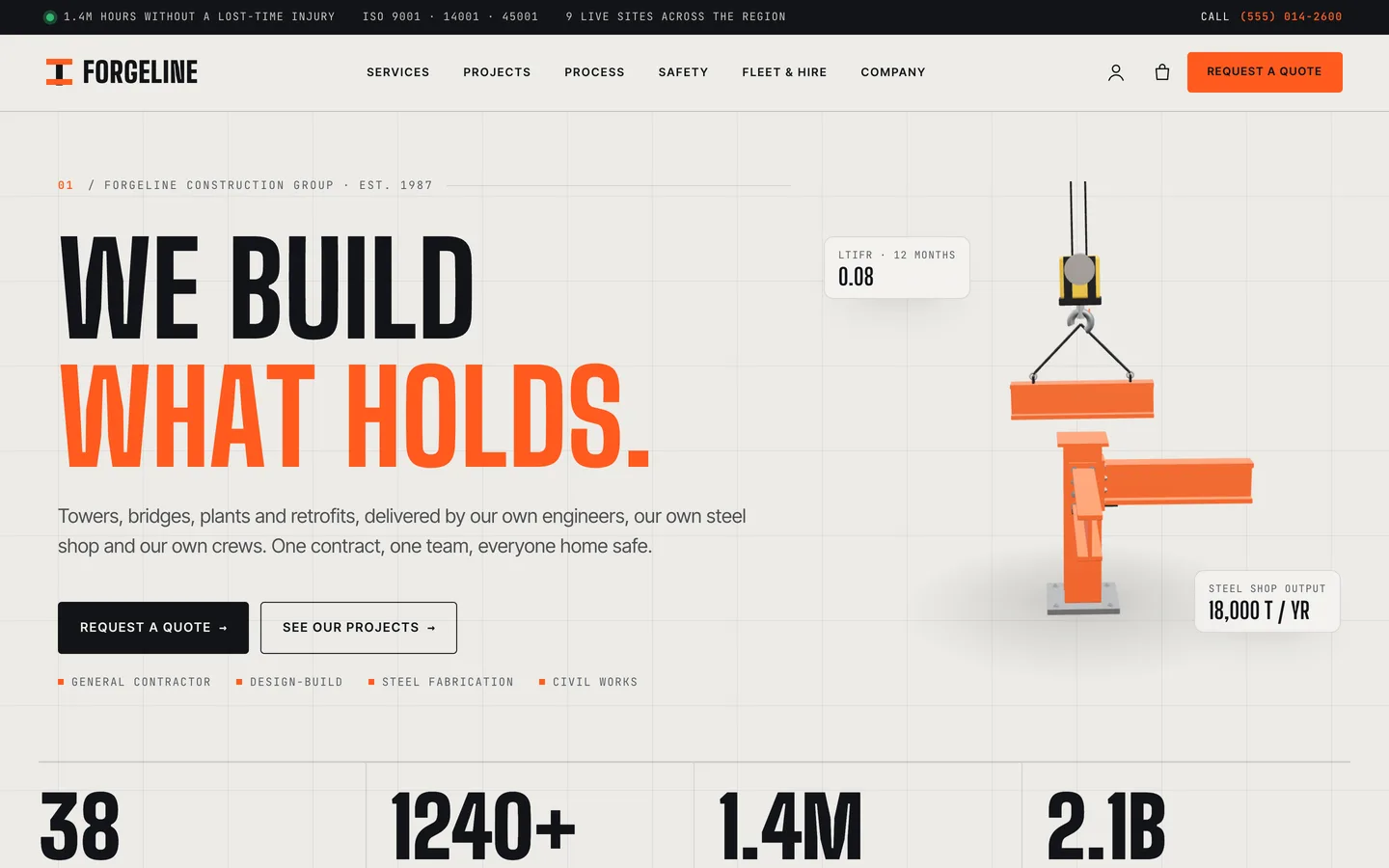
Steel-node hero — a 3D column and beams bolt themselves together while a crane hook lowers the next beam beside the We build what holds headline.

Steel-node hero — a 3D column and beams bolt themselves together while a crane hook lowers the next beam beside the We build what holds headline.

The challenge

Construction companies win work on evidence: what they have built, for whom, for how much, how fast and how safely. Most construction themes show a hero photo of a crane and a grid of project images, and leave the facts to a PDF. Contractors also recruit constantly and take enquiries that come with drawings attached. We wanted a theme where every project carries the facts a client asks for in a tender, where safety and certifications are first-class pages, and where quotes and job applications arrive with files. The look had to feel engineered rather than decorated, with motion that feels mechanical and precise, and a 3D accent small enough to sit beside the headline without slowing the page.

Our solution

Forgeline is a classic PHP theme with theme.json, built on DEV3's shared theme core and the DEV3 Theme Toolkit plugin. The theme owns presentation, its building-block classes and three 3D presets. The toolkit owns functionality: the service, project, job opening, leadership and testimonial post types, Elementor widgets with block twins, request forms, the DEV3 Motion controls, WooCommerce extras and the demo importer.

Key design decisions

  • Projects as a facts sheet. Client, sector, contract value range, duration, location, year and status are plain fields. The Item Facts widget turns them into a facts grid, scope lists or a gallery, and the cards show sector, location, value and duration.
  • Two kinds of enquiry. A detailed project brief (Contact Form 7, with sector chips, budget and a file upload for drawings) sits beside a quick callback form that needs no form plugin: it is stored in the dashboard and emailed, with a nonce, a honeypot and a rate limit.
  • Engineering details as design. A drawing-grid background, condensed industrial type, monospaced labels, an orange scroll ruler and a pulsing live-site dot make the site feel like a set of drawings.
  • One signature motion per page. The home page has a pinned horizontal project rail, and the process page has sticky stacked cards. Everything else uses quieter reveals and counters from the DEV3 Motion panel, and everything has a reduced-motion state.
  • A 3D accent that assembles. The steel node is a procedural three.js object on a transparent canvas: the column and beams bolt together while a crane hook lowers the next beam. It loads only when it comes into view and pauses offscreen. The same engine renders the project dioramas and the product models, so swatches on a hard hat recolour the 3D model.
  • Hire as deposits. Equipment hire is a WooCommerce variable product by hire period, priced as a deposit, with a Customizer note explaining how the balance is invoiced.

Results

Forgeline ships as a complete theme with a one-click demo of a fictional contractor: 14 Elementor pages, 6 services, 13 projects, 7 job openings, 8 leadership profiles, 6 sample client reviews, 6 insight posts, 10 products and 3 forms, plus 22 block patterns.

  • Theme Check: 0 required-level failures and 0 warnings in the WordPress Theme Check plugin.
  • Coding standards: phpcs with WPCS 3 and PHPCompatibilityWP 7.4+ at 0 errors and 0 warnings.
  • Flows tested: variation selected, mini-cart drawer, cart and order received in WooCommerce, and an Elementor editor test where changing the steel paint colour updates the 3D accent live.
  • Frame rate: about 60 fps on every demo page in phone-size browser QA at 390 px.
  • Weight: the 3D engine is about 208 KB gzip and loads only on pages with a 3D view; the motion module is 5.7 KB.

Forgeline is on the DEV3 marketplace. Watch its video tour there.
Setup guide

Requirements

  • WordPress 6.0 or newer and PHP 7.4 or newer
  • The DEV3 Theme Toolkit plugin (included and required)
  • Recommended: Elementor (free), WooCommerce and Contact Form 7 (the project brief and job application forms use it). Elementor Pro is supported but not required.

What's in the download

Unzip the download from your DEV3 account first. Do not upload the download itself to WordPress.

  • dev3-forgeline.zip: the theme. Install this one.
  • dev3-forgeline-child.zip: an optional child theme for your own CSS and PHP.
  • dev3-theme-toolkit.zip: the companion plugin (services, projects, job openings, leadership and testimonial post types, Elementor widgets and blocks, request forms, WooCommerce extras, demo importer).
  • dev3-forgeline-demo-content.zip: the demo package for reference. The importer already has a copy inside the theme.
  • Documentation/index.html: the full guide. Open it in a browser.

Install the theme

  1. Go to Plugins → Add New → Upload Plugin, choose dev3-theme-toolkit.zip, then Activate.
  2. Go to Appearance → Themes → Add New → Upload Theme, choose dev3-forgeline.zip, click Install Now, then Activate.
  3. Follow the notice to install and activate the recommended plugins (Elementor, WooCommerce, Contact Form 7).
  4. Optional: if you plan to change code, upload dev3-forgeline-child.zip the same way and activate DEV3 Forgeline Child. The parent theme must stay installed.

Import the demo

  1. Make sure you are logged in as an administrator. Elementor keeps every widget setting only when an administrator runs the import.
  2. Go to Appearance → DEV3 Demo and click Import.
  3. The import adds:
    • 14 Elementor pages: Home, Services, Projects, Process, Safety & certifications, Equipment & fleet, Company, Careers, Request a quote, Contact, Insights, Shop, Cart, Checkout and legal pages
    • 6 service pages, 13 project pages and 7 job openings
    • 8 leadership profiles, 6 sample client reviews and 6 insight posts
    • 10 products, 3 Contact Form 7 forms, the menus, footer widgets and Customizer settings
  4. Open the home page and scroll through it.

Imported items are tagged, so Reset removes only them. WooCommerce's Shop, Cart and Checkout pages are reused rather than duplicated. With WP-CLI you can run wp dev3tk demo import --user=admin.

After the import

  • Change the "To" address of the Project brief, Job application and Contact forms in Contact → Contact Forms. Quick callback requests are emailed to the site admin and stored under Requests.
  • Set your phone number and top bar under Appearance → Customize → Forgeline: site info.
  • Set up payments in WooCommerce → Settings → Payments, and edit the equipment-hire note in the Customizer.

Updates

Download the new version from your DEV3 account and upload dev3-forgeline.zip again. WordPress offers to replace the installed version. Changes you made in the child theme, the Customizer and your pages are kept.

How to use

Add a project

  1. Go to Projects → Add New. Add a title, the story, a featured image and a Project category (Commercial, Infrastructure and so on). Categories drive the filter bar on the projects page.
  2. Fill the project fields: client, sector, contract value range, duration, location, completion year, status (Completed, In progress or Awarded, shown as a card badge), scope of work (one per line), project team and gallery (image IDs, comma separated).
  3. On the project page, the Item Facts widget shows the facts grid (keys client, sector, value, duration, location, year), the scope lists (keys scope, credits) or the gallery (switch on Gallery).
  4. Use the Before / After widget to compare a site before and after the job.

Services, leadership and careers

  • Services: a typical contract range, programme and quote link. Each service page is an Elementor layout.
  • Leadership: name, role and photo, shown by the Team Grid widget.
  • Job openings: department, location, contract, salary range, closing date, requirements and benefits. The careers page lists them with the Post Type Grid in List layout with filters, and each opening has an application form with CV upload.

Take quote requests

  • The Project brief Contact Form 7 form has sector chips, service, budget range, location, start date and a file upload. Place it with the Form widget, or paste any Contact Form 7 or WPForms shortcode.
  • The Request Form widget with the type General enquiry / quote is the quick callback. It needs no form plugin: requests are stored under Requests and emailed to the site admin.

Change the 3D

  1. Open the home page with Edit with Elementor and select the 3D Scene widget in the hero. It uses the preset Forgeline · Steel node in Accent object mode with a ratio of 1 / 1.
  2. Set the steel paint colour, idle spin, turn while scrolling, hoist ropes and assemble on load.
  3. For a project, add a 3D Scene with Forgeline · Project diorama inline: choose the project type, construction progress (0 to 1), time of day, camera and steel colour. Visitors can drag to turn it.
  4. On WooCommerce products, the 3D product viewer uses Forgeline · Kit & fleet object (hard hat, vest, cone, excavator, tower crane and more). Colour swatches recolour the model live.
  5. Keep to one 3D view per page. Set Quality to "Poster only" to show a still image instead.

Add motion

  • Select any widget or container and open Advanced → DEV3 Motion: reveal, stagger, split heading, mask, parallax, counter, marquee, magnetic, tilt, stacked cards, horizontal scroll or progress. In any CSS classes field you can also type dev3-m-split-chars, dev3-m-reveal, dev3-m-mask-left or dev3-m-stagger.
  • Theme building blocks are HTML widgets with Forgeline classes you can copy: fg-services, fg-rail (horizontal project rail), fg-stack (stacked process cards), fg-certs, fg-fleet, fg-bars and fg-figures. Section styles: fg-dark, fg-concrete, fg-orange-band, fg-grid-bg and fg-hero.

Style the site

  • Appearance → Customize → Forgeline: site info: the top bar and its three items, phone number, scroll ruler, the giant outlined name in the footer and the equipment-hire note.
  • Forgeline Options: brand colours, fonts, base size, header style, sticky header, header button, 3D quality, loader, smooth scroll, footer text and newsletter, shop columns and WooCommerce extras. Elementor's global colours follow.
  • Without Elementor, insert patterns from the DEV3 Forgeline pattern category (22 of them).

Related case studies