DEV3 Technologies home

DEV3 Echolace – AI Transcription & Text-to-Speech SaaS with Gemini AI Admin Tools (Next.js)

Self-hosted transcription and voice SaaS on Next.js 16 and MongoDB with Gemini AI admin tools: summarise, draft replies, flag risks, plain-English library search. Speaker labels, waveform editor, subtitles, voiceovers, Google Translate switcher. Bring your own Gemini key.
by DEV3 TechnologiesVerified Author(0) 0 sales 0 viewsUpdated 14 Nov 2026

Video tour. Pick a section below to browse 38 screenshots in 7 sections.

App & phone tours

Tap play to watch each app. Nothing downloads until you do.

  • Mobile web0:09

Echolace is a transcription and text-to-speech service that you host yourself, built by DEV3 Technologies on Next.js 16, React 19, TypeScript, Tailwind 4 and MongoDB, with a separate Node worker that processes jobs. Each customer gets a workspace with a minutes balance. People upload or record audio, get a transcript with speakers and word timings, correct it in a waveform editor, export it, and turn scripts into voiceovers. You, the operator, sell plans and minute packs and run the platform from an operator panel. The demo shows fictional workspaces: a research lab, a podcast team, a learning company and a support desk.

How the AI works, plainly: every AI feature runs on a built-in simulated engine. Transcripts of the 12 bundled sample recordings come from their known scripts, other uploads get a clearly marked placeholder transcript, summaries and translations are produced by deterministic rules, and the voice is a synthetic tone voice. Real providers are bring-your-own-key and off by default: an OpenAI-compatible speech and text API, a local Whisper.cpp server or the espeak-ng binary. No provider, key or minutes are included, and provider costs are yours. A workspace setting can force simulated mode even when a provider is configured.

No live demo: 37 screenshots and two video tours show the marketing site, the editor, subtitles, voiceovers, the workspace pages and the operator panel. This product is a web application: there are no mobile apps.

For people who transcribe

  • Upload or record audio and video; formats the browser can decode are accepted, and more with ffmpeg on your server. Import by URL is guarded against private addresses.
  • Transcripts with speaker labels you can rename, word-level timestamps, confidence shading and paragraphs.
  • A waveform editor: click a word to seek, the current word highlights during playback, find and replace, merge or split speakers, strike filler words, revision history with restore and comments.
  • Exports: TXT, DOCX, PDF, SRT, VTT and JSON.
  • Subtitles studio with line-length and timing rules, SRT/VTT import and manual edit.
  • AI tasks: summary, chapters, key points, action items and quotes, plus translation of transcripts and subtitles. Output carries a "Simulated" badge.
  • Voiceovers: script to audio with voice, speed and pauses, multi-voice dialogue, WAV export (MP3 with ffmpeg).
  • Library: folders, tags, search across every transcript, custom vocabulary, and read-only share links with a player and optional expiry.

For the operator

  • Plans, minute packs and metering: minutes are reserved when a job starts, settled when it finishes and refunded when it fails or is cancelled, with a ledger and a reconciliation check.
  • Operator panel: overview, workspaces, users, driver settings with a cost table, voices, plans and packs, abuse reports and audit log.
  • Workspaces and roles: owner, admin, editor and viewer, with a team page, API keys, a REST API with OpenAPI, and webhooks.
  • Setup wizard, demo data, installer lock, and a documentation page in the download. Payments are simulated until you connect your own gateway (Stripe and Razorpay adapters included).

Good to know

  • Starting codebase for a transcription service, not a finished business. Extended licence needed to sell the service to paying customers.
  • Uploads only: no live or real-time transcription, no meeting bots, no voice cloning, no phone or IVR.
  • Needs MongoDB 6+ (replica set, a single node works) and two long-lived Node processes: the web app and the worker. ffmpeg is optional and is not bundled.
  • Uploads through the API are buffered in memory up to the plan cap; set a matching body limit on your reverse proxy.
  • Back up your APP_SECRET and your storage folder.
  • All people, workspaces and recordings in the demo are fictional; the sample voices are synthetic tones, not real speech.

Gemini AI admin tools

Add your own GEMINI_API_KEY after purchase (the product ships with it blank and never uses ours) to switch on suggestion-only AI actions that you preview and edit before accepting: summarise a recording, draft a follow-up email, next best actions, tag and route, flag risks, ask the library in plain English, suggest search phrases, polish a voiceover script, clean up a vocabulary list, explain usage, draft share messages, and platform actions for operators (explain figures, triage abuse reports, suggest driver setup). Personal data is redacted before every call. Gemini is also selectable as the text driver for summaries, chapters and translation. A Google Translate language switcher sits in the site header and app top bar. Google bills your own key.

How it's built

Architecture, stack, key decisions and the quality gates DEV3 Echolace passed before release.

The engineering behind Echolace: minutes reserved by duration and settled on completion, a Mongo job queue with leases, guarded provider calls, and a deterministic simulated engine, with limits stated.

The problem it solves

A transcription service sells a resource it cannot see in advance: the length of a file. Customers expect a cost before the work runs, a refund when it fails, and no double charge when an upload is retried. Files are large, jobs are slow, workers die mid-job, and share links expose recordings to people without accounts. On top of that, AI providers cost money, so a product that can reach one by accident is a liability.

Architecture and approach

Echolace is a Next.js 16 application on MongoDB, on a shared DEV3 core for auth, billing and tenancy, with a Node worker that runs jobs. Every tenant model is scoped by workspace through a fail-closed plugin.

Minutes. When a job is enqueued, minutes are reserved from the duration with an atomic conditional balance update and an idempotency key. They are settled when the job is ready and refunded when it fails or is cancelled. A reconciliation command compares the balance with the ledger.

Jobs. The worker claims a job atomically, holds a lease and renews it; a reaper returns jobs from workers that stopped. Handlers are idempotent.

Simulated engine. Speech-to-text, summaries, translation and the voice are deterministic. Sample recordings carry their scripts, so transcripts and word timings are exact; other files get a placeholder transcript and speaker turns taken from silence gaps. Real providers (an OpenAI-compatible API, a local Whisper.cpp server, espeak-ng) are adapters that are off by default; each call checks for a key and an explicit allow flag first, is refused under tests, and goes through DNS-pinned requests.

Files. Media streams with range requests; share links are signed with an expiry, and turning downloads off covers the transcript export.

Quality gates and results

Echolace 1.0.0 passed type-checking and linting with no errors, 377 app tests and 49 core tests, a 75-route production build with 200.5 KB of gzipped first-load JavaScript and CSS, seeding of the empty and demo datasets, and a headless-browser pass over 33 routes and 19 happy paths with a real worker. Lighthouse on the home page, mobile: performance 94.

Tech stack

Area Technologies
Application Next.js 16 App Router, Server actions, React 19, Tailwind CSS 4, wavesurfer.js waveform
Engine Node worker process, Mongo job queue with leases, Simulated speech engine, Subtitle builder (SRT, VTT)
Data MongoDB 6+, Mongoose 9, Atomic minute ledger
Quality Vitest, Headless browser smoke tests

Inside the build

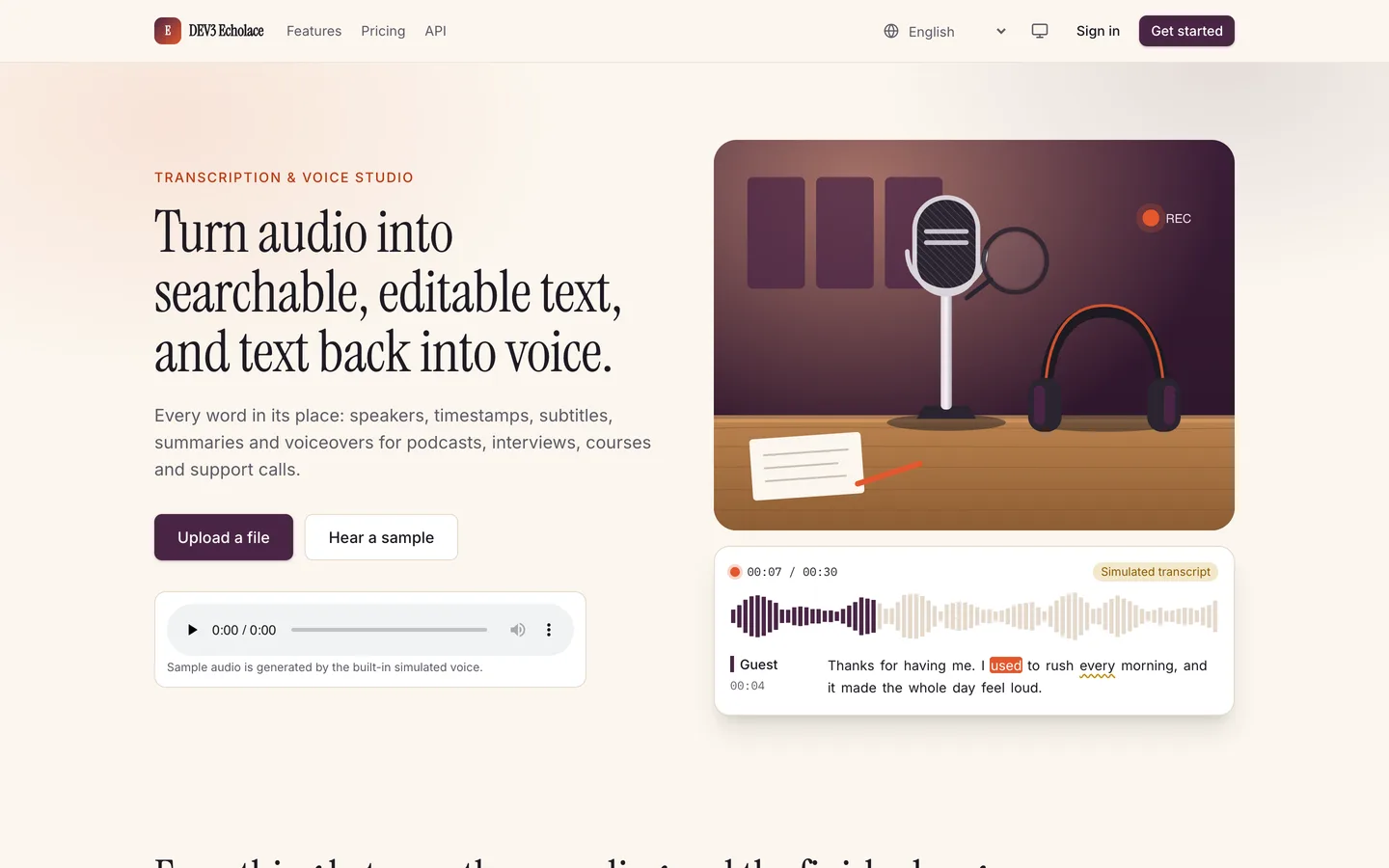
Hero: Turn audio into searchable, editable text, and text back into voice, with the editor preview beside it. Hero — Turn audio into searchable, editable text, and text back into voice, with the editor preview beside it.
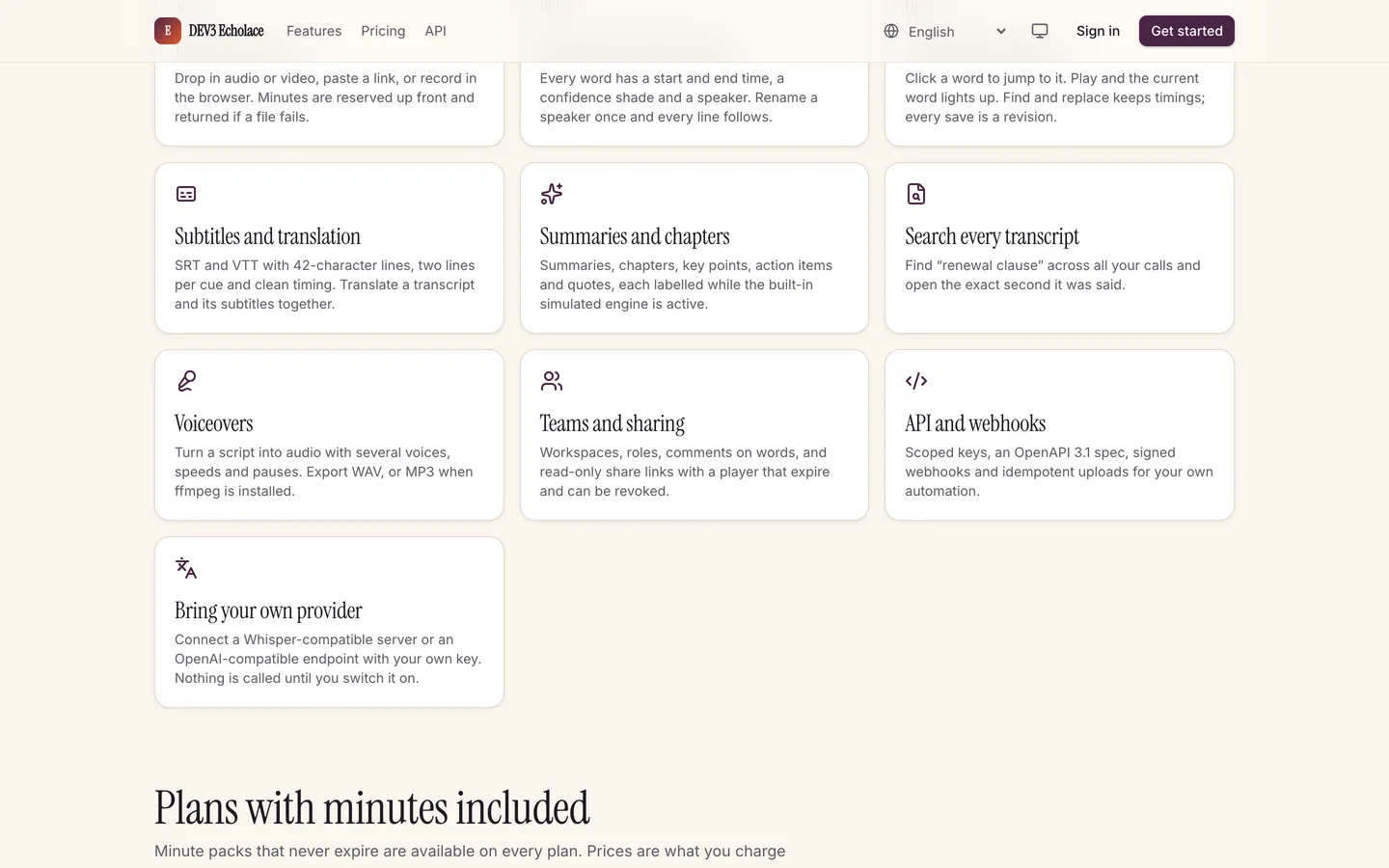
Features: Upload or record, speakers and timestamps, subtitles, summaries, search, voiceovers and an API. Features — Upload or record, speakers and timestamps, subtitles, summaries, search, voiceovers and an API.

Guides & articles

Practical guides and engineering write-ups for DEV3 Echolace.

AI transcription software you host yourself: 7 things to check

Last updated
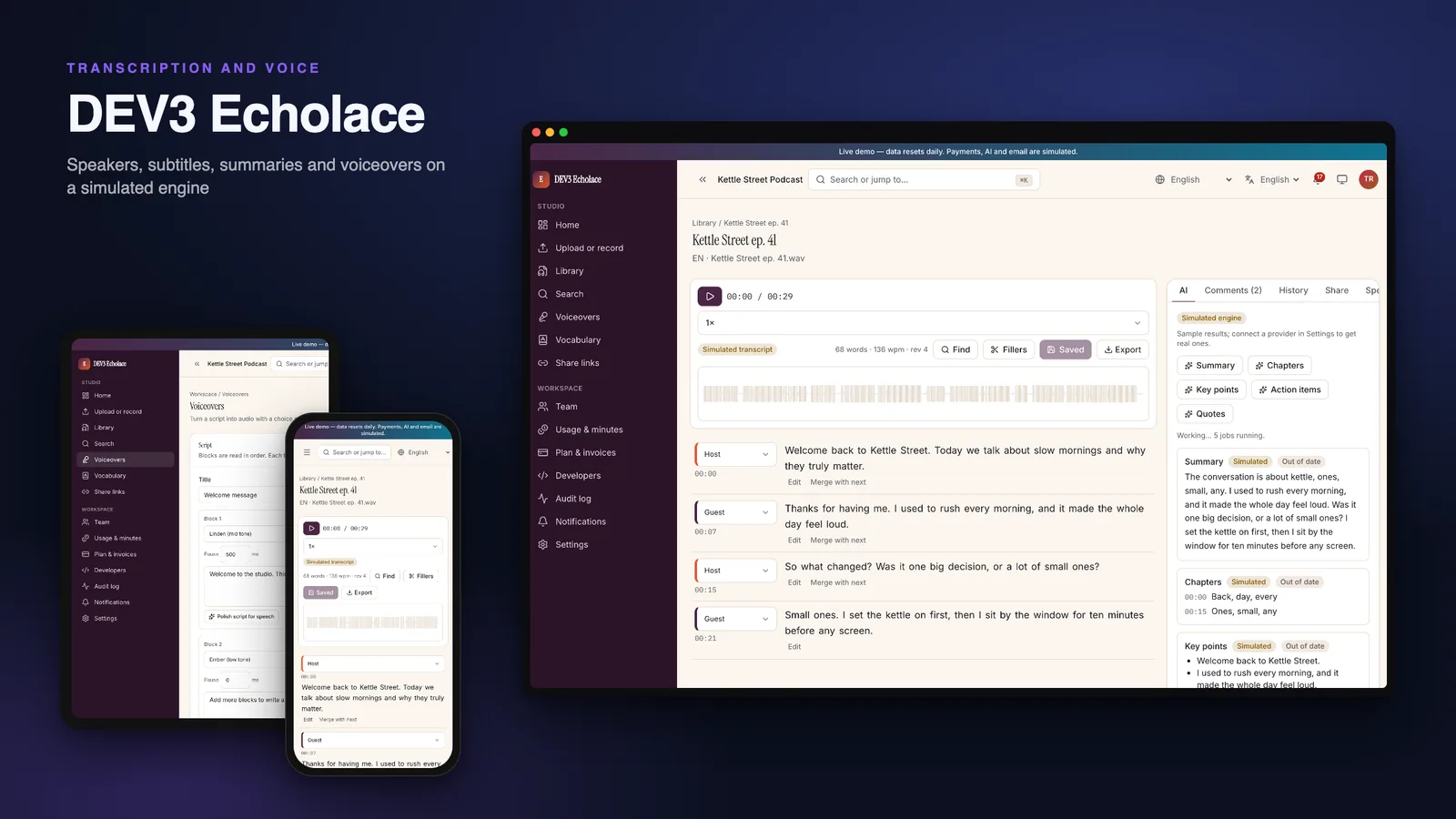
AI transcription software you host yourself: 7 things to check: DEV3 Echolace

A transcript is only useful if people can trust it, fix it and use it. Here are seven things to check before you pick transcription software you host yourself, with DEV3 Echolace as the worked example.
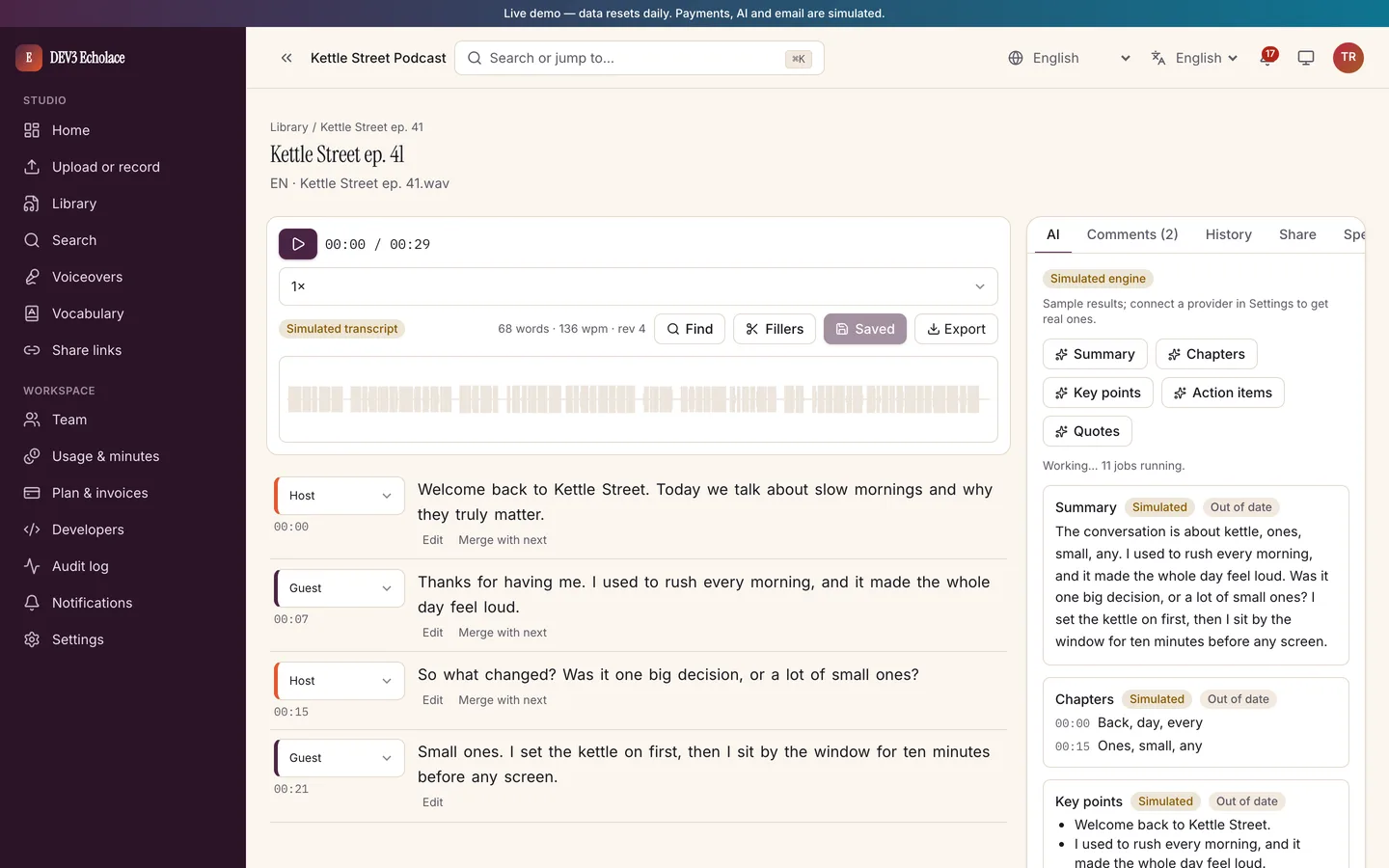
The transcript editor with speakers, timestamps and a waveform

1. Does it know who said what?

Look for speaker labels you can rename, merge and split. Echolace shows a speaker per turn with timestamps.
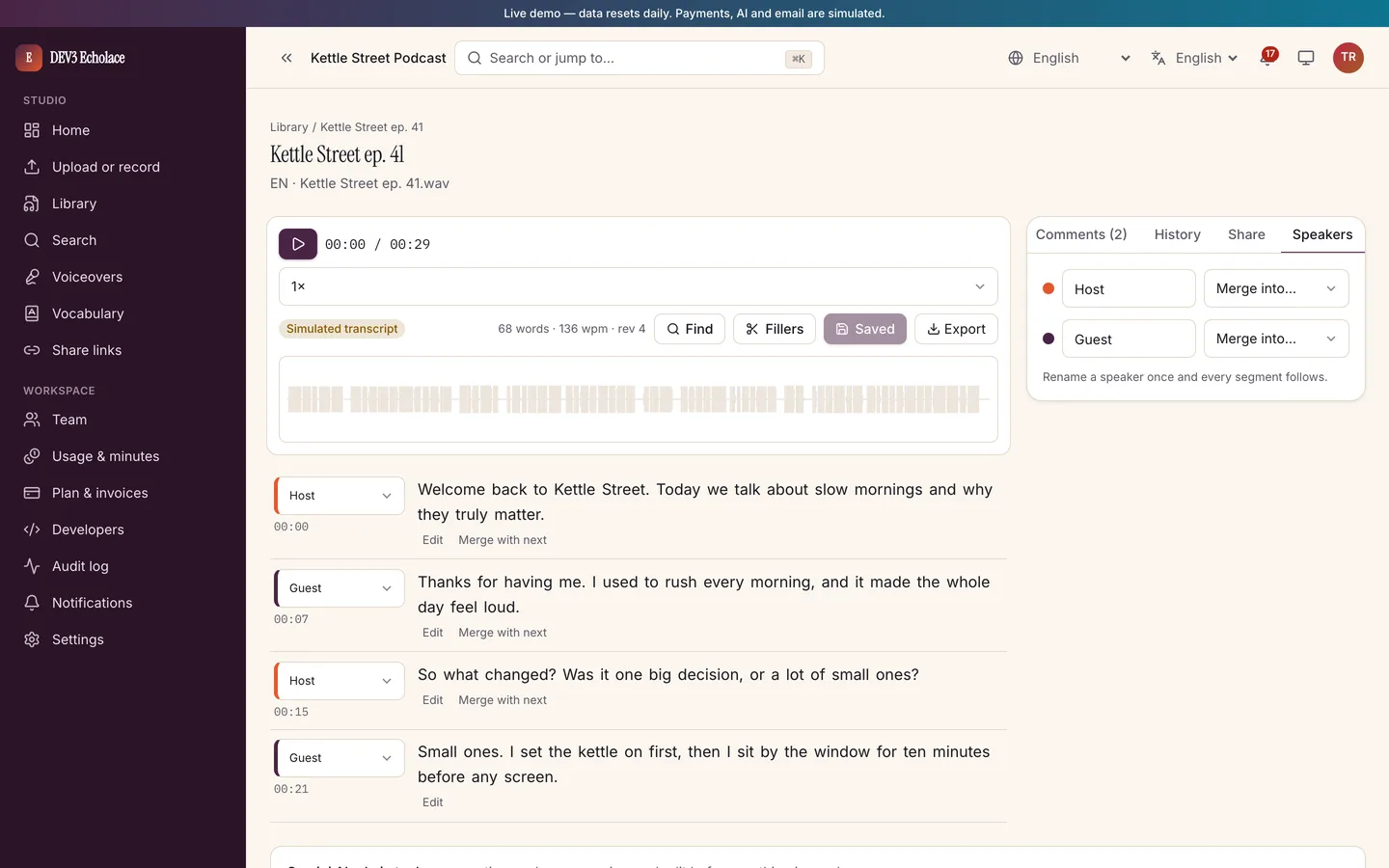
Speaker labels in the editor

2. Can you correct it quickly?

Click a word to jump to it, see the current word highlight while playing, find and replace, and keep a revision history. Confidence shading shows where to listen first.
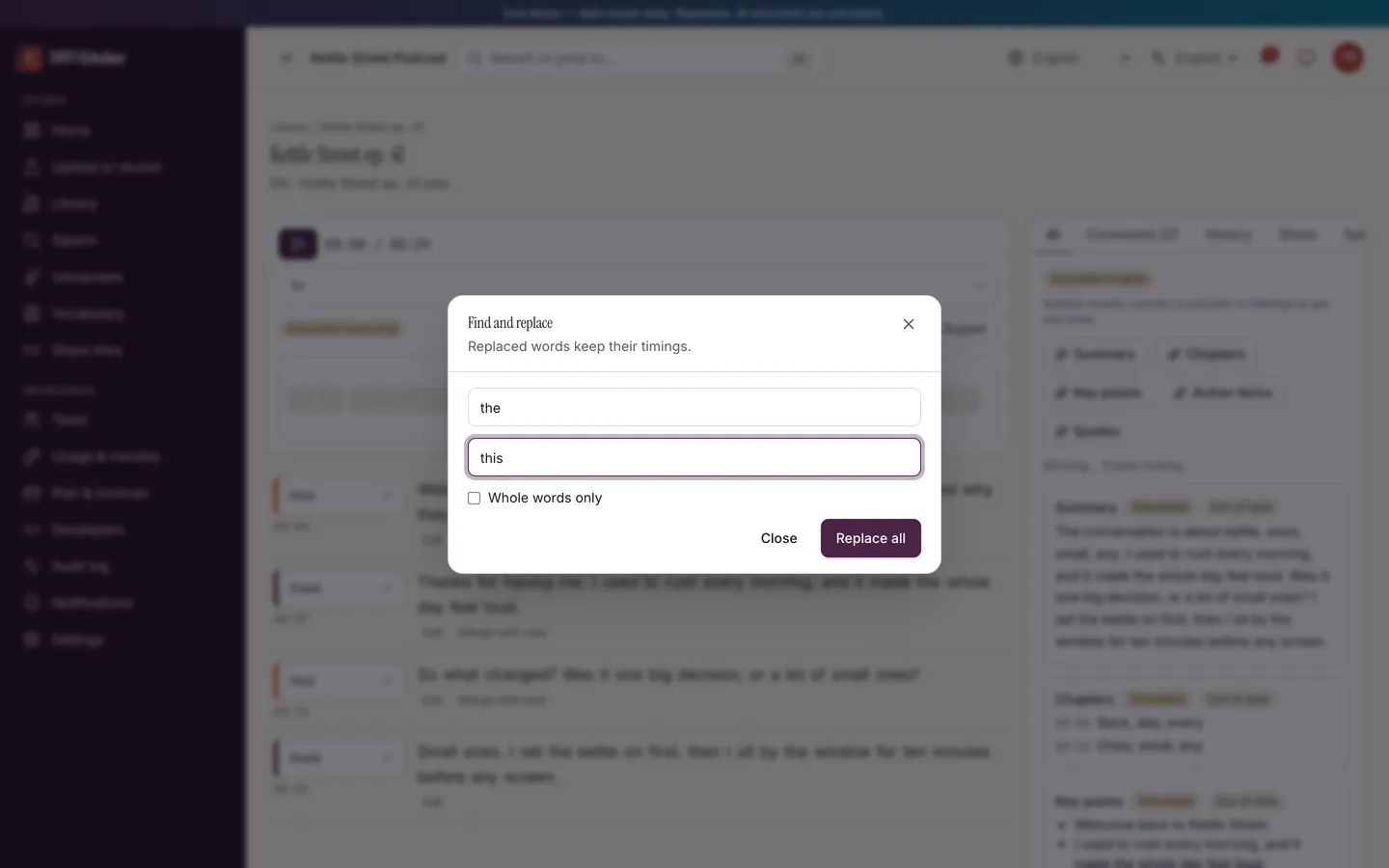
Find and replace across the transcript

3. What can you export?

Text, DOCX, PDF, SRT, VTT and JSON should all be there. Echolace also has a subtitles studio with timing rules.
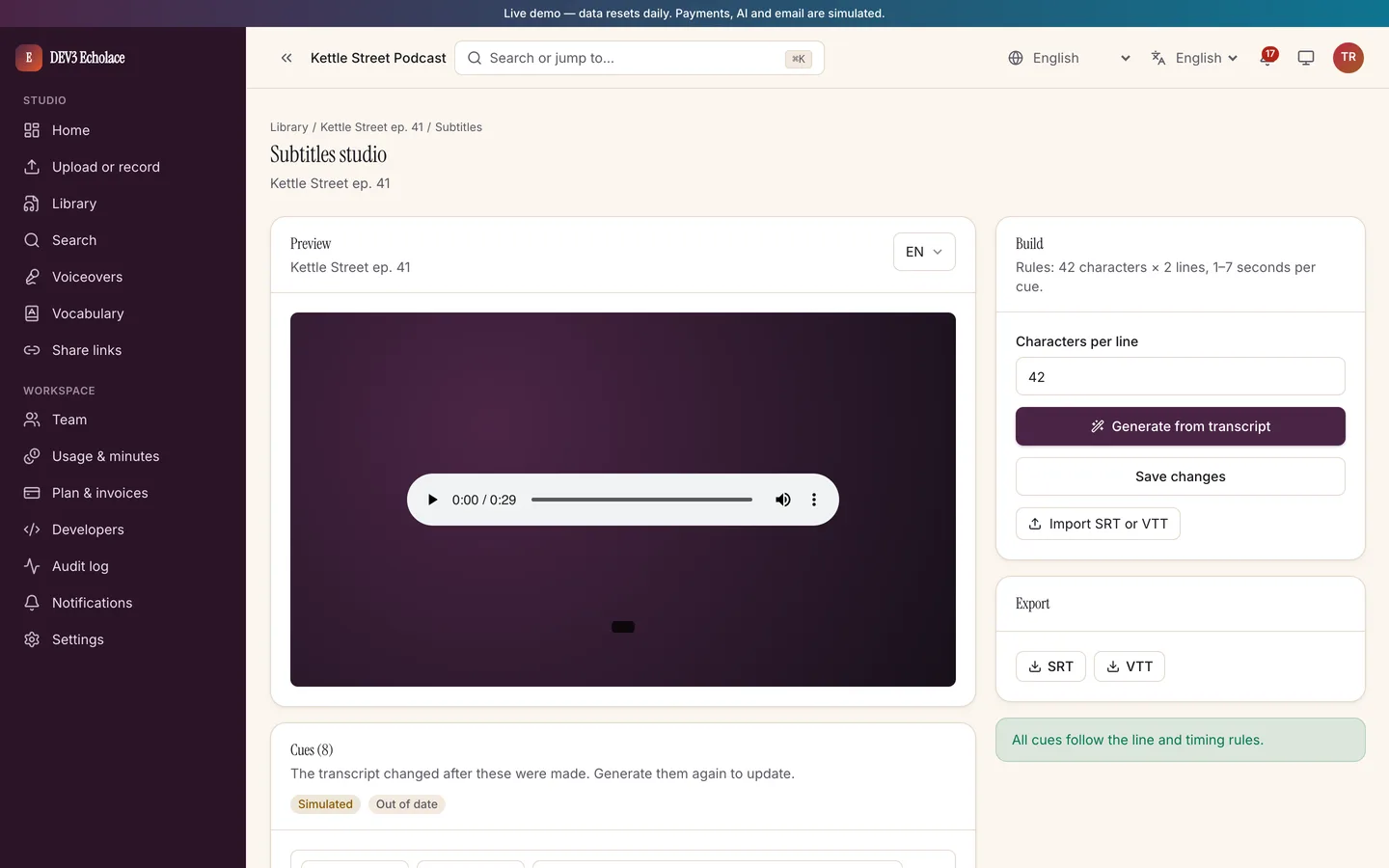
The subtitles studio

4. How are minutes counted?

Check that cost is reserved from the file length, refunded on failure and never charged twice. Echolace keeps a ledger and a reconciliation command.
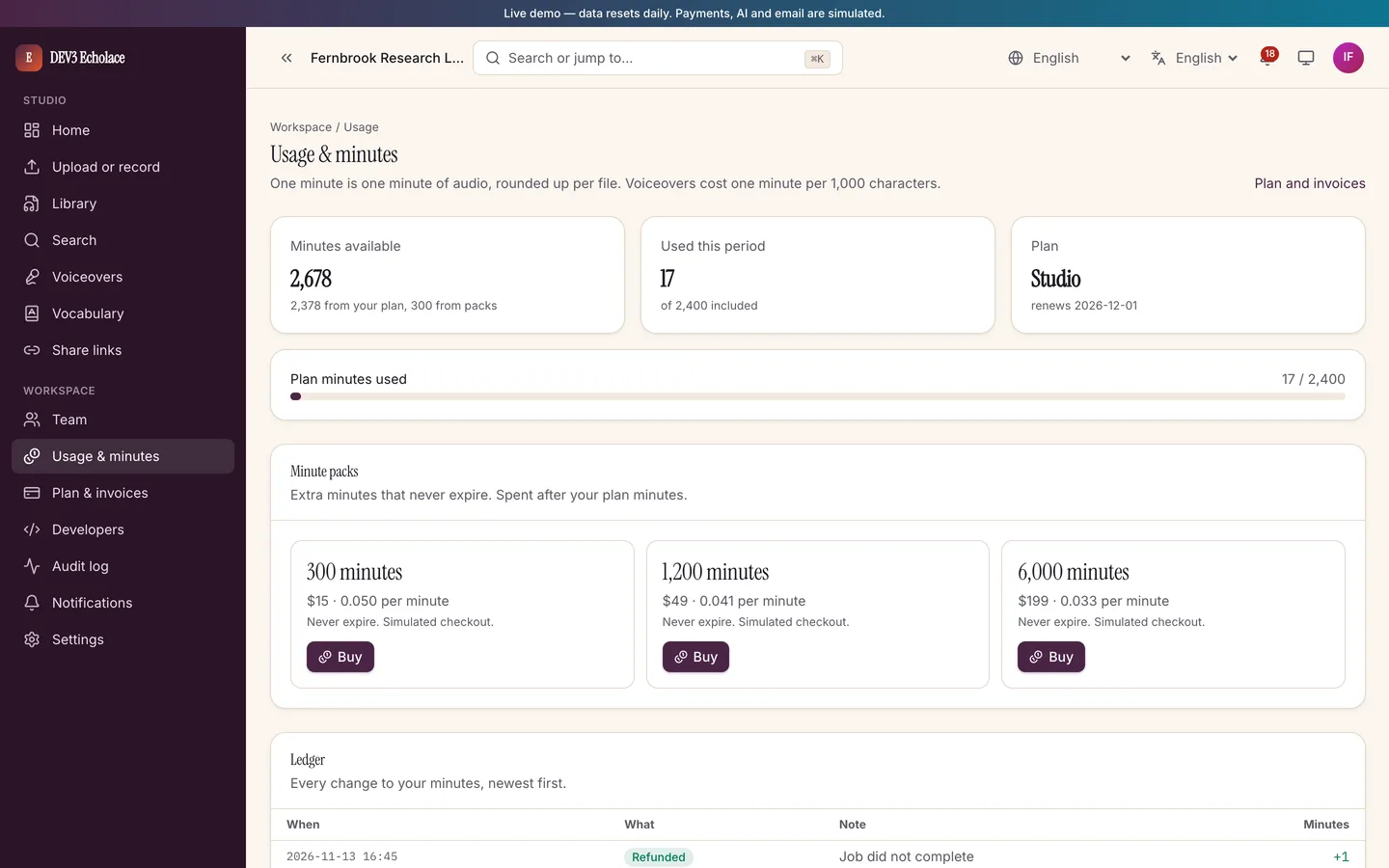
Usage and minute packs

5. How is the AI wired?

This is the question to ask any vendor. In Echolace every AI feature runs on a simulated engine until you add your own provider key; providers are off by default and badged "Simulated" while they are not in use. No minutes or keys are included.
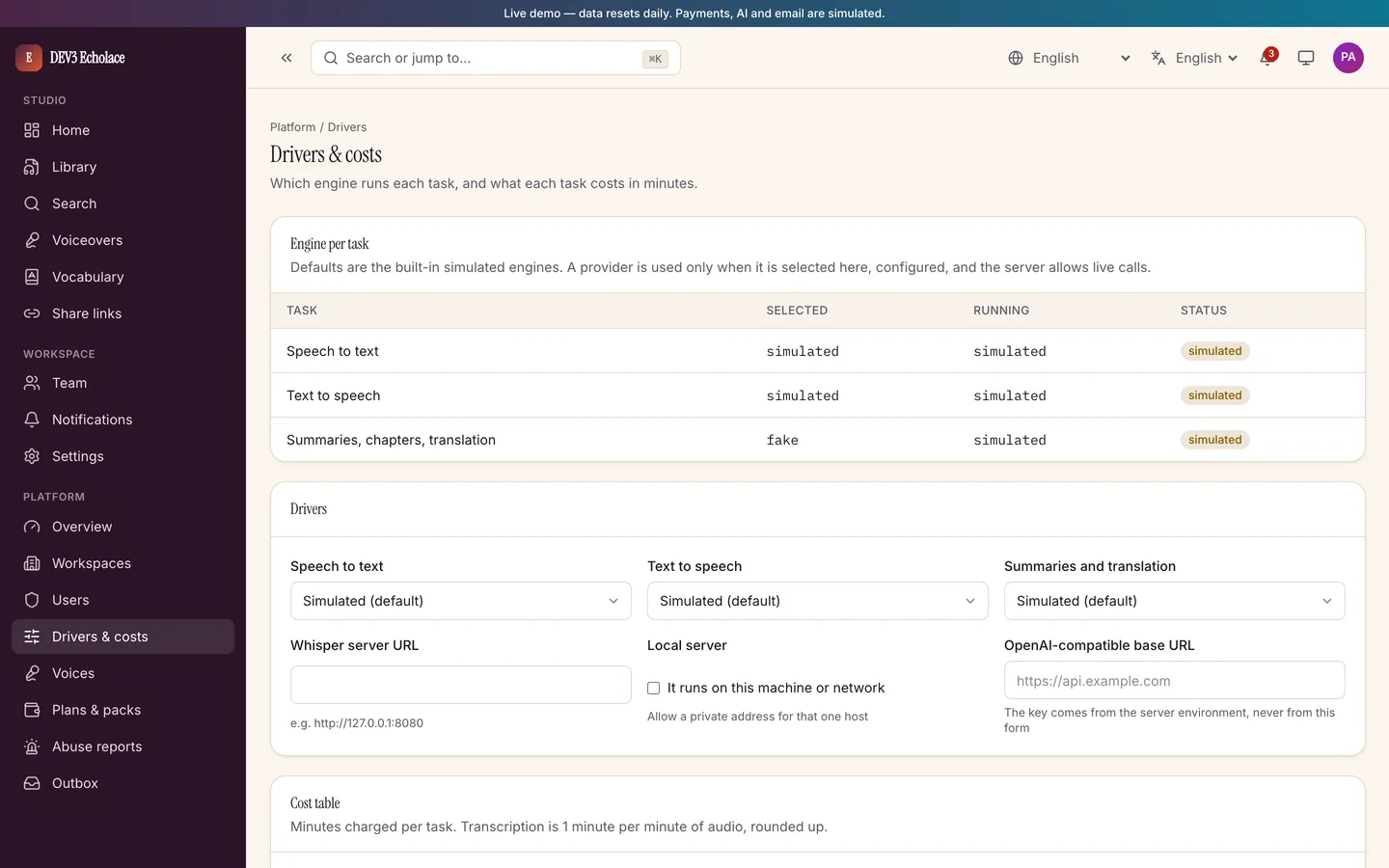
Driver settings showing simulated engines

6. Who can see the recordings?

Share links should be signed and expire. Echolace also lets a workspace force simulated mode so content never leaves your server.

7. Who keeps it running?

A separate worker processes jobs and needs a process manager. The operator panel shows workspaces, abuse reports and an audit log.

Video tour of Echolace

Limits to weigh

Uploads only: no live transcription, meeting bots or voice cloning. Without ffmpeg, only browser-decodable formats are accepted. Check these against your needs.


Frequently asked questions

The complete source code (version 1.0.0) as a download from your account, with the setup and usage guides shown on this page. You can modify the code to suit your product.

Questions about this product (0)

Answers from the DEV3 team and the community.

Ask a question

No questions yet.

Wondering about setup, licensing or customisation? Ask, and the DEV3 team will help.

More from this author

View all

Related in Enterprise SaaS Starters

View all