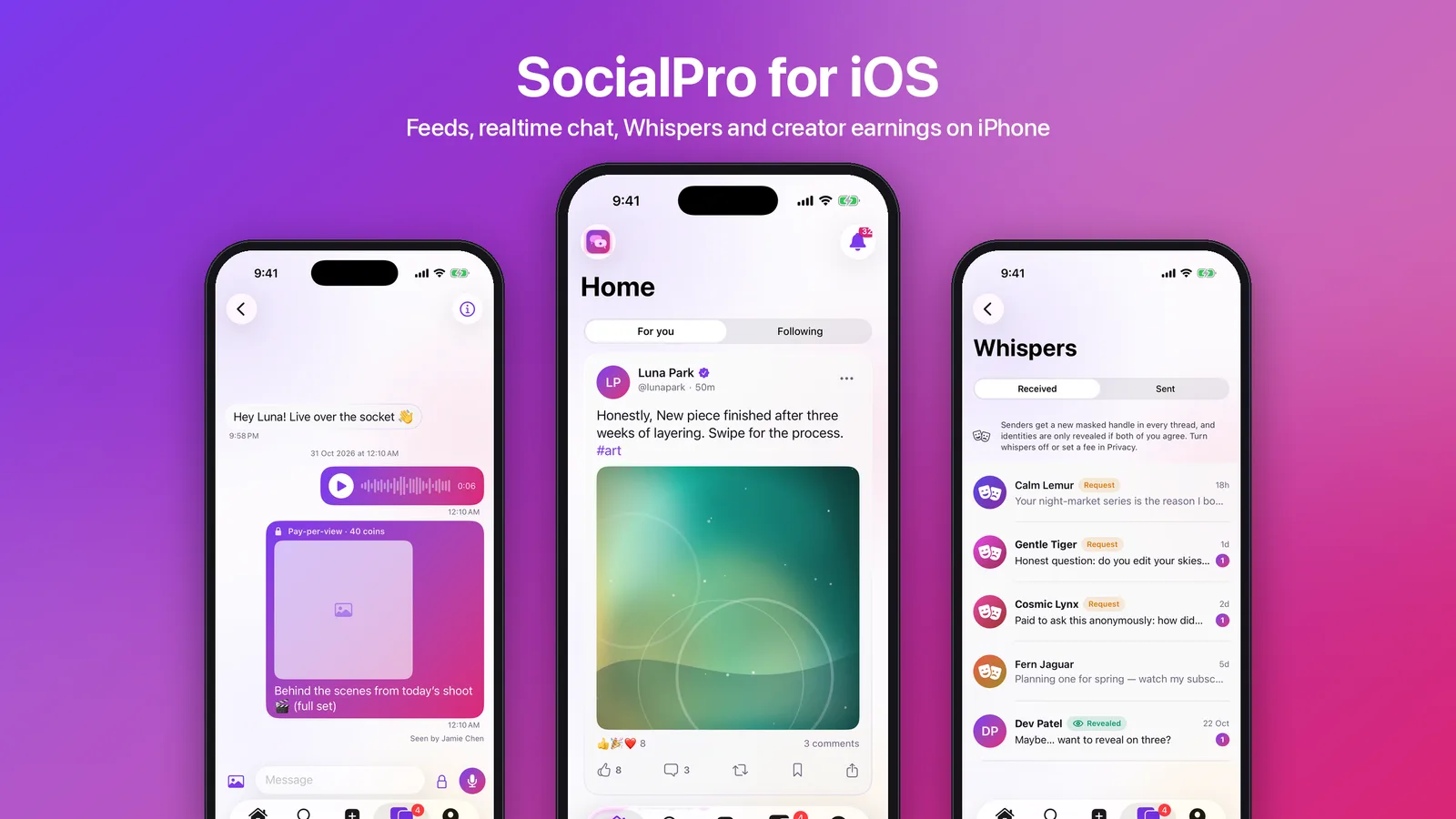
Most social app templates show a feed and a chat screen. They leave out what makes chat hard on iOS: a live connection that survives backgrounding and flaky networks, authentication that ends when the account is signed out elsewhere, and paid content that unlocks the same way on the phone as on the web. SocialPro iOS is the native iPhone and iPad client for SocialPro, and it now ships in the iOS-App/ folder of the SocialPro download. This post walks through its source, starting with the realtime layer, which is built without a third-party socket SDK.
What you get
The app is SwiftUI for iOS 26 and Swift 6, iPhone and iPad, dark-first in the web's violet-to-pink brand on Liquid Glass surfaces, with a light mode. The XcodeGen project has three parts:
- SocialProKit, the API client, the models and a native Socket.IO v4 client.
- SocialProUI, the theme and components.
- The app target and an unread-count widget extension that shares an App Group with it.
Nuke loads images. Realtime, voice recording, media preparation and payments use Apple's frameworks and the server's own APIs.
Signed in, the tabs are Home, Explore, Create, Messages and Profile, with a notification bell and live count in every toolbar.
- Home: For you, Following and AI Discover timelines, with infinite scroll, a "new posts" pill and sponsored posts.
- Posts: photos and video, polls, quotes, reposts, link previews and pay-per-view posts.
- Reactions and comments: six reactions (tap to like, hold for the picker), and comments three levels deep with "Continue this thread". A comment can carry one photo or a GIPHY or Tenor GIF.
- Create: up to ten photos and videos from the library, with HEIC converted to JPEG on the device. A post can be shared publicly, with lists or as an anonymous whisper, and can go to a community.
The backend it talks to
The SocialPro web app in the same package includes an /api/mobile layer. The iOS app uses that layer, the existing JSON routes such as the cursor-paginated feeds, and the socket.io realtime sidecar.
- Sign-in.
/api/mobile/auth/<op>covers email or @handle with password, the second factor (authenticator, emailed or texted code, or recovery code), magic links, sign-up with emailed-code verification, password reset and account deletion. - Sessions. The server mints an
spm_bearer token and stores only its SHA-256 hash on the sameAuthSessionrows the website uses. The web's Settings → Security page lists the phone next to the browsers and can revoke it. - Reads. Queries live under
/api/mobile/q/…. Some are public, such as explore, profiles, tags and communities, and some need a member session, such as the wallet, settings and lists. - Writes. Mutations go through
/api/mobile/rpc/<module>/<action>to an allow-list of the website's own server actions, for posts, the social graph, messages, whispers, communities, billing and more.
Because the website's session lookup accepts the bearer token, everything downstream (rate limits, blocks, privacy settings, moderation) applies to the app unchanged.
A Socket.IO client in about 260 lines of Swift
The realtime sidecar speaks socket.io 4. The usual way to talk to it from iOS is a third-party client library. SocialPro instead speaks the protocol directly over URLSessionWebSocketTask. Engine.IO and Socket.IO v4 text frames are simple enough to parse by hand. This is the parser's core (condensed from SocketIOFrame.swift):
/// Engine.IO: `0{open json}`, `2` ping, `3` pong, `1` close.
/// Socket.IO (inside an Engine.IO message `4`): `40` connected, `44{"message"}` connect error,
/// `42["event",data]` event, `43<id>[data]` ack.
public static func parse(_ text: String) -> SocketIOFrame {
    guard let first = text.first else { return .unknown(text) }
    switch first {
    case "0": return .open(…)
    case "1": return .close
    case "2": return .ping
    case "3": return .pong
    case "4": return parsePacket(String(text.dropFirst()))
    default: return .unknown(text)
    }
}

/// `40{"token":…}`: connect to the default namespace with auth.
public static func connect(token: String) -> String { … "40\(auth)" }
RealtimeClient wraps the connection in a loop that the rest of the app can treat as simple:
- Short-lived socket tokens. Before every connect and reconnect, the client fetches a fresh two-minute HMAC token from
/api/realtime/tokenusing its bearer session. The sidecar checks that the app session is still live, so revoking the phone on the web also drops its socket. - Rooms with acknowledgements. Each user is in their own room automatically, for notifications, counts and new messages. A conversation room is joined with
conv:joinand an ack, and the sidecar refuses rooms the user is not a member of. Joined rooms are remembered and re-joined after a reconnect, and anonConnecthook lets screens refetch anything missed while offline. - Backoff. Reconnects wait 1 second at first, doubling to a maximum of 30.
The package tests cover the frame parser alongside the model decoding, so a protocol change shows up as a failing test.
Messages, voice notes and pay-per-view
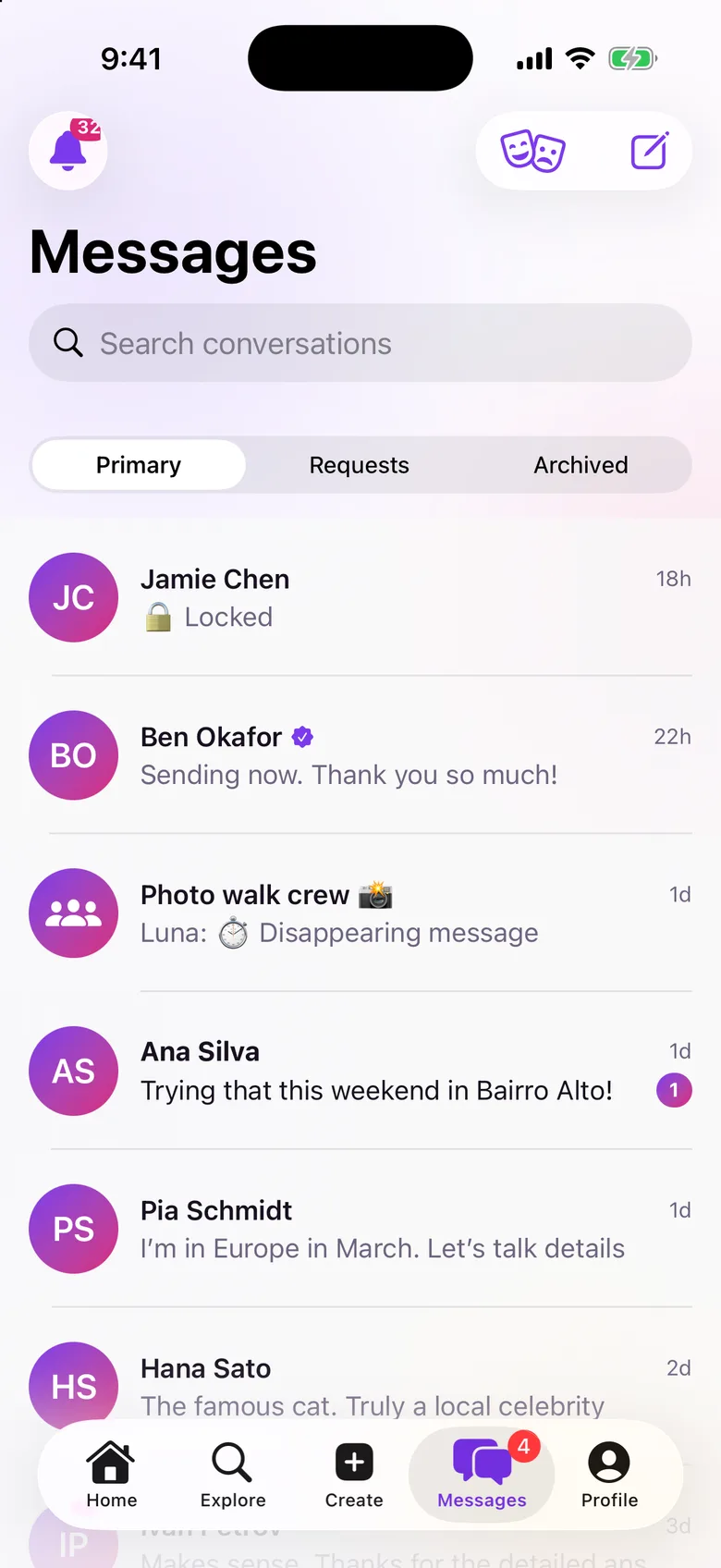
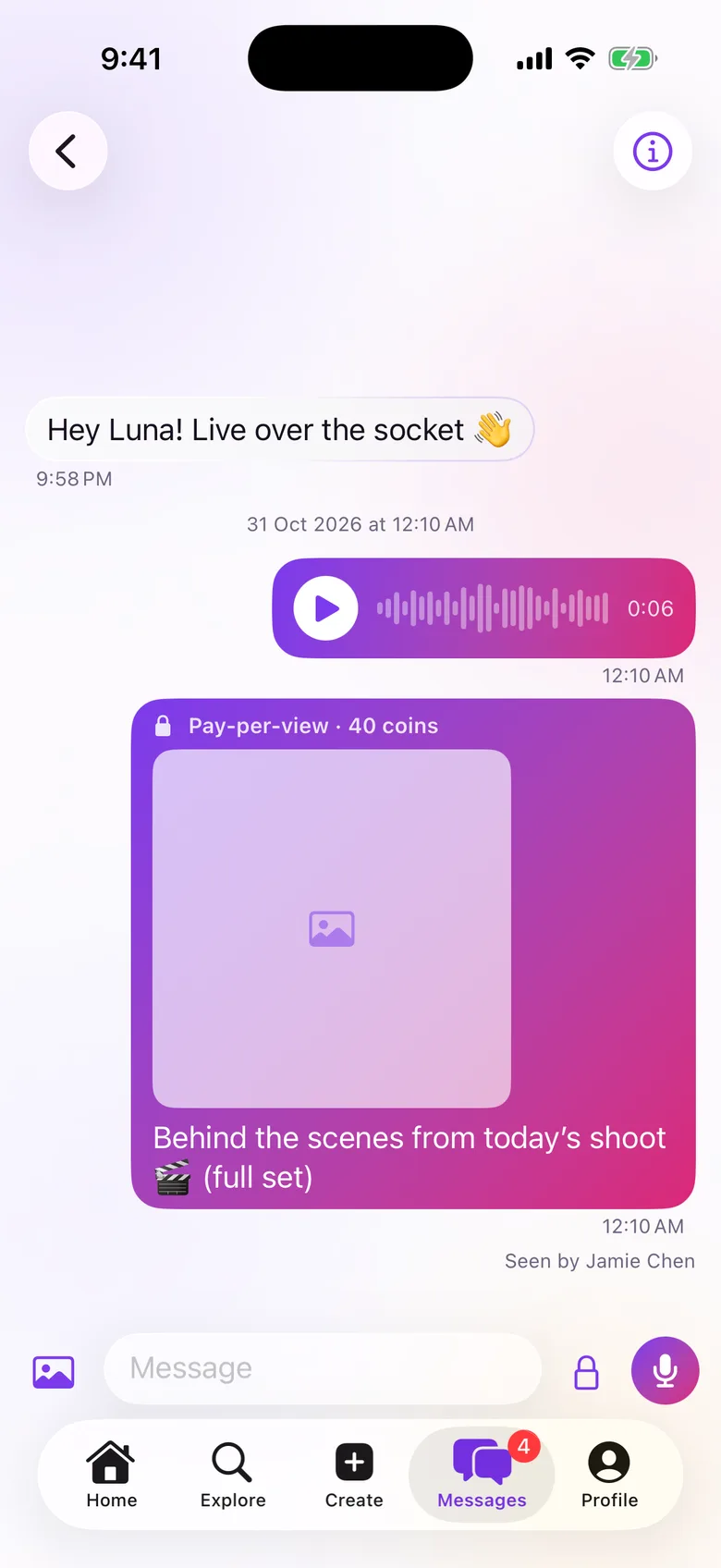
The chat screen sends optimistically and swaps the pending bubble for the server's copy by clientId when the message:new event arrives. It supports replies, reactions, edits within 15 minutes, delete for me or everyone, photos, "Seen by", typing indicators, message requests and groups.
- Voice notes. When the text field is empty, the send button becomes a microphone.
AVAudioRecordercaptures AAC with a live level waveform and a five-minute cap. The note uploads with thevoicepurpose and plays back over a signed private URL through one shared player. - Pay-per-view messages. Verified, Creator and VIP accounts can lock a message with a coin price. The recipient sees a locked card and unlocks it with coins, using an offer signed by the server, and the app then fetches the unlocked message. Realtime copies never overwrite a copy the app already holds unlocked.
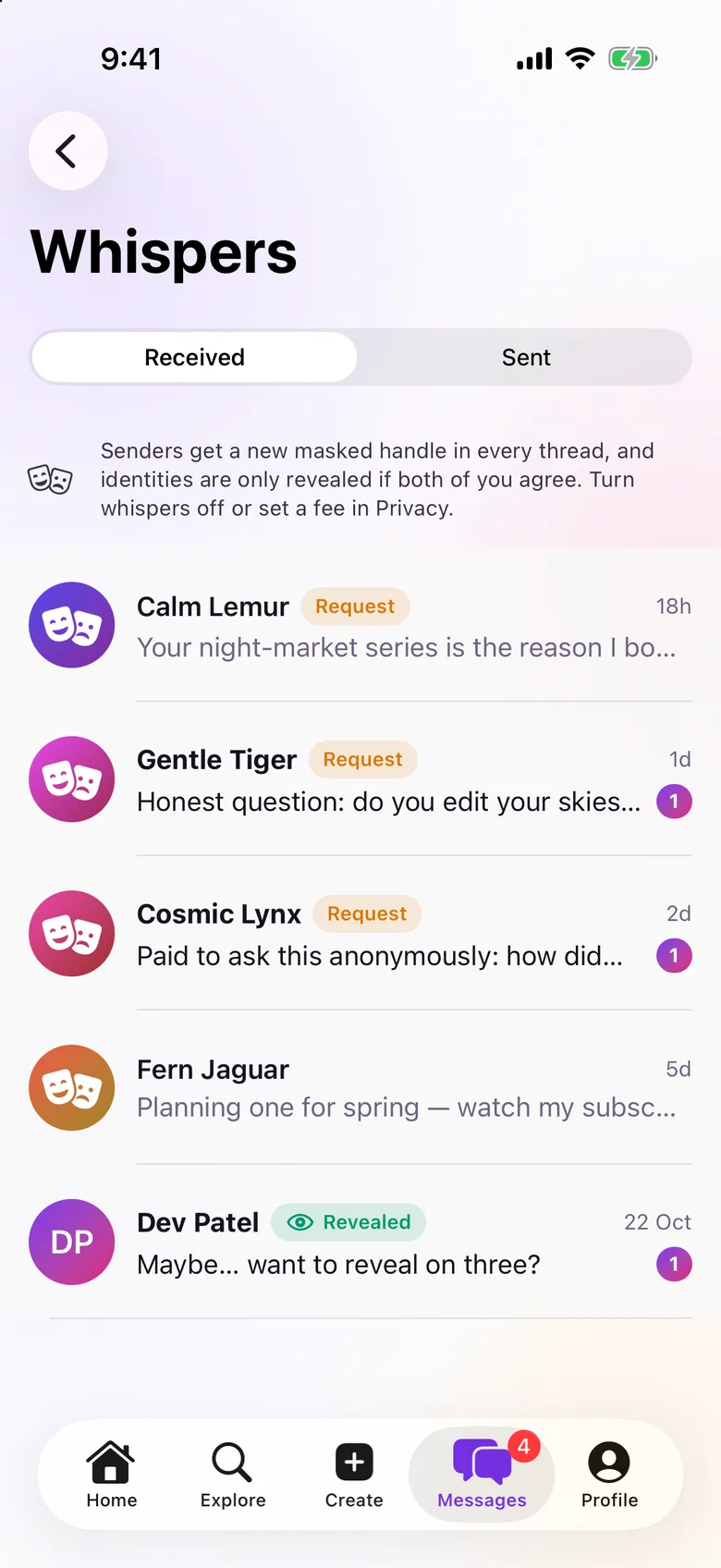
- Whispers. These are anonymous DMs with received and sent inboxes. The recipient can accept, decline or block, and identities are revealed only when both people agree. Senders get a new masked handle in every thread, and the server tests check that the sender never leaks through the bearer-session API.
Money: wallet, creators and Stripe
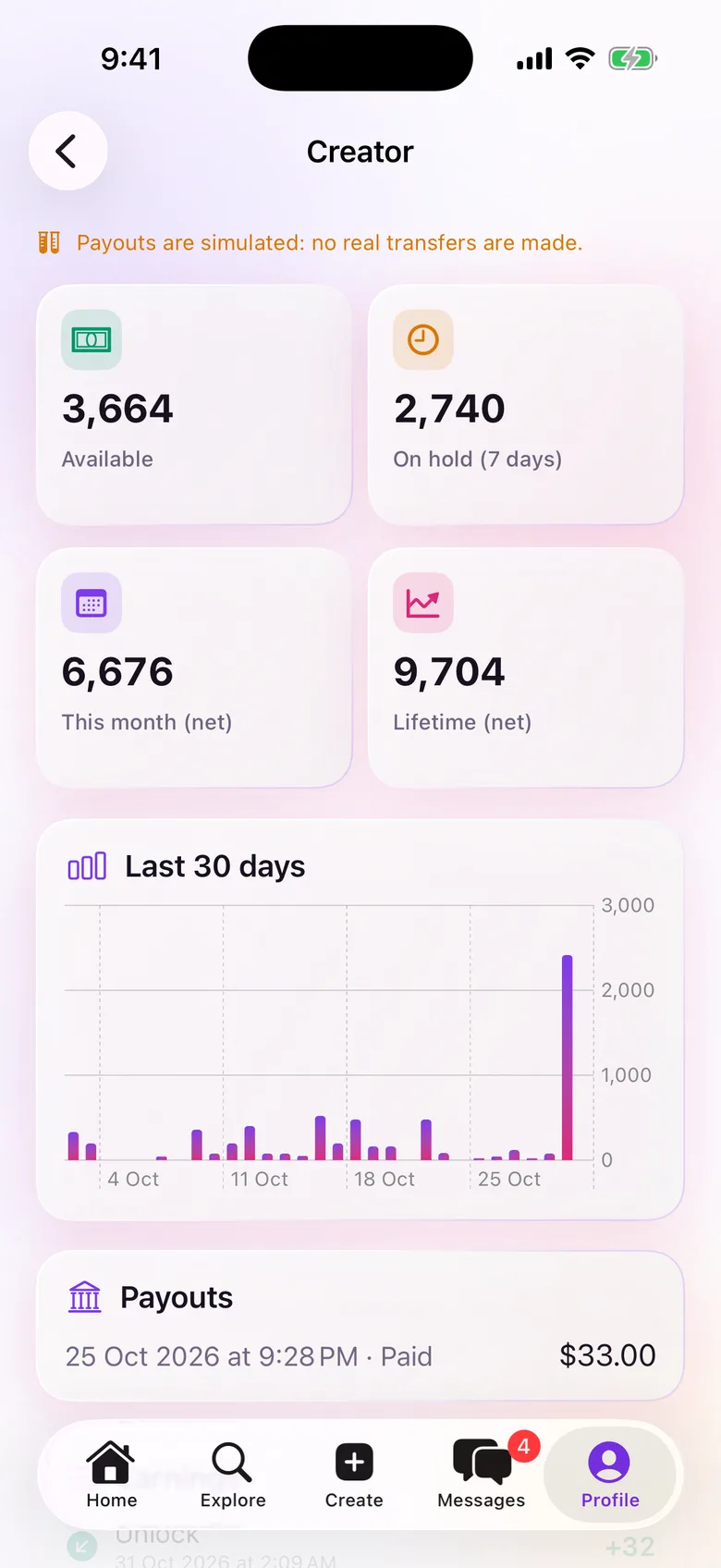
The wallet shows the coin balance, plans and a statement. Creators get an earnings screen with available and on-hold balances, a 30-day chart and payouts. Ads Manager is read-only on the phone. The campaign builder stays on the web.
Purchases go through Stripe Checkout in an ASWebAuthenticationSession. Stripe returns to /api/mobile/checkout/return, which redirects to the app's URL scheme. The app then confirms the payment with the server, and the webhook remains the source of truth. Without Stripe keys, billing is simulated and the app completes test purchases itself, so you can try the whole flow before connecting Stripe.
Guest-first, without a login wall
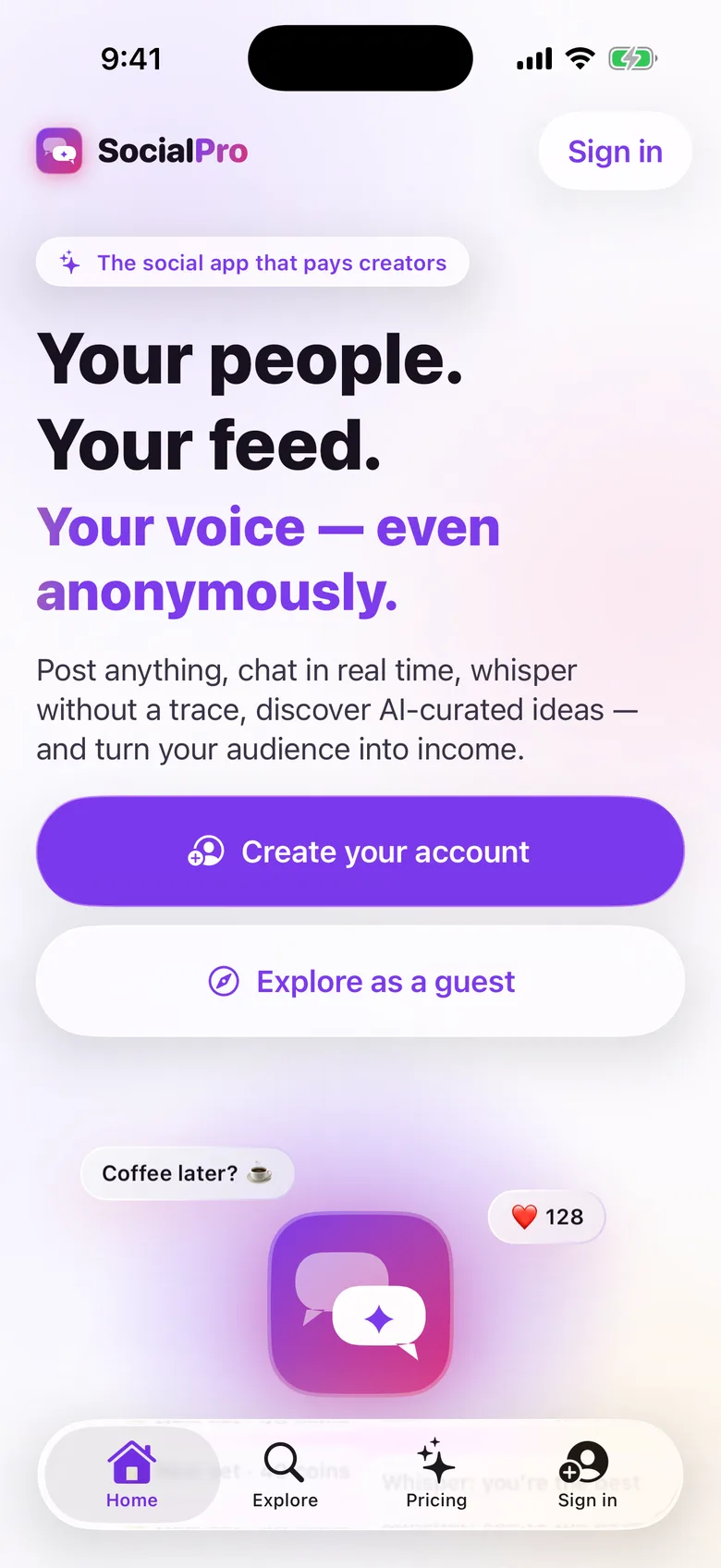
Signed out, the tab bar is Home, Explore, Pricing and Sign in. Home is the website's landing page rendered natively, and its copy comes from one server-side source that the web page also renders from. Explore browses feeds, profiles, posts, tags, communities and the Whispers feed read-only. When a guest taps like, follow, comment or message, the app opens the sign-in sheet and then replays the action once the guest signs in.
What stays on the web
Voice and video calls stay on the website. They use WebRTC, Apple ships no WebRTC stack, and adding one means a large third-party binary plus CallKit and VoIP push. Calls show up in chats as call messages. Creating a community, editing its settings and building ad campaigns also stay on the web. They are long admin forms that people use occasionally.
iOS integration
- Push notifications (APNs). Every push carries its web path, so tapping one opens the matching screen.
- Unread-count widget.
- Links: deep links for posts, profiles and conversations, and Universal Links.
- Shortcuts: Spotlight for people and conversations, Home Screen quick actions and Siri Shortcuts for a new post, messages, search and notifications.
- Face ID lock.
See it in motion
Rebrand and set up
- Backend. Deploy the included SocialPro web app with its
/api/mobilelayer and the realtime sidecar, and set the sidecar's public URL and secret. Optionally add APNs keys for push, Stripe keys for real payments and a minimum app version to force updates. - Brand. In
Config.xcconfig, set the app name, bundle id, App Group, Apple Team ID, the brand gradient, the URL scheme, the Universal Links domain and the server URL for each build type. A fallback socket URL is used only when the server does not publish one. - Icon. Run
scripts/make-icons.shto redraw the two-bubble icon and accent colour from your brand colours. - Build. Run
xcodegen generateand build. Long-press the logo on the sign-in sheet to point a build at another server.
Universal Links also need an apple-app-site-association file on your domain. Signing, device installs and push need your own Apple Developer account. The app is not on the App Store and there is no hosted iOS demo. You publish it under your own account.
Tests. The Swift package has 16 tests: models against captured server JSON, Socket.IO frames and multipart uploads. The app has unit tests for routes and guest gating, the Stripe return, GIF hosts, media preparation and the chat store, plus a UI smoke test. On the server, 23 tests cover the mobile API, including voice-note upload, pay-per-view send and unlock, and Whispers with no sender leak.
Get it
SocialPro iOS is included in the SocialPro download. The case study covers the platform behind it: ranked feeds, the realtime sidecar, Whispers and the creator ledger.