"Should we build it in Phaser or Three.js?" is usually the first technical question on a browser game project, and it is often asked as if the answer has to cover the whole product. It doesn't. You can pick the engine per game and still share most of the code, as long as the rules don't live inside either engine.
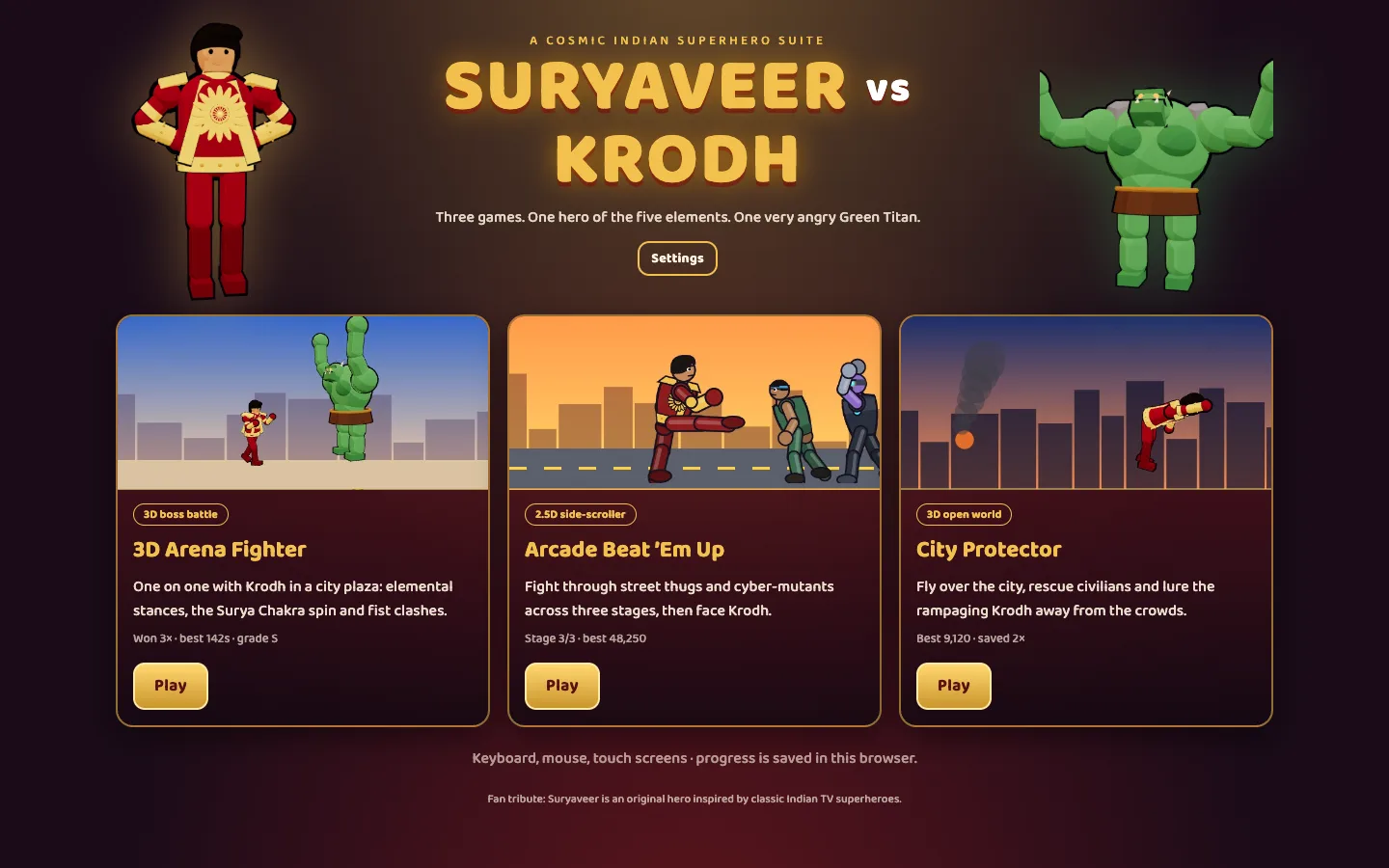
This post works through that decision using a real codebase: Suryaveer vs Krodh, our free suite of three superhero games. Two of the games are 3D and use Three.js. One is a 2.5D side-scroller and uses Phaser 3. All three share one hub, one save, one input layer, one sound system and the same pattern for their rules engines. Here is what each engine was chosen for, what it costs, and how the shared core keeps the suite testable.
The short answer
| If your game is mostly… | Lean towards | Why |
|---|---|---|
| Sprites on a flat or layered 2D stage | Phaser 3 | Sprites, texture atlases, animations, depth sorting, particles and scaling come built in |
| A free camera moving through a 3D space | Three.js | You need a scene graph, perspective camera, lights and meshes; Phaser does not do this |
| 2D gameplay with a 3D look | Either, carefully | A 3D renderer with a locked camera, or 2D sprites rendered from 3D, both work |
| Several of the above in one product | Both, behind a shared core | Each game gets the right renderer; rules, input and audio stay engine-free |
The rest of this post explains why the last row worked for Suryaveer, and where it didn't come free.
What the three games needed
The suite has three games with very different needs:
- 3D Arena Fighter: a one-on-one boss fight on a circular plaza. The camera follows the hero around the boss, the props break apart and the hero switches between four elemental stances.
- Arcade Beat 'Em Up: three side-scrolling stages with lanes of depth, waves of enemies and a boss at the end of each. Characters walk up and down the screen as well as left and right.
- City Protector: an open 3D city on a 10 × 10 block grid with a river, bridges, parks and construction sites. The hero flies, and the camera has to show both the streets and the skyline.
Two of these are real 3D problems: a camera that moves freely, perspective, lighting and depth that the player navigates. The beat 'em up is not. It is a classic 2.5D brawler: every fighter is drawn on a flat stage, and "depth" is just a lane value that moves them up the screen and decides who is drawn in front.
Why Three.js for the arena and the city
Three.js gives you a scene graph, a perspective camera, lights, materials and a WebGL renderer, and almost nothing else. For the two 3D games, that was the right amount.
What the code actually uses it for:
- Characters as jointed rigs. The hero and the boss are groups of primitive meshes (capsules, boxes and so on) with joints the game rotates each frame. They use cel shading (
MeshToonMaterialwith a three-step ramp) and an inverted-hull outline for the inked comic look. There are no model files. - Instancing for crowds and buildings. City Protector draws its crowd of 260 people as a single
InstancedMesh, and the arena's background towers are instanced too. That keeps draw calls low on phones. - A shared environment module.
src/core/three-env.tssets up the renderer, a gradient sky dome, the light rig and a quality preset, and it resizes the canvas with aResizeObserver. On tall phone screens it widens the field of view so the action stays in frame. - A quality switch. Shadows, antialiasing and a pixel ratio of up to 2 are only used on the High setting on non-touch devices. Touch devices always get the lighter preset (no shadows, pixel ratio capped at 1.5), and players can pick Fast (for older devices) in Settings.
What Three.js does not give you is just as important. There is no game loop, no input handling, no sprite system, no audio mixer and no UI layer. You build or borrow all of that. For a 3D game that's a fair trade, because you would replace most of a 2D engine's versions of those anyway.
Why Phaser for the beat 'em up
You could build a side-scroller in Three.js with an orthographic camera. The suite doesn't, because Phaser already solves the things a 2D brawler spends most of its time on:
- Texture atlases and animation frames. Each fighter pose is drawn once with Canvas 2D paths, then registered with Phaser as a texture with
textures.addCanvas(). - Depth sorting. Every fighter's display depth is set from its lane value, so characters further down the screen are drawn in front of those behind them. In Phaser this is one
setDepth()call per sprite. - Parallax layers and particles. The three stage themes are painted as layers, and hit effects and the Power Blast beam use Phaser's built-in tools.
- Scaling. The scene works in a fixed 1600 × 900 logical space with
Scale.FIT, so the stage letterboxes cleanly on any screen.
Just as telling is what the suite switches off in Phaser. The game config sets audio: { noAudio: true } and disables Phaser's keyboard, mouse and touch input. Phaser is used as a renderer and nothing more, because input and sound are handled by the suite's own shared modules. That is what lets the 2D game sit beside the 3D games without feeling different to play.
The shared core that makes mixing engines work
Using two engines in one product only works if as little as possible depends on either of them. In Suryaveer, the engine-free layer is most of the game:
| Module | What it does | Engine-specific? |
|---|---|---|
games/*/logic.ts |
The rules: combat, AI, waves, missions, scoring | No: pure TypeScript, no DOM |
core/input.ts |
Keyboard, mouse-drag look, touch joystick and buttons, read as one snapshot per tick | No |
core/audio.ts |
Synthesised sound effects and four music loops on the Web Audio API | No |
core/storage.ts |
One LocalStorage save for settings and per-game bests | No |
core/rng.ts |
A seeded random number generator | No |
ArenaGame.ts, CityGame.ts |
Draw the engine's state with Three.js | Yes |
BrawlerGame.ts |
Draws the engine's state with Phaser | Yes |
Two contracts hold it together.
One fixed-step loop, two implementations
Every rules engine advances in fixed 1/60-second ticks. For the 3D games, loop() in three-env.ts adds real elapsed time to an accumulator and runs the tick at 60 Hz (at most five steps per frame), then renders once per animation frame. The Phaser scene does exactly the same thing inside its update() method. The renderer is different; the timing contract is identical. Game speed never depends on the display's refresh rate, and the engines don't know which renderer is calling them.
One interface for every game
The hub doesn't know which engine a game uses. Each game receives a small Host object (the stage element, the HUD and touch layers, modal helpers, exit() and restart()) and returns a GameHandle with dispose() and a debug() snapshot. Adding a fourth game, in either engine or neither, means implementing that interface.
Testing without a browser
Because the rules engines import nothing from Three.js, Phaser or the DOM, they can be tested in Node with Vitest. The repository has 40 unit tests across the three engines (counted from tests/arena.test.ts, tests/brawler.test.ts and tests/city.test.ts), plus 7 Playwright browser tests that launch every game, check a 2× high-DPI screen and play on a phone in landscape. The engines are seeded and deterministic, so a test can replay a whole fight. (We wrote about using that to balance the boss fight in Let a bot playtest your boss fight.)
If your rules live inside Phaser scenes or Three.js render loops, you lose this. Engine choice then becomes a testing decision as well as a rendering one.
The costs of using two engines
Mixing engines is not free. These are the real trade-offs in this codebase:
- Download size. Phaser and Three.js are each large. Vite splits them into separate chunks, and the README puts the whole client at about 520 KB gzipped. Phaser loads only when the beat 'em up starts. Three.js, though, is needed at start-up, because the hub renders its portraits from the real 3D models. If your hub didn't need 3D, you could defer both.
- Two mental models. Phaser thinks in scenes, sprites and display lists. Three.js thinks in meshes, materials and cameras. The team has to know both, and code reviews have to cover both.
- Consistent art across dimensions. The 2D fighters (
src/art/figures.ts) and the 3D rigs (src/art/models.ts) are separate artwork that must look like the same characters. A costume change happens in two places. The?gallerypage, which shows every 2D pose, helps you check that. - Duplicated plumbing. Resizing, pausing and cleanup are written once per renderer. Each game's
dispose()has to free its own resources: WebGL geometries and the renderer for the 3D games, the Phaser game instance for the brawler.
A decision checklist for your project
- Does the camera need to move freely in 3D? If not, start with Phaser.
- Do you have more than one game or mode? Then decide the engine per game, not per product.
- Can the rules run without a renderer? Keep them in plain TypeScript modules, so you can test them and swap engines later.
- Who owns input and audio? Pick one owner. If you mix engines, turn off the engines' own input and audio and use one shared layer.
- What is your download budget? Measure the engine chunks and load each one only when its game starts.
- What devices matter? Plan a quality preset for 3D on phones from the start, not after launch.
- Who makes the art? Code-built characters avoid an asset pipeline but need a developer to change them. Two dimensions means two sets of art.
Where to go from here
If you are planning a browser game with more than one mode, or deciding between 2D and 3D, the full source of Suryaveer vs Krodh is a free download from the DEV3 marketplace for anyone who signs in. It is a working example of Three.js and Phaser behind one shared, tested core. The case study covers how the suite was built, and our team can adapt it or build a game like it for your project.