"We want a fun multiplayer game on our site for the launch week, it has to work on phones, and it has to look like us." Agencies get this brief from marketing teams, event organisers and community managers, and studios get it from clients who want a branded game without a months-long build. Starting from an empty Phaser project is slow. Starting from a finished game you can rename, reskin and host is much faster.
This guide shows how to launch a branded browser party game with online rooms, using Bomber Blast, our free HTML5 arena game built with Phaser 3, TypeScript and a Node.js and Socket.io game server. It is written for web developers, small studios, agencies and educators running game clubs or coding classes.
What a good branded browser game needs
Before you start, check any game you plan to use against this list:
- It plays everywhere. Keyboard on desktop, touch on phones, and ideally a gamepad for the big-screen moment at an event.
- It loads instantly. A visitor from a social post will not wait for a 50 MB download.
- Multiplayer is fair. If there is a leaderboard or a prize, a modified client must not be able to cheat.
- It is fun alone, too. Not everyone has three friends online at the same moment, so bots matter.
- It is yours to change. Name, colours, rules and levels can be edited without rewriting the engine.
Bomber Blast covers these: keyboard, touch and the Gamepad API (switching automatically to whichever was used last), a client of about 400 KB gzipped with no image or audio files, a server-authoritative multiplayer mode for up to 4 players per room, and AI bots on Easy, Medium and Hard.
Step 1: Run it locally
Install Node.js 18 or newer (20 LTS recommended), then:
npm install
npm run dev   # client on http://localhost:3090, game server on http://localhost:3091
The dev setup proxies the multiplayer connection, so online rooms work from the single dev URL. Open it in a second browser profile, or on a phone on the same network, to try a two-player room straight away. Behind the main menu, four bots play a live match (attract mode), which is a nice touch on a kiosk screen.
Step 2: Make it yours
The included documentation has a "Customising" table. These are the edits most branded projects need:
| To change | Edit |
|---|---|
| Game title | GAME_TITLE in apps/client/src/ui/App.ts and the <title> in apps/client/index.html |
| UI colours and fonts | CSS variables at the top of apps/client/src/style.css |
| Bomber colours and unlocks | apps/client/src/palette.ts |
| Sprites | the painter functions in apps/client/src/render/atlas.ts, or your own PNGs using the same frame names |
| Sounds and music | synthSfx / synthTrack in apps/client/src/audio/AudioManager.ts |
Name it properly
"Bomberman" is a trademark of its owner, so pick your own title for any commercial or branded release. The display title is deliberately generic for that reason.
Reskin without an art pipeline
Every sprite is drawn in code at the screen's own resolution, so the game stays sharp from phones to 4K. For a quick brand pass, change the palette and the CSS variables. For a full reskin, either edit the painter functions or replace frames with your own PNGs under the same frame names.
Step 3: Tune the rules for your audience
Rules live in one place, DEFAULT_RULES in packages/shared/src/config.ts: fuse time, round time, arena size, power-up drop chance, speeds and scores. The defaults are a 15 × 13 arena, a 3-second fuse and 3-minute rounds followed by Sudden Death.
- For an event or a quick lunchtime game, shorten the round so more people get a turn.
- For younger players or a classroom, lower the bot difficulty in
BOT_PROFILES(packages/shared/src/ai/bot.ts) and adjust the power-up weights inDROP_TABLE(packages/shared/src/powerups.ts). - For a branded campaign, edit the 10 levels in
apps/client/src/campaign.ts.
Keep rule changes inside packages/shared. The server and the client import the same code, so single-player, multiplayer and the client's movement prediction stay consistent. The arena size must be odd and at least 7 × 7. Run npm test afterwards: the suite covers chain reactions, power-ups, Sudden Death, the AI and the multiplayer rooms.
Step 4: Choose how to host it
This is the most important decision, and it depends on whether you need online multiplayer.
Single-player only: any static host
Campaign and Quick Match run entirely in the browser. Build the client and put it on any static host. Vercel and Netlify configs are included.
With online rooms: one container
Multiplayer needs a long-running WebSocket server, which static hosts and short-lived serverless functions cannot provide. The simplest option is the included Dockerfile:
docker build -t bomber .
docker run -p 3091:3091 bomber
One container serves both the game and the WebSocket server on the same origin, and runs on hosts such as Render, Fly.io, Railway, AWS ECS or a VPS.
Split hosting
You can also keep the client on Vercel or Netlify, build it with VITE_SERVER_URL=https://your-server, and run the server on any Node host with CLIENT_ORIGIN=https://your-site so CORS allows your site.
Step 5: Share rooms with your audience
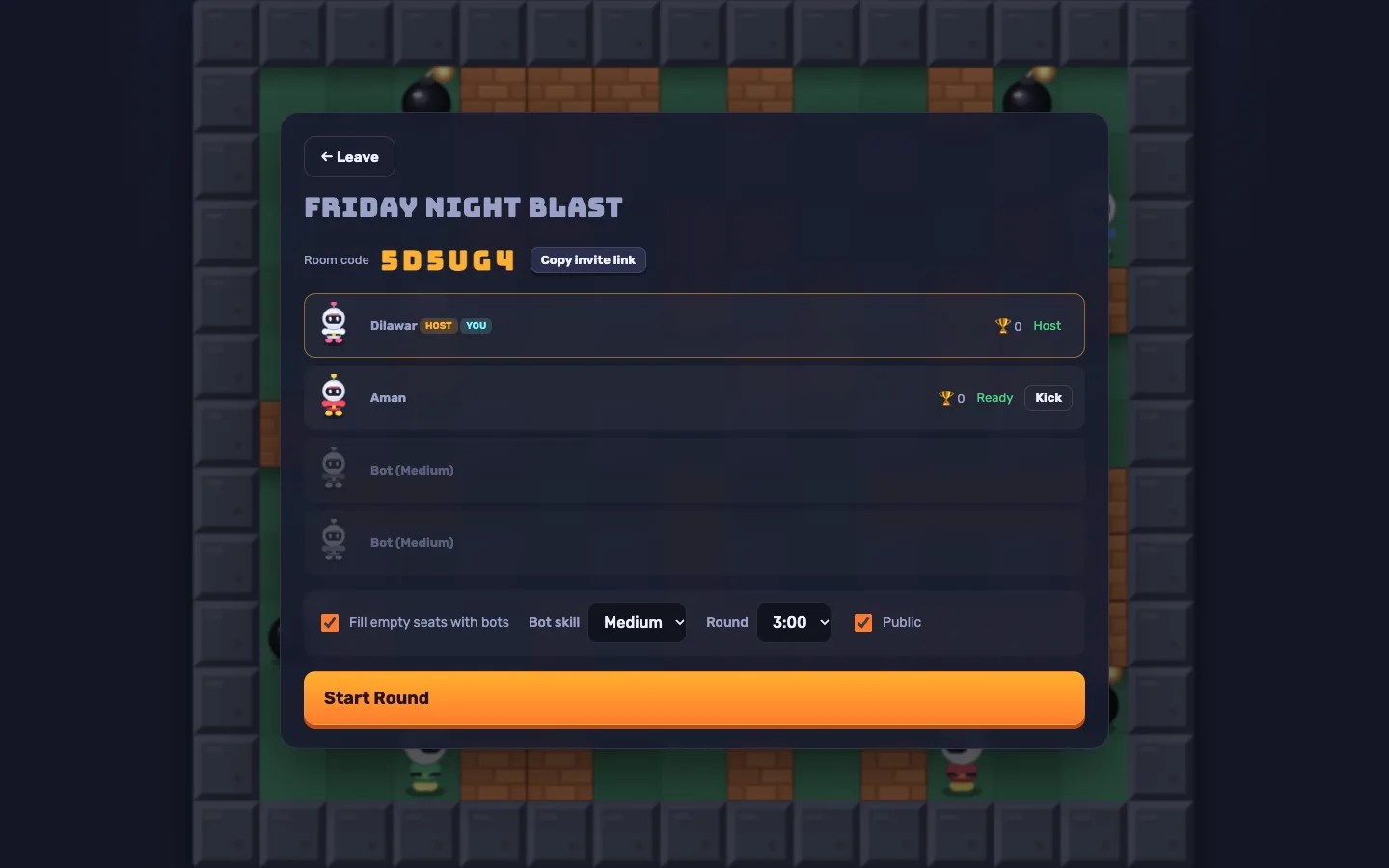
Online rooms have 6-character codes and invite links in the form ?room=CODE. Rooms can be listed publicly or kept private, and the host can fill empty seats with bots, set the bot skill and round length, and kick players. Every player readies up before the host starts the round. This makes it easy to post a room link in a livestream chat, on a slide at an event or in a class group.
Tips and pitfalls
- No accounts, no database. Progress, settings and high scores are saved in the player's browser (LocalStorage). That keeps hosting simple, but it also means there is no central leaderboard to award prizes from out of the box.
- Test on real phones. The touch pad appears automatically and adapts to portrait and landscape, but check it on the devices your audience uses.
- Plan for idle rooms. Empty rooms are removed after 30 seconds and idle rooms after 30 minutes, so a room created the night before an event will not still be there in the morning.
- Use the CI workflow. The included GitHub Actions workflow runs lint, typecheck, tests, the build, a bundle size budget and the Playwright browser tests, including a two-browser multiplayer match.
Who it's for
Bomber Blast suits agencies and studios that need a branded browser game quickly, developers learning real-time multiplayer with a working reference, and educators who want a complete TypeScript game students can read and modify. The Bomber Blast case study explains the shared rules engine and the networking. If you need a custom game or a bigger reskin, our web development team can help, or contact us.
Next step
Bomber Blast gives you a finished arena game with bots, touch and gamepad controls and online rooms that you can rename, reskin and host in an afternoon. Sign in to any DEV3 account to get the full source free from the Bomber Blast marketplace page.