Choosing clinic management software is rarely about one feature. Most demos look good for ten minutes: a calendar, a patient list, an invoice. The problems show up months later, when the pharmacy stock does not match the shelf, a lab charge never reached the bill, a receptionist can read clinical notes she should not see, or you discover that the vendor owns your data and the only export is a PDF.
This checklist is for clinic owners, practice managers and healthtech founders who are comparing systems. It walks through the eight areas worth testing before you commit, the questions to ask in a demo, and how ClinicPro, our source-code clinic platform, answers each one. Use it as a scorecard for any product, not only ours.
How to use this checklist
Run every vendor through the same steps, ideally with the people who will use the system every day:
- Bring a real visit. Take one recent patient journey (booking, check-in, consultation, a lab test, a prescription, payment) and ask the vendor to walk it through live.
- Sign in as each role. Ask for a doctor, nurse, receptionist, pharmacist and accountant login, not just an admin account.
- Ask to see the data leave. Export a report, download an invoice, and ask how you would move every record to another system.
- Score each section below from 0 (missing) to 2 (works well), and note anything that needs customisation.
1. Patients and medical records
The patient record is the centre of everything. A weak one forces staff to keep side notes in spreadsheets.
What to check
- Is there a unique record number (MRN) and does the system warn you about duplicate patients?
- Are allergies and chronic conditions visible wherever a clinician works, not buried in a tab?
- Can you attach documents and see one timeline of visits, diagnoses, prescriptions, lab reports and invoices?
- Does the consultation screen support diagnosis coding (ICD-10 or ICD-11), and can a signed note be corrected only by an addendum?
How ClinicPro handles it
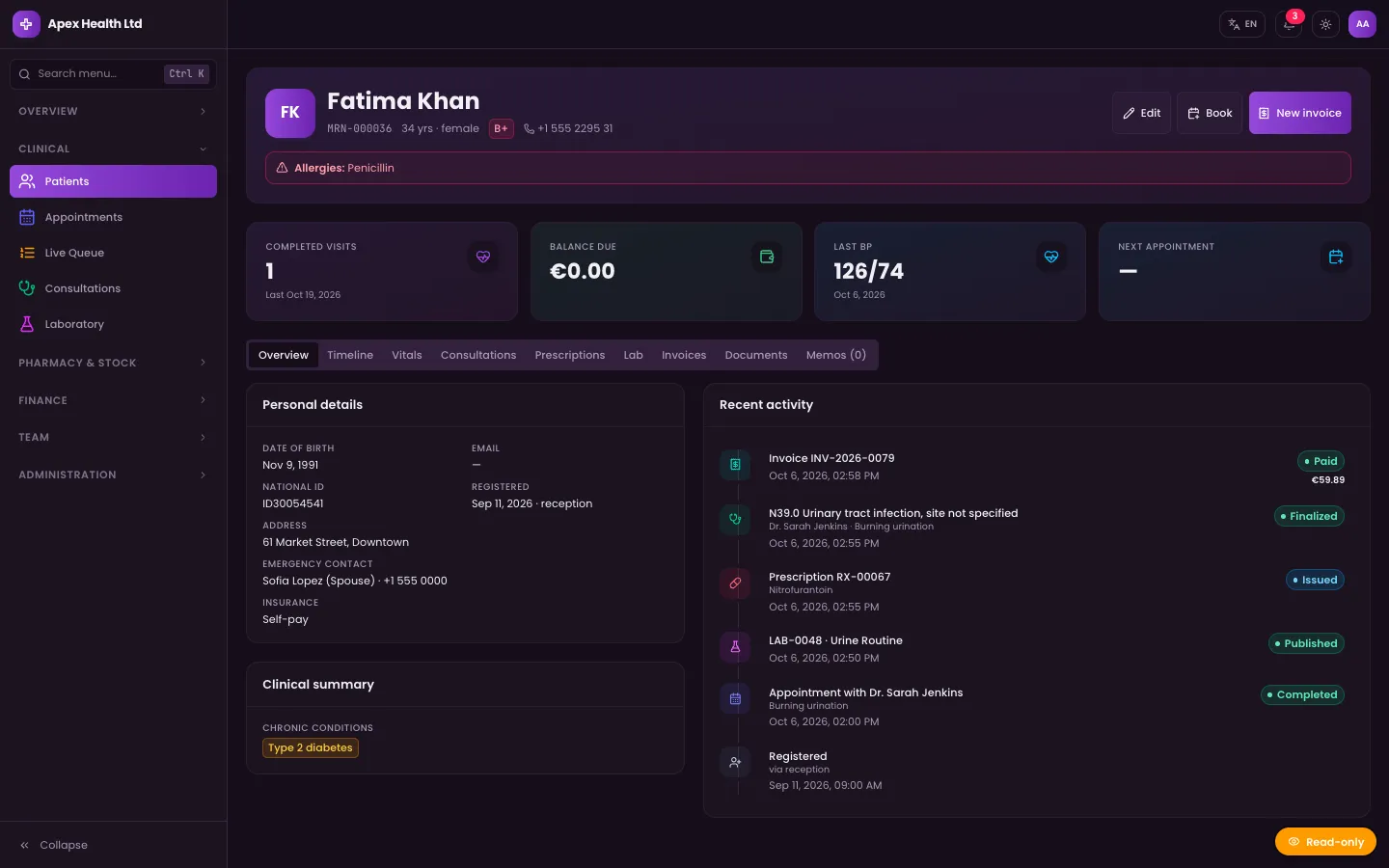
Patients get an MRN sequence with duplicate detection, allergies and chronic conditions, insurance details, secure document uploads and a linked visit timeline. The EMR workspace autosaves, searches ICD-10 and ICD-11 codes, and finalises a consultation with a signature; later changes are added as addenda. Prescriptions are generated as PDFs with a QR code that can be used to verify them.
2. Scheduling and the front desk
Scheduling decides how your day feels. Look past the calendar view to the rules behind it.
What to check
- Can each doctor have their own working hours, breaks and leave?
- Does the system calculate free slots, or does reception guess?
- What stops two people booking the same doctor at the same time?
- Can walk-ins and online bookings share the same queue?
How ClinicPro handles it
Doctor schedules include breaks and leave, and a slot engine offers only valid times in day, week and list views. Double-booking is blocked by a unique index in the database, so it holds even when two receptionists click at once. Walk-ins, a daily token queue, nurse vitals and a drag-and-drop patient-flow board are included. We covered the front desk in detail in how to run a paperless clinic front desk, so this post will not repeat it.
3. Billing and invoices
Billing is where disconnected systems cost real money. The key question is whether charges reach the invoice by themselves.
What to check
- Are consultation, lab and pharmacy charges pulled onto the invoice automatically, or typed again?
- Can a patient pay in parts, by more than one method, and can you refund or void with a record of why?
- Can you design the invoice layout yourself, including a thermal receipt for the counter?
- If you work in more than one currency, which exchange rate is kept on each invoice?
How ClinicPro handles it
Invoices are drafted from visit, lab and pharmacy lines, and staff can still edit them before issuing. Split payments, refunds and voids are supported, and every payment is posted to a revenue ledger. An invoice template builder with live preview produces A4, Letter and 80 mm thermal layouts. Amounts are stored in one base currency and calculated in integer cents; each clinic chooses its display currency and every invoice keeps the exchange rate used. Patients can also pay invoices online through the patient portal with Stripe Checkout. The reasoning behind the money handling is in getting the money right in clinic billing.
4. Pharmacy and stock
If your clinic dispenses medicines or sells over the counter, stock control matters as much as scheduling.
What to check
- Does the system track batches and expiry dates, and which batch does it pick first?
- Will it warn you about low stock and items close to expiry?
- Is there a stock history you can audit, not just a current quantity?
- Can the counter sell to walk-in customers who are not booked patients?
How ClinicPro handles it
The pharmacy module tracks batches and dispenses first-expiry-first-out, so the oldest stock goes first. Low-stock and expiry alerts, a stock movement ledger and counter (OTC) sales are included, and margin data feeds the drug-margin and inventory-turnover reports.
5. Branches, staff and roles
Many buyers underestimate permissions until a privacy problem appears. Ask to sign in as a junior role and try to open things they should not see.
What to check
- How many roles are there, and can a role have read-only access to an area?
- Are permissions checked on the server, or only hidden in the menu?
- How does the system handle several branches or sites?
- Can you lock out a member of staff immediately when they leave?
How ClinicPro handles it
ClinicPro ships with 9 roles: Super Admin, Clinic Admin, Doctor, Nurse, Receptionist, Accountant, Pharmacist, Lab Technician and Patient. There are 20 permission keys, each granted at an all, read or self scope (for example, a nurse can read the EMR without signing it), and every server action checks the permission before it runs. Deactivating a user or changing their password revokes their sessions.
For branches, ClinicPro treats each site as its own clinic: separate staff, data, branding, display currency and language, all managed from one Super Admin console. This is a good fit when branches run independently. If you need staff to move between branches inside one shared record set, raise that early, as it is a customisation rather than a setting.
6. Data isolation and security
Health data needs stronger answers than "we use HTTPS". Ask how the vendor keeps one clinic's data away from another, and what is encrypted.
What to check
- If many clinics share one platform, what stops a query from returning another clinic's records?
- Are sensitive identifiers and clinical notes encrypted at rest?
- Is there an audit trail of who opened or changed records?
- Are sign-in attempts rate-limited?
- Is AI output clearly labelled, and can it change a record on its own?
How ClinicPro handles it
Every clinic-owned record carries a clinic ID, and a database plugin throws an error on any query or aggregation that is missing that filter, so a forgotten filter fails instead of leaking data. National ID, insurance policy number, medical notes, clinical notes and examination findings are encrypted with AES-256-GCM. EMR and document access is written to the audit trail, sign-in and public endpoints are rate-limited, and failed sign-ins are logged. The optional AI features (ICD code suggestions and prescription safety checks) are labelled as suggestions and are never applied automatically. Each clinic can also turn AI off.
The engineering behind the isolation is explained in building multi-tenant RBAC for a clinic SaaS.
7. Reports
A report you cannot filter or export is a screenshot. Ask for the reports your accountant and your medical director will actually request.
What to check
- Can you see revenue and margin after the cost of medicines, not just takings?
- Are receivables aged, and is tax liability reported?
- Can you measure doctor productivity and no-show rates?
- Does every table export to spreadsheet and PDF?
How ClinicPro handles it
Reports cover revenue, net margin including cost of goods sold, receivables ageing, tax liability, drug margins, doctor productivity, appointment and no-show rates, inventory turnover and daily cash. Tables are searchable, filterable and paginated, and export to CSV, XLSX and PDF.
8. Hosting and ownership of the source code
This is the question many buyers leave until last, and it often matters most over five years.
What to check
- Where is the data stored, and can you choose the country or provider?
- Can you take a full backup yourself and restore it?
- Do you get the source code, or only a login?
- If the vendor disappears or changes its terms, what happens to your records?
How ClinicPro handles it
ClinicPro is sold as full TypeScript source code on the DEV3 marketplace. You host it where you choose: a 4-step web installer, a Docker Compose file (app plus a MongoDB replica set) and a PM2 configuration are included. A Super Admin backup tool can create, download and restore full database backups, with an optional daily automatic backup from the cron job. Because you hold the code and the database, your records are not tied to anyone's subscription.
One practical warning from the README: the field-encryption key is generated at install time. Back it up with your database backups, because encrypted fields cannot be read without it.
A quick scorecard
| Area | Key question | ClinicPro |
|---|---|---|
| Patients & records | One timeline, coded diagnoses, signed notes? | Yes |
| Scheduling | Slot rules and a hard double-booking guard? | Yes |
| Billing | Charges flow onto invoices automatically? | Yes |
| Pharmacy & stock | Batches, expiry, first-expiry-first-out? | Yes |
| Roles & branches | Scoped roles; how branches are modelled? | 9 roles; branch = clinic |
| Isolation & security | Enforced isolation, encryption, audit? | Yes |
| Reports | Margin, ageing, export? | Yes |
| Ownership | Source code, self-hosting, backups? | Yes |
Beyond the eight areas, ClinicPro also includes a laboratory workflow, HR and payroll, expenses, internal memos, a patient portal and four interface languages (English, Arabic, Hebrew and Spanish, with right-to-left layouts). The source includes 73 automated test cases across 23 Vitest files, counted from its tests folder.
Closing
The best clinic system is the one your team can run a real visit through without workarounds, and whose data you can still reach years from now. Score every option against the same checklist, sign in as every role, and insist on seeing how the data leaves.
If ClinicPro matches your list, you can try the role logins in the read-only demo and get the source from ClinicPro; DEV3 can also install it or customise it for your clinics. For the design decisions behind it, read the case study.