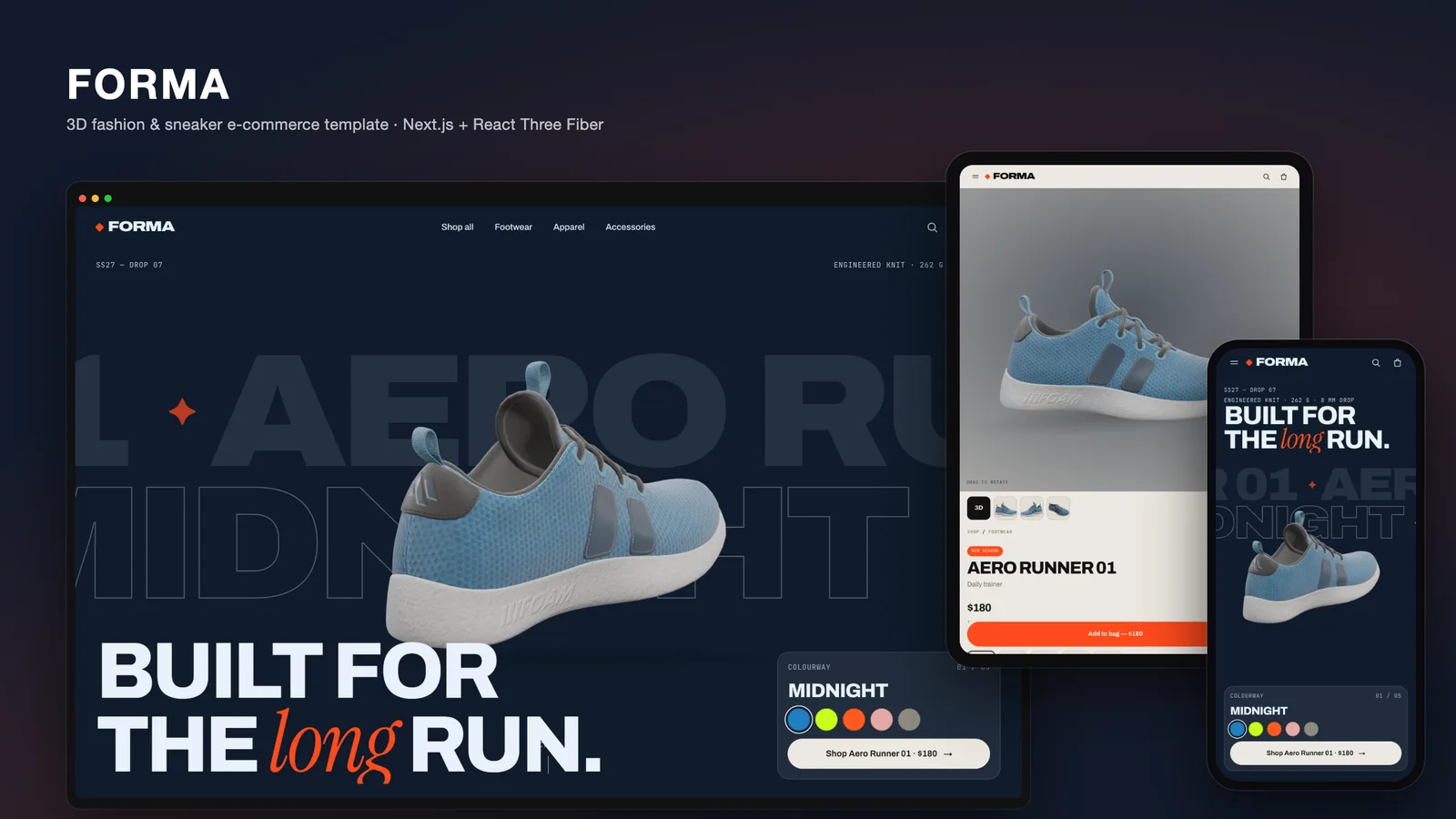
Most 3D product demos on the web are a single model spinning on an empty page. They look good in a portfolio, but they skip the hard part of e-commerce: a shop grid, filters, a bag that survives a reload, a wishlist, a search box and a checkout. With FORMA we set out to build a 3D e-commerce template in React Three Fiber where the 3D does jobs product photography cannot, and the store around it is complete and ready to connect to a real catalogue.
This post walks through how FORMA turns one glTF sneaker into a live product configurator, how it gets more colourways than the file contains, how the exploded anatomy section works, and how the cart and checkout stay simple enough to swap for a real backend.
The stack
FORMA is a Next.js 16 App Router project in TypeScript, on React 19.3, three.js 0.187 and React Three Fiber 9, with Lenis for smooth scrolling. There is no CMS, no database and no environment variables: the catalogue is a typed file, and the cart lives on the visitor's device.
The site has the routes a fashion store needs, from /shop and /product/[slug] to /cart, /wishlist and /checkout, plus a cart drawer and a search overlay. The brand is fictional, and every product image is rendered from the 3D models, so there are no stock photos to license.
One model, many products: glTF material variants
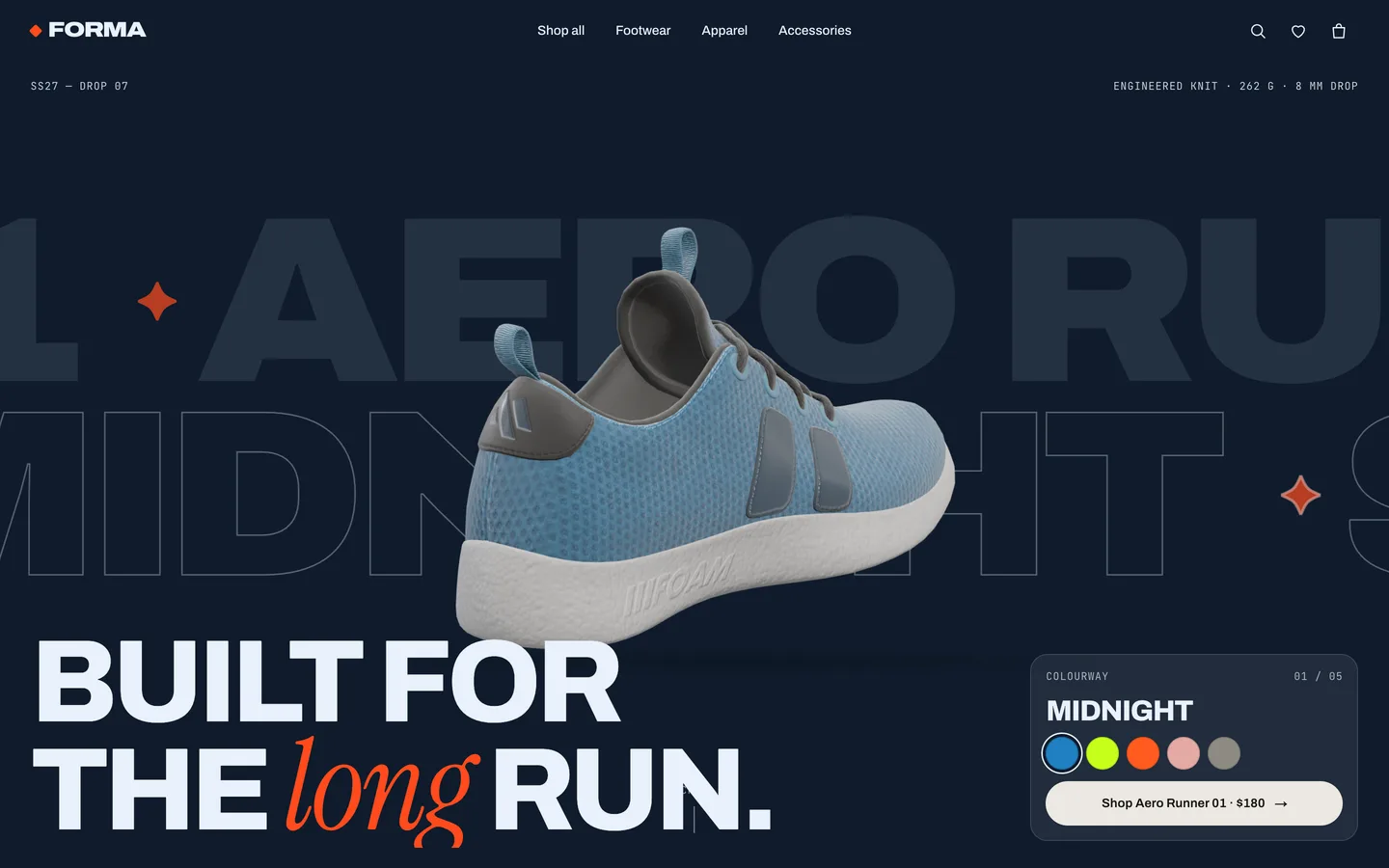
The sneaker is the Khronos "MaterialsVariantsShoe" sample model (by Shopify, CC BY 4.0). It is a single mesh that uses the KHR_materials_variants glTF extension: the file itself carries three alternative materials, named midnight, beach and street. Many viewers swap the whole material, which gives a hard cut on every swatch click.
FORMA does it differently. When the model loads, it reads every variant's base-colour texture through the glTF parser and keeps them all in memory. It then replaces the original material with one MeshPhysicalMaterial whose shader has two texture slots, A and B, and a uWipe uniform. Choosing a new colour puts the old texture in A and the new one in B and animates the wipe from heel to toe, using the shoe's object-space x position. A thin emissive band rides the edge of the wipe, so the change reads like a sheen of light passing over the shoe rather than a texture swap.
Because the material is patched with onBeforeCompile instead of being a full custom shader, it keeps everything three.js gives a physical material: the normal, roughness and ambient-occlusion maps from the file, environment lighting, sheen and clearcoat.
More colourways than the file has
Three variants are not much of a range. Each colour in the catalogue can also carry a tint with three colours: light, accent and dark. When a tint is present, a small GLSL function, formaRecolor, classifies each texel of the original texture by saturation and luminance into one of those three panels, and recolours it while keeping the original shading. Saturated texels become the accent, dark unsaturated texels become the dark panel, and everything else becomes the light panel.
The result is that one texture produces all five colourways on the hero, and adding a new colourway to a product is a matter of adding three hex values to data/products.ts. No new texture, no new model.
Finishes are material settings
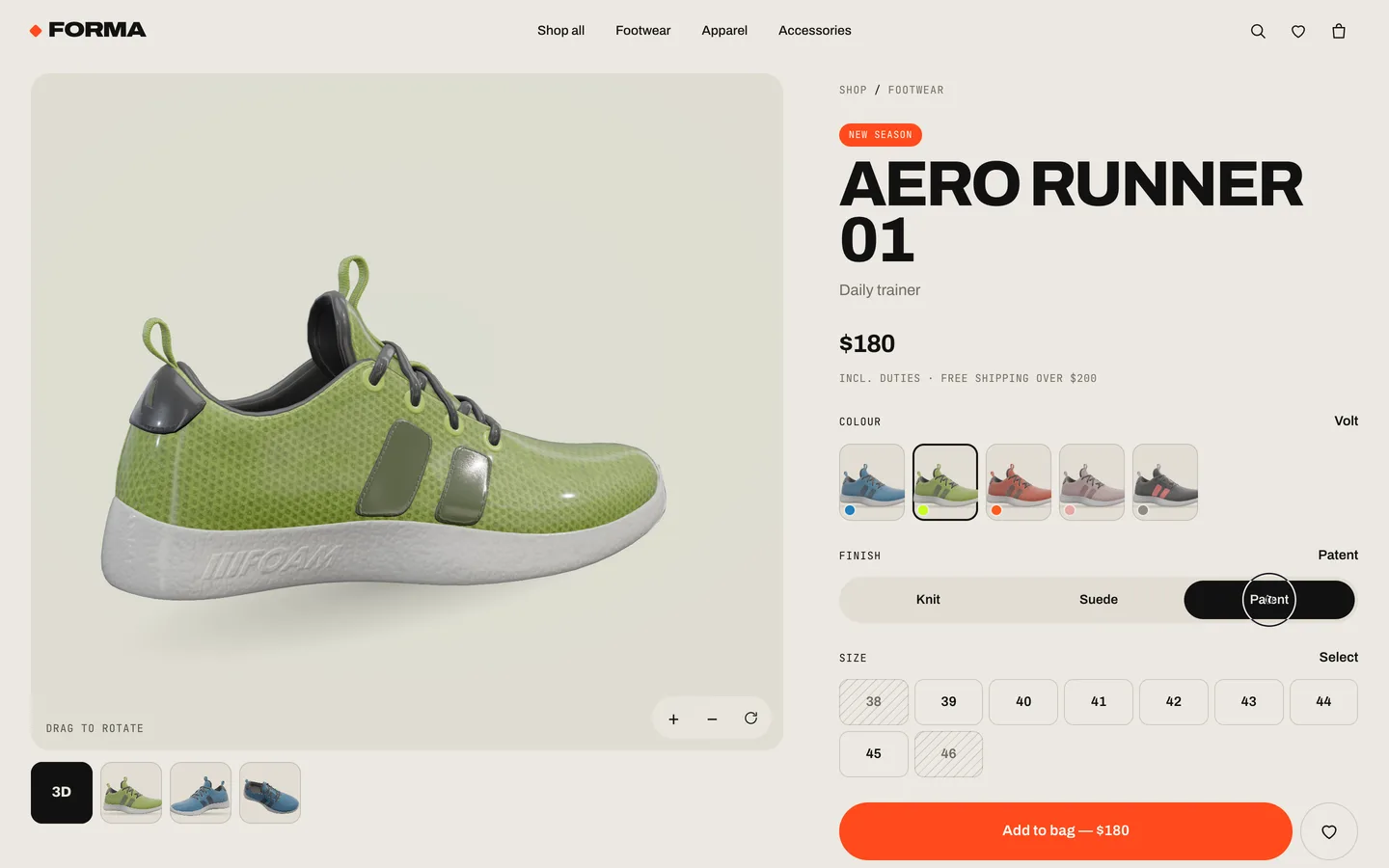
The product page adds a second axis: Knit, Suede and Patent. These are not textures either. Each finish is a preset of roughness, sheen and clearcoat on the same physical material. Knit is rough with a soft sheen, Suede is fully rough with a strong sheen, and Patent drops the roughness and turns the clearcoat up so the shoe picks up sharp highlights from the environment. Switching finish is instant and works with every colourway.
The viewer itself is a React Three Fiber canvas with orbit controls: drag to rotate, pinch or ⌘/ctrl + wheel to zoom, or use the zoom and reset buttons. It auto-rotates gently until the visitor touches it, and the product card image morphs into the viewer as a shared element through React's <ViewTransition>, so the jump from the shop grid to the product page feels like one motion.
Taking the shoe apart
The most memorable section of the home page is the exploded anatomy. As the visitor scrolls, the sneaker separates into four layers: outsole, midsole, upper, and laces with the tongue. Each layer gets a numbered 3D callout pinned to its surface, and a list beside it highlights the part in view.
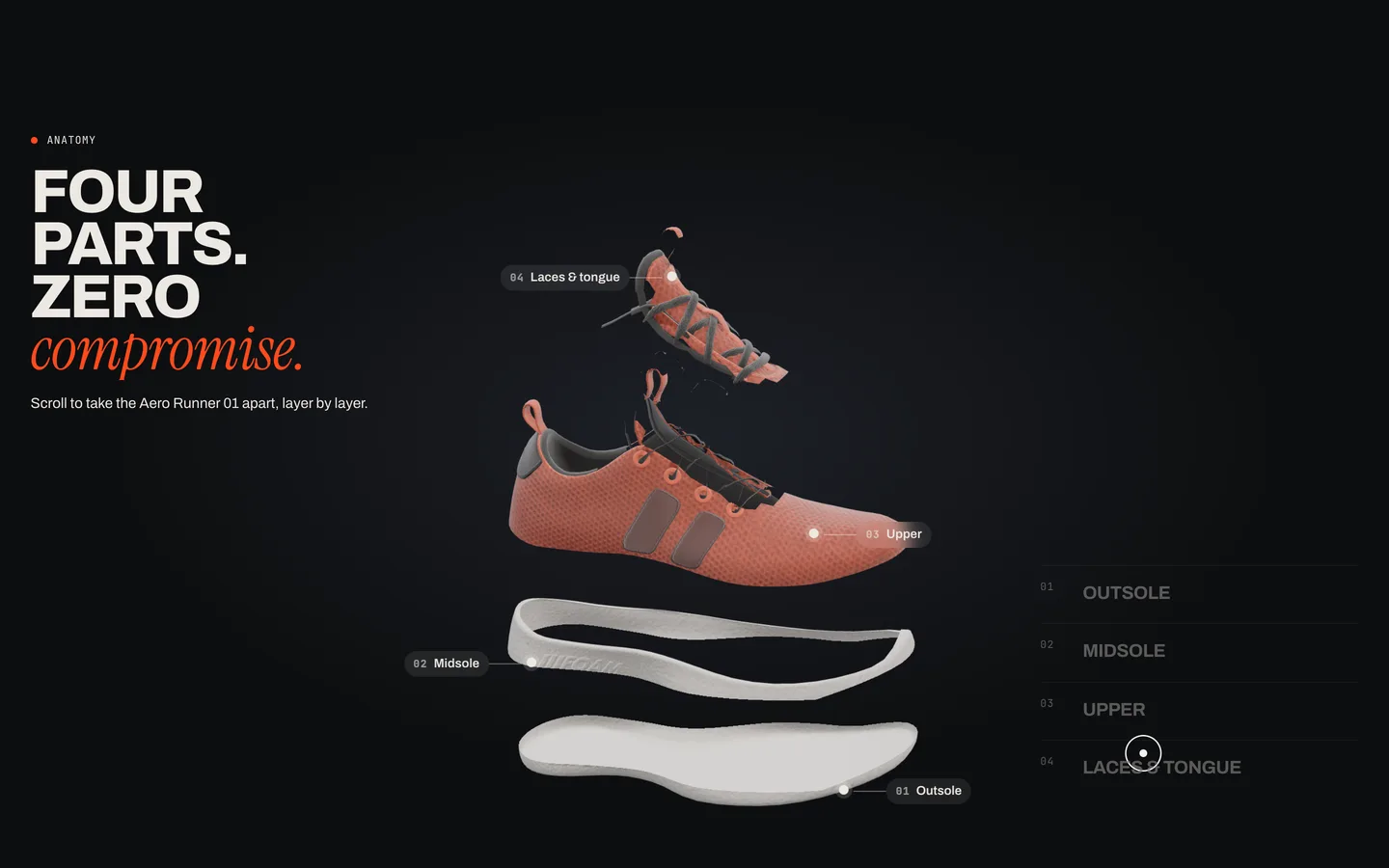
The model was never authored in parts, so FORMA splits it at runtime. Every triangle is assigned to a bucket by its centroid in object space, which works because the shoe is modelled heel to toe along x with y pointing up. The outsole and midsole are a special case: they share triangles along the foam, so a triangle split would leave a jagged edge. Instead, both parts share the full sole geometry and each discards fragments outside its height band in the shader. The cut line is per pixel and perfectly clean, and the visitor never sees a seam.
Procedural apparel
A fashion store is not only shoes. FORMA's tees, longsleeves, crewneck, hoodie, jacket, shorts, socks and tote are generated in code. Each garment starts as a 2D polygon silhouette, which is turned into a signed distance field and inflated into a soft 3D shape. A sheen fabric material, a knit normal map and a canvas detail map add seams, ribbing, prints and pockets, and a small vertex-shader sway keeps the garment alive in the viewer. The cap and beanie are lathe and sphere builds.
It is a deliberate trade-off: procedural garments will not replace a scanned product for a real launch, but they give the template a consistent, licence-free catalogue of 15 products. When you have real models or photos, you point the product at a GLB file or an image URL instead.
The store under the 3D
The 3D only matters if the store works. FORMA's shop has category, size, colour-family and max-price filters plus sort, and filter changes animate cards in, out and into their new slots using view transitions.
Cart, wishlist and UI state live in a tiny external store built on useSyncExternalStore, so any component can subscribe without a provider. The cart and wishlist persist to localStorage, and lines whose product no longer exists are dropped on load, so a changed catalogue never breaks a returning visitor's bag. The cart drawer shows quantities, a subtotal and a free-shipping progress bar driven by the threshold in config/brand.ts.
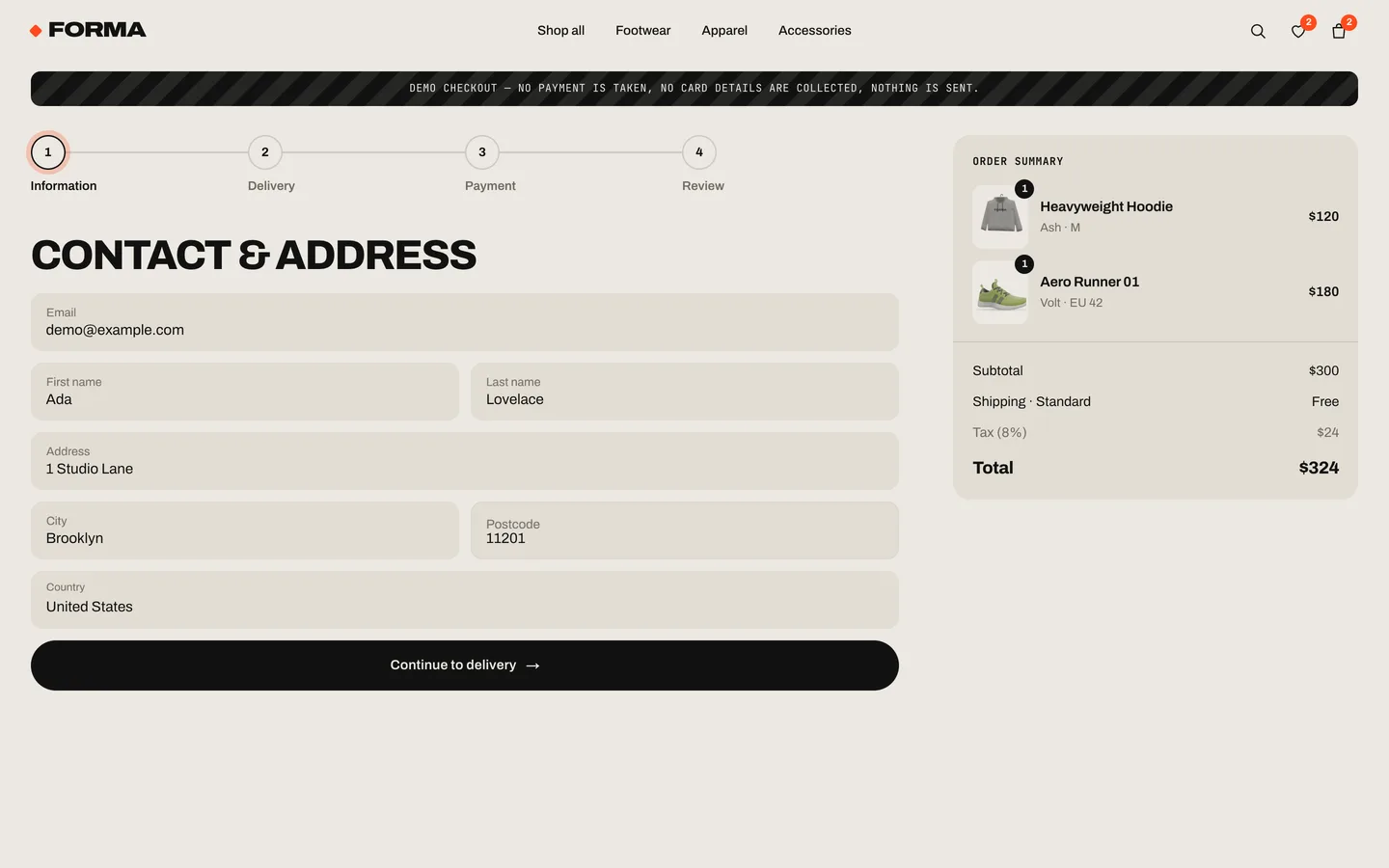
The checkout is four steps (information, delivery, payment, review) and a confirmation screen. It is a demo: it never collects or sends payment data, and it says so on every step. The README shows exactly where to replace placeOrder() with a request to a route handler that creates a Stripe Checkout Session, so card entry stays on Stripe's hosted page.
Motion that respects the visitor
Everything in FORMA moves: the kinetic type stretches with scroll velocity through the display font's width axis, pages change with a wipe, and a custom cursor follows the pointer. All of it checks prefers-reduced-motion. With reduced motion on, Lenis smooth scroll, marquees, wipes, the cursor and auto-rotation are turned off, and colour changes apply instantly instead of wiping. The WebGL canvases cap the device pixel ratio so high-density phones do not render at three times the pixels they need, and the layout is tuned for phones and tablets, with a touch viewer and a sticky add-to-bag bar on mobile.
Making it yours
Rebranding happens in three files. config/brand.ts holds the name, tagline, currency, locale, shipping rules, navigation and colour tokens, which become CSS variables that every component reads. config/fonts.ts sets the fonts through next/font. data/products.ts is the typed catalogue, including each colour's stage colours, glTF variant and tint. A script re-renders the catalogue images from the 3D models whenever you change them.
To go live with real data, map your Shopify Storefront API, Medusa, Sanity or database results to the Product type in the server components, and call your cart API from the store's add, setQty and remove. The 3D layer does not change.
You can try the live demo and see the full feature list on the FORMA item page, and read the design decisions in the case study.