All case studies

DEV3 Technologies · own product

DEV3 Velour: a fashion and beauty WordPress theme with live 3D silk, glass and garments

The reference theme of DEV3's WordPress suite: a couture and beauty storefront with a scroll-driven silk-and-glass scene, 3D product views that recolour with WooCommerce swatches, and a drag-to-turn lookbook rail, all editable in Elementor.

Industry
Fashion & Beauty (WordPress theme)

Live project preview

Client systems are private — screenshots shown where permitted.

DEV3 Technologies · own product — screenshots
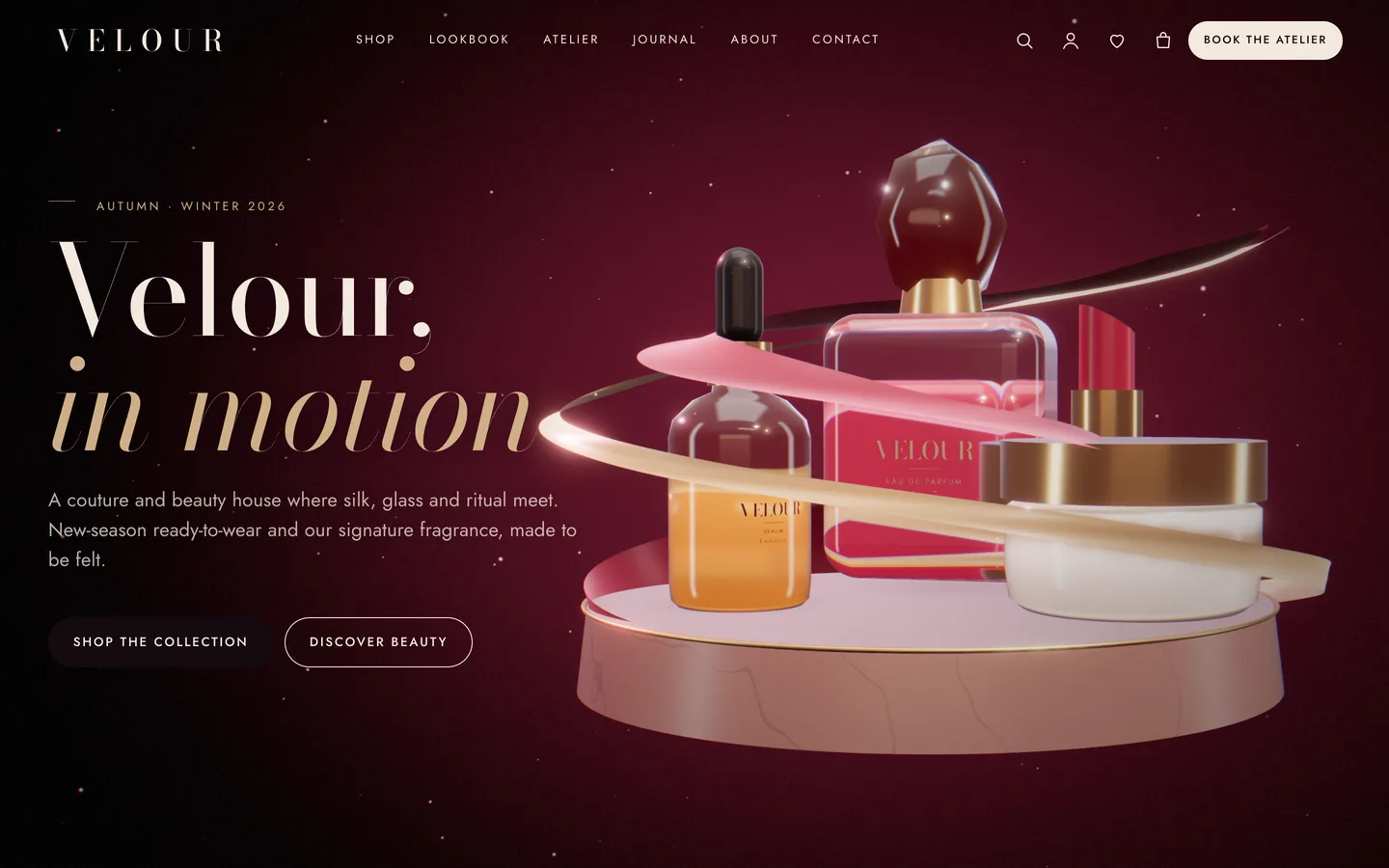
Couture 3D hero — perfume, serum and lipstick on a marble plinth wrapped in a moving silk ribbon, with Shop the collection and Discover beauty buttons.

Couture 3D hero — perfume, serum and lipstick on a marble plinth wrapped in a moving silk ribbon, with Shop the collection and Discover beauty buttons.

The challenge

Fashion and beauty brands sell texture and light: how silk moves, how glass catches a highlight. Most WordPress fashion themes rely on large photo shoots, which small labels and salons rarely have, or on autoplay videos that cost phones seconds. We wanted a boutique theme where the product itself moves on screen and stays light. A buyer choosing a colour should see the garment change colour. And because Velour was the first of nine themes, its engine, toolkit and quality gates had to work for every theme that followed.

Our solution

Velour was built end-to-end first, as the reference for the suite. It is a classic PHP theme with theme.json on DEV3's shared theme core. The DEV3 Theme Toolkit plugin owns post types, the Elementor widgets and their block twins, WooCommerce extras and the demo importer. The theme owns presentation and the 3D presets.

Key design decisions

  • One engine, theme-owned presets. A toolkit widget renders a .dev3-scene element with a preset id and parameters. The active theme's engine hydrates it. Velour registers three presets: silk & glass, product studio and lookbook rail. The toolkit stays generic, and each theme keeps its own look.
  • Procedural cloth and glass. The ribbon, the refractive bottles and the dress, blazer, knit, trousers and tote are generated in code, so there are no licensed renders. The demo's product images come from the same scenes.
  • Chapters are Elementor containers. A DEV3 3D chapter panel on every container sets the camera stop, copy side, header tone and optional scene state (flow, wrap, spread, focus, warm, lift). Values blend between stops.
  • Swatches drive the 3D. WooCommerce variation changes stream to the product's 3D viewer, so choosing crimson, noir or champagne recolours the garment live. A product with its own GLB model also gets an AR link for Android phones (Scene Viewer).
  • Tokens as the single source. One token file generates theme.json, the CSS custom properties and the Elementor kit, so the block editor, Elementor and the Customizer never drift apart.
  • Graceful fallback. Quality tiers are picked per device and step down if the frame rate drops. Reduced motion, Save-Data or no WebGL get a pre-rendered poster, and the text stays in the HTML.

Results

Velour ships as a complete boutique with a one-click demo. The demo has 11 products with colour and size variations, 6 treatments, 4 specialists, 4 sample testimonials, 6 journal posts and 2 forms. The theme adds 26 block patterns.

  • Quality gates passed: php -l on every file, phpcs with WPCS 3 and PHPCompatibilityWP 7.4+ at 0 errors, and the WordPress Theme Check plugin with no required-level failures.
  • Flows tested: the WooCommerce add-to-cart → mini-cart → cart → checkout → order-received flow, and an Elementor editor smoke test where the scene renders in the editor and its controls update it live.
  • Weight: the engine measured 206 KB gzip including three.js after the suite's build fix, inside the 220 KB budget. It loads only on pages with a scene; other pages load about 10 KB of JavaScript.
  • Frame-rate budget: 60 fps on desktop and 30 fps on mid-range phones, checked in headed Chrome at 1440 px and 390 px.

The engine, toolkit and gates built for Velour now power all nine DEV3 themes. Velour is on the DEV3 marketplace. Watch its video tour there.

Setup guide

Requirements

  • WordPress 6.0 or newer and PHP 7.4 or newer
  • The DEV3 Theme Toolkit plugin (included and required)
  • Recommended: Elementor (free), WooCommerce and Contact Form 7. WordPress offers to install them after you activate the theme. Elementor Pro is supported but not required.

What's in the download

Unzip the download from your DEV3 account first. Do not upload the download itself to WordPress.

  • dev3-velour.zip: the theme. Install this one.
  • dev3-velour-child.zip: an optional child theme for your own CSS and PHP.
  • dev3-theme-toolkit.zip: the companion plugin. It is also bundled inside the theme and installed through the prompt.
  • dev3-velour-demo-content.zip: the demo package for reference. The importer already has a copy inside the theme.
  • Documentation/index.html: the full guide. Open it in a browser.

Install the theme

  1. Go to Appearance → Themes → Add New → Upload Theme.
  2. Choose dev3-velour.zip, click Install Now, then Activate.
  3. A notice asks you to install the DEV3 Theme Toolkit (required) and the recommended plugins. Click Begin installing plugins, then install and activate them. You can also upload dev3-theme-toolkit.zip under Plugins → Add New → Upload Plugin.
  4. Optional: if you plan to change code, upload dev3-velour-child.zip the same way and activate DEV3 Velour Child. The parent theme must stay installed.

Import the demo

  1. Log in as an administrator. Elementor keeps every widget setting only when an administrator runs the import.
  2. Go to Appearance → DEV3 Demo and click Import demo. It takes about a minute.
  3. The import adds:
    • the Home (3D scroll story), Shop, Lookbook, The Atelier, About, Journal, Contact, Cart, Checkout, My account and Wishlist pages
    • 11 products with colour and size variations, swatches and 3D views
    • 6 journal posts, 6 treatments, 4 specialists, 4 sample testimonials and 2 Contact Form 7 forms (Contact and Atelier booking)
    • the menus, footer widgets and theme settings
  4. Open the home page and scroll through the story.

Imported items are tagged, so Reset (remove demo content) on the same screen removes only them. On a server with WP-CLI you can run wp --user=admin dev3tk demo import and wp dev3tk demo reset.

After the import

  • Change the recipient of the Contact and Atelier booking forms in Contact → Contact Forms.
  • Set payments, shipping zones and taxes in WooCommerce → Settings.
  • Pick your header style (transparent over the hero, solid or centred logo) in Appearance → Customize → DEV3 Velour Options → Header.

Updates

Download the new version from your DEV3 account and upload dev3-velour.zip again. WordPress offers to replace the installed version. Changes you made in the child theme, the Customizer and your pages are kept.
How to use

Change the 3D story

  1. Open the home page with Edit with Elementor. The top 3D Scene widget uses the Velour: silk & glass preset in Fixed background (scroll story) mode. Its panel sets:
    • the silk colour, silk highlight, perfume colour and room colour
    • the wind and light intensity
    • which objects to show
  2. Every container below it with Advanced → DEV3 3D chapter → Use as 3D chapter switched on is a camera stop. Reorder, duplicate or delete containers to change the story.
  3. Copy side tells the scene where your text is, and the still life moves to the other side. Header tone switches the header to light text over a dark part of the scene.
  4. Optional: set Camera position and Camera target (x,y,z) and Scene state JSON, for example {"flow":1.3,"wrap":0.4,"warm":0.5}. The keys are flow, wrap, spread, focus (0 perfume → 1 serum), warm and lift. Values blend between chapters.
  5. Give the containers that come after the story a background colour, so they slide over the scene.

Add a product with a 3D view

  1. Create a variable product in Products → Add New with Colour and Size attributes.
  2. Set a colour on each attribute term in Products → Attributes → Colour → (term) → Swatch colour. The toolkit then shows round swatches.
  3. Open the product's 3D view tab and choose Velour: product studio with parameters such as {"object":"dress","color":"#7d1230"}. The objects are perfume, serum, cream jar, lipstick, dress, blazer, knit, trousers and tote. You can also paste the URL of your own .glb model.
  4. On the product page, choosing a colour swatch recolours the 3D product live.
  5. Products with a Size attribute show a Size guide link. Edit the table in the dev3tk_size_guide option, or per product in _dev3tk_size_guide.

Build a lookbook

Add a 3D Scene widget with the Velour: lookbook rail preset in inline mode. List the garments and colours separated by commas, and set the paper colour. Visitors drag the rail to turn the garments. Use the Post Type Grid or Product Grid widget under it for the looks themselves.

Run the atelier

  • Services live under Treatments. Each has a price, a duration and an optional booking link, and categories drive the filters on The Atelier page.
  • Staff live under Specialists. Show them with the Team Grid widget.
  • The Form widget shows the Atelier booking Contact Form 7 form. You can use any CF7 or WPForms shortcode instead.

Style the shop

Appearance → Customize → DEV3 Velour Options holds:

  • Colours & Fonts: saving also updates Elementor's Global Colors and Fonts.
  • Header: transparent, solid or centred, plus sticky, search and button options.
  • 3D & Motion: quality (auto, high, low or off), loader, custom cursor, smooth scrolling, film grain and chapter rail.
  • Footer, Blog layout and Shop: columns, products per page, sidebar, mini-cart drawer, quick view and wishlist.

The wishlist page uses the [dev3tk_wishlist] shortcode.

Related case studies