Web Scripts & Software
DEV3 Speaker & Stereo Sound Test — Source Code (React + Tailwind)
from $20$29
Loading…
Everyday tool
Free, no sign-up. Runs in your browser; nothing is uploaded. Buy the source code: $29 Regular / $69 Extended
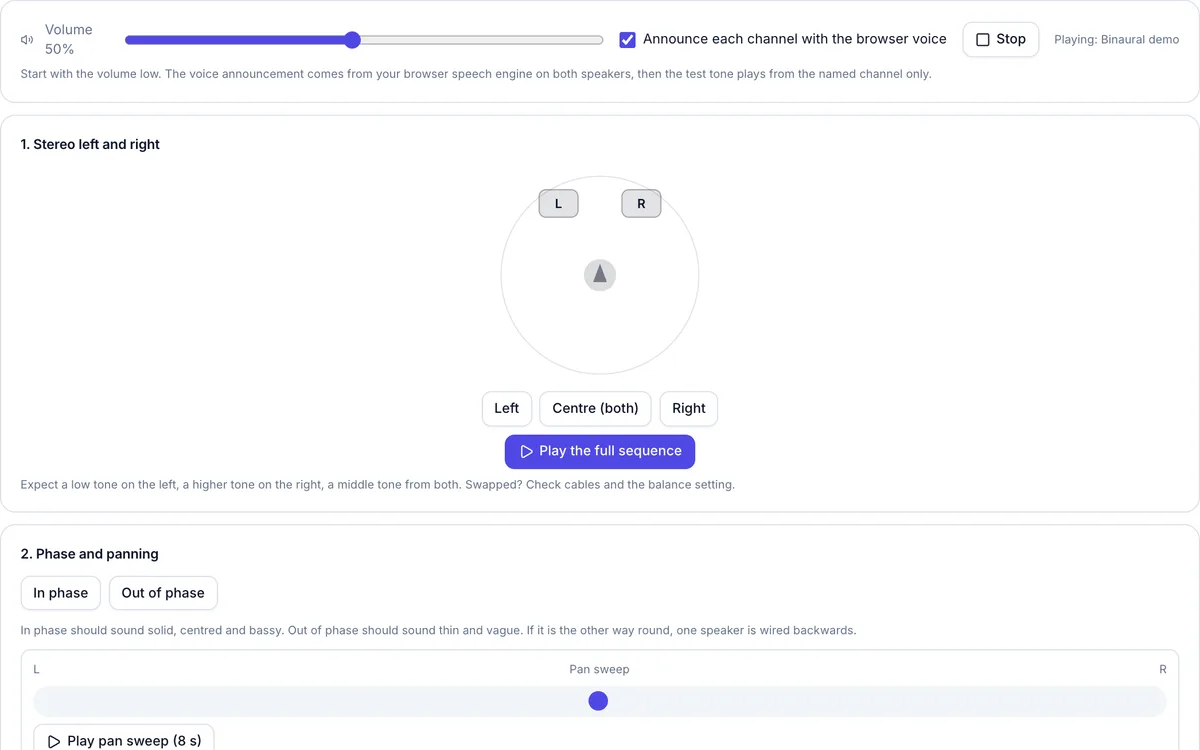
Start with the volume low. The voice announcement comes from your browser speech engine on both speakers, then the test tone plays from the named channel only.
Expect a low tone on the left, a higher tone on the right, a middle tone from both. Swapped? Check cables and the balance setting.
In phase should sound solid, centred and bassy. Out of phase should sound thin and vague. If it is the other way round, one speaker is wired backwards.
Note the pitch where the sound first appears: that is the low limit of your speakers. Dips or silent patches show room or driver problems. Listen for buzzing in the rattle test.
Your output only reports 2 channels. Enable 5.1 in your system sound settings (or HDMI/receiver settings), then reload. You can still download the WAV below.
The tone should be in the named ear only. If the voice says left and it plays on the right, you are wearing them the wrong way round or the cable is swapped.
A ticking sound circles your head every 12 seconds, front, right, back, left. Good headphones make it seem to move outside your head.
Need Speaker & Stereo Sound Test as a full mobile or web app? We build it in about a week. Built in about a week, from $99. Send your requirements or SOW; you get a fixed quote and a delivery date.
The speaker & stereo sound test stays free to use online. If you want the code to run, edit and ship in your own project, get the full source from the DEV3 Marketplace. Instant download, 6 months of support.
Get the full app behind this tool. Buy once, own the source, and try each one live first.
Web Scripts & Software
from $20$29
Web Scripts & Software Mobile app
from $69$99
Enterprise SaaS Starters
from $69$99
Enterprise SaaS Starters
from $69$99
Web Scripts & Software
from $69$99
Web Scripts & Software Mobile app
from $69$99
Web Scripts & Software Mobile app
from $69$99
Web Scripts & Software Mobile app
from $69$99
A few simple sounds can find nearly every common audio problem: swapped channels, a dead driver, a wiring mistake, a weak subwoofer or an output that is not really surround.
Press Play left, right, centre. You should hear a lower tone from the left only, a higher tone from the right only, and then a middle tone from both together, appearing between the speakers. A dedicated button announces each channel using your browser's speech voice before the tone.
Play the in-phase and out-of-phase noise. With correct wiring the first sounds full and centred and the second sounds vague. If it is the other way round, swap the positive and negative wires on one speaker.
A tone glides from left to right and back. It should move smoothly with no jumps and no dead spots, and the on-screen dot follows it.
The bass sweep runs from 20 to 200 Hz. Note the pitch where sound first appears: that is the low limit of your speakers. The full-range sweep shows gaps in the response, and the rattle test excites loose screws and shelves.
Each speaker plays in turn with a diagram. The tool reads how many channels your device supports and says if surround is not active. Download the 6-channel or 8-channel WAV to test in an app that supports multichannel output.
Check left and right earcups, then listen to the binaural demo where a sound circles your head. Good headphones make it seem to move outside your head.
Play the left and right test. The low tone should come only from your left speaker or earcup, the higher tone only from the right. If they are reversed, swap the speaker cables or check the balance and channel settings in your operating system or audio app.
Two speakers wired correctly move their cones in step. Play the in-phase noise: it should sound solid and centred with strong bass. The out-of-phase version should sound thin, hollow and spread out. If the in-phase test sounds like the out-of-phase one, one speaker is wired backwards (positive and negative swapped).
First enable 5.1 or 7.1 output in your computer sound settings for your device. The Surround tab then plays a different tone from each speaker in turn, and shows which speaker should be sounding. If your output reports only two channels, you will be told, and you can download a multi-channel WAV to play in a media player instead.
Many apps and sound cards do not send the LFE channel unless surround output is on. Also, small speakers cannot reproduce below 80 to 100 Hz. Try the bass sweep, check that bass management is enabled and the subwoofer volume is up, and listen for the pitch where it becomes audible.
Bluetooth compresses audio with a codec such as SBC, AAC or aptX, and adds delay. Cheap codecs can reduce treble detail and may mix stereo to mono in some call modes. For testing, use a wired connection or check that the device is in music (A2DP) mode and not hands-free mode.
No. All test sounds are generated in your browser and the downloads are created locally. The tool does not use your microphone.