Web Scripts & Software
DEV3 Decibel Meter (Sound Level) — Source Code (React + Tailwind)
from $20$29
Loading…
Everyday tool
Free, no sign-up. Runs in your browser; nothing is uploaded. Buy the source code: $29 Regular / $69 Extended
Press Start. The microphone is analysed live and nothing is recorded.
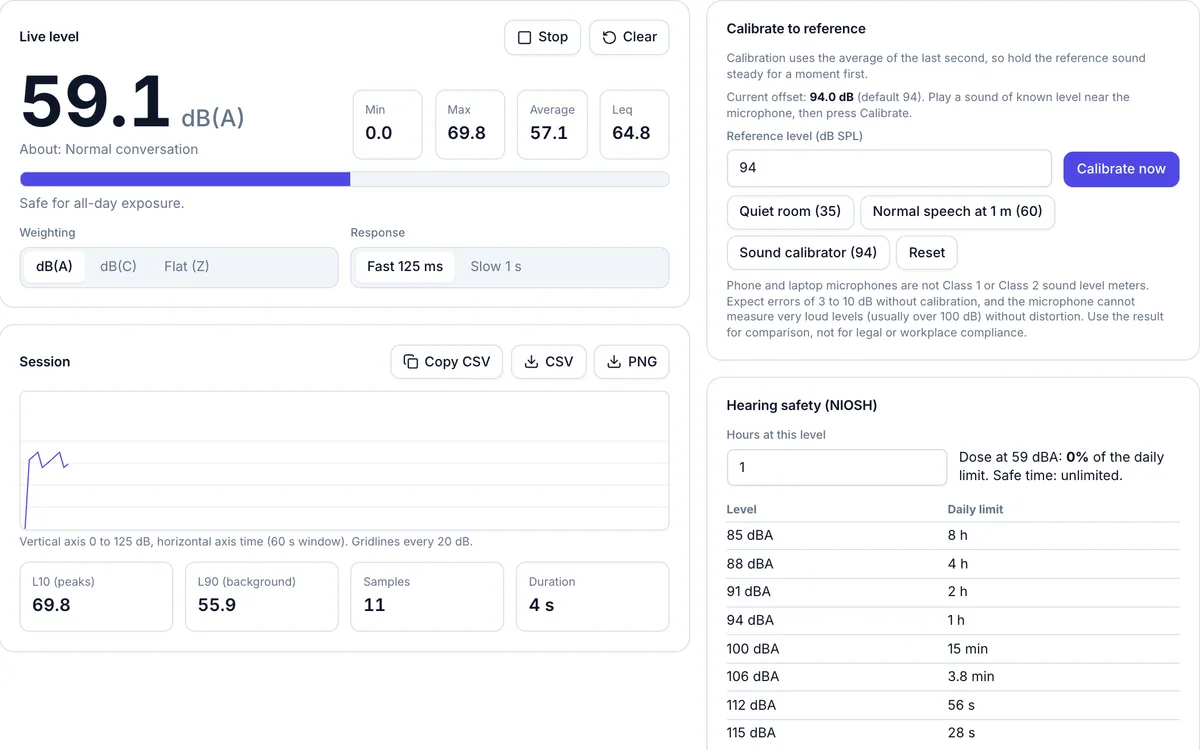
Vertical axis 0 to 125 dB, horizontal axis time (60 s window). Gridlines every 20 dB.
Calibration uses the average of the last second, so hold the reference sound steady for a moment first.
Current offset: 94.0 dB (default 94). Play a sound of known level near the microphone, then press Calibrate.
Phone and laptop microphones are not Class 1 or Class 2 sound level meters. Expect errors of 3 to 10 dB without calibration, and the microphone cannot measure very loud levels (usually over 100 dB) without distortion. Use the result for comparison, not for legal or workplace compliance.
Start with dB(A) weighting to see your dose.
| Level | Daily limit |
|---|---|
| 85 dBA | 8 h |
| 88 dBA | 4 h |
| 91 dBA | 2 h |
| 94 dBA | 1 h |
| 100 dBA | 15 min |
| 106 dBA | 3.8 min |
| 112 dBA | 56 s |
| 115 dBA | 28 s |
Source: NIOSH Criteria for a Recommended Standard, Occupational Noise Exposure (1998): 85 dBA, 8 hours, 3 dB exchange rate. WHO advises 80 dBA for at most 40 hours per week.
Need Decibel Meter (Sound Level) as a full mobile or web app? We build it in about a week. Built in about a week, from $99. Send your requirements or SOW; you get a fixed quote and a delivery date.
The decibel meter (sound level) stays free to use online. If you want the code to run, edit and ship in your own project, get the full source from the DEV3 Marketplace. Instant download, 6 months of support.
Get the full app behind this tool. Buy once, own the source, and try each one live first.
Web Scripts & Software
from $20$29
Web Scripts & Software Mobile app
from $69$99
Enterprise SaaS Starters
from $69$99
Enterprise SaaS Starters
from $69$99
Web Scripts & Software
from $69$99
Web Scripts & Software Mobile app
from $69$99
Web Scripts & Software Mobile app
from $69$99
Web Scripts & Software Mobile app
from $69$99
A decibel meter turns the sound your microphone hears into a level in decibels. This page does the standard work of a sound level meter in your browser: frequency weighting, time weighting and statistics over a session.
Without calibration the absolute level is a guess. Play a reference of known loudness, such as a calibrator or a test tone measured with a trusted meter, type its level into Calibrate to reference, and the tool sets the offset. The offset is stored only in your browser.
The scale compares your reading with everyday sounds and shows the NIOSH recommended daily exposure: 85 dBA for 8 hours, with a 3 dB exchange rate, so every 3 dB cuts the safe time in half.
Download the log as a CSV or the chart as a PNG to share with a landlord, a school or an employer. See the accuracy note before using results formally.
It is an estimate. Phone and laptop microphones are not calibrated sound level meters, so uncalibrated errors of 3 to 10 dB are common. Calibrating against a reference you trust, such as a known 94 dB calibrator, improves it. Use it to compare sounds and spot loud places, not for legal measurements.
dB(A) weights frequencies like the human ear at moderate levels, so it matches hearing risk and most noise rules. dB(C) is flatter and keeps more bass, which is useful for music and machinery. dB(Z) is unweighted.
Leq is the equivalent continuous sound level: the steady level that carries the same energy as your changing noise over the same time. It is calculated by averaging energy, not by averaging decibels, so loud moments count more.
NIOSH recommends a limit of 85 dBA averaged over 8 hours, and halving the time for every 3 dB increase, so 91 dBA is 2 hours and 100 dBA is 15 minutes. WHO also advises keeping listening below 80 dBA for 40 hours per week.
Every microphone and room has a noise floor. A phone microphone often cannot report below 30 to 35 dB, so a very quiet room still shows about that. Treat values near the floor as an upper bound.
No. Only the level numbers are computed in your browser. Sound is analysed live and discarded, and the log is created only if you download it.