DEV3 Technologies home

DEV3 Staffora – Recruitment & Staffing Agency WordPress Theme for Elementor & WooCommerce

A photo-led WordPress theme for recruitment and staffing agencies: a two-path hero for employers and candidates, job search with filters that work without JavaScript, CV upload, a submit-a-vacancy form, a salary guide and JobPosting markup. No 3D, light motion only.
by DEV3 TechnologiesVerified AuthorUpdated 09 Nov 2026

Black Friday: up to 30% off

This item is 30% off: $55.30 instead of $79

Ends in
--
Days
--
Hrs
--
Min
--
Sec

DEV3 Staffora is a WordPress theme for recruitment agencies, staffing firms and executive search boutiques. It looks like a confident, light corporate brand: Wix Madefor Display headlines, a warm cream canvas, navy ink, raspberry actions with sky highlights, square tag chips and 8 px corners. Motion is light (split headings, reveals, counters, a slow Ken Burns drift, stacked process cards) and respects reduced motion. There is no 3D or WebGL in the theme at all.

Buy a licence to download it. There is no public live demo: watch the video tour at the top of this page, or step through the screenshots at desktop, tablet and phone sizes.

A two-path hero for two audiences

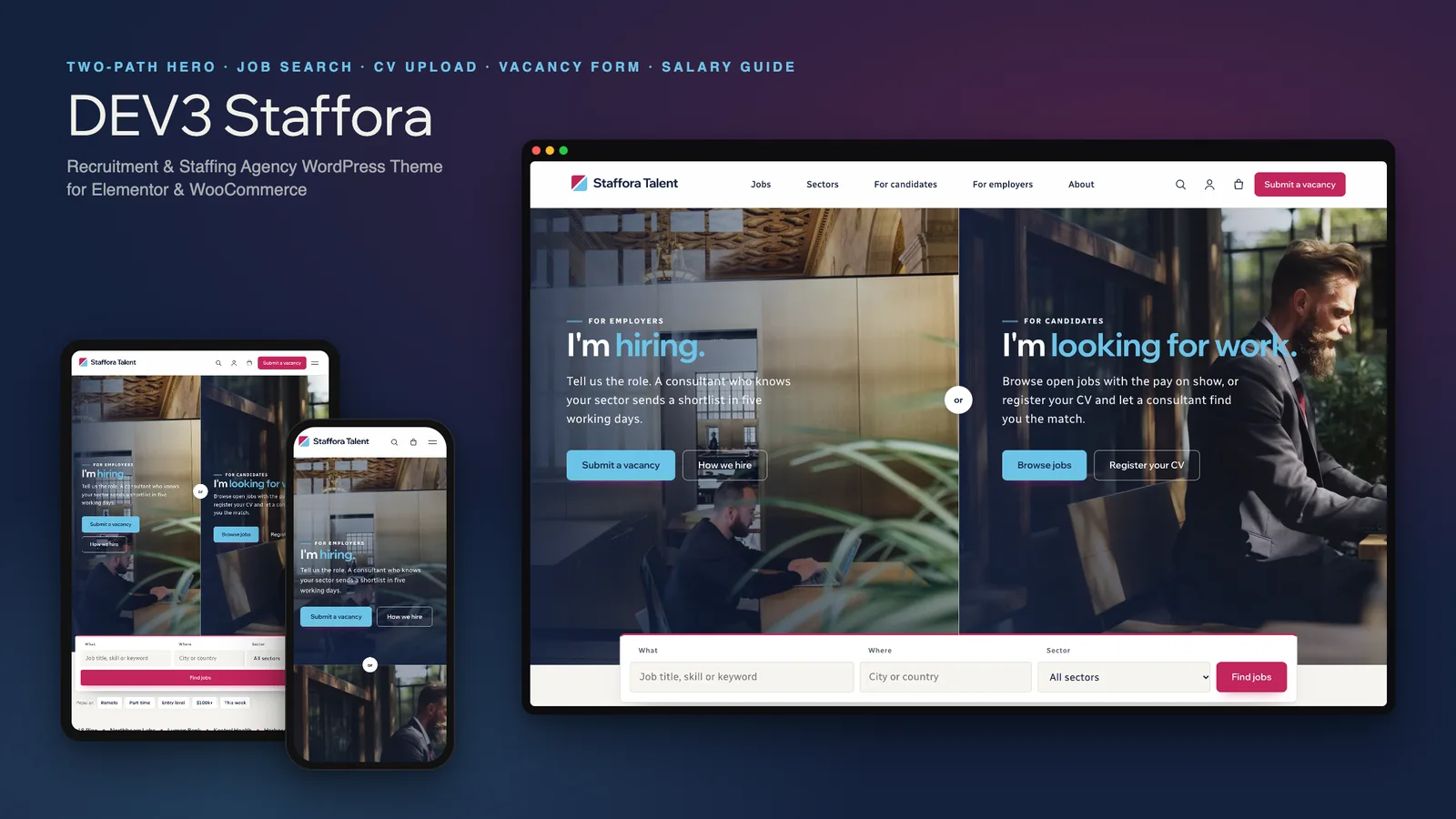
  • The home page opens with one photo split by a hairline into I'm hiring and I'm looking for work, each half with its own headline and buttons, and a job search bar across the bottom edge. On phones the halves stack.
  • Both halves are the toolkit Photo Hero widget, so every photo, overlay and headline is editable in Elementor.

Jobs candidates can search

  • A Jobs post type with a job reference, sector, employment type (permanent, part-time, contract, temporary), location, on-site, hybrid or remote, salary range with period (year, month, day or hour), level, closing date, a featured flag and a named consultant.
  • A jobs archive with filters for keyword, place, sector, type, arrangement, level, minimum salary and posted date. Everything is a plain GET form, so filters work without JavaScript and every result page is linkable.
  • Confidential client adverts: leave the client name empty and the job shows it that way.
  • Every job prints JobPosting JSON-LD (salary, valid-through date, employment type, location or remote flag) so listings can appear in Google for Jobs.

CV upload and the vacancy form

  • An apply form on every job and a Register your CV page. The server checks the file type, size and signature (PDF, DOC or DOCX, up to 5 MB), renames the file, stores it in a private folder with a deny-all rule, and only people who can edit posts can download it.
  • A Submit a vacancy form for employers: company, contact, job title, sector, type of hire, headcount, location, budget and brief. Nonce, honeypot and rate limit on every form; requests are saved privately and emailed to the site admin.
  • Forms are rendered from a content slot, so Elementor's element cache never freezes a nonce.

Sectors, consultants and a salary guide

  • Sector pages with the roles you place, typical pay and the jobs open now, plus six photo tiles with live job counts for the home page.
  • Consultant profiles with portrait, direct phone, sectors, specialities and the jobs each consultant is hiring for.
  • A salary guide: entry, mid and senior pay by role with a range bar, a sector filter and a role search. It works without JavaScript, filters instantly with it and turns into stacked cards on phones. The demo figures are samples; replace them with your own through a filter.

Built for editing

Every demo page is built in Elementor (the free version works) with the DEV3 Theme Toolkit widgets, three job widgets (search card, job list, sectors) and 29 block patterns for the block editor. Colours and fonts come from one token file and sync to the Customizer, theme.json and the Elementor kit. Fonts are self-hosted. WooCommerce is styled for candidate services and job ad credits, and there is compatible styling for WP Job Manager (styling only; the plugin is optional). The demo photos are free-licence stock photos listed in PHOTO-CREDITS.md; all clients, roles, salaries and people are fictional.

How it's built

Architecture, stack, key decisions and the quality gates DEV3 Staffora passed before release.

Our own WordPress theme for recruitment agencies: a two-path hero, filters that work without JavaScript, CV upload, a submit-a-vacancy form, a salary guide and JobPosting JSON-LD on a no-3D theme core.

The problem it solves

A recruitment agency speaks to two audiences at once. Employers want to brief a search quickly and trust the people behind it. Candidates want to see real jobs, pay and a person to talk to. Most agency themes bury one audience, hide salary and lean on heavy plugins for search and CV handling. Staffora had to give both audiences their own door on the home page, make job search work without JavaScript, take a CV upload safely, publish a salary guide that stays honest about sample data and stay editable in Elementor on a core that ships no 3D code.

Architecture and approach

Staffora is a classic PHP theme with theme.json on DEV3's shared theme core in flat mode: a WebGL-free boot and a build gate that fails the theme if any three.js or WebGL code reaches its assets. The always-loaded JavaScript is about 12 KB gzipped.

The home hero is two toolkit Photo Hero widgets side by side, split by a hairline, with the search bar overlapping the bottom edge; theme CSS stacks them on phones. Jobs reuse a toolkit post type with job fields, a reference and a named consultant. The archive reads plain GET parameters, so filters work without JavaScript, and single jobs print JobPosting JSON-LD.

CV uploads go through a theme-local handler: nonce, honeypot, rate limit, extension and MIME check, file signature check, a random file name and a private folder with a deny-all rule, with an admin-only nonce-protected download. Forms render from a content slot filled at request time, so Elementor's element cache cannot freeze a nonce. The salary guide is a server-rendered table with a GET filter that JavaScript upgrades to live filtering.

Quality gates and results

  • 12 KB gzipped always-loaded JavaScript, 40 KB budget.
  • Filters and the salary guide work without JavaScript.
  • Zero errors and warnings under WordPress Coding Standards, and zero required Theme Check items.
  • 29 block patterns and a one-click demo with 18 jobs in six sectors.

Tech stack

Area Technologies
Frontend DEV3 Motion, Photo Hero, Elementor widgets, Block patterns
Platform WordPress 6.0+, PHP 7.4+, WooCommerce, Contact Form 7, DEV3 Theme Toolkit
Delivery phpcs (WPCS 3), Theme Check, No-3D build gate, One-click demo importer

Inside the build

Two-path hero: one photo split by a hairline into I'm hiring and I'm looking for work, each half with its own headline and buttons, over a Ken Burns drift. Two-path hero — one photo split by a hairline into I'm hiring and I'm looking for work, each half with its own headline and buttons, over a Ken Burns drift.

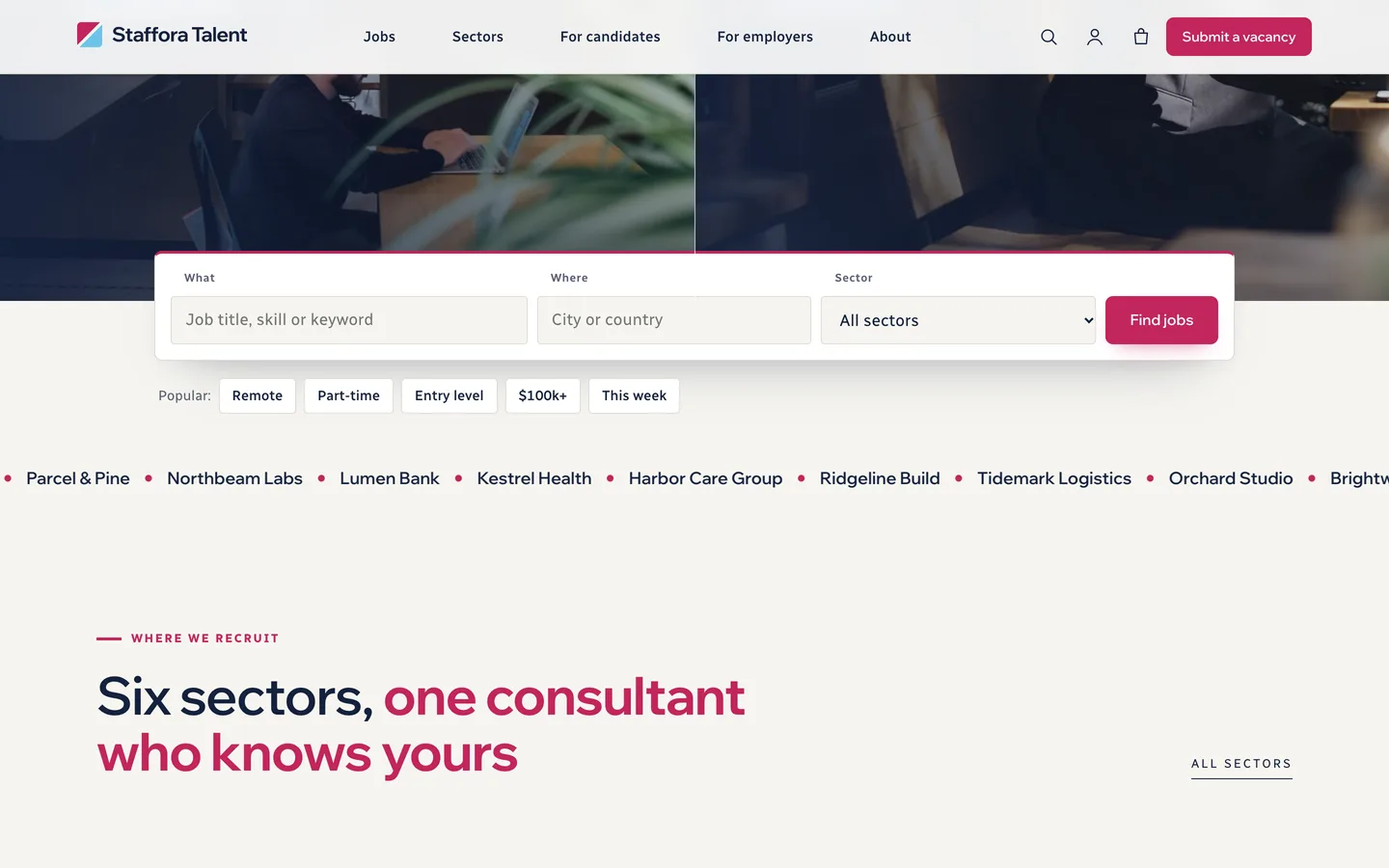
Job search bar: keyword, place and sector overlap the bottom edge of the hero and post to the jobs page, with popular filters one tap away. Job search bar — keyword, place and sector overlap the bottom edge of the hero and post to the jobs page, with popular filters one tap away.

Guides & articles

Practical guides and engineering write-ups for DEV3 Staffora.

A recruitment agency WordPress theme: CV upload and a salary guide with Staffora

Last updated
A recruitment agency WordPress theme: CV upload and a salary guide with Staffora: DEV3 Staffora

A recruitment agency speaks to two audiences at once. Employers want to brief a search quickly and trust the people behind it. Candidates want to see real jobs, honest pay and a person to talk to. DEV3 Staffora is a WordPress theme built for both: a two-path hero, filters that work without JavaScript, a CV upload that is stored safely, a vacancy form and a salary guide, all editable in Elementor.
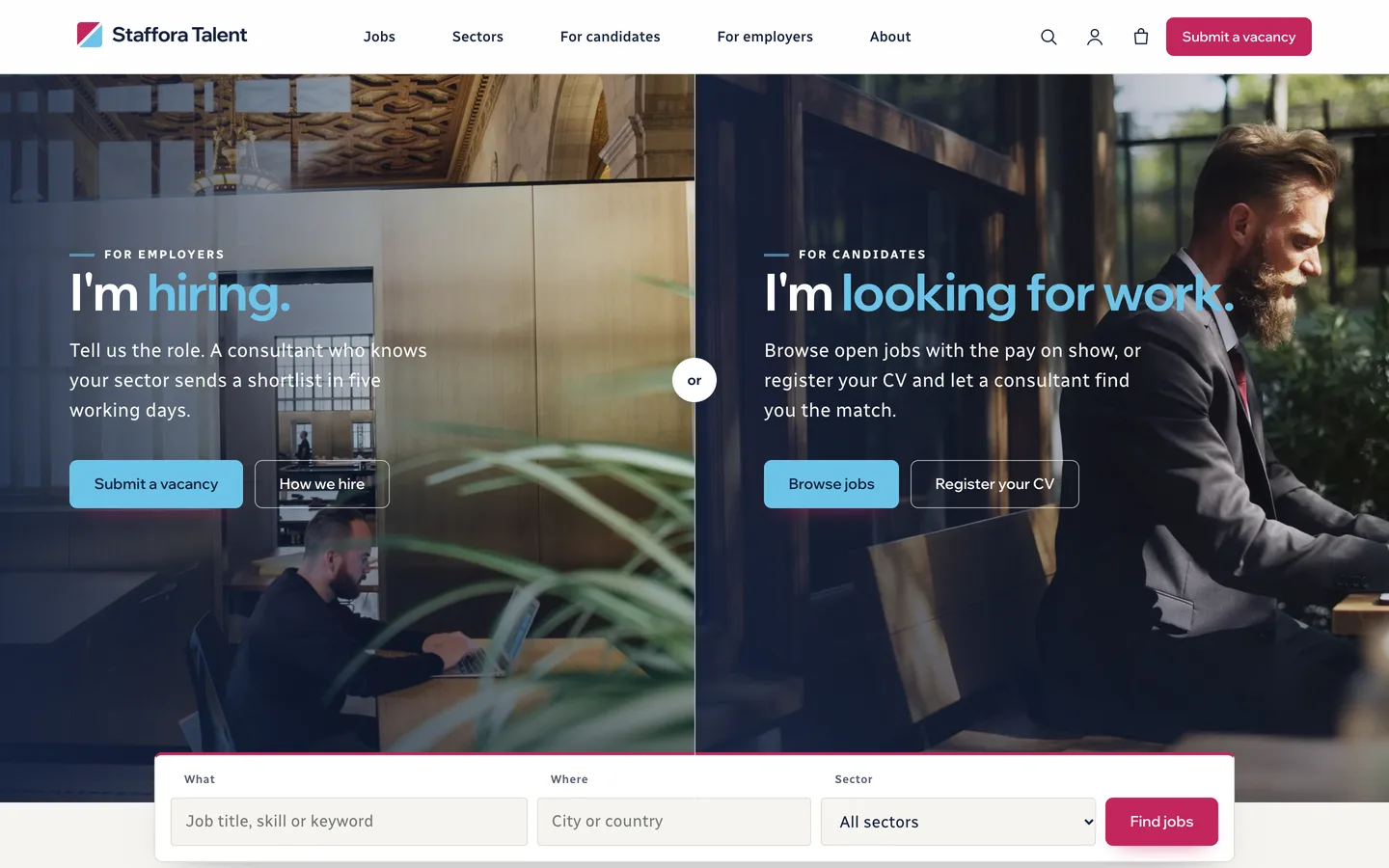
The Staffora home page: one photo split by a hairline into I'm hiring and I'm looking for work, each with its own headline and buttons, and a job search bar across the bottom edge

Video tour of the Staffora demo: the two-path hero, sectors, latest jobs, how we hire, the salary guide, a job page with CV apply and checkout

Who Staffora is for

  • Recruitment and staffing agencies with permanent, contract and temporary desks.
  • Executive search boutiques that want named consultants and confidential adverts.
  • In-house talent teams and sector job sites that need a branded jobs page.

One door for each audience

The home hero is split in two. Employers go to the vacancy form; candidates go to the jobs list or the CV page. Both halves are the same Photo Hero widget, so photos, overlays and headlines are edited in Elementor, and on phones the halves stack.

Search that works without JavaScript

The jobs archive is a plain GET form: keyword, place, sector, job type, on-site, hybrid or remote, level, minimum salary, posted date and sort. Because every filter is a URL parameter, results are linkable and work for visitors on slow connections or with scripts blocked.
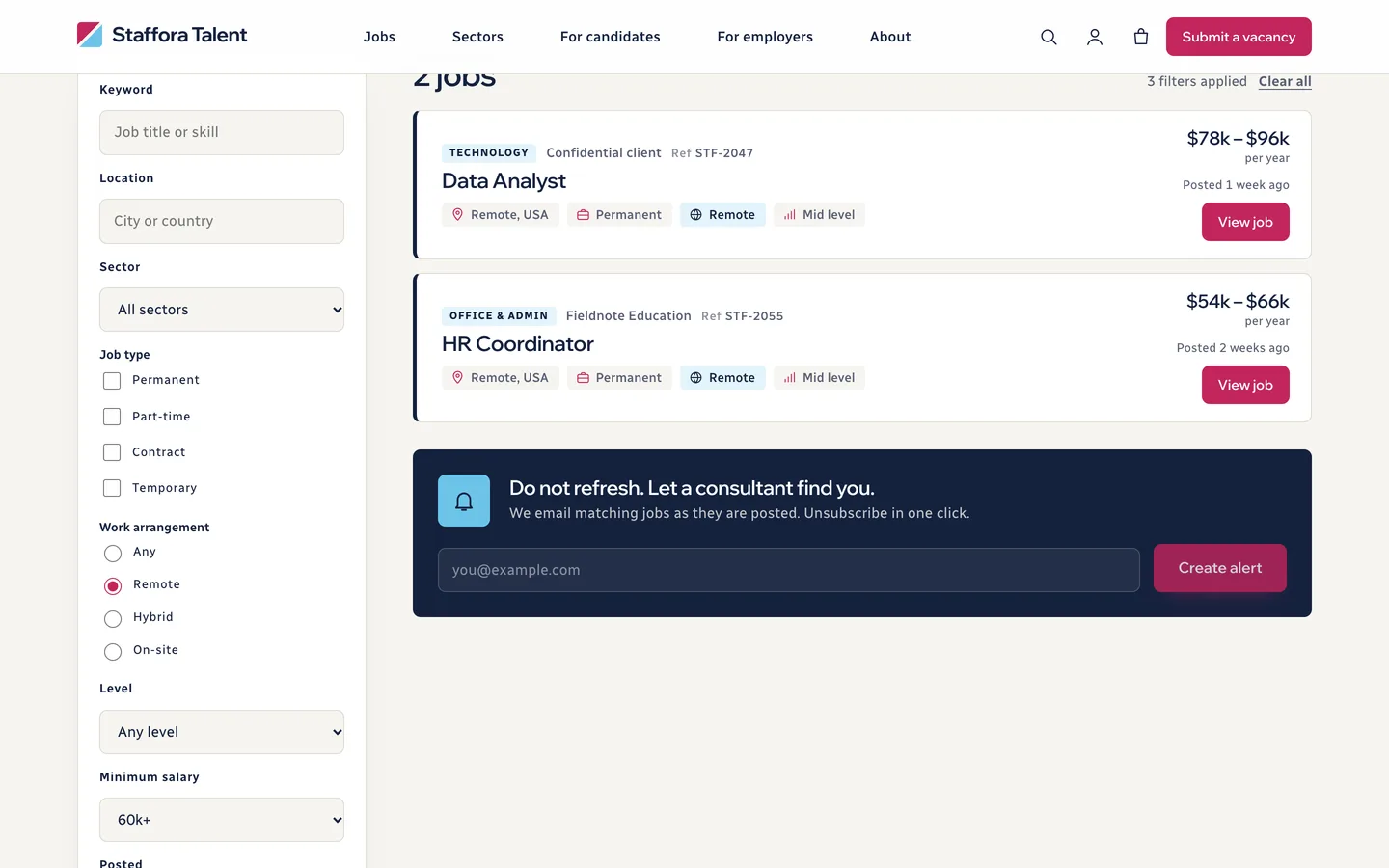
The Staffora jobs archive filtered to remote jobs paying 60k or more, sorted by highest salary

Jobs with a reference, a client and a consultant

Each job shows its reference, sector tag, pay range and arrangement, what you will do and bring, and the consultant who owns it. Leave the client name empty and the advert reads "Confidential client". Every job prints JobPosting JSON-LD with salary and valid-through dates, so it can appear in Google for Jobs.
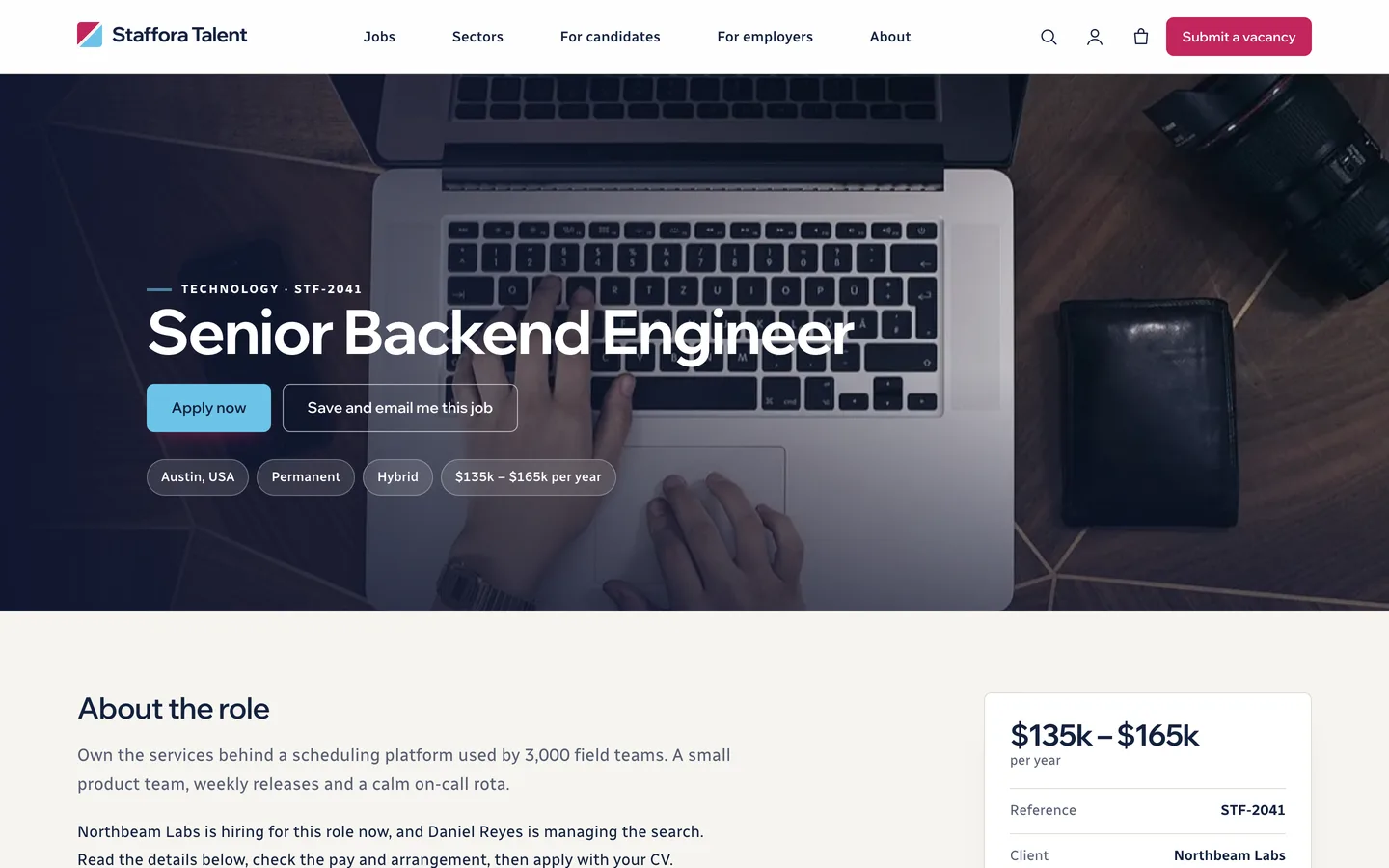
A Staffora job page with a photo hero, key facts and a sticky summary card

CVs and vacancies, handled safely

The apply form takes a PDF, DOC or DOCX up to 5 MB. The server checks the extension, size and file signature, renames the file, stores it in a private folder with a deny-all rule and lets only editors download it. The vacancy form saves a brief for the employer. Both carry a nonce, a honeypot and a rate limit.
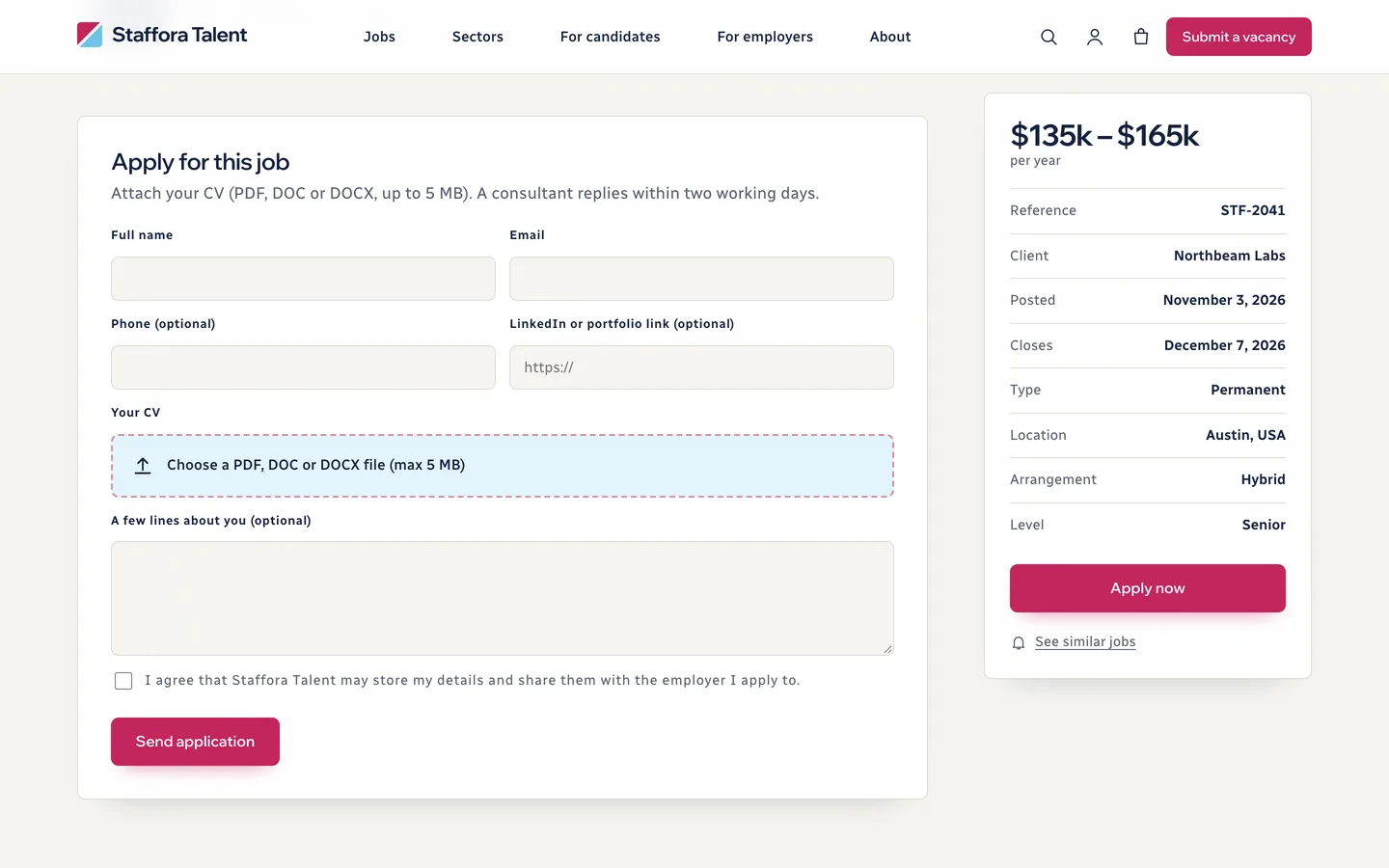
The Staffora apply form with a CV upload field

A salary guide that works for everyone

A table of entry, mid and senior pay by role, with a sector filter and a role search and a range bar for each row. It filters on the server and upgrades to instant filtering with JavaScript. The demo figures are samples: replace them with your own data through a filter.
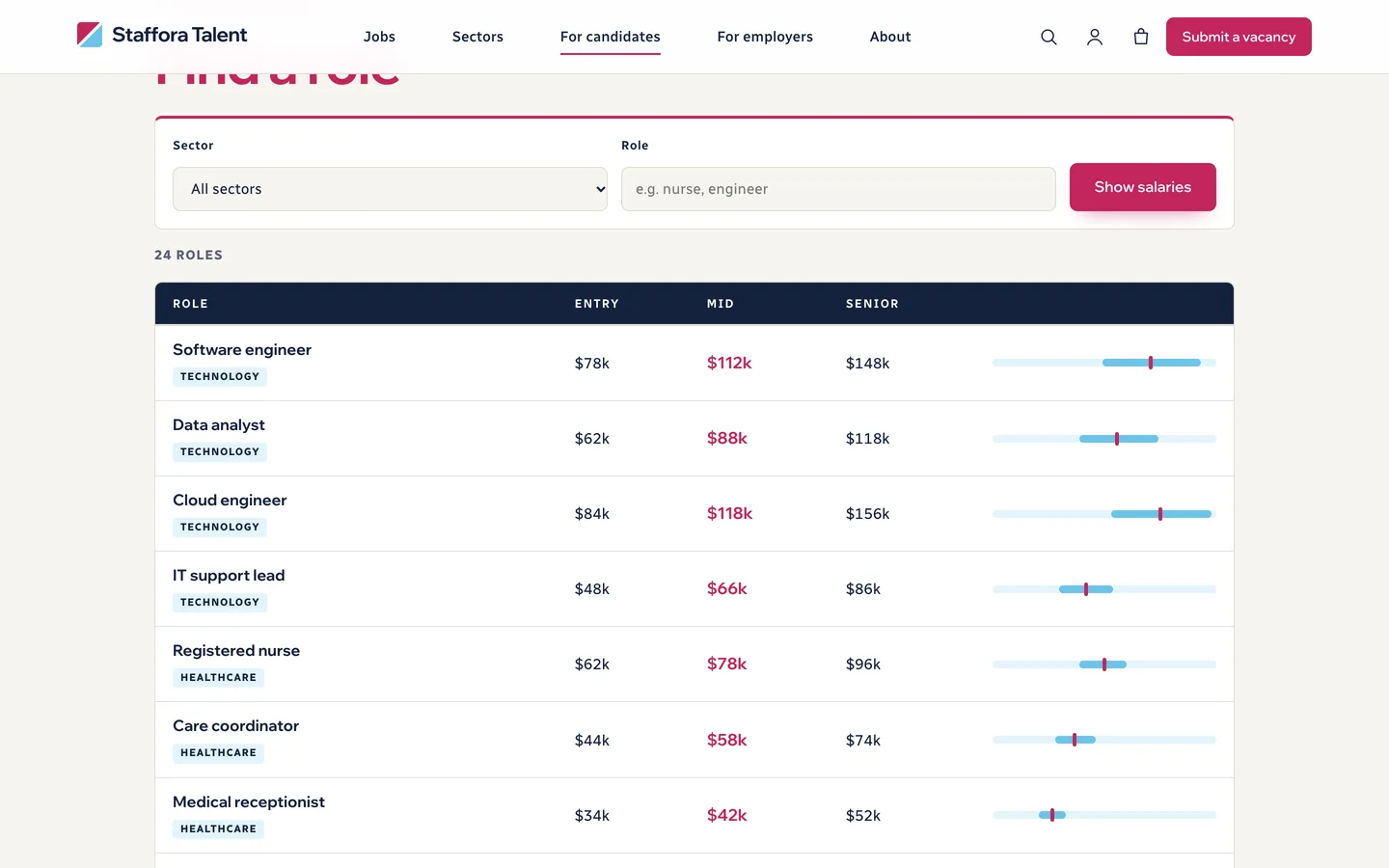
The Staffora salary guide with sector and role filters and range bars

Set it up in an afternoon

  1. Install the theme and the DEV3 Theme Toolkit, then import the demo from Appearance → DEV3 Demo.
  2. Replace the demo photos and edit the two hero halves in the Photo Hero widget.
  3. Add your sectors, consultants and first jobs, with salary and closing date.
  4. Set the vacancy and CV page links under Appearance → Customize → Staffora: agency details and replace the salary guide figures.
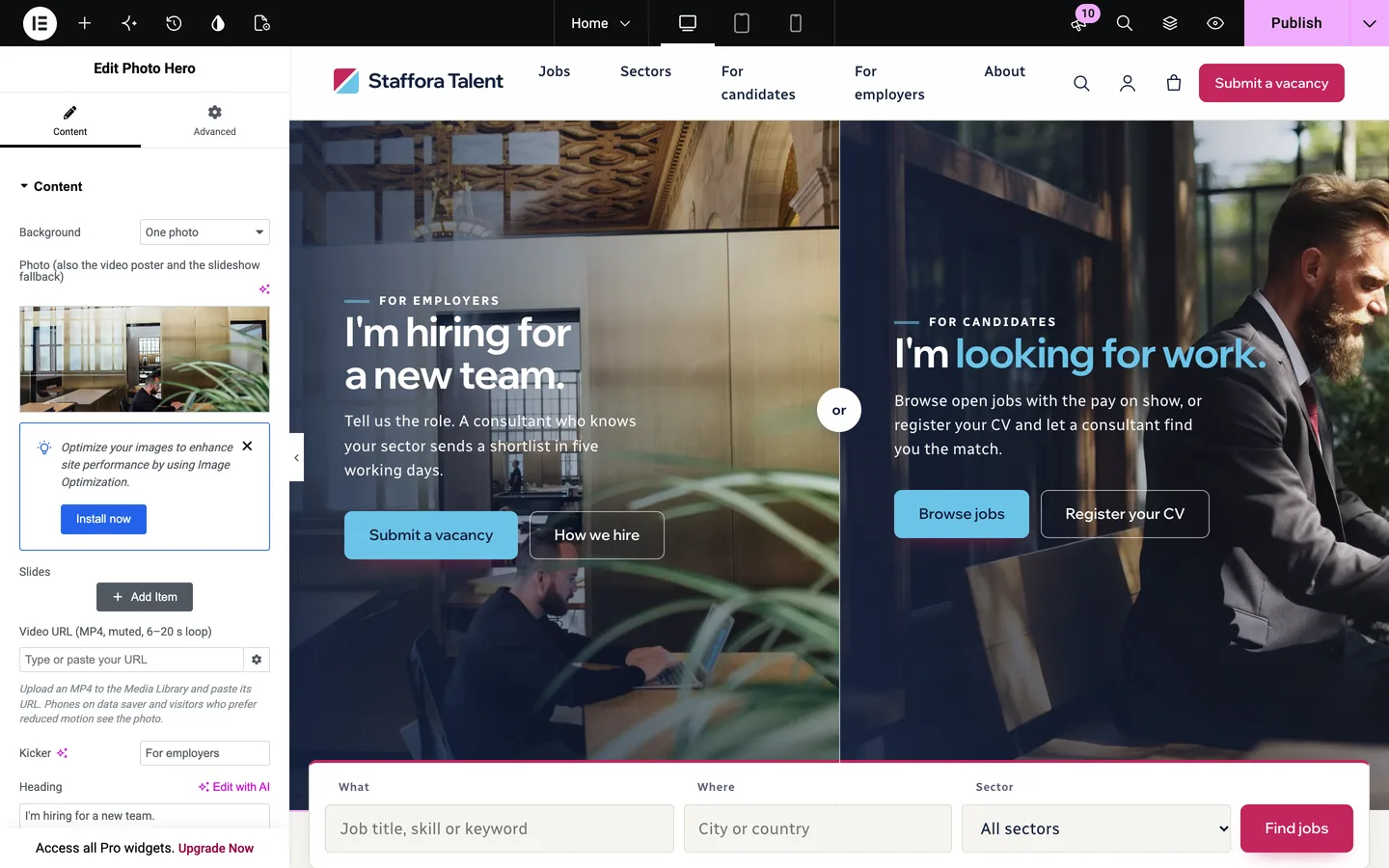
Staffora in the Elementor editor with a Photo Hero widget selected

Get Staffora on the DEV3 Marketplace with a regular or extended licence.

Frequently asked questions

The complete source code (version 1.0.0) as a download from your account, with the setup and usage guides shown on this page. You can modify the code to suit your product.

Buying guides: 3D and motion WordPress themes for Elementor and WooCommerce

Questions about this product (0)

Answers from the DEV3 team and the community.

Ask a question

No questions yet.

Wondering about setup, licensing or customisation? Ask, and the DEV3 team will help.

More from this author

View all

Related in CMS Extensions

View all