DEV3 Technologies home

DEV3 Folioly – Developer & Designer Portfolio WordPress Theme for Elementor & WooCommerce

A dark-first portfolio theme for developers and designers: a terminal-card hero with an availability line, case studies filtered by role and stack, an availability calendar, a project brief form, Now and Uses pages, a printable resume and a light/dark switch. No 3D, light motion.
by DEV3 TechnologiesVerified AuthorUpdated 09 Nov 2026

Black Friday: up to 30% off

This item is 30% off: $55.30 instead of $79

Ends in
--
Days
--
Hrs
--
Min
--
Sec

DEV3 Folioly is a WordPress theme for developers, designers and other independent makers who want a portfolio that works as hard as they do. It is dark by default, with a warm off-white, periwinkle and a highlighter yellow, Darker Grotesque headlines, Geist for reading and Fira Code for the small print. Every card is drawn like a terminal window, and a header button switches the whole site to a light scheme. Motion is light (split headings, reveals, stacked cards, a marquee) and respects reduced motion. There is no 3D or WebGL in the theme at all.

Buy a licence to download it. There is no public live demo: watch the video tour at the top of this page, or step through the screenshots at desktop, tablet and phone sizes.

A hero that says who you are and when you are free

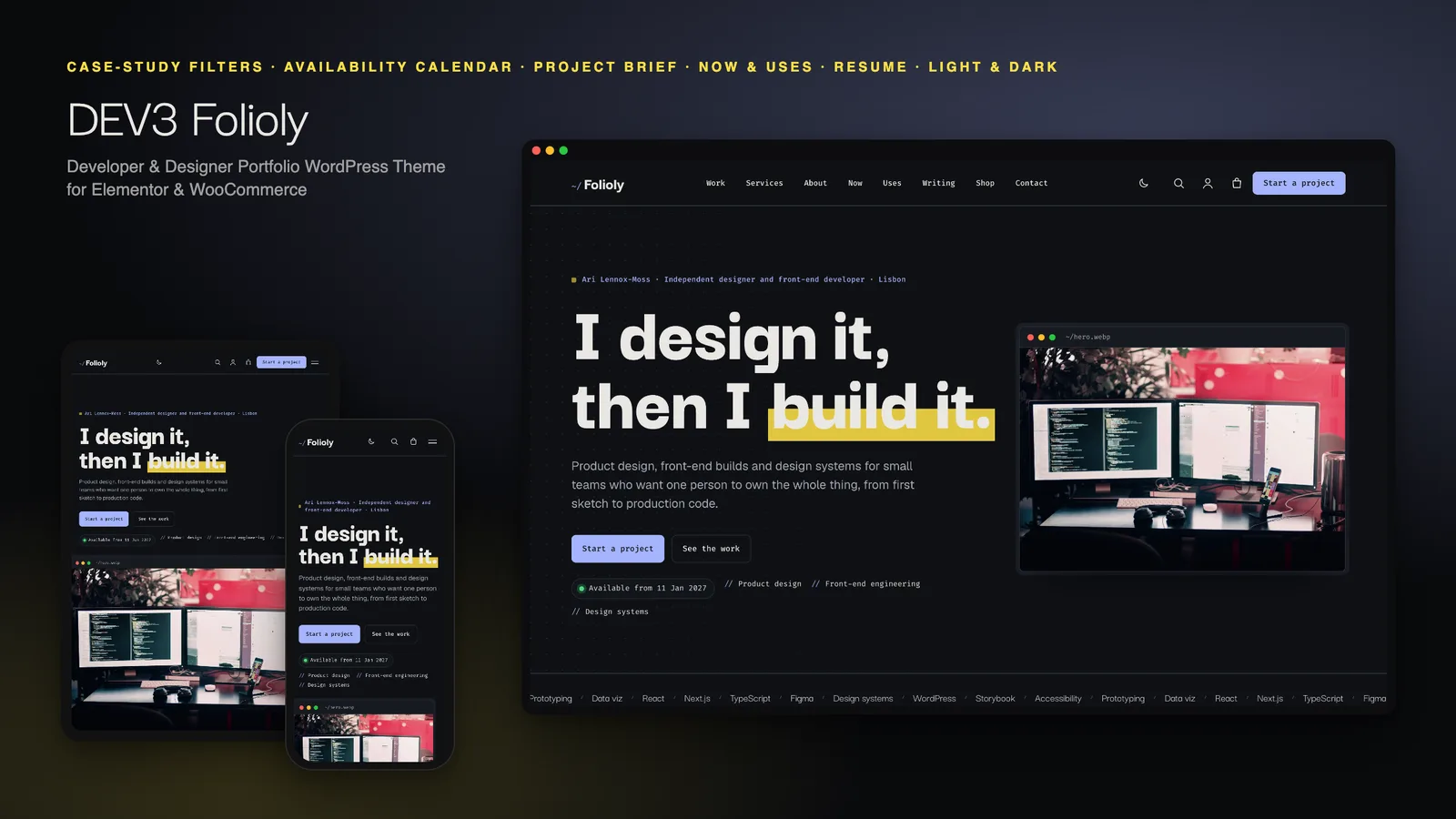
  • The toolkit's Photo Hero widget, drawn as a terminal card: your photo sits in a window with title-bar dots on the right, and a big headline, a lead, two buttons and a role list sit on the left.
  • The first chip is an availability line with a status dot ("Available from 11 Jan 2027"). The rest become a mono // role list.
  • Inner pages, archives and single pages use the same hero with their featured image.

Case studies you can filter

  • A Work post type with client, year, role, what you did, timeline, team, outcomes (figure and meaning) and a live link. A Stack taxonomy tags every case study with React, Figma, WordPress or whatever you used.
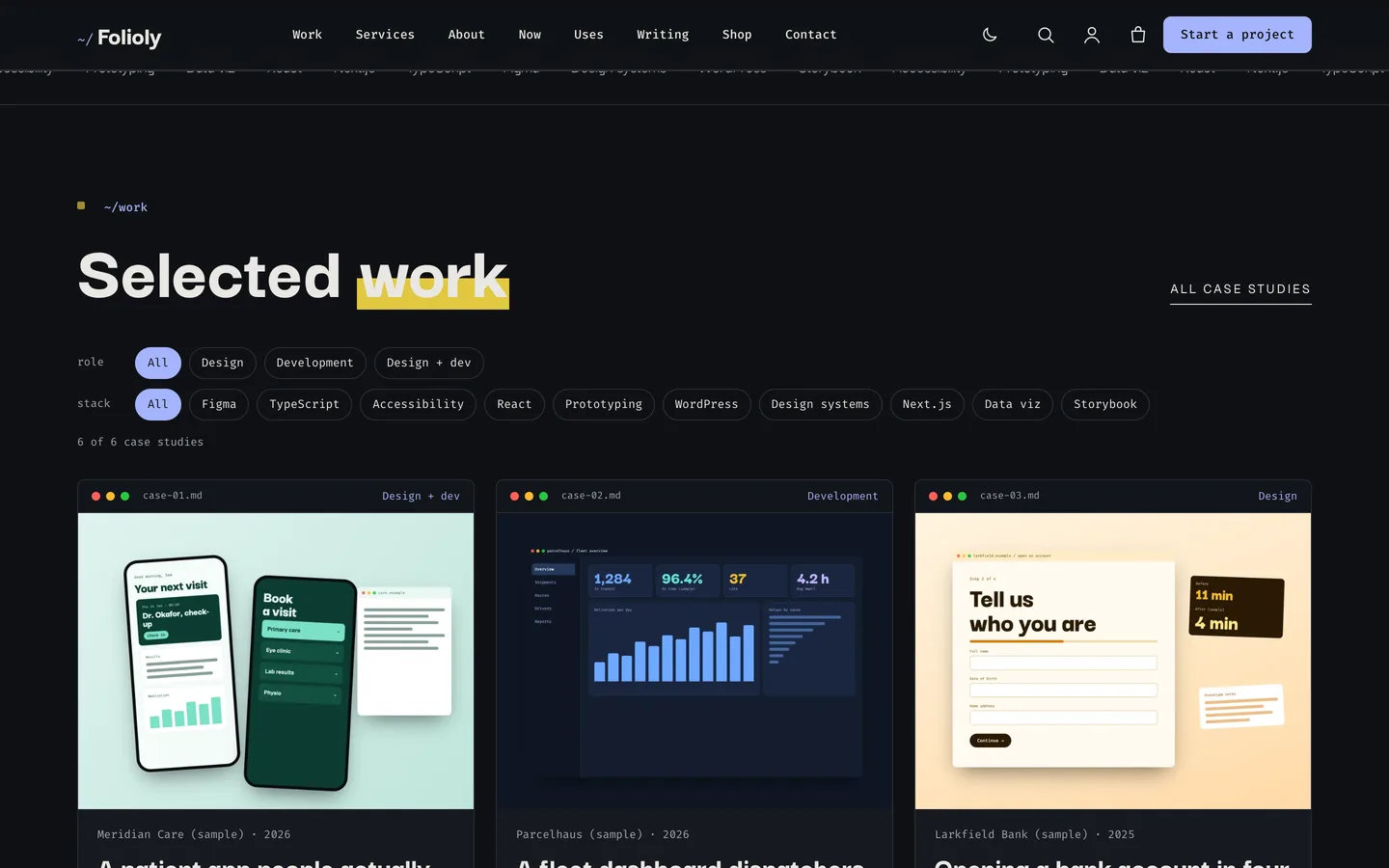
  • The grid has two rows of filter chips, role (design, development or both) and stack. The chips are plain links, so filtering works without JavaScript and can be shared as a URL. With JavaScript the grid filters in place and keeps a live count.
  • Every card is a terminal window with a file name, role, client, stack tags and your screen or mock-up. Single case studies add a facts card, big outcome figures, the story and next and previous cards.

Availability calendar

  • Booked and held ranges come from a plain list in the Customizer (2027-02-01 | 2027-02-12 | tentative | Held for an audit). Days you do not list are open.
  • Shows 1 to 12 months from today, marks weekends, today and past days, prints the next open weekday and lists upcoming ranges with their notes. Every day has text for screen readers, so colour is never the only signal.

A project brief form that qualifies leads

  • What you need (taken from your Services), a budget chip, a timeline and a few lines, plus an optional link. The service pages link in with the service preselected.
  • A plain HTML form with a nonce, a honeypot and a rate limit. Briefs are stored as private requests in the dashboard and emailed to you.

Now, Uses, Talks and a printable resume

  • Now and Uses page templates, filled from lists in the Customizer, in terminal cards.
  • A Talks post type with event, date, place, format, recording and slides links, and Event structured data.
  • A one-page A4 resume template: profile, experience, skills, education and a server-built QR code. Print or save as PDF in one click, in black on white whichever scheme is on screen. A .vcf contact card download is built from the same profile fields.

Built for people who live in a keyboard

  • Press / to search, g then w, n, u, r or c to jump to Work, Now, Uses, Resume or Contact, t to switch scheme and ? for the list.
  • Code blocks get a Copy button. The light and dark choice is remembered in the visitor's browser and applied before the page paints, so it never flashes.

Edit everything

  • Every demo page is built with Elementor (the free version works) and the DEV3 Theme Toolkit widgets (Photo Hero, Kinetic Heading, Marquee, Magnetic Button, Counter, Timeline, Testimonials and Post Type Grid). 31 block patterns cover the same sections for the block editor.
  • A Customizer section holds your profile, calendar, Now and Uses lists and resume. Colours, fonts, header, footer and shop options sync to theme.json and the Elementor kit.
  • A small shop (templates, a UI kit guide and a one-hour consult) with a slide-out mini cart is styled in the same look.
  • A child theme is included for your own CSS and PHP.

Performance and accessibility

  • About 13 KB of JavaScript to boot, with fonts self-hosted and no external requests.
  • Skip link, visible focus rings, keyboard-usable calendar, brief form and shortcut dialog, and an RTL stylesheet, a .pot file and wpml-config.xml.

What's in the download

  • dev3-folioly.zip: the theme (version 1.0.0; the demo package is built in)
  • dev3-folioly-child.zip: the child theme
  • dev3-theme-toolkit.zip: the DEV3 Theme Toolkit plugin (Elementor widgets and blocks, post types, WooCommerce extras, demo importer)
  • dev3-folioly-demo-content.zip: the demo package, for reference
  • Documentation/: the HTML guide

The one-click demo imports 13 pages, 10 case studies, 4 services, 3 talks, 6 posts, 5 sample client quotes, 4 shop products and the menus. The person, clients, products and figures are fictional; the demo photos are free-licence stock listed in PHOTO-CREDITS.md and the case-study visuals are drawn mock-ups.

Requirements

  • WordPress 6.0 or newer (tested up to 6.8) and PHP 7.4 or newer
  • Elementor (the free version works) is recommended
  • WooCommerce for the shop, Contact Form 7 for extra forms
  • The DEV3 Theme Toolkit plugin (included; WordPress prompts you to install it)

Support

Six months of support are included: installation, demo import and questions about the theme's features.

How it's built

Architecture, stack, key decisions and the quality gates DEV3 Folioly passed before release.

Our dark-first WordPress theme for developers and designers: a terminal-card hero, case studies filtered by role and stack, an availability calendar, a project brief form, Now and Uses pages and a printable resume, all editable in Elementor.

The problem it solves

A portfolio has to answer three questions fast: what have you made, do you have time, and how do I hire you. Most portfolio themes are a grid of thumbnails with a contact form. Visitors cannot filter by what they care about, cannot tell whether you have time, and send one-line messages that need three emails to turn into a project. We wanted a theme where the work is filterable, availability is visible and the first message already has a scope, a budget and a timeline. It also had to stay light and keyboard-friendly, because the people who buy it live in terminals.

Architecture and approach

Folioly is a classic PHP theme with theme.json on DEV3's shared theme core. The DEV3 Theme Toolkit plugin owns the post types, the Elementor widgets and the demo importer; the theme owns the look and the portfolio features.

Key design decisions

  • Filters as links first. The role and stack chips are real links with query strings, filtered on the server, so they work without JavaScript and can be shared. A small script then filters in place and keeps the address in sync.
  • Slots instead of shortcodes. The grid, calendar, brief form, Now and Uses lists are placeholders in a page that the theme fills when the page is displayed. A form with a nonce therefore never gets frozen by an Elementor cache.
  • A calendar from a plain list. Booked and held ranges are one line each in the Customizer. The calendar renders real tables with text for screen readers, so colour is never the only signal.
  • A brief that qualifies. The form asks for what, how much and when, takes its options from your services and stores each brief as a private request.
  • The hero is the toolkit's Photo Hero. The terminal-card shape is theme CSS on the widget, so it stays editable in Elementor and falls back to a single column on phones.
  • Dark by default, light on request. One attribute switches the colour tokens. The choice is stored in the visitor's browser and applied before the first paint. The resume prints black on white in either scheme.
  • Keyboard-first. / opens search, g then a letter jumps to a section, t switches scheme and ? lists them.

Quality gates and results

Folioly ships as a complete portfolio with a one-click demo: 13 pages, 10 case studies, 4 services, 3 talks, 6 posts, 5 sample client quotes and 4 shop products, plus 31 block patterns.

  • Quality gates passed: php -l on every file, phpcs with WPCS 3 and PHPCompatibilityWP 7.4+ at 0 errors, and the WordPress Theme Check plugin with no required-level failures.
  • Flows tested: the WooCommerce add-to-cart, mini-cart, cart, checkout and order-received flow, and an Elementor editor smoke test where the Photo Hero keeps its shape and its controls update it live.
  • Weight: about 13 KB gzip of boot JavaScript against a 40 KB budget for flat themes, with no 3D or WebGL code in the build.

Folioly is on the DEV3 marketplace. Watch its video tour there.

Tech stack

Area Technologies
Frontend Photo Hero, Block patterns, CSS custom properties, Progressive enhancement
Backend WordPress, PHP, admin-post forms, Customizer API
Content Elementor, Block editor, WooCommerce
Quality WPCS 3, Theme Check, Playwright

Inside the build

Terminal-card hero: a big headline, an availability chip with a status dot, a role list and two buttons beside a photo in a window with title-bar dots. Terminal-card hero — a big headline, an availability chip with a status dot, a role list and two buttons beside a photo in a window with title-bar dots.

Selected work: case-study cards drawn as terminal windows, each with a file name, role, client, stack tags and a drawn mock-up. Selected work — case-study cards drawn as terminal windows, each with a file name, role, client, stack tags and a drawn mock-up.

Guides & articles

Practical guides and engineering write-ups for DEV3 Folioly.

A developer and designer portfolio in WordPress: Folioly

Last updated
A developer and designer portfolio in WordPress: Folioly: DEV3 Folioly

A portfolio has three jobs. It shows what you have made, it tells people whether you have time, and it makes hiring you easy. Most portfolio themes manage the first, because a grid of thumbnails is easy, and leave the rest to a contact form. DEV3 Folioly is a WordPress theme built around all three. Case studies filter by role and by stack, an availability calendar shows when you can start, and a project brief form turns a vague "hi" into a scope, a budget and a timeline. This post covers who it suits, how to set it up, and how to edit the parts that make it different.
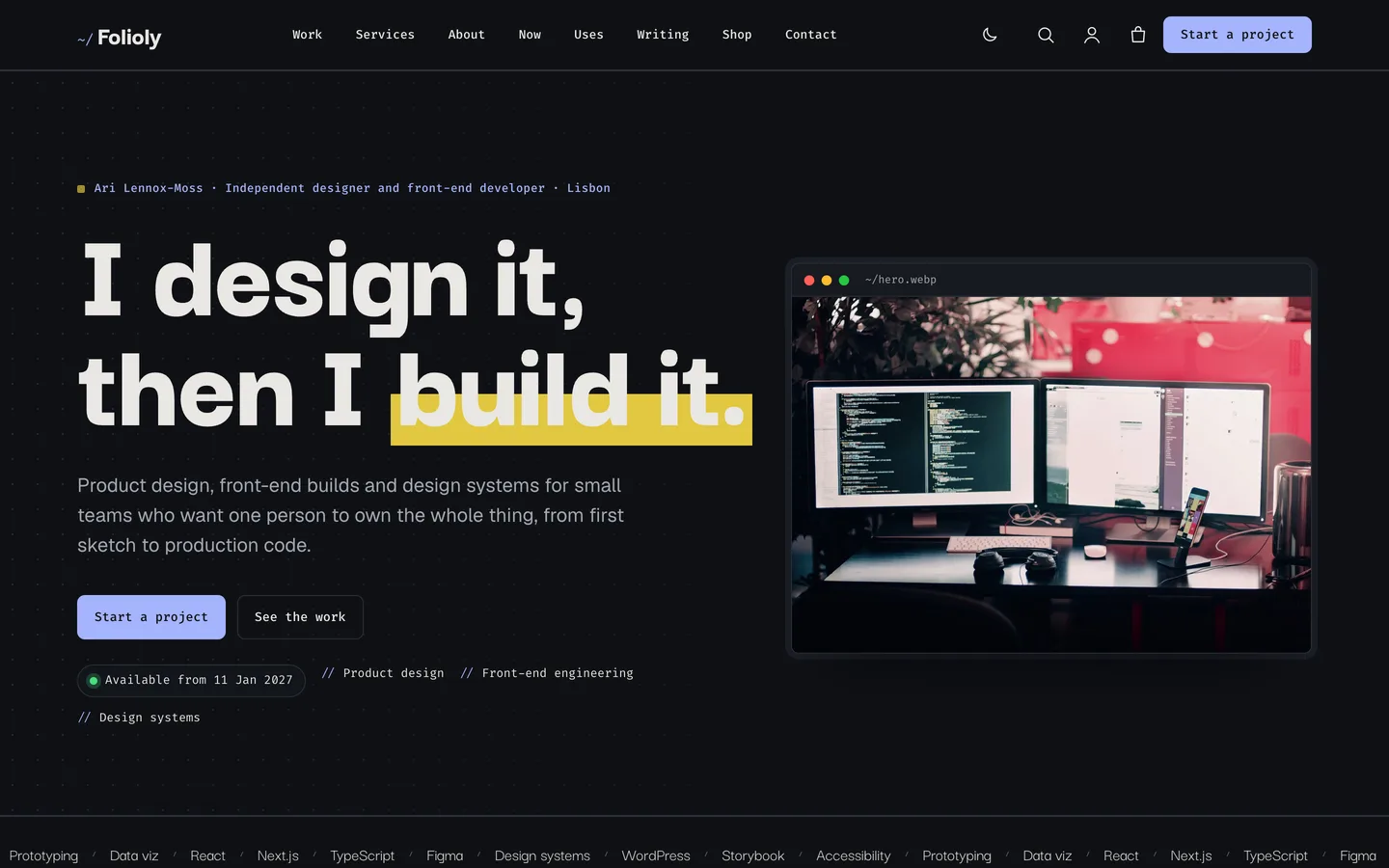
The Folioly home page: a headline, an availability chip, a role list and a photo inside a window with title-bar dots

Video tour of the Folioly demo: the terminal-card hero, filtered case studies, a case study, the availability calendar, the brief form and the resume

Who Folioly is for

  • Freelance designers and developers who take one project at a time and want clients to see their calendar.
  • Small studios of one to three people that sell fixed-scope engagements.
  • Engineers and designers job-hunting who want a resume that prints cleanly and a contact card people can save.
  • Speakers and writers who keep talks and articles next to their work.

If you need a huge agency site with team pages, regional offices and dozens of services, a corporate theme will fit better. Folioly is made for one person's work.

Case studies you can filter

Case studies live in the Work post type. Each has a client, a year, a role, what you did, a timeline, a team line, a few outcomes (a figure and what it means) and a live link. A Stack taxonomy tags it with the tools you used.

The grid shows two rows of chips, one for role (design, development or both) and one for stack. Pick Design and Figma and only the matching cards stay. The chips are ordinary links with a query string, so the filter works without JavaScript and a filtered view can be shared as a link. With JavaScript on, the grid filters in place and keeps a count.
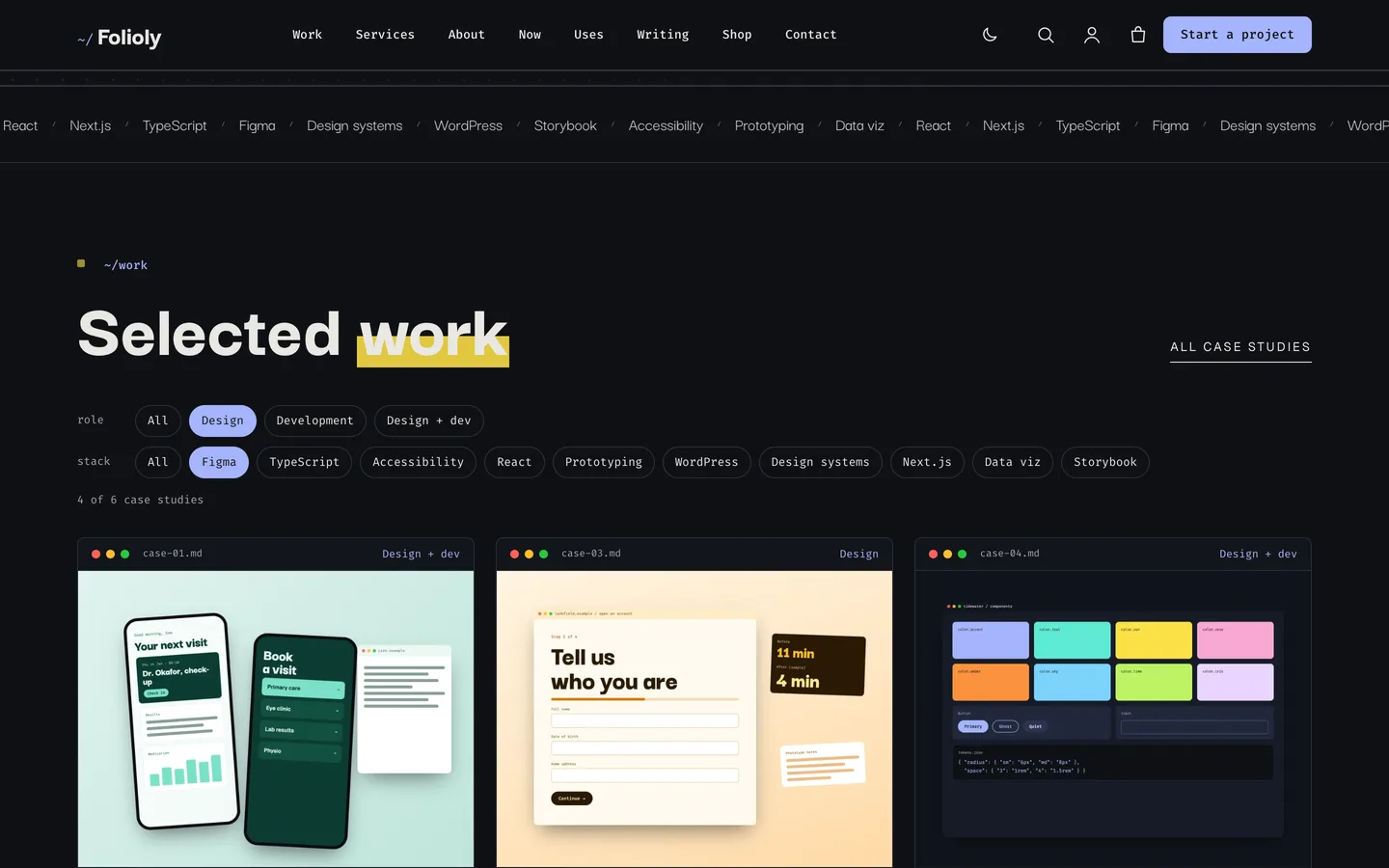
The case-study grid filtered to design work that used Figma, with the chips and a live count above it

Every card is drawn as a terminal window with a file name, the role, the client, a screen or mock-up, and the stack tags. Open one and you get a facts card, big outcome figures, the story and next and previous case studies.
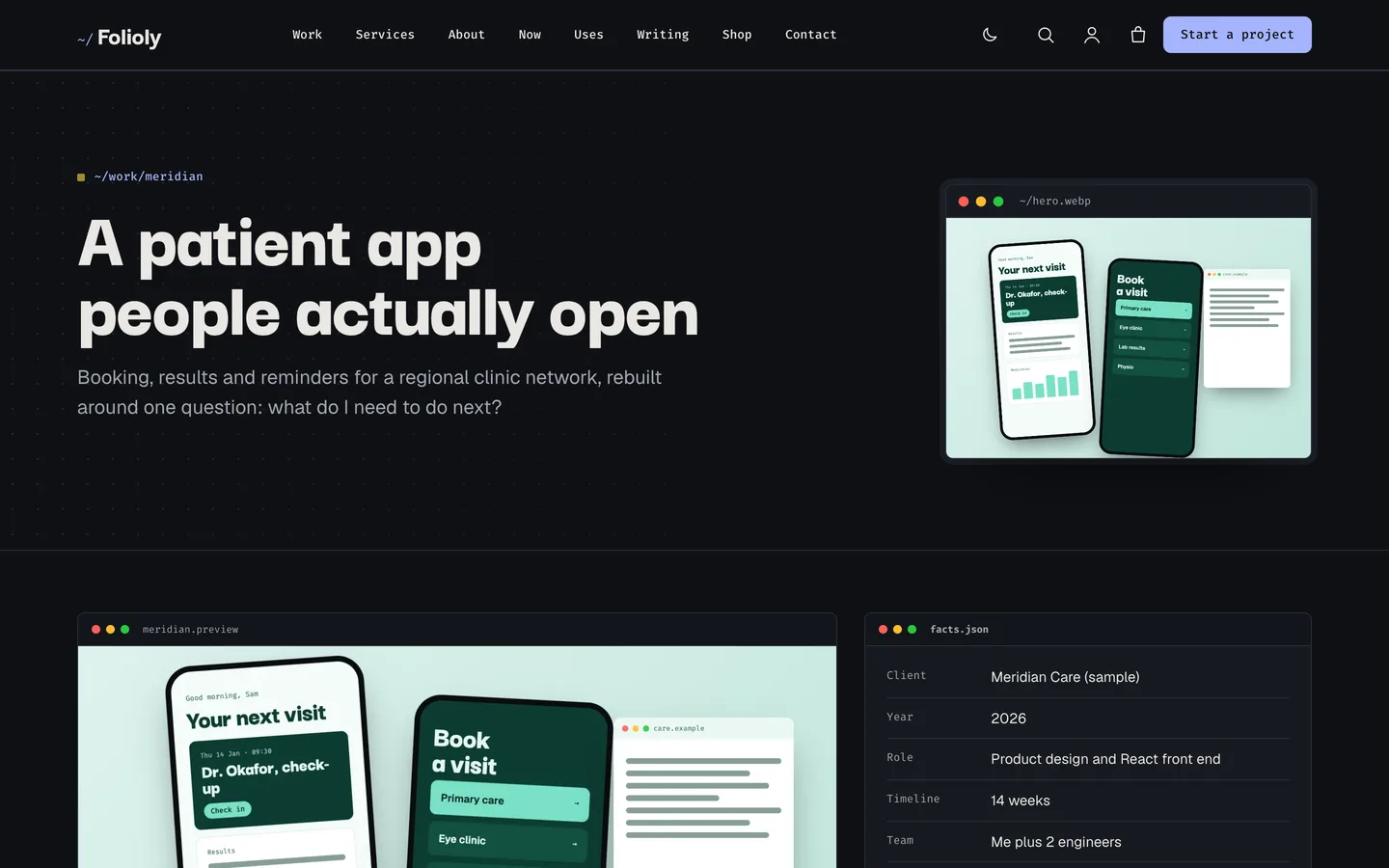
A case study page: the screen card on the left, a facts card on the right with client, year, role, timeline and team

Availability, shown honestly

Under Appearance → Customize → Folioly: profile you list the ranges you are booked or holding, one per line:

2027-02-01 | 2027-02-12 | tentative | Held for a design-system audit
2027-02-15 | 2027-03-26 | booked | Retainer with a logistics start-up

The calendar starts at the current month, shows between one and twelve months, prints the next open weekday and lists upcoming ranges with their notes. Every day has text for screen readers, so the colours are never the only signal.
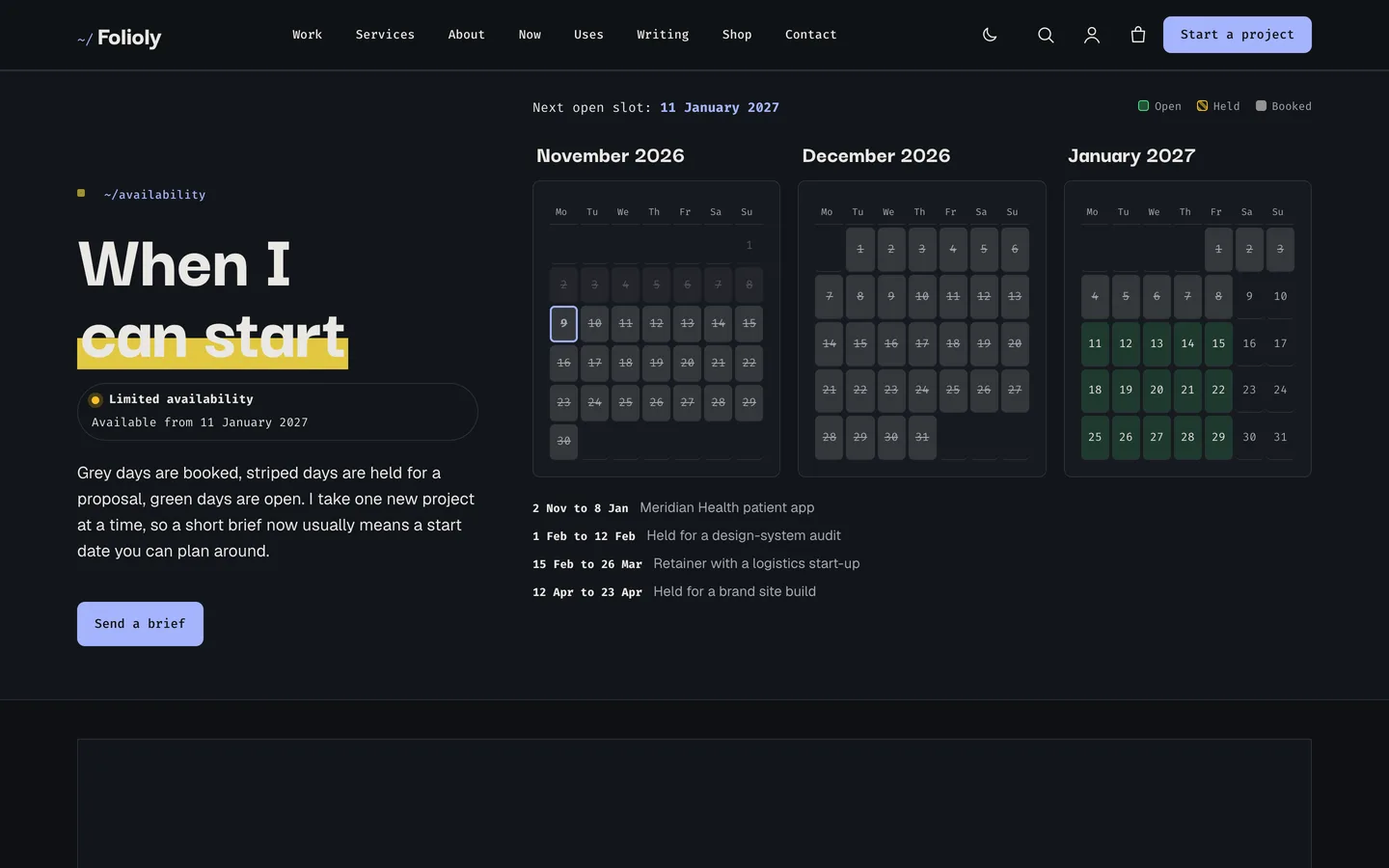
The availability calendar: booked days greyed, held days striped, open days green, with the next open slot above

A brief that already has a scope

The brief form asks what the visitor needs (the options come from your Services), a budget chip, a timeline and a few lines about the project. Service pages link to it with the service preselected. It is a plain HTML form with a nonce, a honeypot and a rate limit; briefs are stored as private requests in the dashboard and emailed to you.
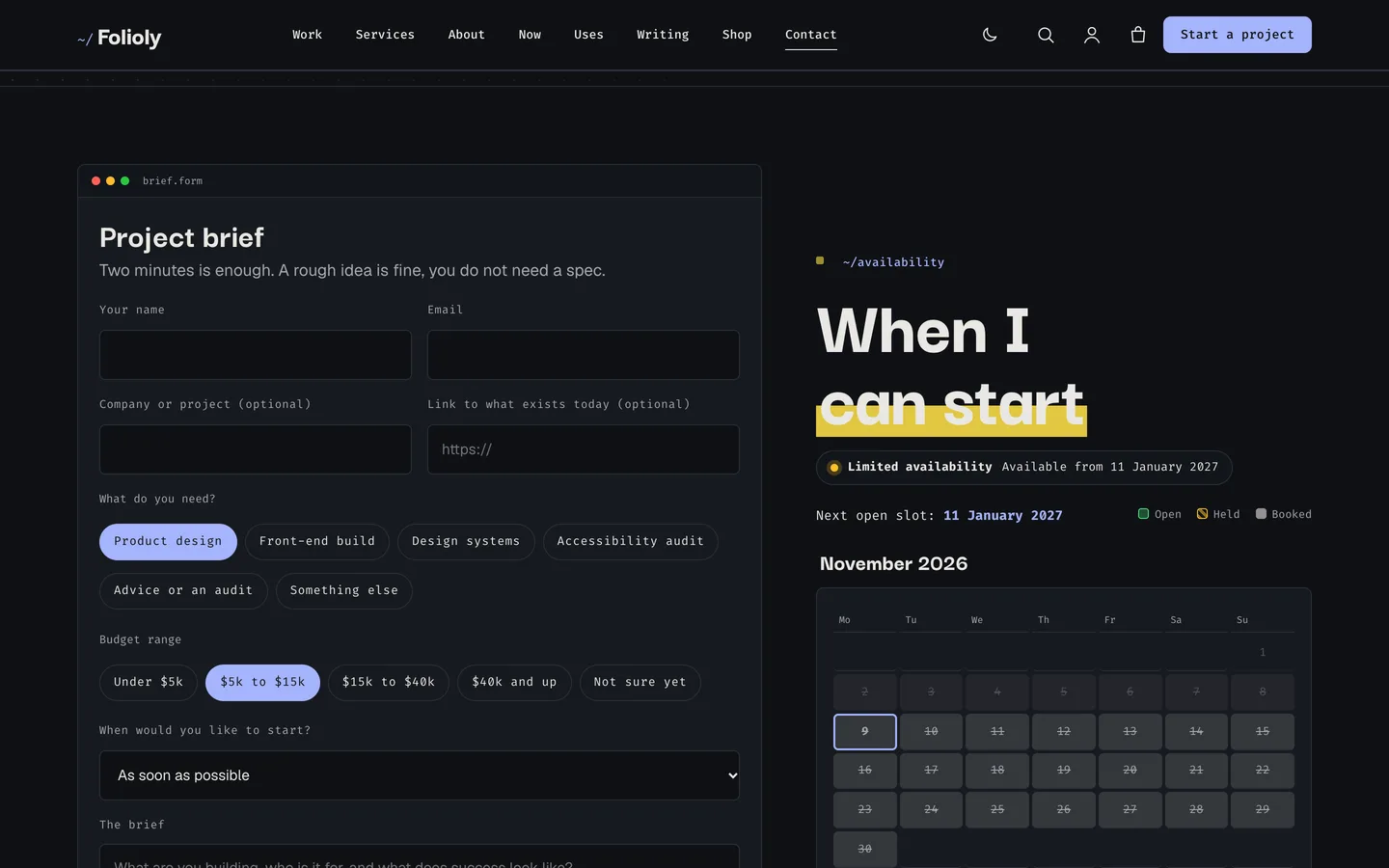
The brief form with need, budget and timeline chips beside the availability calendar

Setting up with Folioly

1. Install

Upload dev3-folioly.zip under Appearance → Themes → Add New → Upload Theme and activate it. A notice offers to install the DEV3 Theme Toolkit, which provides the widgets, post types and demo importer. Add Elementor (the free version works) and WooCommerce if you want the shop.

2. Import the demo

Go to Appearance → DEV3 Demo and click Import demo. You get the whole site: 13 pages, 10 case studies, 4 services, 3 talks, 6 posts and a small shop. Reset removes only the demo.

3. Make it yours

Open the Customizer section Folioly: profile and replace the sample name, role, email, availability, calendar ranges, Now and Uses lists and resume fields. Then replace the case studies: set a featured image (your screen or mock-up), the role filter, the stack tags and the outcomes.

Now, Uses and a resume that prints

Create pages and pick the Now page, Uses page or Printable resume template. Now and Uses are filled from lists in the Customizer. The resume is a one-page A4 layout with a QR code built on your server; Print or Save as PDF gives a clean black-on-white page whichever scheme is on screen, and a button downloads a .vcf contact card.
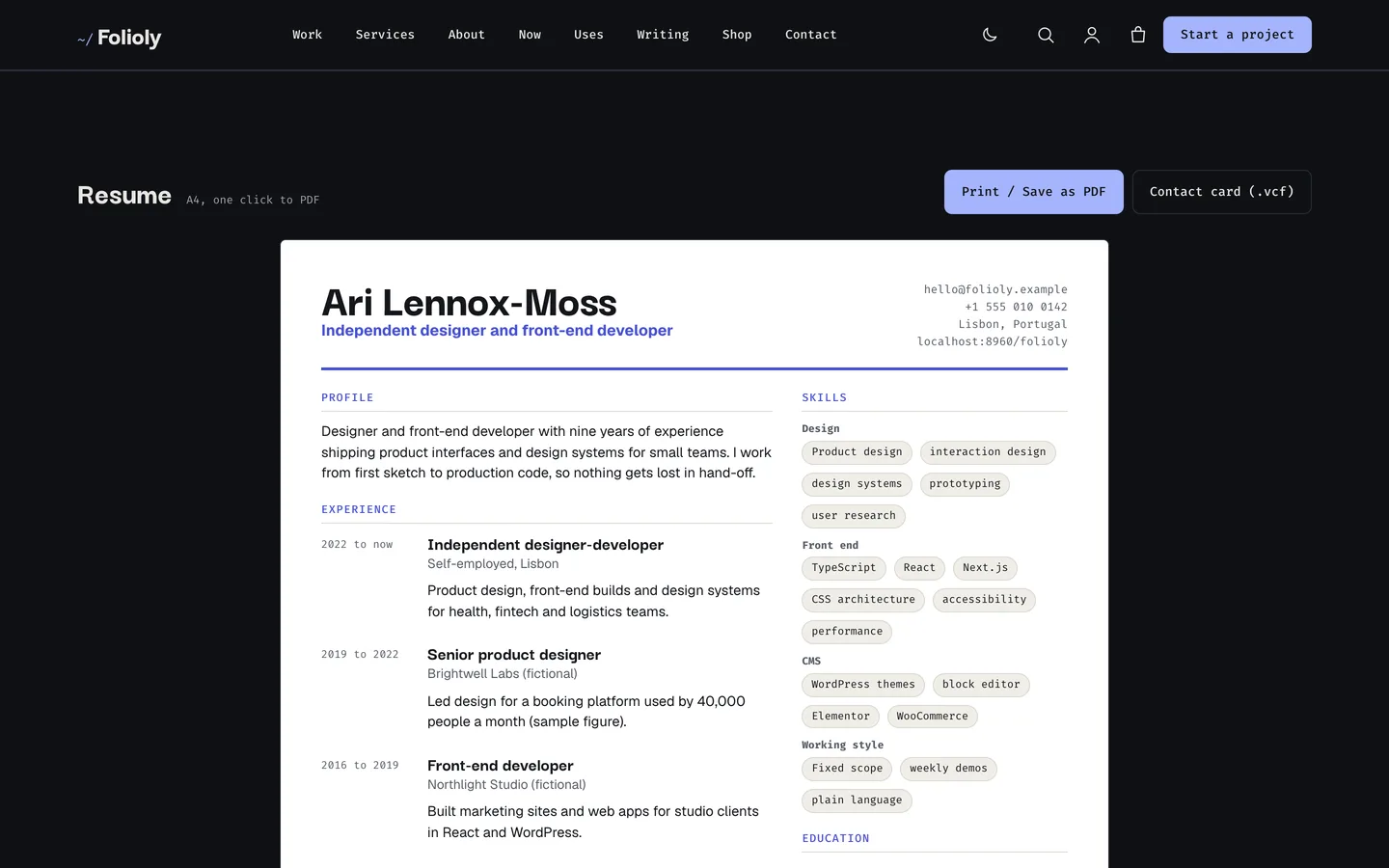
The printable resume: a one-page A4 layout with experience, skills, education and a QR code

Dark by default, light on request

The theme opens in dark. A header button (or the t key) switches to light; the choice is remembered in the visitor's browser and applied before the page paints. Set the first-visit default in the Customizer, or let it follow the visitor's device.
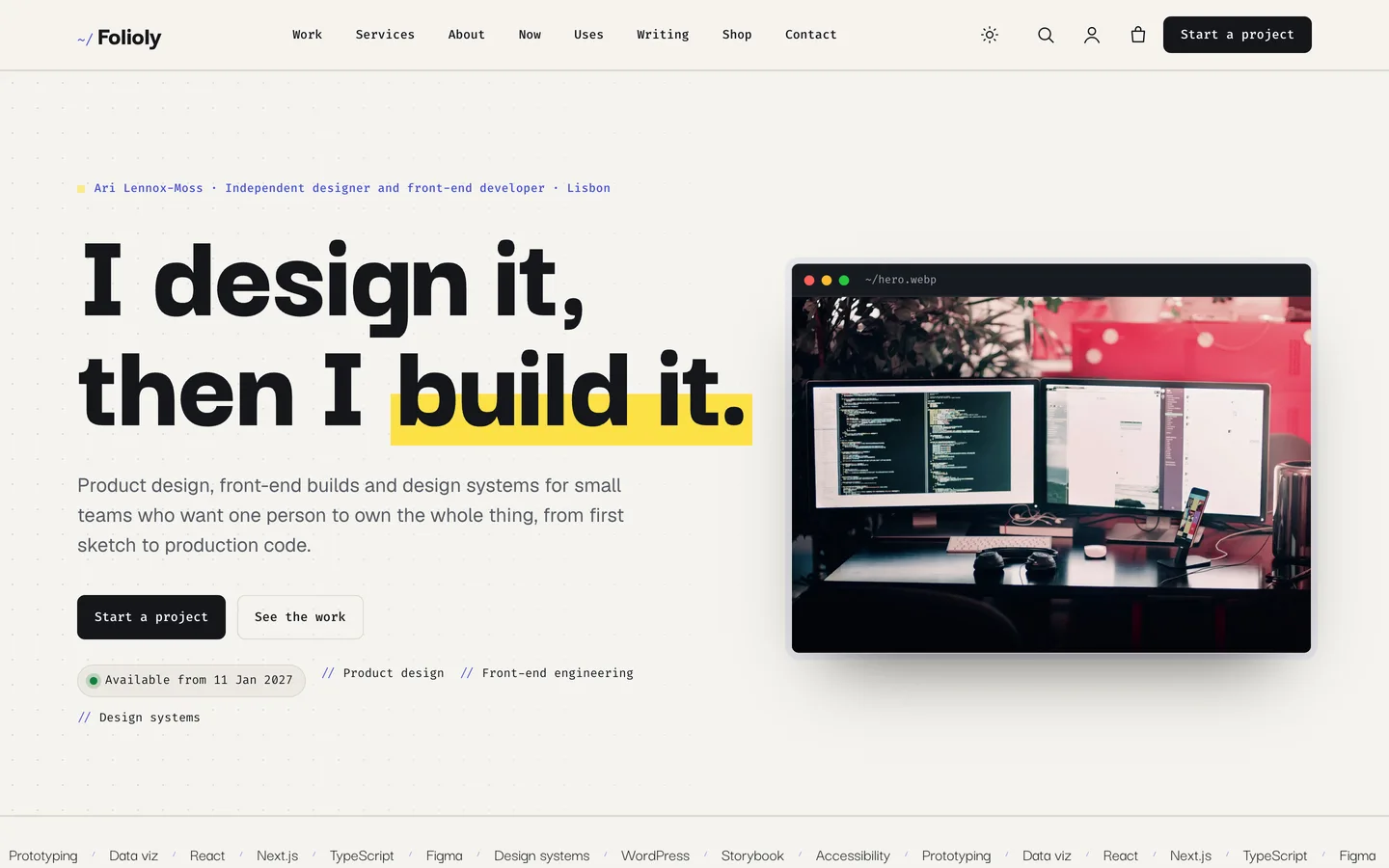
The same home page in the light scheme

Keyboard users get shortcuts: / opens search, g then w, n, u, r or c jumps to Work, Now, Uses, Resume or Contact, and ? lists them all.

Editing in Elementor

Every demo page is built with Elementor and the toolkit's widgets. The hero is the Photo Hero widget: change the photo, headline, chips and buttons and the terminal card keeps its shape. The dynamic parts (grid, calendar, form, Now and Uses) are small content slots you drop into an HTML widget. There are also 31 block patterns for the block editor.
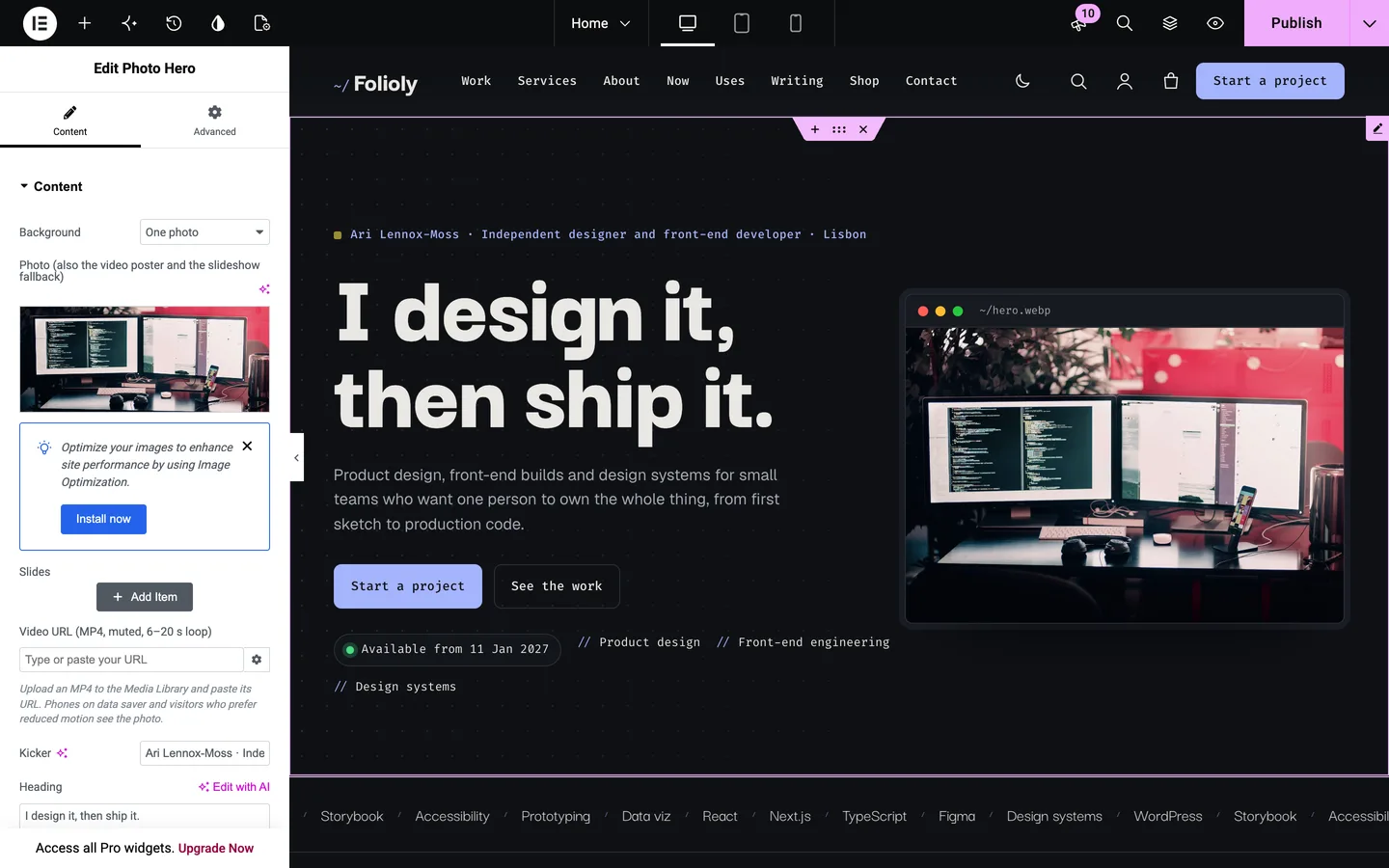
Elementor editing the Photo Hero: the heading changes live inside the terminal card

The shop

A small shop sells templates, a kit guide and a one-hour consult session, with a slide-out cart. It is optional; skip WooCommerce and the theme works without it.
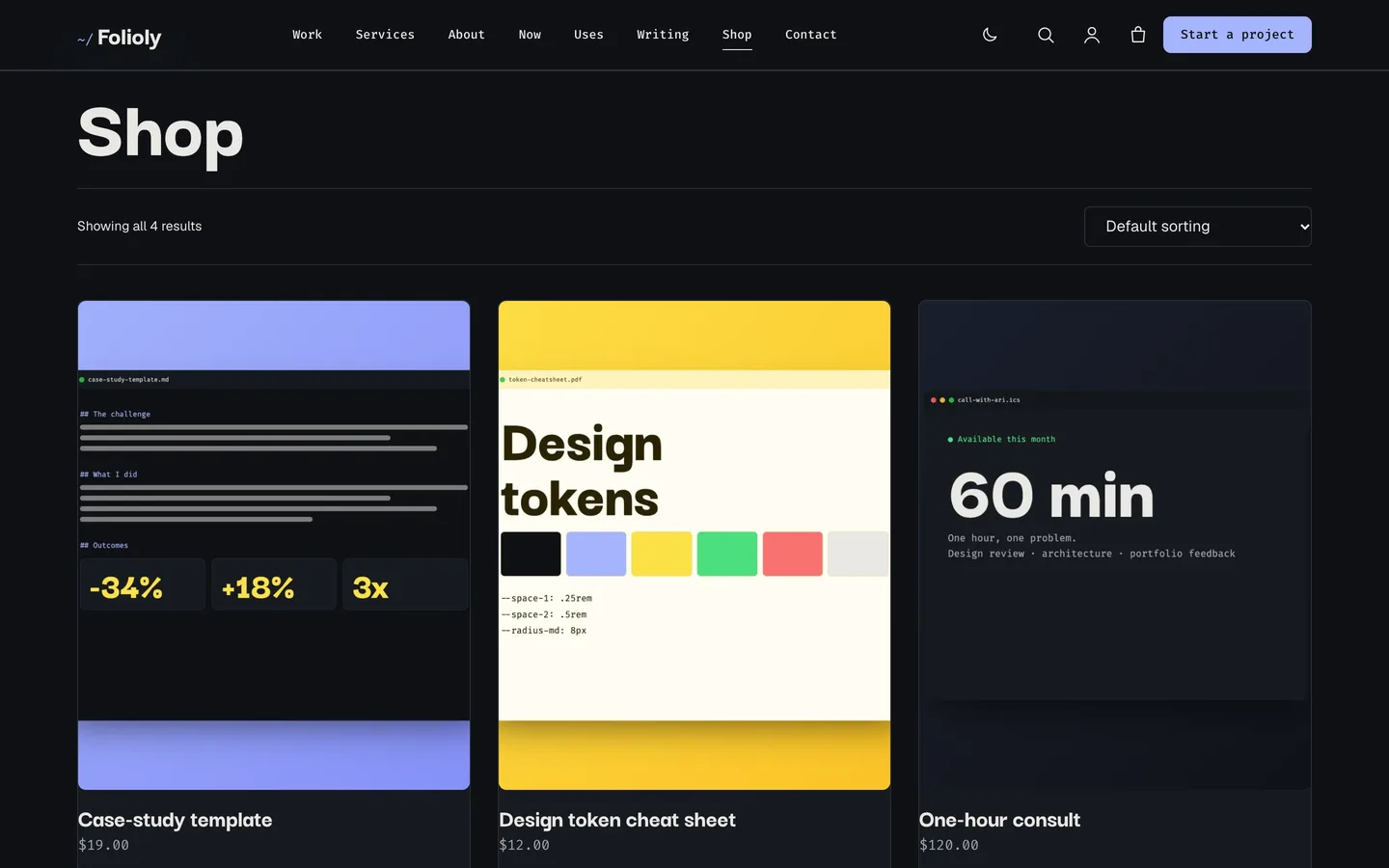
The shop: three downloadable templates and a consult session

FAQ

Can I use it without Elementor? Yes. Case studies, services, talks and the templates work without it, and the patterns cover the page sections.

Does the calendar update by itself? It starts at the current month automatically. You edit the booked ranges in the Customizer.

Is there 3D? No. The hero is a photo and motion is light.

Where does the brief go? Into the private Requests list and your inbox.

Frequently asked questions

The complete source code (version 1.0.0) as a download from your account, with the setup and usage guides shown on this page. You can modify the code to suit your product.

Buying guides: 3D and motion WordPress themes for Elementor and WooCommerce

Questions about this product (0)

Answers from the DEV3 team and the community.

Ask a question

No questions yet.

Wondering about setup, licensing or customisation? Ask, and the DEV3 team will help.

More from this author

View all

Related in CMS Extensions

View all