DEV3 Technologies home

DEV3 Fixora – Phone & Computer Repair WordPress Theme for Elementor & WooCommerce

A light WordPress theme for phone and computer repair: a hero with the photo in a phone outline, a repair price finder, a repair tracker, mail-in steps, booking, stores with open-now hours and a refurbished shop.
by DEV3 TechnologiesVerified AuthorUpdated 09 Nov 2026

DEV3 Fixora is a WordPress theme for phone and computer repair shops, repair labs, mobile-phone stores and IT service desks. It is light and clear: Oxanium headlines, cool grey paper, circuit-violet buttons and amber highlights, with the hero photo set inside a tilted phone outline. Motion is light (split headings, reveals, counters) and respects reduced motion.

Buy a licence to download it. There is no public live demo: watch the video tour at the top of this page, or step through the screenshots at desktop, tablet and phone sizes.

A repair price finder that sells the repair

  • Three steps: a device type (phone, tablet, laptop), a model family and the problem. The result shows a sample price range, the usual time and the warranty, with Book this repair and Mail it in instead buttons.
  • A price guide table per device type lists every problem against every model family, with your row and column highlighted.
  • Server-rendered, so it works without JavaScript; the page enhancer adds instant results. Prices come from one JSON file (types, model families with a price multiplier, issues with base prices and times).
  • Device families are generic ("Phone B-class"); the demo uses no brand or model names.

Repair tracker, mail-in and booking

  • A repair tracker: enter a ticket number to see a six-stage status stepper with the store, expected time and price. Sample tickets are included, and a filter connects your own system.
  • Mail-in repair with five numbered steps and the booking form preset to mail-in.
  • A booking form with walk-in, mail-in or courier pickup, device, day, time slot and store; requests are stored privately and emailed.

Stores, repairs and a refurbished shop

  • Stores with address, phone, features and opening hours with an open now chip, plus store hours in the business JSON-LD.
  • Repairs with from-prices, a while-you-wait tag, what is included and a price-by-device table, grouped into repair groups.
  • WooCommerce styling for refurbished phones, tablets and laptops with storage options, accessories and a repair deposit, with a slide-out mini cart.
  • Warranty, business repairs, about, contact and FAQ pages with FAQ structured data.

Built for editing

Every demo page is built in Elementor (the free version works) with the DEV3 Theme Toolkit widgets, and 30 block patterns cover the same sections for the block editor. Colours and fonts come from one token file and sync to the Customizer, theme.json and the Elementor kit. Fonts are self-hosted. The demo photos are free-licence (CC0) stock photos listed in PHOTO-CREDITS.md; all names, stores, tickets, prices and devices are fictional.

How it's built

Architecture, stack, key decisions and the quality gates DEV3 Fixora passed before release.

Our WordPress theme for repair shops: a hero with the photo in a phone outline, a three-step repair price finder, a ticket-number repair tracker, mail-in steps, booking, stores with open-now hours and a refurbished shop.

The problem it solves

People who need a repair are worried and in a hurry: is it worth fixing, what will it cost, how long will I be without it, and can I trust them with my data? Most repair-shop themes answer with a phone number and a list of services. Fixora had to give a price and a time before the visitor calls, explain the three ways to hand a device over, show where a repair has got to, and stay fully editable in Elementor without naming any real device brand.

Architecture and approach

Fixora is a classic PHP theme with theme.json, built on DEV3's shared theme core in flat mode. The hero is the toolkit's Photo Hero widget, framed by theme CSS as a tilted phone with a notch.

The price finder is server-rendered from inc/data/devices.json: device types with model families and a price multiplier, and 40 issue rows with base prices and times. A small lazy script filters the lists by device type and updates the result instantly. The repair tracker is a plain GET form over sample tickets with a filter for your own system, and the booking and mail-in form posts to the toolkit's appointment request handler. Theme UI is placed in Elementor pages through request-time slots, so nonces and prefill are never cached. Stores reuse a relabelled toolkit type with an opening-hours field and an open-now chip.

Quality gates and results

Fixora ships with a one-click demo: 12 Elementor pages, 12 repairs in 5 groups, 2 stores, 6 reviews, 6 posts, 10 refurbished products and 30 block patterns.

It passes PHP lint, WordPress coding standards (0 errors, 0 warnings), Theme Check with no required issues, the WooCommerce checkout flow and an Elementor editor test.

Tech stack

Area Technologies
Frontend DEV3 Motion, Photo Hero, Lenis, Elementor widgets, Block patterns
Platform WordPress 6.0+, PHP 7.4+, WooCommerce, Contact Form 7, DEV3 Theme Toolkit
Delivery phpcs (WPCS 3), Theme Check, Headless Chrome QA, One-click demo importer

Inside the build

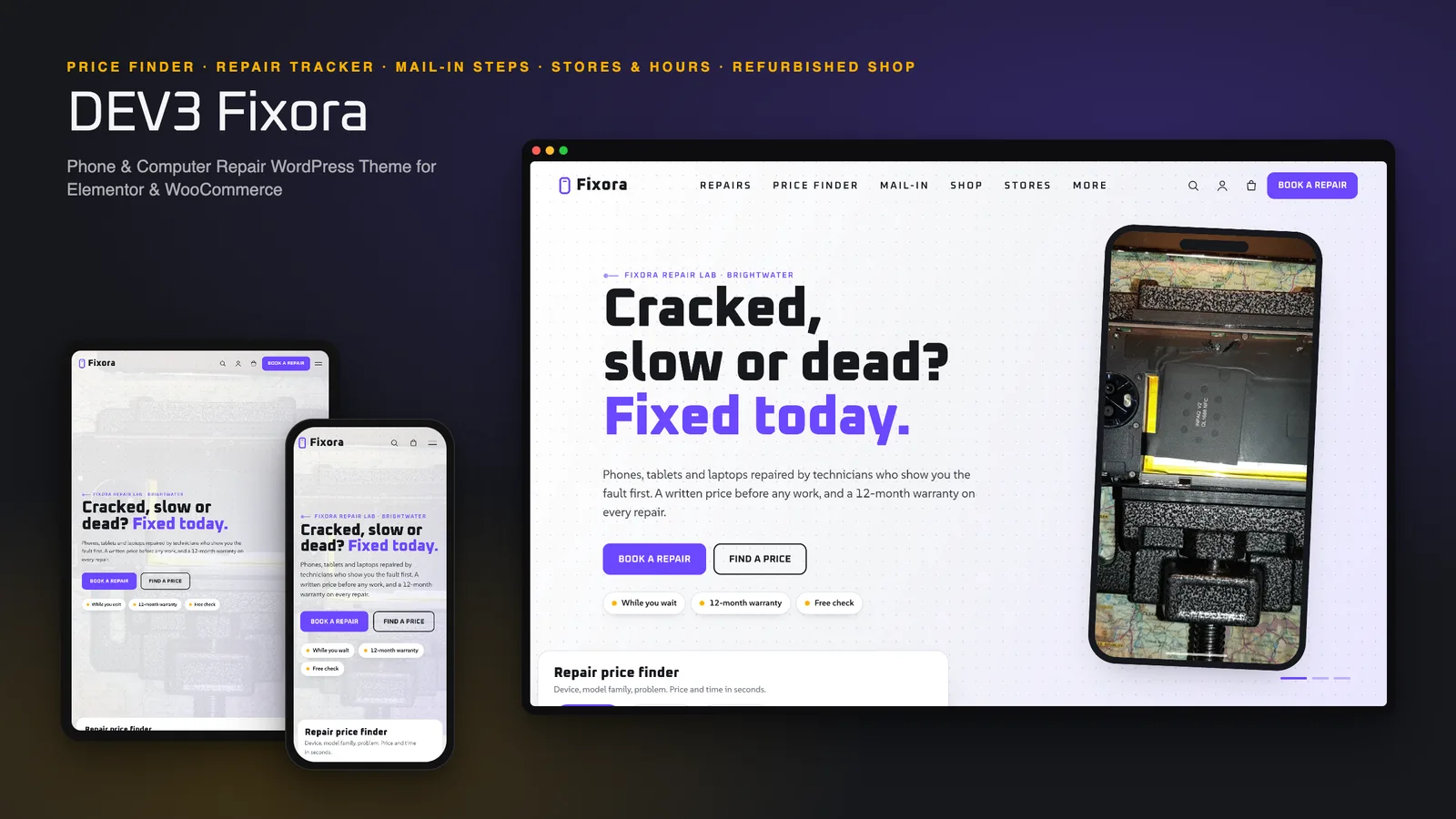
Photo hero in a phone outline: the slideshow sits inside a tilted phone frame beside the headline, buttons and trust chips, with the price-finder card overlapping the hero edge. Photo hero in a phone outline — the slideshow sits inside a tilted phone frame beside the headline, buttons and trust chips, with the price-finder card overlapping the hero edge.

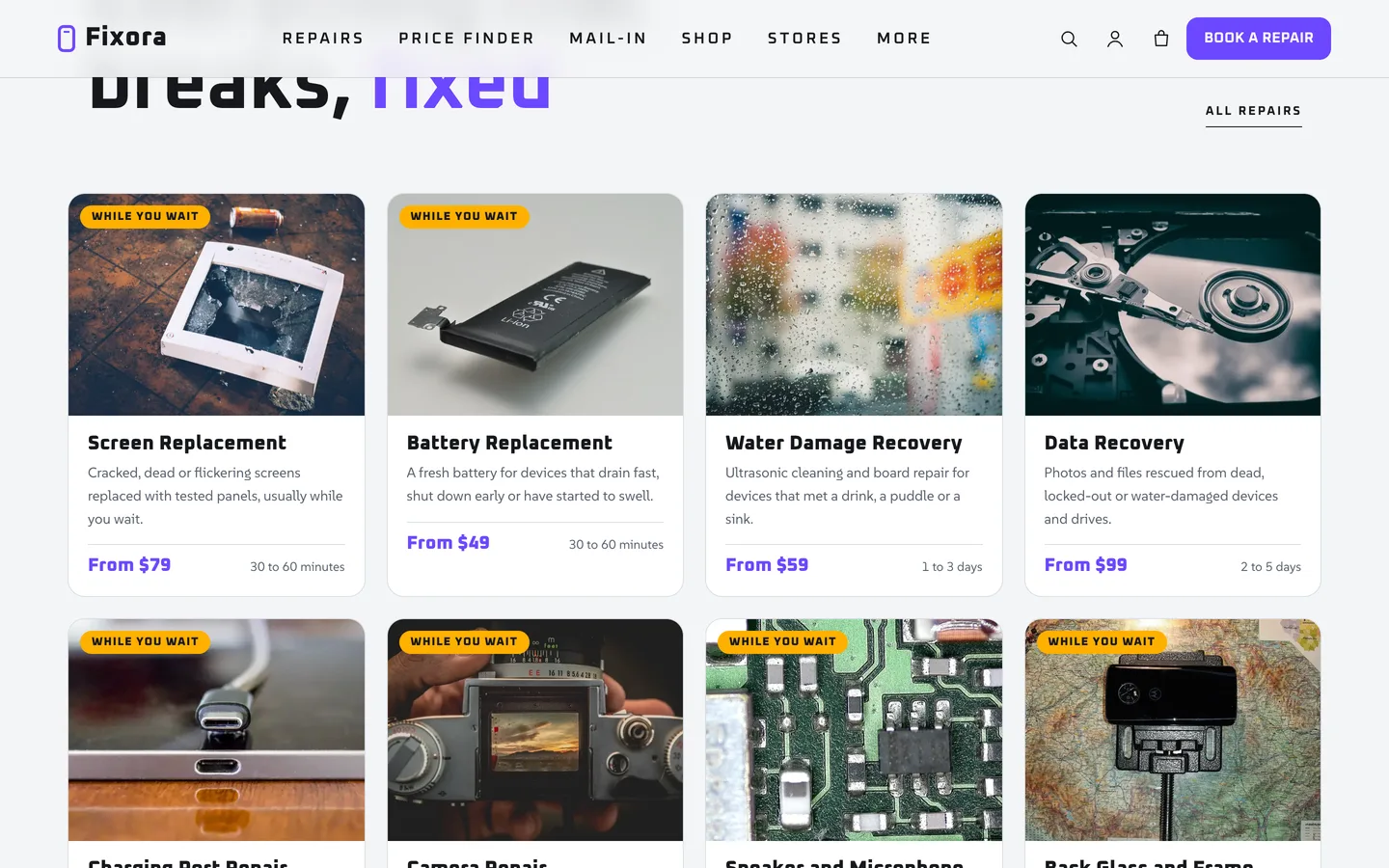
Repairs: twelve repair cards with a from-price, usual time and a while-you-wait tag. Repairs — twelve repair cards with a from-price, usual time and a while-you-wait tag.

Guides & articles

Practical guides and engineering write-ups for DEV3 Fixora.

A repair shop WordPress theme: price finder and tracker with Fixora

Last updated
A repair shop WordPress theme: price finder and tracker with Fixora: DEV3 Fixora

A broken phone is an urgent, slightly embarrassing problem, and the first thing a visitor wants from a repair shop website is not a mission statement: it is a price and a time. DEV3 Fixora is our WordPress theme for phone and computer repair. It puts a price finder, a repair tracker and the three ways to hand a device over at the front of the site. This post covers who it suits, how the finder and tracker work, and how to set the theme up with your own prices.
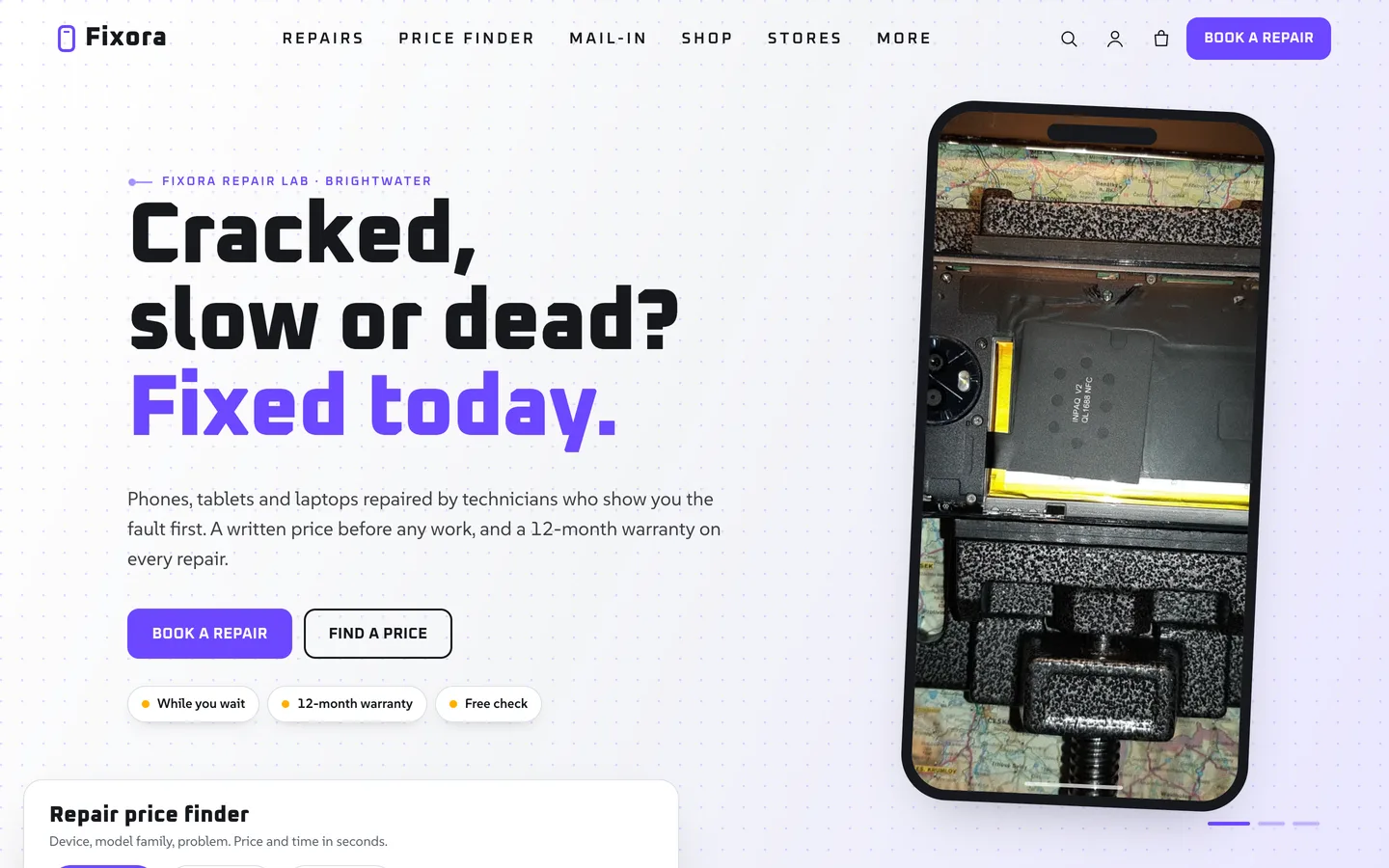
The Fixora home page: a headline beside a phone-shaped photo frame, with the repair price finder card at the bottom left

Video tour of the Fixora demo: the phone-frame hero, the price finder, the repair tracker, mail-in steps, stores and the refurbished shop

Who Fixora is for

  • Phone and tablet repair shops with a walk-in counter and a refurbished range.
  • Computer and laptop repair labs that also take mail-in jobs.
  • IT service desks and small chains with a few stores and business accounts.

The price finder

Visitors pick a device type, a model family and the problem. They see a price range, the usual time and the warranty, and can book or mail the device in from the result. Below it, a price guide table lists every problem against every model family.
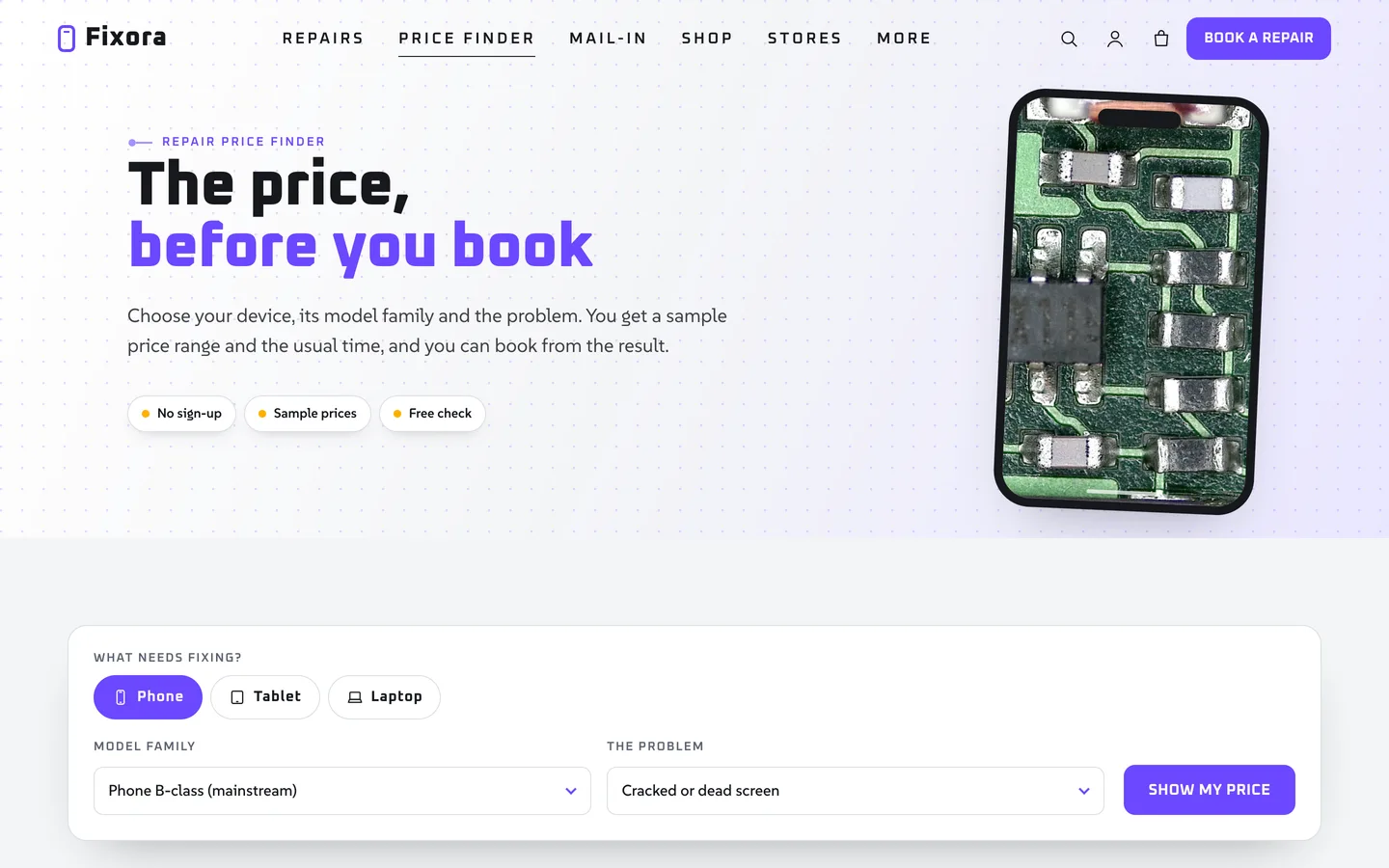
The price finder page: a result card for a cracked screen and the price guide table with the chosen row and column highlighted

The data is one JSON file, so changing prices means editing numbers, not pages. Families are generic classes such as "Phone B-class", which keeps the demo clear of brand names; use your own wording.

The repair tracker

Customers enter the ticket number from their receipt and see a six-stage stepper: booked in, checked in, diagnosed and quoted, repair in progress, testing and ready. The demo runs on sample tickets, and a filter lets you connect your own system.
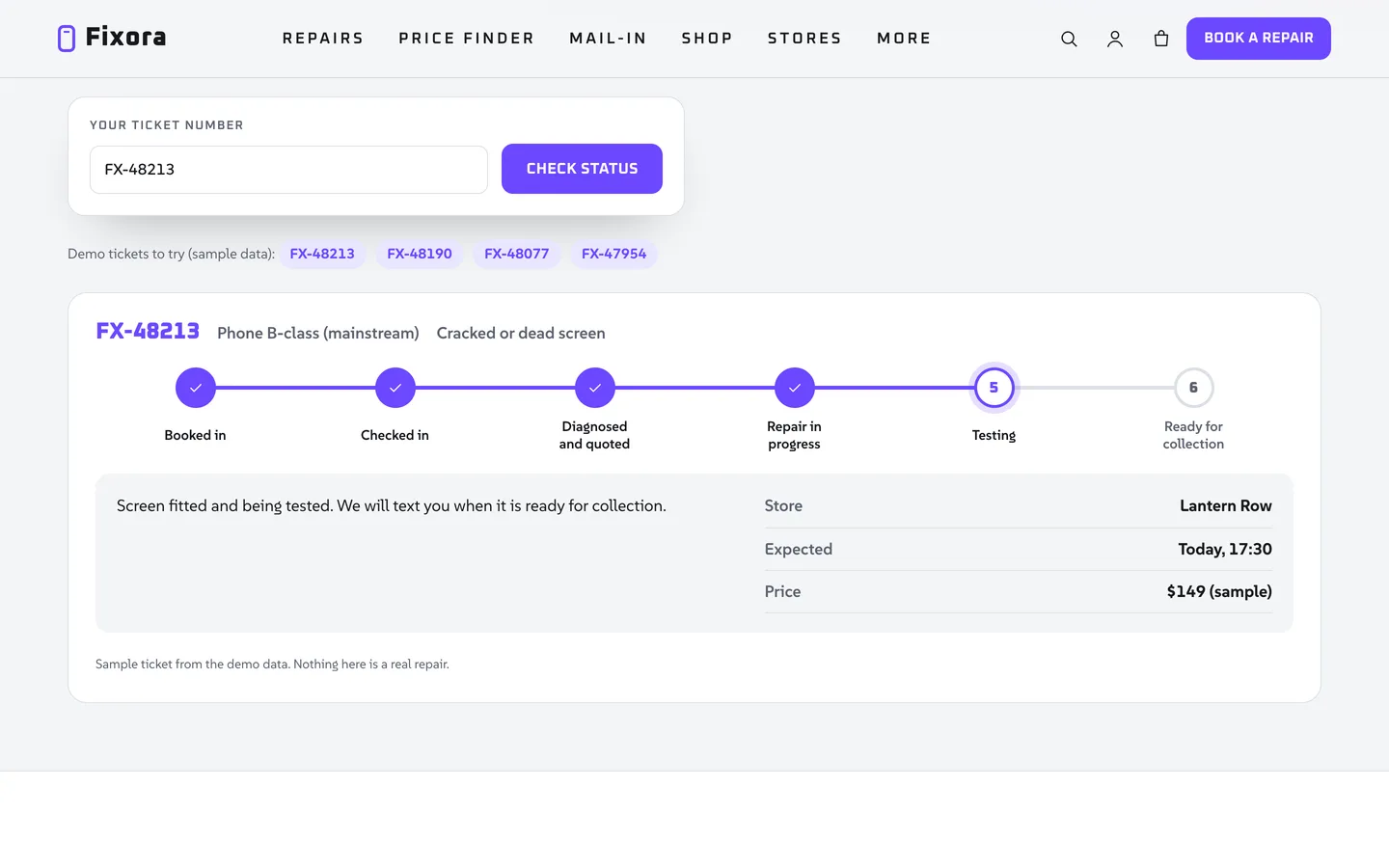
The repair tracker showing a sample ticket at the testing stage

Mail-in, booking and stores

The mail-in page explains five steps and carries the booking form preset to mail-in. The same form handles walk-ins and courier pickups, and requests are stored privately and emailed. Each store shows its address, features and opening hours with an open-now chip.

Set it up

  1. Install the theme and the DEV3 Theme Toolkit plugin, then import the demo under Appearance, DEV3 Demo.
  2. Edit the prices in inc/data/devices.json, or through the dev3fix_devices filter in a child theme.
  3. Set your phone, links, warranty line and price disclaimer in the Customizer.
  4. Add your stores with their opening hours, then replace the demo photos with your own.

Everything in the demo is fictional, and prices are marked as samples. Replace them with your own before launch.


Frequently asked questions

The complete source code (version 1.0.0) as a download from your account, with the setup and usage guides shown on this page. You can modify the code to suit your product.

Buying guides: 3D and motion WordPress themes for Elementor and WooCommerce

Questions about this product (0)

Answers from the DEV3 team and the community.

Ask a question

No questions yet.

Wondering about setup, licensing or customisation? Ask, and the DEV3 team will help.

More from this author

View all

Related in CMS Extensions

View all