
Most business websites already describe themselves in machine-readable form. A cafe's homepage often carries a schema.org CafeOrCoffeeShop block with its phone number, address, map coordinates and opening hours, put there for Google. Yet when that cafe's owner adds a listing to a local directory, they type all of it again, by hand, into a form. When we built DEV3 AI Directory & Listings, a WordPress plugin for business, property, job, event and people directories, we wanted "paste your website" to fill the form. The obvious approach is to send the page to a language model and save what comes back. We didn't do that. This article explains the order we chose instead: structured data first, AI for the gaps, and a response schema generated from each directory type's own fields.
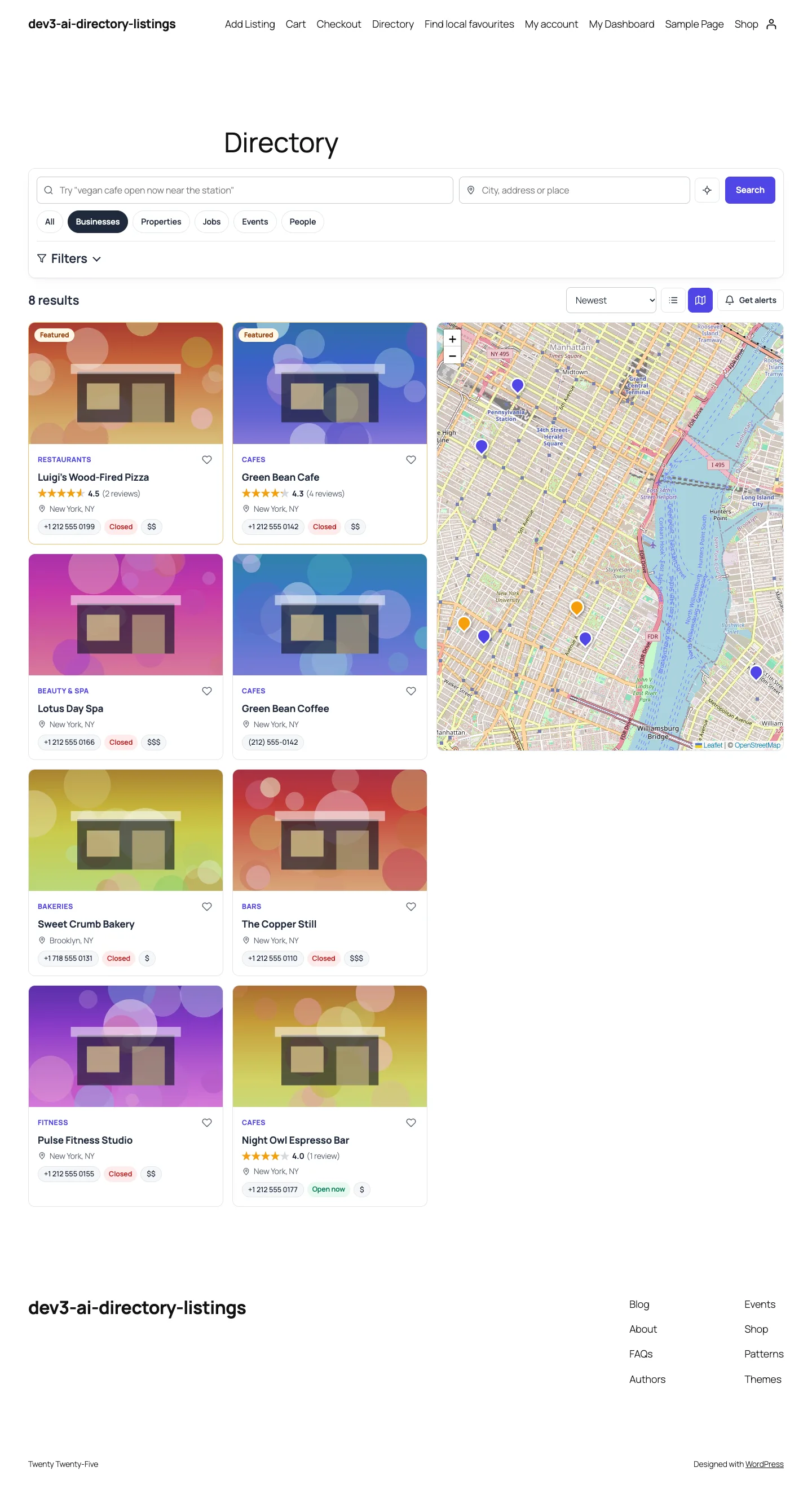 The directory front end: plain-language search, type tabs, listing cards and an OpenStreetMap view.
What it does and who it's for
DEV3 AI Directory & Listings is a complete directory plugin with AI where it saves typing. It suits:
- Local business directories for a town, a neighbourhood or a niche such as vegan cafes, with "open now", ratings, price ranges and a map.
- Membership and chamber-of-commerce sites where member businesses claim and maintain their own listing, with a verified-owner badge.
- Paid listing sites that sell free, featured or time-limited plans through Stripe Checkout, WooCommerce or offline payment.
- Mixed directories that list businesses, properties, jobs, events and people side by side, each with its own fields and schema.org markup.
- Agencies building directories for clients, who need custom types and fields without writing code.
Every AI result is a draft that a person accepts, edits or rejects, and the whole directory works without an API key.
How to set it up
- Install the plugin zip from the bundle download and activate it. Three pages are created: Directory, Add Listing and My Dashboard.
- Optional: add a Google Gemini API key in DEV3 AI Directory → API Config and click Validate & save.
- In Types & fields, review the five ready directory types and add your own fields.
- Add categories and locations in Categories.
- Create plans and pick a payment method in Plans & payments.
- Choose the map provider and moderation rules in Settings.
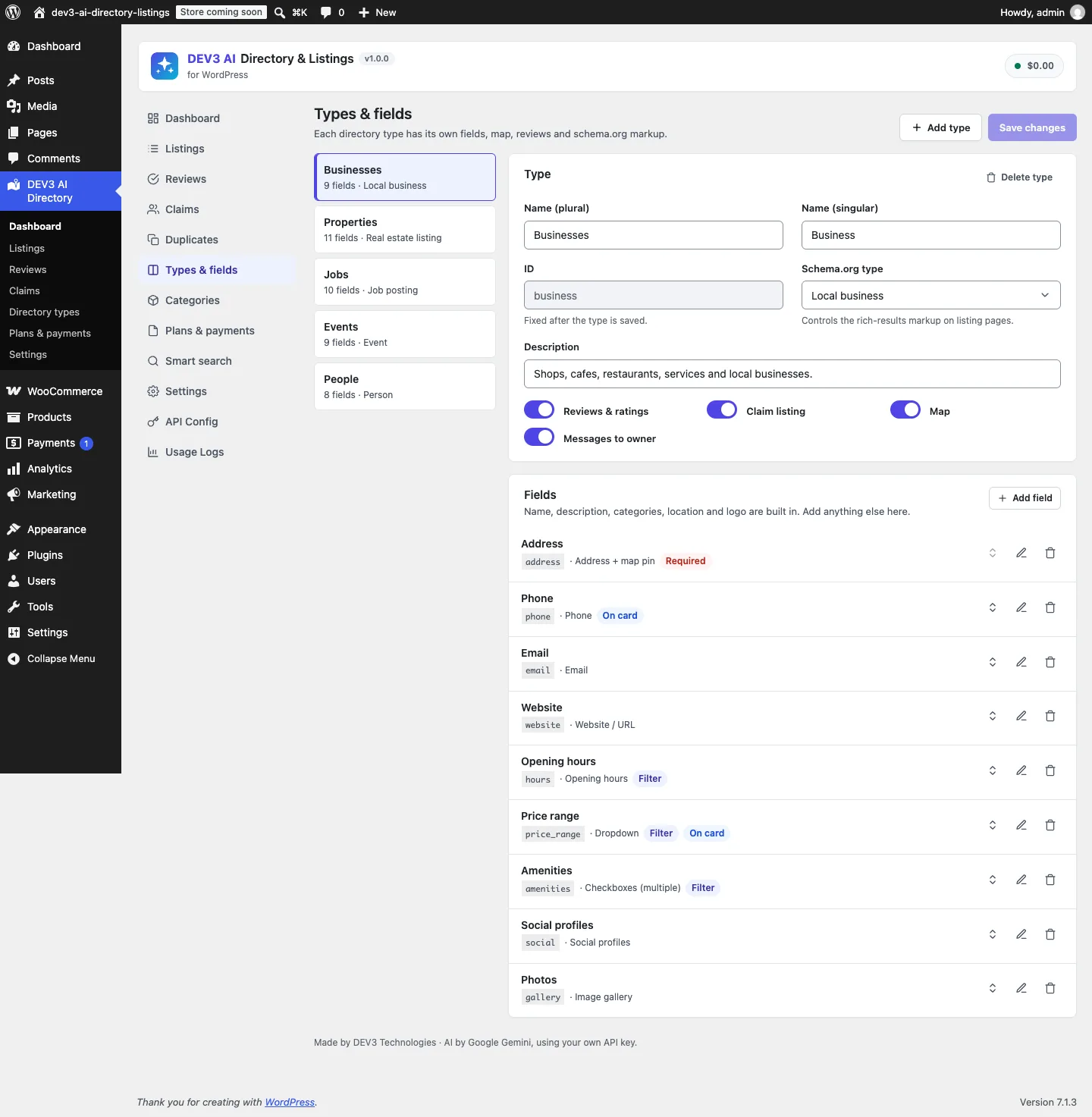 Each directory type has its own fields, schema.org type and feature switches.
How to use it
Fill a listing from a website
Open a listing, paste the business's website into Autofill with DEV3 AI and click Fill from website, or click Upload PDF / image for a menu or flyer. The fields fill in, you check them, then Save changes. The same button is on the front-end Add Listing form, so owners can use it too.
Moderate reviews
Reviews → To moderate lists new reviews with their signals ("Abusive words", "Many reviews from one device"). Approve or mark as spam. With a key, each review also gets an AI verdict, and Regenerate summary in a listing drafts a "What customers say" box.
Sell and manage listings
Owners pick a plan on Add Listing, pay through Stripe or WooCommerce, and then use My Dashboard to edit, renew, upgrade, read messages and see their reviews.
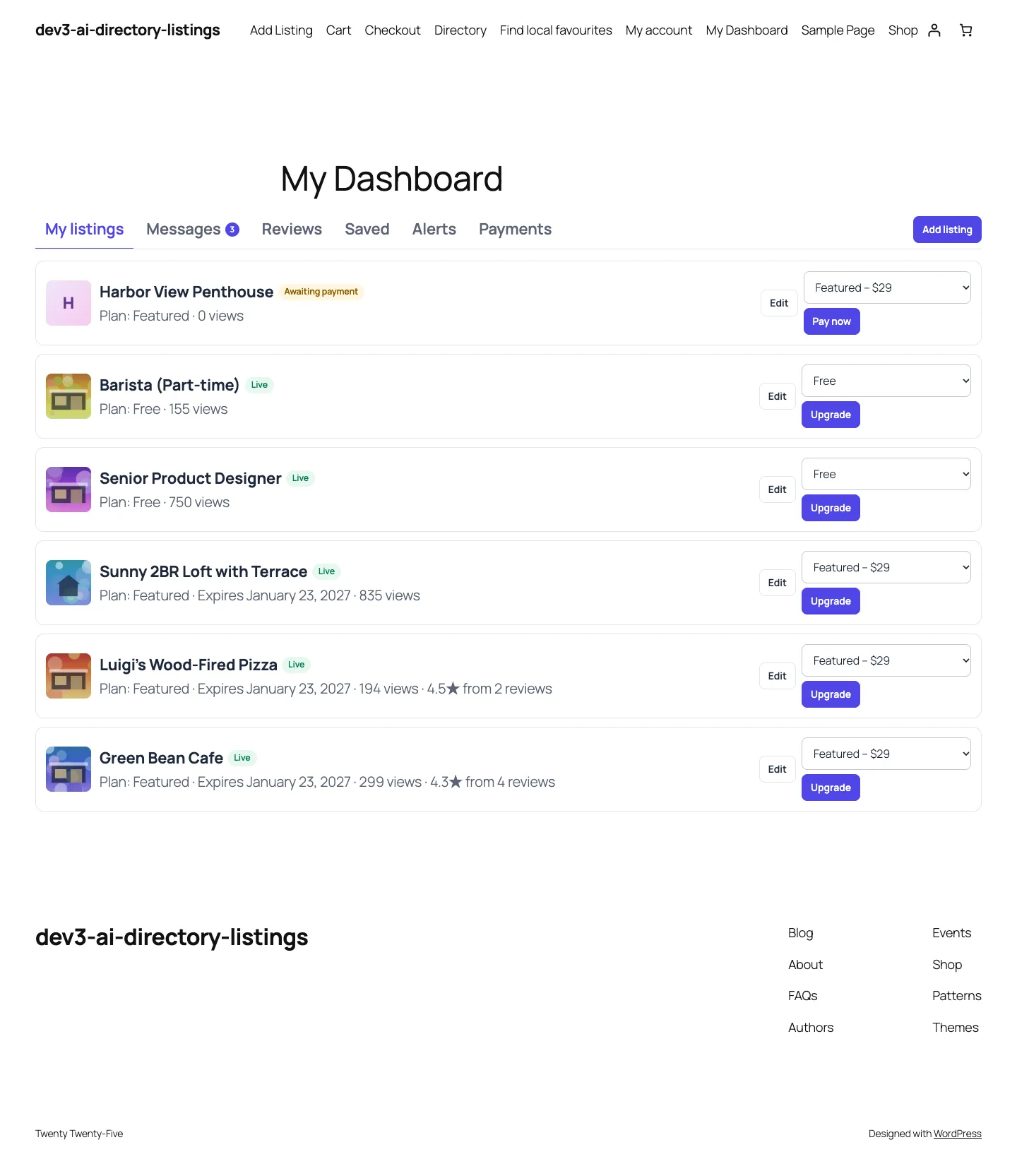 The owner dashboard: listings with plan, expiry, views and ratings, plus Upgrade and Pay now.
The rest of this post is about the first workflow, because it is where the interesting engineering is.
Why not just ask the model?
Sending page text to a model and saving its answer fails in four predictable ways:
- It invents facts. A phone number that "looks right", or hours copied from a different branch mentioned in the footer.
- It ignores your vocabulary. The directory's price range field has the options
$,$$and$$$. The model returns "moderate". Your amenities checklist has "Wi-Fi"; the model returns "Free wireless internet", or "Spaceship". - It doesn't know your fields. Each directory type in the plugin has its own custom fields, and admins add more. A fixed prompt cannot know that this site's Businesses type has an "Outdoor seating" checkbox and a social profiles group.
- It is unnecessary for most fields. If the page already has JSON-LD with a telephone property, that value is more reliable than anything the model will produce from the visible text.
So the pipeline runs in three steps: extract structured facts without AI, map them onto the type's fields with rules, and only then ask the model for what is still missing, using a schema built from that type.
 Illustration: structured data fills most fields first, and AI only fills the gaps.
Step 1: Extract what the page already states
Page_Extractor::fetch() loads the URL with WordPress's safe HTTP API: wp_http_validate_url first (public hosts only, with a filter for sites that need to change that), then wp_safe_remote_get with a 15-second timeout, 4 redirects at most and a 2 MB response cap. The extractor then reads the HTML in a fixed order.
JSON-LD, ranked by usefulness
Real pages rarely have one tidy JSON-LD block. Yoast and Rank Math emit a @graph with WebSite, WebPage, BreadcrumbList, Organization and sometimes a LocalBusiness, all in one script tag. The extractor flattens every block and @graph into a list of nodes, then sorts them so the node that describes the place comes first:
private static function rank( array $node ) {
	$types = array_map( 'strval', (array) $node['@type'] );
	foreach ( $types as $t ) {
		if ( preg_match( '/Business|Restaurant|Store|Cafe|Bakery|Bar|Hotel|Dentist|Physician|Attorney|Agent|Shop|Gym|Salon|Service|CafeOrCoffeeShop|FoodEstablishment/i', $t ) ) {
			return 5;
		}
		if ( preg_match( '/Event|JobPosting|RealEstateListing|Residence|Accommodation|Product/i', $t ) ) {
			return 4;
		}
		if ( preg_match( '/Organization|Person|Place/i', $t ) ) {
			return 3;
		}
	}
	return 0;
}
(from Page_Extractor::rank)
Nodes are then merged with a "first value wins" rule, and anything ranked below 3 is skipped. A WebPage named "Home" can never become the listing's title, and a parent Organization only fills what the LocalBusiness node left empty.
Opening hours in two dialects
schema.org allows hours as openingHoursSpecification objects (dayOfWeek, opens, closes) or as the compact openingHours text form such as "Mo-Fr 08:00-18:00". Both are common, so the extractor reads both. The text parser expands day ranges, including ones that wrap round the week:
if ( preg_match( '/^([a-z]{2})\s*-\s*([a-z]{2})$/', $chunk, $r ) ) {
	$from = array_search( $r[1], $codes, true );
	$to   = array_search( $r[2], $codes, true );
	if ( false !== $from && false !== $to ) {
		for ( $i = $from; $i <= ( $to >= $from ? $to : $to + 7 ); $i++ ) {
			$days[] = $codes[ $i % 7 ];
		}
	}
}
(condensed from Page_Extractor::hours_from_text)
"Fr-Mo" correctly becomes Friday, Saturday, Sunday and Monday. Both forms end in Fields::sanitize_hours(), the same function that cleans a human's input in the editor, so the stored shape is identical whatever the source.
Meta tags and links as fallbacks
When there is no JSON-LD, or it lacks a value, the extractor falls back to og:site_name, og:title, the <title> tag (cut at the first | or –), og:description, og:image, the first tel: and mailto: links, and links to seven social networks. Share links such as facebook.com/sharer are skipped, because a "share this page" button is not the business's profile.
Finally the readable text is extracted (scripts, styles, SVG and iframes removed, block elements turned into line breaks) and capped at 14,000 characters for the AI step.
Step 2: Map facts onto the directory type, with no AI
Autofill::from_facts() walks the current type's fields and fills each one from the facts by field type: the address field gets the street, city, region, postcode, country and the JSON-LD coordinates; the first phone field gets the phone; a URL field whose schema mapping is url (or whose key contains "web") gets the site origin; the hours field gets the parsed hours. A select field mapped to schema.org priceRange gets "$$" matched to the option whose label is $$.
This step alone is useful. In the test fixture (a cafe homepage with a CafeOrCoffeeShop node in a @graph), the rules-only path fills at least 8 fields with no API key at all: title, description, address with map pin, phone, email, website, hours and price range. Sites without an API key still get real autofill.
Step 3: A response schema built from the type
Only after that does the plugin call the Google Gemini API, and only if AI is enabled for the context (admin or front-end submission) and a key exists. The prompt includes the page text, the type's field list, the site's categories, and the facts already found, labelled as trusted hints.
The key part is the response schema. Because every directory type has different fields, Autofill::schema() builds it at request time from the type definition:
foreach ( self::ai_fields( $type ) as $f ) {
	switch ( $f['type'] ) {
		case 'multiselect':
			$prop = Prompts_Library::list_of( 12, 80 );
			break;
		case 'checkbox':
			$prop = array( 'type' => 'STRING', 'enum' => array( 'yes', 'no', 'unknown' ) );
			break;
		case 'hours':
			$days = array();
			foreach ( Fields::DAYS as $d ) {
				$days[ $d ] = Prompts_Library::str( 60 );
			}
			$prop = array( 'type' => 'OBJECT', 'properties' => $days );
			break;
		case 'textarea':
			$prop = Prompts_Library::str( 1500 );
			break;
		default:
			$prop = Prompts_Library::str( 'text' === $f['type'] ? 200 : 120 );
	}
	$prop['description'] = $f['label'] . ( $f['options'] ? ' (one of: ' . implode( ', ', wp_list_pluck( $f['options'], 'label' ) ) . ')' : '' );
	$props[ $f['key'] ]  = $prop;
}
(condensed from Autofill::schema; address and social profiles get nested objects the same way)
Three details matter:
- Every string has a
maxLength. Bounded strings keep structured output from running on, and a unit test asserts the title cap of 200 and the street cap of 160. - Checkboxes get a three-way enum. "unknown" lets the model say the page doesn't mention parking, instead of being forced into a guess. Only "yes" and "no" are mapped to a value; "unknown" leaves the field empty.
- Options travel in the description. The model sees "Price range (one of: $, $$, $$$)" next to the field, so it knows the vocabulary before answering. Fields an admin marked as not AI-fillable, and gallery fields, are not in the schema at all.
The system prompt adds the hard rule: use only facts present in the source, and leave a field empty rather than invent a phone number, email, price, address or hours.
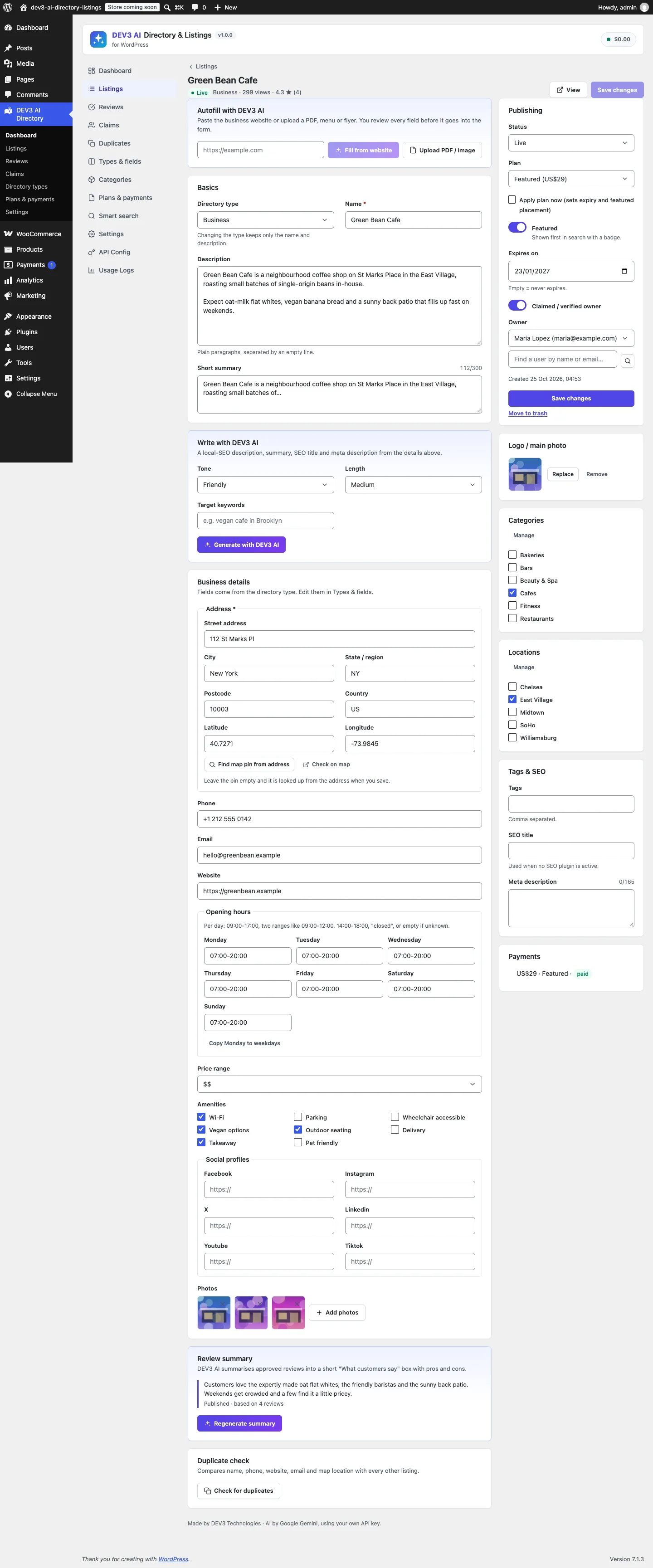 Autofill, the description writer and the type's fields in the listing editor. Nothing is saved until you click Save changes.
Step 4: Validate the answer as if a stranger typed it
The schema shapes the answer but doesn't make it trustworthy. Autofill::map_ai() re-checks every value against the type:
- Select and multi-select values must match an option's value or label.
match_option()comparessanitize_title()of the answer with each option value, and the label case-insensitively. Anything else is dropped, so "Spaceship" never reaches the amenities list. - Checkboxes accept only "yes" or "no".
- Numbers and prices are stripped to digits, dot and minus.
- Categories must match an existing term of this type by name. The model cannot create taxonomy terms.
- Every value then goes through
Fields::sanitize_value(), the same sanitiser used for human input.
Then the merge, where the order of trust is written into code:
public static function merge( array $rules, array $ai ) {
	$out = $rules;
	if ( '' === $out['title'] ) {
		$out['title'] = $ai['title'];
	}
	if ( '' !== $ai['content'] ) {
		$out['content'] = $ai['content'];
	}
	$out['categories'] = $ai['categories'] ? $ai['categories'] : $rules['categories'];
	foreach ( $ai['fields'] as $key => $value ) {
		if ( ! isset( $out['fields'][ $key ] ) ) {
			$out['fields'][ $key ] = $value;
		}
	}
	return $out;
}
(condensed from Autofill::merge)
The one deliberate exception is the description: a meta description is usually a one-line tagline, so a factual multi-paragraph description from the model replaces it. Every field value found by rules stays exactly as extracted.
Measuring "how much did it fill"
The result carries filled and total counts: title and description, plus every AI-fillable field of the type. The editor uses them to tell the owner how much is left, and they gave us a testable acceptance target. The spec set "at least 80% of fields from a real business website", and the PHPUnit test asserts it on the fixture:
- The mocked model answer deliberately disagrees with the page: it returns a different phone number, "$$$" instead of "$$", an extra category "Not a category" and an amenity "Spaceship".
- The test asserts the structured name and phone win, unknown options and categories are dropped,
filled / totalis at least 0.8, the outgoing request contains the page text and aresponseSchema, and no listing post exists afterwards.
That last assertion is the drafts-only rule. Autofill never calls wp_insert_post; it returns a payload that the editor or the submission form displays.
Documents: same schema, different input
Menus and flyers are usually PDFs or photos. Autofill::from_file() accepts PDF, JPG, PNG, WebP or TXT up to 8 MB, checks the detected MIME type against that list, and sends binary files to the model as inline data alongside the same per-type schema. There is no structured-data step for a document, so this path needs AI and says so clearly when there is no key. The test uses a fake menu PDF and asserts that the first request part is application/pdf inline data, and that "tue: closed" becomes an empty day rather than a missing one.
Trade-offs
- The real-site run is still ahead. The 80% figure comes from a fixture with mocked Google Gemini API responses. The spec calls for a live-key run on 10 real business websites before launch, and the build status lists it as open.
- JSON-LD can be wrong. If a theme prints the head office's phone in every branch's JSON-LD, the plugin trusts it. That is why the result is a draft the owner reviews.
- Client-rendered sites have thin HTML. Pages that build everything in JavaScript give the extractor little text and no JSON-LD. The fallback is the PDF/image upload or typing.
- Search scale. Directory search narrows candidates with WP_Query and finishes distance, rating and "open now" in PHP over the index table, which the code documents as fine up to about 20,000 listings.
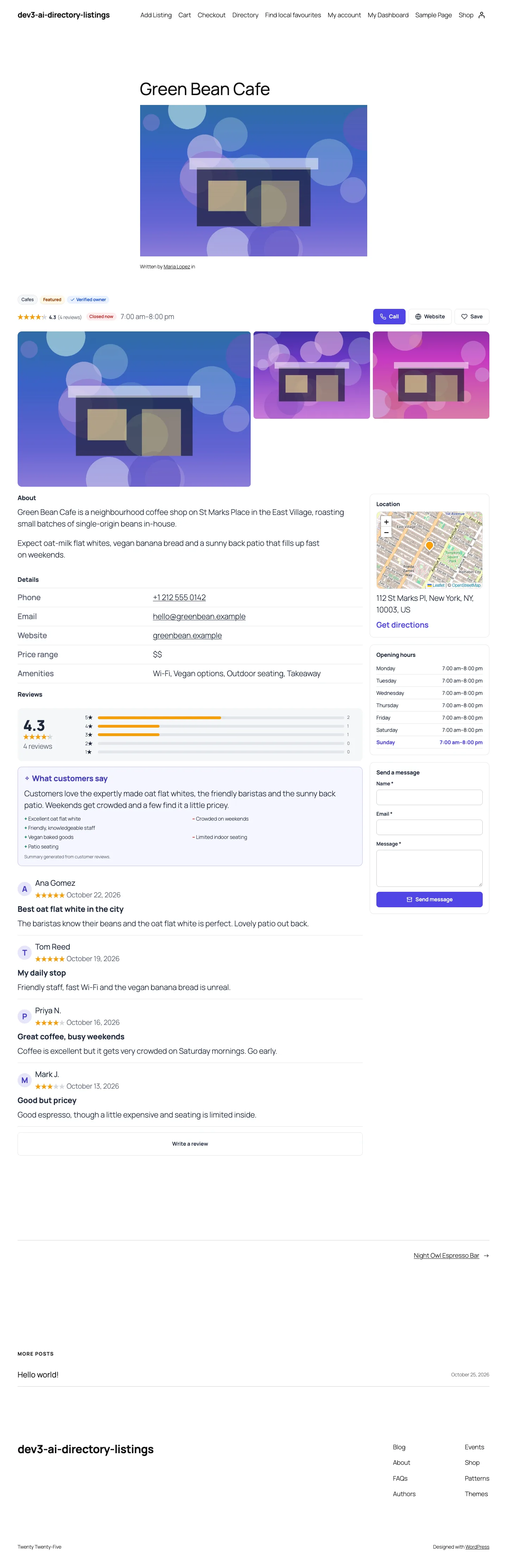 A finished listing: details, opening hours, map, contact form and the accepted review summary.
Conclusion
The pattern works beyond directories: before asking a model to read a page, read what the page already states in structured form, treat it as ground truth, and let the model fill only the remaining fields through a schema built from your own data model. Then validate the answer as strictly as a form submission from a stranger. DEV3 AI Directory & Listings ships in the DEV3 AI Directory, Booking & Events Plugins Bundle on the DEV3 marketplace, alongside 7 other directory, booking and events plugins, and is being prepared for CodeCanyon. The case study covers the rest of the plugin.