
"Human review before publish" is easy to promise and hard to enforce in WordPress. A post can go live from the editor's Publish button, from quick edit, from the REST API, from XML-RPC, from a WP-Cron event that publishes a scheduled post, or from any plugin that calls wp_update_post(). Authors are allowed to publish their own posts by default. If the review rule only exists in the UI of the plugin that wrote the draft, any of those paths can skip it. When we built DEV3 AI Auto Blogger & Content Calendar, we made the rule part of the data layer: an AI-assisted post can't reach publish or future status until someone with approval rights has approved it. This post explains how that guard works, why it downgrades the post instead of rejecting the save, and how autopilot gets a narrow, explicit way through.
What it does and who it's for
DEV3 AI Auto Blogger is an editorial calendar, topic backlog and approval workflow for WordPress, with an optional AI writer that uses the Google Gemini API and your own key.
- Small content teams who want writers to draft, editors to approve, and a calendar that shows what's coming.
- Solo bloggers who want AI to research topics and draft posts, but always read them before they go out.
- Agencies running content plans for clients, with brand voice profiles per site and a review trail.
- Sites worried about thin AI content, where nothing should publish on a timer without a person reading it.
- Teams with no API key, who still get the calendar, backlog, outline editor, workflow and scheduling.
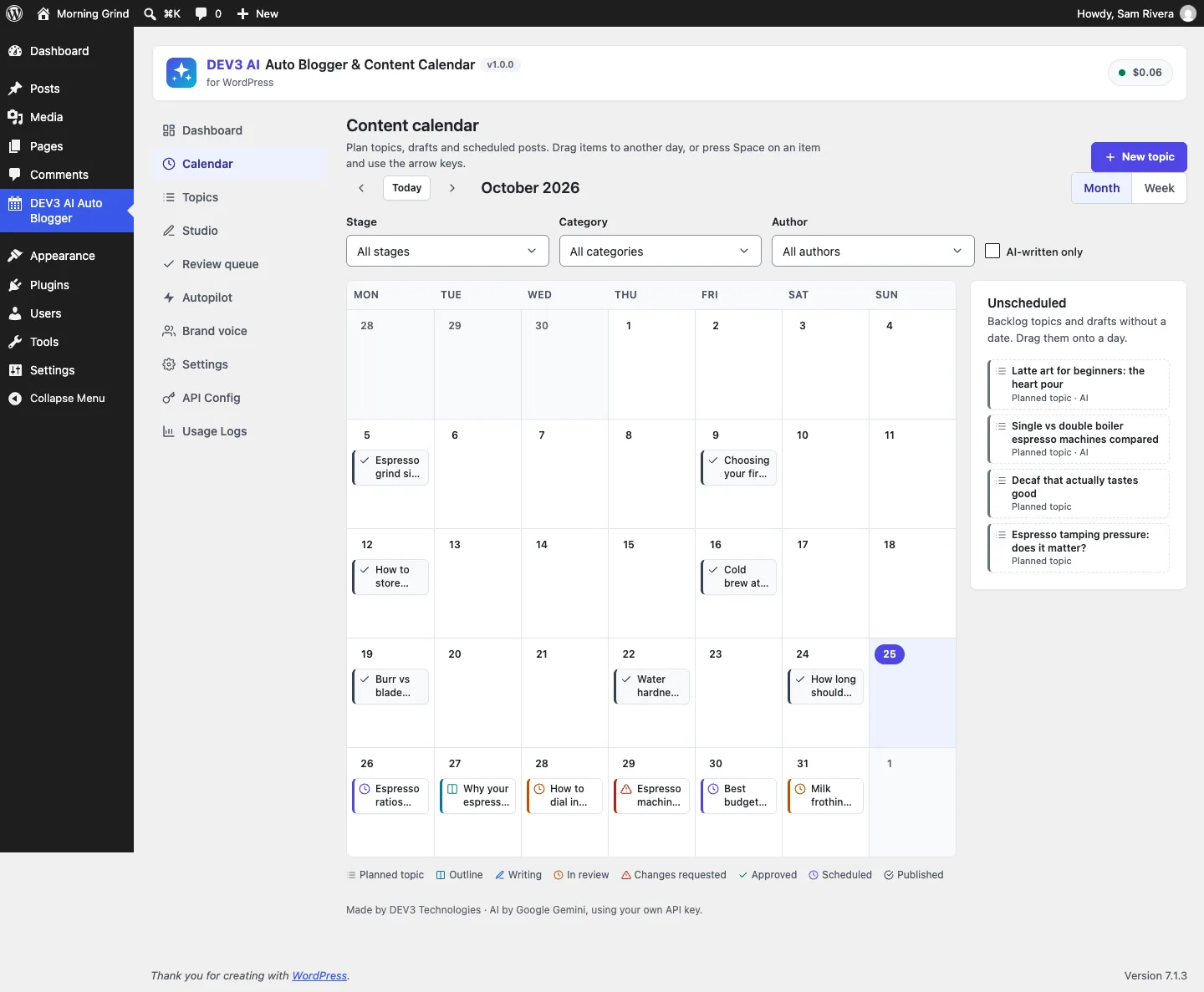
The content calendar: drag topics from the unscheduled tray onto a day; every item shows its stage with an icon and label.
How to set it up
- Install the plugin zip from the bundle in Plugins → Add New → Upload Plugin and activate it.
- Optional: paste a Google Gemini API key in DEV3 AI Auto Blogger → API Config, or define
DEV3AB_GEMINI_API_KEYinwp-config.php. - Create a brand voice in Brand voice, or click Learn my voice with DEV3 AI on a few of your posts.
- In Settings, choose the managed post types, who can approve (editors and administrators by default) and the notifications. Build the site index so research can spot duplicates.
- Make sure WP-Cron runs. Autopilot and the daily digest depend on it.
How to use it
Fill the backlog. In Topics, enter seed keywords and click Research with DEV3 AI. Ideas that resemble existing posts or backlog topics are marked as possible duplicates and left unticked. You can also add topics by hand or import a list.
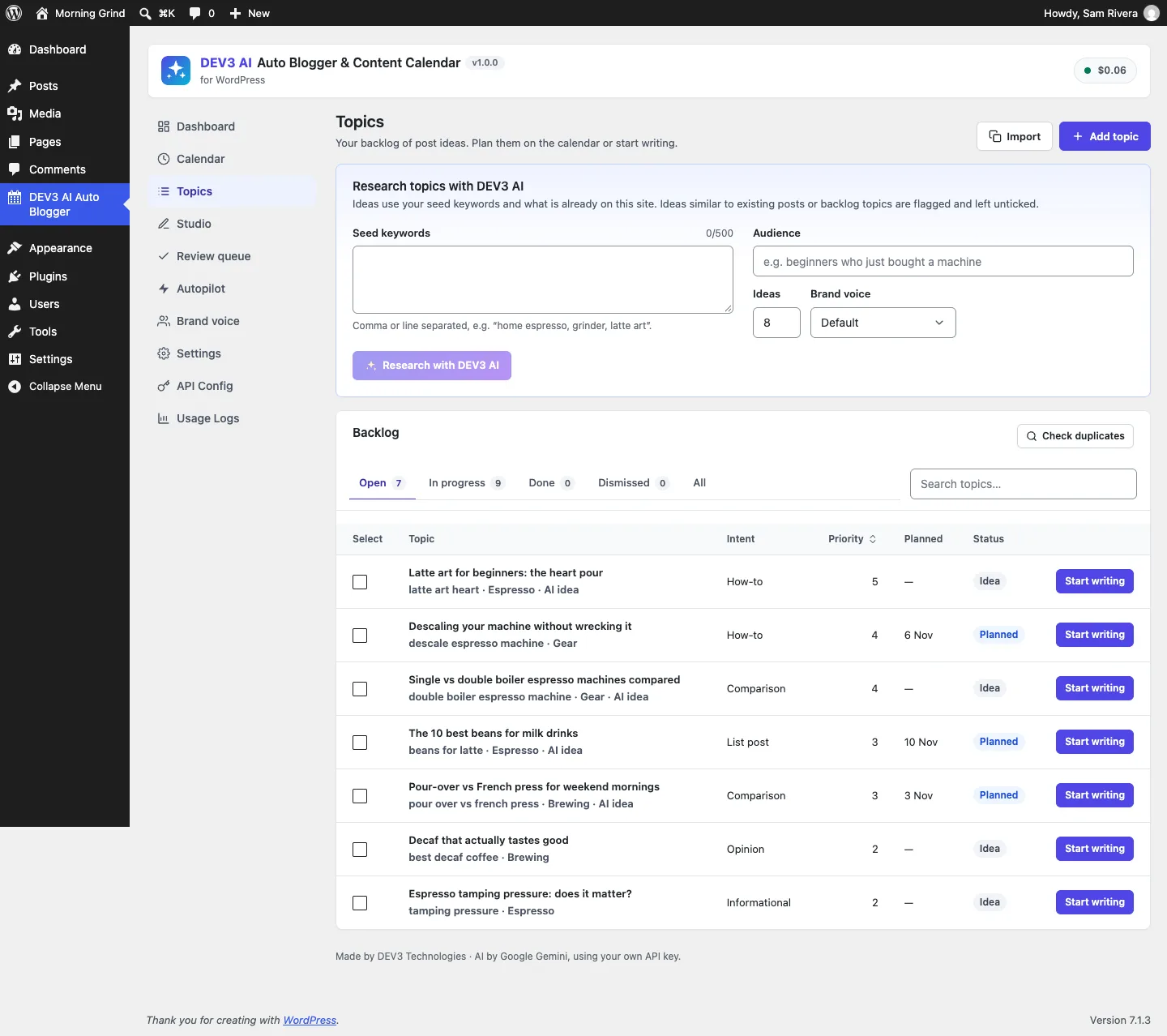
Research uses your seed keywords and what's already on the site; the backlog keeps intent, priority and planned date per topic.
Write in the Studio. Click Start writing on a topic. Use Outline with DEV3 AI or write the outline yourself, then Write draft with DEV3 AI. The draft is built section by section and shown as a preview. It only reaches the post when you click Accept draft into post.
Review and schedule. The writer clicks Submit for review. An editor uses Approve or Request changes in the Review queue, then schedules the approved post.
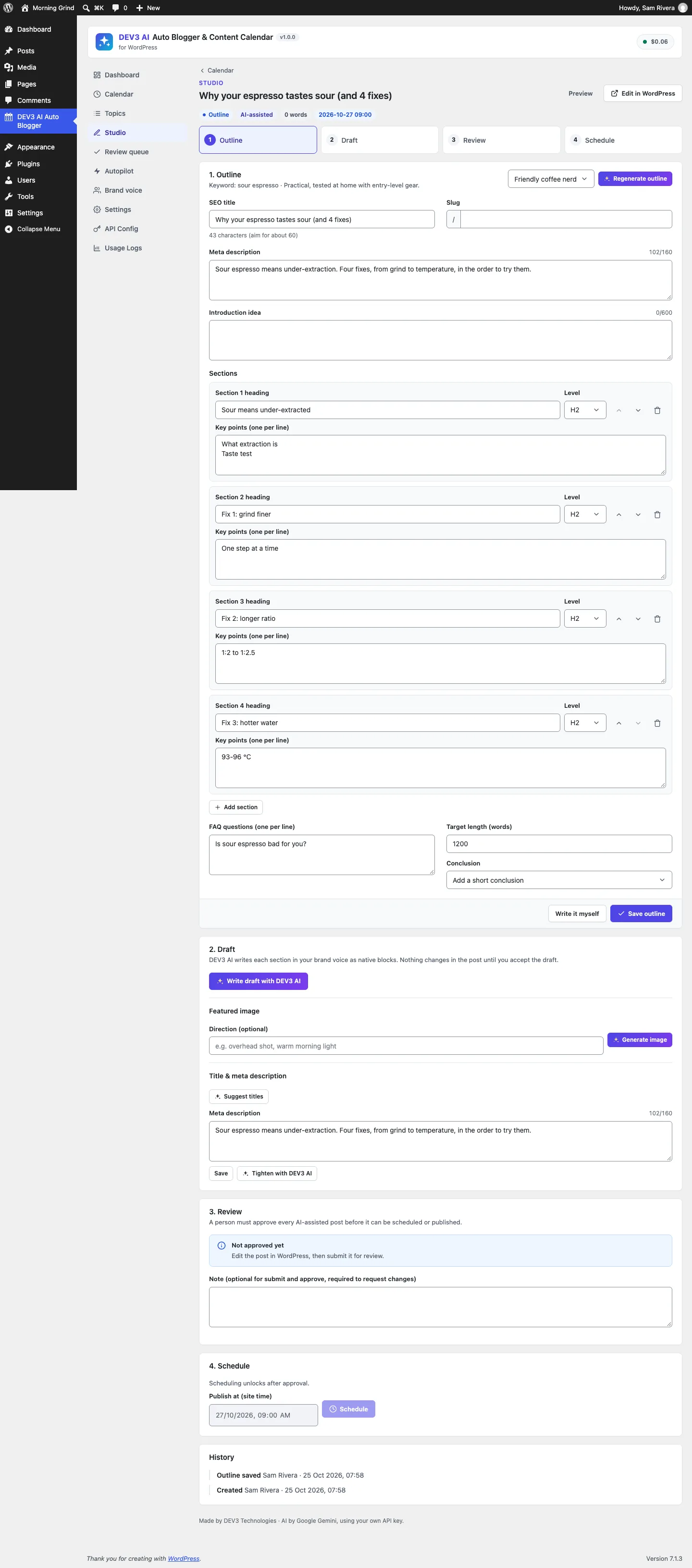
In the Studio, the Schedule step stays locked until the item is approved.
Autopilot. In Autopilot, a schedule picks topics on set days and drafts them. The drafts wait in the review queue unless that schedule has Auto-publish without review switched on.
The rest of this post is about the rule underneath all of this, and how it holds when someone tries to skip the UI.
Where the rule lives
Each managed post has a workflow stage stored in post meta: outline, writing, review, changes, approved, scheduled or published. The last two aren't stored. They're read from the WordPress status, so the stage can't disagree with what the site shows:
public static function stage( $post ) {
	$post = get_post( $post );
	if ( 'publish' === $post->post_status ) {
		return 'published';
	}
	if ( 'future' === $post->post_status ) {
		return 'scheduled';
	}
	$stage = (string) get_post_meta( $post->ID, '_dev3ab_stage', true );
	if ( in_array( $stage, array( 'scheduled', 'published' ), true ) || ! in_array( $stage, self::STAGES, true ) ) {
		$stage = self::is_approved( $post->ID ) ? 'approved' : ( 'pending' === $post->post_status ? 'review' : 'writing' );
	}
	return $stage;
}
(from Content/Workflow.php, condensed)
Approval is a separate record, _dev3ab_approval, holding the user, time and route (studio, editor or autopilot). Submitting for review or requesting changes deletes it. Scheduling through the plugin's own REST route checks it and returns a 409 if it's missing.
That covers the plugin's own buttons. The guard covers every other path.
One filter for every save
Every route that changes a post's status in WordPress ends up in wp_insert_post(), which passes the row through the wp_insert_post_data filter just before it's written. That's the one place where cron, REST, XML-RPC, quick edit, the block editor and other plugins all meet. The guard hooks it at priority 99, so it runs after most other plugins have finished changing the data:
public static function guard( $data, $postarr ) {
	$id = isset( $postarr['ID'] ) ? (int) $postarr['ID'] : 0;
	if ( ! $id || ! in_array( $data['post_status'], array( 'publish', 'future' ), true ) ) {
		return $data;
	}
	$old = get_post_status( $id );
	if ( in_array( $old, array( 'publish', 'future' ), true ) || ! self::is_managed( $id ) || self::is_approved( $id ) || self::$bypass > 0 ) {
		return $data;
	}
	$human   = get_current_user_id() > 0 && ! wp_doing_cron() && self::can_approve();
	$allowed = (bool) apply_filters( 'dev3ab_publish_guard', $human, $id, $data );
	if ( $allowed ) {
		self::$implicit[ $id ] = get_current_user_id();
		return $data;
	}
	$data['post_status'] = 'pending';
	return $data;
}
(from Content/Workflow.php, condensed)
Here's what each early return is for.
- Not going live. Saving a draft or a pending post is always allowed. The guard only looks at transitions to
publishorfuture. - Already live. If the post is already published or scheduled, it was approved earlier. This also lets WordPress's own cron publish a scheduled post when its time comes (
future→publish) without a logged-in user. - Not managed. The guard only applies to posts the plugin created (marked with
_dev3ab_generated), unless the site has switched on "apply to all managed posts". Ordinary posts by human writers aren't affected. - Approved. An approval record is enough.
- Bypass. Autopilot's explicit route, covered below.
Everything else is checked against one question: is a human approver doing this in person? That means a logged-in user, not a cron request, who has the approval capability (edit_others_posts by default, changeable with the dev3ab_approve_capability filter). If yes, the save goes through. If no, the status becomes pending.
Why downgrade instead of refusing
We could have returned an error. But wp_insert_post_data can't fail a save; it can only change the data. The ways to stop a save, such as wp_die() or throwing an exception, break whatever made the call: a REST client gets a 500, a cron job dies halfway through, a bulk edit stops at row 12. Downgrading to pending keeps every caller working. The content is saved, nothing goes live, and the post appears in the review queue where an approver will find it.
The block editor shows this too. A pre-publish panel tells users who can't approve that "publishing will save it as pending", so nobody is surprised by the result.
Publishing in person counts as approval
An editor who opens an AI-written post, reads it and clicks Publish has approved it, even if they never opened the review queue. The guard notes the user id in $implicit. A transition_post_status handler then writes the approval record and a history entry after the save:
if ( isset( self::$implicit[ $post->ID ] ) && in_array( $new_status, array( 'publish', 'future' ), true ) ) {
	self::record_approval( $post->ID, 'editor', self::$implicit[ $post->ID ] );
	self::log( $post->ID, 'approved', __( 'Approved by publishing in the editor.', 'dev3-ai-auto-blogger' ), self::$implicit[ $post->ID ] );
	unset( self::$implicit[ $post->ID ] );
}
(from Workflow::transition, condensed)
The approval is recorded in the transition handler, not in the filter, because the filter runs before the row is written. If another plugin rejected the save later, an approval written from inside the filter would exist for a post that never went live.
For teams who want a deliberate click as well, the editor panel locks saving with lockPostSaving() until the approver ticks "I have reviewed this AI-assisted draft". That's a UI convenience on top. The guard doesn't rely on it.
Autopilot: a bypass that can't leak
Autopilot schedules run from WP-Cron with no user, which is exactly what the guard blocks. By default that's what we want: an autopilot run writes the post and calls Workflow::submit(), and the post waits in the review queue with the note "Written by DEV3 AI Autopilot. Human review required before publishing."
Some site owners do want unattended publishing for a particular schedule. They can switch on Auto-publish without review for that schedule (off by default). Even then, the plugin doesn't turn the guard off globally. It records an autopilot approval, logs it, and runs only the scheduling call inside a scoped bypass:
if ( $schedule['auto_publish'] ) {
	Workflow::record_approval( $post_id, 'autopilot', 0 );
	Workflow::log( $post_id, 'approved', __( 'Auto-approved by an autopilot schedule with auto-publish enabled.', 'dev3-ai-auto-blogger' ), -1 );
	$result = Workflow::with_bypass( static fn() => Workflow::schedule( $post_id, $slot ) );
	if ( is_wp_error( $result ) ) {
		Workflow::submit( $post_id );
	}
} else {
	Workflow::submit( $post_id, __( 'Written by DEV3 AI Autopilot. Human review required before publishing.', 'dev3-ai-auto-blogger' ) );
}

public static function with_bypass( callable $callback ) {
	++self::$bypass;
	try {
		return call_user_func( $callback );
	} finally {
		--self::$bypass;
	}
}
(from Content/Autopilot.php and Content/Workflow.php, condensed)
The bypass is a counter, not a flag, so nested calls can't switch it off early. The decrement is in finally, so an exception can't leave it on for the rest of the request. That matters because one cron request may process several schedules and several posts. If scheduling fails, the post falls back to review instead of being dropped.
The history shows these posts as approved by "DEV3 AI Autopilot", not by a person, so anyone reading the log later can tell the difference.
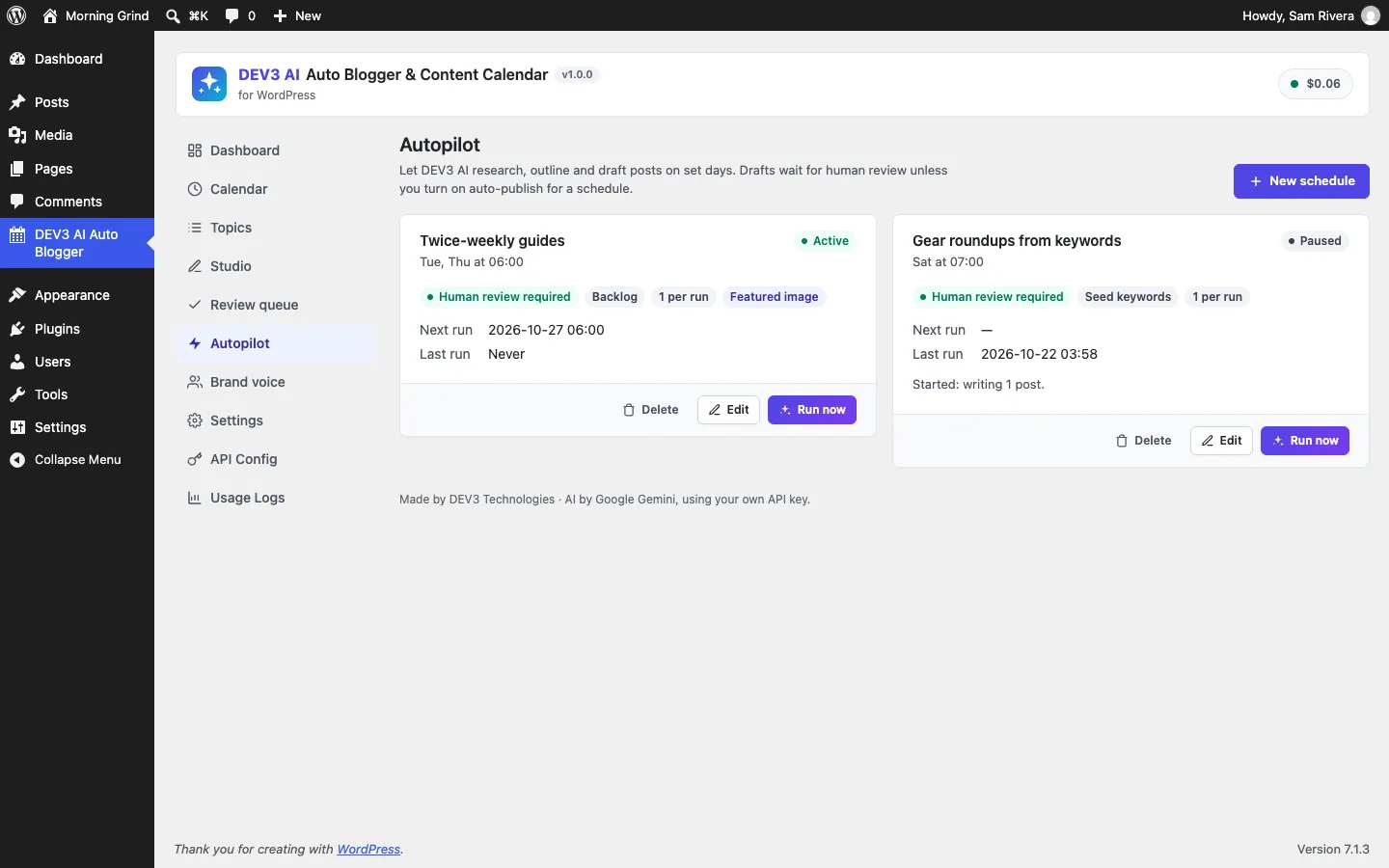
Each schedule shows whether it needs human review; auto-publish has to be switched on per schedule.
Testing every path
Because the guard sits on a WordPress filter, the PHPUnit tests (run in wp-env) call wp_update_post() directly, the same way cron or another plugin would, rather than going through our UI:
- An anonymous save to
publish(user 0, like a cron job) ends aspending. - A user with the author role, who has
publish_postsbut notedit_others_posts, tries bothpublishandfuture. Both end aspending. - An editor publishing in person ends as
publish, with an approval record viaeditorand bothapprovedandpublishedin the history. - Ordinary posts aren't guarded until the "all posts" setting is switched on, and then they are.
- Inside
with_bypass()an anonymous publish goes through. A second post saved straight after the callback ends aspending, which proves the bypass is over. - An autopilot run without auto-publish creates a pending post. Auto-publish happens only when the schedule switches it on.
- The approval capability can be changed with its filter.
The plugin has 72 PHPUnit tests and 39 Jest tests, counted from the repository. The AI features (research, outlines, section drafts, images, voice learning) were tested with mocked API responses. A test checks that an accepted draft's block markup comes back unchanged after parse_blocks() and serialize_blocks(). A run with a live API key is the next step.

Illustration: unapproved AI posts are diverted to review on every path, not just in the plugin's UI.
Trade-offs
- Silent downgrades can confuse. A script that publishes and expects
publishgetspending. We chose that over breaking callers, and the editor UI explains it, but integrations should check the status they get back. - Approval isn't tied to a content hash. Accepting a new AI draft, resubmitting or requesting changes clears the approval, but hand edits in the block editor after approval don't. Teams who need re-approval after every edit can use the
dev3ab_publish_guardfilter. - Another plugin could still undo our change. A filter running after priority 99 could set the status back to
publish. We can't fully prevent that from inside WordPress. A high priority makes it unlikely. - Autopilot needs WP-Cron. On low-traffic sites, schedules run late unless a server cron job calls
wp-cron.php.
Conclusion
If a rule has to hold for every path into a system, put it where all the paths meet. In WordPress that's wp_insert_post_data. Choose a failure mode that doesn't break callers, record the human decision after the write succeeds, and give the one legitimate exception a scoped bypass that ends on its own. The case study covers the rest of DEV3 AI Auto Blogger, including the accessible calendar, embeddings-based duplicate detection and native-block drafts. The plugin ships in the DEV3 AI Content, SEO & Site Tools Plugins Bundle on the DEV3 marketplace and is being prepared for CodeCanyon.