Niche job boards do well because generic ones are noisy. A board for nurses in one region, remote design roles or jobs in a local industry gives employers a targeted audience and gives candidates a shortlist worth reading. The trouble starts once it's live: employers post three-line ads with no salary, candidates send resumes nobody has time to read, and you need a way to charge for posts that doesn't involve chasing invoices.
This guide shows how to launch a niche job board on WordPress with paid job posts, a hiring pipeline and Google for Jobs markup, using DEV3 AI Job Board & Resume Matcher.
What a job board needs to earn its keep
- Employers can post and pay on their own, with packages of job credits.
- Job ads are complete: salary, workplace type, skills and a clear way to apply.
- Jobs show up in Google's job search through valid JobPosting structured data.
- Candidates apply in one click from a profile, and get alerts for new matches.
- Employers have a pipeline, not an inbox full of attachments.
- Screening is fair, and any scoring helps people decide rather than deciding for them.
Step by step: setting up the board
1. Install and review the pages
Upload the zip under Plugins > Add New > Upload Plugin and activate. The plugin creates the Jobs, Post a Job, Employer Dashboard, Candidate Dashboard and Companies pages, the Employer and Candidate roles, and default job types: Full-time, Part-time, Contract, Temporary, Internship and Freelance. Add the pages to your menu.
If your server runs Nginx, protect the private resume folder with a rule like this (Apache is covered by .htaccess automatically):
location ~* /uploads/dev3jb-private/ { deny all; }
2. Decide on moderation
Open DEV3 AI Job Board > Settings. For a curated niche board, set New jobs > Wait for my approval so nothing goes live unchecked; you then approve from Jobs (in bulk) or the editor. Here you also choose whether visitors can create employer accounts, how applications work and which emails go out.
3. Add categories and locations
In Categories & types, create the categories that define your niche and nested locations such as Germany > Berlin. To run a remote-only or single-category board, fix a filter on the board shortcode:
[dev3jb_jobs workplace="remote" filters="yes"]
4. Create packages and connect payments
In Packages & payments, each package has a price (0 for free), a number of job posts (credits), days live, featured placement and an optional "Most popular" highlight. Employers can buy packages ahead of time. Then choose how they pay:
- Offline: employers get your payment instructions by email; mark the payment paid and the job goes live or into review.
- Stripe Checkout: add your secret key and webhook signing secret; the webhook URL is shown on the screen.
- WooCommerce: each package becomes a hidden virtual product.
You can also hand out free credits with Give an employer free job posts, which is a good way to seed the board with launch partners.
How employers post a job
On Post a Job, an employer picks or adds a company (with logo) and fills in the job: description, job type, location, workplace (on-site, hybrid or remote), salary range and period, experience level, skills, how to apply, expiry and deadline.
Two tools help them write a better ad:
- The writing assistant: notes in, a structured job ad out, in a professional, friendly, startup or formal tone.
- Check wording: inclusive-language suggestions covering age, gender, origin, ability and jargon.
Nothing is applied until the employer clicks Use this description or Replace. They preview the job exactly as candidates will see it, then use credits or buy a package. Their Employer Dashboard lists each job with status, applications, views and expiry, plus Mark filled, Relist and Delete.
How candidates apply
Candidates build a profile and upload a resume (PDF, .docx or .txt). The resume reader fills the profile, and the candidate checks every field before saving. With a Google Gemini key, scanned PDFs can be read too. Logged-in candidates then apply in one click; guests can apply with a short form if you allow it, and every application needs a consent tick.
On the board, Email me jobs like these saves the current search as a daily or weekly alert. The Candidate Dashboard also holds applications (with Withdraw), saved jobs and recommended jobs.
The hiring pipeline
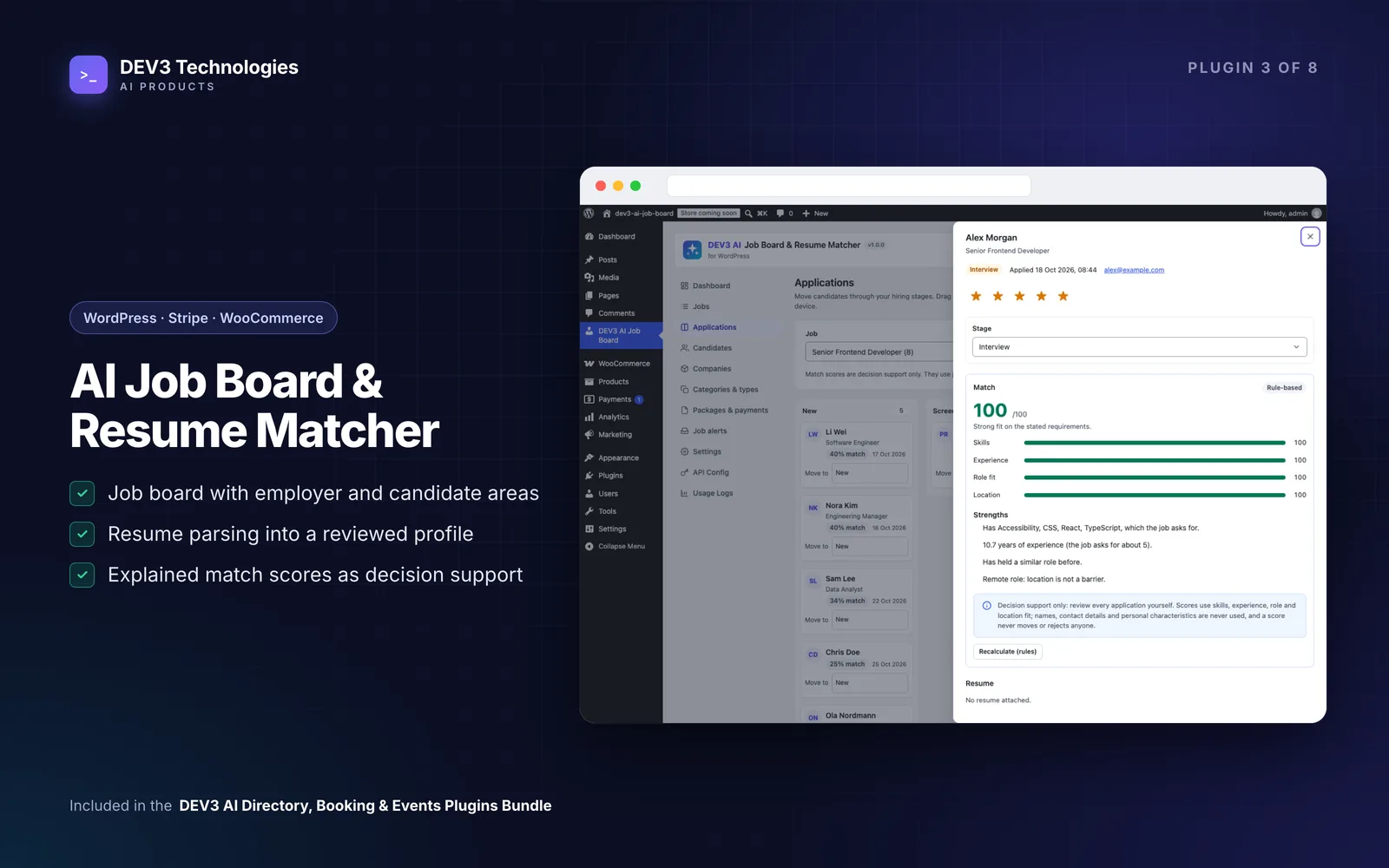
Applications is a Kanban board, in the admin and in each employer's dashboard, with the stages New, Screening, Interview, Offer, Hired and Not a fit. Drag cards on a computer or use Move to on a phone. Each application shows the profile, resume download, cover letter, a match score, a 5-star rating, private notes and a timeline, and moving a stage can email the candidate a status update. Candidates see neutral wording such as "In review" or "Not selected".
The match score combines skills, experience, role fit and location. With AI on, Gemini reviews an anonymised profile against the job and explains strengths and gaps. Protected attributes such as name, age, gender, nationality, religion or health are never used or sent, and scores never move, hide or reject a candidate. If you want employers to judge on skills first, turn on blind screening in Settings > Fairness: contact details stay hidden until the application reaches Interview. The case study explains how the fairness layers work.
Tips and pitfalls
- Test your schema. Live jobs print JobPosting JSON-LD for Google for Jobs. Check a few in Google's Rich Results Test, and encourage employers to fill in salary and location.
- Warn before expiry. A daily task expires jobs and warns employers a few days before, which prompts relisting.
- Use an SMTP plugin so alerts and stage emails arrive.
- Running a careers page instead? Create one company, post from the admin and turn off registration.
- AI is optional. Without a key, the writer gives a structured outline, the wording check uses a built-in list and scores are rule-based with written reasons. Set a monthly budget in API Config if you add one.
- Stay compliant. Employers remain responsible for local employment and anti-discrimination law.
Who this is for
Founders of niche or regional job boards, industry associations, recruitment agencies, universities running graduate boards and companies that want a proper careers section with a pipeline.
Get started
DEV3 AI Job Board & Resume Matcher is part of the DEV3 AI Directory, Booking & Events bundle. If your board needs custom integrations or a bespoke design, our web development team can build it with you.