A product options plugin makes a promise it can't see: the total on the product page is the total in the cart. The product page price is computed in the browser, as the shopper types an engraving or ticks gift wrap, and the cart price is computed in PHP, because a price posted from the browser can't be trusted. If the two disagree by a cent, the shopper sees one number and pays another. When we built DEV3 AI Product Options & Add-Ons for WooCommerce, the hardest version of this problem was price formulas: merchants write rules such as max(0, {len} - 10) * 2, and both sides have to agree on what that means. This post shows how we kept a formula language safe and identical in PHP and JavaScript, and how 127 shared fixtures from a third, independent implementation keep it that way.

A personalised product: every option's price is shown, and the total updates as the shopper chooses.
What it does and who it's for
DEV3 AI Product Options & Add-Ons adds extra fields to WooCommerce products, with prices, conditions and uploads, and carries them through the cart, checkout, orders and emails. It is built for:
- Personalisation shops that engrave, print or embroider and price per letter, per line or per word.
- Made-to-measure products such as curtains, signs or fabric, where width × height × a rate makes the price.
- Print and photo products that need a customer upload with type, size and minimum-resolution rules.
- Team and bulk orders where a repeater collects a name and number per player.
- Gift add-ons (wrapping, a message, a care kit) that only appear when the shopper asks for them.
- Stores with many similar products that want one global option set assigned by category or tag instead of per-product fields.
There are 25 field types in all, including swatches, image pickers, dates, colour pickers, sections and multi-step wizards. AI is optional; every field, condition, price type and upload works without a key.
How to set it up
- Install the plugin zip from the bundle download and activate it with WooCommerce active.
- Open DEV3 AI Product Options in the admin menu and click New option set.
- Add fields, set each field's price type, and choose under Assignment which categories, tags or products show the set.
- Check the Logic checker panel shows no problems, then publish the set.
- Optional: add a Google Gemini API key in API Config to turn on the DEV3 AI tools.
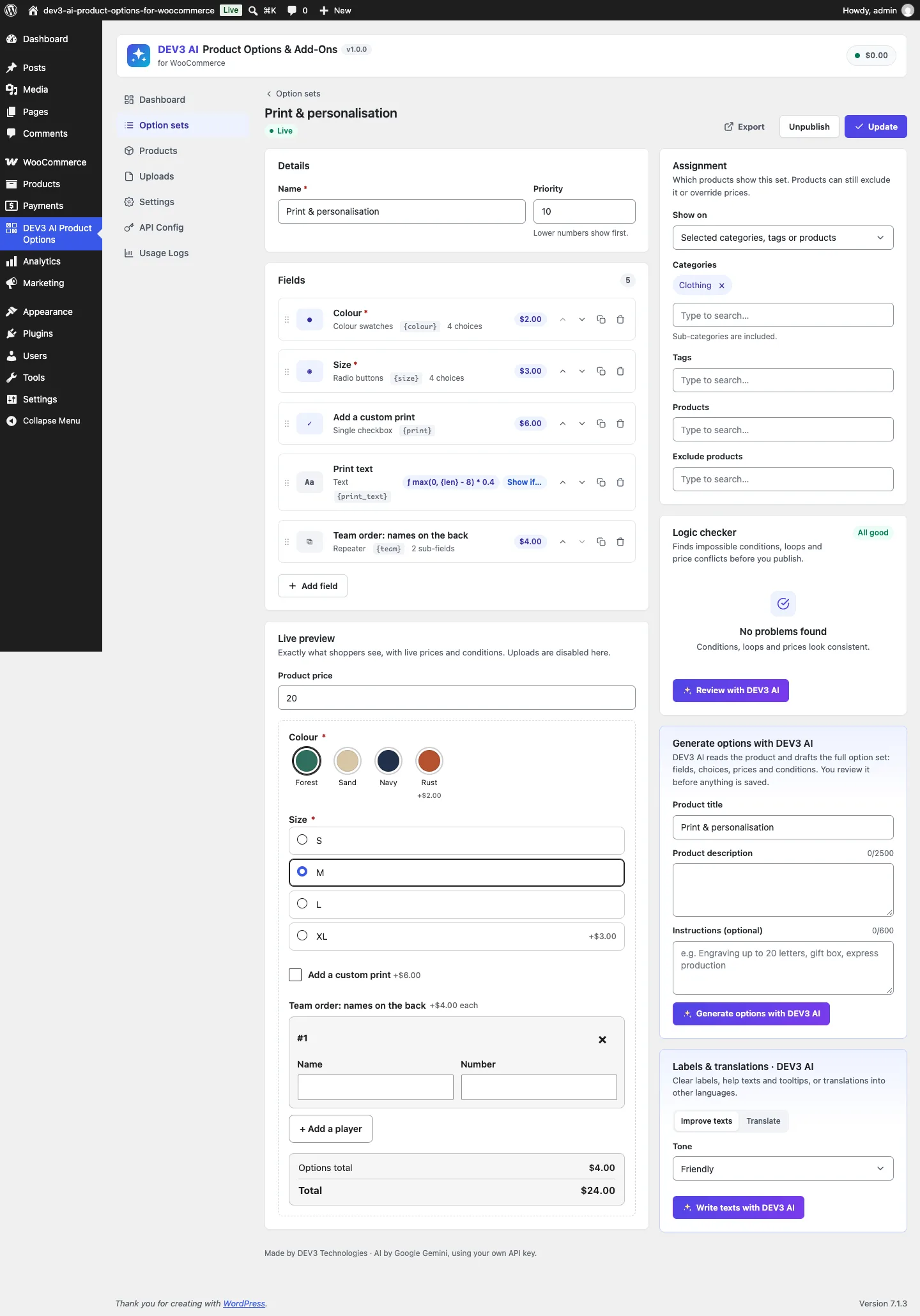
The builder: fields with price badges on the left, assignment and the logic checker on the right, and a live preview below.
How to use it
Build a set from a product description. In the builder, Generate options with DEV3 AI reads the product title, description and optional instructions ("engraving up to 20 letters, gift box, express production") and drafts the fields, choices, prices and conditions. The draft goes into the builder for review; nothing is saved until the merchant clicks Update.
Price by formula. In a field's Pricing tab, choose the Formula price type and write the rule, or describe it in plain words ("add 2 per letter over 10 letters") and click Write formula with DEV3 AI. A test bench under the formula lets the merchant type sample values for {price}, {value}, {len} and {qty} and see the result straight away.
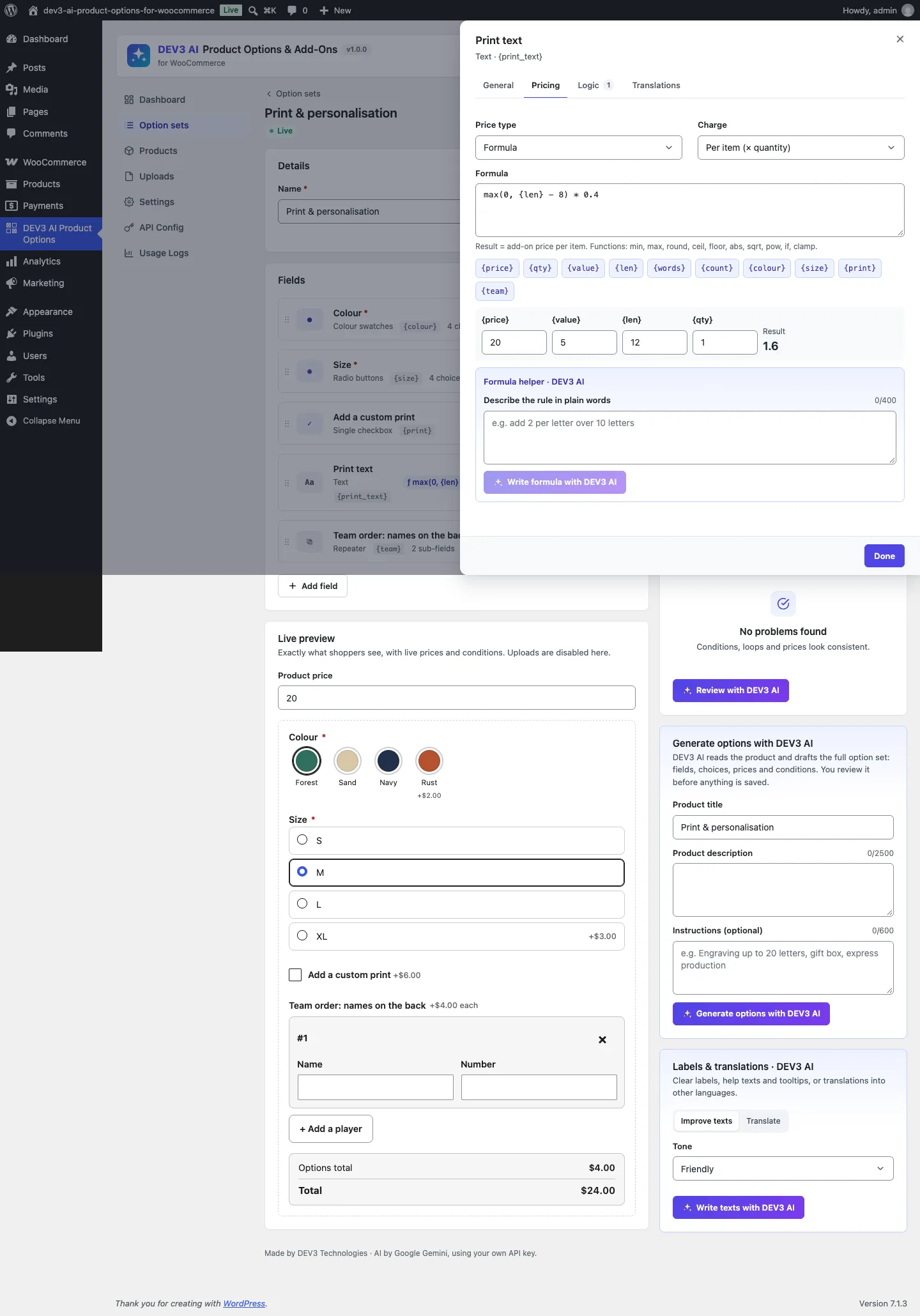
The formula max(0, {len} - 8) * 0.4 with 12 characters gives 1.6, checked in the test bench.
Build a step-by-step wizard. Step fields split long sets into pages, which works well on phones: upload a photo on step one, choose a style on step two. Conditions show or hide any field, section or step when all or any rules match.
Edit from the cart. The product link in the cart opens the product with the chosen options filled in, and saving replaces the cart line rather than adding a second one.

Step 1 of 2 on a phone: a photo upload with file rules, then styles priced as image choices.
Why not just eval?
The simplest formula engine in PHP is eval(), and in JavaScript new Function(). Both are out. A formula is typed by a shop manager, possibly suggested by an AI model, and evaluated on every cart calculation; letting it run arbitrary code would make a typo or a malicious import a remote-code-execution bug. Both suites start with tests that try exactly that:
$this->assertFalse( Formula::compile( 'system("ls")' )['ok'] );
$this->assertSame( 'func:system', Formula::compile( 'system(1)' )['error'] );
$this->assertSame( 'char:$', Formula::compile( '$x + 1' )['error'] );
$this->assertSame( 0.0, Formula::evaluate( 'phpinfo()', array() ) );
(from EngineTest::test_formula_rejects_unsafe_input)
Expression libraries exist for both languages, but two different libraries would never agree on every edge case: operator precedence, ^ associativity, unary minus, rounding, division by zero. So we wrote the grammar down once and implemented it twice.
One grammar, written down
The grammar sits at the top of includes/Engine/Formula.php, and src/shared/formula.js implements the same thing:
expr    := or
or      := and ( "||" and )*
and     := cmp ( "&&" cmp )*
cmp     := add ( ( "==" | "!=" | ">=" | "<=" | ">" | "<" ) add )?
add     := mul ( ( "+" | "-" ) mul )*
mul     := unary ( ( "*" | "/" | "%" ) unary )*
unary   := ( "-" | "+" | "!" ) unary | power
power   := primary ( "^" unary )?
primary := number | "{" name ( "." prop )? "}" | func "(" args ")" | "(" expr ")"
A few decisions in it are deliberate:
- Comparisons are non-associative.
1 < 2 < 3is a parse error, not a surprise. ^is right-associative and binds tighter than a unary minus on its left.2 ^ 3 ^ 2is 512, and-2 ^ 2is −4, as in maths and spreadsheet conventions.- Variables live in braces.
{len},{words},{qty},{price}, or another field's key such as{width}and{name.len}. A bare word can only be a function name, so the tokenizer never has to guess. - Functions are a whitelist with arity. Ten functions, each with a minimum and maximum argument count, checked at parse time.
The tokenizer rejects anything unknown
The PHP tokenizer walks the string character by character. Digits become numbers, {…} must match a strict pattern, letters become identifiers, and only a fixed set of operators is accepted. Anything else is an error with the offending character:
if ( '{' === $c ) {
	if ( ! preg_match( '/\G\{\s*([a-zA-Z_][a-zA-Z0-9_-]*)(?:\.([a-z]+))?\s*\}/', $src, $m, 0, $i ) ) {
		throw new \InvalidArgumentException( 'var' );
	}
	$tokens[] = array( 'var', strtolower( $m[1] ) . ( isset( $m[2] ) && '' !== $m[2] ? '.' . $m[2] : '' ) );
	$i       += strlen( $m[0] );
	continue;
}
// …numbers, identifiers, two-character operators…
if ( false !== strpos( '+-*/%^()<>,!', $c ) ) {
	$tokens[] = array( 'op', $c );
	++$i;
	continue;
}
throw new \InvalidArgumentException( 'char:' . $c );
(condensed from Formula::tokenize)
The parser builds a tiny AST
Each grammar level is a method, and the left-associative levels share one helper:
private function binary( array $ops, $next ) {
	$left = $this->$next();
	$op   = $this->peek_op( $ops );
	while ( null !== $op ) {
		++$this->pos;
		$left = array( 'bin', $op, $left, $this->$next() );
		$op   = $this->peek_op( $ops );
	}
	return $left;
}

private function parse_power() {
	$base = $this->parse_primary();
	if ( null !== $this->peek_op( array( '^' ) ) ) {
		++$this->pos;
		return array( 'bin', '^', $base, $this->parse_unary() );
	}
	return $base;
}
(from Formula::binary and Formula::parse_power)
The result is a nested array such as ['bin', '*', ['fn', 'max', [...]], ['num', 2]]. Compiled ASTs are memoised by source, so a cart with ten lines parses each formula once. Compilation also collects the variable names, which the logic checker and the AI formula helper use to reject references to fields that don't exist.
Total functions, not exceptions
The evaluator never throws. Division and modulo by zero return 0. pow and ^ return 0 when the result isn't finite. sqrt of a negative number is 0. Unknown variables are 0. A formula that fails to compile evaluates to 0 and is flagged in the builder. A price can be wrong because the merchant wrote the wrong rule, but it can never be NaN, INF or a fatal error halfway through a checkout.
Where PHP and JavaScript disagree
Writing the same parser twice is the easy part. The hard part is the places where the two runtimes behave differently, even with identical code.
Rounding. PHP's round( 1.005, 2 ) returns 1.01. In JavaScript, Math.round( 1.005 * 100 ) / 100 returns 1, because 1.005 is stored as 1.00499999… and the multiplication keeps the error. PHP pre-rounds internally; JavaScript doesn't. Our JS roundHalf shifts the decimal point through the string exponent instead of multiplying:
export function roundHalf( value, decimals = 0 ) {
	const d = Math.max( -6, Math.min( 6, Math.trunc( decimals ) ) );
	const sign = value < 0 ? -1 : 1;
	const abs = Math.abs( value );
	const shifted = Number( Math.round( Number( abs + 'e' + d ) ) + 'e' + -d );
	return Number.isFinite( shifted ) ? sign * shifted : 0;
}
(from src/shared/formula.js)
Number( '1.005e2' ) parses straight to 100.5, so the result is 1.01, as in PHP. Working on the absolute value and restoring the sign gives half-away-from-zero for negatives too (round(-2.5) is −3 on both sides), which matches PHP_ROUND_HALF_UP. Money totals also get a 1e-9 nudge in the rounding direction before the final rounding, in both engines.
String length. "Per letter" pricing needs a character count, and "Zoë" or an emoji must cost the same in both places. PHP uses mb_strlen(), JavaScript uses Array.from( text ).length. Both count Unicode code points; text.length in JavaScript would count UTF-16 units and charge two letters for an emoji. Spaces are removed before counting unless the merchant turns on "count spaces", on both sides.
Equality. == and != compare with a tolerance of 1e-9, so 0.1 + 0.2 == 0.3 is true in both runtimes instead of false in both.
Visibility. A hidden field must contribute nothing, including through other fields' formulas. Both engines compute visibility first (sections hide their children, steps behave like sections) and feed hidden fields into the variable table as empty values.
127 fixtures from a third implementation
Testing the PHP engine against the JS engine would only prove they share the same bugs. So the expected values come from somewhere else: tests/fixtures/generate-price-cases.py, an independent Python implementation of the pricing rules. Its docstring explains the key choice:
Formulas are NOT parsed here: each formula case carries a hand-written Python lambda with the same meaning, so the PHP and JS parsers are both checked against arithmetic written separately.
A fixture case looks like this in the generator:
fcase('formula letters over 10 (long)', 'max(0, {len} - 10) * 2', lambda v: max(0, v['len'] - 10) * 2, value='Happy Birthday Anna')
fcase('formula power right assoc', '2 ^ 3 ^ 2 / 100', lambda v: 2 ** (3 ** 2) / 100, value='x')
fcase('formula unary minus power', '10 - -2 ^ 2', lambda v: 10 - (-(2 ** 2)), value='x')
fcase('formula round negative half', 'round(-2.5) + 10', lambda v: -3 + 10, value='x')
(from tests/fixtures/generate-price-cases.py)
The generator writes 127 cases to price-cases.json, covering flat, percentage, per-character, per-unit and quantity-tier prices, formulas, conditions, sections, repeaters, "charge once" fees and quantities. Each case contains the full field definitions, the shopper's values, the base price and quantity, and the expected unit add-on, one-off fee and total.
Both suites load the same file. In Jest:
test.each( cases.map( ( c ) => [ c.name, c ] ) )( '%s', ( name, c ) => {
	const r = calculate( c.fields, c.values, c.base, c.qty );
	expect( r.unit ).toBeCloseTo( c.expect.unit, 6 );
	expect( r.once ).toBeCloseTo( c.expect.once, 6 );
	expect( r.total ).toBe( c.expect.total );
} );
(from tests/js/engine.test.js)
PHPUnit runs the same cases through a data provider and adds one more assertion: after the field list goes through the admin normaliser (the code that sanitises a saved option set), the total must still be identical. That catches a different class of bug, where the builder saves a setting the pricing engine needs and the sanitiser silently drops it.
Totals are compared exactly, not approximately. A total is what the shopper pays, and "close to" isn't good enough there.
The server still decides
Matching engines make the product page honest, but they don't make it authoritative. On add to cart, Cart_Handler ignores any price from the browser. It re-parses the posted values against the field definitions, runs conditions and validation, and stores a snapshot of the visible values only. Then, in woocommerce_before_calculate_totals, it recalculates every line with the PHP engine from the product's own base price:
$base   = $this->bases[ $oid ];
$result = self::price_for( $item, $base );
$product->set_price( max( 0, $base + $result['unit'] ) );
(condensed from Cart_Handler::apply_prices)
The same hook runs for the classic cart and for the block cart through the Store API. Different options make separate cart lines, editing from the cart replaces the line, and "order again" restores the snapshot. The cart screenshot shows the result: each option and its price, recalculated server-side.
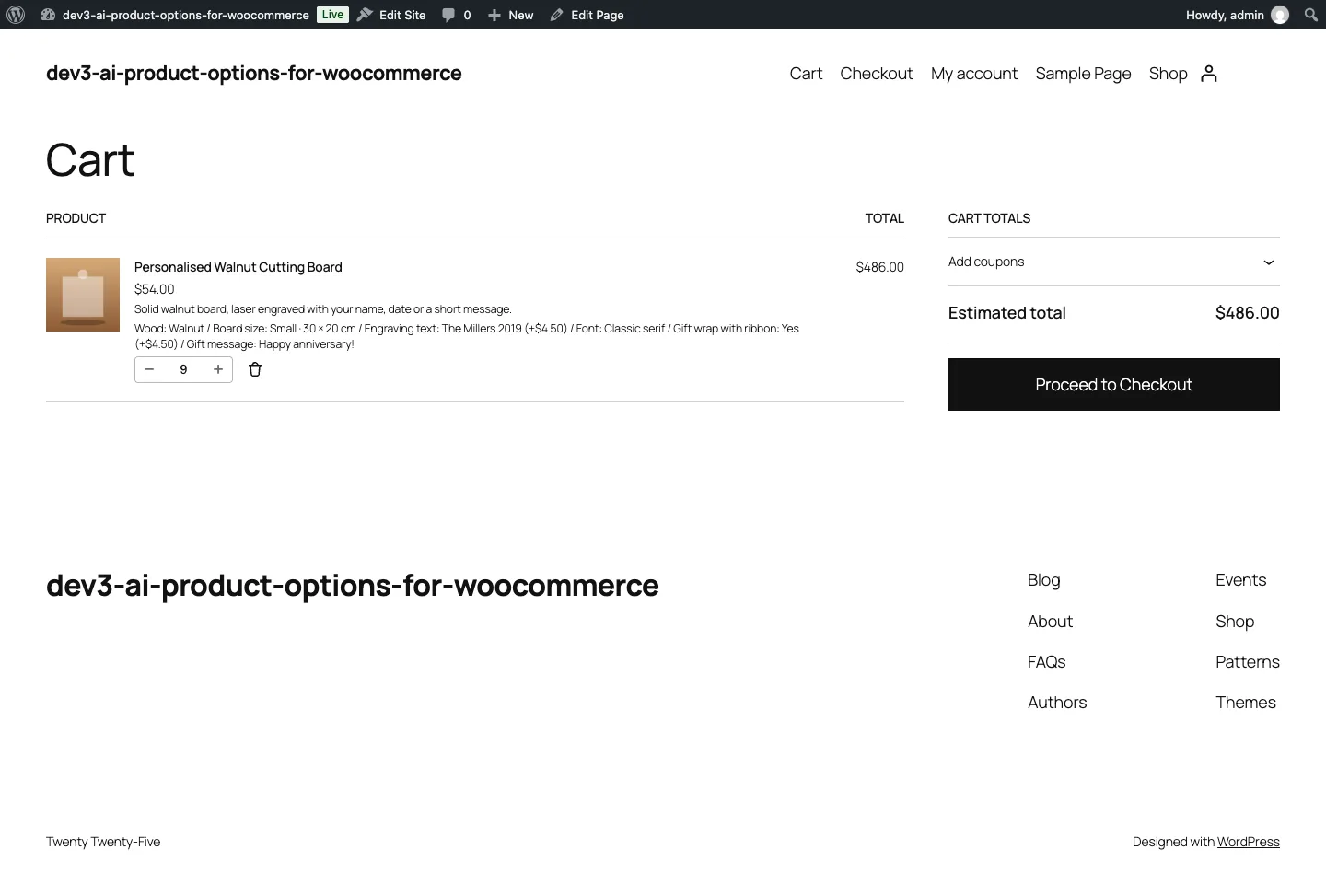
Options carried into the block cart. The line price comes from the server, not the browser.
Where AI fits
The DEV3 AI formula helper is where the parser earns its keep a second time. The model gets the field, the list of valid variables and the merchant's rule, and must return a formula. Ai_Features::formula_problem() compiles it with the same parser and checks every variable against the set's real field keys. If it fails, the error goes back to the model ("Your previous answer was rejected: Unknown variable {letters}") for one more attempt; if that fails too, the merchant is asked to rephrase. A formula that passes comes back with worked examples (0, 5, 10, 12 and 20 characters, for a text field), so the merchant can check the arithmetic before accepting it. The AI paths were tested with mocked API responses, including the retry loop; a run with a live key is still to come.

Illustration: options that each add to the price as they are chosen.
Trade-offs
- Two implementations to maintain. Any grammar change has to land in both files. The shared fixtures make a mismatch fail loudly, but they don't write the second implementation for you.
- A small language on purpose. No loops, no string functions, no user-defined variables. Merchants who need more can set a formula per field and reference other fields' values.
- Zero instead of errors at runtime. A broken formula prices as 0 rather than blocking checkout. The logic checker and the builder flag it before publishing, but a merchant who ignores the warning can undercharge.
- Theme coverage. The storefront has been checked on Twenty Twenty-Five, with the block cart and checkout; other themes use the same markup but have had less visual testing.
Conclusion
When the same number has to be computed in two runtimes, write the rules down as a grammar, implement them without eval, make every function total, and test both implementations against a third one that doesn't share their code. DEV3 AI Product Options & Add-Ons ships in the DEV3 AI WooCommerce Plugins Bundle on the DEV3 marketplace and is being prepared for CodeCanyon. The case study covers the builder, uploads and AI tools. If you need pricing logic that has to match everywhere, our custom software team can help.