A multi-vendor marketplace looks like many shops, but under the hood it is one WooCommerce install with one wp_posts table, one comments table and one orders store. Every vendor's products, reviews, order notes and photo uploads sit next to everyone else's. DEV3 AI Vendor Assistant for Dokan & WCFM adds a helper inside the vendor dashboard that writes listings, suggests prices and drafts buyer replies. The AI features were the easy part. The hard part was making sure a vendor can only ever reach their own data, on two marketplace plugins that disagree about what a vendor is. This post covers what the plugin does and how to use it, then walks through how it draws that boundary and how the tests check it.
 Illustration: many vendor stores on one marketplace, each with its own assistant and its own walls.
What it does and who it's for
- Marketplace owners on Dokan or WCFM who want to give vendors AI help without handing out an unmetered API key: monthly credits per vendor, a ledger with estimated cost, and per-vendor feature switches.
- Vendors who write thin listings. Photos and a few notes become a title, descriptions, attributes, tags, SEO text and alt text, created as a product they own.
- Vendors who guess at prices. Similar published listings on the marketplace give a range and a suggested price, using public prices and ratings only.
- Vendors with unanswered buyers. Reviews, order notes, WCFM inquiries and Dokan Pro support topics land in one inbox, with reply drafts sent back to the right place.
- Owners who need quality control. AI-written listings can be held for review or flagged for blocked words, with an AI policy check before approval.
- Sites without an AI key. Every feature has a basic (non-AI) helper that costs no credits.
How to set it up
- Make sure WooCommerce and either Dokan (Lite or Pro) or WCFM Frontend Manager with WCFM Marketplace are active.
- Upload and activate the plugin zip from the bundle. DEV3 AI Vendors appears in wp-admin, and its Dashboard shows the detected marketplace.
- Optional: add a Google Gemini API key in DEV3 AI Vendors → API Config and set a monthly budget for the site.
- In Settings, choose the features vendors get, the default monthly credits, the credits per feature and the moderation mode.
- Vendors now see AI Assistant in their dashboard menu. If the page says "not found", save Settings → Permalinks once.
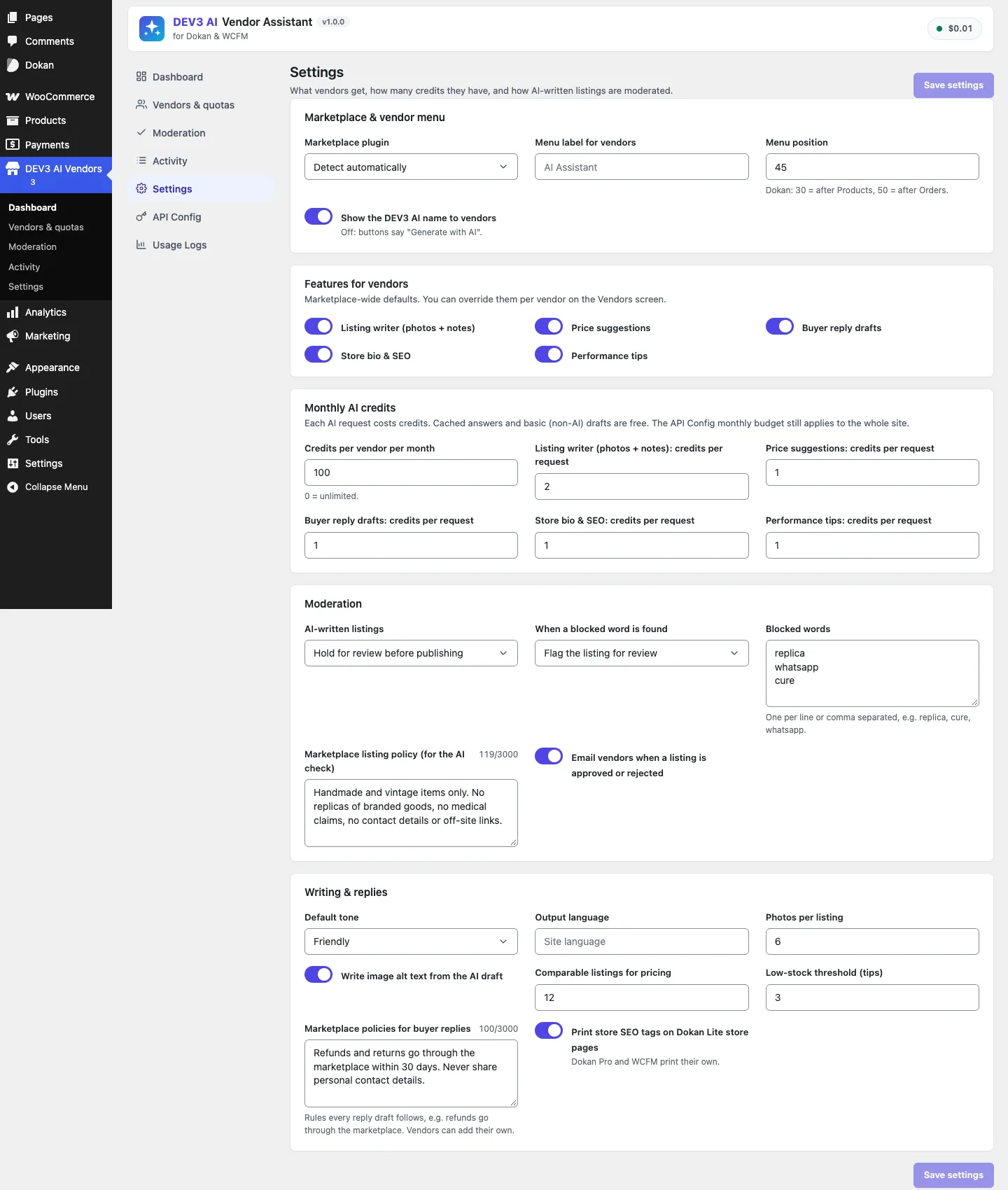 Settings: features, monthly credits per feature, moderation mode and blocked words in one screen.
How to use it
Write a listing
In the vendor dashboard, open AI Assistant → Listing writer, add up to six photos and a few notes, then click Generate with DEV3 AI or Basic draft (no AI). Review the draft, edit any field, and click Create listing. With moderation set to review, the product waits as pending until the owner approves it.
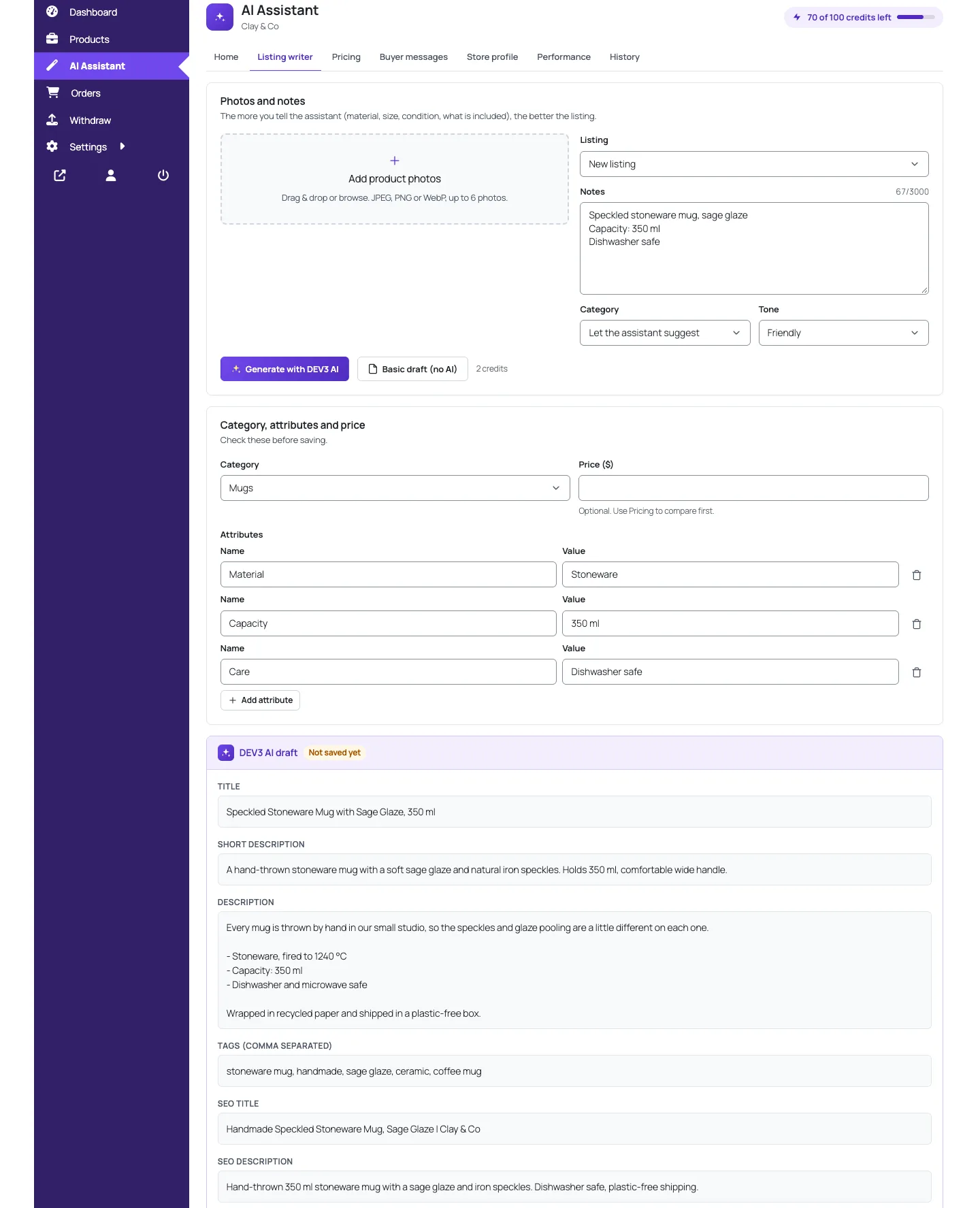 The listing writer: notes and photos in, a draft listing out, saved only when the vendor says so.
Price a product and answer buyers
In Pricing, pick a product and a goal (competitive, premium or quick sale) to see similar listings and a suggested price, then click Apply price. In Buyer messages, pick a review, order note or inquiry, generate a draft and click Send reply.
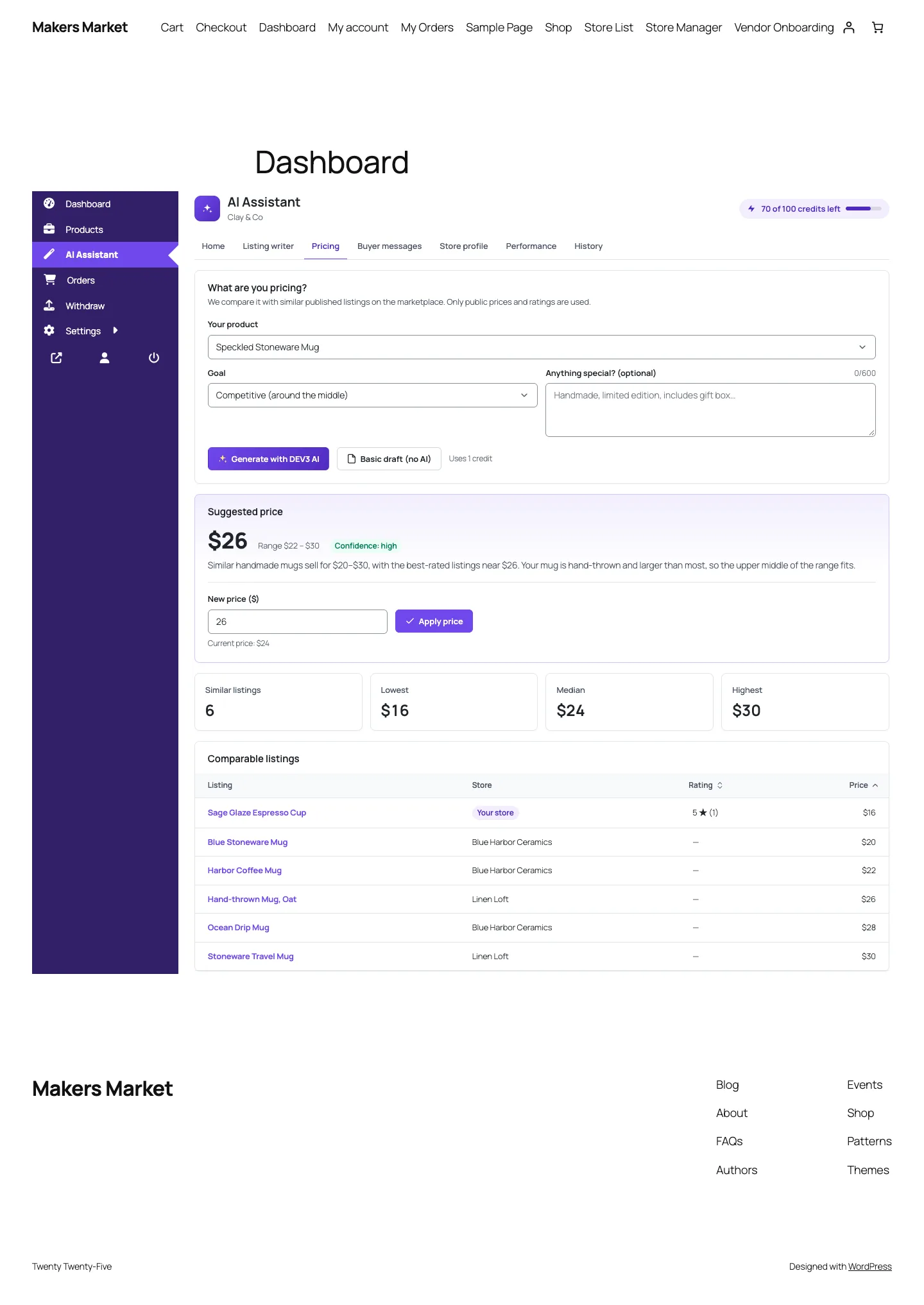 Price suggestions use other stores' public prices and ratings, and can only change the vendor's own product.
Manage vendors as the owner
In DEV3 AI Vendors → Vendors & quotas, switch the assistant off for a store, give it a custom credit limit, or set single features on or off. Review held listings in Moderation and follow usage in Activity.
Why an AI assistant raises the stakes
A normal vendor dashboard mostly reads data. An assistant takes IDs from the browser ("improve product 412", "reply to review 88", "use photo 1030"), reads the object, sends it to a model and often writes something back: a new price, a review reply, a customer note on an order. Every one of those IDs is an integer the browser controls. If any route trusts it, vendor A can price vendor B's mug at one dollar or post a reply under B's store name.
The AI adds a second channel for leaks. Whatever the server loads for context goes into a prompt, so a buyer's full name in an order note becomes part of a request to a third-party API even if it never reaches the screen.
So we set three rules before writing any feature:
- The vendor ID always comes from the session, never from the request.
- Every object ID from the request goes through one ownership check before it is read.
- Anything that is not the vendor's own is a 404, not a 403, so the API never confirms that an ID exists in another store.
Two marketplaces, one question: who is this user?
Dokan uses the seller role and dokan_is_user_seller(). WCFM uses the wcfm_vendor role, wcfm_is_vendor() and a _disable_vendor flag. Staff differ again: Dokan Pro gives staff a vendor_staff capability and a _vendor_id user meta, while WCFM Ultimate uses a shop_staff role and _wcfm_vendor.
Rather than scatter if dokan … else wcfm through the features, the plugin defines an abstract Adapter with the questions every feature needs answered, and one class per marketplace. The base class turns a user into the vendor they act for:
public function vendor_for_user( $user_id ) {
	$user_id = (int) $user_id;
	if ( $user_id <= 0 ) {
		return 0;
	}
	$staff_of = (int) $this->staff_vendor( $user_id );
	if ( $staff_of > 0 && $this->is_vendor( $staff_of ) ) {
		return $staff_of;
	}
	return $this->is_vendor( $user_id ) ? $user_id : 0;
}
(from Marketplace\Adapter)
Staff resolve to their vendor only if that vendor is still a vendor, so a staff account pointing at a disabled store resolves to nothing. Dokan's is_vendor() also returns false for anyone with vendor_staff, so staff can't be mistaken for the vendor of an empty store of their own.
Ownership questions live in the adapter too. A product belongs to its post author (the parent's author for a variation), and an order is visible to a vendor only if it contains at least one of their items:
public function owns_product( $vendor_id, $product_id ) {
	$vendor_id = (int) $vendor_id;
	return $vendor_id > 0 && $this->product_vendor( $product_id ) === $vendor_id;
}
(from Marketplace\Adapter)
For listing orders, each adapter reads its marketplace's own table (dokan_orders or wcfm_marketplace_orders) and falls back to scanning line items. The single-order check always uses line items, so a table that has drifted can hide an order from a vendor but can't grant access to one they have nothing in.
One gate for every route
All vendor routes are registered in one loop, and each gets the same permission callback with the feature it belongs to:
$vendor = Access::current_vendor();
if ( ! $vendor || ! Access::has_access( $vendor ) ) {
	return new \WP_Error( 'dev3va_forbidden', /* … */ array( 'status' => 403 ) );
}
if ( $feature && ! Features::enabled( $feature, $vendor ) ) {
	return new \WP_Error( 'dev3va_feature_off', /* … */ array( 'status' => 403 ) );
}
(condensed from Rest\Vendor_Controller::vendor_permission)
Before those lines the callback checks that the user is logged in (401) and that the REST nonce is valid (403); after them, POSTs are rate limited per user (30 a minute by default). Because routes come from a table, a route without this check can't be added. The shared core relaxes nonces only for public storefront endpoints, where page caches serve stale nonces to visitors. Vendor routes are always called from a logged-in dashboard, so the nonce stays required.
Ownership checks live in one class
Passing the gate only proves the user is some vendor. Every object the request names still has to be theirs, and every feature service asks Vendor\Access before loading anything:
public static function photo( $vendor_id, $attachment_id ) {
	$post = get_post( (int) $attachment_id );
	if ( ! $post || 'attachment' !== $post->post_type || ! wp_attachment_is_image( $post ) ) {
		return self::not_found();
	}
	$adapter = Manager::current();
	$owner   = $adapter ? $adapter->vendor_for_user( (int) $post->post_author ) : 0;
	if ( $owner !== (int) $vendor_id ) {
		return self::not_found();
	}
	return $post;
}
(condensed from Vendor\Access)
The photo check runs the uploader through vendor_for_user(), so a photo uploaded by a staff member counts as the vendor's, and one uploaded by another store's staff doesn't. That matters because the listing writer sends up to six photos to a vision model. Without the check, any attachment ID in the media library, including another vendor's unreleased product shots, could be sent off and attached to the wrong gallery.
The checks run again when a draft is applied. Listing_Writer::apply() loads the draft with the vendor's ID (Drafts::get() returns null for anyone else's draft), checks the target product again and drops any photo that is no longer the vendor's. Ownership can change between draft and apply, for example when a staff member is removed.
Messages: scope the query, not just the result
The inbox reads buyer-written text from four sources. Each implements a small contract in which every method takes the vendor ID, and where the data has a vendor column, the scope goes into the SQL:
$row = $wpdb->get_row( $wpdb->prepare( "SELECT * FROM {$table} WHERE ID = %d AND vendor_id = %d", (int) $id, (int) $vendor_id ), ARRAY_A );
(from Messages\Wcfm_Inquiries::get)
Each send() starts by calling its own get() with the vendor ID and returns the same 404 when it comes back empty. Reviews check that the reviewed product is the vendor's, order notes go through the order check, and the "already replied" flag only counts replies from users who resolve to that same vendor.
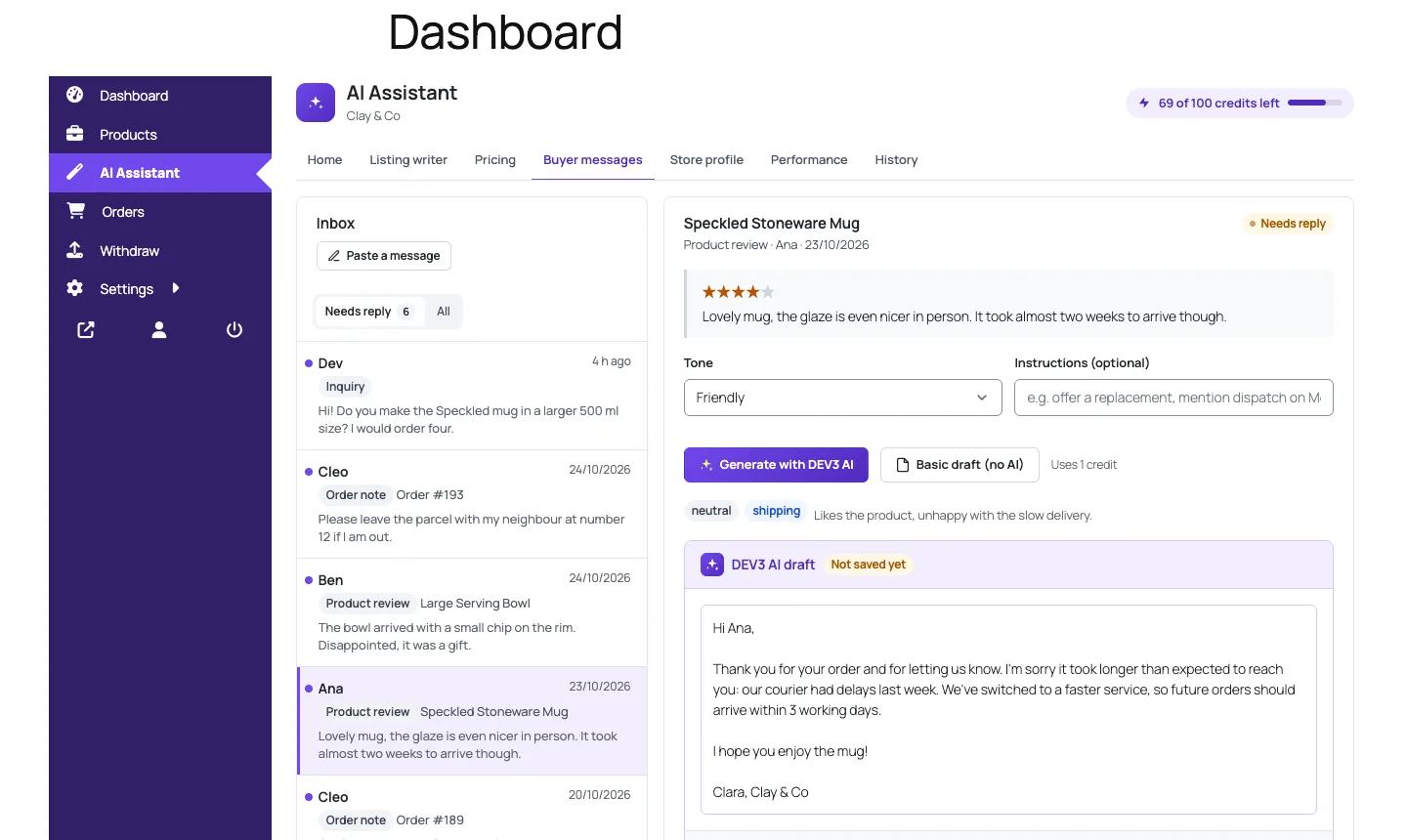 The inbox only lists messages on the vendor's own products and orders, with buyers shown by first name.
For the prompt, Text::first_name() cuts every buyer name to its first word and empties it if it looks like an email address. Order context holds the order number, status, date, shipping method and only the vendor's own line items. A buyer who ordered from three stores in one checkout appears to each vendor as an order with that vendor's items only, and no address or email reaches the model.
Cross-store data that is allowed
Price suggestions are the one feature that looks at other stores. Pricing::comparables() queries published, catalogue-visible products in the same category (or by title words) and returns a fixed set of public fields: title, price, average rating, review count, store name, URL and whether the listing is the vendor's own. Sales, costs and stock are never loaded. The AI's price is clamped to between half the lowest and one and a half times the highest comparable, and applying it goes back through Access::product().
Testing the boundary on both marketplaces
The PHPUnit suite has 59 tests. The bootstrap reads a DEV3VA_MARKETPLACE variable and loads either Dokan Lite or WCFM before the plugin, so the same tests check both adapters. Seven tests in IsolationTest attack the boundary directly:
- Logged out, customer, shop manager. Every vendor route returns 401 logged out and 403 for a customer. On Dokan, where a shop manager counts as a vendor, the test checks they see an empty product list.
- Nonce and switches. A missing nonce gets
dev3va_bad_nonce; access off returns 403; a per-vendor "on" override beats a global "off". - Products, photos and drafts. Vendor A tries six requests against B's product, photo and draft. All return 404, B's price is still 24, B's draft is still pending and A's history is empty.
- Messages. A sees an empty inbox and gets 404 drafting or sending replies to B's review and order note. B sees both messages, the buyer appears as "Ana", and her email is nowhere in the JSON.
- Staff and admin. Staff resolve to their vendor and can use their own uploads, but get 404 on other stores' products. Vendors get 403 on every admin route, including the one that would raise their own credit limit.
There are also 36 Jest tests for the vendor app, admin app and shared UI kit. Dokan Lite and WCFM were tested for real in wp-env. Dokan Pro and WCFM Ultimate parts, such as Dokan staff and support topics, were built against their documented hooks and tested with stubs. The AI paths ran against mocked Google Gemini API responses; a run with a live key is still to come.
 Illustration: one ownership check that every request passes through before it touches a vendor's data.
Trade-offs
- Dokan's idea of a vendor wins. Administrators and shop managers count as Dokan sellers, so they see the assistant as a store of their own, scoped to their own products.
- 404 everywhere costs some clarity. A mistyped ID gets the same answer as a probe of another store. That is the price of never confirming other stores' IDs.
- Line-item ownership is strict. If a product is reassigned to another vendor, its old orders move with it.
Conclusion
The pattern works for any plugin that adds write access on top of shared WordPress tables: take the actor from the session, put every ownership question behind one class, answer "not yours" with the same 404 as "doesn't exist", scope the SQL itself, and write tests that log in as the wrong user and try everything. The case study covers quotas and moderation in more detail. DEV3 AI Vendor Assistant ships in the DEV3 AI WooCommerce Plugins Bundle on the DEV3 marketplace and is being prepared for CodeCanyon.