
An AI writer that produces a perfect meta description is useless if it saves that description where no SEO plugin will ever read it. WooCommerce has no SEO title or meta description of its own: Yoast SEO, Rank Math and SEOPress each keep them in their own post meta keys, and a store without any of them has nowhere to put them at all. When we built DEV3 AI Bulk Product Writer & SEO, a plugin that writes titles, descriptions, SEO meta, tags and alt text for thousands of WooCommerce products, this turned out to be the problem that shaped the rest of the code. This article explains how one small field map decides where SEO fields are read, written, audited, conflict-checked and undone, and how the plugin keeps AI output inside search-friendly lengths.
What it does and who it's for
The plugin checks every product's copy and SEO, writes what is missing as drafts, and only changes a product when someone approves the draft. It suits:
- Stores with large catalogs that imported products from suppliers with empty or copied descriptions and need thousands of them written in one brand voice.
- SEO clean-ups where products have no meta description, SEO titles over 60 characters or no focus keyword, whether the store runs Yoast SEO, Rank Math, SEOPress or no SEO plugin at all.
- Accessibility work, filling alt text for product photos, optionally written from the photo itself.
- Agencies and teams that need a sign-off step: drafts can be reviewed, edited, exported to CSV and undone.
- Stores that don't want AI at all, using template mode to fill meta descriptions, SEO titles and alt text from product data.
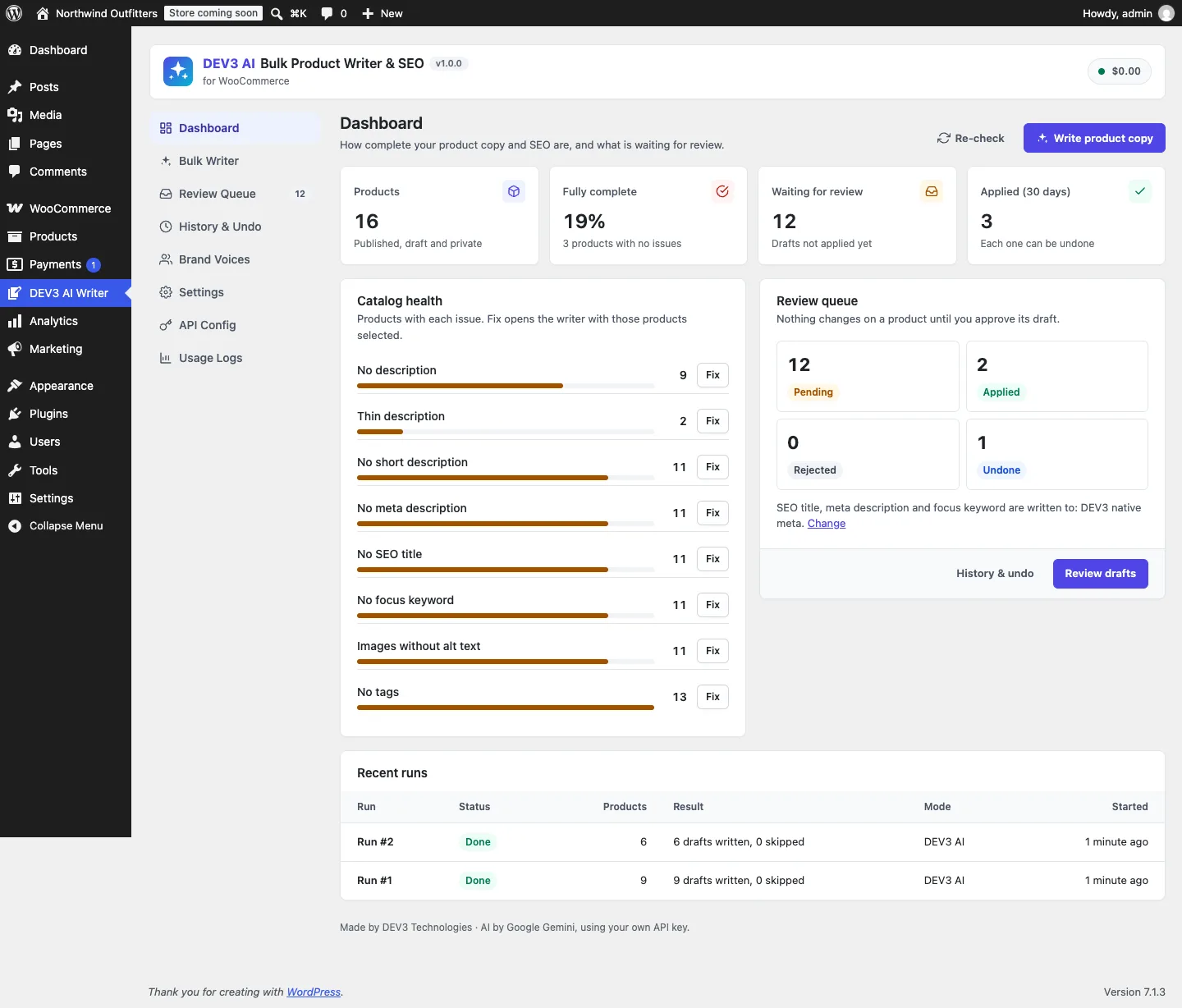 The dashboard counts products per issue; each Fix button opens the writer with those products selected.
How to set it up
- Upload the plugin zip in Plugins → Add New → Upload Plugin and activate it. The DEV3 AI Writer menu appears.
- Optional: add a Google Gemini API key in DEV3 AI Writer → API Config. Without one, templates, the audit, review and undo still work.
- In Settings, leave Write SEO fields to on Detect automatically (or force a target), choose how tags are applied and set the default fields.
- In Brand Voices, edit the default voice or let Learn my voice with DEV3 AI propose one from products you like.
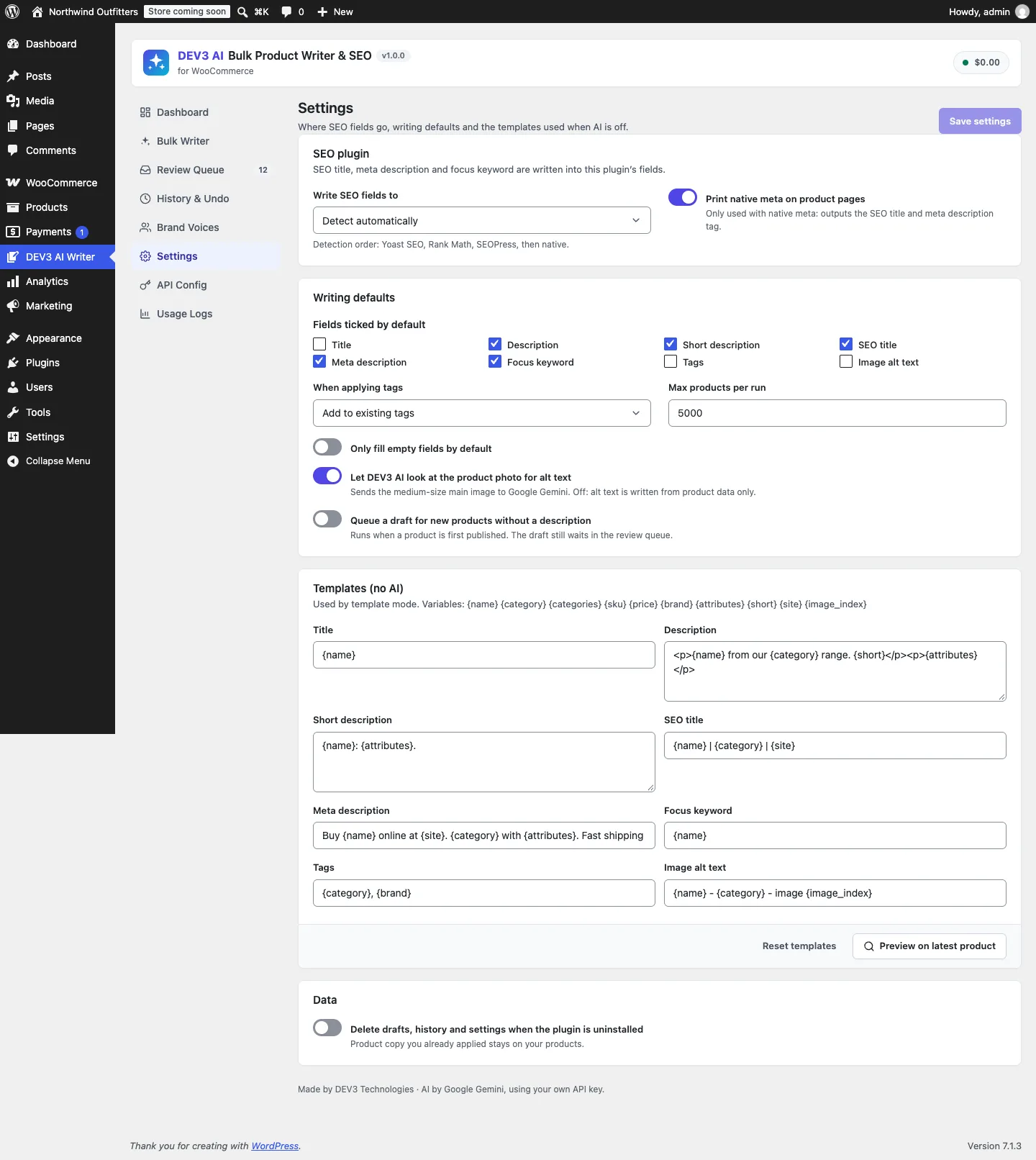 Settings decides where SEO fields go: detection order is Yoast SEO, Rank Math, SEOPress, then native meta.
How to use it
Write a batch. In Bulk Writer, filter by category, status or issue, select the products, tick the fields, pick a voice and start the run. It runs in the background and only creates drafts.
Review and apply. In Review Queue, open a draft to see a word diff per field, edit it or rewrite it with an instruction, then Approve & apply. Many drafts can be approved at once as a background job.
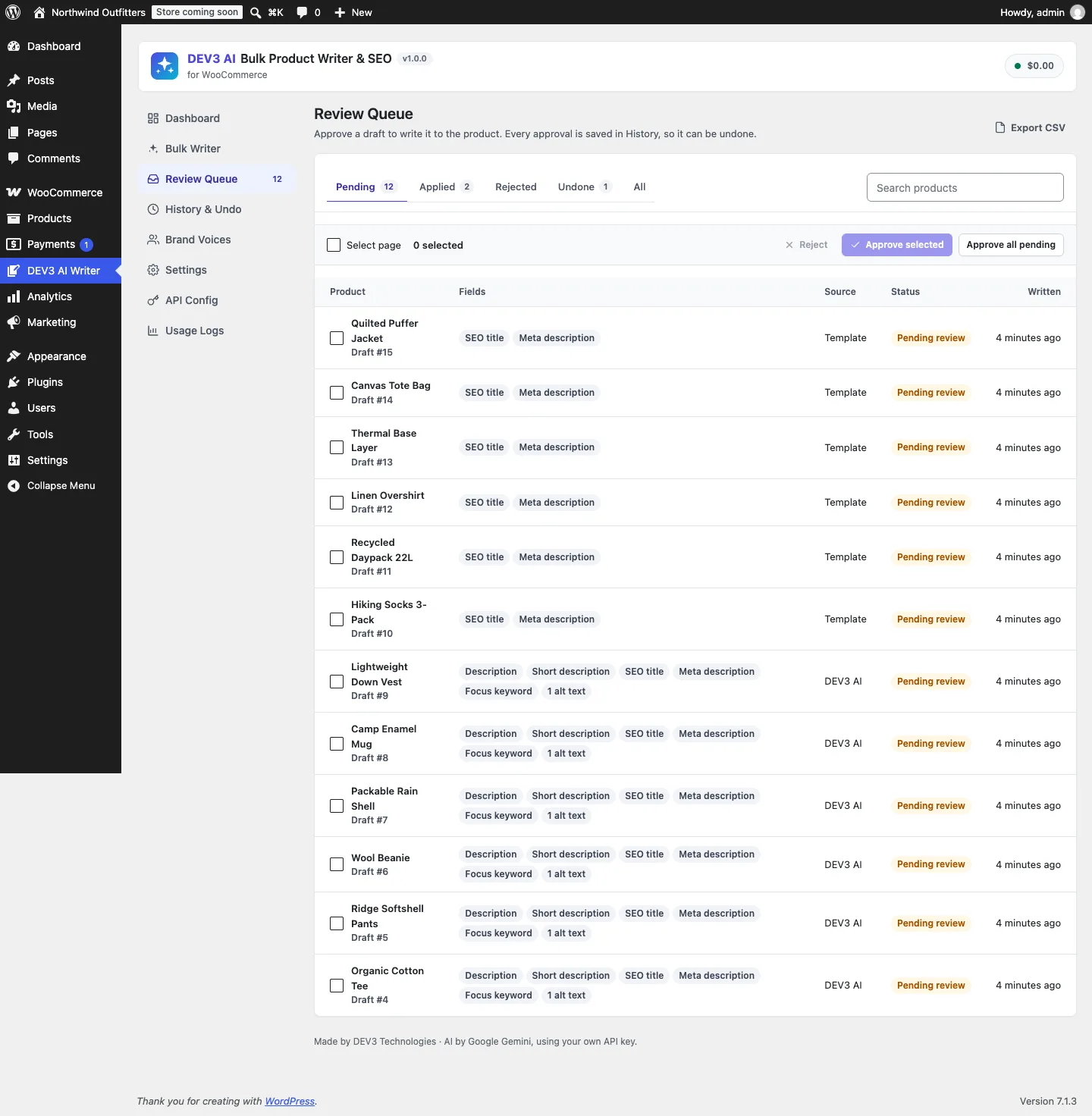 Every draft waits in the review queue; nothing reaches a product before approval.
Undo. History & Undo lists every approval. Undo one product or a whole batch; if the product was edited since, the plugin asks first.
The problem: four stores for the same three fields
The plugin treats every product as a set of concrete field keys: title, description, short_description, seo_title, meta_description, focus_keyword, tags, and one alt_<attachment id> key per product image (featured image first, then up to five gallery images). The first three live on the post. Tags are terms. Alt text lives on the attachment, not the product. The three SEO fields live wherever the store's SEO plugin keeps them.
A bulk writer has to agree with itself in at least five places about where those SEO values are:
- Reading the current value to show in the review diff and to snapshot in the draft.
- Writing the approved value.
- Auditing the catalog, so "No meta description" means no meta description in the plugin the store actually uses.
- Conflict checks, which compare the current value with the draft's snapshot before overwriting.
- Undo, which restores the value from before the approval.
If any of these used a different key from the others, the result would be quietly wrong. Picture an audit that counts Yoast keys while the writer saves to Rank Math keys: the dashboard would report 400 products missing meta descriptions forever, however many drafts you approved.
One map, resolved once
 Illustration: one map routes the three SEO fields to whichever SEO plugin is active.
Seo_Target is the single source of truth. It holds a constant with the meta keys for each target:
const KEYS = array(
	'yoast'    => array(
		'seo_title'        => '_yoast_wpseo_title',
		'meta_description' => '_yoast_wpseo_metadesc',
		'focus_keyword'    => '_yoast_wpseo_focuskw',
	),
	'rankmath' => array(
		'seo_title'        => 'rank_math_title',
		'meta_description' => 'rank_math_description',
		'focus_keyword'    => 'rank_math_focus_keyword',
	),
	'seopress' => array(
		'seo_title'        => '_seopress_titles_title',
		'meta_description' => '_seopress_titles_desc',
		'focus_keyword'    => '_seopress_analysis_target_kw',
	),
	'native'   => array(
		'seo_title'        => '_dev3bw_seo_title',
		'meta_description' => '_dev3bw_meta_description',
		'focus_keyword'    => '_dev3bw_focus_keyword',
	),
);
(from Seo_Target)
The active target comes from a setting, Write SEO fields to, which defaults to Detect automatically. Detection checks for Yoast SEO, then Rank Math, then SEOPress, using each plugin's version constant or main class, and falls back to native:
public static function target() {
	$setting = (string) Settings::get( 'seo_target', 'auto' );
	$target  = isset( self::KEYS[ $setting ] ) ? $setting : self::detect();
	$target  = (string) apply_filters( 'dev3bw_seo_target', $target );
	return isset( self::KEYS[ $target ] ) ? $target : 'native';
}
(condensed from Seo_Target::target)
Two details matter. The filter result is validated against the map, so a typo in a site's custom code falls back to native meta instead of writing to an empty key. And every other class asks Seo_Target::meta_key( $field ) rather than knowing any key itself. Seo_Target::get() and Seo_Target::set() are three lines each, and set() deletes the meta when the value is empty. That last part is what makes undo exact: restoring "there was no meta description" removes the key instead of leaving an empty string that some SEO plugins treat differently from a missing one.
Why there is a "native" target
A surprising number of small WooCommerce stores run no SEO plugin. For them, writing SEO fields to Yoast's keys would be pointless, so the plugin stores them under its own _dev3bw_ keys and prints them itself. Native_Meta hooks document_title_parts to replace the title and wp_head to print an escaped <meta name="description">, but only on single product pages and only when the target is native:
private function product_id() {
	if ( 'native' !== Seo_Target::target() || ! Settings::get( 'native_meta', true ) || ! is_singular( 'product' ) ) {
		return 0;
	}
	return (int) get_queried_object_id();
}
(from Native_Meta)
The moment a store installs Yoast SEO, detection switches the target and the native output stops, so a product page never ends up with two meta descriptions. A PHPUnit test covers exactly that: it prints the description for a product page with native meta, checks that quotes are escaped, then switches the target to Yoast through the filter and asserts the output is empty.
Reads and writes through one field layer
Fields::get() and Fields::set() are the only code that touches product data, and they route each key to its real home:
foreach ( $values as $key => $value ) {
	if ( in_array( $key, array( 'seo_title', 'meta_description', 'focus_keyword' ), true ) ) {
		Seo_Target::set( $product_id, $key, (string) $value );
	} elseif ( preg_match( '/^alt_(\d+)$/', $key, $m ) ) {
		$attachment = (int) $m[1];
		if ( 'attachment' === get_post_type( $attachment ) ) {
			update_post_meta( $attachment, '_wp_attachment_image_alt', (string) $value );
		}
	}
}
// ... tags via wp_set_post_terms(), then title/description/short description via the WC_Product object and save().
(condensed from Fields::set)
The order is deliberate, and the code comment says why: SEO meta and alt text are written before the product save, because that save fires save_post, which SEO plugins use to refresh their own indexes and analysis. If the meta were written afterwards, an SEO plugin could index the product with the old meta description and keep it until the next save.
Title, description and short description go through the WooCommerce product object (set_name(), set_description(), set_short_description(), save()) rather than raw post updates, so WooCommerce's own hooks and caches behave as they would for a manual edit.
The audit speaks the same language, in SQL
Catalog health has to work on thousands of products, so loading every product to check it is not an option. Audit defines ten weighted issues for a per-product score from 100 down to 0, and eight of them also exist as SQL conditions against the posts table. The SEO ones are built from the same map:
$has_meta = static function ( $key ) use ( $wpdb, $p ) {
	return $wpdb->prepare( "EXISTS (SELECT 1 FROM {$wpdb->postmeta} dm WHERE dm.post_id = {$p}.ID AND dm.meta_key = %s AND dm.meta_value <> '')", $key );
};
switch ( $issue ) {
	case 'seo_title_missing':
		return 'NOT ' . $has_meta( Seo_Target::meta_key( 'seo_title' ) );
	case 'meta_missing':
		return 'NOT ' . $has_meta( Seo_Target::meta_key( 'meta_description' ) );
	case 'keyword_missing':
		return 'NOT ' . $has_meta( Seo_Target::meta_key( 'focus_keyword' ) );
	// ...
}
(condensed from Audit::condition)
These conditions drive both the dashboard counts and the Bulk Writer's issue filter, so clicking Fix next to "No meta description" selects exactly the products the dashboard counted, in whichever SEO plugin the store uses. Alt text gets a nested EXISTS that checks the featured image's attachment meta, and "no tags" joins the term tables.
Two checks stay in PHP only: "SEO title over 60 characters" and "meta description not 120–160 characters". They lower a product's score and show as badges in the product table, but they are not offered as SQL filters. Counting characters is simple and exact in PHP with mb_strlen(); keeping only presence checks in SQL means every SQL filter has a PHP twin that the tests can compare it with.
That agreement between PHP and SQL is the kind of thing that drifts, so it has its own test. test_audit_issues_score_and_sql_counts_agree creates a bare product and a complete one, checks the PHP issue list for each, then loops over every filterable issue and asserts that the SQL count and the product filter return exactly the products the PHP check flagged.
Lengths: four layers, each with a job
Search engines truncate titles at around 60 characters and descriptions at around 155–160. A language model asked for "max 60 characters" will sometimes return 64. The plugin handles this with four layers, each looser than the one before it, so a slightly long answer is kept and flagged rather than thrown away:
| Layer | SEO title | Meta description | What happens |
|---|---|---|---|
| Prompt rule | max 60, starts with the focus keyword | 120–155, includes the keyword | The model aims for the target |
| Response schema | maxLength 70 |
maxLength 170 |
Generation stops at a hard ceiling |
Fields::clean() |
cut at 70 | cut at 170 | Nothing longer is ever stored |
| Audit | flags over 60 | flags outside 120–160 | The merchant sees it in review |
The prompt rules are plain lines built per requested field:
case 'seo_title':
	$lines[] = '- seo_title: max 60 characters, starts with the focus keyword, no store name.';
	break;
case 'meta_description':
	$lines[] = '- meta_description: 120-155 characters, includes the focus keyword and a soft call to action; plain text.';
	break;
(from Prompt_Library::field_rules)
The schema caps are deliberately 10 characters above the targets. Setting maxLength to exactly 60 would make the model cut a title mid-word at the ceiling; a little headroom lets it finish the phrase, and the review screen then shows a character count on each field so the merchant can trim it. Every string in the schema carries a maxLength, including tags (8 items of 40 characters) and alt text (125 characters per image), which also protects against the runaway repetition that fast models sometimes produce in structured output.
Fields::clean() is the last line, and it runs on every value: AI output, template output and the merchant's own inline edits. SEO fields go through sanitize_text_field() and a multibyte cut; descriptions go through wp_kses_post(); tags are split, trimmed, de-duplicated case-insensitively and capped at 15 names of 50 characters.
Conflicts and undo use the same keys
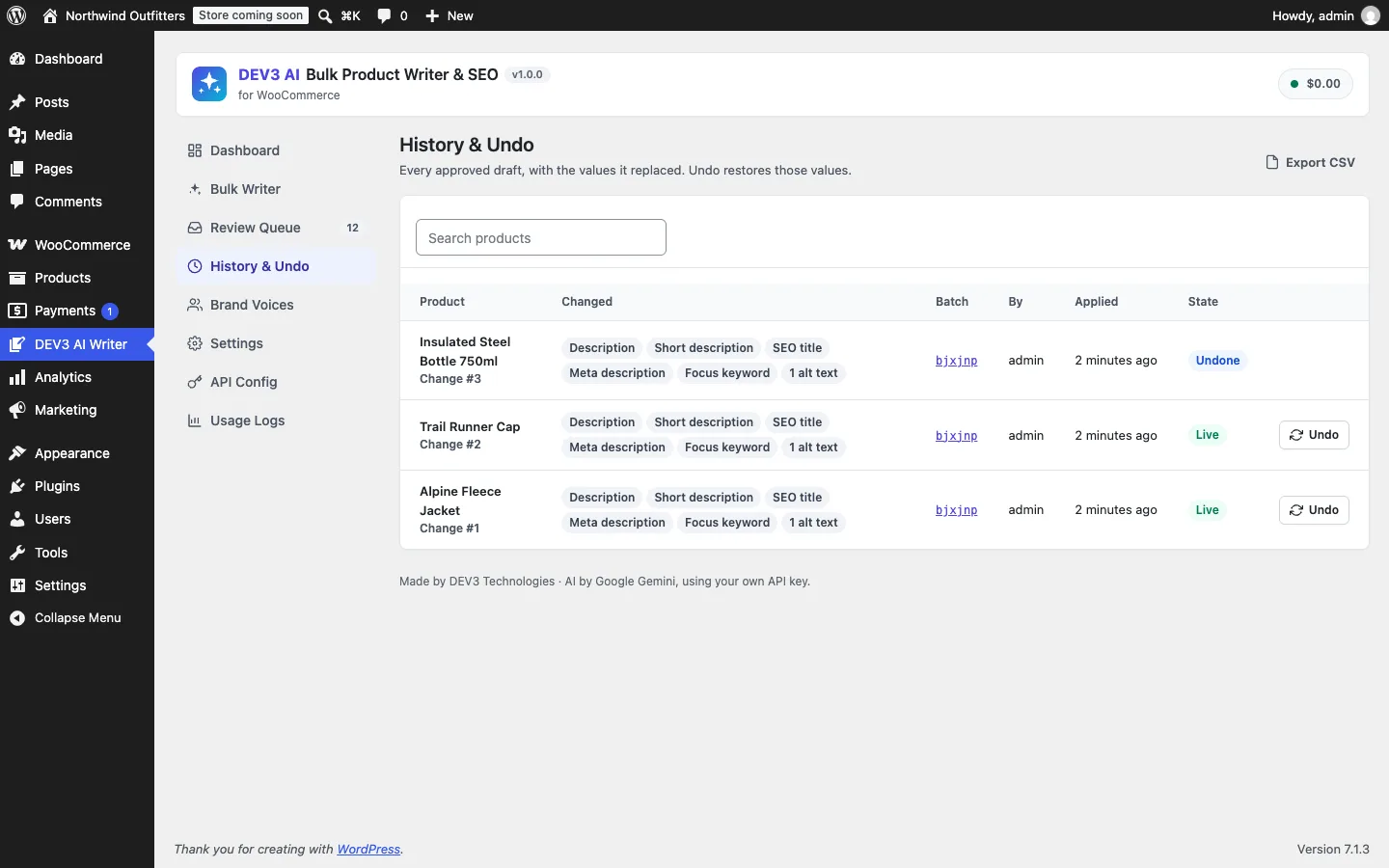 History & Undo: each approval keeps its before and after values, so it can be restored.
Every draft stores a snapshot, original, of the values it is replacing, read through Fields::get() and therefore through Seo_Target. When the merchant approves, Applier::conflicts() reads the current values again and compares them with the snapshot after normalising whitespace. Tags are compared as a sorted, lowercased set, so "Winter, merino" and "merino, winter" count as the same. If anything changed, for example a colleague edited the Yoast meta description by hand while the run was in the queue, the approve returns HTTP 409 with the list of conflicting fields and the UI asks before overwriting.
Undo is the mirror image. A revision stores before and after per field. Undo first checks that the product still holds the after values, refuses with 409 if someone edited it since, and otherwise writes before back through the same Fields::set(), which routes the SEO keys through the map again.
Because of this, a store that switches SEO plugins does not silently undo into the wrong place: the revision holds field names, not meta keys, and the current target decides where they go. The trade-off is that undo after a switch restores the old values into the new plugin's fields, which is what a merchant would usually expect. We decided that was better than writing to keys of a plugin that is no longer active.
The test suite pins this down for Yoast: test_alt_text_and_yoast_target forces the Yoast target, approves a draft with alt text, a meta description and a focus keyword, and asserts the values land in _wp_attachment_image_alt, _yoast_wpseo_metadesc and _yoast_wpseo_focuskw, that the native key stays empty, and that undo clears them again.
Limits and what is still open
The map covers plugins that keep SEO data in post meta. AIOSEO keeps its data in a separate table, so it is not supported yet; it is planned for a later version along with per-language runs for multilingual stores. The Yoast mapping has its own PHPUnit test; Rank Math and SEOPress go through the same code path with their documented meta keys, without dedicated tests of their own. The AI paths (bulk writing, rewrite with an instruction and learn my voice) were tested with mocked API responses; a run with a live key is the next step.
Results
The plugin passes 51 PHPUnit tests in wp-env and 37 Jest tests, with PHP_CodeSniffer at 0 errors and 0 warnings. The tests cover runs that leave products untouched, conflicts on approve and undo, exact tag-set restores, batch undo over REST, background apply jobs that skip conflicting drafts, native meta output and the PHP and SQL audit agreeing issue by issue.
DEV3 AI Bulk Product Writer & SEO ships in the DEV3 AI WooCommerce Plugins Bundle on the DEV3 marketplace, alongside 20 other WooCommerce plugins, and is being prepared for CodeCanyon. For the review queue, brand voices and background jobs, read the full case study.