"Returns are a mess of emails, photos and spreadsheets"
Ask most WooCommerce store owners how returns work and you'll hear something like this: the customer emails, someone checks the order date by hand, asks for a photo, waits, works out what's still refundable, issues a refund in WooCommerce, then forgets to put the item back in stock. Store credit lives in a spreadsheet. And when someone asks "why are people returning this product?", nobody really knows.
Returns are part of selling online. What hurts is handling them without a system. This guide shows how to set one up with DEV3 AI Returns & RMA Manager for WooCommerce: a self-service portal for shoppers, a queue for your team, and reasons data you can act on.
What good looks like
A healthy returns process:
- Lets customers start a return themselves, logged in or as a guest, without emailing you.
- Applies your policy automatically: the return window, which items can't be returned, which resolutions are allowed.
- Collects what you need up front: a reason per item, condition, photos where they matter.
- Gives the shopper a tracking page, so they stop asking "any update?".
- Keeps your team in one queue, with refunds, exchanges, store credit and coupons a click away.
- Never moves money on its own. A person confirms every refund.
- Shows why things come back, by reason, category and product.
Step-by-step setup
1. Install and check the portal page
Upload the zip in Plugins › Add New › Upload Plugin and activate it (WordPress 6.0+, PHP 7.4+, WooCommerce 8.0+). Activation creates a Returns page with the portal block and adds My Account › Returns. If the account link gives a 404, visit Settings › Permalinks and click Save once. Then open DEV3 AI Returns in the admin menu.
2. Add your return address and instructions
In Settings, enter the return address and instructions. They're shown in the portal and in the approval email, so write them the way you'd explain them to a customer on the phone.
3. Write your returns policy as rules
Go to Rules & reasons:
- Return window: days after the order was completed, paid or placed (30 days from completion by default).
- Eligible statuses: which order statuses can be returned (Completed by default).
- Resolutions: which of Refund, Exchange, Store credit and Coupon shoppers may ask for.
- Sale items: optionally block lines bought below the regular price.
- Category and product rules: for example "Underwear: not returnable", a longer window for a category, or credit-only for clearance items. Product rules beat category rules, and the first matching rule wins.
For one-off exceptions, each product's Product data › General tab has "Return window (days)" and "Not returnable" fields that override every rule.
4. Set up reasons that tell you something
Each reason has a label, an analytics category (defect, damaged, wrong item, not as described, size/fit, changed mind, late, other) and a "photo required" option. Require photos for "Damaged" and "Defect", not for "Changed my mind". Reorder reasons with the arrows so the common ones are first.
5. Make the portal easy to find
Customers already see My Account › Returns and a "Return items" button on their orders. Add a link to the Returns page in your footer and order emails for guests, who look up their order by order number and billing email. You can embed the portal elsewhere with the Returns portal block or the shortcode:
[dev3rm_returns_portal]
The form only shows returnable quantities, minus anything refunded or already in a return, and only offers resolutions allowed for every selected item. Each request gets an RMA number and a private link where the shopper follows progress, downloads the label, enters tracking, messages you or cancels while it's pending.
6. Work the queue
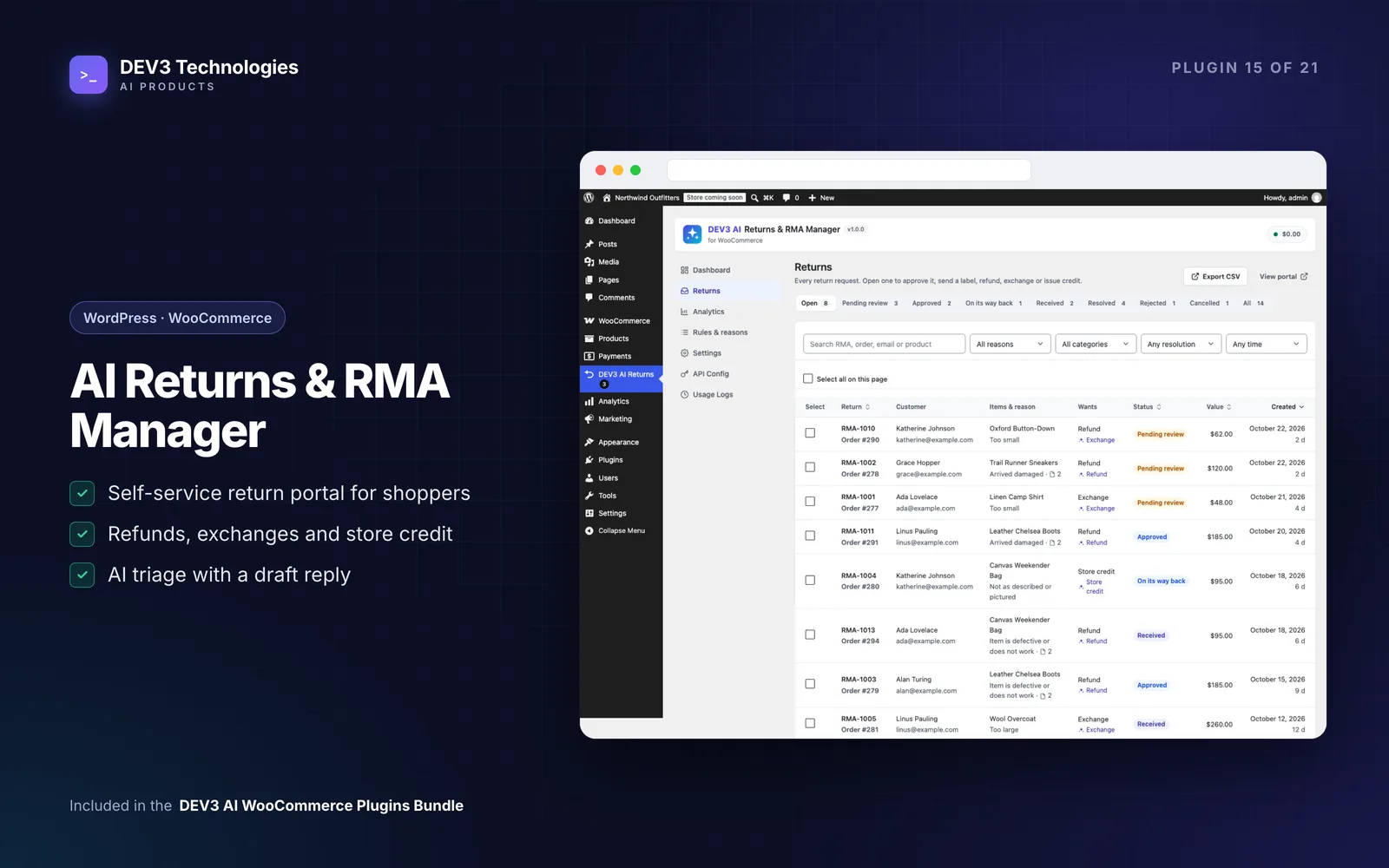
The Returns queue has status tabs with counts, search by RMA, order, email or product, filters by reason, category, requested resolution and period, bulk actions and CSV export. Requests move through Pending review → Approved → On its way back → Received → Resolved, plus Rejected and Cancelled. Every change is on the timeline and can email the shopper with a note.
Open a request to see the items, photos, the customer's order and history, then resolve it:
- Refund through the WooCommerce refund API: pick quantities, edit the amount (capped at what's still refundable), refund through the gateway if it supports it, and restock.
- Exchange creates a new zero-cost order for the same product, another size or colour, or any product you search for.
- Store credit creates a balance code for the shopper's email; the unused part carries over to later orders.
- Coupon creates a one-time goodwill coupon for the shopper's email.
Upload a PDF, PNG or JPG return label with carrier and tracking number; the shopper is emailed and downloads it through a link that expires.
7. Add DEV3 AI triage (optional)
Add a Google Gemini key under API Config and new requests are triaged in the background. DEV3 AI classifies the reason with a summary and urgency, looks at up to three photos to say whether they support the claim, and suggests a resolution with a draft reply. Use suggestion only pre-fills the dialog; you still confirm. The reply writer drafts messages, and Return insights produces a report on themes and problem products.
Tips and pitfalls
- Refunds are never automatic. Every refund, exchange, credit or coupon needs an admin click, even with AI on.
- Gateway can't refund? Untick "Refund via the payment gateway". WooCommerce records a manual refund and you pay the shopper yourself.
- Restock on receipt. Marking an item received can restock it, once, so stock stays accurate.
- Nginx hosts need a deny rule for the private uploads folder; the docs give the exact line. Photos are re-encoded to strip EXIF and GPS data.
- Use the emails. Three emails appear under WooCommerce › Settings › Emails, so you can edit subjects and wording there.
- Read the analytics monthly. Analytics shows the return rate, value requested and refunded, reasons, categories, most returned products and the resolution mix. A product with a high "not as described" share usually needs a better description, not a better returns process.
Who it's for
Fashion and footwear stores dealing with size and fit returns, electronics and homeware stores that need photo evidence for damage claims, and any shop that wants to offer store credit or exchanges instead of defaulting to refunds. Read the case study for how quantities, partial refunds and credit balances are kept consistent.
Wrapping up
A returns portal with clear rules saves your team time and gives customers a predictable experience, and the reasons data helps you sell products that come back less often. DEV3 AI Returns & RMA Manager ships in the DEV3 AI WooCommerce Plugins Bundle; if your returns process needs custom integrations, our web development team can help.