"We added custom fields, and now 400 posts need filling in"
Advanced Custom Fields is how a lot of WordPress sites turn plain posts into structured data: a recipe with prep time and servings, a property with bedrooms and price, a product with weight and dimensions, an event with a date and a venue. The trouble starts when the fields arrive after the content. The information is already in the posts, written as paragraphs, and somebody now has to read each one and copy values into the right boxes.
That job is slow, boring and easy to get wrong. A choice field gets a value it does not accept. A date ends up in the wrong format. A "related posts" field points at the wrong article. This guide shows how to fill ACF fields from the content you already have, one post or hundreds, with review before anything is saved, using DEV3 AI Field Filler for ACF.
What a good bulk fill looks like
- Values match the field. Choices come only from the field's own options, numbers respect min, max and step, dates use ACF's format.
- Your own validation still runs. If you have custom rules, they apply to filled values too.
- Links point at real things. Relationship, taxonomy, user and image fields pick from items that exist on the site.
- Nothing is saved without a person looking at it.
- Mistakes are cheap. One change, one batch or a whole run can be undone.
Step by step: filling ACF fields from your content
The plugin works with Advanced Custom Fields (free or Pro, 6.0+) and Secure Custom Fields. Repeater, flexible content and gallery fields need ACF Pro or Secure Custom Fields, because those field types come from there.
1. Choose where it should work
Install ACF (or Secure Custom Fields) first, then the plugin. In DEV3 AI Field Filler → Settings, tick the post types where the buttons and bulk fill should appear. Posts and pages are on by default; WooCommerce products and custom post types work too.
An API key is optional. With a Google Gemini key in API Config (click Test, then save) you get AI fills. Without one, Basic fill extracts values with simple rules: labelled lines such as "Weight: 12 kg", links, emails, dates, mentioned choices, related posts, the featured image and field defaults.
2. Tell the AI about tricky fields
Open a field in ACF and you will find a DEV3 AI tab in its settings. Use it to add Instructions for DEV3 AI, for example "use the price before discount" or "pick the main cuisine only", or switch on Skip in DEV3 AI for fields a person must always fill. These settings live on the field, so they travel with local JSON.
Some fields are never filled: passwords, Google Map, clone, message, tab, accordion, separator and icon picker.
3. Try one post first
Open a post in the block editor or classic editor. Click the DEV3 AI chip next to a field label to fill one field, or Fill with DEV3 AI in a field group's header to fill the whole group. The fill uses the unsaved title, content, excerpt, terms and the other field values.
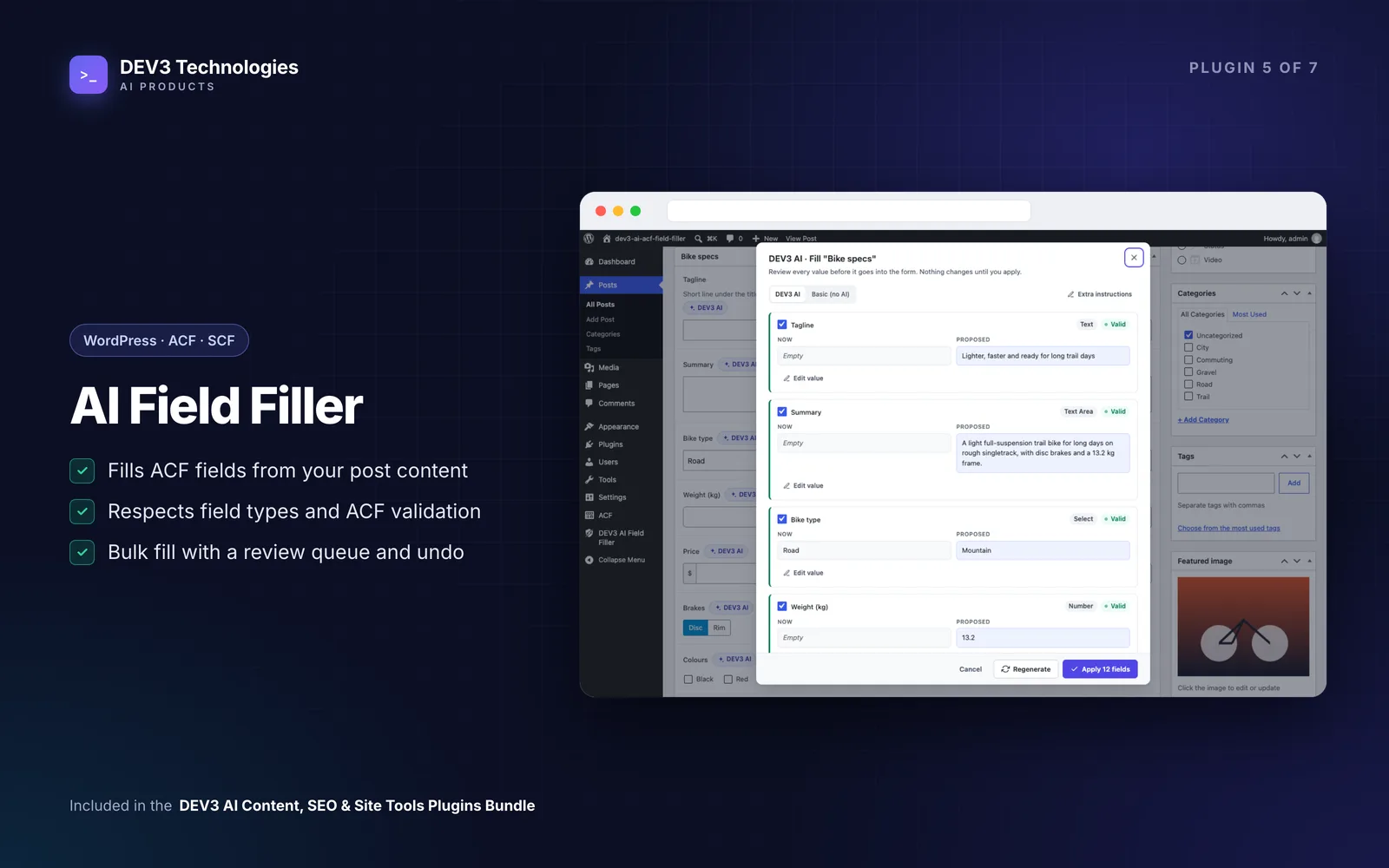
The review dialog shows Now and Proposed for each field, a word diff for text, a validity check and notes. You can untick fields, edit values, add instructions and regenerate, or switch to Basic. Apply writes the values into the ACF form, and you save the post as usual to keep them. An Undo toast appears straight away, and History keeps the change for later.
Repeater, flexible content and gallery values are saved directly when applied, and the field is locked until you reload the page.
4. Run a bulk fill
Once a single post looks right, open Bulk fill. Choose the post type, the fields, filters (status, search) and only fill empty fields. You can also select posts in the posts list and use the bulk action Fill ACF fields with DEV3 AI.
The run works in the background with progress, cancel and retry. Proposed values land in the Review queue with the field type and a validity check. Accept, edit or reject them one by one, in bulk, or accept a whole run. Invalid values are flagged and cannot be applied until fixed.
5. Undo if a run went wrong
History keeps the before and after values of every applied change. Undo a single change, a batch or a whole run. If someone edited the field since, the plugin warns you before undoing.
Bonus: starting a new content type from scratch
If you are planning a new content type rather than filling an old one, open Group generator. Describe the data you need in plain words, tick the post types and click Generate with DEV3 AI. You get a draft field group with labels, snake_case names, types, instructions, choices, ranges, relationships and sub fields, in a field tree editor where you can change anything and check the JSON and PHP export.
Prefer not to use AI? Start from one of eight templates: product specs, event, team member, property listing, recipe, testimonial, location or book. When the draft is ready, choose Database or Local JSON file and click Create field group. Local JSON goes to your theme's acf-json folder when it is writable, otherwise to wp-content/uploads/dev3af-acf-json, which the plugin adds to ACF's load paths.
Tips and pitfalls
- Always tick "only fill empty fields" on the first run. It keeps values your team has already entered.
- Test your instructions on three or four posts before a full run. A good instruction on a choice field saves a lot of review time.
- Images are never generated on their own. Image, file and gallery fields pick from your media library. DEV3 AI can propose a new image, but it is only generated when you click Generate and only saved when you accept it.
- Related items cannot be invented. Relationship, post object, page link, taxonomy and user fields choose from a candidate list built from the field's own filters, and the server checks them again.
- Keep costs predictable. API Config has a usage log, a monthly budget cap, a cache, an AI on/off switch and personal-data masking. Only the content needed for a fill is sent.
Who this is for
- Developers and agencies who add ACF to an existing site and need the old content migrated into the new fields.
- Directory, recipe, property and catalogue sites where every post follows the same structure.
- Content teams who want structured data without turning editors into data-entry clerks.
The case study covers how the plugin was built. If your project needs a custom data model, an import from another system or a headless front end on top of ACF, talk to our web development team.
Getting started
DEV3 AI Field Filler for ACF is included in the DEV3 AI Content, SEO & Site Tools bundle with six other plugins for SEO, translation, accessibility and site management. Install it next to ACF, fill one post, then let the review queue handle the rest.