Anyone who has pasted generated markup into the WordPress block editor knows the yellow box: "This block contains unexpected or invalid content." Gutenberg stores each block as an HTML comment plus the HTML its save() function produced. When a post loads, the editor runs save() again with the stored attributes and compares the result with what is in the database. A missing class, a different attribute order or one extra newline is enough to fail. That makes "ask a language model to write Gutenberg markup" a fragile plan. When we built DEV3 AI Page Builder for Gutenberg, which turns a page description into a complete page, we set one hard rule: the editor must accept every generated page as it is. This post explains how we got there. The model never writes markup, our own blocks have nothing to validate, and the core blocks we build are byte-identical to what the editor would have saved.
 Illustration: a description becomes a full page of native blocks, section by section.
What it does and who it's for
DEV3 AI Page Builder adds 32 blocks to the block editor (sections, grids, hero, pricing with a monthly/yearly toggle, tabs, accordion with FAQ schema, counters, gallery, slider, timeline, team, logo strip, price list, countdown and a form block), a brand kit, five template kits and a library of more than 40 ready-made sections. On top of that sit AI tools that use your own Google Gemini API key. It is built for:
- Small businesses and freelancers who need a landing, services or restaurant page today and would rather edit a good draft than start from a blank canvas.
- Agencies that set up many client sites and want a brand kit, reusable sections and kits that stay plain Gutenberg, with no page-builder lock-in.
- SaaS and product teams who iterate on pricing, feature and FAQ sections and want to regenerate one section without touching the rest.
- Content editors who need rewrite, translate and SEO help inside the editor rather than in another tab.
- Site owners who may change tools later. The text lives in core blocks, so it stays in place if the plugin is removed.
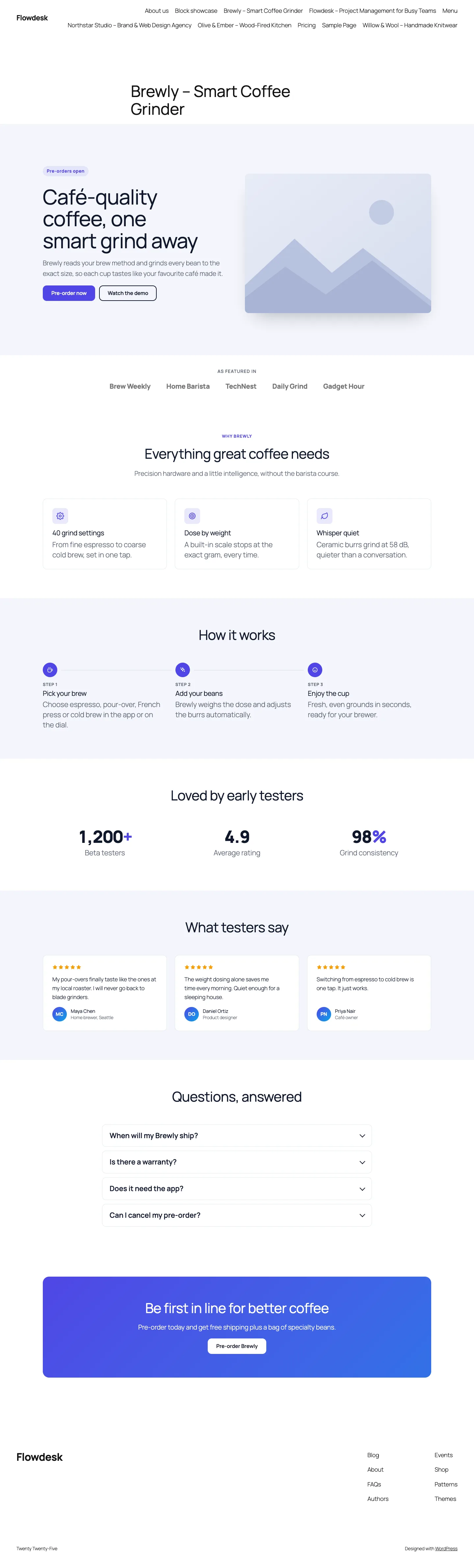 The launch landing kit on Twenty Twenty-Five, built only from DEV3 and core blocks.
How to set it up
- Upload the plugin zip from the bundle under Plugins → Add New → Upload Plugin and activate it.
- Optional: open DEV3 AI Page Builder → API Config, paste a Google Gemini API key and click Validate & save. Blocks, kits, the library, the brand kit and the rule-based SEO checks work without a key.
- Fill in the Brand kit: name, voice, audience, colours, fonts and radius. Turn on the theme.json sync to add your colours to the editor palette.
- Import a Template kit or go straight to Describe a page.
How to use it
Build a page from a description. In the editor, click the sparkle icon to open the DEV3 AI Page Builder sidebar, describe the page, pick the page type, tone and optional sections, and click Generate with DEV3 AI. Untick any sections you don't want and click Insert page. Nothing is saved until you save the page.
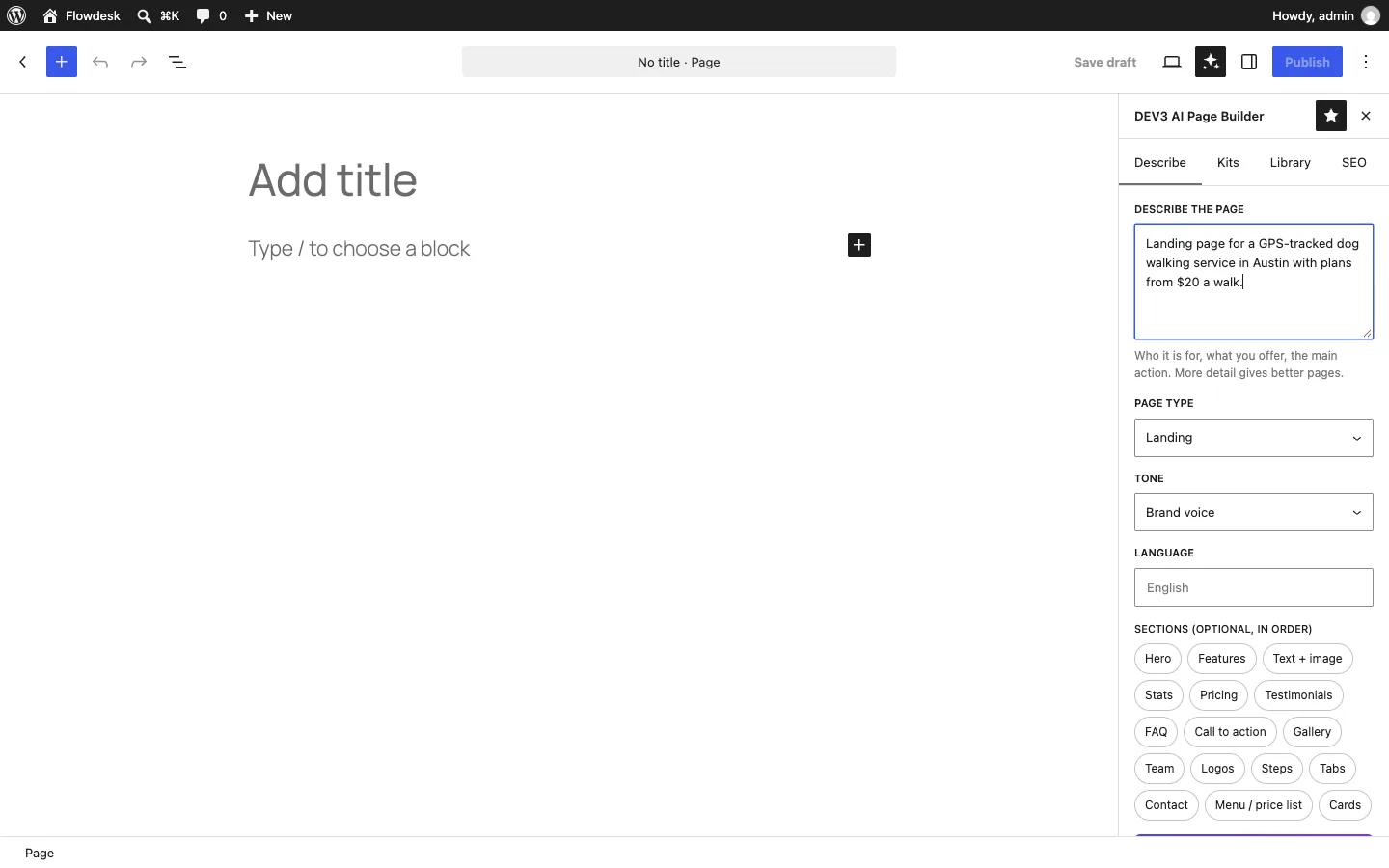 Describing a page in the editor sidebar: page type, tone, language and optional sections in order.
Fix one section. Select a section and click Regenerate section with DEV3 AI in its toolbar. Add an instruction such as "add one about security", check the preview and click Replace section.
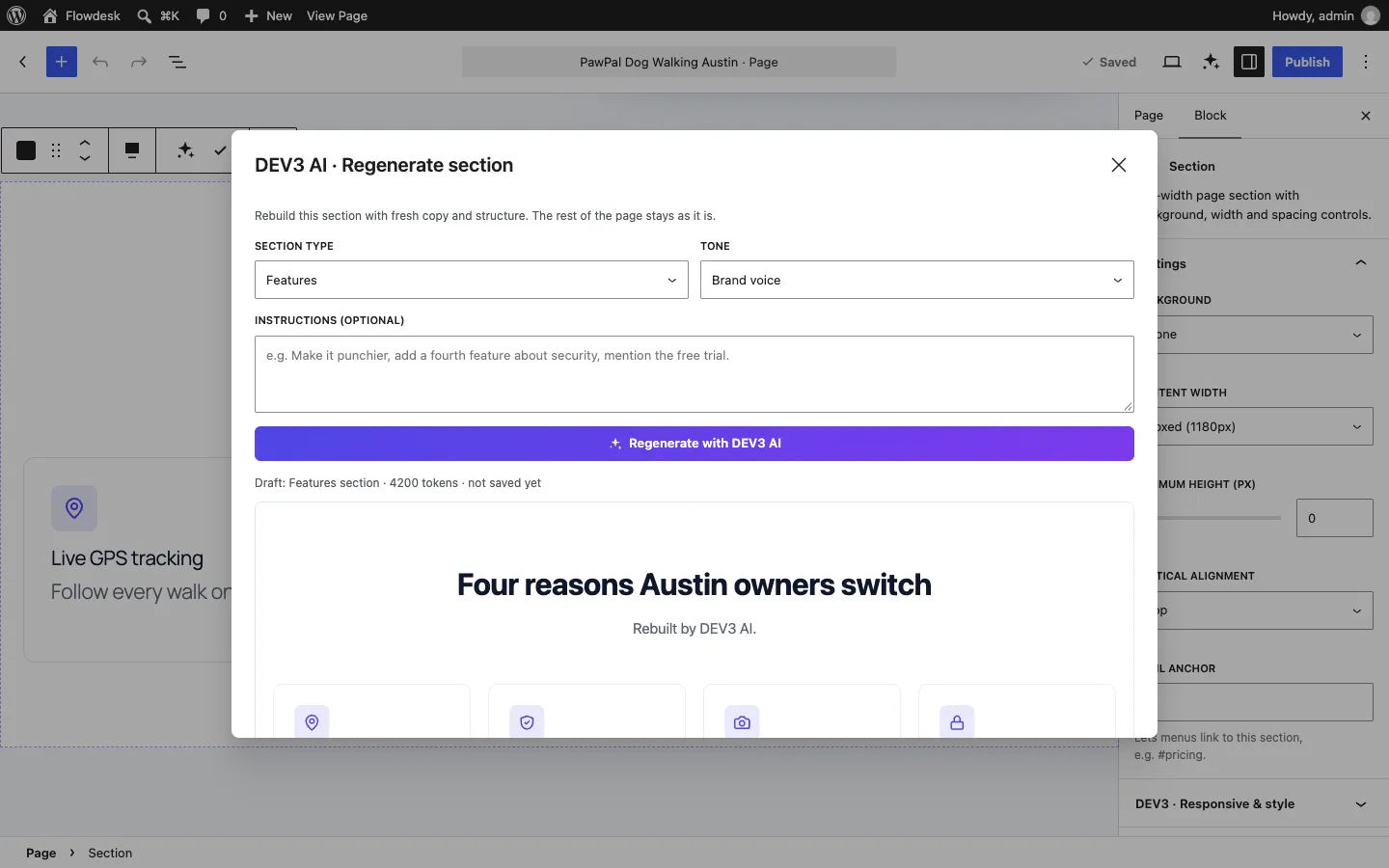 Regenerating the features section. Only that block is replaced.
Polish and publish. Use Rewrite with DEV3 AI on any text block, save strong sections to the library for other pages, and run the SEO tab's checks before publishing.
The rest of this post is about the engineering problem underneath all of this: making sure the editor accepts what the AI produces.
Why the obvious approaches fail
There are three common ways to put AI output into the block editor, and each has a cost.
- One big Custom HTML block. It always validates, but nobody can edit a hero inside an HTML textarea, and the page loses everything the block editor is for.
- Let the model write block markup. Models are good at producing something that looks like
<!-- wp:heading -->, but "looks like" is not enough. Core heading markup has to be<h2 class="wp-block-heading">, a centred heading needs"textAlign":"center"in the comment andhas-text-align-centerin the class list, and a list needswp-block-listplus acore/list-itemper item. One slip in a 40-block page and the user is clicking "Attempt block recovery". - Static custom blocks. If our blocks stored their wrapper HTML, every markup change in a later version would break old pages unless we kept a deprecation for each version.
We ended up with a fourth approach that combines three ideas.
Idea 1: the model returns a plan, not HTML
The AI request uses structured output. The model fills in a page tree: a title, meta title and description, and up to 10 sections. Each section has a type from a fixed list of 16 (hero, features, content, stats, pricing, testimonials, FAQ, CTA, gallery, team, logos, steps, tabs, contact, menu, cards), a layout and background from enums, a heading, text, bullets, up to 2 buttons and up to 12 items. Every string in the schema has a maxLength, and a PHPUnit test walks the whole schema to prove it.
The plan is then normalised as untrusted input. Schema::normalize_section() drops unknown types, clips every string with sanitize_text_field(), clears icons that aren't in the icon set, and fixes structural mistakes the model is likely to make:
if ( 'pricing' === $out['type'] ) {
	// Plans without a price are dropped.
	$out['items'] = array_values( array_filter( $out['items'], static function ( $p ) {
		return '' !== $p['value'];
	} ) );
	$featured = array_keys( array_filter( wp_list_pluck( $out['items'], 'featured' ) ) );
	if ( 1 !== count( $featured ) && count( $out['items'] ) > 1 ) {
		$pick = $featured ? (int) $featured[0] : (int) floor( count( $out['items'] ) / 2 );
		foreach ( array_keys( $out['items'] ) as $i ) {
			$out['items'][ $i ]['featured'] = ( $pick === $i );
		}
	}
}
$needs_items = array( 'features', 'stats', 'pricing', 'testimonials', 'faq', /* … */ );
if ( in_array( $out['type'], $needs_items, true ) && ! $out['items'] ) {
	// A list section without items would render empty: keep its copy as a plain content section.
	$out['type'] = '' !== $out['text'] || $out['bullets'] ? 'content' : $out['type'];
	if ( 'content' !== $out['type'] ) {
		return self::invalid();
	}
}
(condensed from Schema::normalize_section)
Two featured plans become one, no featured plan means the middle plan is featured, and a "features" section that arrives with no features becomes a text section instead of an empty grid. None of this is about block validation yet. It means the builder in the next step only ever sees a well-formed tree, so it never has to guess.
Idea 2: our own blocks have nothing to compare
All 32 dev3pb/* blocks are dynamic. In the editor they are registered from the server definitions, and their save() functions are as small as possible:
registerBlockType( `dev3pb/${ name }`, {
	title: def.title,
	icon: <BlockIcon name={ def.icon } />,
	edit: def.container && EDITS[ name ] ? EDITS[ name ] : leafEdit( name ),
	save: def.container ? () => <InnerBlocks.Content /> : () => null,
} );
(condensed from src/editor/blocks/index.js)
A container such as dev3pb/section, dev3pb/hero or dev3pb/pricing-plan stores only its attributes and its inner blocks. Leaf blocks such as counters, icons and logo strips store only attributes. The wrapper HTML, classes, CSS variables for the responsive controls, FAQ schema and pricing toggle are all produced by Render::render() on the server when the page is viewed. The editor has no stored wrapper HTML to compare against, so a validation failure on our own blocks is impossible. A CSS or markup change in a future version just changes the rendered output, with no deprecation chain.
A test loops over the registry and asserts that every block is dynamic and has the responsive style attribute.
A side benefit: the words live in core blocks inside the containers, so they survive if the plugin is deactivated.
Idea 3: core blocks built to the byte
That leaves the core blocks inside the sections: core/heading, core/paragraph, core/list with core/list-item, core/buttons with core/button, core/image and core/details. These are static blocks, and the editor will compare them. So the plugin builds them in PHP as parsed-block arrays (the same shape parse_blocks() returns) and lets WordPress's own serialize_block() write the comments. All the attention goes into making innerHTML match each block's save() exactly.
Here is the heading builder:
public static function heading( $text, $level = 2, $align = '', $extra_class = '' ) {
	$text = self::inline( $text );
	if ( '' === $text ) {
		return null;
	}
	$level   = max( 1, min( 6, (int) $level ) );
	$classes = trim( 'wp-block-heading' . ( $align ? ' has-text-align-' . $align : '' ) . ( $extra_class ? ' ' . $extra_class : '' ) );
	return self::make(
		'core/heading',
		array(
			'level'     => 2 === $level ? null : $level,
			'textAlign' => $align ? $align : null,
			'className' => $extra_class ? $extra_class : null,
		),
		array(),
		sprintf( '<h%1$d class="%2$s">%3$s</h%1$d>', $level, esc_attr( $classes ), $text )
	);
}
(from Layout\Block::heading)
The details are the point. level is left out when it is 2, because 2 is the default and the editor omits default attributes when it serialises. The class order is wp-block-heading, then the alignment class, then any extra class, which is the order the heading's save() produces. Block::clean() drops every null, empty-string and empty-array attribute so the comment JSON matches what the editor would write. Text goes through Block::inline(), a wp_kses allow-list of strong, em, br, code and a[href] with whitespace collapsed, so the model's copy can't add markup the rich-text field would rewrite.
Whitespace matters too. Block::make() reproduces the editor serialiser's newlines exactly ("\n<tag>" before inner blocks, "</tag>\n" after, "\n\n" between the children of a dynamic container) and fills innerContent with a null at the position of each inner block, which is how serialize_block() knows where to put them.
core/details only exists from WordPress 6.3, so on older sites Block::details() emits a dev3pb/accordion-item instead; a block the running editor doesn't know would be another way to get the warning.
Testing exact strings, not "looks right"
The builders are tested against literal expected output, not with "contains" assertions:
$this->assertSame(
	'<!-- wp:heading {"level":1,"textAlign":"center"} -->' . "\n" .
	'<h1 class="wp-block-heading has-text-align-center">T</h1>' . "\n" .
	'<!-- /wp:heading -->',
	$this->one( Block::heading( 'T', 1, 'center' ) )
);
(from LayoutTest::test_core_block_markup_is_exact)
The same test covers paragraphs, lists, button groups, images and details. Further tests parse a full generated page and every page of the five template kits with parse_blocks() and assert that every block is a dev3pb/* block or one of eight allowed core blocks, that every name is registered, that there are no shortcodes, and that only the hero heading is an <h1>.
PHPUnit can't run the editor's JavaScript validator, so there is a browser check as well. A Puppeteer script opens each seeded kit page and a page containing every block in the real block editor, collects any block whose isValid is false, and listens for console messages about invalid content. It then runs the AI flows against a mocked model response: describe a page, insert it, save, reload and validate again, then regenerate a section and rewrite a text block.
A safety net in the editor
Even with exact builders, the editor integration doesn't insert raw markup. It parses the server's markup and rebuilds each block with createBlock():
export function toBlocks( markup ) {
	let invalid = 0;
	const rebuild = ( b ) => {
		if ( b.isValid === false ) {
			invalid++;
		}
		return createBlock( b.name, { ...b.attributes }, ( b.innerBlocks || [] ).map( rebuild ) );
	};
	const blocks = parse( String( markup || '' ) )
		.filter( ( b ) => b.name && ! ( b.name === 'core/freeform' && ! String( b.attributes.content || '' ).trim() ) )
		.map( rebuild );
	return { blocks, invalid };
}
(from src/editor/insert.js)
A block created from its attributes is serialised by its own save() the next time the post is saved, so even a core block from a newer WordPress version with slightly different markup is normalised instead of flagged. The invalid count still reports anything the parser rejected, so it shows up in testing rather than being hidden.
Creating a page: never trust the client's markup
The "Describe a page" screen shows a preview and a section list before anything is saved. When the user clicks Create draft page, the browser sends the tree, not the HTML it was shown:
public static function create_page( $tree, $status = 'draft', $source = 'ai', array $meta = array() ) {
	$tree = Schema::normalize_page( $tree );
	if ( is_wp_error( $tree ) ) {
		return $tree;
	}
	if ( 'publish' === $status && ! current_user_can( 'publish_pages' ) ) {
		$status = 'draft';
	}
	$id = wp_insert_post( array(
		'post_type'    => 'page',
		'post_status'  => $status,
		'post_content' => wp_slash( Builder::page_markup( $tree ) ),
		// …
	), true );
(condensed from Page_Ai::create_page)
The tree is normalised a second time and the blocks are rebuilt on the server. Any markup edited in the browser's dev tools never reaches post_content, and a test that feeds a <script> through the sample tree confirms that it doesn't come out the other side. The preview endpoint has a similar rule: it runs wp_kses_post() on the markup unless the user has unfiltered_html.
Regenerating one section
A page is only useful if you can fix one part of it. Each generated section is a dev3pb/section (or dev3pb/hero) with an aiType attribute that records what it was built as. When the user asks to regenerate a section, the editor sends that block's serialised markup. The server finds the type from aiType, or from the blocks inside for sections built by hand, and turns the current content into a compact plain-text outline for the prompt:
    [h2] Everything your dog needs
    [paragraph] Walks that fit your schedule, with updates you will actually read.
        [h3] Live GPS tracking
        [paragraph] Follow every walk on a live map.
(shape of the outline; wrapper blocks with no text of their own are skipped)
Outline::summary() reads text from the core blocks' HTML and from the text attributes of dev3pb leaves (plan names, prices, counter values, quotes), indents by depth and caps the result at 3,000 characters. The model gets the outline, the section type, the page title, a short context of the other sections and the user's instruction ("add one about security"), and answers with a single section in the same schema. That section goes through the same normaliser and the same builder, and the editor swaps it in with replaceBlocks(). Every other block on the page keeps its client ID, attributes and any manual edits. The H1 rule still applies: a regenerated hero only gets an <h1> when the editor reports that it is the first block on the page.
 Illustration: every block matches its mold, and one section can be swapped without touching the rest.
Trade-offs
- A fixed vocabulary. The model can only combine the 16 section types. That is the price of guaranteed markup, and why the kits and the AI share one builder.
- Placeholders, not photos. Image slots get a placeholder with real alt text; photos come from the user or a separate AI image request.
- Core markup can change. If WordPress changes a core block's
save(), the builders need an update. ThecreateBlock()rebuild covers the gap, and the exact-string tests will fail loudly. - Mocked AI so far. Every AI path is tested with mocked responses. A live-key run, including timing a full page against our under-60-seconds target, is still to do.
Where it ships
DEV3 AI Page Builder for Gutenberg ships in the DEV3 AI Page Builder & Design Plugins Bundle on the DEV3 marketplace, alongside three other page-builder and design plugins, and is being prepared for CodeCanyon. The architecture, test counts and screenshots are in the case study.