All case studies

DEV3 Technologies · own product

DEV3 AI Page Builder for Gutenberg: whole pages from a description, as native blocks the editor accepts

Our own block-editor plugin: 32 server-rendered blocks, five template kits and a brand kit, plus AI that turns a page description into a draft built from native blocks, with no shortcodes and no block-validation warnings.

Industry
Web publishing (WordPress)

Live project preview

Client systems are private — screenshots shown where permitted.

DEV3 Technologies · own product — screenshots
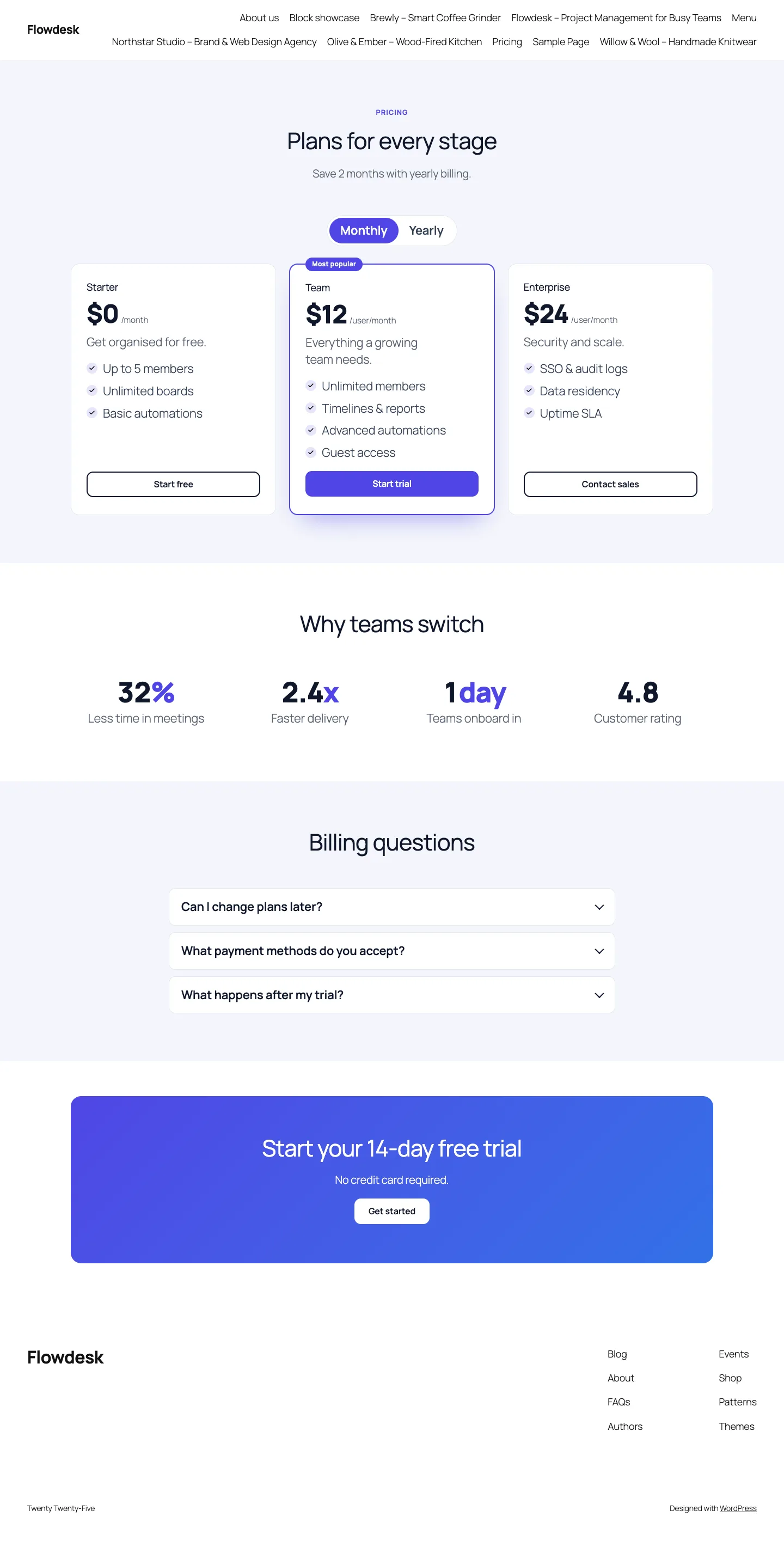
A SaaS pricing page from the template kit on Twenty Twenty-Five: pricing toggle, counters, FAQ accordion and call to action, all built from native blocks.

A SaaS pricing page from the template kit on Twenty Twenty-Five: pricing toggle, counters, FAQ accordion and call to action, all built from native blocks.

The challenge

AI page generators for WordPress tend to fail in one of two ways. Some paste raw HTML into a Custom HTML block, which nobody can edit. Others ask the model for Gutenberg markup directly, and the editor then compares every block with its save() output and shows "This block contains unexpected or invalid content" whenever a class, attribute or whitespace character differs. We wanted a page builder whose AI output opens cleanly in the real editor, stays readable if the plugin is removed, can regenerate one section without touching the rest, and never puts the model's HTML into the page.

Our solution

We built DEV3 AI Page Builder for Gutenberg in PHP with a React editor integration. The model never writes markup. It returns a small, typed page plan, and the plugin builds the blocks itself.

Key design decisions

  • A section plan, not HTML. The Google Gemini API answers with structured JSON: up to 10 sections drawn from 16 types (hero, features, pricing, FAQ, menu and others), each with capped strings, enums for layout, background and icons, and up to 12 items. Schema::normalize_page() then re-checks every field: unknown types are dropped, list sections without items become plain content sections, plans without a price are removed, and exactly one pricing plan ends up featured.
  • Every DEV3 block is dynamic. All 32 dev3pb/* blocks render on the server. Containers save only <InnerBlocks.Content /> and leaves save null, so the editor has no stored wrapper HTML to compare and validation cannot fail on them.
  • Byte-exact core blocks. The text inside sections uses core heading, paragraph, list, buttons, image and details blocks. Layout\Block builds each one as a parsed-block array whose HTML matches that block's own save() output, down to class order and newlines, and serialize_block() writes it out. PHPUnit asserts the exact strings.
  • Rebuild on insert. In the editor, generated markup is parsed and every block is rebuilt with createBlock(), so the editor re-serialises it with its own save functions before anything is stored.
  • The server never trusts client markup. "Create draft page" sends the plan back, not HTML; the server normalises it again and rebuilds the blocks. Only the hero heading becomes an H1.
  • Regenerate one section. Each generated section carries an aiType attribute. Regeneration summarises the current section as indented plain text, sends it with the user's instruction, and swaps in a new section of the same type while the rest of the page stays as it is.

Architecture

Block definitions live in PHP and the editor reads them from server data, so attributes have one source of truth. A brand kit (colours, fonts, radius, voice) becomes CSS custom properties, can be added to the theme.json palette and is passed into every prompt; a WCAG contrast table checks the saved colours. Five template kits (landing, SaaS, agency, shop, restaurant) with eight pages, and a library of more than 40 ready-made sections, are built from the same section plans as the AI output. An SEO pass reads headings, images and links back out of the blocks and syncs titles with Yoast SEO and Rank Math. The API client, encrypted key storage, usage caps and logs come from a shared core used across DEV3's plugins.
Results

The plugin is complete. It ships in the DEV3 AI Page Builder & Design Plugins Bundle on the DEV3 marketplace, alongside three other page-builder and design plugins, and it is being prepared for CodeCanyon. What was built and verified:

  • 73 PHPUnit tests, including exact-markup checks for every core block builder, a round trip of a generated page through parse_blocks(), and a test that every page of all five kits builds only from registered native blocks
  • 33 Jest tests for the admin screens, the responsive style helpers and the shared UI kit
  • A test checks that every one of the 32 blocks is registered as dynamic and has responsive controls
  • A Puppeteer script that opens every seeded kit page and a showcase of all blocks in the real block editor and reports any block that fails validation, then runs describe, insert, save, reload, regenerate and rewrite against a mocked AI response
  • Build, Jest, PHP_CodeSniffer (0 errors, 0 warnings), PHPUnit in wp-env and packaging all pass
  • AI paths were tested with mocked Google Gemini responses only. A live-key run, including measuring generation time against our under-60-seconds target, is the next step

Setup guide

No licence key or activation is needed: install the zip and every feature works.

Requirements

  • WordPress 6.0 or newer (6.3 or newer recommended, for the native Details block used by accordions) and PHP 7.4 or newer
  • The block editor (Gutenberg). Works with block themes and classic themes
  • Optional: a Google Gemini API key. Without one, blocks, template kits, the design library, the brand kit, forms and the rule-based SEO checks all work; only the AI tools need it

1. Install the plugin

  1. The plugin ships inside the bundle download. Unzip the bundle and find dev3-ai-page-builder-design-plugins-bundle/dev3-ai-page-builder/dev3-ai-page-builder.zip.
  2. In WordPress, go to Plugins → Add New → Upload Plugin, choose that zip and click Install Now.
  3. Click Activate. DEV3 AI Page Builder for Gutenberg appears in the plugin list and its menu, DEV3 AI Page Builder, appears in the admin sidebar.

2. Connect Google Gemini (optional)

  1. Create a free API key in Google AI Studio (sign in with a Google account, then Create API key).
  2. Go to DEV3 AI Page Builder → API Config, paste the key and click Validate & save. The key is stored encrypted (AES-256-GCM) and never sent to the browser.
  3. Optional: pick the model (gemini-2.5-flash is the fast default; gemini-2.5-pro for the highest quality).

Prefer config files? Add define( 'DEV3PB_GEMINI_API_KEY', 'your-key' ); to wp-config.php instead.

3. Set it up

  1. Open Brand kit first: brand name, tagline, voice, audience, colours, fonts and corner radius. Turn on Add brand colours to the editor palette to sync them with theme.json, and check the contrast table at the bottom.
  2. In Template kits, preview the landing, SaaS, agency, shop and restaurant kits and click Import kit to create their pages as drafts.
  3. Or go to Describe a page, write what the page is for, pick the page type, tone and language, and click Generate with DEV3 AI. Review the sections and preview, then click Create draft page.
  4. In the block editor, click the sparkle icon at the top right to open the DEV3 AI Page Builder sidebar (Describe, Kits, Library, SEO). Select a section to regenerate it, save it to the Design library, or rewrite any text block.
  5. Run the SEO pass for meta title and description, heading fixes, image alt text and internal link suggestions. Built-in form submissions are listed under Form entries; AI usage and cost under Usage Logs.

Updating

Download the new version of the bundle, then upload the plugin zip in Plugins → Add New → Upload Plugin and choose Replace current with uploaded. Settings and pages are kept.

Uninstalling

Deactivate and delete the plugin from Plugins. Headings, paragraphs, lists, buttons and images stay in your pages because they are core blocks; only the DEV3 layout wrappers lose their styling.

How to use

Build a page from a description

  1. Go to DEV3 AI Page Builder → Describe a page, or open a new page in the block editor and click the sparkle icon at the top right to open the sidebar on its Describe tab.
  2. Write who the page is for, what you offer, any prices or facts to include and the main action. Pick the Page type, Tone and, if needed, a Language. In the sidebar you can also pick the sections you want, in order.
  3. Click Generate with DEV3 AI. You get a draft: a list of sections and a preview rendered with your brand kit. Nothing is saved yet.
  4. Reorder or delete sections in the list, regenerate any one of them, or click Regenerate page to start again.
  5. Click Create draft page on the admin screen. In the editor sidebar, tick the sections to keep and click Insert page (on a page that already has content: Replace page content or Add to the end). Review the page and save it.

Start from a template kit

  1. Go to Template kits and click Preview on any page of the landing, SaaS, agency, shop or restaurant kit.
  2. Click Import kit. Every page of the kit is created as a draft, and the Apply the kit colours to my brand kit switch copies the kit's palette into your brand kit.
  3. To add one kit page to a page you are already editing, use the Kits tab in the editor sidebar and click Insert (or Replace on a page that already has content).

Regenerate one section

  1. In the block editor, select a section, hero or call-to-action block and click Regenerate section with DEV3 AI in its toolbar.
  2. Choose the Section type (or Keep the current type) and Tone, and optionally add an instruction such as "add a fourth feature about security".
  3. Click Regenerate with DEV3 AI, check the draft preview, then click Replace section or Insert below. The rest of the page stays as it is.

Rewrite text

  1. Select a heading, paragraph or list and click Rewrite with DEV3 AI in the toolbar.
  2. Choose what to do (Improve, Expand, Shorten, Simplify, Fix spelling & grammar or Translate) and a tone.
  3. Compare the draft with the original, then click Use this text, Edit, Regenerate or Reject.

Save and reuse sections

  1. Select a section and click Save section to DEV3 library in its toolbar, give it a name and click Save section.
  2. Insert it on any page from the Library tab of the editor sidebar. Saved sections are also listed under Design library in the admin, next to the ready-made sections.

Run the SEO pass

  1. Open the SEO tab in the editor sidebar. The rule-based checks (one H1, heading order, alt text, title and description length, word count, internal links) and the score need no API key.
  2. Optionally enter a focus keyword and click Run SEO pass with DEV3 AI for a meta title and description, heading fixes, image alt text and internal link suggestions.
  3. Apply the suggestions you want (Apply meta writes the title and description, which sync to Yoast SEO or Rank Math when one is active), then save the page.

Related case studies

DEV3 Technologies · own product · Content Management (WordPress)

DEV3 AI Field Filler for ACF: type-aware AI values for custom fields, checked against ACF's own validation

Our own WordPress plugin for Advanced Custom Fields and Secure Custom Fields: it fills a post's custom fields from its content with the Google Gemini API, using a schema built from each field's settings, then checks every value with its own codec and ACF's validation before saving.