
"Close to excellent schools and great transport links" appears in thousands of property listings, and almost nobody checks it. When a language model writes a neighbourhood paragraph, the risk gets worse: it will name a park that sounds plausible, put a tram stop where there is none, or comment on school quality and safety, which a property site should never claim. For DEV3 AI Real Estate Listings, our WordPress real estate plugin, we wanted AI to write the neighbourhood section only from places that really exist near the property, to keep the verifiable facts separate from the AI wording, and to label the AI text on the public page until a person has checked it. This article walks through how that works: an Overpass query, a summariser that turns raw map data into a short list, a tightly limited prompt, and a provenance flag that travels from the editor to the listing page.
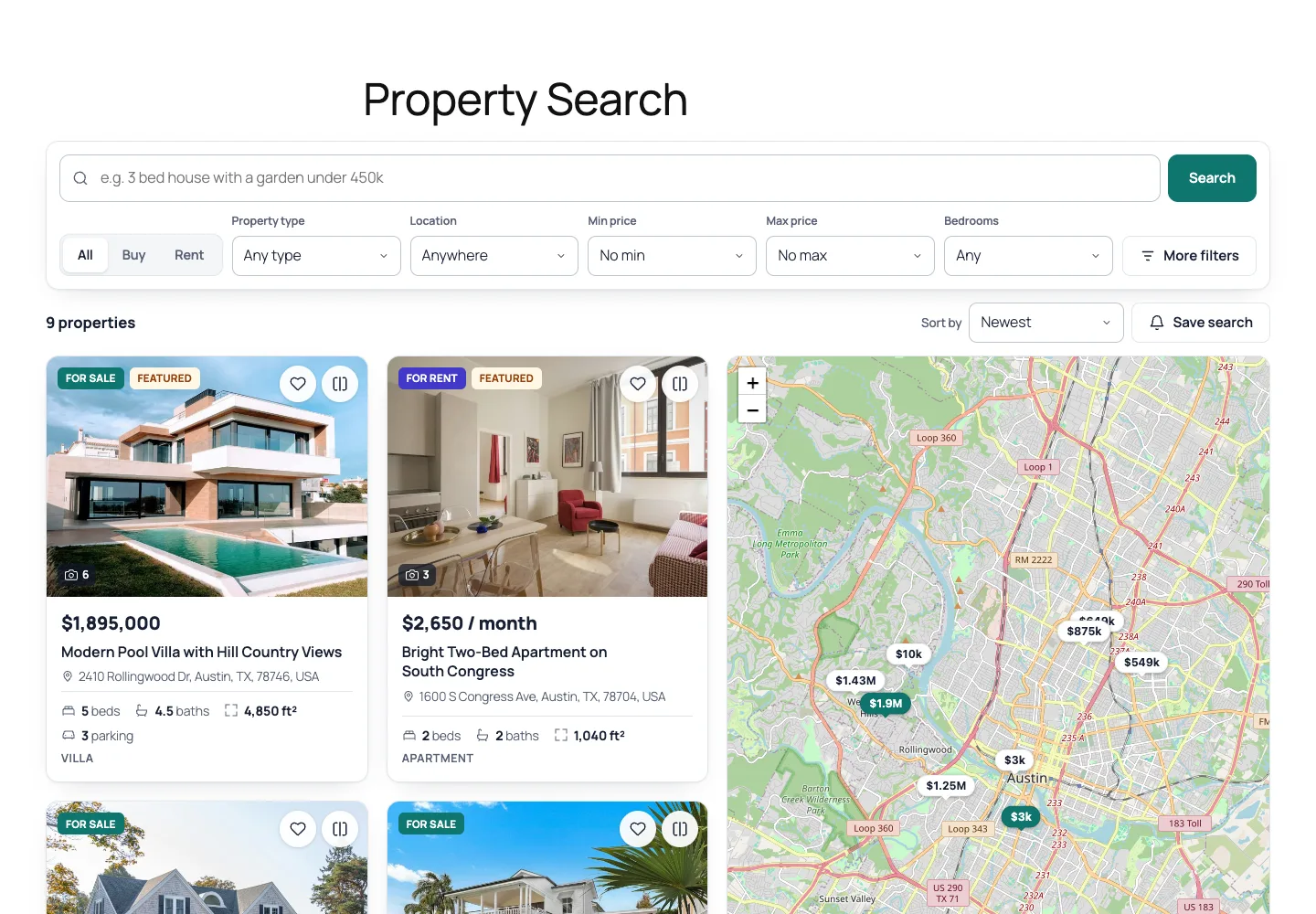 Property search: a plain-language box, filters, property cards and a price-tag map.
What it does and who it's for
DEV3 AI Real Estate Listings is a theme-independent real estate plugin with the feature set people usually buy a real estate theme for, plus AI writing help. It suits:
- Independent agencies that want listings, agents, a lead inbox and map search on their existing WordPress site, without switching to a heavy theme.
- Rental and holiday-let operators who list properties per month, week, day or year and want visitors to save searches and get alerts.
- Agent teams where each agent submits listings from the front end and sees only their own listings and leads.
- Developers selling a new-build project, who need floor plans, click-to-load virtual tours and a mortgage calculator on each unit.
- Portals in one city that want neighbourhood sections on every listing without writing hundreds of them by hand.
Everything works without an API key; the key adds descriptions from photos, AI neighbourhood highlights and AI search.
How to set it up
- Install the plugin zip from the bundle download and activate it.
- In DEV3 AI Real Estate → Settings, click Create missing pages, then pick the currency, area unit and map provider.
- Leave Look up nearby places on OpenStreetMap on; it powers the neighbourhood section.
- Review property types, locations and features in Settings → Vocabulary.
- Add agents in Agents and link them to WordPress users.
- Optional: add a Google Gemini API key in API Config and click Validate & save.
How to use it
Describe a property from its photos
In the property editor, add private notes, then click Write from 6 photos with DEV3 AI. The plugin sends up to 8 gallery photos with the facts and notes, and shows what it saw in the photos plus a draft title, summary, description and highlights, compared with your current text. Features are suggested only from your own list.
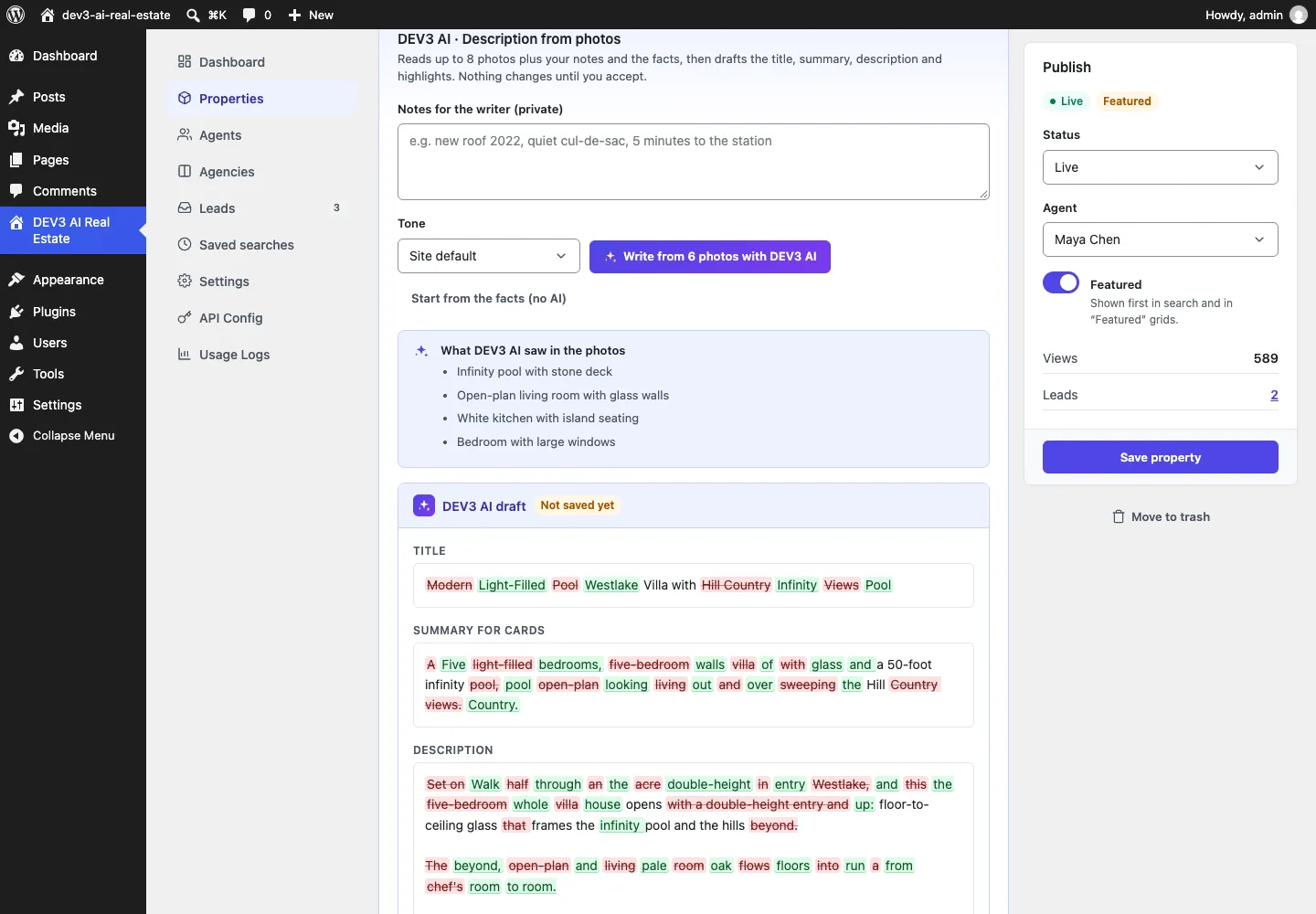 What DEV3 AI saw in the photos, and the draft compared with the current text. Nothing changes until you accept it.
Add neighbourhood highlights
With an address or map pin set, click Suggest with DEV3 AI in Neighbourhood highlights, review the draft and click Use in the form. Or click List nearby places (no AI) for a facts-only version.
Work leads
Enquiries and viewing requests arrive in Leads and in the agent's front-end dashboard. Set a status, add private notes and Reply by email.
The rest of this article is about the second workflow.
Step 1: Ask OpenStreetMap what is actually nearby
The plugin starts from coordinates. If the agent has dropped a map pin, it uses that; otherwise it geocodes the address (OpenStreetMap Nominatim by default, or Google Geocoding with a key). Then it asks the public Overpass API for everything in seven categories within 1 km, in one query:
public static function query( $lat, $lng ) {
	$a = sprintf( '(around:%d,%.6F,%.6F)', self::RADIUS, $lat, $lng );
	return '[out:json][timeout:20];('
		. 'nwr["amenity"~"^(school|kindergarten|college|university|hospital|clinic|pharmacy|doctors|dentist|restaurant|cafe|bar|pub|fast_food)$"]' . $a . ';'
		. 'nwr["public_transport"="station"]' . $a . ';'
		. 'nwr["railway"~"^(station|halt|tram_stop)$"]' . $a . ';'
		. 'node["highway"="bus_stop"]' . $a . ';'
		. 'nwr["leisure"~"^(park|playground|garden|nature_reserve|fitness_centre|sports_centre|swimming_pool)$"]' . $a . ';'
		. 'nwr["shop"~"^(supermarket|convenience|mall|bakery|greengrocer)$"]' . $a . ';'
		. ');out center tags 400;';
}
(from Amenities::query)
A few choices in that query are deliberate:
nwrrather thannode. In OpenStreetMap, a school or a park is often mapped as a way (an outline) or a relation, not a single point. Querying nodes only would miss most parks.out center. For ways and relations, Overpass returns a centre point, so every element has a coordinate the plugin can measure a distance to.- Bus stops as nodes only. Stops are points by convention, and limiting them keeps the response small on dense city streets.
- A hard cap of 400 elements and a 20-second server timeout. A city-centre property can have hundreds of cafes within a kilometre; the summary needs only counts and the nearest names.
The Overpass endpoint is filterable (dev3re_overpass_url), so a busy site can point at its own Overpass instance.
Step 2: Turn raw map data into a short, ordered list
Raw Overpass output is hundreds of tagged elements. Amenities::classify() maps each element's tags to one of seven categories (schools, public transport, parks and playgrounds, supermarkets and shops, healthcare, restaurants and cafés, gyms and sports), and anything else (a bench, a post box) is ignored. Then summarise() reduces each category to a count, the nearest distance, and at most three named places sorted by distance:
$dist = null === $elat ? null : (int) round( Geo::distance_km( $lat, $lng, $elat, $elng ) * 1000 );
++$out[ $cat ]['count'];
if ( null !== $dist && ( null === $out[ $cat ]['nearest_m'] || $dist < $out[ $cat ]['nearest_m'] ) ) {
	$out[ $cat ]['nearest_m'] = $dist;
}
$name = isset( $tags['name'] ) ? mb_substr( sanitize_text_field( (string) $tags['name'] ), 0, 80 ) : '';
if ( '' !== $name ) {
	$out[ $cat ]['places'][ $name ] = null === $dist ? 99999 : min( $dist, $out[ $cat ]['places'][ $name ] ?? 99999 );
}
(condensed from Amenities::summarise)
Distances use the haversine formula in Geo::distance_km(), rounded to whole metres. Keying places by name merges duplicates: a station mapped as both a node and a building outline appears once, at its nearer distance. Unnamed elements still count towards the category, but never appear as named places, because "a park 300 m away" is a fact and "Unnamed Park" is not. Names from OpenStreetMap are untrusted input and are sanitised and capped at 80 characters before they go anywhere.
Categories come back in a fixed order (schools, transport, parks, shops, healthcare, food, fitness), so the prompt and the page are stable from one run to the next.
Caching, including failures
Overpass is a shared public service with rate limits, so the plugin is careful with it. Results are cached for 30 days, keyed by the coordinates rounded to four decimal places (about 11 m). A failed or non-200 response is cached too, as a "none" marker for one hour, so a struggling Overpass server is not hit again on every click. The PHPUnit test asserts this directly: two neighbourhood generations for the same property make exactly one Overpass request.
 Illustration: every statement in the AI paragraph traces back to a real place from the map data.
Step 3: Two outputs, stored differently
The summarised list produces two things, and keeping them apart is the core of the design.
Facts. Neighbourhood::nearby_lines() turns the list into short lines such as "Schools · Eanes Elementary · 450 m". These are stored in the property's nearby field (at most 8 lines) and shown under the map on the listing page, with the note "Nearby places from OpenStreetMap." They are not AI output, so they carry no AI label.
Wording. The same list, formatted as "Category: count; nearest names with distance", becomes the only source material for the AI paragraph.
The prompt is short, and most of it is about what the model must not do:
You write short, factual neighbourhood overviews for property listings. Base every statement on the nearby places list (from OpenStreetMap) and the address. If the list is empty, keep to general, non-specific statements about the city or area and do not name places. Never claim school quality, crime levels, demographics or future developments.
(the system prompt registered in Prompts_Library)
The user template asks for a 2–3 sentence summary of at most 600 characters and up to 6 highlights of at most 90 characters, "naming real nearby places from the list with walking-distance hints (80 m ≈ 1 minute walk)". The walking hint gives the model a fixed conversion, so "450 m" becomes "about 5 minutes on foot" consistently rather than a guess. The response schema enforces the same limits (maxLength 600 and 90, maxItems 6), and the plugin cuts the summary to 600 characters again after sanitising, whatever comes back.
The rule against school quality, crime, demographics and future developments matters for real estate in particular. In many markets, describing who lives in an area, or steering buyers by it, is a fair-housing problem. The description-from-photos prompt follows the same line: no references to the ideal buyer's family status, religion, ethnicity, age or disability.
Step 4: A provenance flag that reaches the public page
Nothing is saved when the draft appears. The admin clicks Use in the form, which copies the summary and highlights into the neighbourhood text, fills the nearby-places field, and sets neighbourhood_ai to true. That flag is a typed field on the property (a boolean, default false), saved with everything else.
On the listing page, the template checks it:
<?php if ( $f['neighbourhood_ai'] ) : ?>
	<p class="dev3re-aimark"><?php echo Templates::icon( 'sparkles', 14 ); ?><span><?php esc_html_e( 'AI-generated summary. Please check details locally.', 'dev3-ai-real-estate' ); ?></span></p>
<?php endif; ?>
(from Front\Single)
The flag does not switch itself off when someone edits a word. The editor shows a toggle, Label as AI-generated on the listing, with the help text "Turn off once you have checked and edited the text yourself." We chose an explicit action because a one-character typo fix is not a review, and the person who turns the label off takes responsibility for the text. The front-end submission form carries the same flag in a hidden field, so a paragraph an agent generated from the front end is labelled too.
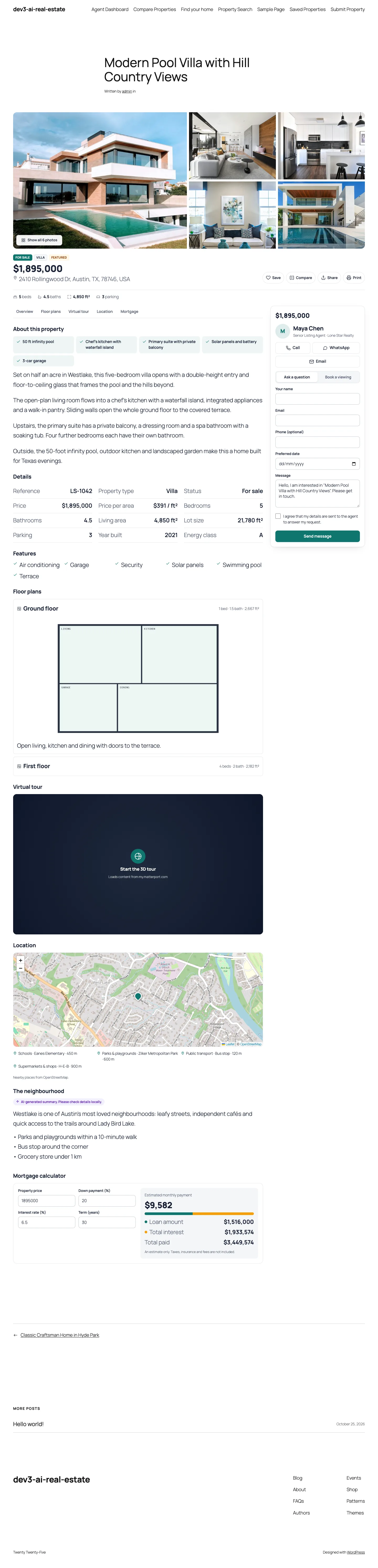 The property page: nearby places from OpenStreetMap under the map, and the neighbourhood paragraph with its AI label.
The no-AI path uses the same data
With no API key, or with AI switched off, List nearby places (no AI) runs the same Overpass lookup and writes the text with a template instead:
- The summary says that everyday essentials are close by in the area, and that this is what OpenStreetMap lists within about 1 km.
- Each highlight reads like "3 × schools within 1 km — nearest: Lincoln Elementary (350 m)".
The result is less fluent but entirely factual, and it is not flagged as AI because no model wrote it. If OpenStreetMap has nothing within 1 km, the plugin says so and asks the agent to write the highlights, rather than producing an empty paragraph.
What the tests check
The neighbourhood test stubs both the Overpass API and the Google Gemini API, then checks:
- the amenities come back in the fixed category order (schools, transport, parks, shops) with "Lincoln Elementary" as the nearest school;
- the first stored nearby line starts with "Schools · Lincoln Elementary ·";
- the prompt sent to the model contains "Washington Park", a name that came from the Overpass stub;
- a second generation for the same coordinates makes no new Overpass request;
- with AI turned off, the facts-only text mentions the city and "nearest: Lincoln Elementary".
A separate test checks that a property saved with neighbourhood_ai keeps the flag, and another that the single page renders the label. All of this runs in 53 PHPUnit tests in wp-env, alongside 40 Jest tests. As with every DEV3 plugin in this release, the AI side was tested with mocked responses; a live-key run is the next step.
Trade-offs
- OpenStreetMap coverage varies. Central European cities are mapped in great detail; some suburbs have few named places. The plugin only knows what OpenStreetMap knows, which is why the label says to check locally.
- 1 km is a fixed radius. It suits walkable areas. Rural properties will often see small counts; changing the radius means changing the
RADIUSconstant. - Distances are straight-line. Haversine distance is not walking distance; a river with no bridge can make "5 minutes" optimistic. The walking hints are approximate by design.
- The public Overpass API is shared. The 30-day cache and one-hour failure cache keep load low, and the endpoint filter allows a private instance for large portals.
Conclusion
Grounding is less about the prompt than about the data you give the model and what you do with its answer. Fetch real places, reduce them to a short ordered list, store that list as facts in its own field, let the model only rephrase it within strict limits, and keep a provenance flag on the AI text until a person removes it. DEV3 AI Real Estate Listings ships in the DEV3 AI Directory, Booking & Events Plugins Bundle on the DEV3 marketplace, alongside 7 other directory, booking and events plugins, and is being prepared for CodeCanyon. The case study covers the search, agents and leads side of the plugin.