All case studies

DEV3 Technologies · own product

DEV3 AI Real Estate Listings: map search, agents and leads, with descriptions written from listing photos

Our own theme-independent real estate plugin for WordPress. Agents list properties for sale or rent, visitors search on a map, and the Google Gemini API drafts descriptions from the photos and neighbourhood notes grounded in OpenStreetMap data.

Industry
Real Estate (WordPress)

Live project preview

Client systems are private — screenshots shown where permitted.

DEV3 Technologies · own product — screenshots
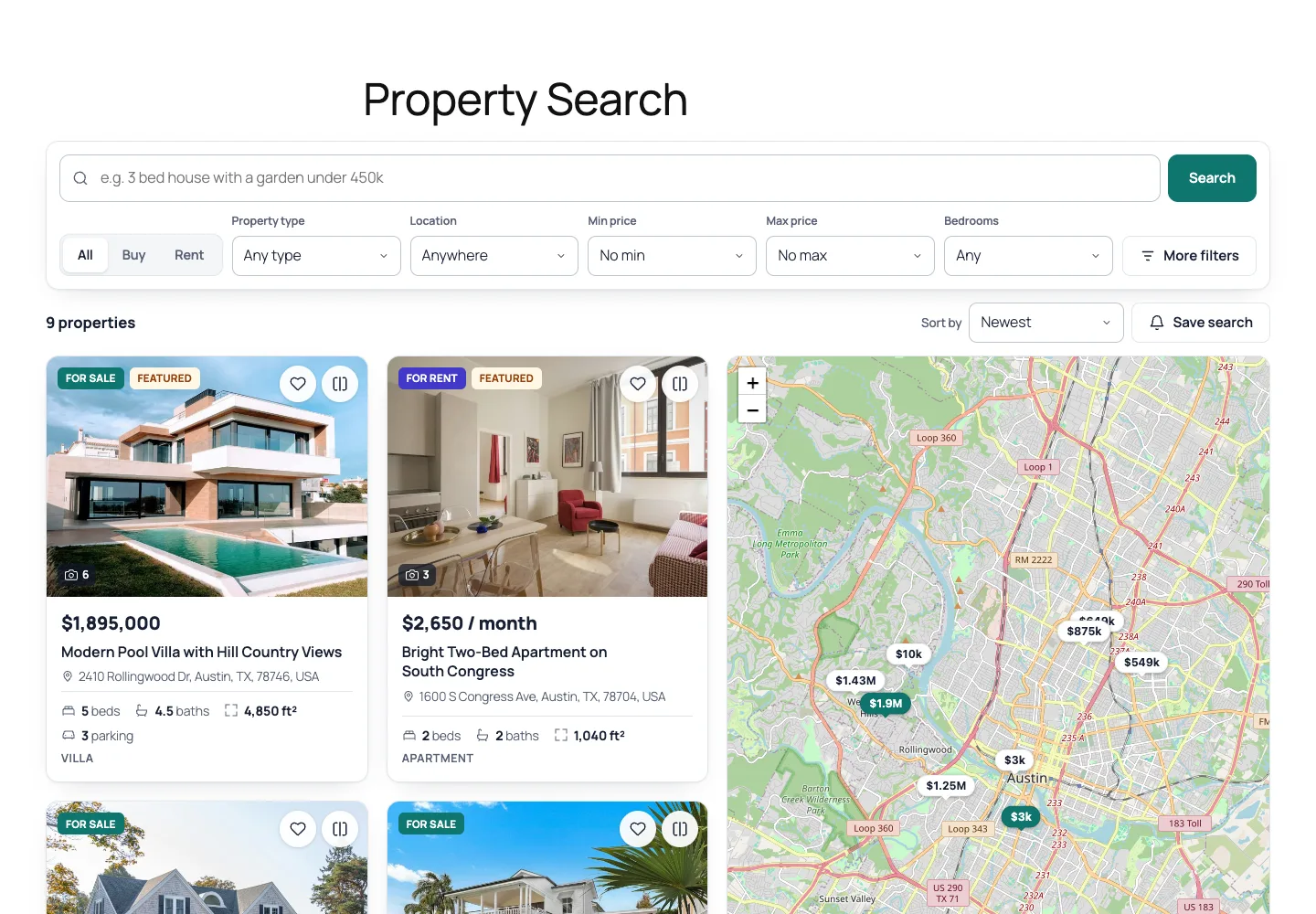
Property search with a plain-language box, buy/rent filters, property cards and a price-tag map.

Property search with a plain-language box, buy/rent filters, property cards and a price-tag map.

The challenge

Real estate sites on WordPress usually depend on one heavy theme, with search, agents, favourites and the mortgage calculator locked into it. Agents still write every description by hand from their photos, and neighbourhood paragraphs are either missing or full of vague claims about "great schools" that nobody checked. AI can help with both, but a description model can invent a sea view, and a neighbourhood model can name a park that does not exist or make claims about school quality and crime that a property site should never make. We needed a plugin that works with any theme, writes from the photos the agent actually uploaded, grounds neighbourhood text in real nearby places, and labels AI text on the public page until a person has checked it.

Our solution

We built DEV3 AI Real Estate Listings as a WordPress plugin in PHP with a React admin and a fast, mobile-first front end. It bundles the feature set that real estate themes are known for: map search with filters, saved searches with email alerts, favourites, compare, agents and agencies, front-end submission, a lead inbox, a mortgage calculator and RealEstateListing schema.

Key design decisions

  • Descriptions from photos, as drafts. Up to 8 gallery photos go to the Google Gemini API as inline images with the facts and the agent's private notes. The model returns a title, summary, description, highlights and features, and features are kept only when they match the site's own feature list.
  • Agents can only send their own photos. Describer::images() drops any attachment the agent did not upload, unless it is already in the gallery of a property they may edit.
  • Neighbourhood text grounded in OpenStreetMap. The plugin asks the Overpass API for schools, transport, parks, shops, healthcare, food and gyms within 1 km, then gives the model that list with names and distances. The prompt forbids claims about school quality, crime, demographics or future developments.
  • Facts and AI text shown separately. The nearby-places list is stored and displayed as facts with an OpenStreetMap credit; the AI paragraph carries an neighbourhood_ai flag and an "AI-generated summary. Please check details locally." label until an admin turns it off.
  • Everything works without AI. Template descriptions from the facts, a facts-only neighbourhood summary from the OpenStreetMap counts, and a rule-based search parser for queries like "3 bed house for rent under 2000 with pool".

Architecture

Properties, agents and agencies are custom post types. A search index table holds price, beds, baths, area in m², coordinates and status, so range and bounding-box queries avoid meta-query joins. Leads and saved searches have their own tables. Maps use Leaflet and OpenStreetMap by default, or Google Maps with a key. The mortgage formula exists in PHP and JavaScript and is tested in both. Public endpoints check the origin and rate-limit by IP. The API client, encryption, caching and usage logs come from a shared core used across DEV3's plugins.
Results

The plugin is complete. It ships in the DEV3 AI Directory, Booking & Events Plugins Bundle on the DEV3 marketplace, alongside 7 other directory, booking and events plugins, and is being prepared for CodeCanyon. What was built and verified:

  • 53 PHPUnit tests in wp-env, covering search filters and sorting, saved-search alerts, agent ownership of listings and leads, schema, the annuity formula, photo descriptions and neighbourhood grounding
  • 40 Jest tests for the admin app, the storefront scripts (search, compare, favourites, mortgage) and the shared UI kit
  • Grounding test: with a stubbed Overpass response, nearby places come back in a fixed category order with the nearest named place first, the prompt contains those real names, and the Overpass result is cached so a second call makes no request
  • AI paths were tested with mocked Google Gemini API responses; a live-key run is the next step before launch
  • UI checked at phone, tablet and desktop widths and on Twenty Twenty-Five and Twenty Twenty-One
  • Open for v1.1: MLS/IDX import, paid listing packages and PDF brochures

Setup guide

No licence key or activation is needed: install the zip and every feature works.

Requirements

  • WordPress 6.0 or newer and PHP 7.4 or newer
  • Any theme: the plugin brings its own search, property, agent and dashboard layouts
  • Optional: a Google Maps browser key (OpenStreetMap works with no key)
  • Optional: a Google Gemini API key. Without one, descriptions start from the property facts, neighbourhood notes list nearby places, and search uses the built-in parser

1. Install the plugin

  1. The plugin ships inside the bundle download at dev3-ai-directory-booking-events-plugins-bundle/dev3-ai-real-estate/dev3-ai-real-estate.zip.
  2. In WordPress, go to Plugins → Add New → Upload Plugin, choose that zip and click Install Now.
  3. Click Activate. The menu DEV3 AI Real Estate appears in the admin sidebar.

2. Connect Google Gemini (optional)

  1. Create a free API key in Google AI Studio (sign in with a Google account, then Create API key).
  2. Go to DEV3 AI Real Estate → API Config, paste the key and click Validate & save. The key is stored encrypted (AES-256-GCM) and never sent to the browser.
  3. Optional: pick the model (gemini-2.5-flash is the fast default; gemini-2.5-pro for the highest quality).

Prefer config files? Add define( 'DEV3RE_GEMINI_API_KEY', 'your-key' ); to wp-config.php instead.

3. Set it up

  1. Open Settings and click Create missing pages. This adds the search, submission, dashboard, saved properties and compare pages.
  2. Still in Settings, choose the currency, area unit (m² or ft²), map provider, moderation for agent listings, mortgage defaults and whether visitors can use AI search.
  3. In Settings → Vocabulary, review your property types, locations and features. Features matter: DEV3 AI only suggests features from this list.
  4. In Agents and Agencies, add profiles and link each agent to a WordPress user so they can use the front-end dashboard.
  5. Add your first property in Properties, or let an agent submit one from the front end.

Updating

Download the new bundle version, then upload the plugin zip in Plugins → Add New → Upload Plugin and choose Replace current with uploaded. Settings and properties are kept.

Uninstalling

Deactivate and delete the plugin from Plugins. Properties, leads and settings are kept in the database, so reinstalling picks up where you left off.

How to use

Write a description from the photos

  1. Go to DEV3 AI Real Estate → Properties and open a property with its gallery uploaded.
  2. In DEV3 AI · Description from photos, add private notes for the writer (for example "new roof 2022, quiet cul-de-sac") and pick a tone.
  3. Click Write from 6 photos with DEV3 AI (the number follows your gallery, up to 8). You see what the AI noticed in the photos and a draft title, summary and description, compared with your current text.
  4. Accept, edit or discard the draft, then click Save property. Without an API key, Start from the facts (no AI) builds a template description instead.

Add neighbourhood highlights

  1. Make sure the address or map pin is set.
  2. In DEV3 AI · Neighbourhood highlights, click Suggest with DEV3 AI, or List nearby places (no AI) for a facts-only version.
  3. Review the draft summary and highlights, then click Use in the form. The nearby places list from OpenStreetMap is filled in too.
  4. Leave Label as AI-generated on the listing on until you have checked the text yourself, then turn it off.

Let agents list from the front end

  1. Agents log in and open the Submit Property page.
  2. They fill the details, upload and reorder photos, drop the map pin, then click Write the description from my photos or Start from the facts.
  3. They edit the draft and click Save draft or Publish. Depending on your moderation setting, the listing goes live or waits for review.

Answer leads

  1. Enquiries and viewing requests land in Leads and in the agent's dashboard, and are emailed to the agent.
  2. Open a lead to see the message, set its status (New, Contacted, Viewing booked, Closed, Spam), add private notes and click Reply by email.
  3. Click Export CSV when you need the leads elsewhere.

Help buyers search

  1. Visitors type plain requests such as "3 bed house with a garden under 450k" on the Property Search page and see the filters it was turned into as removable chips.
  2. They can Save search for daily, weekly or instant email alerts, save favourites, and compare up to 4 properties side by side.

Related case studies