
Low-contrast text is one of the most common automated WCAG failures, and on paper it's simple: compute the ratio between the text colour and the background, compare it with 4.5:1, done. In WordPress content it's harder. The text colour may come from an inline style, a has-vivid-red-color class, a var:preset|color|primary value in block attributes, or nothing at all. The background may be three groups up, semi-transparent, or a photo. And once you know the pair fails, you have to change it in a way that keeps the block valid in the editor and changes as little of the design as possible. This post explains how DEV3 AI Accessibility Checker & Fixer finds the real colour pair and writes a fix back into the block.
What it does and who it's for
DEV3 AI Accessibility Checker & Fixer scans WordPress pages and post content against WCAG 2.2 rules, then drafts real fixes in the content: alt text, contrast, heading order, link text and accessible names. Nothing changes until a person applies a fix, and every fix can be undone. It isn't an overlay, and it never claims your site is compliant.
- Site owners and editors who want to find and fix the common automated failures without learning ARIA.
- Agencies that need a repeatable check before handing over a site, plus an honest accessibility statement.
- Content teams who want problems caught in the block editor while they write, not after publishing.
- Organisations with large media libraries that need alt text for hundreds of images, with a person checking each one.
- Sites without an API key, which still get the full scan and rules-based fixes.
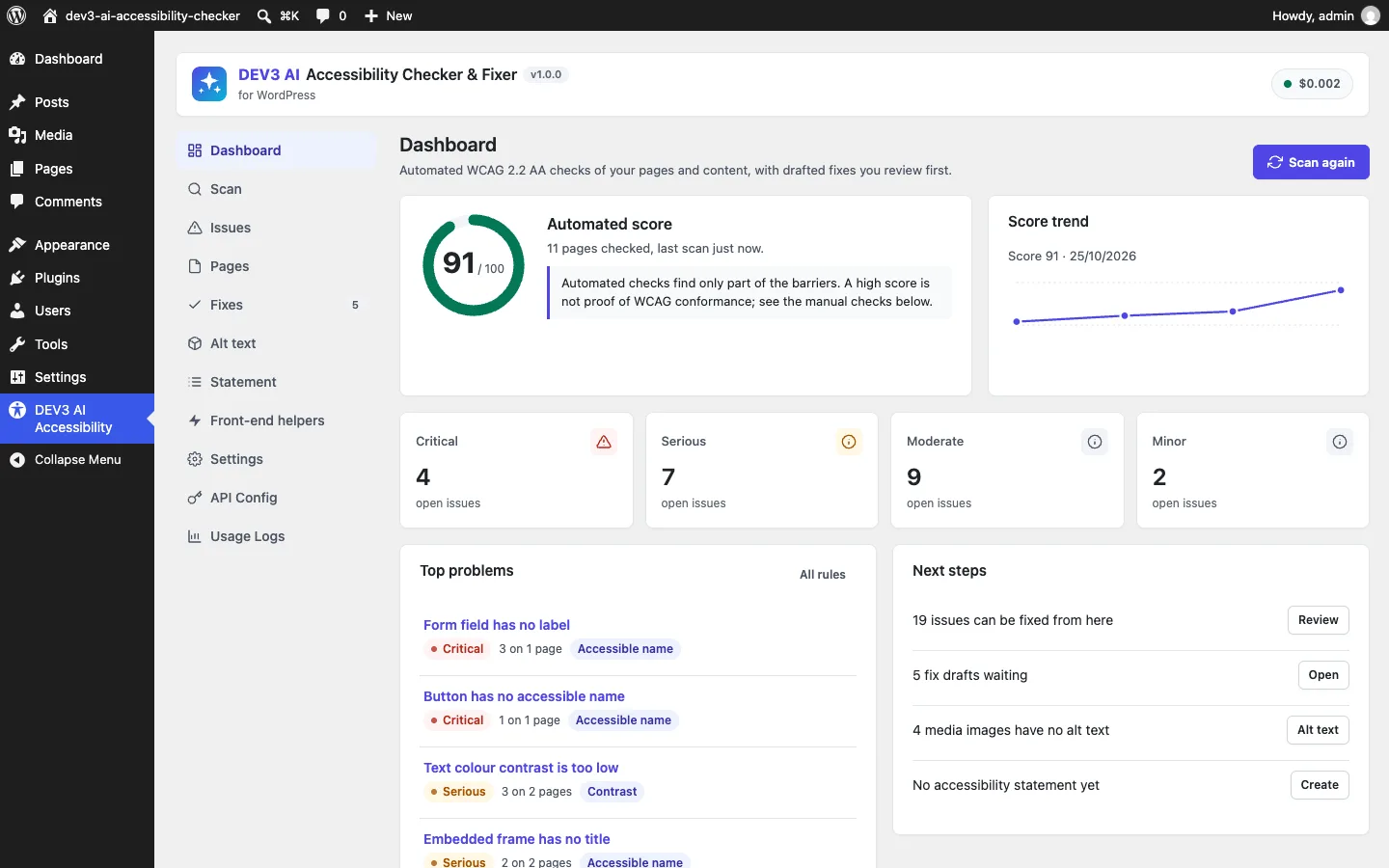
The dashboard shows the automated score with an explicit note that it isn't proof of WCAG conformance.
How to set it up
- Install the plugin zip from the bundle in Plugins → Add New → Upload Plugin and activate it.
- In DEV3 AI Accessibility → Settings, choose the content types, the scan size and an optional daily or weekly schedule.
- Go to Scan and click Start scan. It runs in the background.
- Optional: add a Google Gemini API key in API Config, or define
DEV3AX_GEMINI_API_KEYinwp-config.php, for AI alt text and link text. - Optional: switch on a skip link or focus outline in Front-end helpers. Both are off by default.
How to use it
Fix an issue from the list. Open Issues, click an issue and read why it matters and how to fix it. Review the suggested fix and click apply. The change goes into the post content, and the Fixes screen keeps a before/after copy for undo.
Draft alt text in bulk. In Alt text, click Draft alt text for all missing. DEV3 AI looks at each image and the text around it and drafts alt text in the site language. Every draft waits in Fixes → Pending until someone applies it or marks the image decorative.
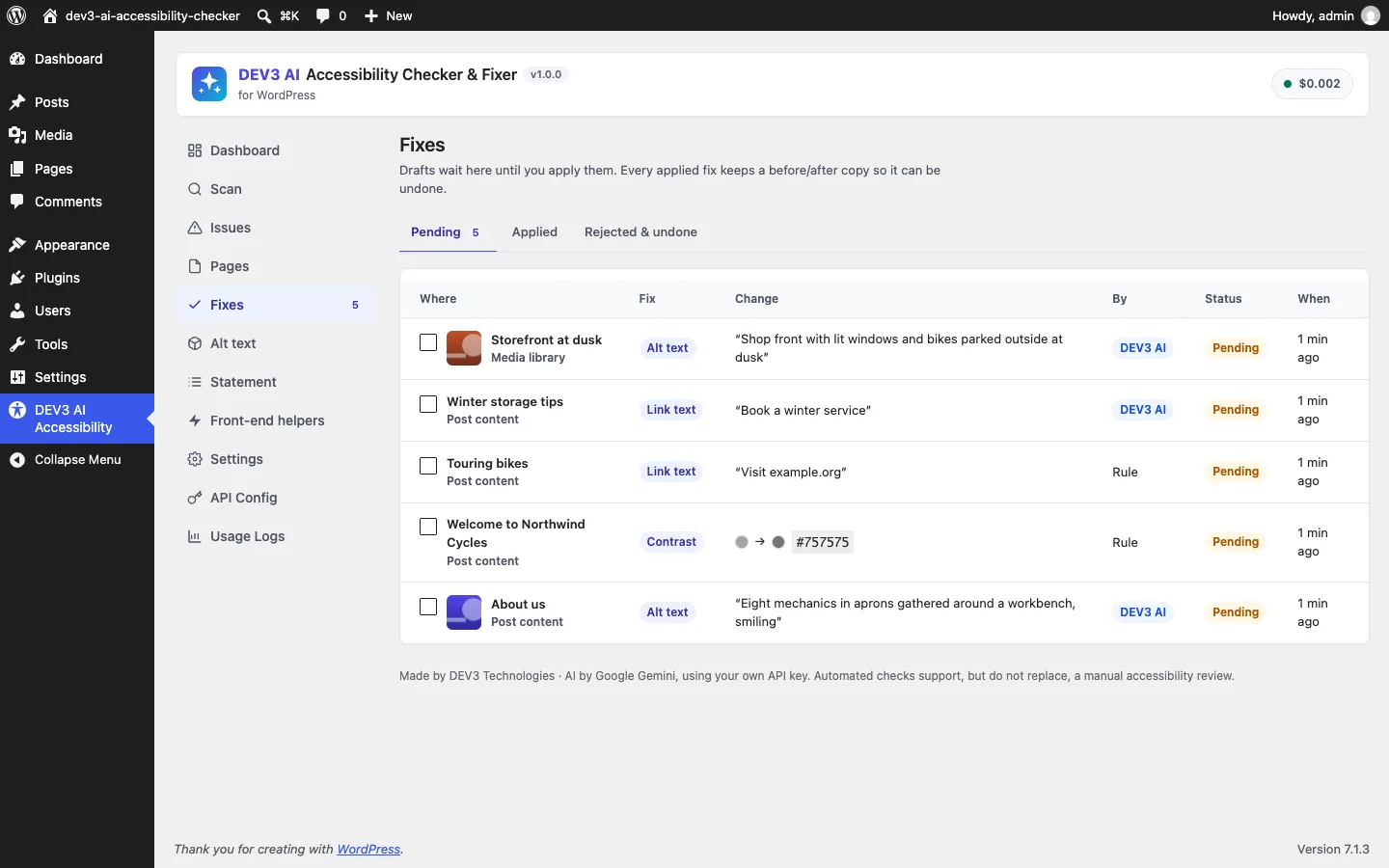
Fixes waits for review; each row shows whether DEV3 AI or a rule wrote it.
Check while writing. In the block editor, the DEV3 AI Accessibility sidebar checks unsaved content, shows the heading outline and lets you click Apply to block, which uses normal editor undo.
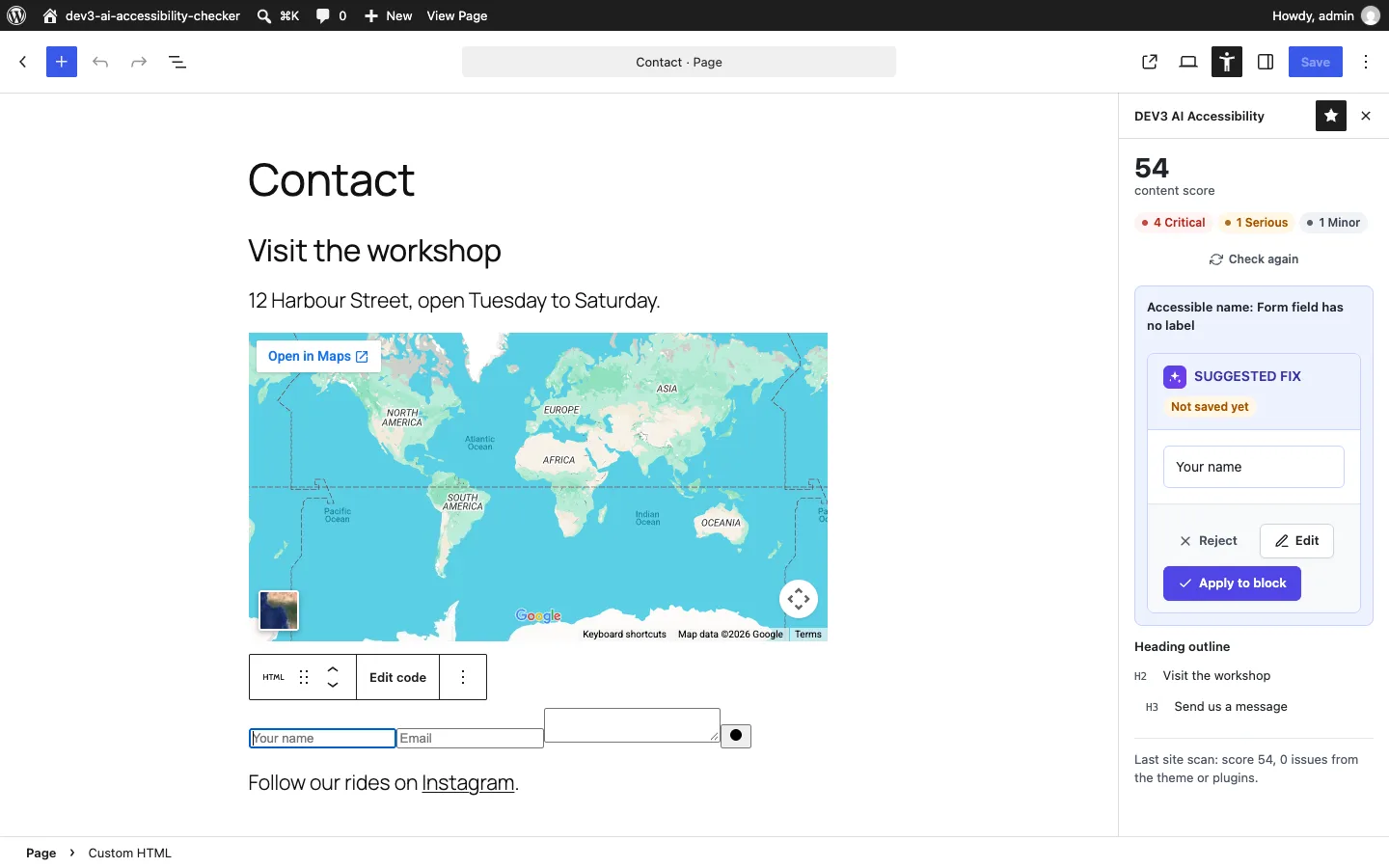
The editor sidebar finds an unlabelled field and applies the suggested label to the block.
Publish a statement. In Statement, fill in the W3C-style form. Known limitations are pre-filled from open issues, and the page is created as a draft.
Step 1: get the maths exactly right
WCAG defines contrast from relative luminance: linearise each sRGB channel, weight them, then compare. Getting this wrong by a rounding error decides whether #777777 on white passes, and it doesn't (4.48:1), while #767676 does (4.54:1). Both values are asserted in the test suite.
public static function luminance( array $rgb ) {
	$out = array();
	for ( $i = 0; $i < 3; $i++ ) {
		$c     = $rgb[ $i ] / 255;
		$out[] = $c <= 0.04045 ? $c / 12.92 : pow( ( $c + 0.055 ) / 1.055, 2.4 );
	}
	return 0.2126 * $out[0] + 0.7152 * $out[1] + 0.0722 * $out[2];
}

public static function ratio( array $fg, array $bg ) {
	if ( isset( $fg[3] ) && $fg[3] < 1 ) {
		$fg = self::blend( $fg, $bg ); // semi-transparent text is composited first
	}
	$l1 = self::luminance( $fg );
	$l2 = self::luminance( $bg );
	return round( ( max( $l1, $l2 ) + 0.05 ) / ( min( $l1, $l2 ) + 0.05 ), 2 );
}
(from Engine/Color.php, condensed)
The parser behind it accepts the colour formats WordPress content really contains: 3, 4, 6 and 8-digit hex, rgb()/rgba() with commas or spaces, hsl()/hsla(), and the common named colours. transparent, inherit and currentColor return null, which means "not decided here, keep looking up the tree".
Step 2: find the real colour pair
The checker parses the block's HTML with DOMDocument. For each element that has its own text, it walks up through the parents and collects colours as it goes:
for ( $node = $el; $node instanceof \DOMElement; $node = $node->parentNode ) {
	$c = $node === $el ? $own : self::own_colors( $node );
	if ( null === $fg && $c['fg'] ) {
		$fg  = $c['fg'];   // nearest text colour wins
		$exp = true;
	}
	if ( $c['unknown'] ) {
		return;            // background image or gradient: can't compute without rendering
	}
	if ( $c['bg'] ) {
		$bgs[] = $c['bg'];
		$exp   = true;
		if ( $c['bg'][3] >= 1 ) {
			break;         // an opaque background ends the search
		}
	}
}
if ( ! $exp && empty( $this->opts['base']['explicit'] ) ) {
	return;                // theme defaults only: the theme's job, not this content's
}
foreach ( array_reverse( $bgs ) as $layer ) {
	$bg = Color::blend( $layer, $bg ); // stack semi-transparent backgrounds
}
(from Engine/Checker.php, condensed)
own_colors() reads an element's inline color and background-color, plus WordPress's colour classes. has-luminous-vivid-amber-color and has-black-background-color are looked up in the theme palette. That palette comes from wp_get_global_settings() (theme.json for block themes), then from editor-color-palette theme support for classic themes, and it can be extended with the dev3ax_palette filter. Values such as var:preset|color|primary and var(--wp--preset--color--primary) resolve through the same palette.
Four rules keep it from crying wolf:
- No explicit colour, no verdict. A paragraph with no colour in its own markup or its parents is styled by the theme. The content scan can't see theme CSS, so it says nothing, and the theme is judged in the rendered scan.
- Images and gradients stop the check. White text on a photo might pass or fail depending on the pixels. The test suite includes exactly this case and expects no issue.
- Links without their own colour are skipped, because their colour comes from theme CSS.
- Nested text is reported once. A
<strong>inside a grey paragraph has the same colour pair, so it isn't a second issue. The checker remembers the pair it reported on each ancestor.
Blocks complicate this. When the content scan checks one block, its parent group's background isn't in that block's HTML; it's in the parent's attributes. So the scanner passes inherited colours down as a base, and a paragraph inside a dark group is still checked against the dark background. The tests cover a #1e1e1e paragraph inherited onto #222222.
"Large text" also needs a decision, because it lowers the requirement to 3:1. The checker treats 24px and above, bold 18.66px and above, the has-large-font-size family of classes, and h1 to h3 as large. The heading rule is a heuristic. It matches most themes but not every one, which we list as a trade-off below.
Illustration: the fixer keeps the hue and moves only lightness until the pair passes.
Step 3: suggest the smallest change that passes
The obvious fix is black or white, but that wipes out the designer's choice. We wanted the nearest colour that passes. The fixer converts the text colour to HSL, keeps hue and saturation, and steps lightness in 0.5% increments in both directions until the ratio passes. The direction that needs fewer steps wins:
public static function suggest( array $fg, array $bg, $target ) {
	$target = (float) $target + 0.05; // small margin so rounding never lands just below
	if ( self::ratio( $fg, $bg ) >= $target ) {
		return self::hex( $fg );
	}
	list( $h, $s, $l ) = self::rgb_to_hsl( $fg );
	$best              = null;
	foreach ( array( -1, 1 ) as $dir ) {
		for ( $step = 1; $step <= 200; $step++ ) {
			$nl = $l + $dir * $step * 0.005;
			if ( $nl < 0 || $nl > 1 ) {
				break;
			}
			$rgb = array_map( 'round', self::hsl_to_rgb( $h, $s, $nl ) );
			if ( self::ratio( $rgb, $bg ) >= $target ) {
				if ( null === $best || $step < $best[0] ) {
					$best = array( $step, $rgb );
				}
				break;
			}
		}
	}
	// … falls back to black or white if no lightness passes
	return self::hex( $best[1] );
}
(from Engine/Color.php, condensed)
The 0.05 margin matters. Without it, a colour at 4.499:1 could be rounded to 4.50 and shown as fixed. The tests check the direction too: #aaaaaa on white gets darker, not inverted, and #335577 on #111111 gets lighter.
For sites with a strict palette there's a second option: Use a palette colour picks the passing theme colour that's nearest in RGB distance. When an editor types their own colour instead, the server recomputes the ratio and refuses anything below the requirement with "That colour reaches only 3.10:1; at least 4.5:1 is needed."
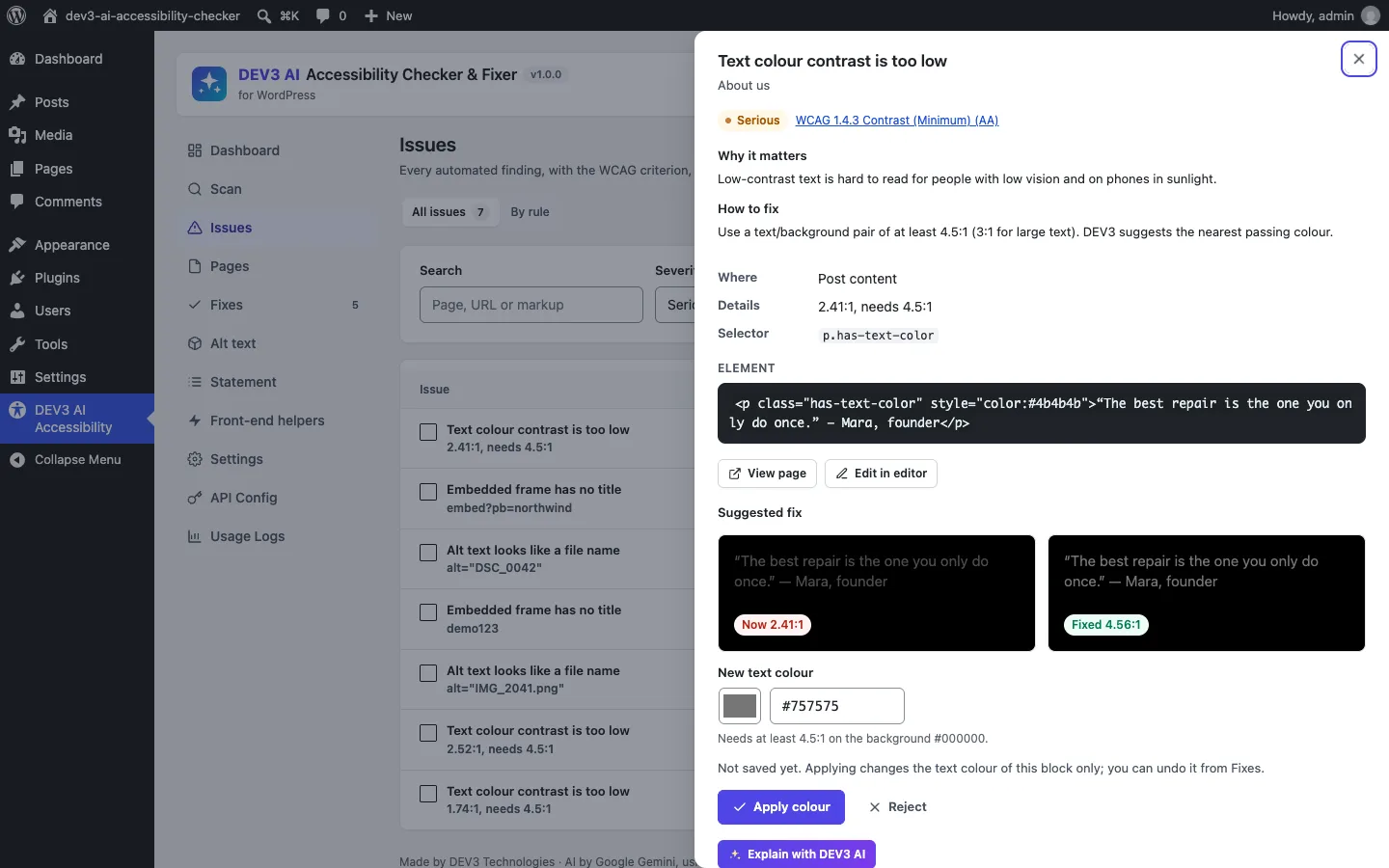
The drawer shows the ratio now and with the suggested colour before anything is saved.
Step 4: write it back without breaking the block
A block in post content is an HTML comment holding JSON attributes, followed by the saved HTML. The editor rebuilds the HTML from the attributes and compares the two. If they don't match, the block shows "This block contains unexpected or invalid content". So changing only the style="color:…" in the HTML breaks the block, and changing only the attribute does nothing visible until someone opens the editor.
The contrast fix changes both, together:
// Outer element (or the button link inside core/button) gets the new colour.
$classes = array_filter( $classes, static fn( $c ) => ! self::is_color_class( $c ) );
$classes[] = 'has-text-color';
if ( '' !== $slug ) {
	$classes[] = 'has-' . $slug . '-color';       // palette colour: class only
} else {
	$style = Html_Edit::style_set( $style, 'color', $to ); // custom colour: inline style
}
// … and the block attributes match what the editor would have saved.
unset( $block['attrs']['textColor'] );
if ( '' !== $slug ) {
	$block['attrs']['textColor'] = $slug;
	unset( $block['attrs']['style']['color']['text'] );
} else {
	$block['attrs']['style']['color']['text'] = $to;
}
(from Fix/Fixer.php, condensed)
This mirrors what the editor's colour picker saves. A palette colour becomes a textColor slug plus a has-{slug}-color class. A custom colour becomes style.color.text plus an inline style. The old text-colour class is removed so it can't win in the cascade, but background classes such as has-black-background-color are kept. Empty style objects are cleaned up so the attribute JSON matches what the editor would produce.
The edit itself is targeted. Html_Edit changes only the target tag, and the rest of the post is put back together from the parsed blocks. A test adds a title to one iframe and checks that the whole post grew by exactly the length of title="Product tour", so no other byte changed. Another test fixes a white-on-amber button inside a core/buttons wrapper. It checks that the parent block survives, the amber background attribute stays, the has-white-color class is gone, and a rescan of the result finds zero issues.
Every apply stores the post content before and after. Undo refuses with a 409 if the post has changed since, so it can't overwrite later edits unless forced.
Testing
The plugin has 56 PHPUnit tests and 30 Jest tests, counted from the repository. The contrast tests cover the WCAG reference values, the colour formats, palette and class resolution, inherited group backgrounds, the large-text threshold, images and gradients, deduplication of nested text, custom and palette fixes, nested buttons and the byte-level round trip. The AI features (vision alt text, link text, accessible names, explanations, statement polish) were tested with mocked API responses; a run with a live key is next.
Trade-offs
- Theme CSS is invisible to the content check. Colours set only in a stylesheet are judged in the rendered scan when possible and otherwise stay on the manual checklist, along with target size (2.5.8).
- h1 to h3 count as large text. That matches most themes, but a theme with a small h3 can make the checker too lenient for it.
- Text over images isn't judged. Doing it properly needs pixel rendering, so the plugin skips it rather than guessing.
- Lightness search changes perceived colour. Keeping the hue keeps the brand feel, but a very light accent may end up noticeably darker. The palette option exists for designers who would rather choose.
Conclusion
A trustworthy contrast fix comes from exact maths, honest limits on what can be known from markup, the smallest colour change that passes, and an edit that speaks the block editor's format. DEV3 AI Accessibility Checker & Fixer applies the same approach to alt text, headings, link text and accessible names, as the case study describes. The plugin ships in the DEV3 AI Content, SEO & Site Tools Plugins Bundle on the DEV3 marketplace and is being prepared for CodeCanyon.