All case studies

DEV3 Technologies · own product

DEV3 AI Accessibility Checker & Fixer: WCAG 2.2 checks with real fixes written into content, not an overlay

Our own WordPress plugin: it scans rendered pages and block content against WCAG 2.2 rules, drafts fixes for alt text, contrast, headings, link text and accessible names, and applies them as valid block markup with undo. The Google Gemini API writes alt text and link text.

Industry
Web Accessibility (WordPress)

Live project preview

Client systems are private — screenshots shown where permitted.

DEV3 Technologies · own product — screenshots
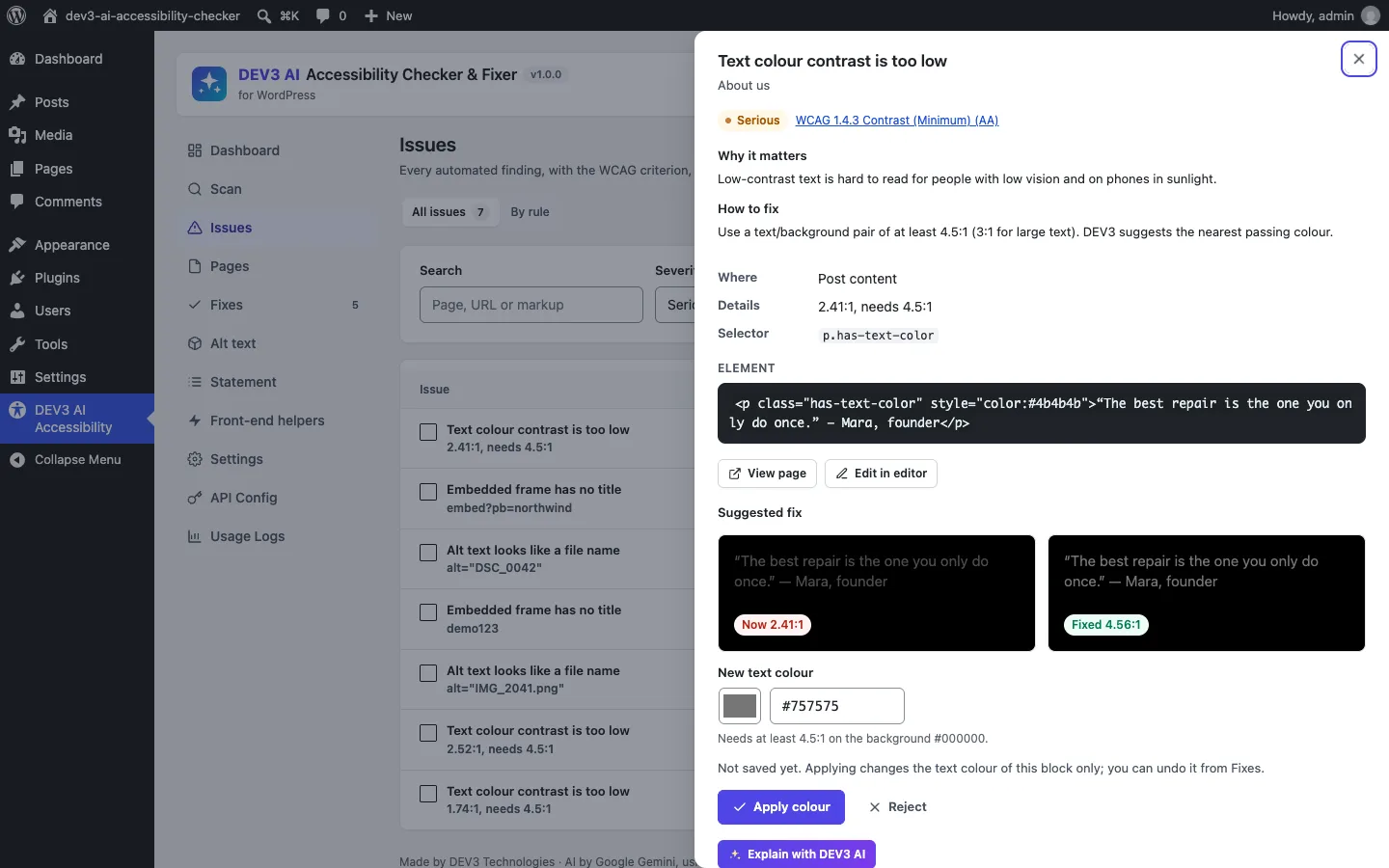
A contrast issue with its WCAG criterion, the element, and a before/after preview: 2.41:1 now, 4.56:1 with the suggested colour.

A contrast issue with its WCAG criterion, the element, and a before/after preview: 2.41:1 now, 4.56:1 with the suggested colour.

The challenge

Accessibility tools for WordPress mostly fall into two camps. Checkers report problems and leave the fixing to the site owner. Overlays inject a toolbar and rewrite pages at render time, often while claiming compliance, a practice regulators have already fined vendors for. We wanted a third option: find the common automated failures, draft a real fix in the post content, let a person approve it, and keep it reversible. That meant working out the actual text and background colours from inline styles, block attributes, theme palettes and parent blocks, then changing them without breaking the block editor's validation, and being honest that automated checks find only part of the barriers.

Our solution

We built DEV3 AI Accessibility Checker & Fixer as a PHP plugin with a React admin app, a block editor sidebar and optional front-end helpers. There is no overlay and no compliance badge; every score screen says it covers automated checks only.

Key design decisions

  • One rule engine, two inputs. A DOMDocument-based checker runs 20+ WCAG 2.2 rules on a whole rendered page or on one block's HTML. Content issues carry a block-path locator so they can be fixed; issues in theme markup get guidance only.
  • Contrast from the real colour stack. Text and background colours are resolved from inline styles, has-*-color classes, var:preset|color|* values and the theme palette, then walked up through parent blocks with alpha blending. Text over images or gradients is skipped rather than guessed.
  • Deterministic contrast fixes. The fixer keeps the hue and saturation and searches lightness in 0.5% steps for the nearest colour that reaches 4.5:1 (3:1 for large text), or offers the nearest passing theme palette colour.
  • Block-valid edits. Fixes change the target tag and the block's attributes together (for example style.color.text or textColor), and leave every other byte of the post alone, so blocks stay valid in the editor.
  • Draft, apply, undo. Each fix stores the post content before and after. Undo refuses with a 409 if the post changed since; a draft whose target changed becomes stale.
  • An honest statement generator. The accessibility statement follows the W3C structure, pre-fills known limitations from open issues, and flags over-claims such as "fully compliant" unless a manual audit is confirmed.

Architecture

Site scans run as background jobs: each page is fetched as a logged-out visitor (same host only, signed request) and its content is also checked block by block, so issues are attributed to content or to the theme. The editor sidebar checks unsaved content live and applies fixes through block attributes, so normal editor undo works. The Google Gemini API (gemini-2.5-flash) drafts vision alt text from the image and nearby text, descriptive link text and accessible names; with AI off, rules-based fixes still work. Skip link, focus outline, link underlines and new-tab hints are optional helpers, off by default. The API client, jobs and settings come from a shared core used across DEV3's plugins.
Results

The plugin is complete. It ships in the DEV3 AI Content, SEO & Site Tools Plugins Bundle on the DEV3 marketplace, alongside 6 other content and site plugins, and is being prepared for CodeCanyon. What was built and verified:

  • 56 PHPUnit tests in wp-env, including WCAG contrast maths (#767676 on white is 4.54:1, #777777 is 4.48:1), inherited group and palette colours, contrast fixes on paragraphs and nested buttons, heading outline repair, and a round trip that leaves untouched blocks byte-identical
  • 30 Jest tests for the admin screens and shared UI
  • Admin screens, the editor sidebar and the front-end helpers checked on a block theme (Twenty Twenty-Five) and a classic theme (Twenty Twenty-One)
  • The AI paths (alt text, link text, accessible names, explanations, statement polish) were tested with mocked API responses; a run with a live key is the next step
  • Known limits: contrast set only in theme CSS, and target size (2.5.8), stay on the manual checklist

Setup guide

No licence key or activation is needed: install the zip and every feature works.

Requirements

  • WordPress 6.0 or newer and PHP 7.4 or newer
  • Block or classic themes; block editor and classic content are both checked (the live editor sidebar needs the block editor)
  • For full-page scans, your server must be able to load its own pages (loopback requests). If a firewall or Basic auth blocks that, pages are checked from their saved content only
  • Optional: a Google Gemini API key for AI alt text, link text and explanations. Without one, rules-based fixes still work

1. Install the plugin

  1. Unzip the bundle download and find dev3-ai-content-seo-site-tools-plugins-bundle/dev3-ai-accessibility-checker/dev3-ai-accessibility-checker.zip.
  2. In WordPress, go to Plugins → Add New → Upload Plugin, choose the zip and click Install Now.
  3. Click Activate. DEV3 AI Accessibility Checker & Fixer for WordPress appears in the plugin list and its menu, DEV3 AI Accessibility, appears in the admin sidebar.

2. Connect Google Gemini (optional)

  1. Create a free API key in Google AI Studio (sign in with a Google account, then Create API key).
  2. Go to DEV3 AI Accessibility → API Config, paste the key and click Validate & save. The key is stored encrypted and never sent to the browser.
  3. Optional: pick the model (gemini-2.5-flash is the fast default; gemini-2.5-pro for the highest quality). Scans themselves never send anything to Google.

Prefer config files? Add define( 'DEV3AX_GEMINI_API_KEY', 'your-key' ); to wp-config.php instead.

3. Set it up

  1. In Settings, choose the content types to scan, the pages per scan, a daily or weekly schedule, whether to rescan a post when it is published or updated, the enabled rules and the alt text language.
  2. Go to Scan and click Start scan. The scan runs in the background with progress; you can leave the page.
  3. Open the Dashboard to see the automated score, open issues by severity, top problems and next steps, plus the list of things to check by hand.
  4. Optional: in Front-end helpers, switch on a skip link, a visible focus outline, underlined content links or a "(opens in a new tab)" hint. All are off by default.

Updating

Download the new bundle version, then upload the plugin zip in Plugins → Add New → Upload Plugin and choose Replace current with uploaded. Settings, issues and fix history are kept.

Uninstalling

Deactivate and delete the plugin from Plugins. Scan data and fix history are kept unless you turn on the delete-data-on-uninstall option in Settings first. Fixes already applied stay in your content.

How to use

Fix low-contrast text

  1. Open DEV3 AI Accessibility → Issues and click a "Text colour contrast is too low" issue.
  2. The drawer explains why it matters, shows the element, the selector and a before/after preview with both ratios (for example Now 2.41:1 and Fixed 4.56:1).
  3. Keep the suggested colour, type your own (it must still pass), or choose Use a palette colour to pick the nearest passing colour from your theme.
  4. Click Apply colour. Only that block's text colour changes; you can undo it from Fixes.

Write alt text for images

  1. Open Alt text to see media images with no alt or a file name as alt.
  2. Click Draft alt text for all missing. DEV3 AI looks at each image and its page context and drafts alt text in your site language. Drafts appear in Fixes → Pending.
  3. Review each draft, edit it if needed, or choose Mark decorative for images that carry no information. Tick Also save this alt text in the media library to reuse it, then Apply fix.

Check a post while you write

  1. In the block editor, click the DEV3 AI Accessibility icon in the top bar. The sidebar shows a content score, issue counts and the heading outline.
  2. Click an issue to select its block, review the suggested fix, then click Apply to block. The change uses normal editor undo; save the post to keep it.
  3. Click Check again after editing. Before publishing, the pre-publish panel shows how many issues are still open.

Repair the heading outline and link text

  1. For a "Heading level is skipped" issue, open it and review the outline before and after, then click Apply new outline.
  2. For ambiguous links such as "read more", accept the suggested text (from the target page title, or DEV3 AI when connected) or write your own.
  3. Use Apply selected in Fixes to apply several reviewed drafts at once, and the Applied tab to undo any of them.

Publish an accessibility statement

  1. Open Statement, fill in your organisation, contact details, standard (WCAG 2.2 AA), conformance status and assessment approach.
  2. Known limitations are pre-filled from your open issues; edit them freely.
  3. Click Build the statement, preview it, then Create the page. It is saved as a draft page for you to publish.

Related case studies

DEV3 Technologies · own product · Content Management (WordPress)

DEV3 AI Field Filler for ACF: type-aware AI values for custom fields, checked against ACF's own validation

Our own WordPress plugin for Advanced Custom Fields and Secure Custom Fields: it fills a post's custom fields from its content with the Google Gemini API, using a schema built from each field's settings, then checks every value with its own codec and ACF's validation before saving.