A B2B quote is a promise about money. A buyer asks for 120 mugs and 30 notebooks, the store answers with a priced document valid for 30 days, and the buyer's purchasing team takes a week to sign it off. In that week the store may change a pricing rule, start a sale or edit a product. When the buyer clicks Accept, they expect to pay the number on the PDF, not whatever the cart would charge today. When we built DEV3 AI B2B Wholesale & Quote Requests for WooCommerce, this was the problem that shaped the code: prices must come from one set of rules while the quote is being prepared, and must stop following those rules the moment the quote is sent and accepted. This post covers how the plugin does both, and how it turns an accepted quote into exactly one payable WooCommerce order.
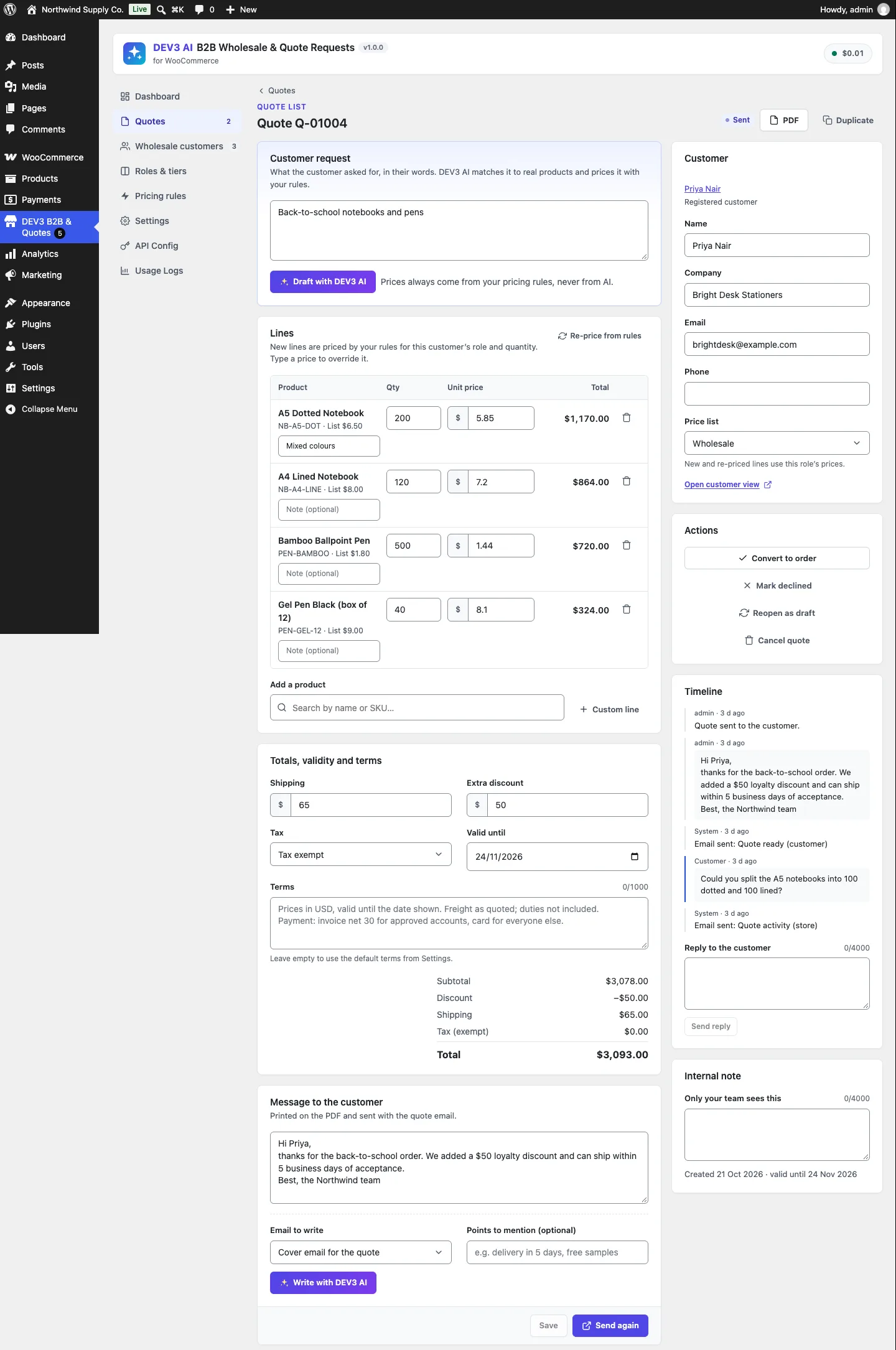
The quote editor: lines priced by the customer's rules, quoted shipping, an extra discount, validity, terms and the timeline.
What it does and who it's for
- Wholesalers and distributors on WooCommerce that need trade prices per customer group, with minimum orders, pack sizes and tax exemption.
- Manufacturers and suppliers that sell on quote: buyers add products to a quote basket or describe what they need, and the store replies with a priced PDF.
- Stores that sell to both consumers and businesses: retail shoppers see normal prices, approved trade accounts see their own prices and payment options, and guests can be asked to log in to see prices.
- Sales teams that handle requests by email: DEV3 AI turns a pasted request into draft lines from the real catalogue and writes the cover and follow-up emails.
- Buyers who reorder in bulk: a quick-order table and a paste-a-list box replace dozens of product-page visits.
How to set it up
- Install the plugin zip from the bundle and activate it (WooCommerce 8.0 or newer must be active).
- Open DEV3 B2B & Quotes → Settings and click Create page for the quote request, quick-order and wholesale registration pages.
- In Roles & tiers, adjust the default Wholesale and Distributor roles: discount, minimum order, tax exemption, payment and shipping methods.
- In Pricing rules, add tier prices and quantity breaks, and check them with Price preview.
- Optional: paste a Google Gemini API key in API Config to turn on the DEV3 AI buttons. Everything else works without it.
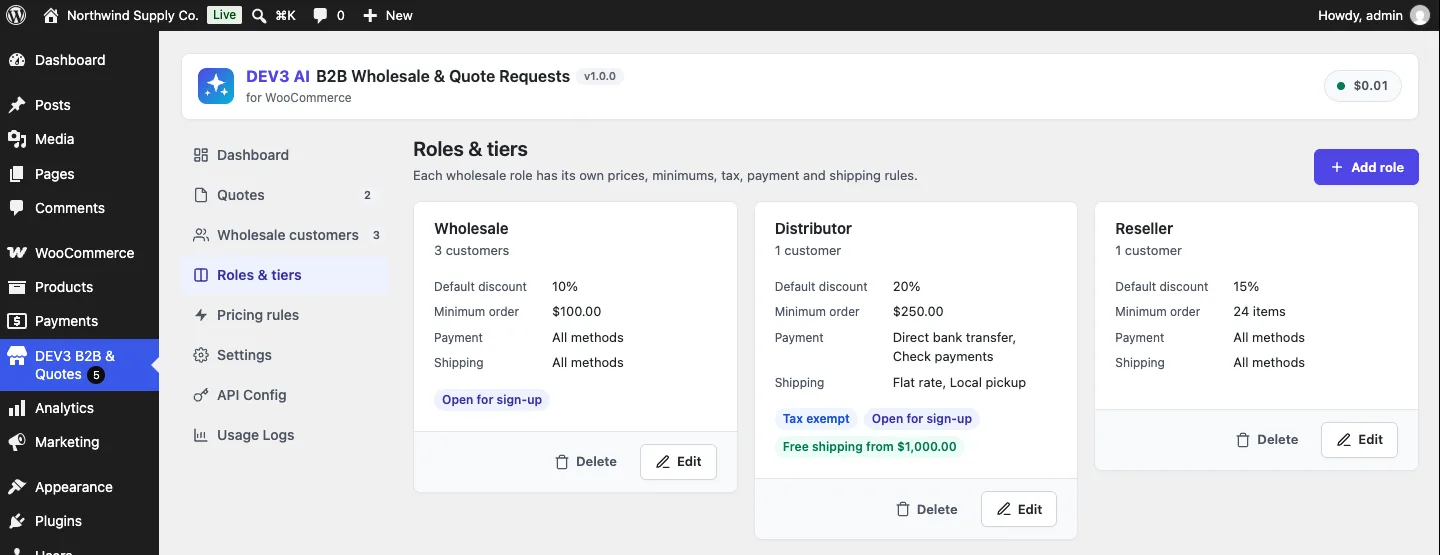
Each role has its own discount, minimum order, payment and shipping methods, and can be tax exempt.
How to use it
Approve a trade account. A business applies on the registration page. In Wholesale customers, open the application, read the optional DEV3 AI screening notes, pick the role and click Approve. From their next page view the customer sees that role's prices.
Turn an emailed request into a quote. Open the quote in Quotes, paste the request into Customer request and click Draft with DEV3 AI. Review the matched lines, unmatched items and questions, then click Accept lines. Adjust quantities or type a price to override one, add shipping and an extra discount, then send the quote. The customer gets an email with the PDF.
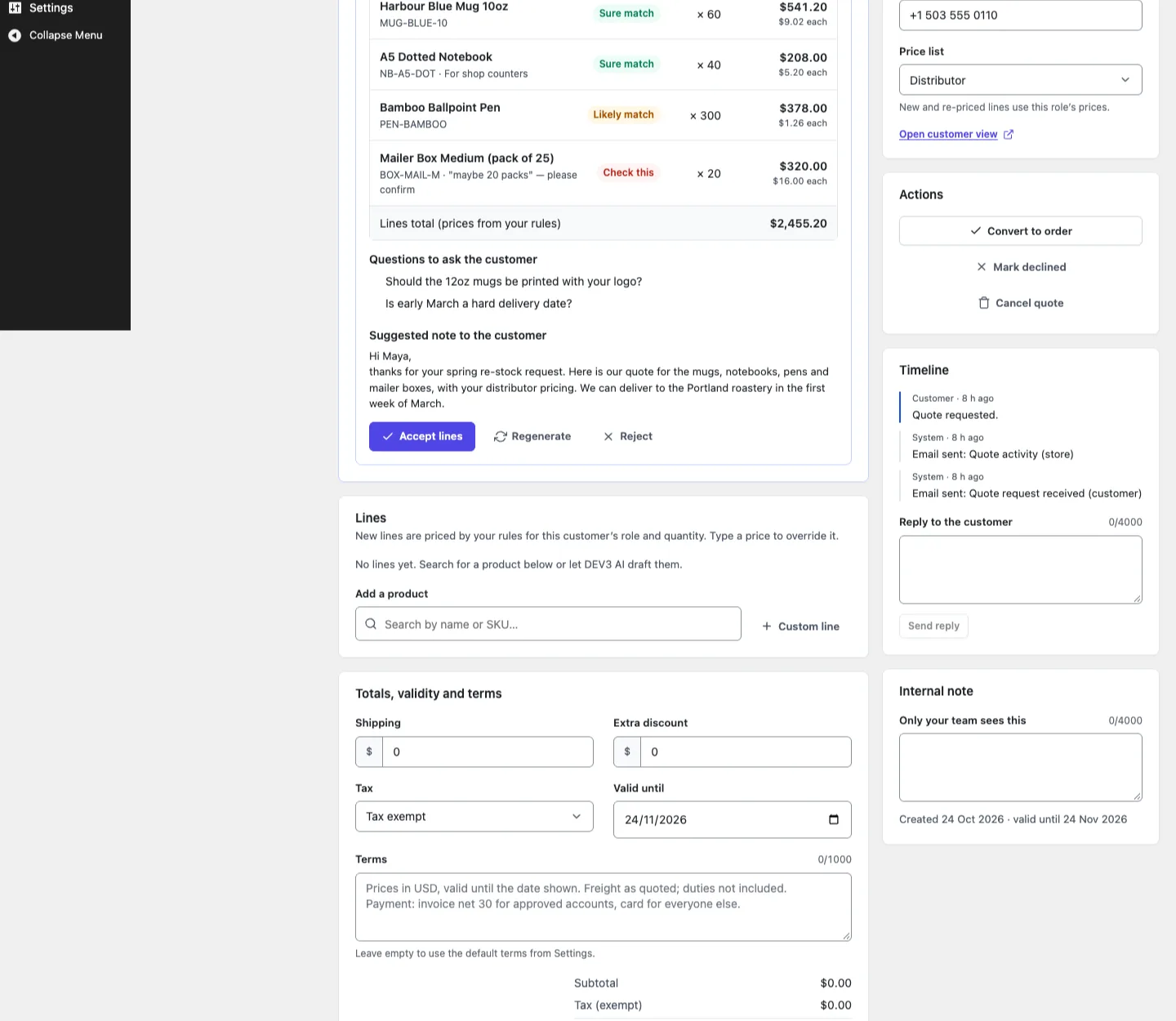
A DEV3 AI draft: real catalogue products, prices from the distributor's rules, and nothing saved until Accept lines.
Let the buyer accept and pay. The customer opens the quote in My Account → Quotes (or a private link), sends a message if something needs changing, and clicks Accept quote. A pending WooCommerce order with the quoted prices is created, and they pay it on the normal pay-for-order page.
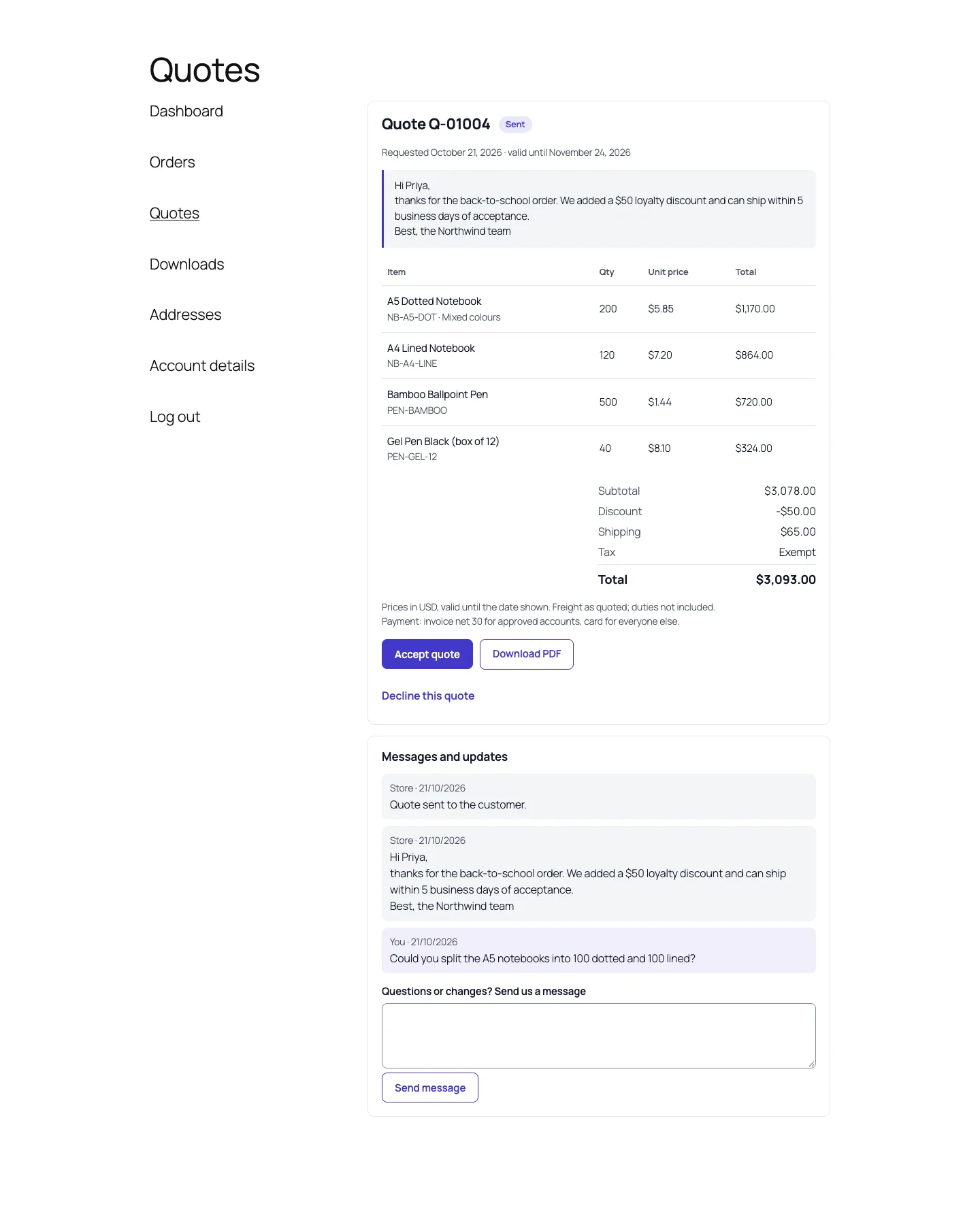
What the buyer sees: the quote, the PDF, Accept and a message thread with the store.

Illustration: prices calculated by rules, then sealed into the order.
One engine, one answer
Most stores that sell to businesses run one plugin for wholesale prices and another for quotes, and the two never share a price calculation. Here the cart, product pages, the quick-order table, the quote editor and the AI draft all call one function, and a quote has a clear point at which it stops calling it.
Everything goes through Pricing\Engine::price( $product, $role, $qty ). It returns a structured result: the price, the base and regular prices, which source won (product, rule, role or none), the rule id and name, the quantity break that applied, and the full tier table for display.
The precedence is fixed and short:
- A product-level price for this role, with that product's own quantity breaks. A merchant who typed "distributors pay $7 for this mug" means it, so it beats every rule.
- Pricing rules. Each rule targets everyone, any wholesale role or one role, and all products, some categories or some products. The highest priority wins, and on a tie the lowest price wins.
- The role's default discount, for example 10% off for "Wholesale".
- Nothing, which leaves the product's own price.
The rule loop is the heart of it:
foreach ( Rules::active() as $rule ) {
	if ( ! Rules::for_role( $rule, $role ) || ! Rules::covers( $rule, $product ) ) {
		continue;
	}
	$calc = self::rule_price( $rule, $base, $qty );
	if ( null === $best || $rule['priority'] > $best['rule']['priority']
		|| ( $rule['priority'] === $best['rule']['priority'] && $calc['price'] < $best['calc']['price'] ) ) {
		$best = array( 'rule' => $rule, 'calc' => $calc );
	}
}
(condensed from Engine::price)
rule_price() starts from the rule's base discount, then walks its quantity breaks. The highest break whose minimum is at or below the quantity replaces the base discount. Each break carries its own type, so one rule can say "20% off, 25% off from 50 units, a fixed $6 from 100". The acceptance test in PricingTest checks exactly that: a $10 mug costs a distributor $8 for 1 unit, $7.50 for 60 and $6.00 for 120, while a retail customer still pays $10 and the "Wholesale" role gets its 10% default.
The base price must never be our own output
The cart integration calls $product->set_price() with the engine's result in woocommerce_before_calculate_totals, which WooCommerce can run several times per request. If the engine read get_price(), the second pass would discount an already discounted price. So Engine::base_price() reads the product's own regular and sale prices in the edit context, which ignores runtime changes. A sale price is the base, variations fall back to their parent's role prices, and results are memoised per product, role and quantity within a request.
Quotes call the same engine, until they don't
A quote line is normalised by Quotes::normalize_line( $line, $role ), where the role is the quote customer's wholesale role, stored on the quote when it is created. If the line names a product and no unit price was typed, the engine prices it at the quoted quantity:
$price = Engine::price( $prod, $role, $qty );
$unit  = isset( $line['unit_price'] ) && '' !== $line['unit_price'] && is_numeric( $line['unit_price'] )
	? Engine::round( $line['unit_price'] )
	: $price['price'];
(condensed from Quotes::normalize_line)
This gives the admin both behaviours they need. Lines start at the rule price, and a typed price overrides it. A custom line with no product (for example "Custom print setup") is kept with its typed price. A variable parent is rejected, because a variable product has no price of its own until a variation is chosen. Every line also stores regular_price, so the PDF and the customer view can show the saving.
The editor's Re-price from rules button is the only way back to the rules: Quotes::reprice() removes the stored unit price from every product line and normalises them again. A test pins this down: a line typed at $5 stays at $5 until reprice() runs, then becomes $9 under a 10% rule. Apart from that button, nothing recalculates a stored line. Prices are stored in the plugin's own dev3bq_quote_items table, not in the session, so they stay put across days and devices.
The AI draft follows the same path
The plugin's DEV3 AI step turns a free-text request ("we need 120 kraft mugs and 30 A5 notebooks, plus 10 golden spoons") into draft lines. It could have been the weak point, so it was built to have no say over price at all. The Google Gemini API receives the request text and up to 40 candidate products from a keyword and SKU search: id, name, SKU, attributes and category, with no prices. It returns product ids, quantities, notes and a confidence level. Assistant::draft_quote() then drops every id that wasn't in the candidate list, merges duplicate lines and passes each line through normalize_line(), so the price comes from the engine for the customer's role and the merged quantity.
The PHPUnit test for this captures the outgoing request and asserts that it contains the SKU MUG-KRAFT-12 and no "price" key. Its mocked response includes a product id that doesn't exist. The draft comes back with two lines, one dropped suggestion reported as unmatched, the mug at the 100+ tier price of $6.00 and a line total of $720.00, and the quote's stored lines unchanged until the admin presses Accept lines. Like all of the plugin's AI paths, this was tested with mocked responses; a run against a live key is still to be done.
Sending is where the price is promised
Service::send() moves the quote to sent, sets valid_until (30 days by default) when it is missing or past, recalculates totals from the stored line totals (not the engine) and emails the PDF, which comes from a small built-in PDF 1.4 writer. The extra discount is spread pro rata across the lines before tax is estimated; the PDF labels that line "Estimated tax", because the real tax is calculated on the order.
Accept: claim first, then build

Illustration: two accept requests race for one quote, and only one claim succeeds.
The accept step has two failure modes that cost real money: two orders from one quote (a double click, two tabs, or a customer and an admin at the same moment), and an order whose prices differ from the quote.
Exactly one order
The first problem is handled with a conditional update. Quotes::transition() changes the status only if the current status is in an allowed set, and reports success only when exactly one row changed:
$sql     = "UPDATE {$table} SET " . implode( ', ', $sets ) . " WHERE id = %d AND status IN ({$in})";
$changed = $wpdb->query( $wpdb->prepare( $sql, $vals ) );
return 1 === (int) $changed;
(condensed from Quotes::transition)
Service::accept() claims the quote this way before it touches WooCommerce:
$from = 'admin' === $actor ? array( 'requested', 'draft', 'sent' ) : array( 'sent' );
// ...expiry and empty-quote checks...
if ( ! Quotes::transition( $id, 'accepted', $from, array( 'decided_at' => current_time( 'mysql', true ) ) ) ) {
	return new \WP_Error( 'dev3bq_quote_locked', __( 'This quote was already accepted.', '...' ), array( 'status' => 409 ) );
}
$order = self::create_order( Quotes::get( $id ) );
if ( is_wp_error( $order ) ) {
	Quotes::transition( $id, $quote['status'], array( 'accepted' ) );
	return $order;
}
(condensed from Service::accept)
MySQL applies the UPDATE ... WHERE status IN (...) atomically, so of two concurrent requests only one sees a changed row; the other gets a 409. If order creation fails, the quote goes back to its previous status. Customers can accept only a sent quote, and an expired one is moved to expired on the spot. The daily cron uses the same transition, which is why each reminder is sent exactly once.
Exactly the quoted prices
The second problem is about how WooCommerce totals an order. $order->add_product() normally takes the product's current price. Service::create_order() passes the stored line total as both subtotal and total instead:
$total = (float) $item['line_total'];
if ( $incl_tax && $product ) {
	$rates  = \WC_Tax::get_base_tax_rates( $product->get_tax_class() );
	$total -= array_sum( \WC_Tax::calc_tax( $total, $rates, true ) );
}
$order->add_product( $product, $item['qty'], array( 'subtotal' => $total, 'total' => $total ) );
(condensed from Service::create_order)
Because subtotal and total are set explicitly, neither the current product price nor the plugin's cart hooks have any effect; this order never passes through a cart. When the store enters prices including tax, the tax part is taken out of the line first, so that calculate_totals() adds it back and the customer still pays the quoted gross amount.
The rest of the quote follows the same idea:
- Shipping becomes a shipping line called "Shipping (as quoted)" with the quoted amount, not a recalculated rate.
- The extra discount becomes a negative fee named after the quote number, with tax status
none, rather than a coupon that WooCommerce's coupon rules could reject. - Tax-exempt quotes set the order's
is_vat_exemptmeta and skip tax incalculate_totals(). - Addresses come from the customer account when there is one, otherwise from the quote's contact details.
- The order is created as
pendingwithcreated_viaset todev3bq_quote, and the customer pays through WooCommerce's standard pay-for-order page, so every payment gateway the store already has works without changes.
Storage-agnostic by construction
Every step goes through wc_create_order(), WC_Order setters and save(), with no SQL against posts or postmeta, which is what lets the plugin declare HPOS compatibility truthfully. The longest test in QuotesTest runs the whole flow twice, with HPOS on and off. It sends a 50-unit quote at a typed $7.25 with $25 shipping and a $12.50 discount, checks that the email carries a .pdf attachment, then saves a new rule that would price the product at $1, and only then accepts. The order is pending, its subtotal is 362.5 and its total 362.5 + 25 − 12.5, it carries the quote id and the distributor role, its billing city is Berlin, and its payment URL points to order-pay. Depending on the mode, the test then checks that the order lives in wc_orders or as a shop_order post. A second accept returns an error, and wc_get_orders() finds exactly one order for the quote.
Trade-offs
- The claim is not a database transaction. If PHP dies between claiming the quote and saving the order, the quote stays
acceptedwith no order id. That's the safe direction (no duplicate order), and an admin can see it in the timeline, but it isn't automatic recovery. - Frozen prices are frozen. If a product's cost rises after the quote is sent, the accepted order still uses the quoted price. That is what a quote means, and the validity date limits the exposure.
- Quote tax is an estimate. The real tax is calculated on the order, and it can differ if the customer's address changes.
- Stock is not reserved by a quote. WooCommerce reduces stock when the order is paid, so a long-running quote can be accepted for an item that has since sold out.
- The PDF has no logo yet. The built-in writer handles text, lines and filled boxes in WinAnsi encoding; a currency symbol outside it, such as ₹, is detected and the PDF prints the currency code (INR) instead.
Verification
The plugin has 73 PHPUnit tests, run against WooCommerce in wp-env, and 38 Jest tests (17 for the admin and storefront scripts, 20 for the shared UI kit). phpcs runs with the WordPress standards at 0 errors and 0 warnings.
Conclusion
The rule we took from this build: let a single function compute prices while a quote is being prepared, store the result, and then never compute it again without an explicit action. Claim the state change with a conditional update before creating anything, and hand WooCommerce totals rather than prices. DEV3 AI B2B Wholesale & Quote Requests ships in the DEV3 AI WooCommerce Plugins Bundle on the DEV3 marketplace, alongside 20 other WooCommerce plugins, and is being prepared for CodeCanyon. The case study covers the wholesale side of the plugin.