
A cart recovery email has a schedule built into it: "one hour after the shopper left", "a day later", "two days after that". Those delays are easy to implement and easy to explain, but they ignore the shopper. A reminder computed for 03:10 in the morning is still sent at 03:10, and by the time the shopper wakes up it is buried under newsletters. When we built DEV3 AI Abandoned Cart & Win-back Emails for WooCommerce, we wanted each reminder to land at an hour when that particular shopper tends to read email and buy, without making the sequence unpredictable for the merchant. This post explains the rule we ended up with, forward-only send-time tuning, and the details that make it behave: whose clock to use, how hours are scored, why a send may never move earlier, and what happens when every candidate hour is asleep.
What it does and who it's for
DEV3 AI Abandoned Cart & Win-back Emails captures carts on the WooCommerce checkout, runs email and SMS reminder sequences with unique coupons and one-click restore links, and reports the revenue that came back. Everything stays inside WordPress.
- Stores on the block checkout that need capture to work through the Store API, not just on the classic form.
- Shops selling into the EU and UK that need an opt-in mode which stores nothing personal until the box is ticked, a separate SMS opt-in, and a personal-data exporter and eraser.
- Merchants who want personal copy without risk: AI drafts per cart wait in a review queue, and the approved template is the fallback.
- Stores with lapsed customers: a win-back sequence enrols customers whose last paid order is older than a set number of days.
- International stores whose shoppers live in other timezones, which is what the send-time tuning below is for.
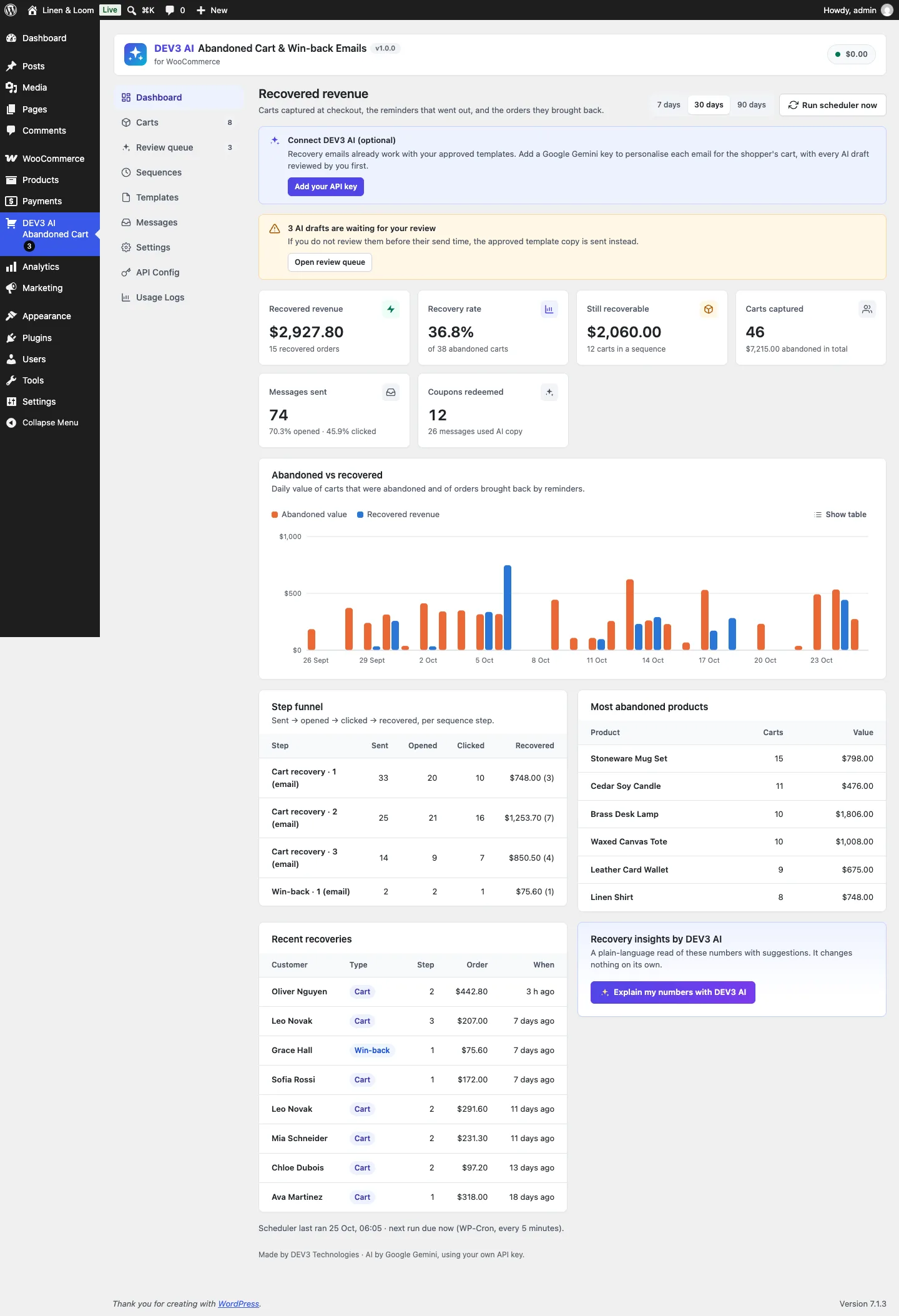 The dashboard counts a cart as recovered only when a reminder was sent or its link clicked before the order was paid.
How to set it up
- Upload the plugin zip from the bundle in Plugins → Add New → Upload Plugin and activate it (WooCommerce 8.0+ must be active).
- Open DEV3 AI Abandoned Cart → Settings → Capture & consent: pick the consent mode, the abandonment cut-off (15 minutes by default) and any roles to exclude.
- In Settings → Sending & timing, set the from address, and switch on send-time tuning with your quiet hours and maximum shift.
- Optional: paste a Google Gemini API key in API Config, or define
DEV3AC_GEMINI_API_KEYinwp-config.php. - Check the two ready-made sequences and six approved templates, then press Run scheduler now on the dashboard to see the first sweep.
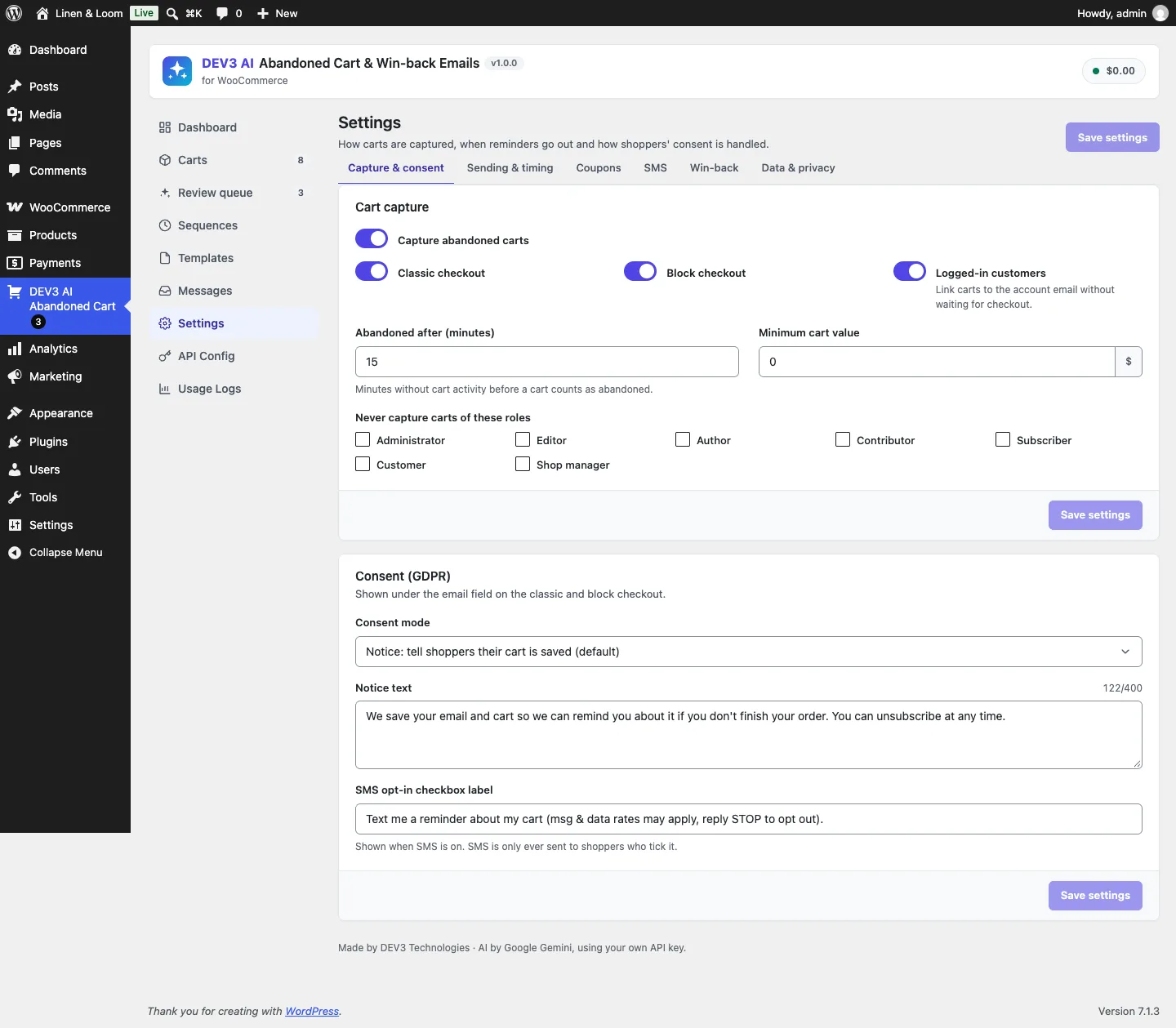 Capture can be switched on per checkout type, and the consent notice text is editable.
How to use it
Tune a sequence. In Sequences, set each step's wait, channel and template, and switch on Unique coupon in this step where you want a single-use code. Build with DEV3 AI suggests steps with reasons, but nothing changes until you apply and save.
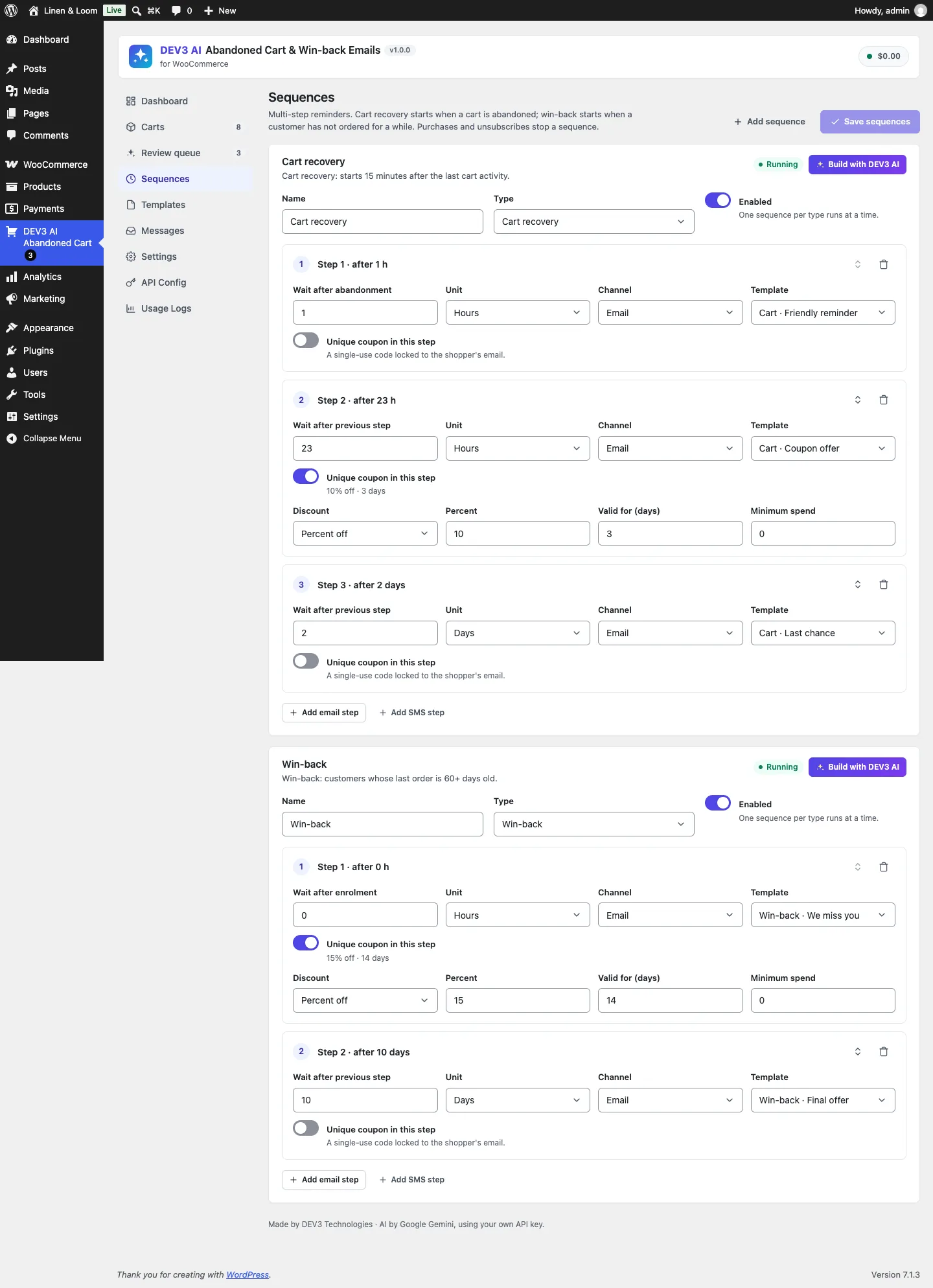 Step 1 waits from the shopper's last activity; later steps wait from the previous send.
Review AI drafts. With Personalise each message with DEV3 AI on for a template, each abandoned cart gets its own draft, written ahead of the send time. In Review queue you approve, edit, regenerate or reject it. Anything not reviewed in time goes out as the approved template copy.
Follow up by hand. In Carts, open any cart to see its consent record, next message and timeline, then Send next step now, Stop sequence or Copy recovery link for a support reply.
The engineering problem: when to send
The rest of this post is about one rule in the scheduler: when each reminder actually goes out.
Where tuning sits in the scheduler
Everything in the plugin is driven by one WP-Cron sweep every five minutes. A sweep detects carts idle past the cut-off (15 minutes by default), marks them abandoned, enrols lapsed customers into win-back once an hour, prepares AI drafts for messages that need them, sends what is due and closes carts with nothing left to send. An atomic option lock (add_option fails if the row exists) keeps two sweeps from overlapping, with a five-minute stale timeout so a crashed run does not block the scheduler forever.
Each sequence step becomes a row in a messages table with a scheduled_at time. Send-time tuning happens exactly once per message, when the step is scheduled:
$earliest = max( $now, (int) $base_ts + Sequences::delay_seconds( $step ) );
$when     = Send_Time::best( $earliest, $cart, $step, $index );
$ai       = $tpl['ai_personalise'] && Copywriter::available( 'cron' );
$id       = Messages::insert(
	array(
		'cart_id'      => $cart['id'],
		'step_index'   => $index,
		'status'       => 'scheduled',
		'ai_state'     => $ai ? 'pending' : '',
		'scheduled_at' => Carts::now( $when ),
	)
);
(condensed from Scheduler::schedule_next)
Deciding once means the time a merchant sees in the Carts screen is the time the message goes out, and the AI draft can be generated ahead of it so there is time to review it. The review gate is keyed on scheduled_at too.
For step 1 the base is the shopper's last cart activity, not the moment the sweep noticed the abandonment. For later steps the base is the moment the previous message was really sent. That second choice matters for tuning: if step 1 was pushed back by an hour, step 2's "23 hours later" counts from the real send, so the gap the merchant configured between two emails is never squeezed.
Whose clock?
An hour score is meaningless unless you know which clock it is measured on. A store in London selling to a shopper in Chicago should not consider 19:00 London time a good evening slot.
The storefront capture script sends the browser's offset with every capture, as minutes east of UTC:
tz_offset: -new Date().getTimezoneOffset(),
(from src/storefront/capture.js)
The public REST controller records whether a numeric offset actually arrived ('tz_known' => is_numeric( $tz )), and the tracker clamps it to the range real timezones use before storing it on the cart:
if ( isset( $data['tz_offset'] ) && ! empty( $data['tz_known'] ) ) {
	$row['tz_offset'] = min( 840, max( -720, (int) $data['tz_offset'] ) );
	$row['tz_known']  = 1;
} else {
	$row['tz_offset'] = Send_Time::store_offset();
}
(condensed from Capture\Tracker)
The range is UTC−12:00 to UTC+14:00, so a tampered request cannot push a shopper into a 30-hour timezone. When the offset is unknown (a cart captured from the block checkout's Store API hook before the script ran, a win-back enrolment built from an old order), the store's own offset is used, and the tz_known flag records which one we have.
Converting a UTC timestamp to the shopper's local hour is then one line, with no DateTimeZone objects involved:
public static function local_hour( $ts, $offset ) {
	return (int) gmdate( 'G', (int) $ts + (int) $offset * 60 );
}
The trade-off we accepted
Storing an offset rather than an IANA zone name such as America/Chicago means the plugin does not follow daylight saving changes: a reminder computed across a clock change can land an hour off. We chose the offset anyway. The browser gives it without a library, it fits in a small integer column, and SQL can apply it with DATE_ADD. An hour of error near a DST boundary, inside a window that already tolerates a shift of several hours, was a fair price.
Scoring the 24 hours
Each cart gets an array of 24 scores, one per shopper-local hour. Three sources feed it, weighted by how strongly they predict that this person will act:
- 3 points for each of the shopper's own paid orders (up to 20) placed in that hour. Someone who has bought at 19:00 three times is very likely to read email at 19:00.
- 2 points for each of their last 30 opens or clicks on earlier reminders.
- Up to 1 point from store-wide clicks, normalised so the busiest hour of the store scores exactly 1.
- 0.5 points for each of the merchant's preferred hours (10:00 and 19:00 by default), which acts as a prior when there is no data at all.
$scores = array_fill( 0, 24, 0.0 );
foreach ( (array) Settings::get( 'best_hours' ) as $h ) {
	$scores[ (int) $h ] += 0.5;
}
$store = self::store_histogram();
$max   = max( 1, max( $store['clicks'] ) );
foreach ( $store['clicks'] as $h => $n ) {
	$scores[ $h ] += $n / $max;
}
foreach ( $orders as $order ) {
	$scores[ self::local_hour( $order->get_date_created()->getTimestamp(), $offset ) ] += 3;
}
foreach ( $rows as $when ) {
	$scores[ self::local_hour( strtotime( $when . ' UTC' ), $offset ) ] += 2;
}
(condensed from Send_Time::scores)
Scaled to a maximum of 1, store-wide data can only break ties between hours the shopper has shown no preference for; it can never drown out their own orders.
Store-wide histograms in shopper-local hours
The store-wide histogram has the same timezone problem in aggregate. Clicks from shoppers in Sydney and Toronto at 20:00 their time are 12 hours apart in UTC, and adding them up by UTC hour would produce two meaningless half-peaks. So the histogram query shifts each event by the offset stored on its cart before grouping:
$rows = $wpdb->get_results( $wpdb->prepare(
	"SELECT HOUR(DATE_ADD({$col}, INTERVAL c.tz_offset MINUTE)) AS h, COUNT(*) AS n
	 FROM {$m} m JOIN {$c} c ON c.id = m.cart_id
	 WHERE {$col} IS NOT NULL AND {$col} >= %s GROUP BY h",
	$since
), ARRAY_A );
(condensed from Send_Time::store_histogram)
It covers the last 90 days, runs for opens, clicks and recovered orders, and is cached in a transient for an hour plus a per-request memo, so a sweep scheduling 50 messages runs the aggregate once. The same histogram feeds the optional DEV3 AI send-time insights, which suggest best hours, quiet hours and a maximum shift. Those suggestions are clamped (hours 0–23, at most four best hours, a shift of 0–12 hours) and saved only when the merchant accepts them. The model tunes the settings; it never sits in the send path.
 Illustration: a reminder only ever moves forward to the shopper's best hour, skipping their night.
Forward only
With scores in hand, Send_Time::best() picks a time. The rule that shapes everything else: a send can only move later than the delay says, never earlier, and never by more than max_shift_hours (6 by default).
$candidates = array( $earliest );
$next_hour  = (int) ( ceil( ( $earliest + 1 ) / HOUR_IN_SECONDS ) * HOUR_IN_SECONDS );
for ( $ts = $next_hour; $ts <= $earliest + $max_shift * HOUR_IN_SECONDS; $ts += HOUR_IN_SECONDS ) {
	$candidates[] = $ts;
}
$best       = null;
$best_score = -1.0;
foreach ( $candidates as $ts ) {
	$hour = self::local_hour( $ts, $offset );
	if ( self::is_quiet( $hour, $quiet_start, $quiet_end ) ) {
		continue;
	}
	$score = isset( $scores[ $hour ] ) ? (float) $scores[ $hour ] : 0.0;
	if ( $score > $best_score + 0.0001 ) {
		$best       = $ts;
		$best_score = $score;
	}
}
(condensed from Send_Time::best)
Why forward only? Moving a send earlier is tempting (the shopper's best hour may be 40 minutes before the step's due time), but it breaks the promise the merchant configured. "Wait one hour after abandonment" exists so the shopper has time to come back on their own, and an email that arrives early to someone still browsing the store feels like surveillance. Moving later only costs a little freshness, and the maximum shift caps that.
The candidates are the exact earliest time plus every whole hour up to the limit. Including the unrounded earliest time means that if nothing scores better, the message goes out exactly when the delay said, not rounded to the next hour. The comparison is strictly greater than the best so far (with a small epsilon for float noise), so ties keep the earliest candidate: tuning never delays a send unless some later hour is actually better.
Quiet hours that wrap midnight
Quiet hours default to 21:00–08:00, which crosses midnight, so the check has two shapes:
public static function is_quiet( $hour, $start, $end ) {
	if ( $start === $end ) {
		return false;
	}
	return $start > $end ? ( $hour >= $start || $hour < $end ) : ( $hour >= $start && $hour < $end );
}
Equal start and end means "no quiet hours", and the end hour itself is awake, so with 21–8 a send at 08:00 is allowed. Quiet hours are evaluated on the shopper's clock, not the server's.
When every candidate is asleep
A six-hour window starting at 22:00 local time contains nothing but quiet hours. Rather than sending at 22:00 anyway, or dropping the message, the function walks forward an hour at a time (up to 25 steps, so it always terminates) to the first hour outside quiet hours:
if ( null === $best ) {
	$best = $earliest;
	for ( $i = 0; $i < 25; $i++ ) {
		$ts = $next_hour + $i * HOUR_IN_SECONDS;
		if ( ! self::is_quiet( self::local_hour( $ts, $offset ), $quiet_start, $quiet_end ) ) {
			$best = $ts;
			break;
		}
	}
}
return (int) apply_filters( 'dev3ac_best_send_time', max( $earliest, (int) $best ), $cart, $step );
This is the one case where a message can move further than max_shift_hours. We decided that respecting the shopper's night is more important than the shift limit; the limit exists to keep reminders timely, and a message at 08:00 is more timely than one read at 08:00 after arriving at 23:00. The final max( $earliest, ... ) is a belt-and-braces guarantee that nothing, including a developer's filter, can make the result earlier than the delay.
Keeping the first reminder fresh
The first cart reminder is different from the rest. An hour after abandonment the shopper still remembers the cart, and the value of that email decays fast. Letting tuning push it six hours to an evening slot would trade most of its value for a slightly better open rate. So step 1 of a cart sequence, when it is due within two hours, may shift by one hour at most:
if ( 0 === (int) $step_index && 'cart' === $cart['kind'] && Sequences::delay_seconds( $step ) <= 2 * HOUR_IN_SECONDS ) {
	$max_shift = min( $max_shift, 1 );
}
(condensed from Send_Time::best)
Win-back sequences don't get this rule. A "we miss you" email to someone who last ordered 60 days ago is not time-sensitive, so it is free to wait for the shopper's best hour.
Testing time without waiting for it
Time-based code is easy to get subtly wrong and tedious to test by hand, so best() takes optional precomputed scores and the scheduler has an injectable clock (Scheduler::$now). Seven PHPUnit tests in SendTimeTest fix the behaviour with exact timestamps in 2030. They cover quiet hours that wrap midnight, a send from 13:20 landing at exactly 17:00 because the higher-scoring 22:00 is quiet, flat scores leaving 10:05 untouched, a UTC−5 shopper whose 21:00 send waits for 08:00 their time (13:00 UTC), a one-hour first reminder that goes at 12:00 rather than the better-scoring 16:00, and tuning switched off.
These sit alongside the rest of the plugin's 73 PHPUnit tests, run in wp-env against real WooCommerce, and 42 Jest tests for the storefront capture script and admin screens. The AI paths were tested with mocked Google Gemini API responses; no live-key run has been made yet. We can't quote open-rate improvements either: there is no production data, and the weights are a reasoned starting point that merchants can override in settings or with the dev3ac_best_send_time filter.
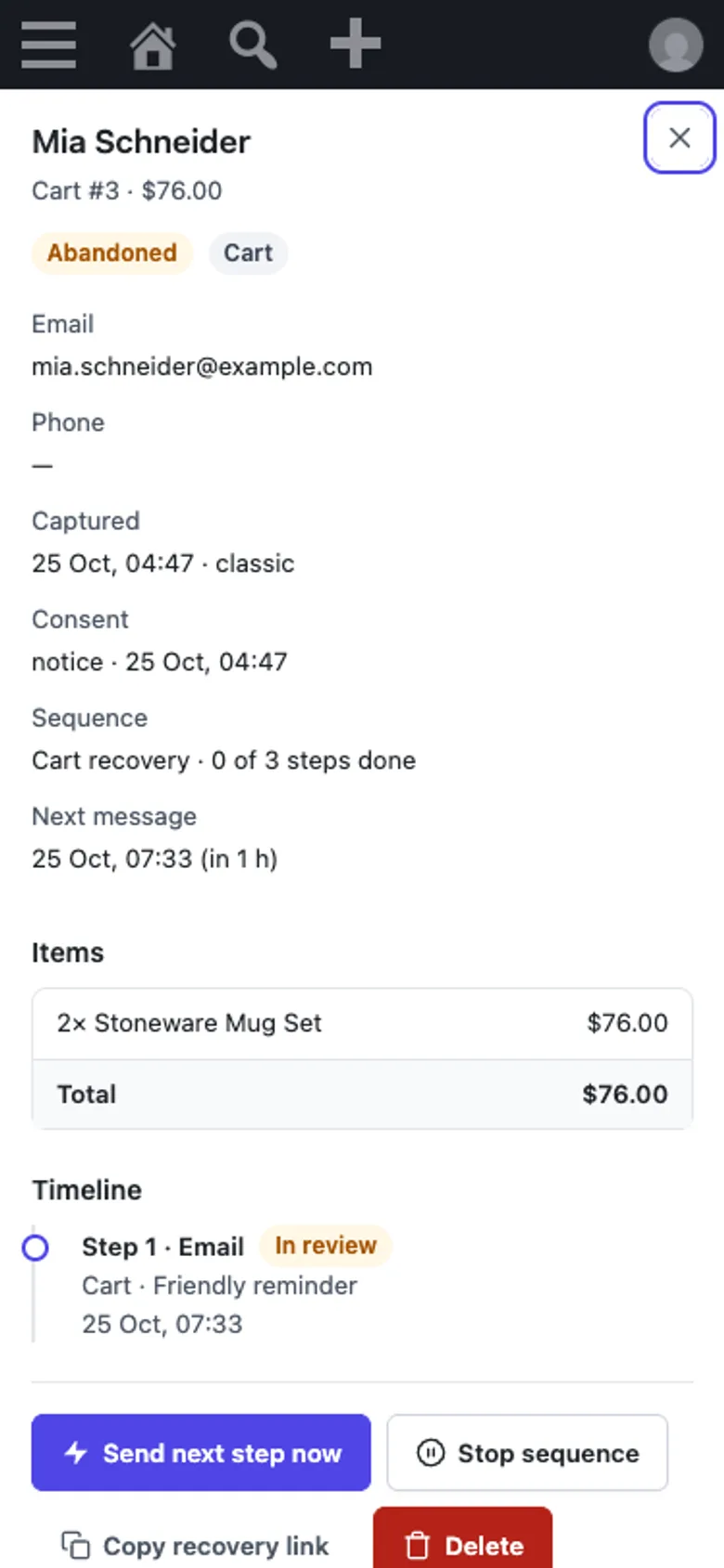 The tuned send time is the one the merchant sees: "Next message 07:33" is when it goes out.
The rule in one line
Decide once, move only forward, respect the shopper's night, and keep the first reminder close to the moment it matters. Storing an IANA zone name when the browser reports one would remove the daylight saving edge case, but the rule itself stays the same.
DEV3 AI Abandoned Cart & Win-back Emails is part of the DEV3 AI WooCommerce Plugins Bundle on the DEV3 marketplace and is being prepared for CodeCanyon. The full build, from block checkout capture to the AI review queue, is in the case study.