A salon opens at 09:00. That sounds like a fact, but for a booking system it is a rule that has to be turned into a different UTC instant on different days. On the Friday before the clocks go back in London, 09:00 is 08:00 UTC; on the Monday after, it is 09:00 UTC. In New York, the Sunday in March when clocks spring forward has no 02:30 at all, and the Sunday in November has two 01:30s. Add a stylist who works in a different timezone from the business and a customer booking from Tokyo, and "show the free slots for Tuesday" stops being a simple loop. This post explains how the availability engine in DEV3 AI Booking & Appointments, our WordPress appointment plugin, keeps slots correct across daylight saving changes and timezones, and how the same engine guards the moment of booking.
 Illustration: slots stay on the wall clock while bookings are stored as real instants.
What it does and who it's for
DEV3 AI Booking & Appointments is a complete appointment system that runs inside WordPress, with no external booking service:
- Salons, barbers and beauty studios with several stylists, each with their own hours, breaks and services.
- Clinics, therapists and consultants who need buffers between sessions, minimum notice and deposits.
- Fitness and yoga studios running group classes, where one slot has several seats.
- Teams across timezones, where staff and customers are not in the same place.
- WooCommerce shops that want appointments paid through the existing checkout, and sites that prefer Stripe Checkout or payment at the appointment.
How to set it up
- Install the plugin zip from the bundle and activate it. The Book an appointment and My bookings pages are created for you.
- In Settings, set the timezone, slot interval, notice and advance limits, and your cancel, reschedule and refund policies.
- Add business hours and holidays in Schedule, then your Services, and your Staff with their weekly hours and time off.
- Optional: add Stripe keys in Settings → Payments or turn on WooCommerce checkout, and paste a Google Gemini API key in API Config to enable the AI features.
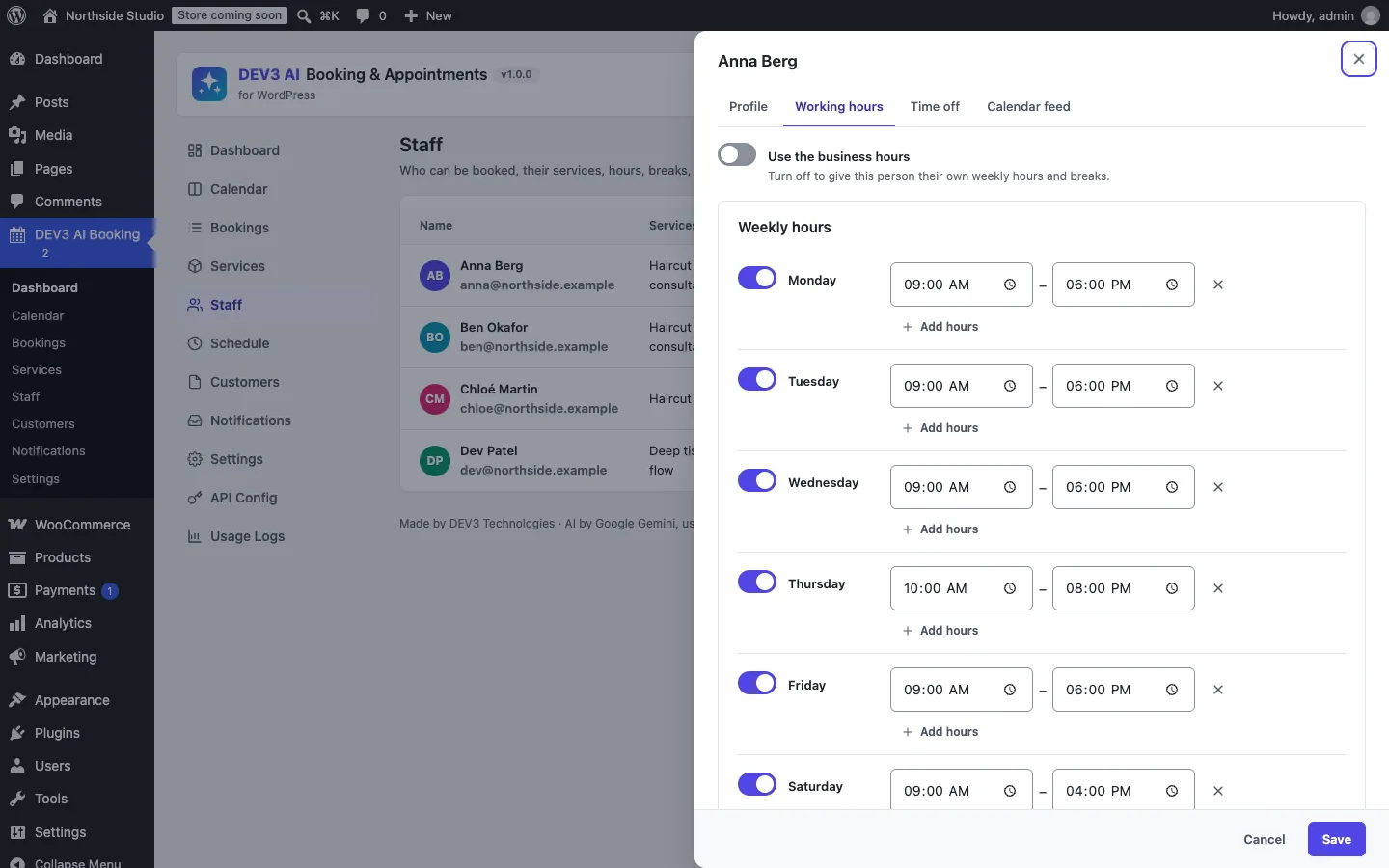 Each staff member can follow the business hours or keep their own week, time off and calendar feed.
How to use it
Customers book on their phone. The widget walks through service, staff, date and time, details and payment. Instead of browsing, a customer can type "Thursday after 5" and get only matching free times.
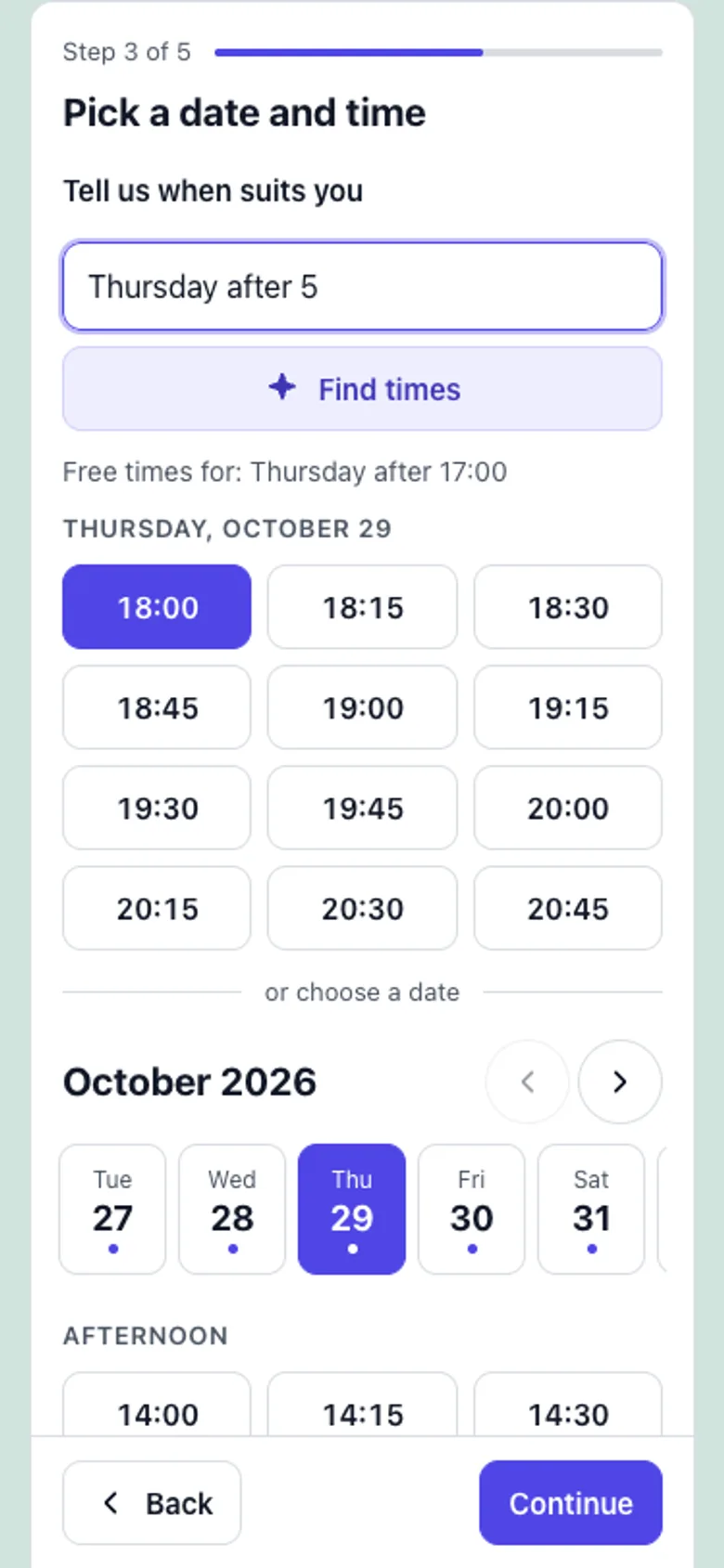 Natural-language booking returns real free slots, never invented ones.
Staff run the day from the calendar. Day, week and month views, colour by staff or service, and a drawer per booking to confirm, reschedule, mark paid, refund or send a reminder. Find a slot with DEV3 AI answers phone requests the same way the widget does.
Owners act on risk. The dashboard's no-show watch lists upcoming bookings with a high rule-based score. Explain with DEV3 AI adds a suggested nudge, and nothing changes unless you act.
The rest of this post is about the part customers never see: keeping those slots correct.
Two kinds of time
The design rests on one distinction that the spec states in a single line: slots are aligned to wall-clock times in the staff timezone; durations and buffers are real elapsed minutes.
- Wall-clock time is what people agree on: "I work 09:00 to 17:00", "appointments start on the hour and half hour", "closed on 25 December". These are stored as local
HH:MMstrings and dates, never as UTC. - Elapsed time is what the appointment actually takes: a 60-minute colour treatment lasts 3,600 seconds whether or not the clocks change halfway through it. Buffers before and after are elapsed time too.
Everything that gets stored or compared, such as booking starts and ends, holds and conflicts, is a Unix timestamp in UTC. Wall-clock values are converted to UTC per date, as late as possible, and always in the timezone of the staff member whose hours they are. Each staff row carries an IANA timezone that defaults to the site's.
Turning a wall-clock time into an instant
Every conversion goes through one helper. It takes a local date, a number of minutes after local midnight and a zone, and returns a timestamp:
public static function local( $date, $minutes, \DateTimeZone $tz, $strict = false ) {
	$day     = new \DateTimeImmutable( $date . ' 00:00:00', $tz );
	$extra   = intdiv( (int) $minutes, 1440 );
	$minutes = (int) $minutes % 1440;
	if ( $extra ) {
		$day = $day->modify( '+' . $extra . ' day' );
	}
	$wall = sprintf( '%02d:%02d', intdiv( $minutes, 60 ), $minutes % 60 );
	$dt   = new \DateTimeImmutable( $day->format( 'Y-m-d' ) . ' ' . $wall . ':00', $tz );
	if ( $strict && $dt->format( 'H:i' ) !== $wall ) {
		return null;
	}
	return $dt->getTimestamp();
}
(from Availability\Clock::local)
Three details carry most of the weight.
Minutes may pass 1440. A shift that ends at midnight is saved as 24:00 (the interval sanitiser rewrites an end of 00:00 to 24:00, so 20:00–00:00 is a valid Friday late shift rather than an empty interval). The helper moves to the next calendar day and builds the time there, instead of adding 86,400 seconds, which would be wrong on a 23- or 25-hour day.
Strict mode detects the gap. When you ask PHP for 02:30 on 8 March 2026 in America/New_York, it does not fail. It quietly moves forward to 03:30 EDT. In strict mode the helper formats the result back to H:i and compares it with what was asked for. If they differ, that wall-clock time does not exist on that date and the helper returns null.
Ambiguous times resolve to the first occurrence. For 01:30 on 1 November 2026 in New York, PHP returns the earlier instant (01:30 EDT, 05:30 UTC). We rely on that behaviour deliberately and pin it down with a test, described below.
From working hours to working intervals
For each staff member and each date in their timezone, Engine::working() builds a list of [start, end) UTC intervals:
- Special hours for that date (the staff member's own, else the business's) replace the weekly hours and that day's breaks.
- Otherwise the weekly hours apply, either the person's own or the business hours, and their breaks are cut out.
- An all-day closure or time off returns an empty list immediately. Partial time off is cut out like a break.
The conversion uses non-strict Clock::local() at both ends, and interval subtraction is plain arithmetic on timestamps. This is where elapsed time comes for free: a shift stored as 01:00–04:00 on spring-forward Sunday becomes an interval of two real hours, and the same shift on fall-back Sunday becomes four. Nobody has to special-case it.
Generating candidates on the wall clock
The slot grid is where the two kinds of time meet. Candidate starts step along the wall clock from the start of each interval, every slot interval minutes, and each candidate is converted back to UTC in strict mode:
for ( $guard = 0; $guard < 600; $guard++, $m += $step ) {
	$ts = Clock::local( $date, $m, $tz, true );
	if ( null === $ts ) {
		continue; // Wall-clock time skipped by a DST change.
	}
	if ( $ts < $iv[0] || isset( $seen[ $ts ] ) ) {
		continue;
	}
	if ( $ts + $dur > $iv[1] ) {
		break;
	}
	$seen[ $ts ] = true;
	$out[]       = $ts;
}
(condensed from Engine::candidates)
Stepping in wall-clock minutes rather than in seconds is what keeps a salon's grid on :00 and :30 after a clock change. If we stepped 1,800 seconds at a time from 01:00 on spring-forward day, every slot after 02:00 would land half an hour off the grid. The fit check, $ts + $dur > $iv[1], uses elapsed seconds, so an appointment must really fit inside the interval. The $seen set guarantees that no instant is offered twice, and the 600-step guard keeps a misconfigured interval from looping.
What the tests pin down
The AvailabilityTest suite has 20 tests, and three of them exist only for daylight saving.
Spring forward, New York, 8 March 2026. A staff member works 01:00–04:00 with a 30-minute service on a 30-minute grid. The expected labels are 01:00, 01:30, 03:00, 03:30, because 02:00 to 02:59 does not exist that night. Every slot is asserted to last exactly 1,800 seconds. The same day with a 60-minute service gives 01:00, 01:30, 03:00, and the test checks that the 01:30 appointment ends at 03:30 local time: it starts in EST, ends in EDT and lasts one real hour.
Fall back, New York, 1 November 2026. Hours 00:00–03:00, 30-minute slots. The labels are 00:00, 00:30, 01:00, 01:30, 02:00, 02:30, with no duplicates. The test asserts that 01:00 is 2026-11-01T05:00:00Z (the EDT occurrence) and 02:00 is 07:00:00Z (EST), and that the number of slots equals the number of unique start instants.
A normal week across a change, London, 25 October 2026. The first slot on Friday 23 October is 08:00Z; on Monday 26 October it is 09:00Z. Both days have 15 slots. From the shop's point of view nothing happened, and that is the point.
Two neighbouring tests cover the edges of the day: a Friday 20:00–00:00 late shift produces seven hour-long slots ending with 23:00, and a staff member in America/New_York working for a London business gets a first slot of 14:00Z on 3 November, which is 09:00 EST.
Conflicts, buffers and seats in UTC
Once a candidate exists, Engine::seats_left() decides whether it is free. Each candidate occupies [start − buffer_before, end + buffer_after], and so does every blocking booking of that staff member, for any service. Any overlap blocks the slot. The one exception is group services: a booking of the same service at the same start shares seats instead of blocking, until the capacity is used up.
foreach ( $busy as $b ) {
	$s = Clock::ts( $b['starts_at'] );
	$e = Clock::ts( $b['ends_at'] );
	if ( $capacity > 1 && (int) $b['service_id'] === (int) $service['id'] && $s === $ts ) {
		$taken += max( 1, (int) $b['seats'] );
		continue;
	}
	$b1 = $s - (int) $b['buffer_before'] * MINUTE_IN_SECONDS;
	$b2 = $e + (int) $b['buffer_after'] * MINUTE_IN_SECONDS;
	if ( $a1 < $b2 && $b1 < $a2 ) {
		return 0;
	}
}
return max( 0, $capacity - $taken );
(from Engine::seats_left)
Because both sides are UTC, the overlap test is two comparisons and needs no timezone at all. The buffers a booking had when it was made are stored on the booking row, so changing a service's buffers later doesn't silently create overlaps with existing appointments. The query that loads busy bookings widens its window by five hours on each side, since buffers are capped at four hours, and skips unpaid online bookings whose payment hold has expired (15 minutes by default, longer for Stripe and WooCommerce checkout). That is how an abandoned Stripe checkout gives its slot back without a cleanup job.
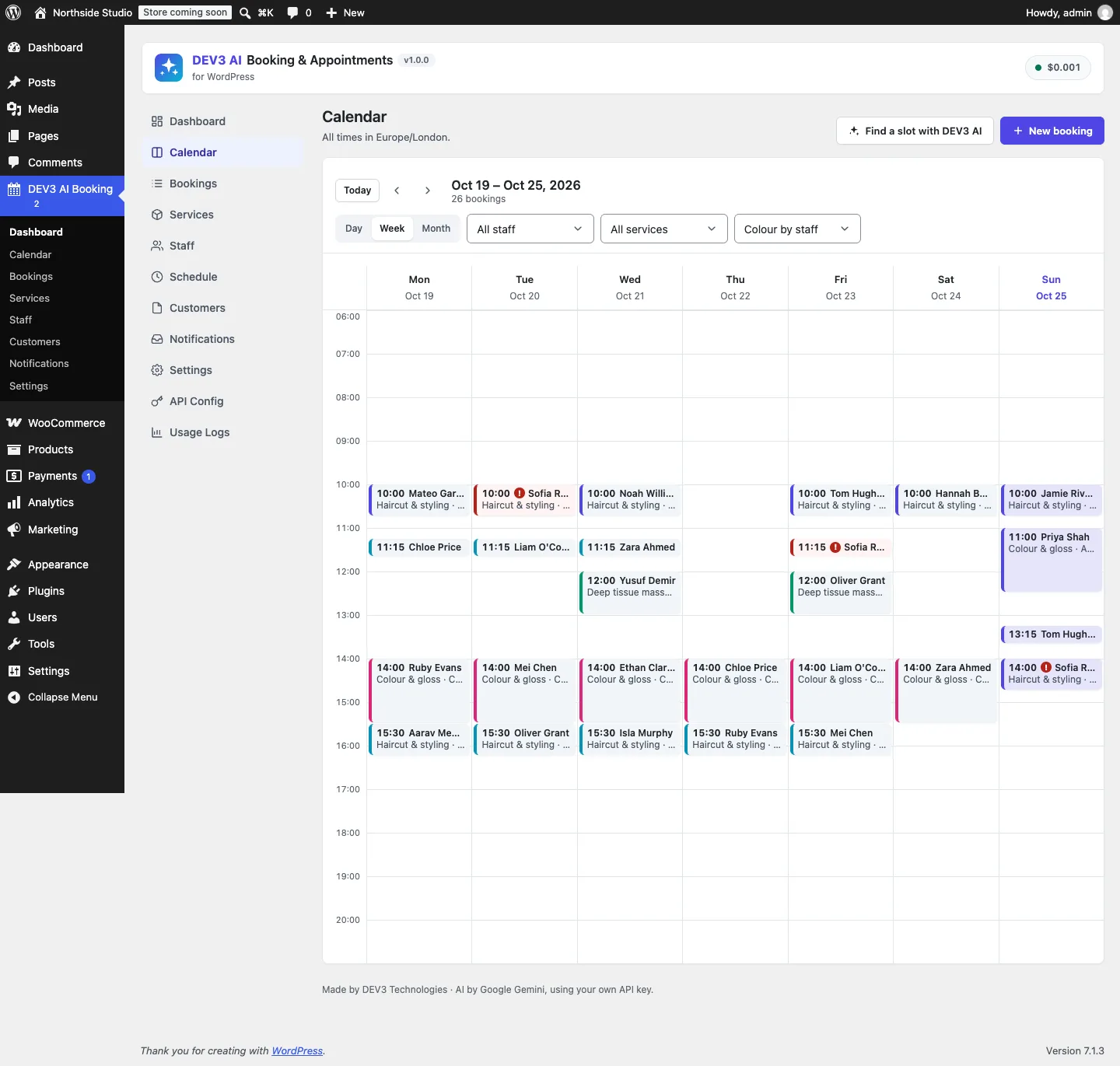 The admin calendar shows the same UTC bookings in the business timezone.
Showing the customer their own day
Staff dates and customer dates are different things. Engine::days() takes a date range in the customer's timezone, which the widget detects from the browser and lets the customer change. It converts that range to a UTC window from local midnight to local midnight, asks the engine for slots (which walks each staff member's own local dates across that window), and then groups the results by the customer's local date. Each slot goes out as a UTC ISO start plus a label formatted in the customer's zone.
The Tokyo test shows why the grouping must happen last. A London stylist's Monday 15:00 is Tuesday 00:00 in Tokyo, so the customer's "Tuesday 3 November" starts with 00:00, 00:30, 01:00 (Monday afternoon in London), includes 18:00 (Tuesday 09:00 in London) and ends at 23:30, the last slot before Tokyo midnight. Only the requested local date comes back. The widget never computes availability; it only renders what the server grouped.
The engine also guards the write
Correct slots on screen are only half the job, because two customers can choose the last one in the same second. Booking\Manager::create() handles that with a MySQL named lock per staff member:
foreach ( $candidates as $sid ) {
	if ( ! self::lock( $sid ) ) {      // SELECT GET_LOCK('<prefix>dev3bk_staff_<id>', 8)
		continue;
	}
	Bookings::forget();
	$free = $force || Engine::is_free( $service, $sid, $ts, array( 'seats' => $seats, 'ignore_rules' => $admin ) );
	if ( $free ) {
		$id = Bookings::insert( $row + array( 'staff_id' => (int) $sid ) );
	}
	self::unlock( $sid );
	if ( $id ) {
		break;
	}
}
(condensed from Manager::create)
Engine::is_free() doesn't have a separate rule set. It runs the full slot generator for the one-second window [ts, ts + 1) and checks that the exact start comes out. That means a start the engine would never have offered is refused even if nobody else holds it: in the concurrency test, a second booking at 10:00 fails with HTTP 409, an overlapping 10:30 fails, and a hand-crafted 10:10 fails because it isn't on the grid. With "any staff", candidates are tried in order of fewest bookings that day, so a lost race falls through to the next free colleague. Rescheduling takes the same lock and excludes the booking being moved from the busy list.
 Illustration: a free-text request becomes constraints, and only real free slots come out.
AI sits on top, not inside
The plugin lets customers type "Tuesday after 5 with Anna" instead of browsing a calendar. The model is only allowed to return constraints: a service ID, a staff ID, a date range, weekdays and a time window. The server drops IDs it doesn't know, clamps the dates to the booking window and runs the same engine, so every time shown is a real, free, DST-correct slot. With AI switched off, a rules parser handles the same phrases. These paths were tested with mocked API responses; a run with a live key is still to come.
Trade-offs
- The repeated hour is offered once. On fall-back night the second 01:00–01:59 is never offered, because labels would be indistinguishable to a customer. A business that really works through that hour loses one hour of slots once a year.
- The engine is computed, not cached. Every request rebuilds intervals and slots from the rules and the busy list. It is simple and always current, and it caps a public availability request at 42 days.
- Named locks are per database connection.
GET_LOCKis reliable on a single MySQL primary. On a setup that splits writes across servers, the re-check inside the lock is still needed, and it is still there. - PHP's timezone database decides. Rule changes by governments arrive with PHP and tzdata updates, not with the plugin.
Conclusion
Store wall-clock rules and UTC facts separately, convert per date in the right zone, step on the wall clock but measure in seconds, and make the write path re-run the same engine that drew the screen. With that in place the DST tests read like the business owner's expectations, and they pass. The plugin has 89 PHPUnit tests and 29 Jest tests in total, and the case study covers payments, reminders and the admin calendar. DEV3 AI Booking & Appointments ships in the DEV3 AI Directory, Booking & Events Plugins Bundle on the DEV3 marketplace and is being prepared for CodeCanyon.