
Ask a language model to "fill in the custom fields for this bike" and you get something that looks right: a tagline, a weight of "about 13 kg", brakes "hydraulic disc", a release date of "mid-November", and three related accessories, one of which was deleted last year. Advanced Custom Fields would accept almost none of it as stored data. The weight field is a number with a step of 0.5. "Hydraulic disc" isn't one of the brake choices. Date pickers store Ymd. A relationship field holds post ids, limited to certain post types. DEV3 AI Field Filler for ACF exists to close that gap. This post explains its codec: how an ACF field definition becomes a structured-output schema, how every value is normalised and validated on the way back, and why the plugin validates twice.
What it does and who it's for
DEV3 AI Field Filler fills a post's ACF or Secure Custom Fields from its content with the Google Gemini API, one field or one group at a time in the editor, or across many posts in a background job. It can also turn a plain description into a reviewed field group. Every value is checked against the field's own rules, every change can be undone, and a basic mode works without AI.
- Developers and agencies who build sites on ACF and want editors to stop leaving custom fields empty.
- Catalogue and directory sites (products, listings, events, recipes) with many structured fields per post.
- Content migrations, where old posts have the facts in the body text but not in the new fields.
- Site builders who want a field group drafted from a sentence instead of clicking through ACF's field editor.
- Teams with no API key, who can still use basic fill, templates, the queue and undo.
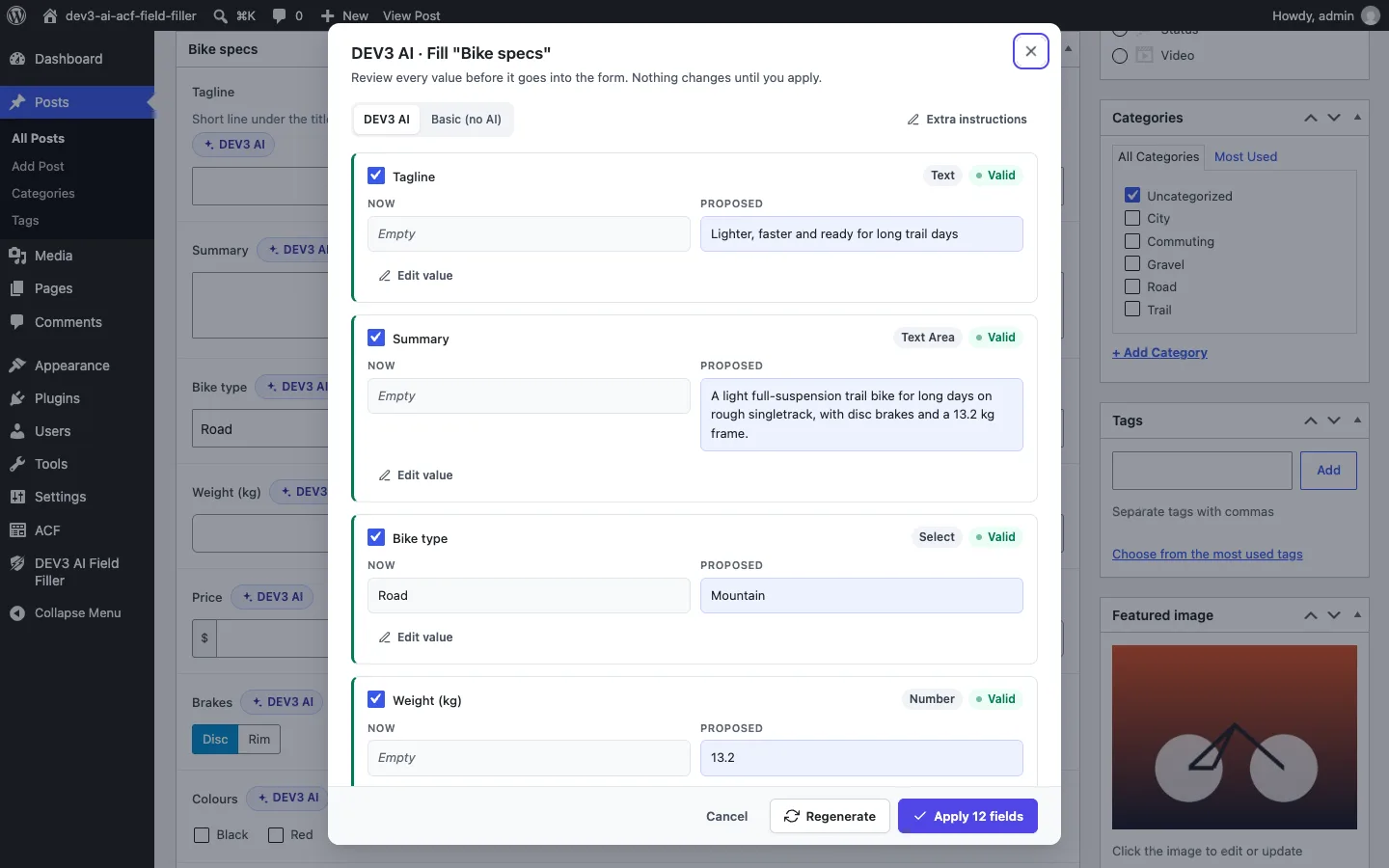
Filling a field group: each field shows the current and proposed value, the field type and a validity check.
How to set it up
- Make sure ACF 6.0+ (free or Pro) or Secure Custom Fields is active, then install the plugin zip from the bundle and activate it.
- Optional: add a Google Gemini API key in DEV3 AI Field Filler → API Config, or define
DEV3AF_GEMINI_API_KEYinwp-config.php. - Check the Dashboard for ACF detection and field coverage.
- Optional: in ACF's field settings, use the DEV3 AI tab to add instructions per field or skip a field.
- In Settings, choose post types, language, the image policy and whether new terms may be created.
How to use it
In the editor. Click DEV3 AI next to a field label, or the group button in an ACF box. Review the modal, edit or untick fields, and apply. The values go into ACF's form and are saved with the post.
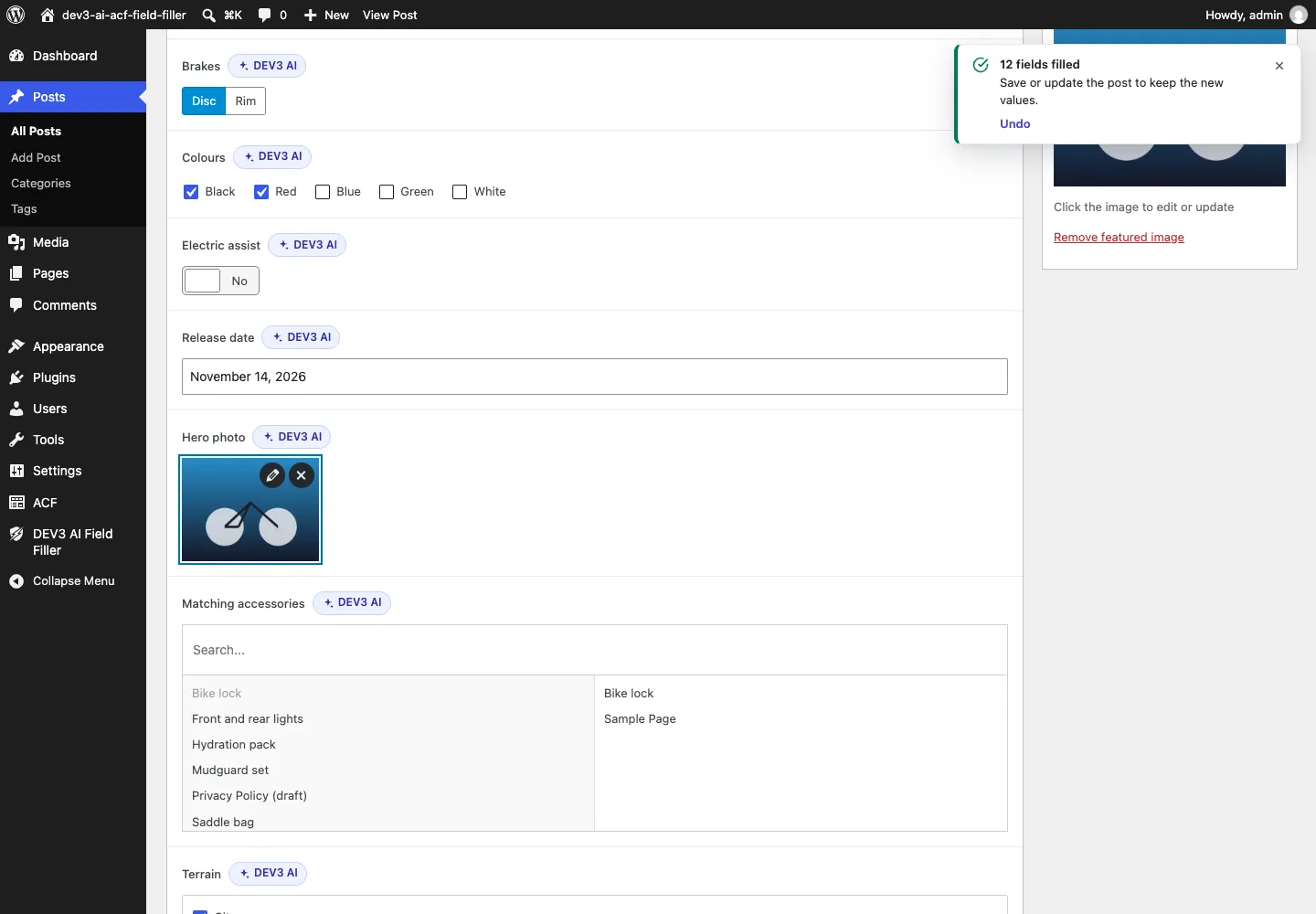
Accepted values land in ACF's own inputs: choices, true/false, a date, a library image and related posts.
In bulk. Use Bulk fill, or the Fill ACF fields with DEV3 AI bulk action in the Posts list. Drafts go to Review queue, where you accept, edit or reject them, and History can undo a whole run.
New field groups. In Group generator, describe the data, click Generate with DEV3 AI, review the fields and create the group in the database or as local JSON.
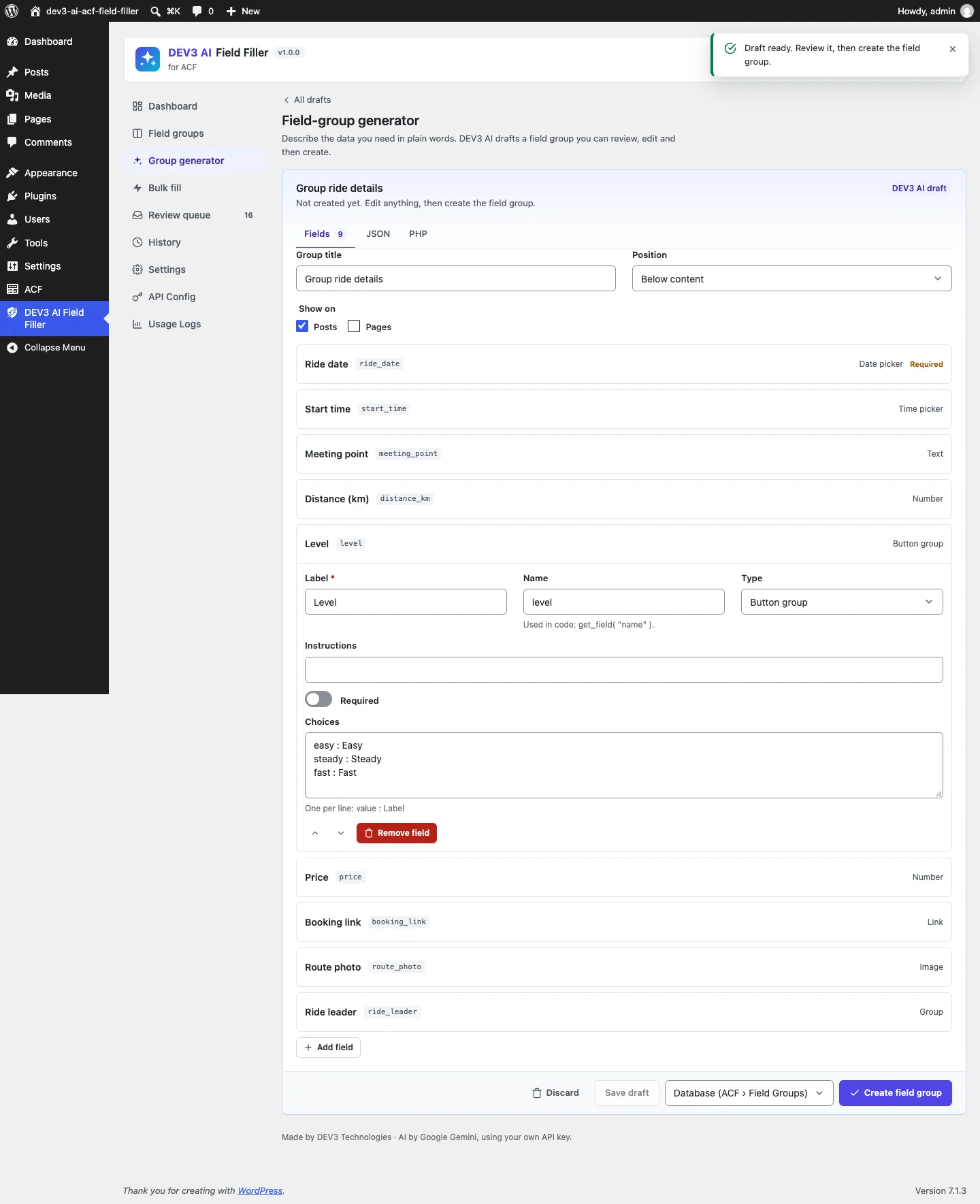
The generator drafts names, types, choices and sub-fields; nothing is created until you click Create field group.
Stage 1: compile the field into a schema
The Gemini API accepts a response schema: types, enums, numeric bounds and string lengths that the model's output has to follow. The plugin builds one property per fillable field from the field's ACF settings. Here's the core of it:
public static function schema( array $field, array $cands, $nested = false ) {
	$handler = Types::handler( $field );
	$desc    = mb_substr( self::describe( $field ), 0, 600 );
	$multi   = Types::multiple( $field );
	$ids     = array_map( static fn( $c ) => (string) $c['id'], (array) ( $cands[ $field['key'] ] ?? array() ) );
	switch ( $handler ) {
		case 'text':
		case 'date':
			return array( 'type' => 'STRING', 'description' => $desc, 'maxLength' => min( self::max_length( $field ), 4000 ) );
		case 'number':
			$s = array( 'type' => 'NUMBER', 'description' => $desc );
			if ( is_numeric( $field['min'] ?? '' ) ) {
				$s['minimum'] = (float) $field['min'];
			}
			if ( is_numeric( $field['max'] ?? '' ) ) {
				$s['maximum'] = (float) $field['max'];
			}
			return $s;
		case 'choice':
			$item = array( 'type' => 'STRING', 'enum' => array_map( 'strval', array_keys( self::choices( $field ) ) ) );
			return $multi ? array( 'type' => 'ARRAY', 'description' => $desc, 'items' => $item ) : $item + array( 'description' => $desc );
		case 'post':
		case 'user':
			if ( ! $ids ) {
				return null; // no candidates: the field isn't asked at all
			}
			$item = array( 'type' => 'STRING', 'enum' => $ids );
			return $multi ? array( 'type' => 'ARRAY', 'description' => $desc . '. Pick candidate ids only', 'items' => $item ) : $item;
		// … link, image, term, group, repeater, flexible
	}
	return null;
}
(from Fields/Codec.php, condensed)
A few decisions are worth explaining.
The description carries what the schema can't. describe() packs the field's label, ACF instructions, the DEV3 AI instructions from the field's own settings tab (as a "Writer note"), the expected format such as "Date as YYYY-MM-DD", the number range and step, and whether the field is required into a description of up to 600 characters. "Upbeat, under 60 characters, no exclamation marks" reaches the model next to the field it applies to.
Choice enums use values, not labels. ACF stores disc, not "Disc". The enum is built from the choice keys, so the model can only return a stored value.
Relationships become an enum of candidate ids. Before the call, Candidates::for_field() builds up to 25 candidates per field (a setting) from the field's own filters (allowed post types, statuses, taxonomies, roles). It searches for the post's top keywords first, then tops the list up with the most recent matching posts. The schema lists their ids as strings. If there are no candidates, the field is left out of the request, because a model asked for a relationship with nothing to choose from will make one up. Image and gallery fields work the same way with media-library candidates, plus an optional generate_prompt when the image policy allows generation.
Composite fields recurse. A group becomes an object of its sub-fields. A repeater becomes an array of row objects, with the field's min and max rows in the description. Flexible content becomes an array of rows with a required layout enum, and the description tells the model which keys each layout uses.
A test checks the compiled schemas directly. A tagline with a 40-character limit gets maxLength: 40. A weight field gets minimum: 5.0 and maximum: 30.0. A colours checkbox gets the enum red, blue, black. A relationship with no candidates returns null, and with one candidate (id 7) it returns the enum ['7'].
Stage 2: normalise every value as if the schema didn't exist
Structured output makes good answers much more likely, but it isn't a guarantee we can build on. Models round numbers their own way, enums can fail on some edge cases, and the bulk and basic modes produce values that never went through a schema. So everything goes through Codec::normalize(), which returns the value plus errors (blocking) and notes (explanations):
private static function number( array $field, $raw ) {
	$str = is_scalar( $raw ) ? str_replace( array( ',', ' ' ), '', (string) $raw ) : '';
	if ( ! is_numeric( $str ) ) {
		return array( 'value' => '', 'errors' => array( __( 'Not a number.', 'dev3-ai-acf-field-filler' ) ) );
	}
	$num  = (float) $str;
	$min  = is_numeric( $field['min'] ?? '' ) ? (float) $field['min'] : null;
	$max  = is_numeric( $field['max'] ?? '' ) ? (float) $field['max'] : null;
	$step = is_numeric( $field['step'] ?? '' ) && (float) $field['step'] > 0 ? (float) $field['step'] : null;
	if ( null !== $step ) {
		$base = null !== $min ? $min : 0.0;
		$num  = round( $base + round( ( $num - $base ) / $step ) * $step, 6 ); // note: "Rounded to the field step."
	}
	if ( null !== $min && $num < $min ) {
		$num = $min;                                                          // note: "Raised to the field minimum."
	}
	if ( null !== $max && $num > $max ) {
		$num = $max;                                                          // note: "Lowered to the field maximum."
	}
	return array( 'value' => floor( $num ) === $num ? (int) $num : $num );
}
(from Fields/Codec.php, condensed)
Step rounding is anchored at the minimum, as in an HTML number input, so a field with min: 5, step: 0.5 treats 12.3 as 12.5. The test covers '12.3' → 12.5, 99 → 30, '1' → 5, and 'heavy' → empty with an error.
The other handlers follow the same pattern:
- Text is sanitised and cut to the character limit, with a note saying it was shortened.
- Choices accept either the stored value or the label, case-insensitively, so "Disc" maps to
disc. Anything else is dropped with a note ("hydraulic" becomes empty). Multi-select values are deduplicated. - Dates are parsed in the site's time zone and written in ACF's storage format:
Ymdfor date pickers,Y-m-d H:i:sfor date-time,H:i:sfor time. Both2026-11-02andNovember 2, 2026become20261102; "soon-ish" is an error. - Relationships are checked against the database, not just the candidate list.
post_allowed()loads the post and checks its type against the field's allowed types and its status against the field's status filter (or rejects trash and auto-drafts). The list is then trimmed to the field's maximum, and an error is raised if there are fewer than its minimum. In AI mode the stricter rule applies too: the id must also be one of the candidates offered. A test passes a valid page, a post of the wrong type, the id 999999, another valid page and a third page, and gets back the first two valid pages, trimmed to the field's maximum of 2. - Links, emails, URLs and colours are checked for shape: a full http(s) URL, a valid email, hex colours (rgba only when the field allows opacity).
- Required fields that end up empty get an error.
The notes are what make review fast. The modal and the queue show "Lowered to the field maximum" next to the value, so the editor knows the 35 kg the model suggested was capped, rather than guessing why the number looks different.

Illustration: values are normalised first, then validated, and anything invalid is held back.
Stage 3: let ACF have the last word
The codec knows the general rules for each field type. It doesn't know a site's own rules. ACF lets developers add validation with acf/validate_value filters, for example "taglines may not say cheap" or "SKU must match our format", and ACF's own field types have checks of their own. An AI value that skips those rules would be worse than no value, because it would be saved without the checks a human editor faces.
So after the codec, the plugin calls ACF's validation the same way a form submission would:
public static function errors( array $field, $value ) {
	if ( ! function_exists( 'acf_validate_value' ) || ! function_exists( 'acf_reset_validation_errors' ) ) {
		return array();
	}
	$field = array_merge( array( 'required' => 0, '_name' => $field['name'] ?? '', 'label' => '' ), $field );
	$input = 'acf[' . $field['key'] . ']';
	acf_reset_validation_errors();
	acf_validate_value( self::to_input( $field, $value ), $field, $input );
	$found = (array) acf_get_validation_errors();
	acf_reset_validation_errors();
	return array_values( array_unique( array_map( static fn( $e ) => wp_strip_all_tags( (string) $e['message'] ), $found ) ) );
}
(from Fields/Validator.php, condensed)
to_input() converts the normalised value back to what ACF expects from a form post, for example ids as strings. ACF's error list is reset before and after, so the check doesn't leak into a real save in the same request. The test registers acf/validate_value/name=tagline with a "No cheap in taglines" rule and checks that "A cheap bike" comes back with exactly that message. A weight of 40 fails ACF's own maximum.
A value with any error, from the codec or from ACF, is shown as invalid and can't be applied until someone edits it. The review queue only offers "Select all valid drafts on this page".
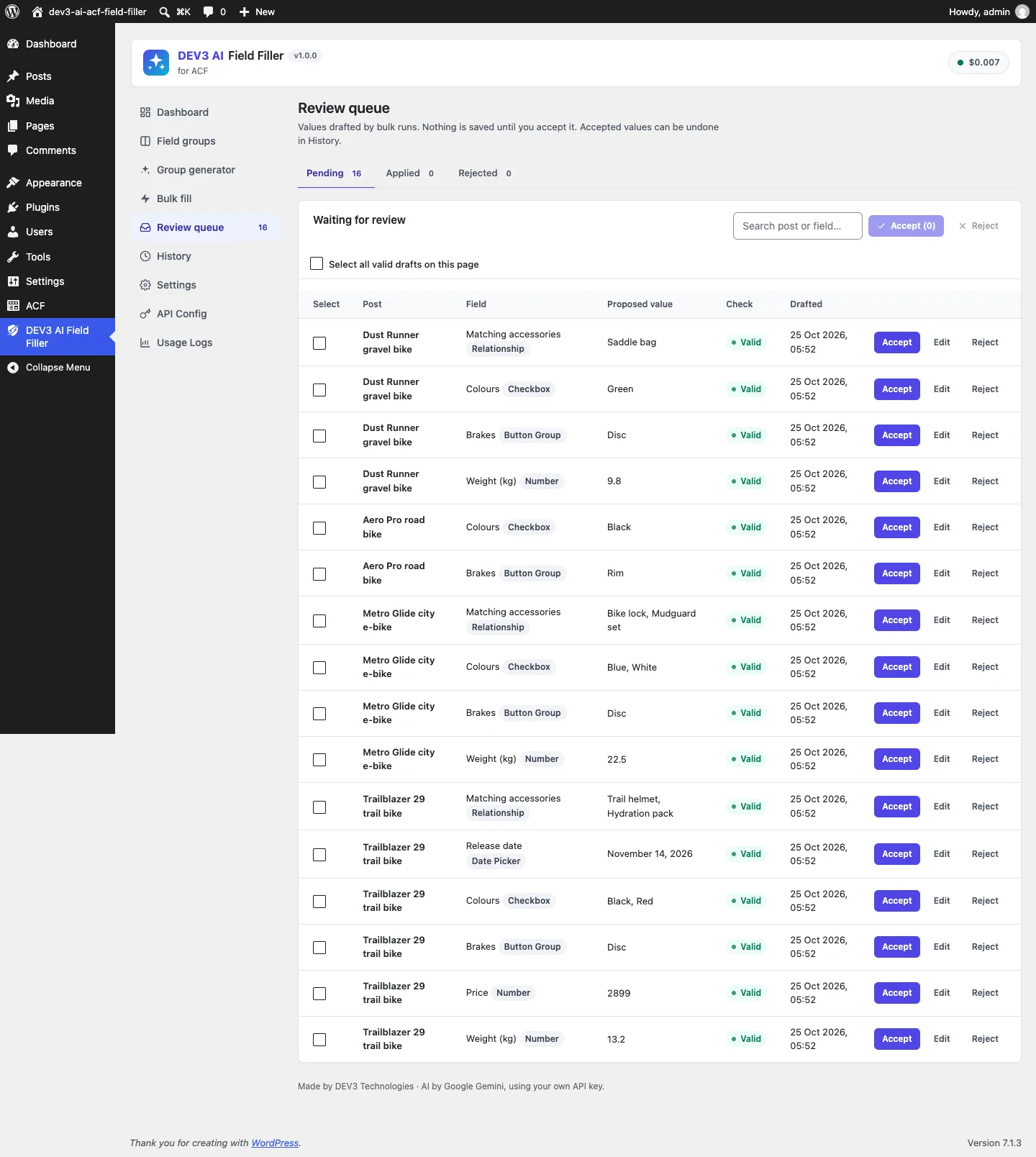
Bulk drafts carry their field type and validity; only valid drafts can be accepted in bulk.
Storing and undoing in ACF's formats
Applying goes through update_field(). Repeater, flexible content and gallery values are built in ACF's documented row formats. Those composite types are unit-tested with stub fields, which we say plainly, because they need ACF Pro or Secure Custom Fields. Each apply writes a history row with the value before and after and whether the field existed. Undo restores the old value, or deletes the meta if the field didn't exist before, and refuses if the value has changed since unless forced. In the editor, values go into ACF's form and a save hook logs them to history when ACF saves the post, so editor fills can be undone like bulk ones.
Testing
The plugin has 58 PHPUnit tests and 43 Jest tests, counted from the repository. The PHP tests run in wp-env with ACF and Secure Custom Fields. Codec tests cover text limits, number clamping and steps, choices, dates, booleans, colours, links, emails, relationships, terms (new ones only when allowed), images (library ids or a generate prompt), groups, repeaters and flexible content, the compiled schemas, and native plus custom ACF validation. Other tests cover editor logging, bulk runs with accept-all and batch undo, queue edits being revalidated, capabilities, and the generator writing to the database and to local JSON. The AI calls were tested with mocked API responses; a run with a live key is next.
Trade-offs
- Only post fields for now. Options pages, taxonomy term fields and user fields aren't filled yet.
- Candidate lists cap relationships. The model can only link what's in the top 25 candidates (a setting). A correct but low-ranked post won't be suggested, which is the price of never inventing one.
- Some types are skipped. Google Map, icon picker, clone, password and layout fields aren't filled; maps would need geocoding.
- Composite types rely on documented formats. Repeater, flexible content and gallery values follow ACF's documented formats and pass stub tests; a run on a live ACF Pro site is still useful before relying on them heavily.
Conclusion
The pattern works for any typed store that an AI writes to. Compile the target's own definitions into the request, normalise every answer as if no schema existed, run the target's own validation last, and explain every change you make. The case study covers the rest of DEV3 AI Field Filler for ACF, including the generator and bulk runs. The plugin ships in the DEV3 AI Content, SEO & Site Tools Plugins Bundle on the DEV3 marketplace and is being prepared for CodeCanyon.