
Most multi-currency plugins for WooCommerce are judged on the product page: does the price show in euros? That's the easy 10%. The hard part is everything else in the checkout that carries a number in the store's base currency: shipping rates and their taxes, fixed coupon amounts, minimum and maximum spends, free-shipping thresholds, subscription sign-up fees. Each one has to be converted exactly once, with the right rounding, in the right requests, and the resulting order has to keep reading correctly in the admin, the customer's email and the refund screen after the exchange rate has moved. This post covers how DEV3 AI Multi Currency & Geo Pricing handles the whole checkout, and the test that holds it to account.
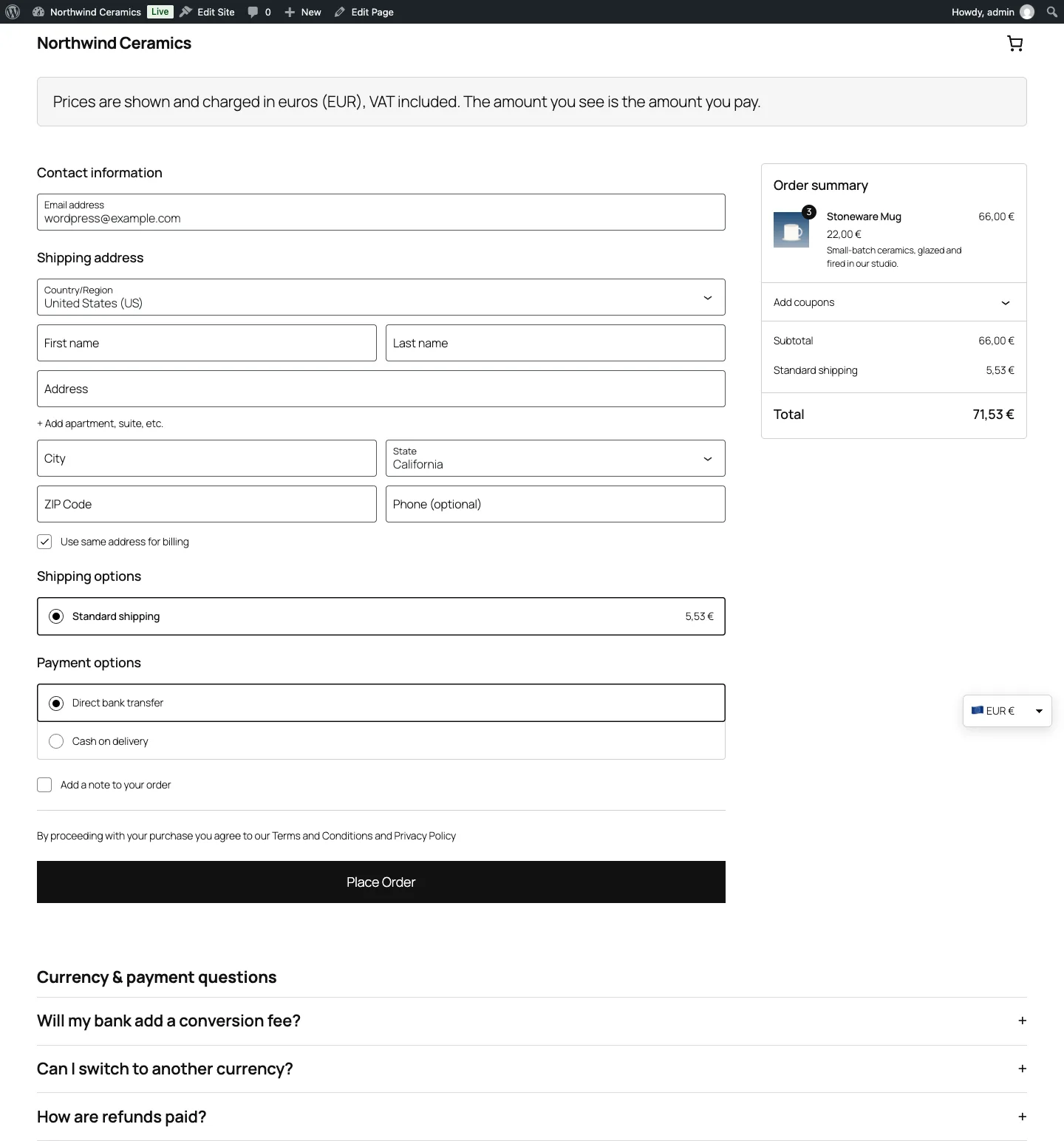
The block checkout in euros. Product prices sit on local price points; shipping is converted but not rounded to .99.
What it does and who it's for
DEV3 AI Multi Currency & Geo Pricing lets shoppers see and pay in their own currency, while the store keeps one base currency for its catalogue. It suits:
- Stores selling across borders that want euros in Germany, pounds in the UK and yen in Japan without running separate shops.
- Merchants who care about price perception, where €22.99 sells better than €23.47 and ¥2,380 looks local.
- Shops with market-specific pricing, using fixed prices per currency for key products or a regional adjustment for a whole market.
- Stores with payment constraints, for example bank transfer only in pounds, or charging in the base currency while showing local prices.
- Sites behind full-page caching, where showing one visitor's currency to the next is a real risk.
The AI tools are optional. Currencies, rates, geo detection, fixed prices and the switcher all work without an API key.
How to set it up
- Install the plugin zip from the bundle download and activate it with WooCommerce active.
- In Currencies, click Add currency for each one you sell in and set its symbol, decimals and rounding rule.
- In Exchange rates, pick a provider (Frankfurter with ECB data is free and needs no key) and an update schedule, then click Update rates now.
- In Geo & switcher, turn on geo detection and choose how the switcher appears: a block, shortcode, widget, menu item or floating switcher.
- Optional: add a Google Gemini API key in API Config to use the DEV3 AI drafts.
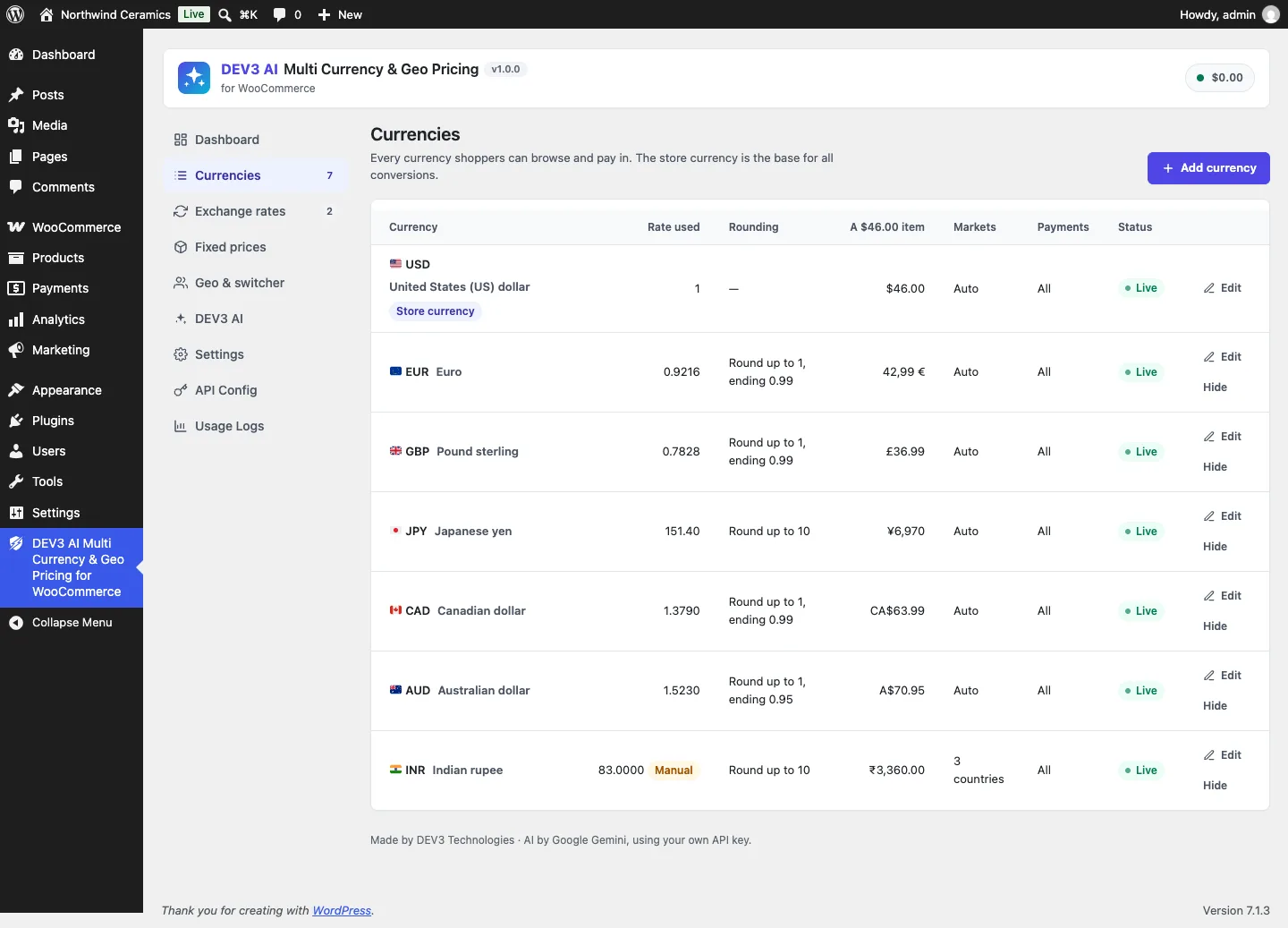
Each currency shows the rate used, its rounding rule and what a $46.00 item becomes.
How to use it
Set local price points. A rounding rule is a step and an ending: step 1 with ending 0.99 for euros and pounds, step 10 for rupees, step 100 for yen. The currencies table previews the effect on a real item. In the DEV3 AI tab, smart rounding drafts a rule per currency from real catalogue prices, with before-and-after examples; Use recommended presets (no AI) applies built-in defaults instead.
Pin prices that matter. In Fixed prices, any product or variation can have an exact price per currency. Fixed prices win over conversion, respect the product's sale schedule, and show a badge in the table.
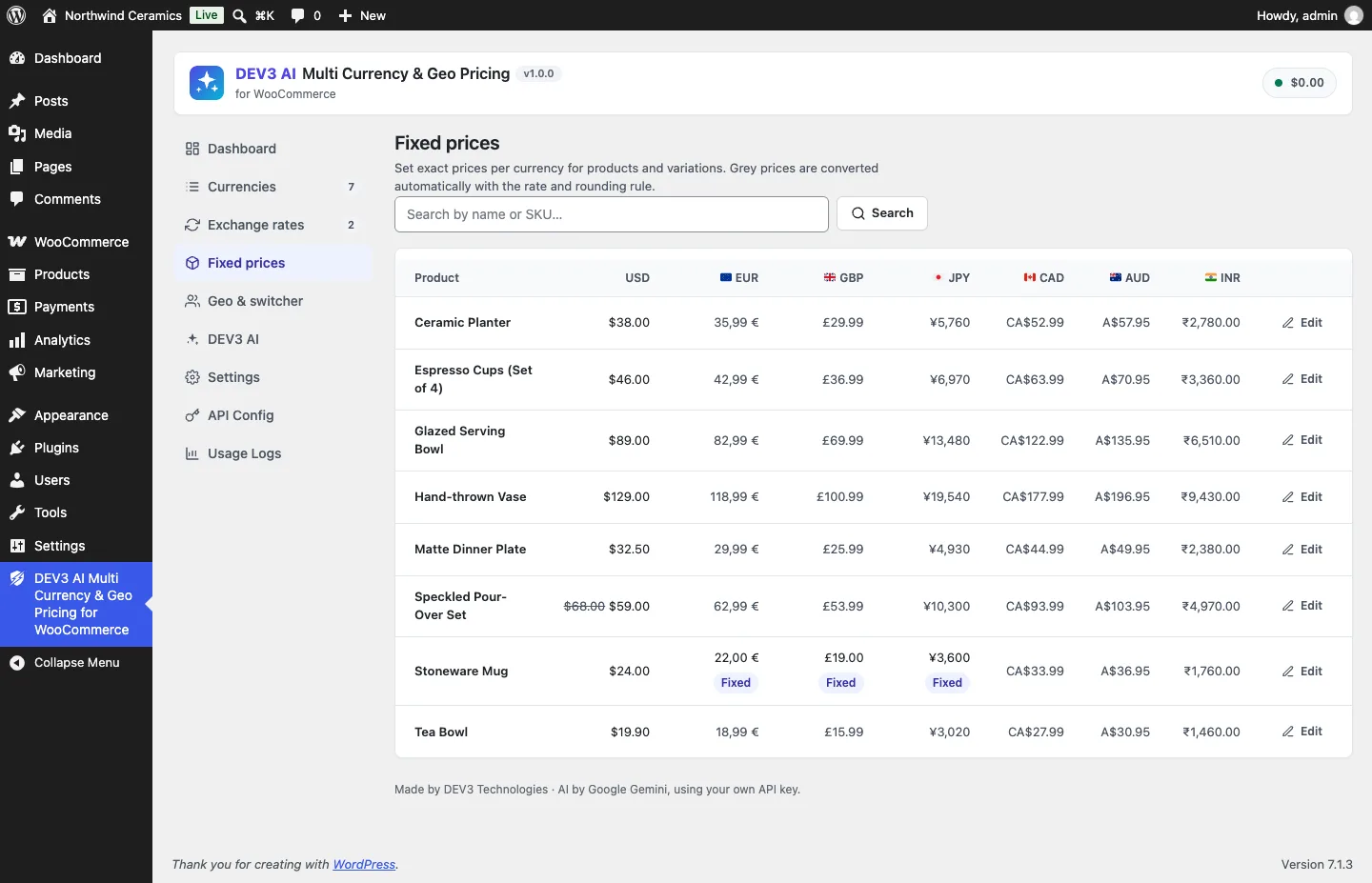
Grey prices are converted automatically; "Fixed" marks prices set by hand.
Watch the rates. The Exchange rates screen shows the provider, the schedule, a history chart and alerts such as "EUR prices are 4.1% lower than last month". A manual rate can be set per currency, and an alert flags when the market has drifted away from it.
Control payment per currency. Each currency can limit the payment gateways shown at checkout, and a setting lets shoppers browse in their currency but pay in the store currency.
Two kinds of amount
The first design decision was to stop treating every number the same way. The Converter has one entry point and two kinds:
public static function convert( $amount, $code, $kind = 'price' ) {
	$amount = (float) $amount;
	$c      = Currencies::get( $code );
	if ( ! $c || Currencies::base() === $c['code'] ) {
		return $amount;
	}
	$value = $amount * Currencies::effective_rate( $c['code'] );
	if ( 'price' === $kind ) {
		$value *= 1 + (float) $c['adjust'] / 100;
		$value  = self::round_price( $value, $c['round_mode'], (float) $c['round_increment'], (float) $c['round_ending'], (int) $c['decimals'] );
	} else {
		$value = round( $value, (int) $c['decimals'] );
	}
	return (float) apply_filters( 'dev3mc_converted_amount', $value, $amount, $c['code'], $kind );
}
(condensed from Currency\Converter::convert)
Product prices get the effective rate (the market or manual rate, times one plus the currency's exchange fee), the regional adjustment and the price-point rule. Plain amounts (shipping, coupon amounts, spend limits) get the effective rate and are rounded to the currency's decimals, nothing more. At a demo rate of 0.9216 euros to the dollar, a $5 flat rate in euros should be €4.61, not €4.99, and a $3 coupon shouldn't grow to €3.99 because of a rule meant for shelf prices.
Subscription sign-up fees are the one exception that goes through the price path, because shoppers see them next to the product price and expect the same style.
Price points as a candidate search
round_price() treats a rule as a set of candidates: every value that ends in ending at multiples of increment. Step 1 and ending 0.99 gives …22.99, 23.99, 24.99…; step 100 and ending 80 gives …2,280, 2,380…. Then the mode picks one:
$eps   = 1e-9;
$steps = ( $value - $ending ) / $increment;
if ( 'up' === $mode ) {
	$k = ceil( $steps - $eps );
} elseif ( 'down' === $mode ) {
	$k = floor( $steps + $eps );
} else {
	$k = round( $steps );
}
$result = $k * $increment + $ending;
if ( $result <= 0 ) {
	$result = $ending > 0 ? $ending : $increment;
}
return round( $result, $decimals );
(from Converter::round_price)
The epsilon matters. A converted value is the product of a base price and a rate, so a price that should land exactly on 23.99 can arrive a few billionths above it. Without the epsilon, ceil would push it to the next candidate, and a price already on a price point would jump a whole unit. The other guard stops rounding down from producing zero or a negative price: 0.30 rounded down to a .99 ending becomes 0.99, not −0.01. The 21 rounding fixtures in tests/fixtures/rounding.json pin these cases, including ¥2,345 → ¥2,380, ¥2,381 → ¥2,480, CHF-style 0.05 steps and none mode.
Convert only where shoppers are
The most damaging multi-currency bug isn't a wrong rate; it's converting in the wrong request. If the admin product editor sees converted prices, saving a product writes euros into the base price. If a cron job sending order emails sees the visitor currency of whoever triggered WP-Cron, the email is wrong.
So every conversion hook first asks Currency_Manager::converting(), which is true only for a shopper-facing request whose currency isn't the base:
public static function is_frontend() {
	$frontend = true;
	if ( wp_doing_cron() || ( defined( 'WP_CLI' ) && WP_CLI ) ) {
		$frontend = false;
	} elseif ( wp_doing_ajax() ) {
		$referer  = (string) wp_get_raw_referer();
		$frontend = '' === $referer || false === strpos( $referer, admin_url() );
	} elseif ( is_admin() ) {
		$frontend = false;
	} elseif ( self::is_rest() ) {
		$route    = self::rest_route();
		$frontend = 0 === strpos( $route, '/wc/store' ) || 0 === strpos( $route, '/dev3mc/v1/public' );
	}
	return (bool) apply_filters( 'dev3mc_is_frontend', $frontend );
}
(condensed from Currency_Manager::is_frontend)
Admin-ajax is split by referer, because WooCommerce uses it from both the storefront and the order editor. For REST, only the Store API (the block cart and checkout) and the plugin's own public routes convert. Everything else, including the WooCommerce admin REST API, sees base prices. A PHPUnit test, test_admin_context_never_converts, pins this.
The visitor currency itself comes from a cookie, then the WooCommerce session, then geo detection on the first visit, and only ever resolves to an enabled currency.
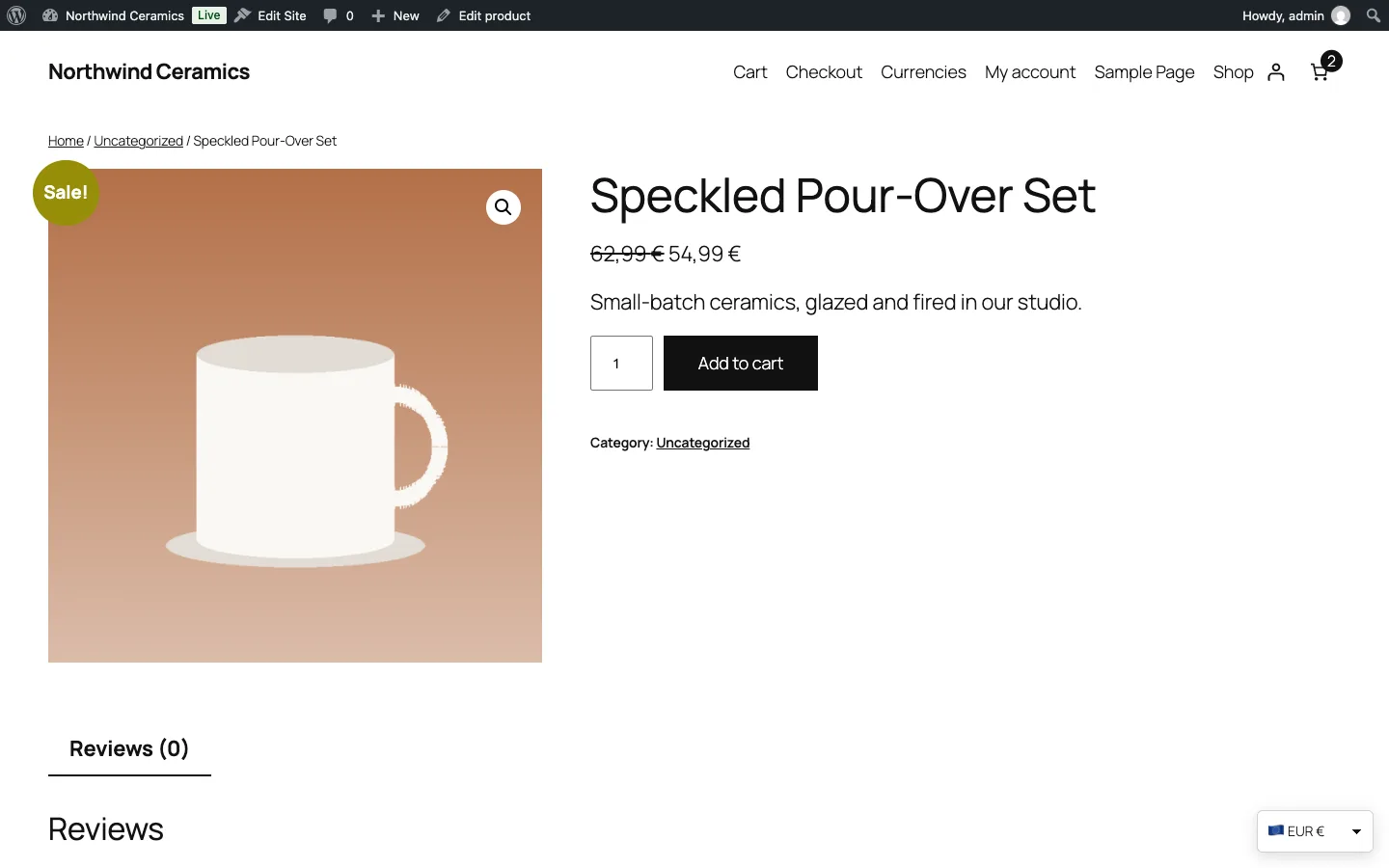
Regular and sale prices both converted and rounded, with the floating switcher in the corner.
Everything around the cart
Woo\Cart_Compat is the class that handles the rest of the checkout. Its header comment sums it up: "Everything around the cart that carries a base-currency amount."
- Shipping rates are converted in
woocommerce_package_rates, including each tax line, and marked so they're never converted twice:
$meta = $rate->get_meta_data();
if ( ! empty( $meta['dev3mc_converted'] ) ) {
	continue;
}
$rate->set_cost( (string) $this->plain( $rate->get_cost() ) );
$taxes = array();
foreach ( (array) $rate->get_taxes() as $key => $tax ) {
	$taxes[ $key ] = $this->plain( $tax );
}
$rate->set_taxes( $taxes );
$rate->add_meta_data( 'dev3mc_converted', Currency_Manager::current() );
(from Cart_Compat::package_rates)
- Shipping packages get the currency added, because WooCommerce caches calculated rates per package hash. Without it, a shopper who switches from euros to yen would get the cached euro rates.
- Free-shipping minimums are converted where WooCommerce reads the method's
min_amountoption. - Coupons: fixed-cart and fixed-product amounts are converted; percentage coupons are left alone. Minimum and maximum spend limits are converted too, so at that demo rate a $50 minimum becomes €46.08 rather than €50.
- Variable products add the currency and a fingerprint of the currency settings to WooCommerce's variation price hash, so the price range cache is per currency and is rebuilt when a rate or rule changes.
- Cart fragments hash includes the currency, so the mini-cart can't show a stale total after a switch.
- Payment gateways are filtered to the list allowed for the checkout currency.
The rate goes on the order
When the order is created, through the classic checkout or the Store API, the plugin writes two meta values:
$order->update_meta_data( '_dev3mc_base_currency', Currencies::base() );
$order->update_meta_data( '_dev3mc_rate', (string) Currencies::effective_rate( $code ) );
(from Cart_Compat::order_meta)
The order itself is stored in the shopper's currency, as WooCommerce intends. The saved rate is what makes reporting honest later: "Sales by currency" on the dashboard converts each order back to the base currency with the rate it was paid at, not today's rate.
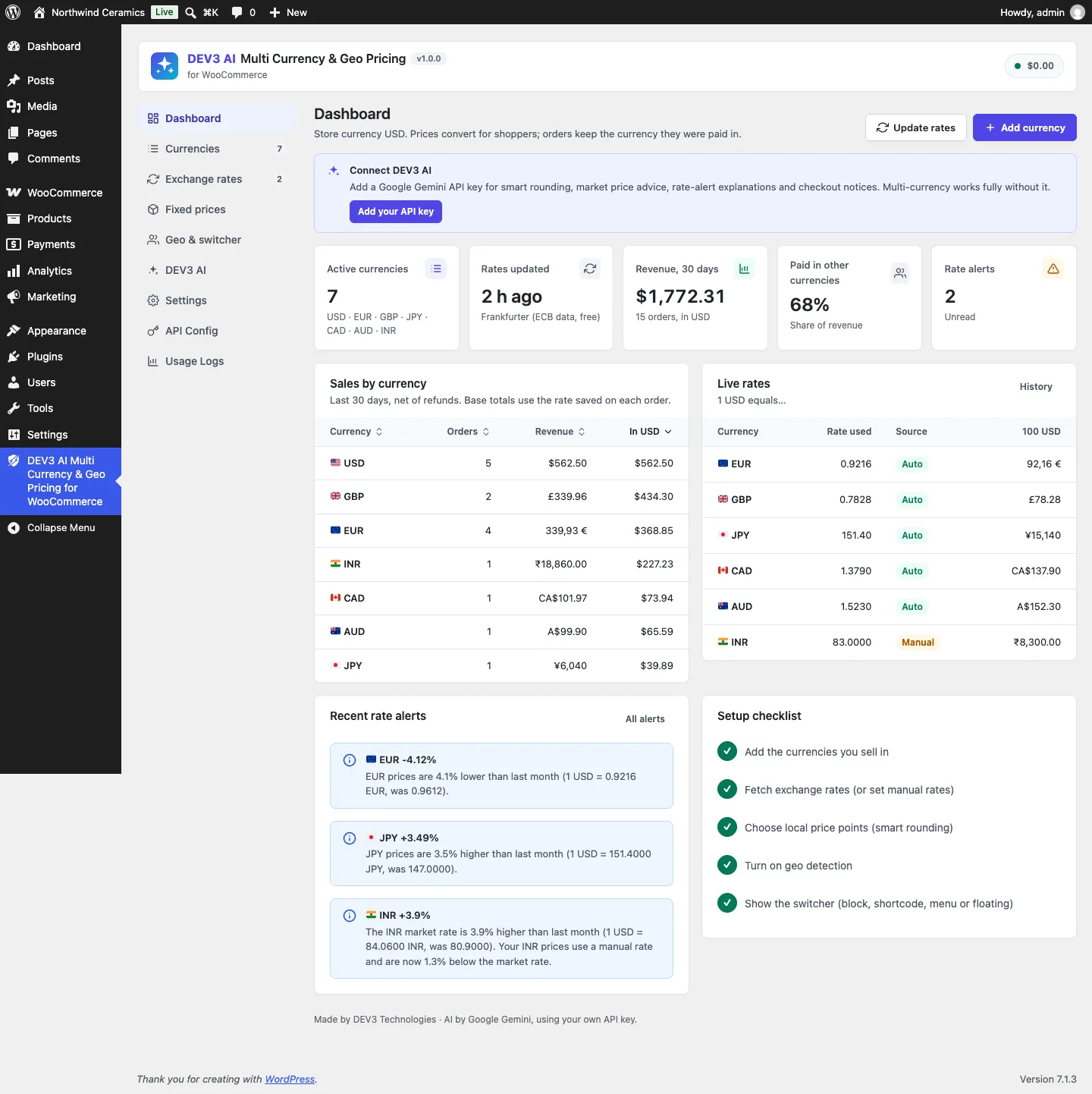
Sales by currency are converted back with the rate saved on each order.
The test that holds it together
Unit tests for each hook are necessary but not enough; the bugs live in how they combine. The acceptance test from the spec is a single scenario run in five currencies: USD, EUR, GBP, JPY and INR. For each one:
- Add two units of a $25 product and one $12.40 product to the cart, apply a $3 fixed-cart coupon, and choose a $5 flat rate.
- Compute the expected total independently: the converted product prices (price kind), minus the converted coupon (plain), plus the converted shipping (plain), rounded to the currency's decimals.
- Assert the cart's subtotal, discount, shipping and total match.
- Create the order through
WC()->checkout()->create_order()and assert its currency, total, shipping, base currency meta and saved rate. - Switch to an admin context, reload the order, and assert it still has the same currency and total.
- Render the customer email template and assert it contains the total formatted in the order's currency. For yen, assert there's no ".00".
- Refund the full amount and assert the refund is in the order currency and nothing is left to refund.
public function currencies_provider() {
	return array( array( 'USD' ), array( 'EUR' ), array( 'GBP' ), array( 'JPY' ), array( 'INR' ) );
}
(from CheckoutTotalsTest)
The same class tests page caching: a product's price HTML rendered for a euro visitor is "served" to a yen visitor, whose browser then calls the public prices endpoint. The test asserts that the response is in yen (¥3,750 for the $25 product), contains no euro sign, ignores an unknown product ID, isn't double-wrapped, carries Cache-Control: no-store, and falls back to the visitor's own currency, not an arbitrary one, when asked for a disabled currency. The public routes also reject cross-origin requests and are rate-limited, which a further test checks with a 403 and a 429.

Illustration: every amount converted once, and the result locked onto the order.
Known gaps
Two issues are open before launch, and both are about amounts that don't go through the paths above:
- Percentage-based shipping is converted twice. A shipping cost written as a percentage of the cart is calculated from cart totals that are already converted, and the rate filter then converts it again. The fix is to skip conversion for those rates.
- Manual admin orders use base prices. Because wp-admin never converts, an order created by hand in another currency gets base-currency product prices, which then have to be edited.
The WooCommerce Subscriptions sign-up fee hook was built against the documented filter and tested with stubs; it hasn't yet been run against the real extension. The AI drafts were tested with mocked API responses, and a live-key run is still to come.
Trade-offs
- Rounding up favours the merchant. The default presets round up, so converted prices never fall below the exchange-rate value. Shoppers may pay a few cents more than a pure conversion.
- Refreshing cached prices costs one request. On a cached page served in the wrong currency, prices update after the browser's fetch. The alternative, varying the whole page cache by currency, is supported for WP Rocket, LiteSpeed and WP Super Cache, but costs cache hit rate.
- The saved rate is the rate at checkout. Reports reflect what the shopper paid, not what the payment provider settled, which can differ by the provider's own conversion.
Conclusion
Multi-currency in WooCommerce is mostly about the amounts nobody looks at: shipping taxes, spend limits, cached rates and the rate an order was paid at. Classifying every amount as a price or a plain amount, converting only in shopper-facing requests, marking what's already converted and testing the whole journey in five currencies kept those amounts honest. DEV3 AI Multi Currency & Geo Pricing ships in the DEV3 AI WooCommerce Plugins Bundle on the DEV3 marketplace and is being prepared for CodeCanyon. The case study covers geo detection, rate providers and the AI pricing assistant. If your checkout has to work in more than one currency, our web development team can help.