All case studies

DEV3 Technologies · own product

DEV3 AI Shared Stock & Inventory: one stock pool for many WooCommerce products, tested in 36 order scenarios

Our own WooCommerce plugin: stock pools that many products, variations and attribute values draw from, kept correct through orders, refunds, cancellations and edits, with statistical forecasts and optional AI explanations.

Industry
E-commerce (WooCommerce)

Live project preview

Client systems are private — screenshots shown where permitted.

DEV3 Technologies · own product — screenshots
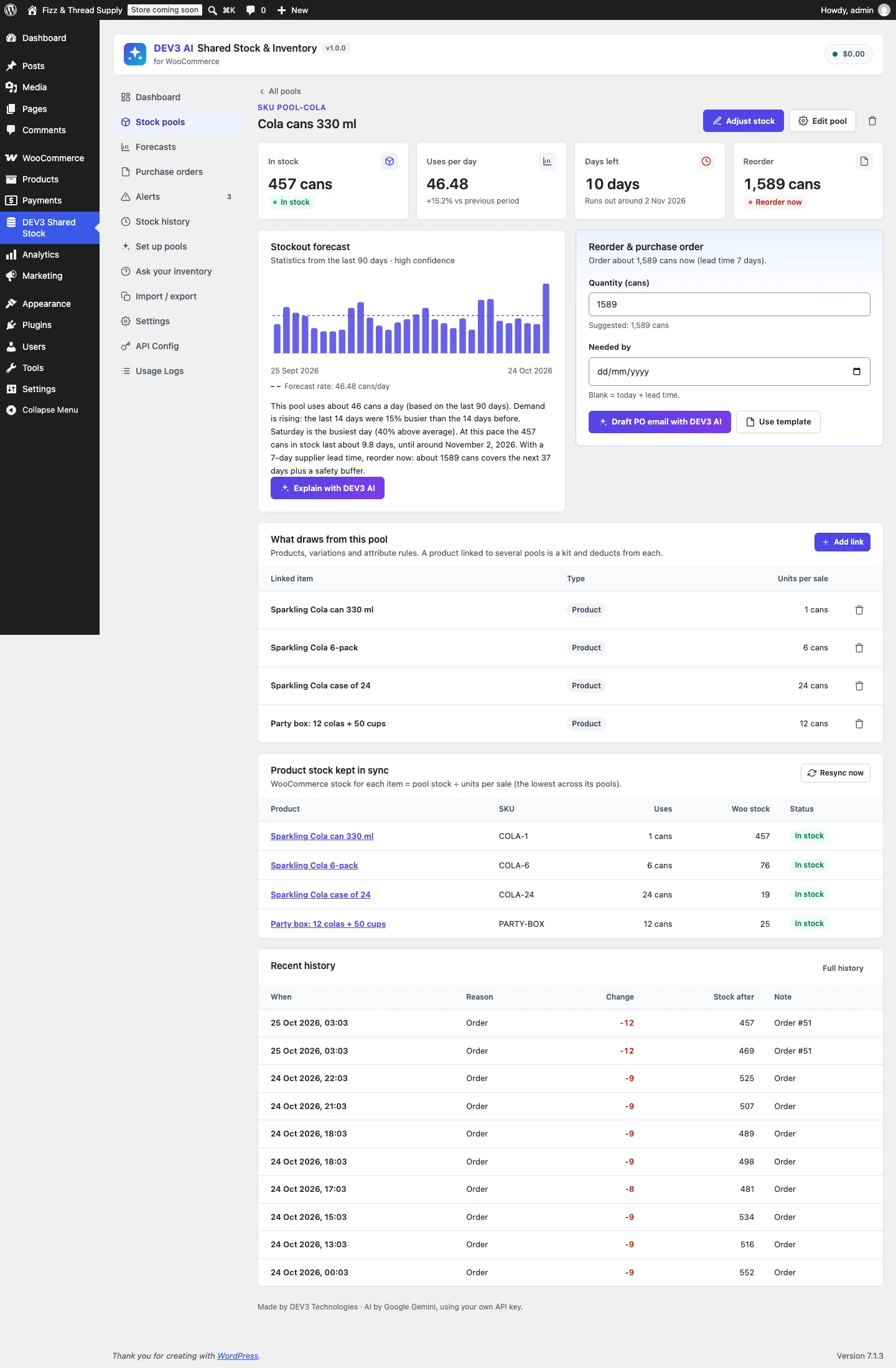
A stock pool of cola cans: single cans, 6-packs, cases and a party box all draw from it, and each product's WooCommerce stock is kept in sync.

A stock pool of cola cans: single cans, 6-packs, cases and a party box all draw from it, and each product's WooCommerce stock is kept in sync.

The challenge

WooCommerce tracks stock per product. A drinks shop that sells single cans, 6-packs and cases of 24 from the same pallet, or a print shop that cuts every "Linen" product from one roll of fabric, has one real stock and several products pretending to have their own. Merchants end up adjusting numbers by hand and overselling. Fixing it means a shared number that every sale reduces by the right amount, and that comes back exactly when an order is cancelled, partly refunded, edited or moved back to pending, even if the product links changed in between, on both legacy and HPOS order storage.

Our solution

We built DEV3 AI Shared Stock & Inventory as a WooCommerce plugin in PHP with a React admin. A stock pool holds the real units; products, variations and attribute values link to it with a number of units per sale.

Key design decisions

  • Each order line remembers what it took. On first deduction a line stores its pool map (pool → units per item); later syncs use that map, not today's links, so a cancellation returns exactly what was taken.
  • Target-based, idempotent sync. Every hook computes the line's target ((quantity − restocked) × units, or 0 when the order doesn't hold stock) and moves each pool by the difference from what is already deducted. Repeated or out-of-order WooCommerce hooks can't double-count.
  • Atomic pool updates. Pool stock changes with a single UPDATE … SET stock = stock + delta, never read-modify-write in PHP, and every change is written to a history log with its order, item and reason.
  • Link resolution with precedence. Every matching link applies, so a party box linked to cans and cups is a kit. When several links point at the same pool, a variation link beats a product link, which beats an attribute rule.
  • A whole-cart check. WooCommerce checks stock per product, so a 6-pack and singles could each pass while together they need more cans than exist. A cart guard sums demand per pool across the classic cart, the block cart and the Store API checkout.
  • Product stock mirrored. Each linked product's own WooCommerce stock is set to pool stock ÷ units per sale (the lowest across its pools), so stock text, the quantity box, feeds and the REST API all show the shared number.

Architecture

Pools, links, purchase orders, alerts and the stock log live in custom tables. Forecasts are statistics first (a blended daily rate, trend, weekday pattern and a 95% safety buffer), giving days left and a reorder quantity and date. With the Google Gemini API connected, DEV3 AI explains forecasts in plain words, drafts purchase-order emails, proposes pools from the catalogue, explains anomalies such as an extra zero typed by hand, and answers questions about the inventory. Every AI result is a draft, and every feature has a non-AI fallback. Product Bundles, Composite Products and Mix and Match lines can deduct as the container, the children or both. The API client, encrypted key storage and usage logs come from a shared core used across DEV3's plugins.
Results

The plugin is complete. It ships in the DEV3 AI WooCommerce Plugins Bundle on the DEV3 marketplace, alongside 20 other WooCommerce plugins, and is being prepared for CodeCanyon. What was built and verified:

  • 36 order scenarios (processing, on-hold, pending, cancel, refunds with and without restock, two partial refunds, refund then cancel, admin quantity edits, deleted lines, kits, variations, attribute rules, changed links, deleted pools, bundles, fractional units), each run twice: on legacy order storage and on HPOS
  • 87 PHPUnit test methods in total, including forecasts, anomaly detection, AI drafts with mocked responses, REST permissions and the core services
  • 30 Jest tests for the admin screens and UI kit
  • Cart guard checked on the block cart: a 6-pack and singles that together exceed the pool are stopped with a clear message
  • Product Bundles and Composite Products support was built against their documented data and tested with stubs, not yet with the real extensions; AI features were tested with mocked API responses and a live-key run is still to come
  • Known gap: attribute rules on simple products match global attributes only

Setup guide

No licence key or activation is needed: install the zip and every feature works.

Requirements

  • WordPress 6.0 or newer and PHP 7.4 or newer
  • WooCommerce 8.0 or newer, active, with WooCommerce → Settings → Products → Inventory → Enable stock management turned on (legacy order storage and HPOS are both supported, as are the cart and checkout blocks)
  • Optional: Product Bundles, Composite Products or Mix and Match, if you sell bundles
  • Optional: a Google Gemini API key for the DEV3 AI explanations and drafts. Pools, deduction, alerts, statistical forecasts and template purchase orders work without one

1. Install the plugin

  1. The plugin ships inside the DEV3 AI WooCommerce Plugins Bundle download. Unzip the bundle and find dev3-ai-woocommerce-plugins-bundle/dev3-ai-shared-stock-for-woocommerce/dev3-ai-shared-stock-for-woocommerce.zip.
  2. In WordPress, go to Plugins → Add New → Upload Plugin, choose that zip and click Install Now.
  3. Click Activate. DEV3 AI Shared Stock & Inventory for WooCommerce appears in the plugin list and its menu, DEV3 Shared Stock, appears in the admin sidebar.

2. Connect Google Gemini (optional)

  1. Create a free API key in Google AI Studio (sign in with a Google account, then Create API key).
  2. Go to DEV3 Shared Stock → API Config, paste the key and click Validate & save. The key is stored encrypted (AES-256-GCM) and never sent to the browser.
  3. Optional: pick the model (gemini-2.5-flash is the fast default; gemini-2.5-pro for the highest quality).

Prefer config files? Add define( 'DEV3SS_GEMINI_API_KEY', 'your-key' ); to wp-config.php instead.

3. First-time setup

  1. On the Dashboard, click Set up pools for me to get proposals from your catalogue, or New pool to create one by hand with a name, unit, low-stock threshold and supplier lead time.
  2. Open the pool and click Add link to link products, variations or an attribute value, each with its units per sale.
  3. Click Adjust stock to enter the real units you hold. Linked products get "Manage stock" turned on and show pool stock ÷ units per sale.
  4. In Settings, check the cart guard, product stock syncing, alert emails and, if you sell bundles, which bundle lines deduct.
  5. Have existing stock in a spreadsheet? Use Import / export to import pools and links from CSV with a preview first.

Updating

Download the latest bundle, find the new plugin zip at the same path, then upload it in Plugins → Add New → Upload Plugin and choose Replace current with uploaded. Pools, links and history are kept.

Uninstalling

Deactivate and delete the plugin from Plugins. Data is removed only if "delete data on uninstall" is turned on in Settings. Products keep the stock quantity they had at that moment.

How to use

Create pools from your catalogue

  1. Go to DEV3 Shared Stock → Set up pools.
  2. Click Use built-in rules (no AI) to find pack sizes of one item, or Propose pools with DEV3 AI for materials and kits as well.
  3. For each proposal, check the pool name, unit, opening stock and units per sale for every product. Untick anything you don't want.
  4. Click Create, or Reject all. Nothing is created until you do.

Link products, variations and attributes by hand

  1. Open Stock pools, choose a pool and click Add link.
  2. On Product or variation, search by name or SKU and set the units per sale (6 for a 6-pack, 0.5 for half a metre). On Attribute rule, link every item with an attribute value, for example every "Linen" product.
  3. Click Add link. To make a kit, link the same product to several pools. Use Resync now under "Product stock kept in sync" if product stock looks out of date.

Reorder before you run out

  1. Check Runs out first on the Dashboard or the Forecasts screen for days left and the suggested reorder.
  2. Open the pool. Under Reorder & purchase order, adjust the quantity and date, then click Use template or Draft PO email with DEV3 AI.
  3. In Purchase orders, review the email, click Send, and when the delivery arrives click Receive and enter the quantity received to add it to the pool.

Handle alerts

  1. Open Alerts to see low-stock, out-of-stock, forecast and anomaly alerts. Click Scan for anomalies to check recent changes now.
  2. For a likely typo, review the Suggested fix and click Accept, Edit or Reject. Explain with DEV3 AI adds a plain-language explanation.
  3. Click Dismiss on alerts you have dealt with.

Ask your inventory

  1. Open Ask your inventory and pick a suggested question such as "What should I reorder this week?" or type your own.
  2. Turn on Answer with DEV3 AI for free-form questions; with it off, built-in answers cover dates, reorders, best sellers and low stock.

Correct stock and review history

  1. In a pool, click Adjust stock after a stock count or a delivery outside a purchase order.
  2. Open Stock history to see every change with its reason, order and stock after, or export it from Import / export.

Related case studies