All case studies

DEV3 Technologies · own product

DEV3 AI Popup & Lead Capture Builder: cache-safe popups, honest A/B tests and AI-written variants

Our own WordPress plugin for popups, slide-ins, bars, welcome mats and inline forms. It works behind full-page caches, keeps phones free of blocking overlays, and runs A/B tests whose variants DEV3 AI can write, with the server deciding what counts.

Industry
Marketing & lead generation (WordPress)

Live project preview

Client systems are private — screenshots shown where permitted.

DEV3 Technologies · own product — screenshots
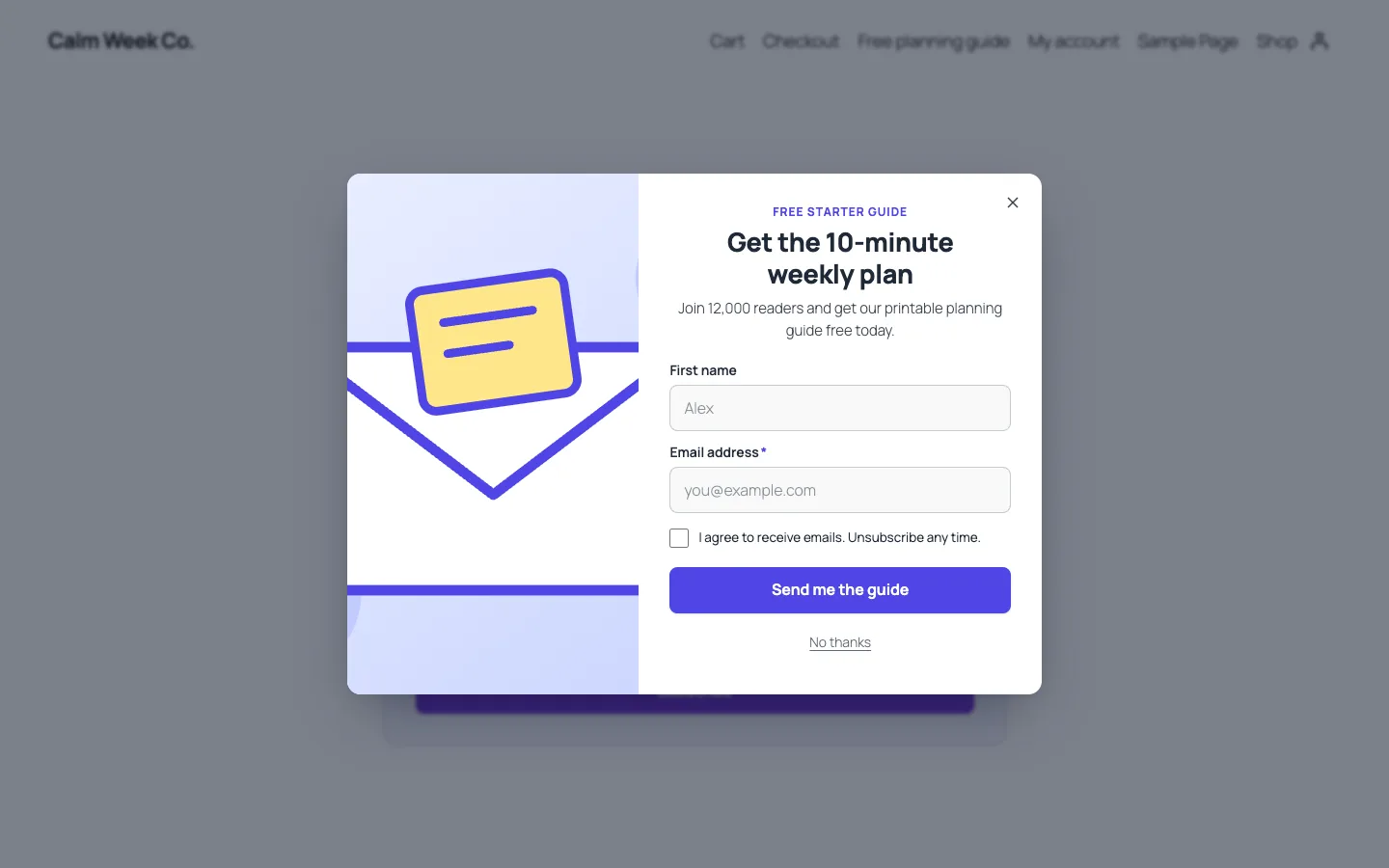
A lead-magnet popup on the front end: image layout, consent checkbox and a clear "No thanks" link.

A lead-magnet popup on the front end: image layout, consent checkbox and a clear "No thanks" link.

The challenge

Popup plugins tend to fail site owners in three ways. They print every campaign's markup on every page and load their script everywhere, which hurts Core Web Vitals. They break or show stale variants behind full-page caches, because targeting and nonces are baked into cached HTML. And their A/B numbers are easy to inflate: views counted on page load, conversions counted from any click, and a winner announced after a handful of visits. We wanted a lead capture builder that stays fast and respectful on phones, runs correctly on cached sites, and reports A/B results a marketer can trust. We also wanted AI to write copy and whole offer variants without ever publishing anything on its own.

Our solution

We built DEV3 AI Popup & Lead Capture Builder as a WordPress plugin in PHP, with a React admin and a dependency-free front-end runtime. It covers five formats (popup, full-screen welcome mat, slide-in, floating bar and inline form), 12 templates, six triggers, page and visitor targeting, frequency caps, A/B tests with up to four variants, a leads table, and Mailchimp, Brevo and signed-webhook delivery.

Key design decisions

  • Split targeting at the cache boundary. Page rules (post types, terms, URLs, 404, search) depend only on the URL, so the server evaluates them and prints a small JSON config holding only the campaigns that can match. Device, referrer, UTM, login, new or returning visitor, pages viewed and WooCommerce cart value are evaluated in the browser, so a cached page stays correct for every visitor.
  • No markup until a trigger fires. Overlay DOM and images are created only when exit intent, scroll, time, click, inactivity or load fires. Nothing is enqueued on pages with no matching campaign, and overlays are fixed-position, so the plugin adds no layout shift.
  • Mobile-safe mode on by default. On phones, popups and full-screen campaigns become non-blocking bottom sheets, and a load trigger waits for 10 seconds or 40% scroll, in line with Google's intrusive-interstitial guidance.
  • The server decides what counts. Public endpoints take no nonce, which page caches would serve stale. Instead they require a same-origin request and a per-IP rate limit, accept only active campaigns and existing variant ids, and count a click as a conversion only for button-only campaigns. Form conversions are counted only when a new lead is stored.
  • Sticky variants without cookies. The assigned variant lives in localStorage. Inline A/B forms print every variant hidden, plus a tiny inline script that un-hides the assigned one before first paint.
  • AI drafts, people publish. DEV3 AI, using the Google Gemini API, writes copy, proposes three offer variants for the A/B test, suggests triggers and targeting, explains results and drafts a whole campaign from one sentence. Every result is a draft. It can't name a winner before each variant has 100 views.

Architecture

Campaigns are stored as sanitised JSON in a custom table. Daily counters live in a stats table keyed by campaign, variant and day and are written with one atomic upsert. Leads go to a third table with consent text, UTM tags, page and device, and are deduplicated by email per campaign. The results view computes conversion rate, uplift against the control and confidence from a two-proportion z-test. Declaring a winner stops the test and keeps the history. Integration keys are encrypted, webhooks are sent with wp_safe_remote_post and an optional HMAC-SHA256 signature, and failed syncs can be retried. With WooCommerce active, campaigns can target cart value through a cache-safe cookie and reveal a unique one-time coupon. The API client, settings store and admin UI kit come from a shared core used across DEV3's plugins.
Results

The plugin is complete. It ships in the DEV3 AI Forms & Lead Generation Plugins Bundle on the DEV3 marketplace, alongside the Form Builder, Entry Insights and Form Autofill & Spam Shield plugins, and is being prepared for CodeCanyon. What was built and verified:

  • 69 PHPUnit tests, covering the sanitiser, page rules, the public payload (no integration settings or codes leak to the page), inline A/B markup, counters and the z-test, lead capture and deduplication, CSV formula guarding, rate limits and cross-origin rejection
  • 59 Jest tests for targeting, frequency caps, sticky variant choice, mobile-safe triggers, the overlay runtime and the admin UI kit
  • Every gate passing: build, Jest, PHP_CodeSniffer at 0 errors and 0 warnings, PHPUnit in wp-env, make-pot and packaging
  • Popups, slide-ins, welcome mats and inline forms checked on the front end of a WooCommerce demo site at 375 and 1440 px, on Twenty Twenty-Five and Twenty Twenty-One
  • The AI features were tested with mocked API responses only. A run with a real key is still to come.
  • Mailchimp and Brevo were tested against mocks of their documented APIs, not live accounts
  • Known gap: the Leads screen has no bulk delete yet, although the REST API supports it

Setup guide

No licence key or activation is needed: install the zip and every feature works.

Requirements

  • WordPress 6.0 or newer and PHP 7.4 or newer. Block and classic themes are both supported
  • Optional: WooCommerce 8 or newer, for cart-value targeting and unique one-time coupons
  • Optional: a Google Gemini API key for the DEV3 AI features. Templates, the editor, triggers, targeting, A/B tests, leads and integrations all work without one
  • Optional: a Mailchimp or Brevo account, or any webhook receiver (Zapier, Make, n8n, your CRM)

1. Install the plugin

  1. The plugin ships inside the DEV3 AI Forms & Lead Generation Plugins Bundle. Unzip the bundle download and find dev3-ai-forms-lead-generation-plugins-bundle/dev3-ai-popup-builder/dev3-ai-popup-builder.zip.
  2. In WordPress, go to Plugins → Add New → Upload Plugin, choose that zip and click Install Now.
  3. Click Activate. DEV3 AI Popup & Lead Capture Builder for WordPress appears in the plugin list, and its menu, DEV3 AI Popups, appears in the admin sidebar.

2. Connect Google Gemini (optional)

  1. Create a free API key in Google AI Studio (sign in with a Google account, then Create API key).
  2. Go to DEV3 AI Popups → API Config, paste the key and click Validate & save. The key is stored encrypted and never sent to the browser.
  3. Optional: pick the model (gemini-2.5-flash is the fast default) and set a monthly AI budget. Every request is listed in Usage Logs.

Prefer config files? Add define( 'DEV3PU_GEMINI_API_KEY', 'your-key' ); to wp-config.php instead.

3. Connect your email tools (optional)

  1. Go to DEV3 AI Popups → Integrations.
  2. Paste your Mailchimp API key and/or your Brevo API key (v3), then click Test connection and Save. Keys are stored encrypted and shown masked.
  3. For webhooks, set a Signing secret (optional). Each webhook then carries an X-DEV3PU-Signature header (HMAC-SHA256 of the body). Use Send a test event to check your receiver.

4. First-time setup

  1. Open Settings and review Visitor experience. Mobile-safe mode (recommended) is on by default, at most one overlay is shown per page view, and you can hide campaigns from roles such as administrators.
  2. Under DEV3 AI, describe your Brand voice. It is used for every copy and variant draft.
  3. Under Privacy & data, choose whether to count views, closes and conversions (needed for A/B tests), whether to store a hashed IP with each lead, how long to keep leads, and the minimum seconds before a form can be sent.
  4. Go to Campaigns → New campaign and pick a template, or describe a campaign with DEV3 AI. Every new campaign starts as a draft.

Updating

Download the new version of the bundle, then upload the plugin zip in Plugins → Add New → Upload Plugin and choose Replace current with uploaded. Campaigns, stats, leads and settings are kept.

Uninstalling

Deactivate and delete the plugin from Plugins. Campaigns, leads and settings stay in the database unless you turned on Delete all data when the plugin is uninstalled in Settings.

How to use

Launch a campaign from a template

  1. Go to DEV3 AI Popups → Campaigns and click New campaign.
  2. On the Templates tab, filter by format (Popup, Slide-in, Floating bar, Full screen, Inline form) and click Use template on one of the 12 templates.
  3. In the editor, work through the tabs: Content, Form & offer, Design, Triggers and Targeting. The preview on the right uses the real front-end renderer. Switch between Desktop and Phone, and between Form and Success.
  4. Click Save draft while you work, use Preview on site to see the campaign on a real page, then click Publish. Pause takes it off the site again.

Describe a campaign with DEV3 AI

  1. In New campaign, open the Describe with DEV3 AI tab.
  2. Write one sentence with the goal, the offer and who should see it, for example "10% off for first-time visitors who are about to leave the shop".
  3. Check the draft (format, copy, colours and triggers), click Regenerate with DEV3 AI or Reject if it isn't right, or click Create draft and edit. Nothing is live until you publish it.

Run an A/B test with AI-written variants

  1. Open a campaign and go to the A/B test tab. Click Add variant (copy of the control), or use Offer variants with DEV3 AI → Generate variants with DEV3 AI and click Add to test on the ideas you like. A test holds up to 4 variants.
  2. Set each variant's weight. Each visitor always sees the same variant.
  3. To change one variant's copy, select it above the preview and use Write with DEV3 AI on the Content tab. Accepted copy goes into the editor and is kept only when you save.
  4. Click Publish. The test starts collecting views and sign-ups per variant.

Read the results and declare a winner

  1. Open the campaign's Results tab. A/B results shows views, leads, conversion, the change against the control and confidence for each variant, plus Leads per day (30 days).
  2. A Leading badge appears on the best variant. A result counts as significant at 95% confidence with at least 100 views per variant.
  3. Optional: click Explain the results under Explain with DEV3 AI for a plain-language summary and an idea for the next test. It only suggests a winner once every variant has enough data.
  4. Click Declare winner on a variant. The test stops, everyone sees that variant, and the history is kept.

Target the right visitors

  1. On the Triggers tab, click Add trigger and choose exit intent, scroll depth, time on page, click, inactivity or page load. The first trigger that fires opens the campaign, once per page view.
  2. On the Targeting tab, set Pages (checked on the server, so it works with page caching), then Visitors: devices, login, new or returning, minimum pages viewed, referrer, UTM tags and, with WooCommerce, Target by cart. Set the frequency caps there too.
  3. Not sure? Click Suggest with DEV3 AI under Suggest targeting with DEV3 AI, review the suggestion and save to keep it.

Work with leads

  1. Go to Leads. Search by email, name or phone, and filter by campaign, status and date.
  2. Open a lead to see its fields, consent text, page, referrer, UTM tags and sync status. If Mailchimp, Brevo or the webhook failed, click Retry sync.
  3. Click Export CSV to download the filtered list. Personal data export and erasure requests in Tools include these leads.

Related case studies