Every WooCommerce filter widget has the same hidden cost: the numbers in brackets. "Black (12)", "Red (4)", "Size M (31)". Showing the matching products is one query, but showing an honest count next to every value of every filter, under the shopper's current selection, is dozens. Built the obvious way, with tax_query and meta_query against wp_posts and wp_postmeta, those counts are what makes a filtered shop page take seconds on a large catalogue. When we built DEV3 AI Product Filter & Smart Search, the target from the spec was a full filter response in under 300 ms on 50,000 products. This post explains how we got to 91 ms: by not asking MySQL to count anything at request time. First, a short tour of what the plugin does and how a store uses it.
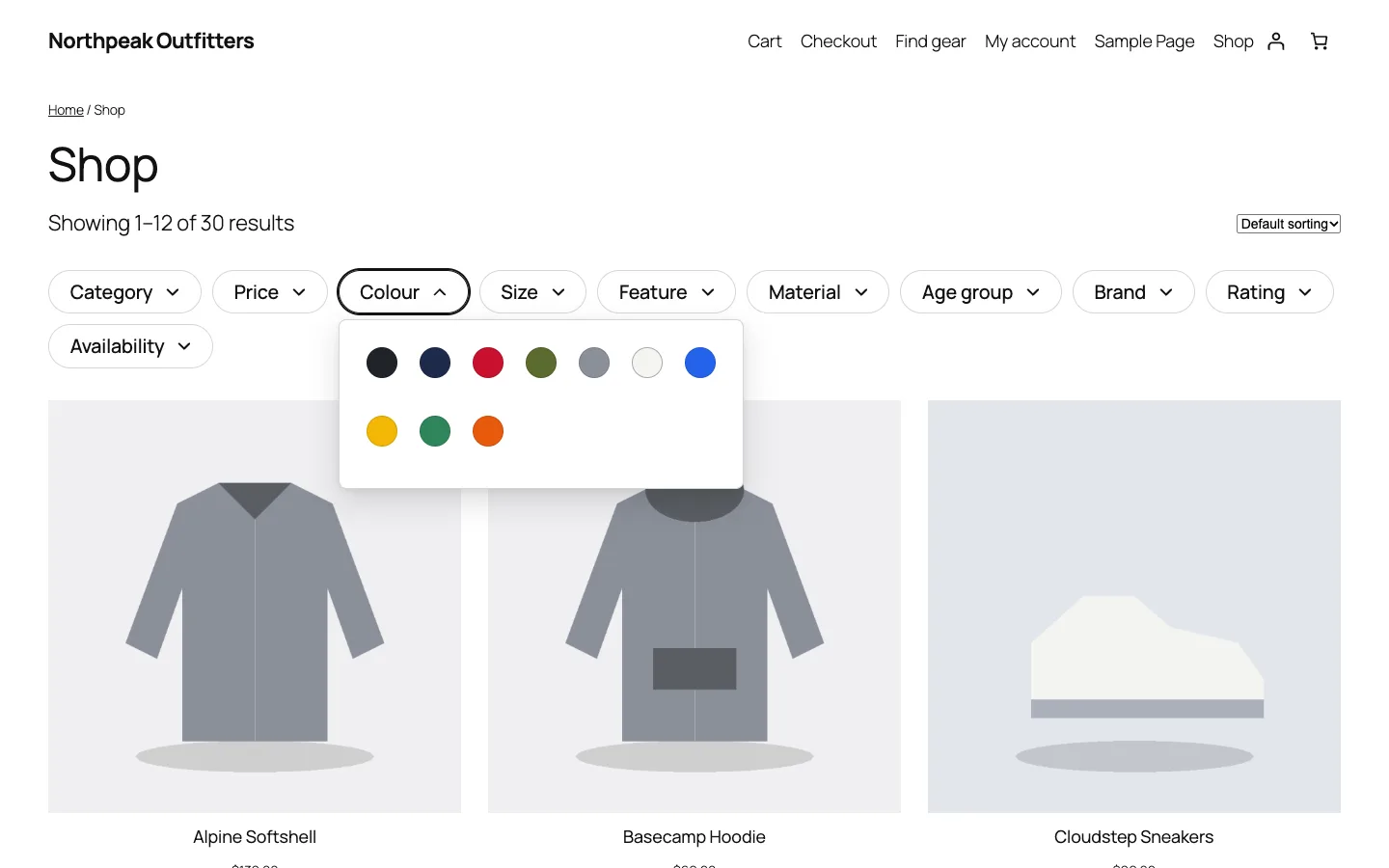
The filter bar on a block theme. Every count and swatch is served from the facet index.
What it does and who it's for
DEV3 AI Product Filter & Smart Search replaces WooCommerce's basic layered navigation and search with indexed AJAX filters and a live search box. It suits:
- Large catalogues (thousands to tens of thousands of products) where filtered pages built from taxonomy and meta queries have become slow.
- Fashion and outdoor stores with many attributes, such as colour, size, material and age group, where swatches, size buttons and stock-aware variations matter.
- Stores with category-specific needs, for example footwear filtered by EU size and type while jackets are filtered by feature and colour.
- Shops that rely on search, where shoppers type "black waterproof jacket under 100 for kids" and expect filters, not zero results.
- SEO-minded merchants who want a few filter combinations to rank as landing pages without thousands of crawlable duplicates.
AI is optional. Filters, live search, typo tolerance, synonyms and the rules-based natural-language parser all work without an API key.
How to set it up
- Install the plugin zip from the bundle download and activate it with WooCommerce active. A starter filter set is created and the index is built in the background.
- Open the plugin's Dashboard and check that the filter index shows Up to date.
- In Filters, edit the starter set or click Suggest from catalog data to get a set built from your attributes and prices.
- Add the Smart Product Search block or
[dev3pf_search]to your header. - Optional: add a Google Gemini API key in API Config to turn on natural-language AI, semantic search and the AI suggestions.
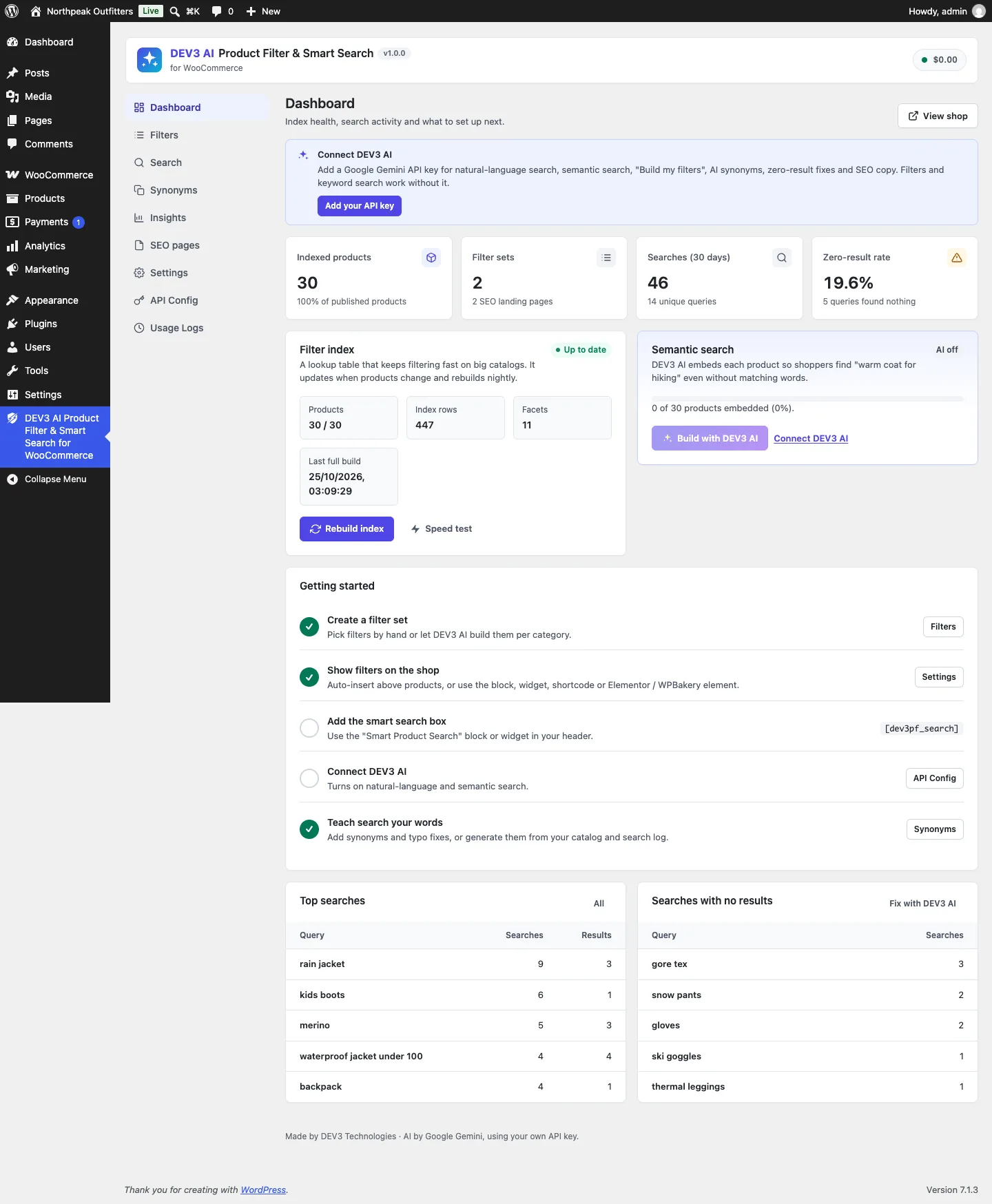
The dashboard shows index health, a speed test, top searches, zero-result queries and what to set up next.
How to use it
Give each category its own filters. A filter set has sources, display types and placement rules. The footwear set below shows type as image labels, EU sizes as buttons with counts, colour swatches and a min/max price, in "Apply" mode, so shoppers make several choices before the page reloads.
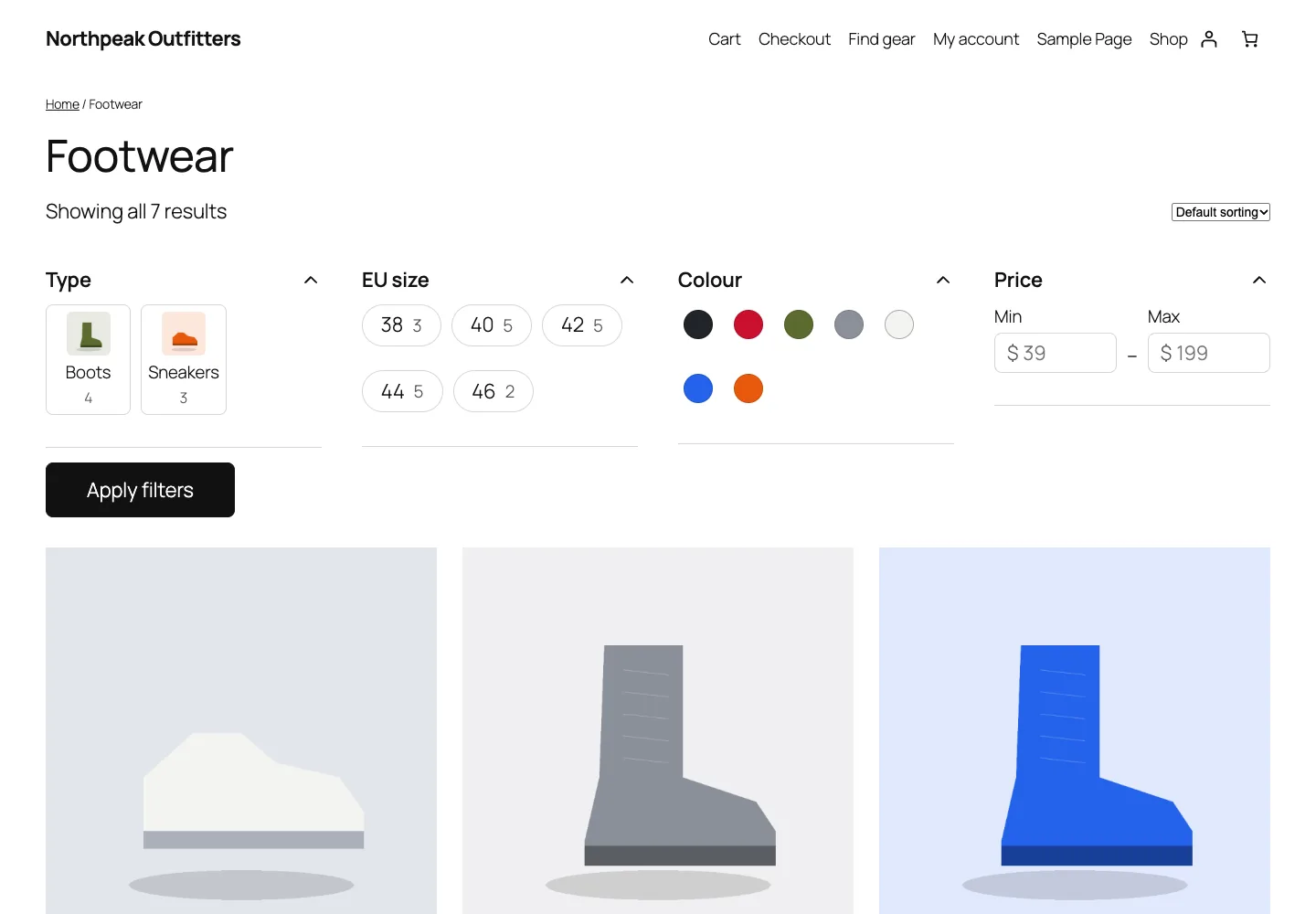
A category-specific filter set in "Apply" mode.
Let search turn sentences into filters. The live search recognises categories, attribute values, price phrases ("under 100", "between 100 and 200"), stock and sale words from the store's own vocabulary and synonyms, then offers a "smart match" that opens the filtered shop.
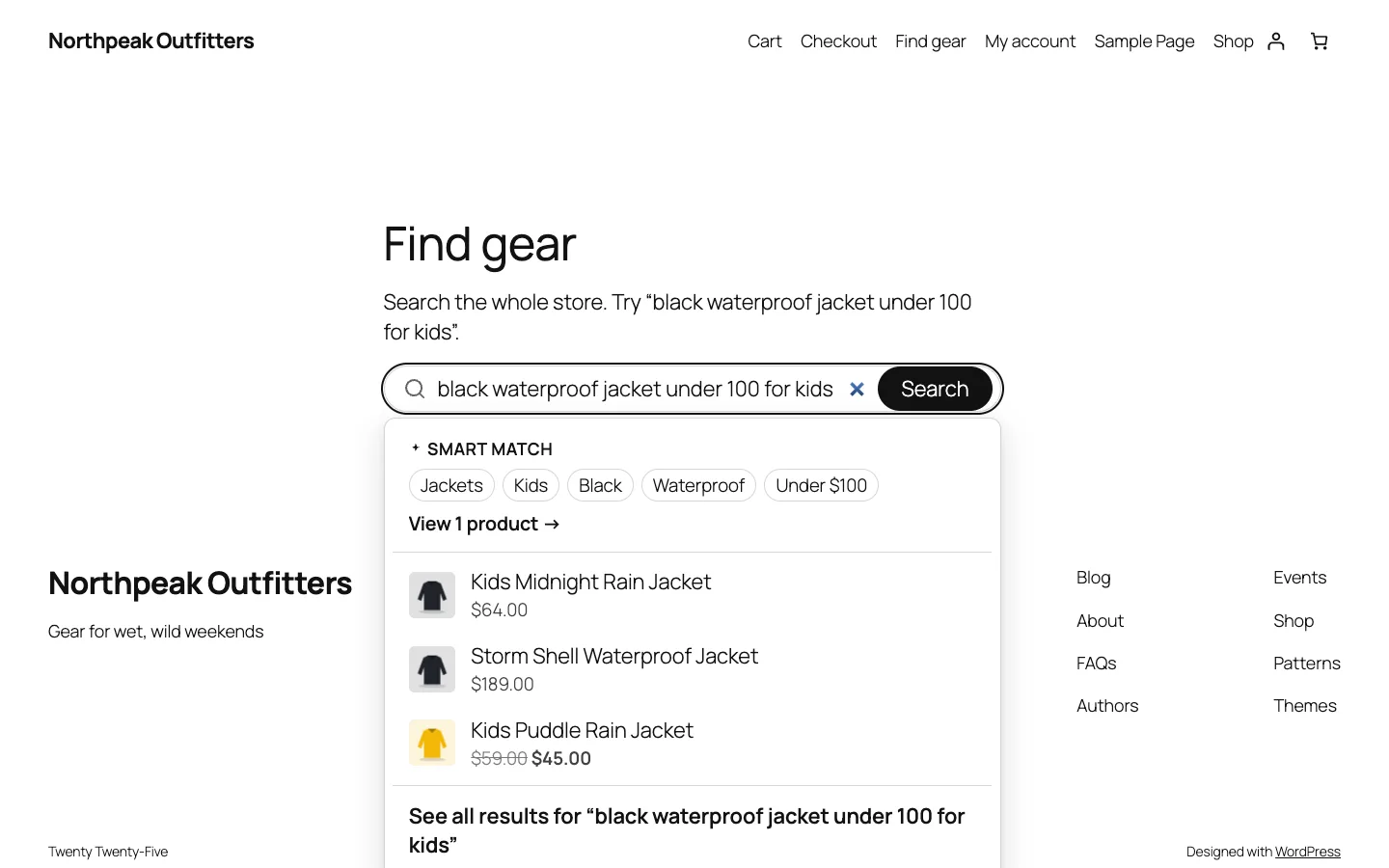
"black waterproof jacket under 100 for kids" becomes Jackets, Kids, Black, Waterproof and Under $100.
Close the zero-result gaps. Insights lists queries that found nothing. With AI connected, the plugin proposes a synonym, a typo fix, a missing attribute or "not sold here" for each one, and nothing changes until the merchant clicks Apply fix.
Turn the best combinations into landing pages. In SEO pages, a combination such as Jackets + Waterproof gets its own URL, title, meta description, H1 and intro, and is added to the XML sitemap. Every other combination stays noindex with one canonical URL per state.
Now to the engineering problem behind the counts.

Illustration: a large catalogue narrowed through filter gates.
What a "full response" means
It is worth being precise, because most benchmarks time only the product list. When a shopper ticks "Black", the storefront needs all of this in one round trip:
- the number of matching products
- the first page of products, in the chosen sort order
- for every filter in the set, the count next to each value
- the price range for the slider
- how many products have at least 4, 3, 2 and 1 stars
Our load test (tests/smoke/bench-50k.php) times exactly that bundle: the count, a page of 24 IDs, term counts for category, colour, size, feature and stock, the price range and the rating thresholds. It runs 30 random combinations of colours (OR), a size, a price range and, on every other run, two features combined with AND.
Step 1: flatten products into a facet index
The first decision was a dedicated index table. Each product becomes a set of rows:
CREATE TABLE {$index} (
	id bigint(20) unsigned NOT NULL AUTO_INCREMENT,
	product_id bigint(20) unsigned NOT NULL DEFAULT 0,
	facet varchar(64) NOT NULL DEFAULT '',
	value varchar(150) NOT NULL DEFAULT '',
	label varchar(190) NOT NULL DEFAULT '',
	num_value decimal(20,4) DEFAULT NULL,
	term_id bigint(20) unsigned NOT NULL DEFAULT 0,
	parent_id bigint(20) unsigned NOT NULL DEFAULT 0,
	PRIMARY KEY  (id),
	KEY facet_value (facet,value,product_id),
	KEY facet_num (facet,num_value),
	KEY product (product_id),
	KEY term (term_id)
) {$charset};
(from Data\Tables::schema, condensed)
Indexer::rows_for() decides what goes in, and most of the shopper-facing correctness lives there rather than in the query:
- Visibility first. Every product gets a
_visrow forcatalogand/orsearch. Every filter query starts from that set, so hidden products never leak into counts. - Categories with their ancestors. A product in "Boots" also gets a row for "Shoes", so filtering by a parent category includes its children without a recursive query.
- Only in-stock variation values. For a variable product, the indexer collects the attribute values and prices of published, in-stock variations only. A hoodie whose size L is sold out is not indexed under L, and its price rows are the distinct in-stock variation prices, so a price range matches if any buyable variation is inside it.
- Numbers as numbers. Price and rating carry a
num_value, which the range and threshold maths use later.
Products are re-indexed from WooCommerce hooks: saves, stock status changes on the product or a variation, term assignments, status transitions, deletions and review count changes. They are queued in memory and written once at shutdown. A batch of more than 50 IDs (a bulk edit, an import) is handed to a background job instead of slowing down the admin request. A nightly Action Scheduler run rebuilds everything and deletes rows for products that are no longer published.
Step 2: don't query the index either
A good index table helps, but counting values with GROUP BY for five facets under five different selections is still a lot of SQL per request. So the request path doesn't touch the index table at all. It reads postings lists: for each facet, a map from value to the IDs of the products that have it. This is the same structure search engines use, and it turns filtering into set operations.
Index\Postings::build() streams the index for one facet in pages of 20,000 rows and packs each ID list into a binary string:
foreach ( $values as $value => &$info ) {
	$list        = array_values( array_unique( $ids[ $value ] ) );
	$info['ids'] = $list ? base64_encode( pack( 'V*', ...$list ) ) : '';
}
unset( $info );
return array(
	'values'    => $values,
	'pair_ids'  => $pairs ? base64_encode( pack( 'V*', ...array_column( $pairs, 0 ) ) ) : '',
	'pair_nums' => $pairs ? base64_encode( pack( 'e*', ...array_column( $pairs, 1 ) ) ) : '',
);
(condensed from Postings::build)
V* packs each product ID as a 4-byte little-endian integer and e* packs the numeric values as little-endian doubles. A list of 5,000 IDs is 20 KB of binary data, instead of a serialised PHP array several times that size, and unpack() turns it back into an array in one C call. The packed form is stored in a non-autoloaded option per facet, so it works on any host, with or without a persistent object cache.
Invalidation by version, not by key
Each stored list carries the index version it was built from. Any index write calls Postings::bump(), which stores a new uniqid() in dev3pf_index_ver. On the next read, a list with a stale version is rebuilt:
$version = self::version();
$stored  = get_option( self::key( $facet ) );
if ( ! is_array( $stored ) || ! isset( $stored['ver'] ) || $stored['ver'] !== $version ) {
	$stored        = self::build( $facet );
	$stored['ver'] = $version;
	update_option( self::key( $facet ), $stored, false );
}
(from Postings::get)
There's no need to work out which lists a product change affects. One integer of state marks all of them stale. The cost is that the first reader after a change pays for the rebuild, which on 50,000 products took about 1.8 seconds in our test. We didn't want a shopper to pay that, so after indexing a queue the plugin calls Postings::warm(), which immediately rebuilds the lists for the base facets and for every facet used in a filter set. The admin request that saved the product absorbs the cost.
When a list is decoded, the IDs are flipped into keys: array_fill_keys( $ids, true ). That one detail makes everything after it fast, because PHP's array_intersect_key() and the + union operator are hash lookups.
Step 3: filtering is set maths

Illustration: postings lists intersected as sets.
Filter_Query::facet_set() turns one filter selection into a set of product IDs. For terms, OR is a union and AND is an intersection:
foreach ( $values as $value ) {
	$ids = isset( $lists['values'][ $value ] ) ? $lists['values'][ $value ]['ids'] : array();
	if ( null === $out ) {
		$out = $ids;
	} elseif ( $and ) {
		$out = array_intersect_key( $out, $ids );
	} else {
		$out += $ids;
	}
}
(from Filter_Query::facet_set)
Ranges walk the (id, number) pairs of the facet and keep the IDs inside the bounds. The full match is the base set (visible products, narrowed by the current category archive or search results) intersected with each facet's set:
usort( $sets, static function ( $a, $b ) {
	return count( $a ) - count( $b );
} );
foreach ( $sets as $one ) {
	$set = count( $one ) < count( $set ) ? array_intersect_key( $one, $set ) : array_intersect_key( $set, $one );
	if ( ! $set ) {
		break;
	}
}
(condensed from Filter_Query::set)
Two small optimisations matter here. The sets are intersected smallest first, so the working set shrinks as early as possible. And each intersection iterates over the smaller array and looks up keys in the larger one, because array_intersect_key() costs roughly the size of its first argument. When the set becomes empty, the loop stops.
Step 4: counts that let shoppers widen a choice
The obvious count for "Red" is "how many products match the current filters and are red". If the shopper has already picked "Black", that is zero for every other colour, and the filter becomes a dead end. Most filter UIs avoid this with disjunctive faceting: the counts for a facet ignore that facet's own selection but respect all the others. With "Black" and "Kids" selected, "Red (1)" means "selecting red as well would add one kids' product".
Filter_Query::term_counts() does this with two memoised sets per facet:
$context = $this->set( $facet, false );
$others  = $this->state;
unset( $others[ $facet ] );
$current = $others ? $this->set( $facet ) : $context;
foreach ( $lists['values'] as $value => $info ) {
	$total = self::overlap( $info['ids'], $context );
	if ( ! $total ) {
		continue;
	}
	$out[] = array(
		'value' => (string) $value,
		'total' => $total,
		'count' => $others ? self::overlap( $info['ids'], $current ) : $total,
	);
}
(condensed from Filter_Query::term_counts)
$context is the archive without any selection: it decides which values exist on this page at all, so a "Shoes" category never shows jacket colours. $current is the selection minus this facet. Each value's count is then the size of one intersection. set() memoises by the excluded facet, so five facets cost at most five extra intersections of already-decoded lists.
The PHPUnit case test_disjunctive_counts_ignore_own_facet pins this behaviour: with black and kids selected, the colour counts show black 1, red 1, green 1 and blue 0 (the kids' products in each colour), while the age-group counts show 2 adults' products in black.
The same thinking applies to the other widgets. range() computes the price slider's bounds from the context set, ignoring the price selection, so the slider doesn't shrink under the shopper's thumb. threshold_counts() takes each product's best rating once and counts it under every threshold it clears, so "4 stars & up" and "3 stars & up" come from one pass.
Step 5: SQL only for the page you see
After all that, the database still has one job: turning the ID set into an ordered page of 24 products. Filter_Query::ids() runs a single SELECT p.ID FROM wp_posts p WHERE p.ID IN (…) with the right ORDER BY (menu order, date, title, or a join on the index for price and rating, or on the search table for popularity) and a LIMIT. On the shop page, the main WordPress query is narrowed with the same ID list through posts_where, so the theme's own product template renders the results and pagination stays correct.
The numbers
The load test writes 50,000 synthetic products straight into the index (650,000 rows, IDs from 50,000,000 up so they can't collide with real products), rebuilds the lists once, and then times 30 full responses, clearing the in-request memo before each one so every run decodes the cached lists like a fresh request. On a laptop running WordPress in Docker with MariaDB:
- 91 ms average, 104 ms p95 for the full response
- about 1.8 s to rebuild the cached lists after an index change, paid once, by the request that changed the index
The script is in the source package, so a store can run it on its own hosting with wp eval-file. The admin dashboard also has a "Speed test" button that times ten typical filter queries against the store's real index.
Trade-offs
- Memory over SQL. Decoded lists live in PHP memory for the request. At 50,000 products that is comfortable; for catalogues an order of magnitude larger, the right next step is a persistent object cache or an external search engine. The plugin's semantic search already has a
dev3pf_vector_storefilter for that reason. - Rebuilds are coarse. One version number invalidates every facet. A price edit also rebuilds the colour lists. We chose simplicity and correctness over a dependency graph, and moved the cost to the admin side with warming.
- The index is a copy. Anything that changes product data without firing WooCommerce hooks (a direct SQL import, for example) needs a manual "Rebuild index", or waits for the nightly run. The dashboard shows index health and the last full build so this is visible.
- The block theme is what we checked. The screenshots and manual checks cover Twenty Twenty-Five; classic themes are supported through the same templates but have had less visual testing.
Conclusion
The pattern behind the 91 ms is old and simple: precompute an inverted index, keep it in a compact form, and answer questions with set operations instead of joins. WordPress's options table and PHP's hash-based array functions turned out to be enough to do that well, with no extra services. DEV3 AI Product Filter & Smart Search ships in the DEV3 AI WooCommerce Plugins Bundle on the DEV3 marketplace and is being prepared for CodeCanyon; the case study covers the smart search, SEO landing pages and AI features. If your store's filters are slow, our web development team can help.