Every product importer has a dangerous button labelled "Import". After you press it, a supplier file has created products and variations, changed the prices and stock of products you already had, added categories and tags, registered global attributes and downloaded images into the media library. If the decimal comma was read wrong or a parent SKU column grouped the wrong rows, the usual fix is a database backup or an afternoon of manual clean-up. When we built DEV3 AI Catalog Importer, our WooCommerce plugin that turns supplier spreadsheets, PDF catalogs and product pages into products, we wanted that button to be reversible. This post explains how the plugin records an import so that one click can undo it: a write ledger with before-snapshots, a strict rollback order, and the WooCommerce details that make "undo" harder than deleting what you created.
What it does and who it's for
DEV3 AI Catalog Importer is an admin-only WooCommerce plugin: it writes products, variations, categories, tags, attributes and images, and never touches orders or the checkout. It is built for:
- Shops that resell from several suppliers, each sending a different price list layout, often with German, French or Dutch column names and a decimal comma.
- Store owners who only have a PDF catalog, which DEV3 AI reads into products, prices and variations (up to 100 products per request).
- Merchants copying products from a supplier's website, where schema.org product data is read without AI and DEV3 AI fills the gaps (up to 50 products per page).
- Apparel and homeware stores with one row per size or colour, which need those rows grouped into variable products.
- Anyone who refreshes prices and stock weekly from a supplier feed and wants a saved mapping, a schedule and a way back if a feed is wrong.
How to set it up
- Install the plugin zip from the bundle under Plugins → Add New → Upload Plugin and activate it. WooCommerce 8.0+ must be active.
- Open DEV3 AI Import in the admin menu.
- Optional: paste a Google Gemini API key under API Config and click Validate & save. Spreadsheets, feeds and structured pages import without one.
- Click New import and drop a supplier file.
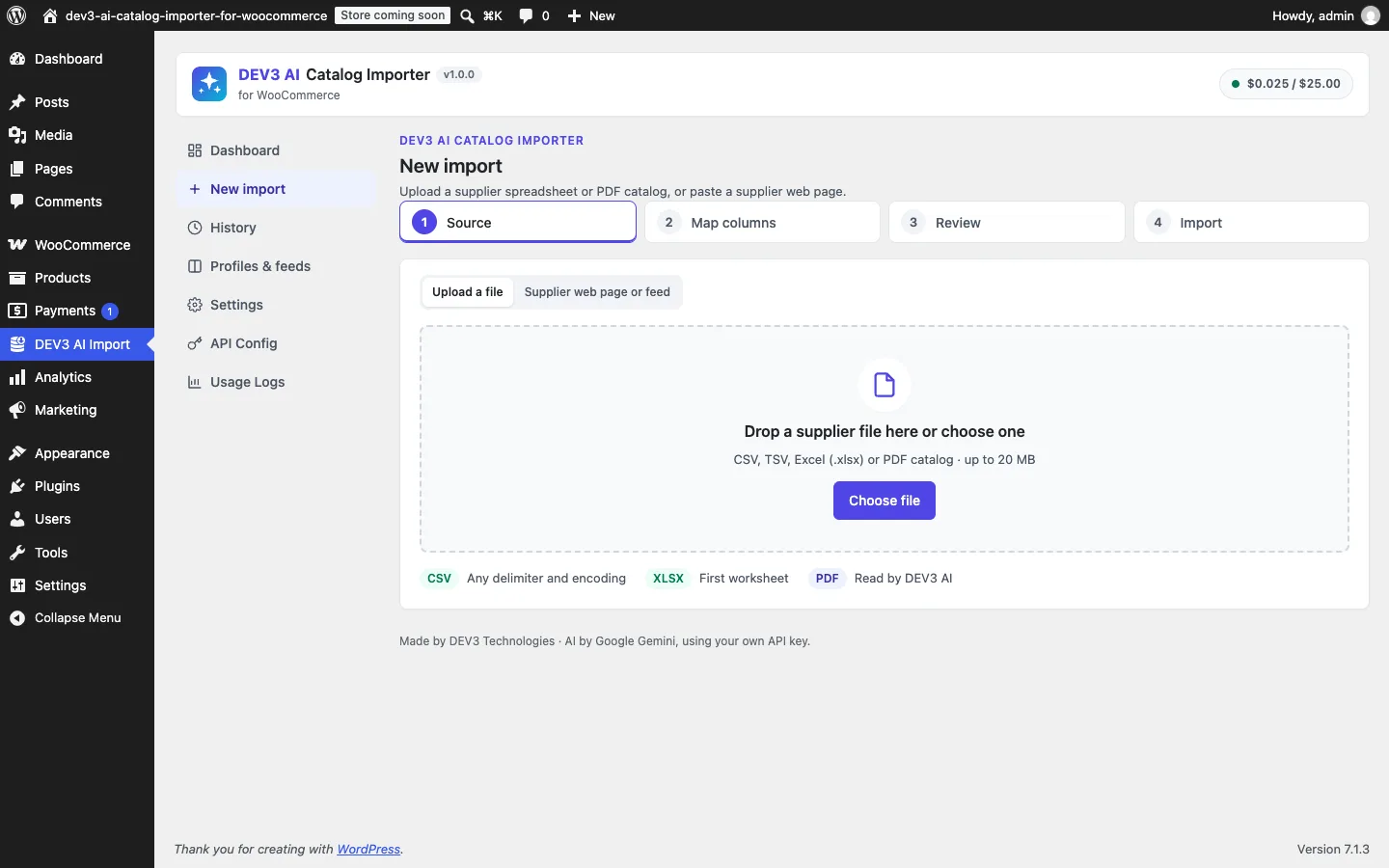
Step 1 of the wizard: a file, a feed URL or a supplier page.
How to use it
Import a spreadsheet. Drop the CSV or Excel file and check the column mapping. Common supplier headers in six languages are mapped automatically; Map with DEV3 AI suggests the rest, each with a confidence score, and you tick the ones to apply. Map the style column to Parent SKU so that sizes and colours become one variable product, then click Build products & review.
Review before anything is written. The review grid shows every product and variation with its status. Missing names, invalid prices, a sale price that isn't lower than the regular price and duplicate SKUs are flagged per row. Map categories and Polish titles with DEV3 AI produce drafts you accept or reject.
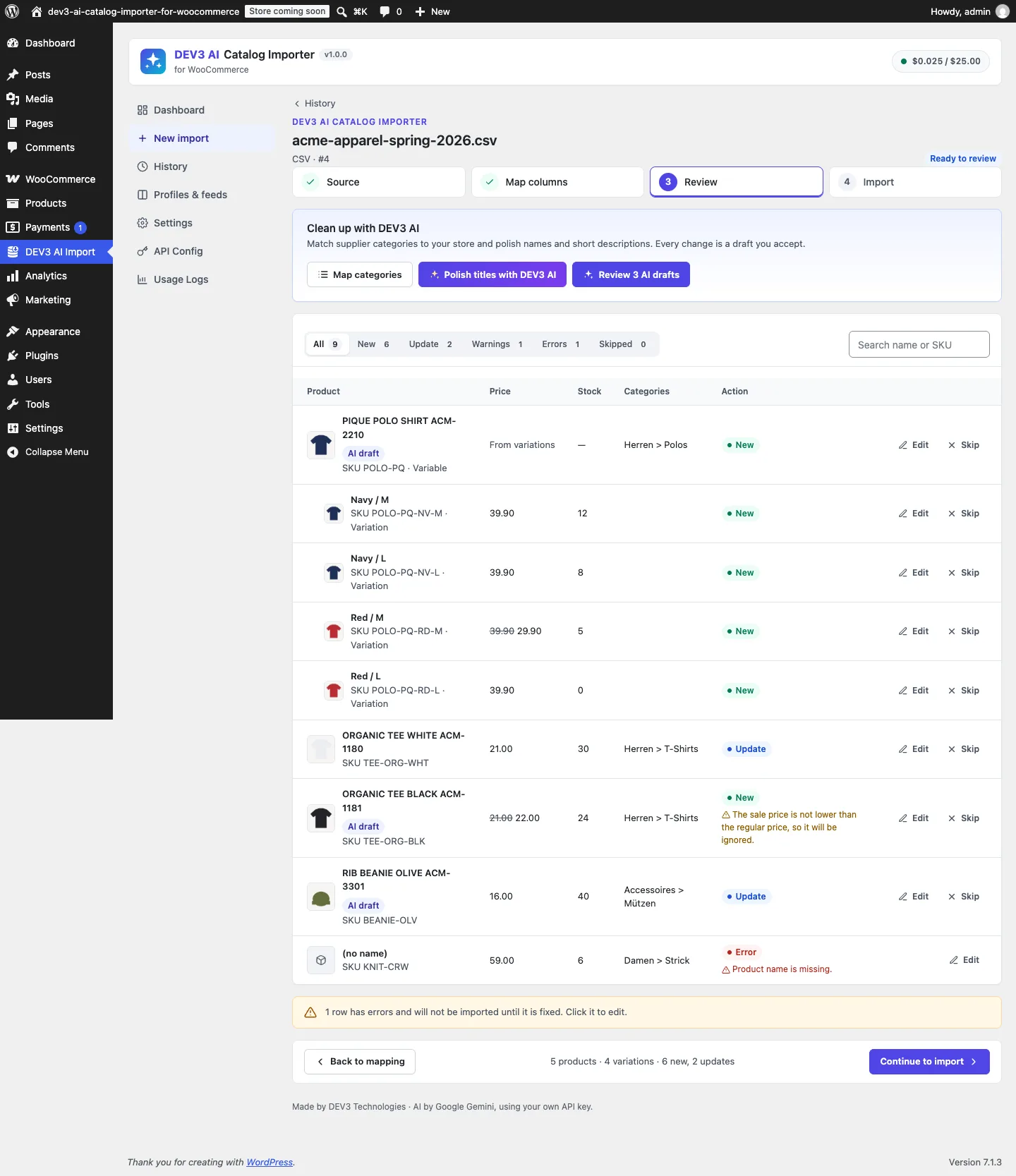
New, updated, warning and error rows, all visible before the import runs.
Dry-run, import, and undo if needed. Start dry run shows what each row would do, then Import N rows runs the job in the background. If the result is wrong, Roll back import puts the store back. The rest of this post is about how that last button works.
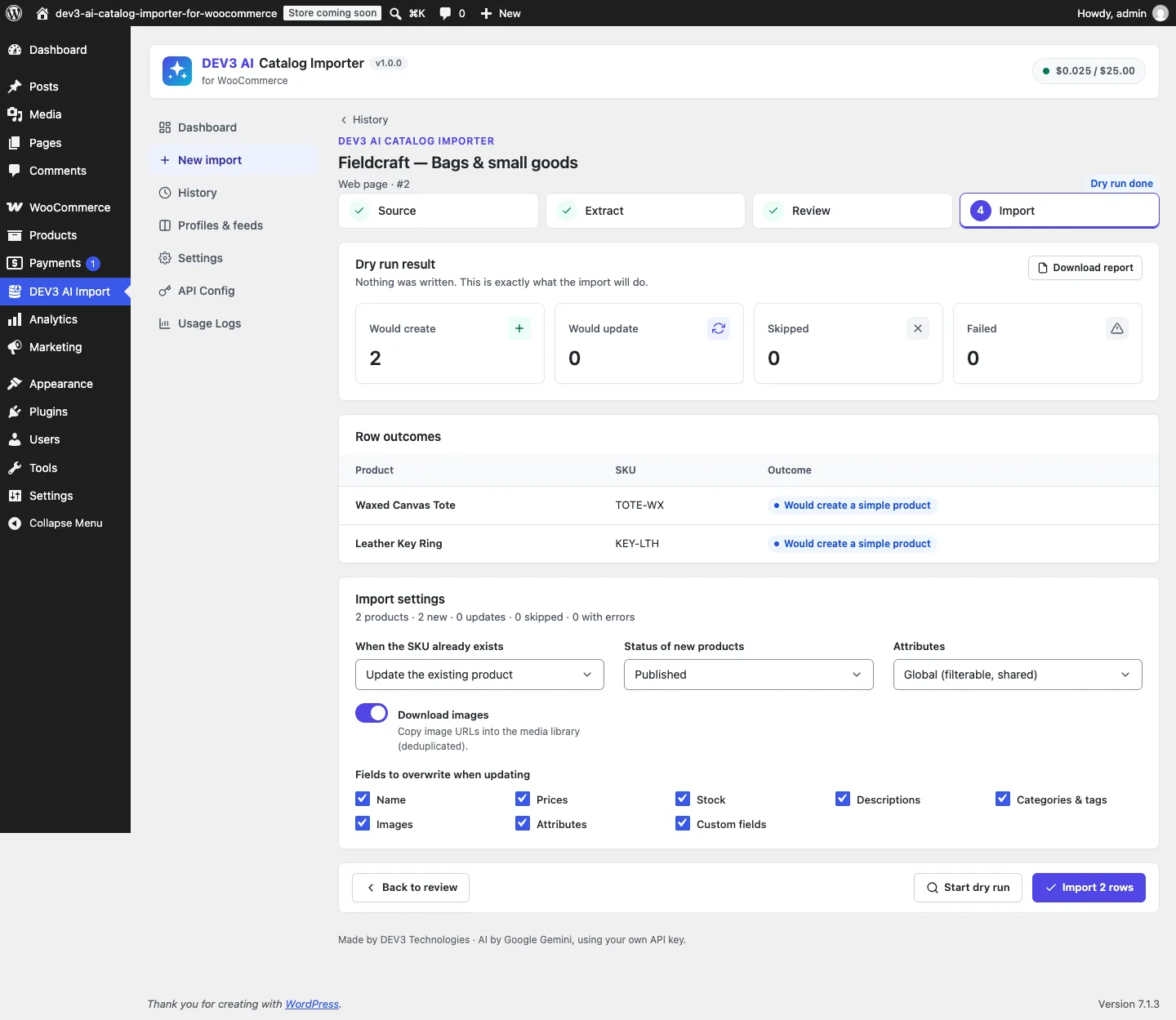
A dry run: same pipeline, no writes, an outcome on every row.
The deep dive: why "delete what we created" is not enough
The obvious rollback is to tag each created product with the import's ID and delete everything with that tag. It handles about a third of the problem. A typical supplier import does four kinds of work:
- Creates products and variations for SKUs the store hasn't seen before.
- Updates existing products whose SKU is already in the store: new price, new stock, sometimes a new description.
- Creates supporting objects: category paths like
Men > Shirts, tags, global attributes such aspa_colourwith their terms, and image attachments. - Changes the type of an existing product. A simple product called Hoodie with SKU
HOODgains rowsHOOD-SandHOOD-Mthat name it as their parent, so it becomes a variable product.
A tag-and-delete rollback can't undo the second kind, because those products existed before and must survive with their old values. It leaves the third kind behind as clutter: empty categories, an attribute nobody uses, orphaned images. And it has nothing to say about the fourth. We needed a record of every write, in enough detail to reverse it.
The ledger
Every import session has rows in a custom table, {prefix}dev3ci_ledger. Each entry says which object was touched, what kind of object it is, whether it was created or updated, and, for updates, what it looked like before:
public static function add( $session_id, $object_type, $object_id, $action, array $snapshot = array() ) {
	global $wpdb;
	$wpdb->insert(
		Tables::name( 'ledger' ),
		array(
			'session_id'  => (int) $session_id,
			'object_type' => (string) $object_type, // product|variation|term|attachment|attribute
			'object_id'   => (int) $object_id,
			'action'      => (string) $action,      // created|updated
			'snapshot'    => wp_json_encode( $snapshot ),
			'created_at'  => Tables::now(),
		)
	);
	return (int) $wpdb->insert_id;
}
(from Data\Ledger, condensed)
Illustration: every write lands in the ledger, so the store can be rewound.
The import engine calls this wherever it writes. Creating a product, a variation, a term, a global attribute or an attachment adds a created entry. Updating a product or variation adds an updated entry with a snapshot, and the snapshot is taken before the first change is made.
We chose an explicit ledger over reconstructing the import afterwards from post meta or modified dates. WordPress doesn't record who created a term, and a product's modified date doesn't say what it looked like before. The ledger is cheap, a handful of rows per product, and the plugin deletes it along with the session after the retention period (30 days by default). So rollback is available for as long as the import history is.
First snapshot wins
There is a subtle rule in how updates are recorded:
if ( ! Ledger::has( $session['id'], 'product', $existing->get_id() ) ) {
	Ledger::add( $session['id'], 'product', $existing->get_id(), 'updated', self::snapshot( $existing, $data ) );
}
(from Importer::save_product)
The same session can be imported twice. A shop owner imports, notices a wrong price in the grid, fixes the row and imports again. After the first run every SKU in the file already exists, so the second run consists only of updates. If the second run took fresh snapshots, it would capture the state written by the first run, and rollback would restore the import's own output. Ledger::has() makes sure that only the first before-state of an object per session is kept, so rollback always returns to the state before the session ever touched the store.
What a snapshot contains
Importer::snapshot() stores every field an import can write: type, name, status, both descriptions, prices, stock settings, dimensions, category and tag IDs, the featured image and gallery, attributes and the custom fields the import maps. It reads them with WooCommerce's 'edit' context so that filters don't change the values we save.
Two choices are worth explaining.
Attributes are stored by value. A WC_Product_Attribute object doesn't survive JSON encoding, so each one is flattened to its ID, name, options, position and its visible and variation flags. On restore, new attribute objects are built from those values.
Meta is stored per key, with absence recorded as null. The snapshot covers only the custom-field keys this import maps, plus the plugin's own _dev3ci_session and _dev3ci_gtin. If a key didn't exist before, it is stored as null, and restore deletes it instead of writing an empty string. Without this, a rolled-back product would keep an empty custom field it never had. The test suite checks this: after rolling back an update, _dev3ci_session reads as an empty value, exactly as it did before the import.
Rollback order matters
Undoing writes in the wrong order breaks things in WooCommerce. If a parent product is deleted before its variations, the variations become orphaned posts. If a category is deleted while a product still uses it, the product loses its category. If an attribute taxonomy is deleted while terms still exist in it, those terms are stranded. So the ledger isn't replayed in insertion order. It is read in a fixed order by type, newest first within each type:
"SELECT id FROM {$table} WHERE session_id = %d
 ORDER BY FIELD(object_type,'variation','product','attachment','term','attribute'), id DESC"
(from Ledger::rollback_ids)
- Variations first, so no variation is ever left without its parent.
- Then products. Created products are deleted, and updated products are restored from their snapshots.
- Then attachments the import downloaded, after the products that used them are gone.
- Then terms, newest first. Category paths are created from the top down:
MenbeforeShirts. Reading them newest first deletesShirtsbeforeMen, so a parent is never deleted while it still has the import's own child under it. - Attributes last, after their terms are gone.
Rollback runs as a background job in chunks of 10 ledger entries, through the same job runner as the import. A catalog with thousands of variations doesn't hit PHP's time limit, and the screen shows progress.
Created things are only deleted if nothing else uses them
Terms and attributes are shared. The import may have created the Shirts category, but by the time someone presses rollback, the shop owner could have put a hand-made product in it. So the undo for a term checks for current use first:
case 'term':
	$taxonomy = isset( $entry['snapshot']['taxonomy'] ) ? (string) $entry['snapshot']['taxonomy'] : '';
	$term     = $taxonomy ? get_term( $id, $taxonomy ) : null;
	if ( $term && ! is_wp_error( $term ) ) {
		$used = get_objects_in_term( $id, $taxonomy );
		if ( ! is_wp_error( $used ) && ! $used && ! get_term_children( $id, $taxonomy ) ) {
			wp_delete_term( $id, $taxonomy );
		}
	}
	return true;
(from Rollback::undo)
It uses get_objects_in_term() and not the term's cached count. The import runs with wp_defer_term_counting( true ) to stay fast, so the cached count can be stale exactly when rollback reads it. The relationship table is the truth. Global attributes follow the same rule: wc_delete_attribute() runs only when the attribute's taxonomy has no terms left. A term that is still in use is not an error. Rollback leaves it alone and moves on.
Attachments are deduplicated by their source URL during import (a _dev3ci_source_url meta), and only attachments that this import actually downloaded are ledgered. An image reused from an earlier import never appears in this session's ledger, so rolling this session back can't delete it.
Restoring an updated product, including its type
Restoring from a snapshot is mostly set_props() with the saved values. The interesting case is the hoodie from earlier. The import turned a simple product into a variable one:
// A simple product that gains variations becomes variable; everything else keeps its type.
$product = $variable && ! $existing->is_type( 'variable' ) ? new \WC_Product_Variable( $existing->get_id() ) : $existing;
(from Importer::save_product)
WooCommerce stores a product's type as a product_type taxonomy term, and the CRUD class you save with decides what gets written. Rollback mirrors this. If the snapshot says the product was simple and it isn't simple now, the product is loaded as a WC_Product_Simple with the same ID before the props are applied:
if ( isset( $snap['type'] ) && 'simple' === $snap['type'] && ! $product->is_type( 'simple' ) && ! $product->is_type( 'variation' ) ) {
	$product = new \WC_Product_Simple( $id );
}
$errors = $product->set_props( $props ); // saved fields from the snapshot
(condensed from Rollback::restore)
The variations the import added to the hoodie were deleted earlier in the run, because variations come first in the rollback order. So when the parent is saved as simple again, it has no children to leave behind. A PHPUnit test runs this case end to end: the hoodie gains two variations, rollback runs, the product is simple again with its original price of 30, and the SKU HOOD-S no longer exists.
Variations get their own handling. Their attributes are a flat map of attribute to value, not attribute objects, and fields that only belong to a parent (name, categories, tags, gallery) are left out of the restore.
The dry run uses the same pipeline
Rollback is the safety net, and the dry run lets you avoid needing it. The two share code on purpose. A dry run starts the same background job as a real import, with dry_run set in the job arguments. Importer::import_group() then branches just before the first write:
if ( $dry ) {
	self::predict( $parent, $group );
	return true;
}
$product_id = self::save_product( $parent, $session, $options );
(from Importer::import_group)
Everything before that line is shared: skip and error handling, grouping rows into a parent and its variations, and matching existing products by SKU. predict() writes a readable outcome on each row instead of saving it, for example "Would create a variable product with 3 variations", or "Would update: price 5 → 7.25; stock 2 → 40". It builds that text with a diff() helper that compares the record with the live product, field by field. The session totals for a dry run and a real import come from the same result_counts() function, so they can be compared directly.
The acceptance test for the plugin holds both sides to that. It maps a semicolon-separated CSV with a three-variation polo shirt, a mug, a duplicate mug row and a row without a name. Then it:
- runs a dry run and asserts the product count is unchanged and 5 creations are predicted,
- runs the real import and asserts exactly 5 were created and the product count went up by 5,
- rolls back and asserts the product count is back where it started, the
Shirtscategory and thepa_colourattribute are gone, the ledger for the session is empty, and the rows show as "new" again, ready to re-import.
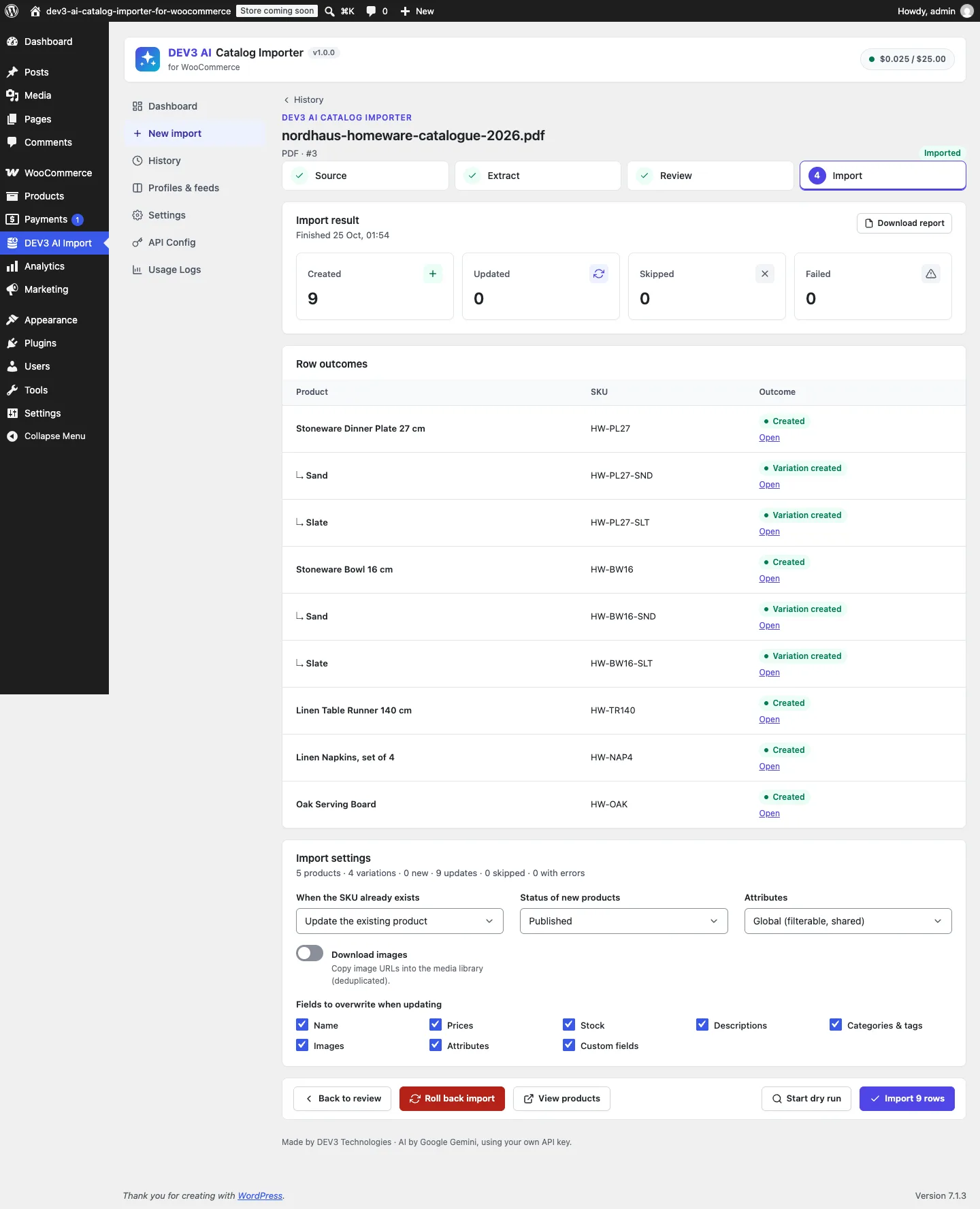
The result screen, with the one-click rollback next to the report.
The trade-offs we accepted
Rollback restores the snapshot, not a merge. If a shop owner edits an imported product's description after the import and then rolls back, the description returns to its pre-import value, and the manual edit is lost. A field-level three-way merge would be possible, but it would make rollback's result hard to predict. We chose "back to exactly how it was".
Rollback lasts as long as the history. The ledger is deleted with its session after the retention period (30 days by default, configurable). That keeps the tables small, and it means a months-old import can't be undone. That is usually what people expect.
Deleted products can't be restored. If an updated product was deleted by hand after the import, its ledger entry reports "The product no longer exists" and rollback continues with the rest of the ledger.
One AI request has limits. The AI stages that feed the review grid (PDF extraction and reading free-form supplier pages) read at most 100 products from a PDF or 50 from a web page per request. Rollback doesn't care where a row came from. AI-extracted rows go through the same grid, validator, ledger and undo as rows from a spreadsheet. The AI paths themselves are tested with mocked API responses; a run with a live key is still to come.
Takeaways
Undo needs a per-object record of every write with the state before the first change, a fixed dependency order for reversing it, and in-use checks for anything shared. A dry run built into the same code path keeps the preview honest.
The full build, from the six-language header mapper to the SSRF-guarded image fetcher, is in the case study. DEV3 AI Catalog Importer ships in the DEV3 AI WooCommerce Plugins Bundle on the DEV3 marketplace, alongside 20 other WooCommerce plugins, and is also being prepared for CodeCanyon.