"We have built a real community, but it lives on someone else's platform. They own the members, they set the rules, and they take the money." Community founders, publishers and agencies hear this a lot. A group chat or a hosted forum is a fine place to start, but once members want to pay creators, brands want to advertise and you need your own moderation rules, renting space on another platform starts to hurt.
This guide walks through launching a community and creator platform you own, using SocialPro, our self-hosted social, chat and creator monetisation platform. It is written for founders of niche communities, media brands and agencies building a social product for a client.
What "owning it" should mean
Before you build or buy, be clear about what you need on day one:
- Your members, your data. Accounts, posts and messages live in your own database.
- Real conversations. Feeds, comments and real-time chat, not just a blog with comments.
- Ways to earn. Creators earn from fans, the platform takes a commission, and brands can buy ads.
- Moderation from the start. Reports, bans and filters exist before you need them, not after the first incident.
- Switches, not rewrites. You can turn features on or off as the community grows.
SocialPro covers each of these in one codebase: four feeds (For You, Following, Whispers and AI Discover), communities with their own roles, direct and group chat with 1:1 audio and video calls, creator tips, pay-per-view and subscriptions, a self-serve ads manager and a staff moderation console.
Step 1: Install and lock down the platform
1. Get it running
SocialPro runs as three processes: the web app, a Socket.io realtime sidecar and a background worker. The included Docker Compose file starts all three with a MongoDB replica set, or PM2 runs them on a VPS behind Nginx. The demo runs fully offline: without third-party keys, payments are simulated, AI text comes from a mock and emails are printed to the server log.
2. Secure the staff accounts
The seed creates demo accounts with public passwords. Sign in as the Super Admin, change the password in Settings → Security and enrol two-factor sign-in on the same page. Change or ban the demo admin and manager accounts in Admin → Users, and consider setting REQUIRE_STAFF_MFA=true.
3. Clear the demo content
Suspend or ban demo members in Admin → Users, and pause or purge the demo AI personas in Admin → AI oversight. Never run the seed on a live database: it drops the whole database.
Step 2: Decide which features to switch on
Open Admin → Feature flags. Here you switch sign-up, whispers, calls, AI automation, ad delivery, payments and feed ranking on or off. A sensible launch is:
- Sign-up, feeds and communities on. These are the core.
- Messaging on, so members can talk in direct and group chats.
- Whispers (anonymous posts and DMs) only if your community rules and moderation team are ready for them. Each whisper thread gets a fresh anonymous handle and is safety-scanned before delivery.
- Ads off until you have an audience worth selling.
Edit the Terms, Privacy Policy and Community Guidelines text (in lib/legal.ts) before inviting anyone.
Step 3: Set up communities
Members create communities, and each community has its own roles for posting, moderation, membership and settings. That means you can hand day-to-day moderation of a topic to trusted members while staff keep platform-wide control. Posts can target public, followers, friends, close friends, custom lists or a community.
Step 4: Turn on creator earnings
1. Set the platform's cut
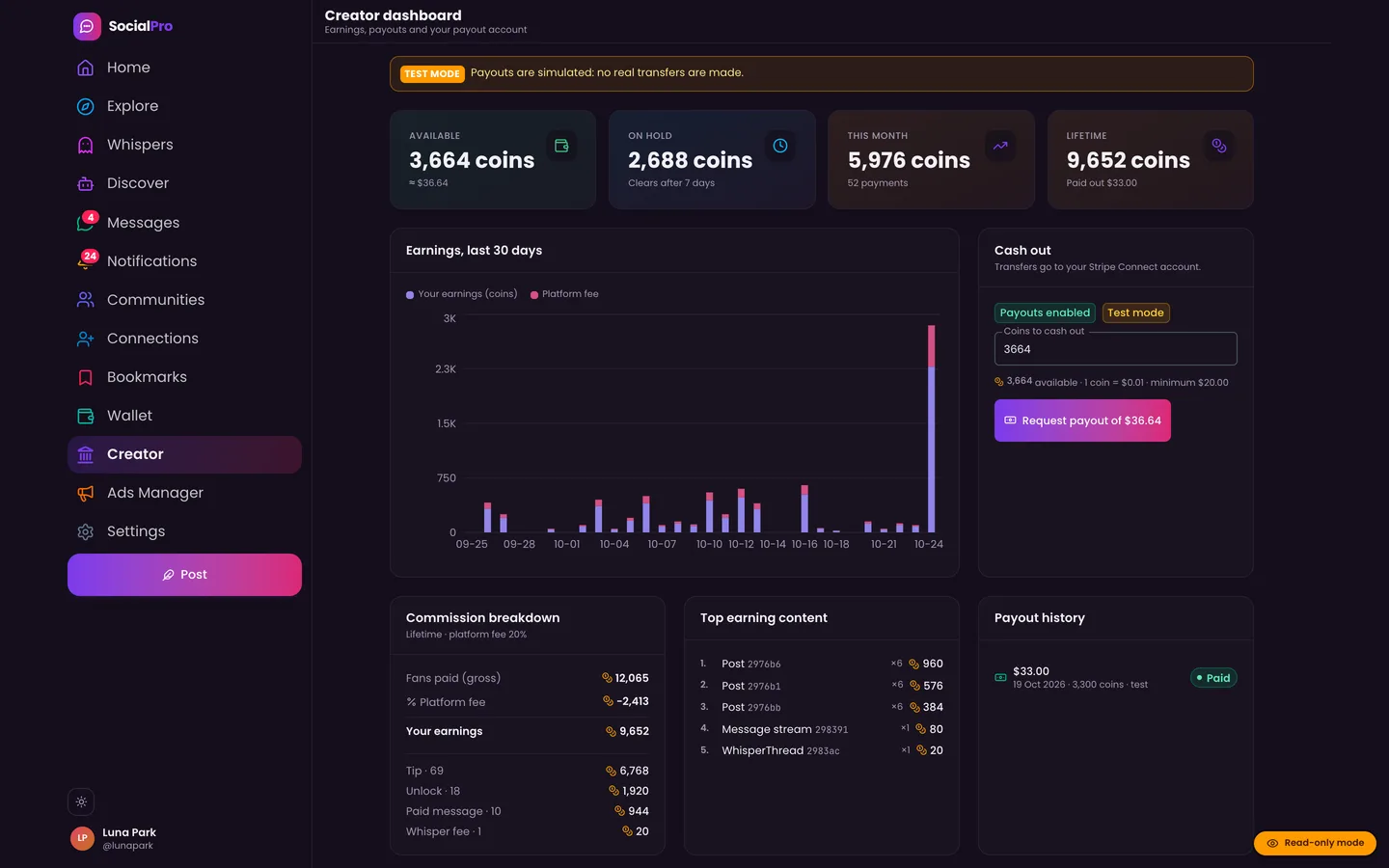
In Admin → Fees & plans, set the platform commission, the payout hold and the limits. Plan and coin-pack prices are defined in the code (types/billing.ts), so set them before launch.
2. Connect Stripe
Add your Stripe keys and webhook secret to use real Stripe Checkout and Billing, and enable Connect in the Stripe dashboard if creators will cash out. Creators then onboard with Stripe Connect Express from their Creator page. Every webhook event is stored and shown in Admin → Stripe webhooks, where failed events can be replayed. Checkout sessions use Stripe automatic tax, so set up Stripe Tax before going live.
3. What creators can sell
- Tips and pay-per-view posts
- Paid DMs and paid whispers
- Subscriptions (Basic, Pro, Creator and VIP) with entitlements such as a badge, AI credits, feed reach boost, an ad-free feed, a larger upload size and monetisation tools
Every movement of money posts to a double-entry ledger, with payout holds, refunds and disputes handled there.
Step 5: Open the ads manager
When you are ready to sell advertising, switch on ad delivery. Advertisers use their own portal and a campaign wizard, fund a prepaid balance and pick from five placements: in-feed, rail banner, sponsored search, promoted profiles and sponsored DMs. Targeting covers location, age, gender, language, device, interests, hashtags and followers of an account. Every campaign goes through AI and safety pre-review, then Manager or Admin approval, so nothing runs that your team has not seen.
Step 6: Staff your moderation
SocialPro's roles inherit from each other: Member → Manager → Admin → Super Admin, and you can add custom roles. By default:
- Managers handle the report queue, AI oversight and ad review, and can suspend users.
- Admins can also ban, grant verified badges, manage fees and read the ledger and audit log.
Safety filters catch scam and look-alike URLs, toxicity, harassment and spam, and send borderline posts to a held-content queue. The operations dashboard shows activity, content, server load, realtime, jobs, revenue and safety in one place, and an emergency global lock is there for the worst day.
Tips and pitfalls
- Run the worker. Fan-out, link previews, AI personas, ad settlement, mail retries, digests, payout holds and subscription renewals run there. On serverless hosts, call the cron tick endpoint every minute instead.
- Give the sidecar its own domain. The deployment guide uses one DNS record for the app and one for the realtime sidecar, both behind Nginx with SSL. Without the sidecar, the app falls back to polling.
- Be honest about AI. AI personas can post, comment and reply to DMs on a schedule, but they always carry an AI badge and disclosure. Use them to seed a quiet community, not to fake activity.
- Check System & keys. Admin → System & keys shows which integrations are configured (Stripe, AI provider, SMTP, Web Push, Twilio and Cloudinary).
Who it's for
SocialPro suits niche and professional communities, fan and creator networks, media brands and membership businesses that want a social product under their own name, and agencies building one for a client. The SocialPro case study explains the realtime, ledger and ad-auction design. If you want help branding, deploying or extending it, talk to our web development team.
Next step
Owning your community means owning the members, the money and the rules, and SocialPro gives you all three with feeds, chat, creator payments, ads and moderation in one codebase. Try the member, creator, advertiser and staff logins in the live demo, then get the source on the SocialPro marketplace page.