If your job board runs on WP Job Manager, you already have the hard parts: submissions, listings and expiry. What you probably don't have is consistency. One employer writes a full page with salary and benefits; the next posts "URGENT!!! Rockstar Dev wanted, competitive pay" and nothing else. Candidates skip thin ads, search engines skip listings with unreadable salaries, and you can't rewrite hundreds of old posts by hand.
This guide shows how to raise the quality of every listing on an existing WP Job Manager site, both new submissions and the backlog, with DEV3 AI Job Listings Assistant.
What a good job listing has
The plugin scores every listing from 0 to 100, and the checklist is a useful definition of "good" in itself:
- A description of 250+ words, with headings and bullet points.
- A salary with a readable amount and a pay period.
- A job type, a location (or the remote flag) and a company name.
- A clean title: no hype words, emojis, shouting or pay in it.
- Three or more tags or categories.
- Inclusive wording, with no flagged phrases.
Step by step: setup on an existing board
1. Install alongside WP Job Manager
WP Job Manager (free) must be active. Upload the zip under Plugins → Add New → Upload Plugin and activate. There's no licence key or activation, and everything except AI writing and AI explanations works without an API key.
2. Turn on WP Job Manager's salary fields
In Job Listings → Settings, under Job Submission and Listings, turn on Enable Job Salary, salary currency and salary unit. Normalised salaries need somewhere to go. Turn on Remote Position too if you post remote jobs.
3. Open the dashboard
Open DEV3 AI Jobs. The dashboard shows your listing count, average quality, how many listings need attention, how many have an unclear salary or exclusionary wording, and how many drafts are waiting for review. A setup card checks your WP Job Manager version, salary fields, job tags and Resume Manager. Every listing gets a score the first time you open the Listings screen, and the score is recalculated on every save.
4. Optionally add a Google Gemini key
In DEV3 AI Jobs → API Config, paste a key from Google AI Studio, Save, then Test connection. Set a monthly budget; when it's reached, AI pauses and the plugin carries on with rules and templates.
Fixing one listing
Open a listing from DEV3 AI Jobs → Listings. The quality checklist is on the left and the tools are on the right:
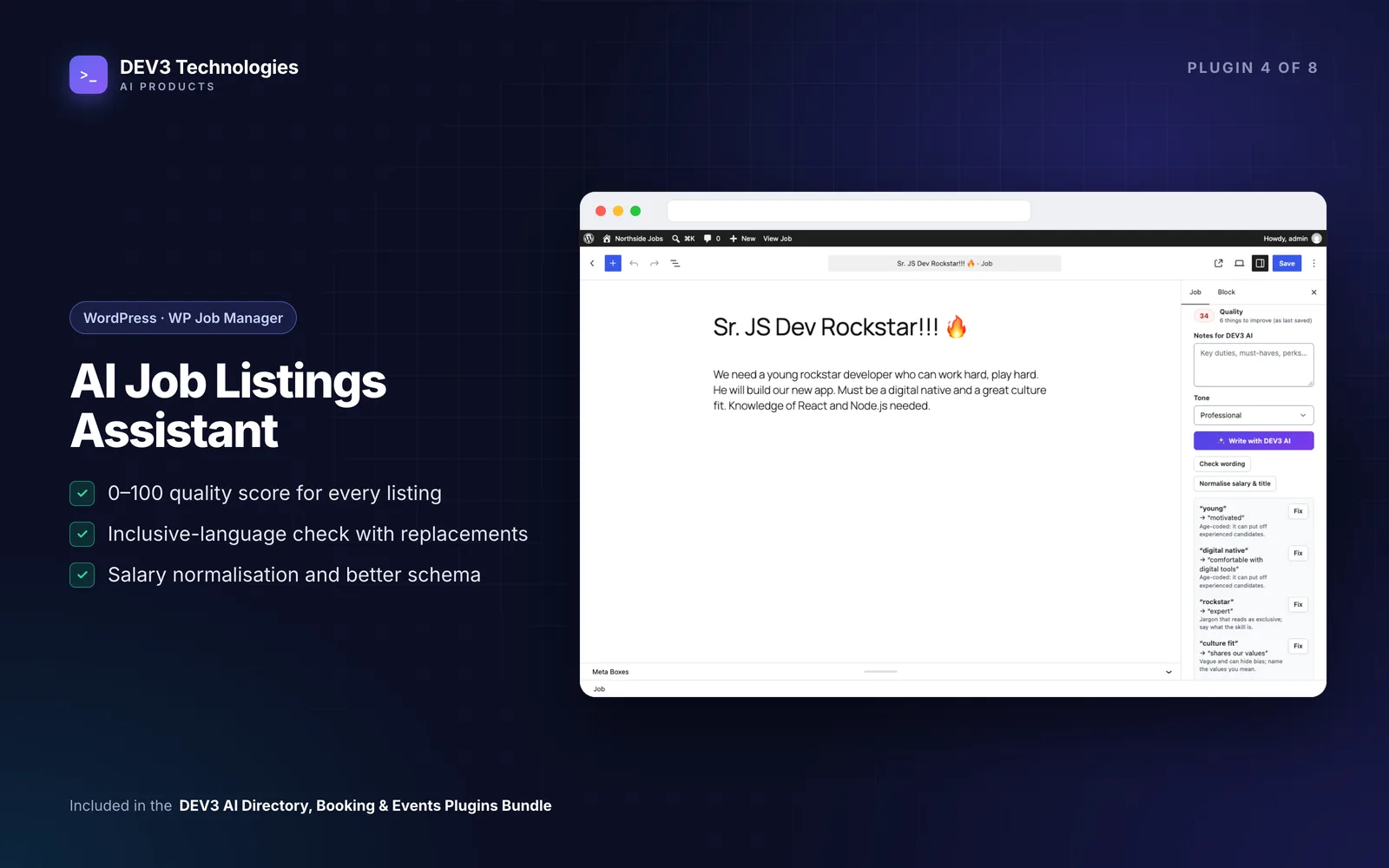
- Description: add notes, pick a tone and press Write with DEV3 AI. Compare the draft in Changes, Side by side or Draft view, edit it, then Save to listing. Without AI you get a clean outline built from the current text.
- Inclusive language: run Check with DEV3 AI or Word list only, untick any fixes you disagree with and press Apply fixes.
- Salary & title: press Normalise (rules) or Ask DEV3 AI. Results go into WP Job Manager's own salary, currency and unit fields.
- Types & tags: tick the suggested job types and skill tags you want and save.
- Schema: check the JobPosting JSON-LD and the Google for Jobs checklist.
The same tools appear in the DEV3 AI Job Assistant box in the job editor sidebar. Accepted drafts go into the editor and fields, and are saved when you press Update.
What the salary rules understand
Free-text salaries are the most common problem, so here is what the rules turn them into:
| Employer typed | Stored as |
|---|---|
| $50k-70k/yr | USD 50,000 – 70,000 per year |
| £30,000 - £35,000 per annum | GBP 30,000 – 35,000 per year |
| 20-25 USD/hour | USD 20 – 25 per hour |
| €4.5k monthly | EUR 4,500 per month |
| Competitive | Flagged: no amount |
Titles get the same treatment: hype words (rockstar, ninja, guru), emojis, "URGENT" and pay are removed, abbreviations such as Sr and JS are expanded, and ALL CAPS becomes Title Case.
Help employers write better ads up front
On pages with [submit_job_form], employers get a writing assistant under the description:
- Help me write it: notes and a tone become a suggested ad they can use or discard.
- Check wording: flagged phrases with Replace buttons.
- Suggest type & tags: selects a job type and adds tags.
- A live salary reading under the salary field, for example "Reads as USD 50,000 – 70,000 per year", with a button to set the currency and period.
The visitor-facing text has no plugin branding, the routes are rate-limited per visitor, and they fall back to templates and the word list when AI is off. If you want clear salaries cleaned automatically, turn on Normalise salary on submit in Settings. It's rules-only and off by default.
Cleaning up the backlog in bulk
This is where most of the time goes on an older board.
- Open DEV3 AI Jobs → Bulk improve.
- Choose listings: low quality, missing salary, missing type/tags, exclusionary wording, all, or the ones you selected in Listings.
- Choose improvements: rewrite description, inclusive fixes, normalise salary, clean up titles, suggest types & tags. Toggle DEV3 AI on or off.
- Press Start. The run goes through WP-Cron in the background.
- Open the Review queue. Accept, edit or reject each draft, or press Accept safe changes to apply salary, title, seniority, type and tag fixes at once while keeping description rewrites for individual review.
Nothing changes on your listings until you accept.
Ranking candidates (with Resume Manager)
If you use the paid Resume Manager add-on, DEV3 AI Jobs → Matching ranks resumes for a job by skills, experience, role fit and location. Explain top 10 with DEV3 AI adds a model review. Scores are decision support only: they never change a resume or application, and every candidate stays visible. Names, contact details and protected attributes are removed before anything is sent.
Tips and pitfalls
- Bulk run stuck at 0%? Your host's WP-Cron may be off. Keep the Bulk improve screen open and the progress bar advances the run itself.
- No assistant on the submit form? Check the page uses
[submit_job_form]and that at least one submit-form feature is on in Settings. - Version check. WP Job Manager 1.36 or later is needed for salary fields.
- Sort by quality. The Quality column in Job Listings is sortable, and each row has an Improve with DEV3 AI link.
For how salaries become valid structured data, see the case study.
Who this is for
Owners of existing WP Job Manager boards, recruitment agencies with years of old listings, and developers who maintain job sites for clients and want better listings without changing platforms.
Get started
DEV3 AI Job Listings Assistant is included in the DEV3 AI Directory, Booking & Events bundle. Planning a bigger rework of your job site? Talk to our team.