If you build WordPress sites for clients, or for your own business, the layout is rarely what slows you down. It's the words. Every hero needs a headline, every service box needs a paragraph, every FAQ needs answers, every page needs an SEO title and description, and every image needs alt text that somebody always forgets. Copying text back and forth between a chat window and Elementor, WPBakery or the block editor works, but it's slow, it loses formatting, and nothing ties it to the client's brand voice.
This guide shows how to do that work inside the editor you already use with DEV3 AI Content & Layout Builder: copy on any text field, SEO meta for each post, alt text for the whole Media Library, and full sections when you need a starting point.
What a good AI writing workflow looks like
- It lives where you edit. A button on the field, not a separate tab.
- It sounds like the brand, every time, without retyping instructions.
- Nothing changes until you accept it. You preview, then replace, insert, edit or discard.
- Your team reuses what works, like a tested prompt for product blurbs or FAQs.
- Accessibility isn't an afterthought. Images get real alt text in bulk.
- Costs and history are visible, and anything you generated can be restored.
Step-by-step setup
1. Install and connect Gemini
- Upload
dev3-ai-content-layout-builder.zip(the plugin zip, not the whole download) in Plugins → Add New → Upload Plugin and activate it. A DEV3 AI Builder menu appears. - Create a key in Google AI Studio under API keys.
- Go to DEV3 AI Builder → API Config, paste the key and click Validate & save. You should see "Connected" with the number of models available. The key is encrypted and never sent to the browser; agencies can define it in
wp-config.phpinstead.
The free tier is enough to try the plugin. For regular use, enable billing on the Google Cloud project behind the key, or you may see "quota exhausted" messages. gemini-2.5-flash is recommended for writing and gemini-2.5-pro for layouts.
2. Set the brand voice once
Open DEV3 AI Builder → General Settings:
- Tick the editors you use: Elementor, WPBakery Page Builder, Block editor (Gutenberg) and Media Library.
- Set the default tone and language.
- Write your brand voice guidelines. They're added to every copy request, so a friendly bakery and a formal law firm don't end up sounding the same.
- Set history retention (default 90 days) and a per-user requests-per-minute limit.
3. Save your team's prompts
Under Prompt Templates you'll find 10 built-in templates: Landing Page Hero Copy, Product Description, FAQ List, Feature Grid, Pricing Table, SEO Meta, About Us, Testimonials Section, Call to Action and Blog Post Intro. Add your own with {placeholders}; each placeholder becomes a field in the modal:
Write a product description for {product} aimed at {audience}. Mention {usp}.
Now a junior editor fills three fields instead of crafting a prompt from scratch.
Using it in each editor
Every integration opens the same compact modal. You type what you want and click Generate (⌘/Ctrl + Enter), or use a quick action on the field's current content: Rewrite, Expand, Shorten, Summarize, Fix Grammar, Change tone (Professional, Casual, Persuasive, Technical, Friendly, Witty, Formal, Empathetic) or Translate (20+ languages, keeping HTML and brand names intact). Heading fields add Headline ideas. Then Replace/Insert, Insert below, Edit, Copy, Regenerate or Discard.
Elementor
- A small ✦ wand appears next to the label of text, textarea, WYSIWYG and HTML-code controls in any widget, including third-party widgets.
- Heading, Text Editor, HTML, Button, Icon Box, Image Box, Testimonial and Call to Action (Pro) get a Write with DEV3 AI button.
- Generate items with DEV3 AI on Accordion, Toggle and Tabs fills the repeater with titled items. Elementor's placeholder items are replaced; your own are kept. That's an FAQ in one click.
WPBakery
Open any element's edit popup: text fields, textareas, the WYSIWYG editor and Raw HTML show a ✦ next to their label. Text Block, Custom Heading, Button, Call to Action, Message Box, Toggle and several others also get a Write with DEV3 AI button.
Block editor
Select a Paragraph, Heading, List, Quote, Verse or Preformatted block and click Write with DEV3 AI in the toolbar. The DEV3 AI Assistant sidebar (✦ at the top right) has Write new content, Improve selected block and SEO title & description, which applies the excerpt and slug. Length counters help you keep titles and descriptions within limits.
Fix alt text across the Media Library
Missing alt text hurts accessibility, and it's tedious to fix by hand once a library has hundreds of images.
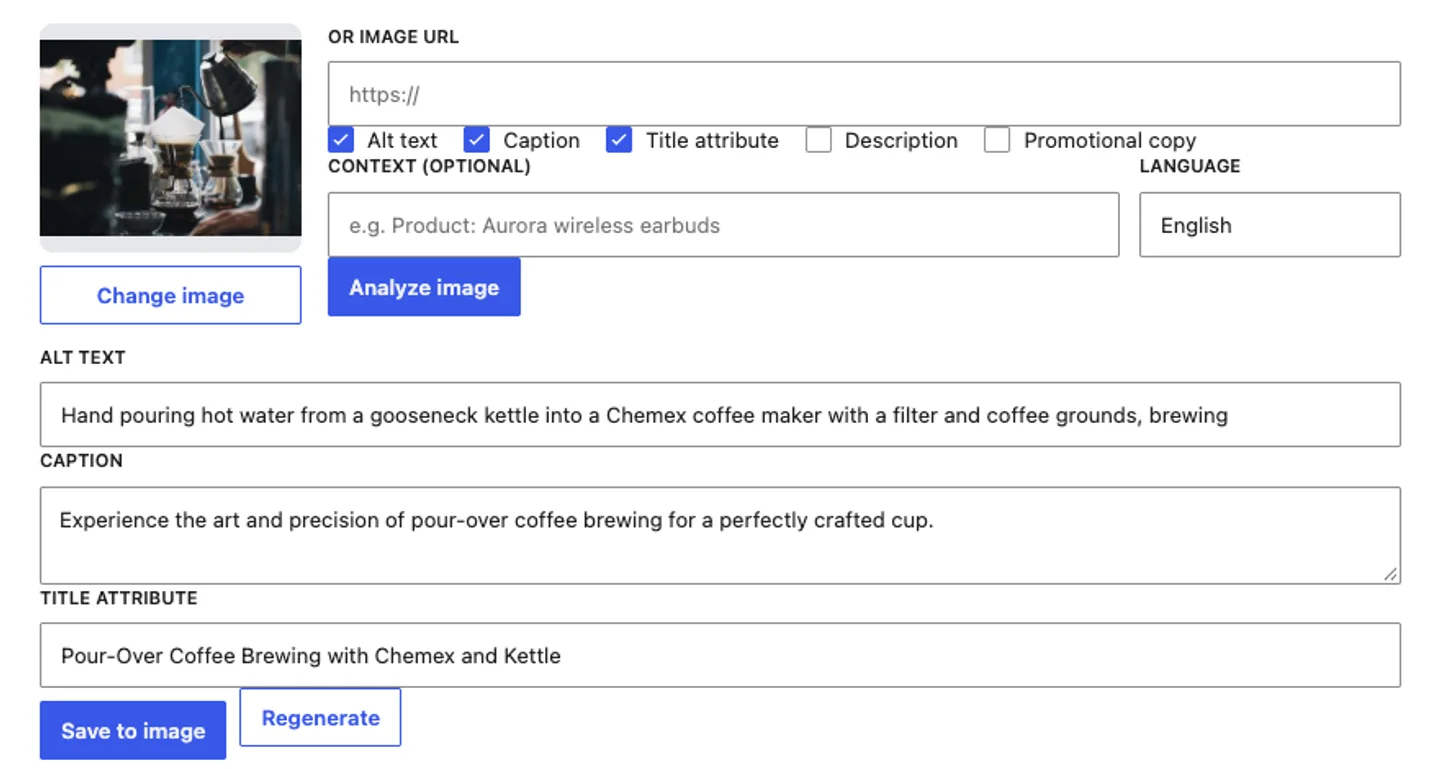
- One image: open its details in Media → Library, click Generate alt text, caption & title, review, then Save to image.
- In bulk: switch to list view, select images, then Bulk actions → Generate missing alt text (AI). Up to 10 images without alt text are processed per run.
- In a post: on an Image block, the same toolbar button writes alt text and a caption.
The image tools can also write a description or promotional copy from a picture, which is handy for product shots.
When you need a whole section
For a blank page, describe the section instead: click the purple ✦ in Elementor's "Drag widget here" area (or ⌘/Ctrl + Shift + G), or the ✦ in the WPBakery navbar. The section is inserted as native, editable containers or rows using free Elementor widgets, and pricing tables can include a working monthly/yearly toggle. Layouts take 15–45 seconds because the model plans the whole section, so keep the description focused.
Tips and pitfalls
- Review before you publish. Generated text is a draft. Check facts, prices and claims, especially on client sites.
- Use History. Search and restore anything generated earlier, from the History tab of the modal.
- Watch Usage Logs for requests and tokens per day, task, model and user. Check exact billing in Google AI Studio or the Cloud Console.
- No ✦ buttons? Check the integration is enabled in General Settings and the user's role can edit posts.
- Timeouts on layouts? Hosts with very short PHP limits may need
max_execution_timeof at least 120. - Permissions: users with
edit_postscan generate; only users withmanage_optionschange settings. - Privacy: nothing is sent to Google until someone clicks an AI action. Consider mentioning AI-assisted content and Google Gemini in your privacy policy.
Who it's for
Agencies and freelancers building on Elementor or WPBakery, in-house marketing teams maintaining many pages, and site owners who need accessible, SEO-ready content without a copywriter on every page. If you'd like a custom AI workflow or a tailored rollout across client sites, see our AI implementation services, or read the case study.
Get started
DEV3 AI Content & Layout Builder is part of the DEV3 AI Page Builder & Design Plugins Bundle, with the Gutenberg Page Builder, Element Pack and Mega Menu. Set your brand voice once and every text field on your site gets a writer that follows it.