A WooCommerce order doesn't take stock once and give it back once. It reduces stock when it goes to processing or on hold, restores it when it's cancelled or sent back to pending, partly restores it on a refund with "restock" ticked, and changes it again when a shop manager edits a quantity or deletes a line. Some of those hooks fire more than once for the same transition. WooCommerce copes because it tracks one product's stock with one flag per order. When we built DEV3 AI Shared Stock & Inventory, where one pool of cans or one roll of fabric is shared by many products, we needed something sturdier: a sync that gives the right answer no matter how many times, or in what order, those hooks fire. This post explains the target-based design that made that possible, and the 36 order scenarios we run against it on both legacy order storage and HPOS.
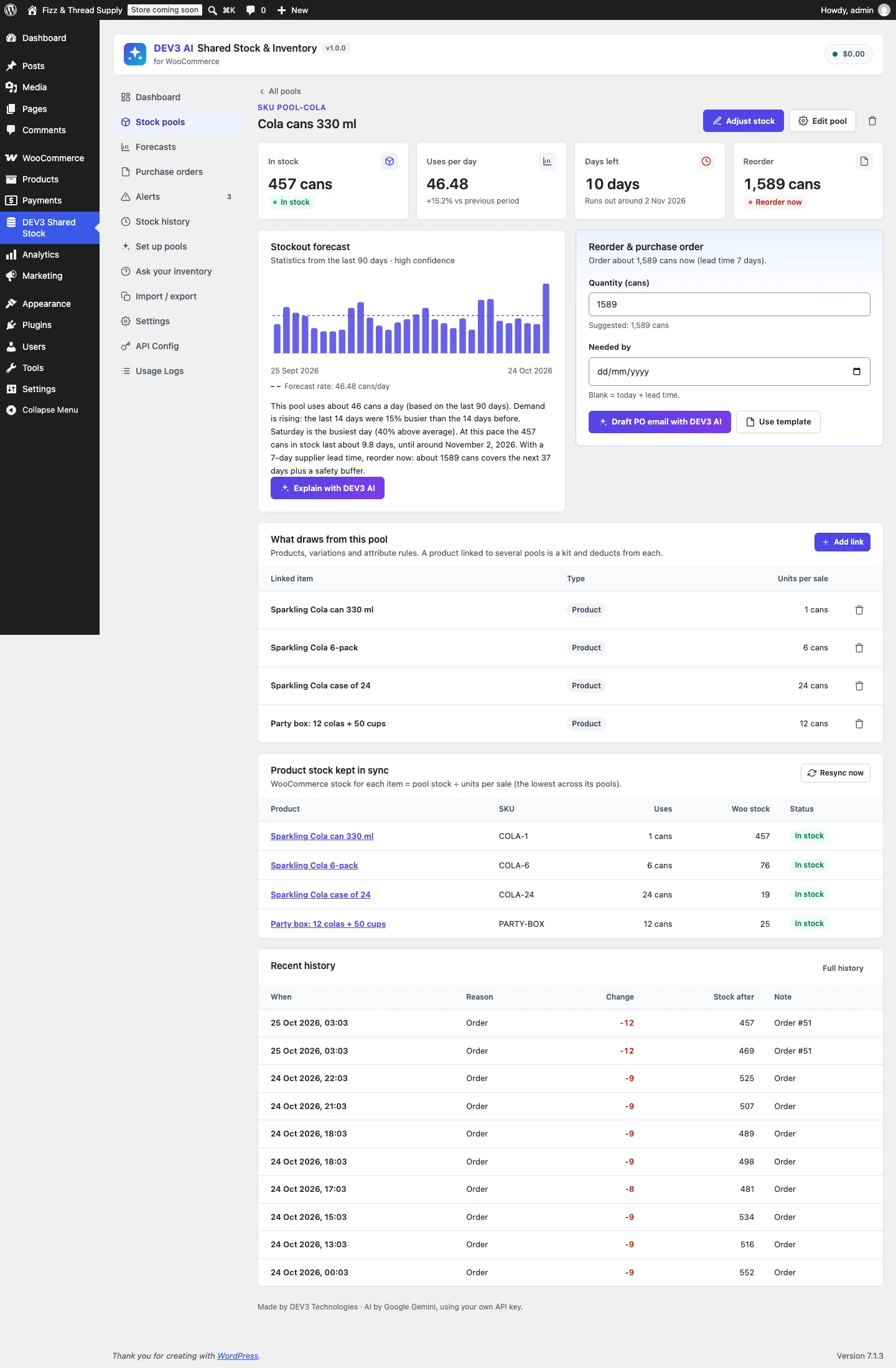
One pool, four products: a single can uses 1, a 6-pack 6, a case 24 and a party box 12.
What it does and who it's for
DEV3 AI Shared Stock & Inventory lets several products sell from one physical stock. It suits:
- Pack sizes of one item: single cans, 6-packs and cases of 24 from the same pallet.
- Made-from-material products: every "Linen" napkin, tablecloth and cushion cut from one roll, deducting 0.25 m or 1.5 m per sale.
- Print-on-demand and blanks: every T-shirt design drawing from the same blank tees, with the red variations also using red ink.
- Kits and gift boxes that use units from several pools at once.
- Bundle stores using Product Bundles, Composite Products or Mix and Match, where the container, the children or both should deduct.
- Merchants who reorder from suppliers and want to know what runs out first and how much to order.
Pools, deductions, the cart check, alerts, forecasts and template purchase orders all work without AI. With a Google Gemini API key, DEV3 AI adds plain-language explanations, purchase-order emails, pool proposals and inventory questions.
How to set it up
- Install the plugin zip from the bundle download and activate it. Make sure WooCommerce's "Enable stock management" is on.
- Open DEV3 Shared Stock and click New pool, or Set up pools for me to get proposals from your catalogue.
- In the pool, click Add link and link products, variations or an attribute value, each with its units per sale.
- Set the pool's opening stock with Adjust stock, plus the supplier lead time for forecasts.
- Optional: add a Google Gemini API key in API Config.
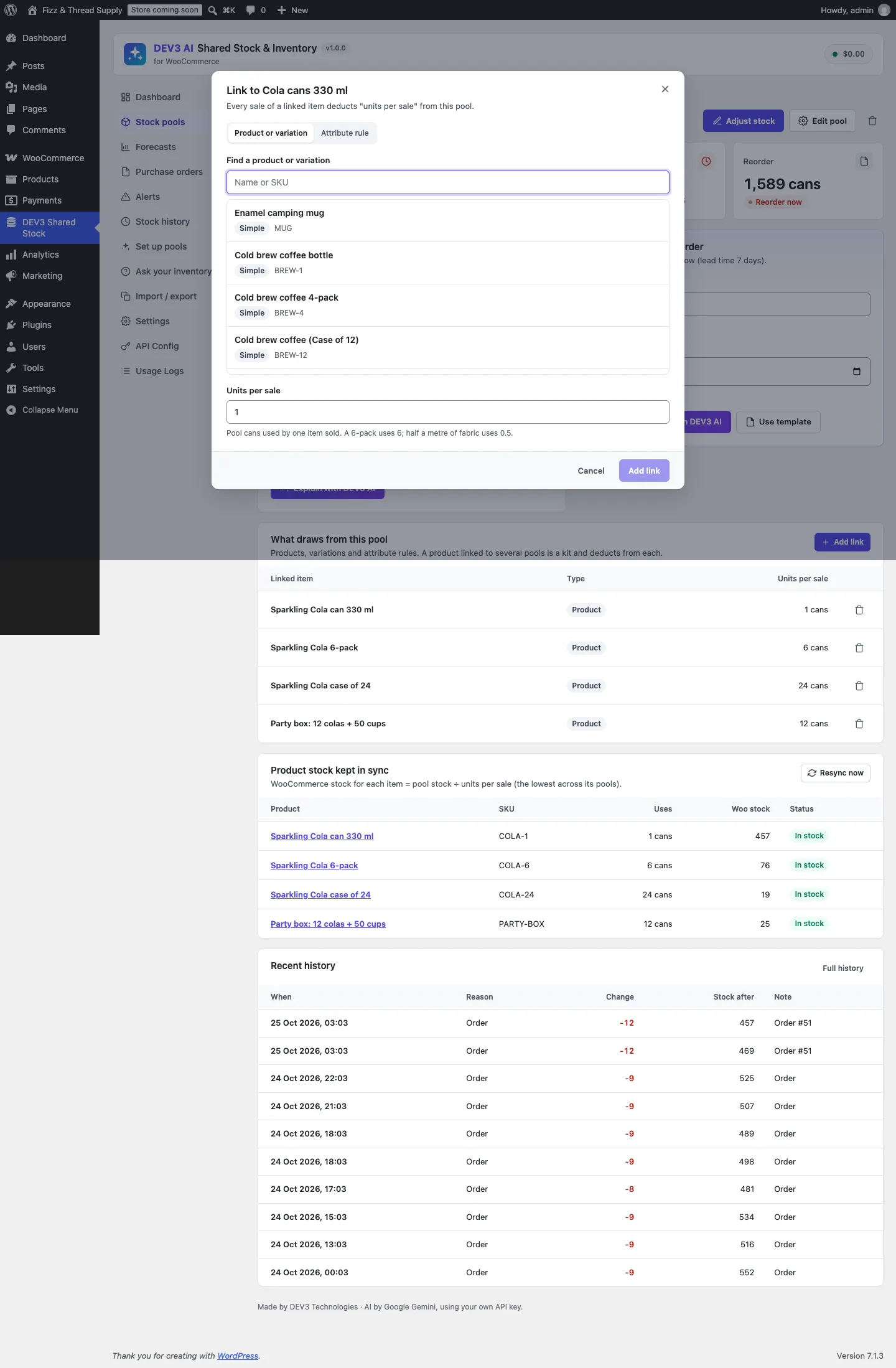
Linking a product to a pool. A 6-pack uses 6; half a metre of fabric uses 0.5.
How to use it
Let the catalogue suggest pools. Set up pools reads products, variations and attributes and proposes pools: pack sizes of one item, variations cut from one material, kits made from the same parts. Use built-in rules (no AI) finds the obvious ones; Propose pools with DEV3 AI looks for less obvious ones. Each proposal can be renamed, given an opening stock and edited before Create.
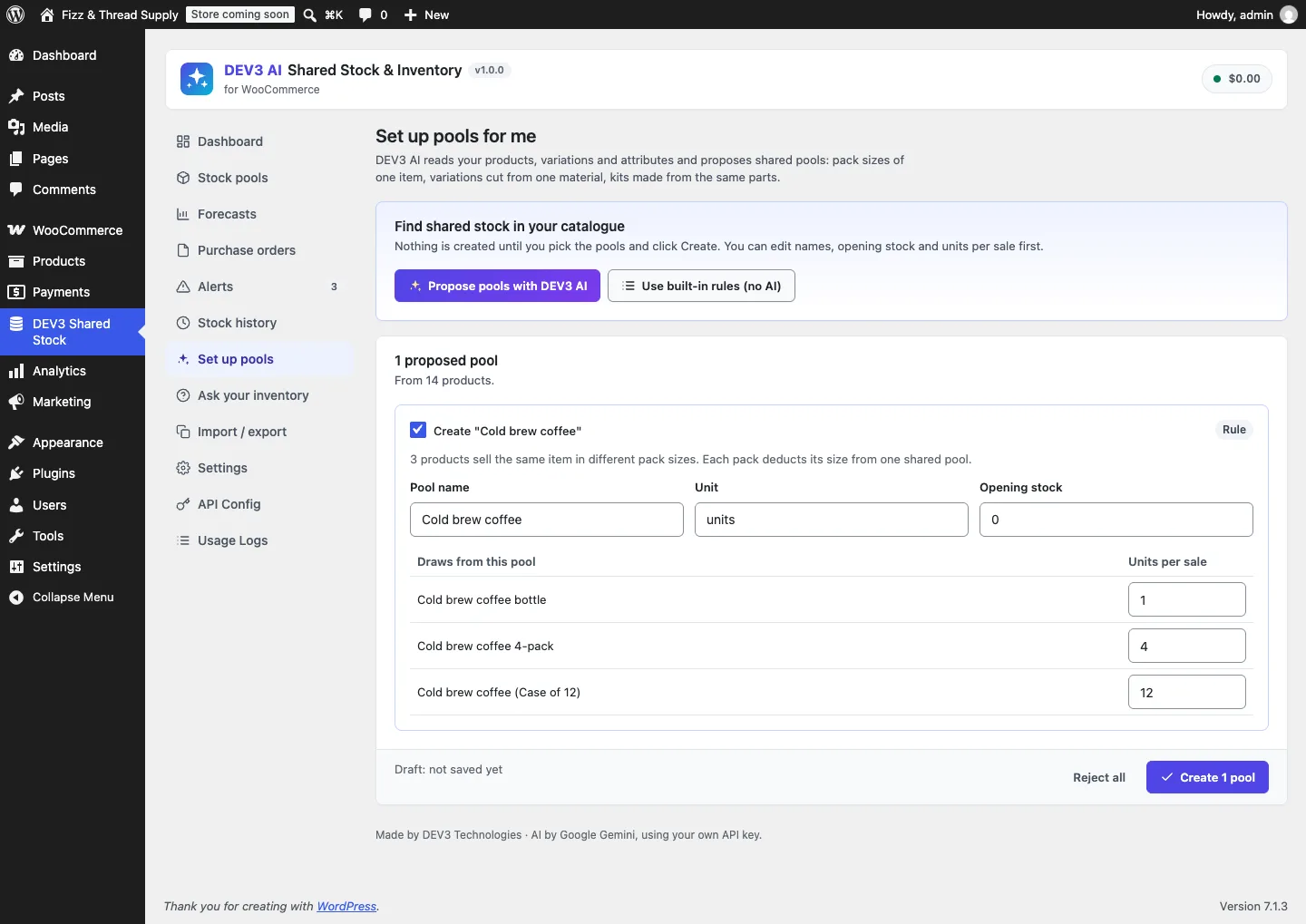
A rule-based proposal: three cold brew pack sizes drawing 1, 4 and 12 from one pool.
Know what runs out first. The dashboard lists pools by days of stock left, with a reorder quantity and date. In a pool, the reorder panel turns that into a purchase order: Use template for a plain one, or Draft PO email with DEV3 AI for a supplier email to review before sending.
Catch mistakes. Alerts cover low and out-of-stock pools, pools that will run out before a delivery can arrive, sudden drops, and likely typos such as an extra zero. A typo alert comes with a suggested fix to Accept, Edit or Reject.
Ask questions. Ask your inventory answers questions such as "What will run out before Black Friday?" with built-in answers, or free-form answers with AI turned on.
The problem with "on reduce, subtract"
The obvious design hooks woocommerce_reduce_order_stock and subtracts each line's quantity × units from its pools, then hooks woocommerce_restore_order_stock and adds it back. It breaks in at least four ways:
- Repeated hooks. Code paths that call the reduce action twice for one order (a gateway callback plus a status change, or another plugin) subtract twice.
- Changed links. If the merchant changes the 6-pack from 6 cans to 12 between the order and its cancellation, "add back quantity × units" returns 12 cans that were never taken.
- Partial refunds. Refunding 1 of 3 items with restock should return a third. Then cancelling the order should return only the remaining two-thirds.
- Admin edits. Changing a quantity from 3 to 5 on a processing order must take two more, and deleting a line must return everything that line took.
Each of these can be patched with a special case. We preferred a model in which none of them is special.
Each line remembers what it took
Stock\Order_Sync stores three pieces of meta on every order line, as its class comment describes:
_dev3ss_map: pool → units per item, fixed the first time the line deducts_dev3ss_deducted: pool → units this line currently holds_dev3ss_restocked: items returned to stock by refunds
From those, the line's correct state is a pure function: while the order holds stock, the target for each pool is (quantity − restocked) × units per item; otherwise it is 0. A sync never asks "what happened?". It asks "what should this line hold now?" and moves each pool by the difference.
$map = $item->get_meta( self::META_MAP, true );
if ( ! is_array( $map ) ) {
	if ( ! $active ) {
		return array();
	}
	$map = Bundles::skip_order_item( $item ) ? array() : Resolver::for_order_item( $item );
	$item->update_meta_data( self::META_MAP, $map );
}
$deducted  = $item->get_meta( self::META_DEDUCTED, true );
$deducted  = is_array( $deducted ) ? $deducted : array();
$restocked = (float) $item->get_meta( self::META_RESTOCKED, true );
$units     = $active ? max( 0, (float) $item->get_quantity() - $restocked ) : 0;
foreach ( array_unique( array_merge( array_keys( $map ), array_keys( $deducted ) ) ) as $pool_id ) {
	$target  = round( $units * (float) ( $map[ $pool_id ] ?? 0 ), 4 );
	$current = (float) ( $deducted[ $pool_id ] ?? 0 );
	$diff    = round( $target - $current, 4 );
	if ( abs( $diff ) < 0.00005 ) {
		continue;
	}
	$result = Pools::adjust( $pool_id, -1 * $diff, $diff > 0 ? 'order' : $reason, $ctx );
	if ( is_wp_error( $result ) ) {
		unset( $deducted[ $pool_id ] ); // Pool deleted: forget it.
		continue;
	}
	$deducted[ $pool_id ] = $target;
}
(condensed from Order_Sync::sync_item)
Walk the four failure cases through it:
- Repeated hooks. The second reduce computes the same target as the first, finds
diff = 0and does nothing. Scenario 09 fires the reduce action twice and asserts 94 cans remain, not 88. - Changed links. The map is written once, the first time the line deducts. Scenario 27 relinks the 6-pack to 12 cans after the order and then cancels; the pool returns to exactly 100.
- Partial refunds. A refund with restock increments
_dev3ss_restocked, capped at the ordered quantity, and re-syncs. The target drops by one item. A later cancellation sets the target to 0 and returns only what's left. Scenarios 11, 13, 14 and 15 cover one partial refund, two partial refunds, an over-large restock and a refund followed by a cancel. - Admin edits.
woocommerce_saved_order_itemsre-syncs the order; a higher quantity raises the target, a lower one reduces it. Deleting a line runs the same sync with the target forced to 0.
The loop also iterates over pools in either the map or the deducted list. That covers a pool that was deducted but has since disappeared from the map, and it lets a deleted pool be forgotten instead of breaking the restore for the order's other pools (scenario 28).
Which state does the order hold?
active comes from WooCommerce itself, not from our guess about statuses:
public static function holds_stock( $order ) {
	return (bool) $order->get_data_store()->get_stock_reduced( $order->get_id() );
}
(from Order_Sync::holds_stock)
The order data store's "stock reduced" flag is what WooCommerce uses to decide whether to reduce or restore, and it works the same with HPOS and legacy storage. Scenario 36 pins this, and scenarios 05 to 08 and 16 to 17 walk orders through on-hold, pending, processing, completed, cancelled and back.
Atomic changes, one log
The sync decides how much to move; Pools::adjust() moves it. It doesn't read the pool, add in PHP and write back, which would lose updates when two orders land at once. It does the arithmetic in one SQL statement:
$done  = $wpdb->query( $wpdb->prepare( "UPDATE {$table} SET stock = stock + %f, updated_at = %s WHERE id = %d", $delta, self::now(), $id ) );
if ( ! $done ) {
	return self::missing();
}
$after = (float) $wpdb->get_var( $wpdb->prepare( "SELECT stock FROM {$table} WHERE id = %d", $id ) );
$log_id = Log::add( $id, $delta, $after, $reason, $ctx );
do_action( 'dev3ss_stock_changed', $id, $delta, $after, $reason, $ctx + array( 'log_id' => $log_id ) );
(condensed from Data\Pools::adjust)
Every change becomes a row in the stock history with the delta, the stock after, the reason (order, cancel, refund, edit, manual, import, restock or setup) and the order, line and product it came from. The order also gets a note summarising the pool changes. The stock-after value is read separately and is for display; the pool total itself never depends on it.
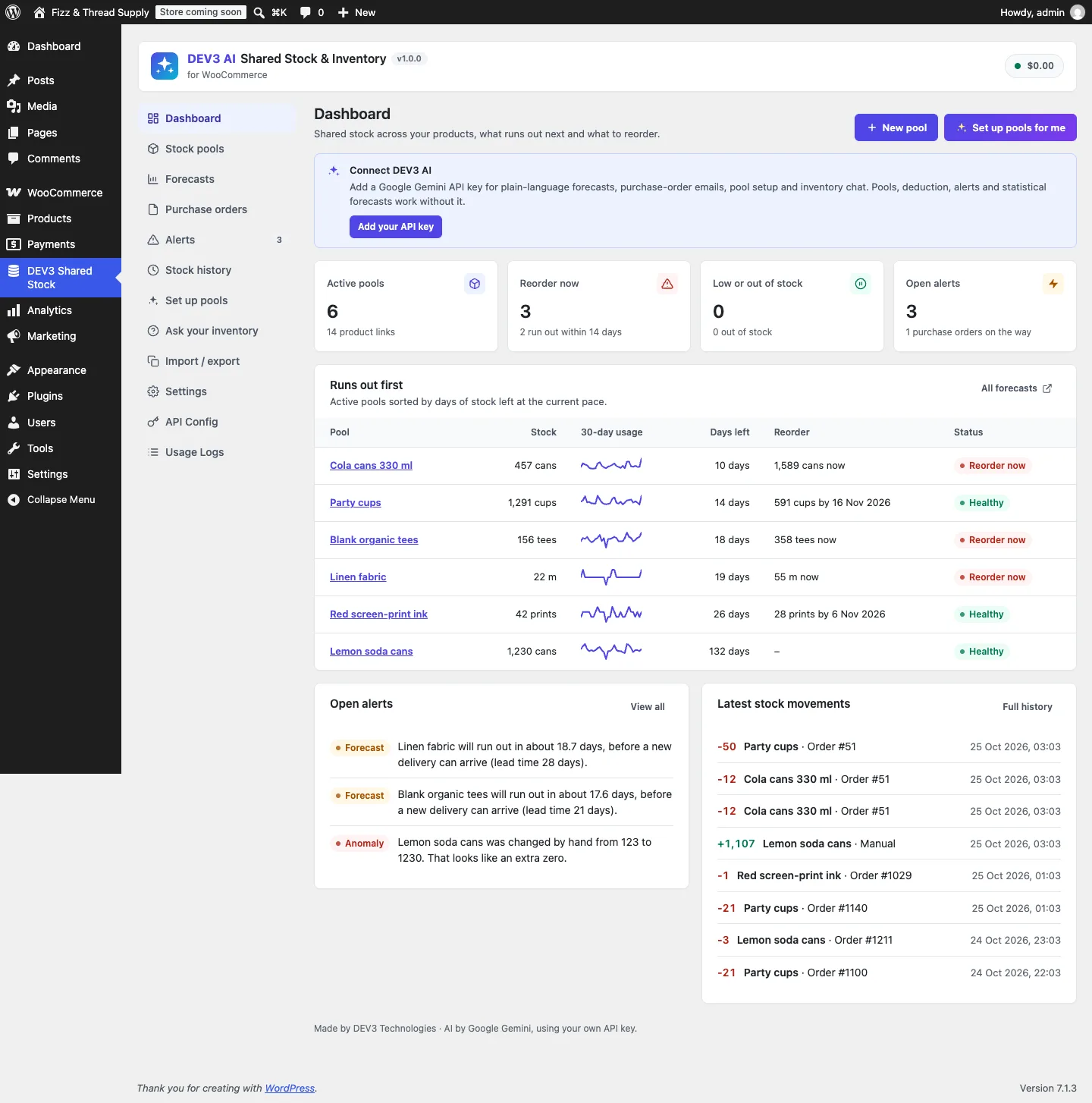
The latest stock movements on the dashboard come straight from the log.
Mirroring without thrashing
Shoppers never see pools. They see a product's own WooCommerce stock: "76 in stock", the maximum in the quantity box, the stock in feeds and the REST API. Stock\Mirror keeps that number equal to the pool stock divided by units per sale, rounded down, taking the lowest across a product's pools. A 6-pack linked to 457 cans shows 76.
An order with five lines from the same pool would otherwise recompute the mirrored stock five times. So sync_order() wraps its loop in Mirror::begin() and Mirror::end(): stock changes inside are queued per pool, and each affected pool's products are mirrored once at the end. Because the mirror runs after the pool moves, it also corrects whatever WooCommerce did to the product's own stock during the same order.
Before the order: the cart guard
The sync keeps the pool honest after an order. Overselling has to be stopped before it. WooCommerce validates stock per product, so a cart with 70 6-packs and 50 single cans passes both product checks against a 457-can pool, then needs 470 cans. Stock\Cart_Guard sums the demand per pool across the whole cart, skipping bundle lines according to the bundle mode, and compares it to each active pool that doesn't allow backorders. It runs on add to cart, on cart updates and on woocommerce_check_cart_items, which the Store API also calls, so the block cart and checkout are covered.
Link precedence and kits
Stock\Resolver decides the map a line freezes. Every matching link applies, which is how kits work: the party box takes 12 cans and 10 cups. When several links point at the same pool, the most specific wins: a variation link beats a product link, which beats an attribute rule on that product, which beats a store-wide attribute rule. Scenario 25 links the red T-shirt variation to the red dye pool at 2 units while a store-wide "colour is red" rule says 0.5; one red shirt takes 2.
Scenarios 22 to 24 cover kits, a variation inheriting its parent's pool, and a variation link stacking with an attribute rule on a different pool. Scenario 33 covers fractional units: three napkins at 0.25 m take 0.75 m from 10 m of linen, and refunding one returns 0.25 m.

Illustration: many products drawing from one shared pool.
Running everything twice
All 36 scenarios live in OrderScenariosTest. OrderScenariosHposTest extends it, creates the custom order tables, turns on HPOS inside the test transaction, and asserts orders really are stored in wc_orders before inheriting every scenario. Because the sync only uses WooCommerce's CRUD API (item meta, the order data store's stock flag), there's no storage-specific code to diverge, and the double run proves it. In total the plugin has 87 PHPUnit test methods and 30 Jest tests.
Trade-offs and gaps
- The map is frozen per line. That's what makes cancellations exact, but it also means fixing a wrong link doesn't correct orders already placed. Those need a manual adjustment, which is logged.
- The guard checks, it doesn't reserve. Two shoppers can both pass the cart check for the last units; the second order can then take the pool below zero, and the out-of-stock alert (and email, if turned on) fires. Reserving stock in carts would trade that for abandoned carts holding stock.
- Bundles are tested against stubs. Product Bundles, Composite Products and Mix and Match line data was built from their documentation and tested with stubbed line items, not the real extensions.
- Attribute rules on simple products match global attributes only. Custom per-product attributes on simple products are not matched yet.
- AI is tested with mocks. Forecast explanations, purchase-order emails and pool proposals were tested with mocked API responses; a live-key run is still to come.
Conclusion
Event-driven stock code is fragile when it tries to replay what happened. Storing the intended state on each order line and moving the pool by the difference turns repeated, missing and reordered hooks into no-ops, and makes refunds, edits and cancellations the same operation. DEV3 AI Shared Stock & Inventory ships in the DEV3 AI WooCommerce Plugins Bundle on the DEV3 marketplace and is being prepared for CodeCanyon. The case study covers forecasts, alerts and the AI tools. If your store needs inventory logic WooCommerce doesn't have, our custom software team can help.