A shopper asks "Can I put it in the dryer?" on a jacket page at eleven at night. If the answer is in the product's care instructions, waiting until the store opens the next morning helps nobody. If it isn't, an AI that confidently says "yes" has just made a promise on the store's behalf. When we built DEV3 AI Product Q&A for WooCommerce, the hardest question wasn't how to draft an answer. It was when a drafted answer may skip the inbox and appear on the product page with nobody reviewing it. This post explains the gate we built for that: what the model is given, what it must return, and how the server decides how much of the model's own confidence to believe.

Illustration: shopper questions answered from the product's own information, with the answer linked back to its sources.
What it does and who it's for
- Stores that get the same pre-sale questions every day, about fit, care, compatibility or shipping, and want each answer written once and shown to every later shopper on the product page.
- Small teams without a support desk. DEV3 AI drafts each answer from the product's details, attributes, description, approved reviews and earlier answers, so answering becomes a review and a click.
- Stores with large catalogues that need a FAQ on products nobody has asked about yet. FAQ suggestions and an importer for questions hidden in old reviews fill the gaps.
- Merchants who care about SEO. Published Q&A is rendered in the page HTML and marked up as FAQPage or QAPage structured data.
- Anyone who wants Q&A without AI. With no API key the inbox, emails, votes, keyword search, spam protection and CSV import and export all still work.
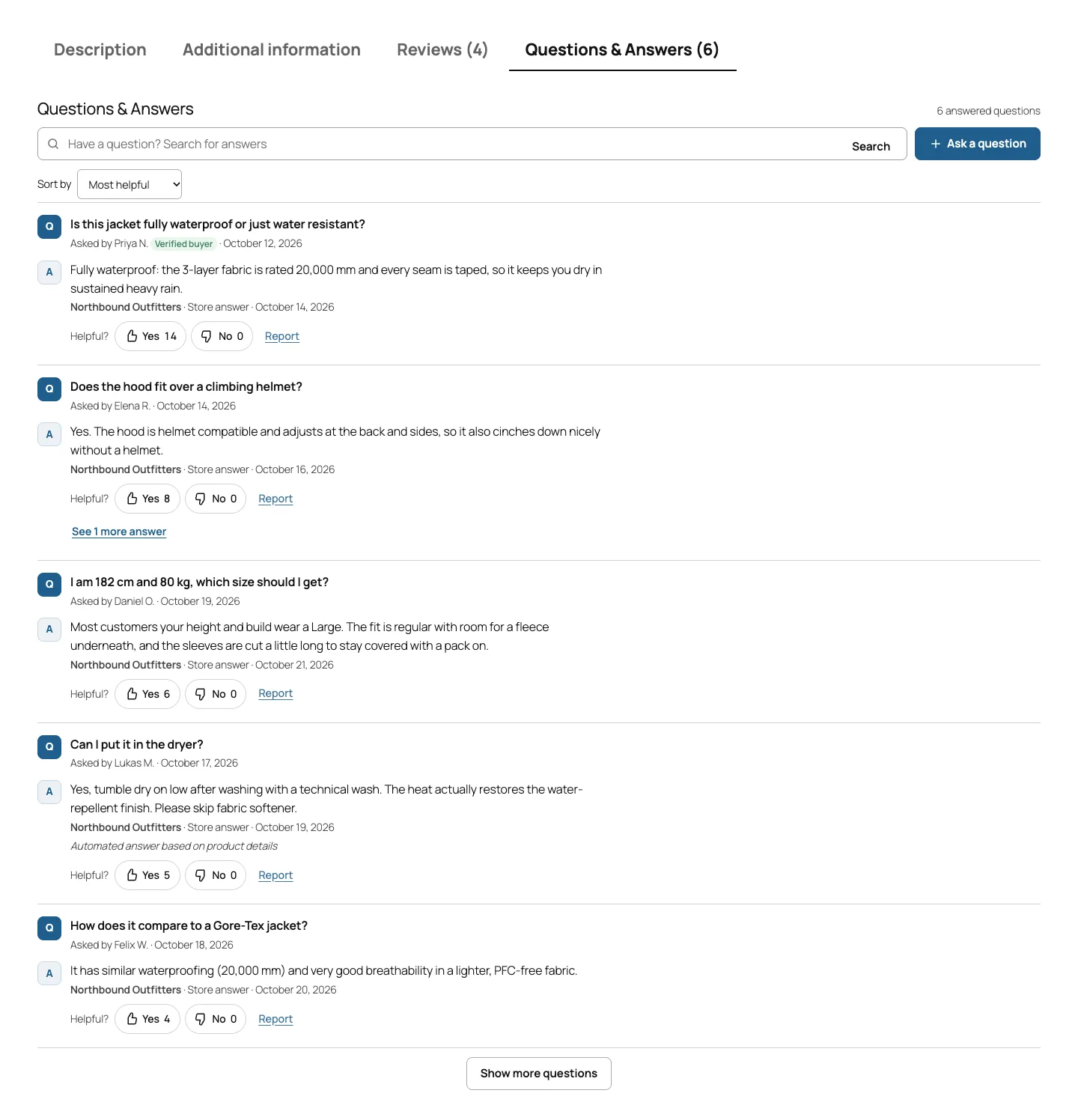
The Q&A tab on a block theme, with search, votes, verified-buyer badges and a label on an automated answer.
How to set it up
- Install the plugin zip from the bundle and activate it. WooCommerce 8.0 or newer must be active.
- Optional: open DEV3 AI Q&A → API Config and add a Google Gemini API key to turn on DEV3 AI.
- In Settings → Display, choose the placement: a product tab, below the summary, after the tabs, or only where you add the Product Q&A block or the
[dev3qa_qa]shortcode. - In Settings → DEV3 AI answers, tick the sources DEV3 AI may use, and decide whether high-confidence answers may publish themselves.
- Check Spam protection and Emails, pick FAQPage or QAPage under Rich results & data, and click Build index on the Dashboard.
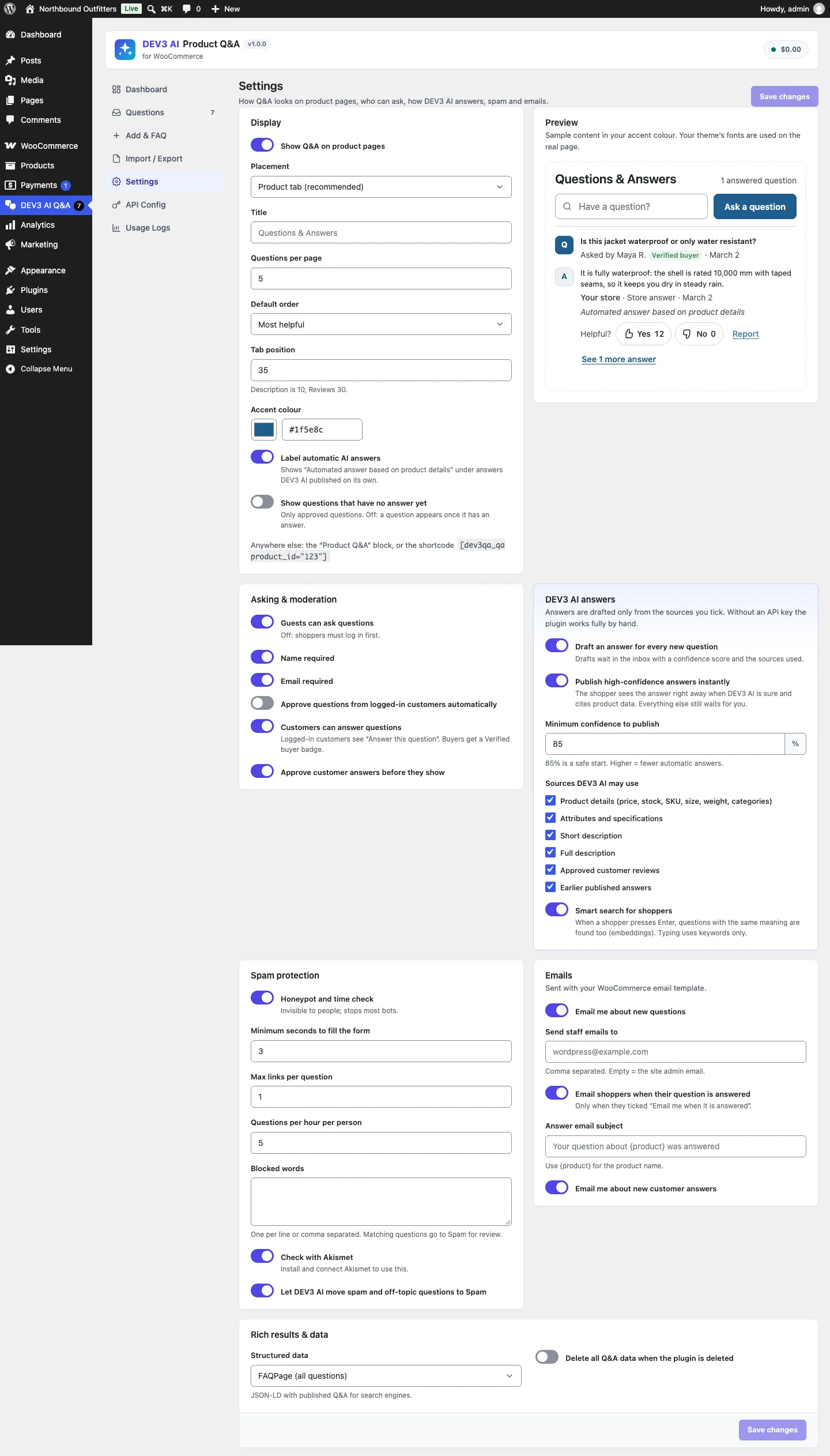
Settings: placement and a live preview, the auto-publish threshold, allowed sources, spam rules and structured data.
How to use it
Answer the inbox. Open Questions, click a question and read the DEV3 AI · Suggested answer card: the draft, its confidence and the sources it used. Click Accept & publish, edit it first, or write your own answer. The shopper is emailed if they asked to be.
Draft in bulk. On the Dashboard, click Draft n open answers with DEV3 AI, or select questions and use the bulk action. Drafting runs in the background and the results appear in the AI drafts view.
Seed an FAQ. In Add & FAQ, pick a product and click Suggest FAQ with DEV3 AI, then tick the suggestions to publish. Under Import / Export, Scan reviews finds questions buried in existing reviews and turns your replies into answers.
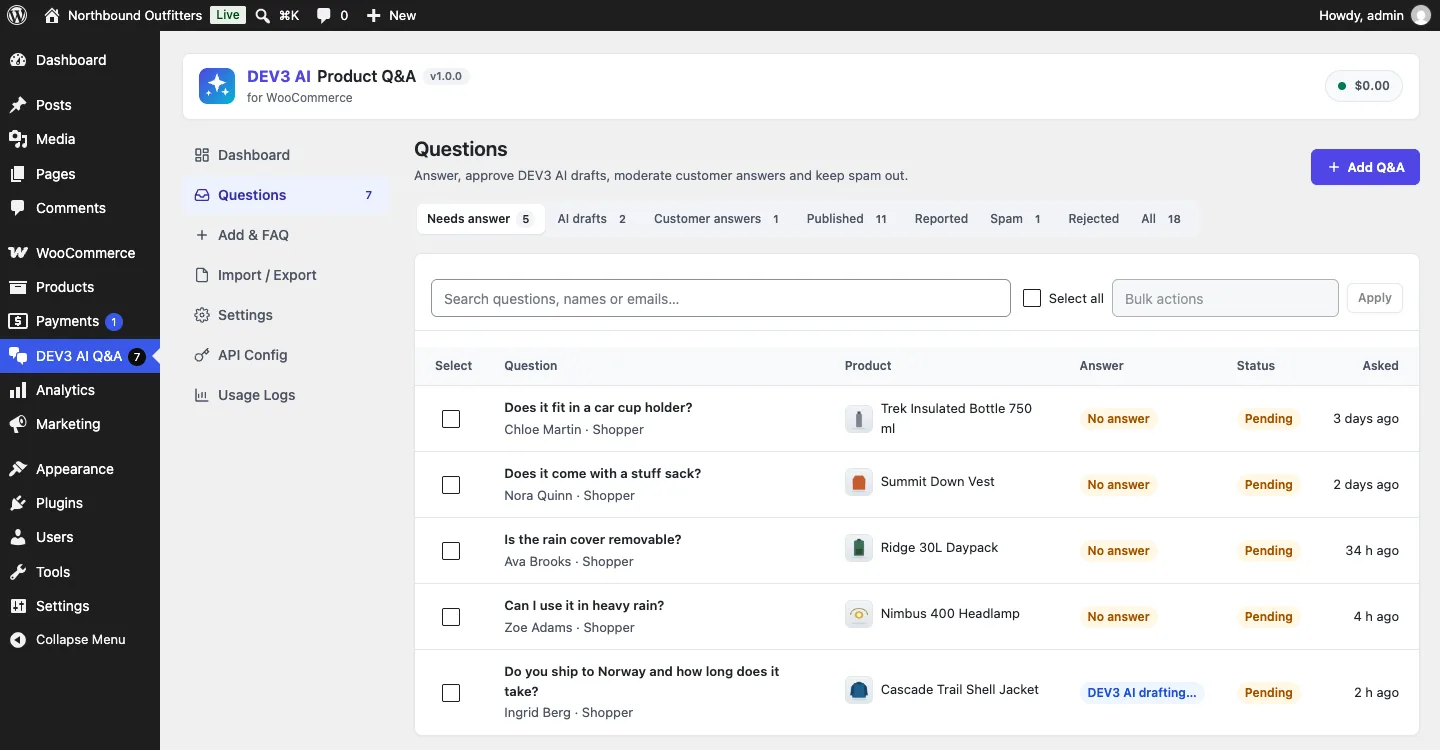
The inbox: needs answer, AI drafts, customer answers, published, reported, spam and rejected.
The rest of this post is the engineering behind one switch: letting an answer publish without a person.
Default: nothing goes public without a click
The plugin works without AI. Shoppers ask, staff answer in an inbox, the asker gets an email, and the Q&A appears on the product page with search, votes and structured data. With an API key, every new question also gets a draft answer, but a draft is stored as an answer with status draft, and drafts are never public. A PHPUnit test asserts exactly that: after the background job drafts an answer, Questions::public_count() for the product is still 0.
Auto-publishing is a separate switch, Publish high-confidence answers instantly, and it is off by default. When it's on, the plugin tries to answer while the shopper's request is still open. The rest of this post is about what has to be true before that answer is shown.
Step 1: knowledge from this product only
A model can only be grounded in what you give it. Chunker::build() turns each product into chunks of named kinds: facts (price, availability and stock left, SKU, weight, dimensions, categories, rating), attributes, the short description, the description in parts of about 700 characters, up to 30 approved reviews with their star rating, and up to 30 published qa items. The merchant chooses which kinds DEV3 AI may use, and the dev3qa_product_chunks filter lets a developer add their own, such as a size chart.
Chunker::sync() keys chunks by kind, reference id and content hash, so an unchanged chunk keeps its id and its embedding, and the index job embeds only stale chunks. A test runs the index job, calls embed_product() again and asserts that no new embedding request went out.
Retrieval that cannot leak across products
Retriever::chunks() scores the product's chunks two ways, by keyword overlap and (when AI is allowed in this context) by embedding similarity, and fuses the two rankings by reciprocal rank. The important detail is the scope of the vector search:
foreach ( Embeddings_Store::instance()->search(
	$vector,
	'chunk',
	$limit,
	array(
		'ids'       => array_keys( $by_id ),
		'min_score' => 0.3,
	)
) as $hit ) {
	$semantic[ (int) $hit['object_id'] ] = (float) $hit['score'];
}
(condensed from Retriever::chunks)
$by_id holds only this product's chunks, so a near-identical sentence from a different product can never be retrieved. A test indexes a rain umbrella whose description says "waterproof canopy, wet days", then asks the jacket a question and asserts that every retrieved chunk belongs to the jacket.
After fusion, facts and attributes are always placed first, because price, stock and size answer a large share of pre-sale questions. If too little matched, the description opening is added so the model always has some context. With AI off, the same function returns keyword results, and the inbox and drafting UI keep working.
Step 2: numbered sources and a typed answer
Each retrieved chunk goes into the prompt with its database id in brackets:
$lines[] = '[' . (int) $c['id'] . '] (' . $c['kind'] . ') ' . Text::cut( $c['content'], 900 );
(from Answerer::sources_text)
The system prompt sets the rules. Use only the numbered sources. Never invent specifications, prices, delivery times, discounts or guarantees. If the sources don't contain the answer, set answerable to false, reply politely that the store will check, and give a confidence below 0.4. Reviews are customer opinions, so say "customers mention" when relying on them. Answer in the language of the question, in at most 120 words.
The response is structured JSON with a schema: answer (max 900 characters), answerable, confidence, source_ids (at most 6 integers), spam, off_topic, reason (max 200) and language. Every string has a maxLength, which stops the runaway repetition flash models sometimes produce in structured output. The answer prompt runs at temperature 0.2.
Step 3: believe the citations, not the confidence
A model's self-reported confidence is a hint, not a measurement. Its citations are more useful, because they can be checked. Answerer::draft() keeps only source ids that were actually in the retrieved set, and then adjusts the confidence on the server:
$cited = array();
foreach ( (array) ( $data['source_ids'] ?? array() ) as $sid ) {
	$sid = (int) $sid;
	if ( isset( $by_id[ $sid ] ) && ! isset( $cited[ $sid ] ) ) {
		$cited[ $sid ] = array( /* id, kind, label, ref_id, excerpt */ );
	}
}
$answer     = sanitize_textarea_field( (string) ( $data['answer'] ?? '' ) );
$answerable = ! empty( $data['answerable'] );
$confidence = min( 1, max( 0, (float) ( $data['confidence'] ?? 0 ) ) );
if ( ! $answerable ) {
	$confidence = min( $confidence, 0.4 );
}
if ( ! $cited ) {
	$confidence = round( $confidence * 0.6, 3 ); // An answer that cites nothing is not grounded.
}
if ( '' === $answer ) {
	$confidence = 0;
}
(condensed from Answerer::draft)
Four rules come out of this:
- Confidence is clamped to 0–1. A model returning 7 or -1 can't push it out of range.
- "Not answerable" caps confidence at 0.4, whatever number the model sent with it. A model that says "I don't know, 0.9" is treated as not knowing.
- No valid citation costs 40% of the confidence. A 0.95 answer with no real source becomes 0.57, well under the default threshold.
- An empty answer has zero confidence.
Invented ids are the interesting case. A model can return a plausible-looking id that was never in the prompt. The AdminRestTest case for this builds a jacket, mocks the model to cite the real first source id plus 999999, and asserts that the draft keeps exactly one source. The prompt sent to the mocked API is also checked: it must contain "Waterproof: 10,000 mm" from the attributes and a sentence from a review, which proves the right product's knowledge was retrieved.
The cited sources are stored with the draft, with their kind, a readable label ("Product details", "Customer review", "Earlier answer") and an excerpt of up to 220 characters. In the inbox, the draft card shows the confidence and a "Based on n sources" list, so the person reviewing the draft can see what it stands on without opening the product.

Illustration: only answers tied to real sources pass the gate; the rest wait for a person.
Step 4: the gate itself
With the draft and its adjusted confidence in hand, Answerer::qualifies() is short on purpose:
$threshold = (float) Settings::get( 'auto_publish_threshold', 0.85 );
$ok        = $draft['answer_id'] && $draft['answerable'] && ! $draft['spam'] && ! $draft['off_topic']
	&& $draft['confidence'] >= $threshold && ! empty( $draft['sources'] );
return (bool) apply_filters( 'dev3qa_auto_publish', $ok, $draft );
(condensed from Answerer::qualifies)
The citation requirement appears twice, once as a confidence penalty and once as a hard condition. The penalty affects what the reviewer sees in the inbox, and the hard condition means a merchant who lowers the threshold to 50% still never gets an uncited answer published automatically. The filter lets a developer add a rule of their own, for example never auto-publishing on products in a "regulated" category.
Answerer::apply() then decides in a fixed order. A spam flag moves the question to the Spam folder (when the merchant allows DEV3 AI to do that) and deletes the draft. A qualifying draft is published and the question's ai_state becomes auto. Anything else stays queued for a person.
Step 5: the request path, and what happens when AI can't run
The shopper's POST public/ask goes through validation and the spam guard before any AI is involved. Bots that fill the honeypot get the normal "Thanks! Your question was sent" reply and nothing is stored. Questions that are too fast, have too many links, exceed the hourly limit or exactly repeat an existing question on the same product are refused with a clear message. Blocked words and Akismet send a question to Spam without a draft.
Only then does Answerer::on_new_question() run:
if ( Settings::get( 'auto_publish', false ) && Ai::enabled( 'submission' ) ) {
	$draft = self::draft( $question_id, 'submission' );
	if ( ! is_wp_error( $draft ) ) {
		self::$instant = true;
		$state         = self::apply( $question_id, $draft );
		self::$instant = false;
		return $state;
	}
}
Questions::update( $question_id, array( 'ai_state' => 'queued' ) );
$id = Jobs::create( self::JOB, array( (int) $question_id ), array( 'auto' => true ), 1 );
(condensed from Answerer::on_new_question)
submission is one of the shared core's public AI contexts. If the merchant has switched off storefront AI, or the monthly AI budget is spent, Ai::enabled( 'submission' ) returns false and the question falls through to a background job without a single model call from the shopper's request. The same happens when the call fails. One test turns auto-publish on and the public AI switch off, and asserts that no generate request is sent and the question is queued.
When auto-publish is off, the shopper never waits for AI at all: the question is stored, the job is queued and the reply goes back at once. A test asserts that no generate request is made during the ask call, then runs the job and finds the draft.
The $instant flag handles a small detail. The answer-published email exists to tell an asker their answer is ready. When the answer appears in the same response that confirmed their question, that email is noise, so Mailer::answered() skips it while the flag is set. The staff notification about the new question still goes out, and a test checks that exactly one email is sent.
What the shopper sees
A published AI answer looks like any store answer, plus the line "Automated answer based on product details" while Label automatic AI answers is on (the default). Staff can still edit or unpublish it. Structured data is built only from published, answered questions, so a draft can never reach search engines.
Testing it
The PHPUnit suite has 79 tests. The ones that matter for this gate:
- a high-confidence, cited answer is published in the response to the ask request and labelled as automated
- a low-confidence, not-answerable reply ("Can I return it after 90 days?") stays pending with an
unanswerableflag and nothing becomes public - a spam verdict moves the question to Spam and sends no email
- the storefront kill switch falls back to the queue with zero model calls
- source ids that were not retrieved are dropped from the draft
- retrieval is limited to the asked-about product, and respects the merchant's source settings
All AI paths were tested with mocked Google Gemini API responses; no run with a live key has been done yet, so we make no claims here about live answer quality or speed. The Jest suite adds 38 tests, 18 of them for the storefront widget and admin screens.
Trade-offs
- The gate depends on the model reporting
answerablehonestly. The server can verify that citations exist, not that the answer actually follows from them. That is why the default threshold is high and the label is on by default. - Facts always take prompt space. Putting price and stock first helps most questions, but on products with long descriptions it leaves fewer slots for the passage that answers an unusual question.
- Reviews are evidence, not truth. A review saying "runs small" can ground a sizing answer. The prompt requires "customers mention" wording, but the merchant can also untick reviews as a source entirely.
- Duplicate detection is exact. Two questions are duplicates only when they match after lower-casing and stripping punctuation. Paraphrased repeats get through, and smart search is what helps shoppers find the earlier answer.
Conclusion
A confidence threshold on its own isn't a safety mechanism, because the number comes from the same model you are trying to check. What makes the gate work is giving the model numbered, product-scoped sources, verifying every citation against what was actually retrieved, letting the server lower the confidence when the evidence is missing, and requiring a real citation no matter where the threshold is set. DEV3 AI Product Q&A is part of the DEV3 AI WooCommerce Plugins Bundle on the DEV3 marketplace and is being prepared for CodeCanyon. The case study covers the rest of the plugin, and our AI implementation team builds grounded AI features like this for other platforms.