"Ask your data a question" usually means text-to-SQL: hand a language model the schema, let it write a query, run the query. For a WooCommerce store that is a poor trade. The database holds customer addresses, password hashes and order notes next to the sales numbers, and a model that writes SQL can be talked into reading any of it. It can also write a query that looks right and quietly counts refunds twice. When we built DEV3 AI Store Insights, a WooCommerce plugin that answers questions like "best sellers in Dubai last month" with a chart and a short explanation, we took a different route. The model never writes a query. It picks one of 11 fixed reports and fills in typed options, and the plugin checks every option again before anything touches the database. This post walks through that pipeline, from the function declarations to the prepared statements, and the HPOS detail that made "in Dubai" harder than it looks. First, a short tour of what the plugin does.
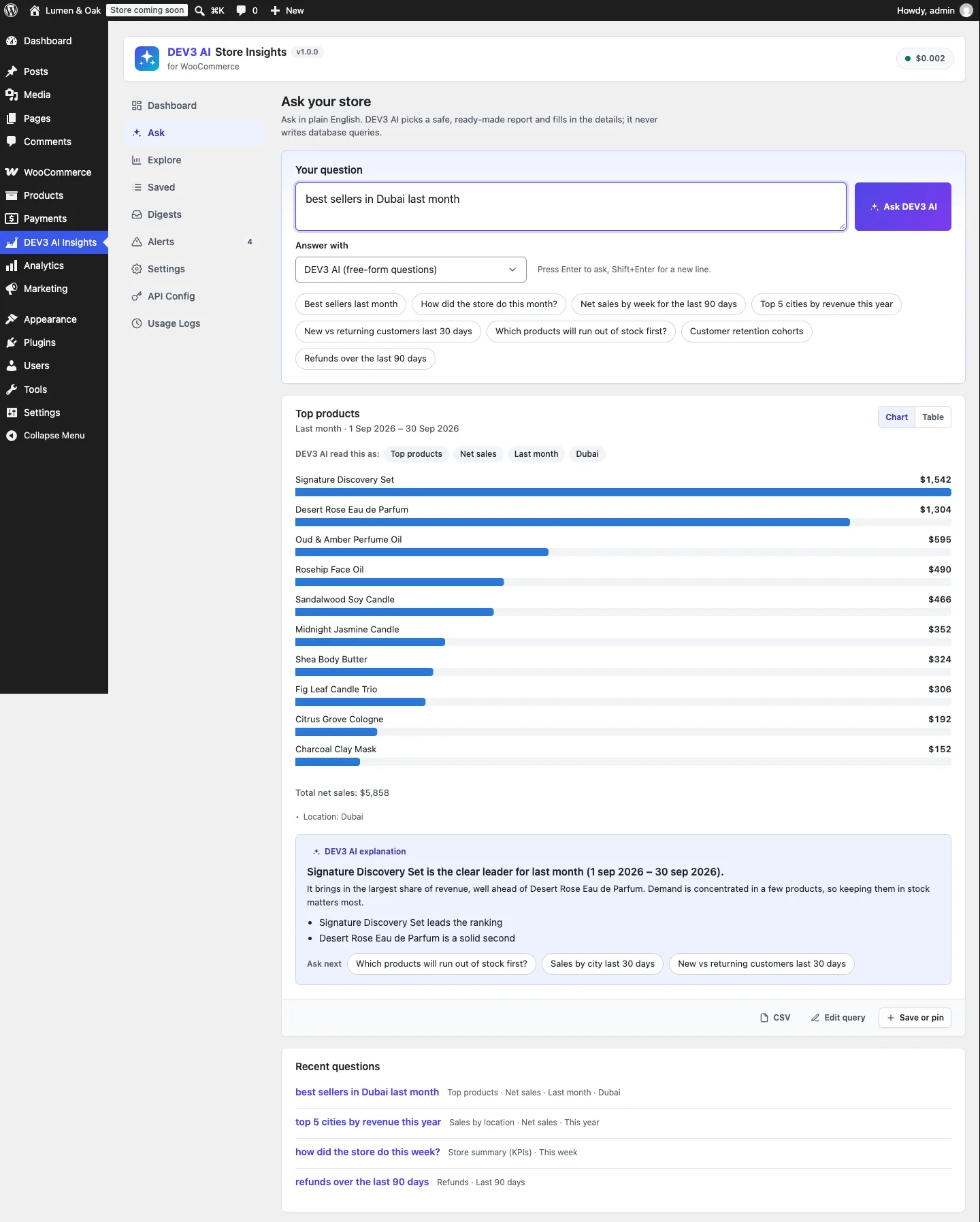
One question, one ready-made report: top products by net sales, last month, Dubai.
What it does and who it's for
DEV3 AI Store Insights adds plain-English questions, a pinned dashboard, e-mail digests and anomaly alerts on top of the WooCommerce Analytics data a store already has. It suits:
- Store owners who don't live in reports and want "how did we do last week?" answered in one line, with a chart.
- Stores that sell across regions and need sales by country, emirate, state or city, which WooCommerce's own reports don't break down.
- Teams that want a Monday e-mail with the key numbers and a few saved questions, instead of logging in.
- Merchants who want early warnings when sales drop, orders spike or a best seller is about to run out.
- Privacy-minded shops that won't copy their order data into a hosted analytics service. Everything runs inside WordPress.
AI is optional. The rule parser, Explore, the dashboard, digests and alerts all work without an API key.
How to set it up
- Install the plugin zip from the bundle download and activate it with WooCommerce 8.0 or newer.
- Open DEV3 AI Insights → Settings, check Data health, and start the Analytics import if any orders are missing.
- In Settings, choose the theme, the default dashboard period, whether answers use DEV3 AI or the rules, and whether locations come from the billing or shipping address.
- Optional: add a Google Gemini API key in API Config for free-form questions and explanations.
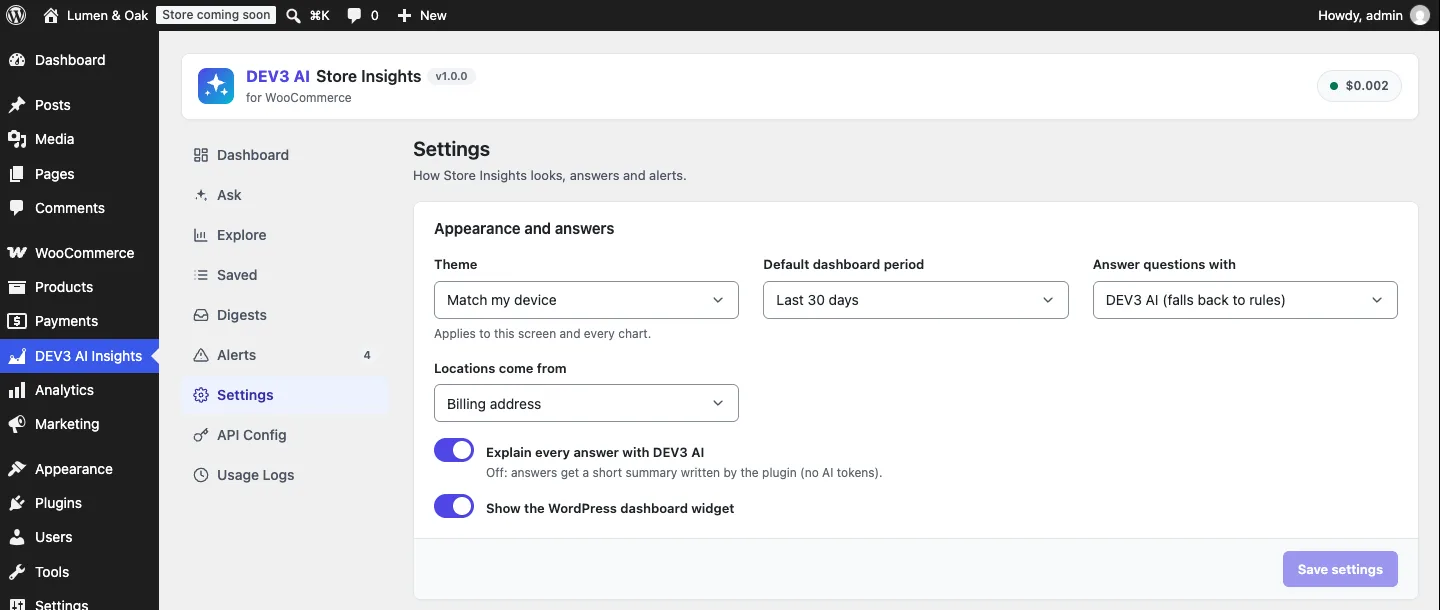
Settings: how answers are produced and where locations come from.
How to use it
Ask, check, keep. Type a question in Ask. The "DEV3 AI read this as" chips show the report, measure, period and filters that actually ran. Edit query opens the same report in Explore to adjust it, and Save or pin keeps it.
Pin a dashboard. Pinned answers become cards on the Dashboard, each with a chart and table toggle. One Date range control can show every card for the same period.
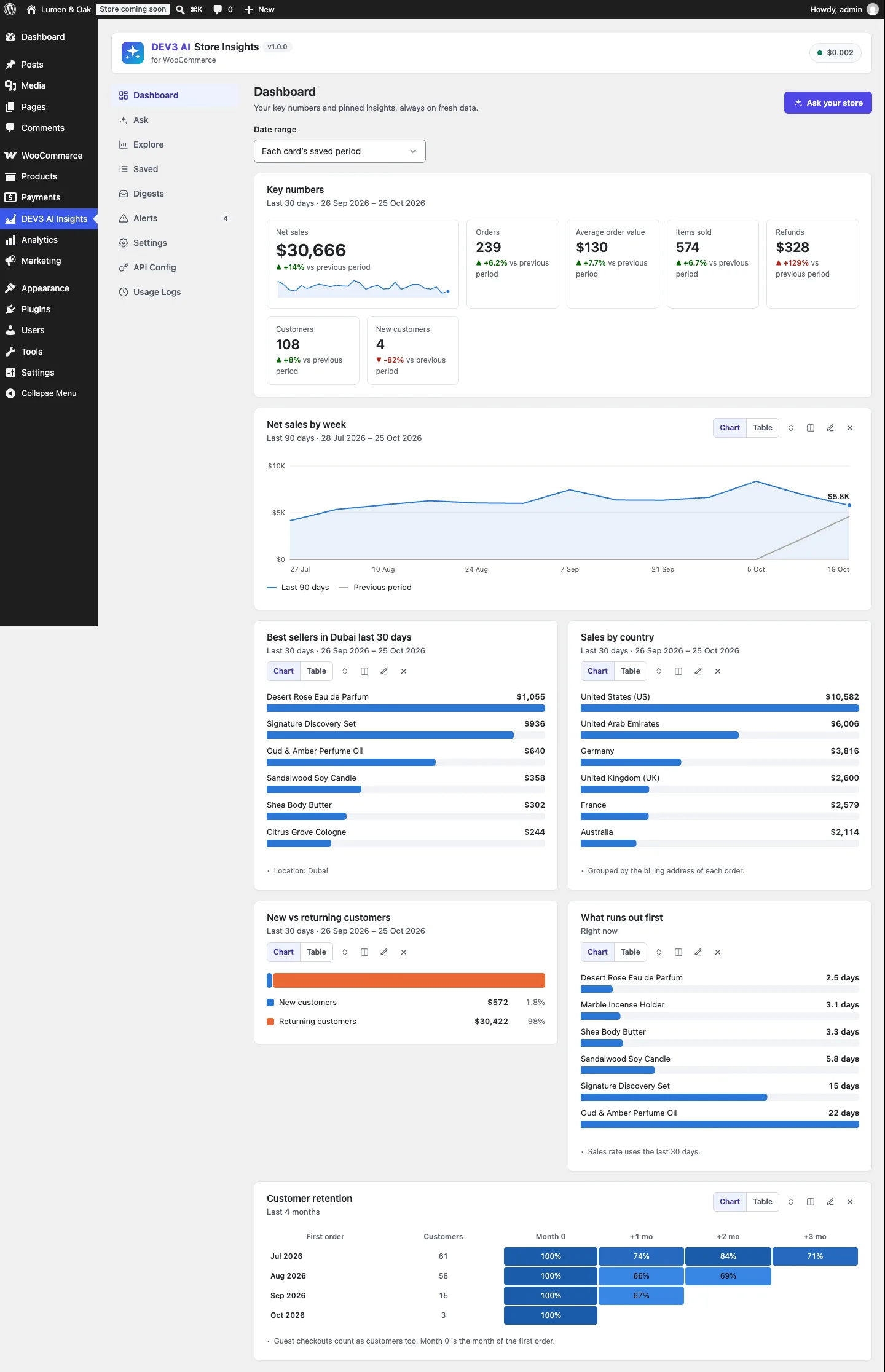
Key numbers with changes against the previous period, and pinned insights below.
Get told when something is off. Alert rules compare yesterday with the previous 28 days using a z-score and a minimum change. Each alert lists the products and countries that moved most, and it can be e-mailed.
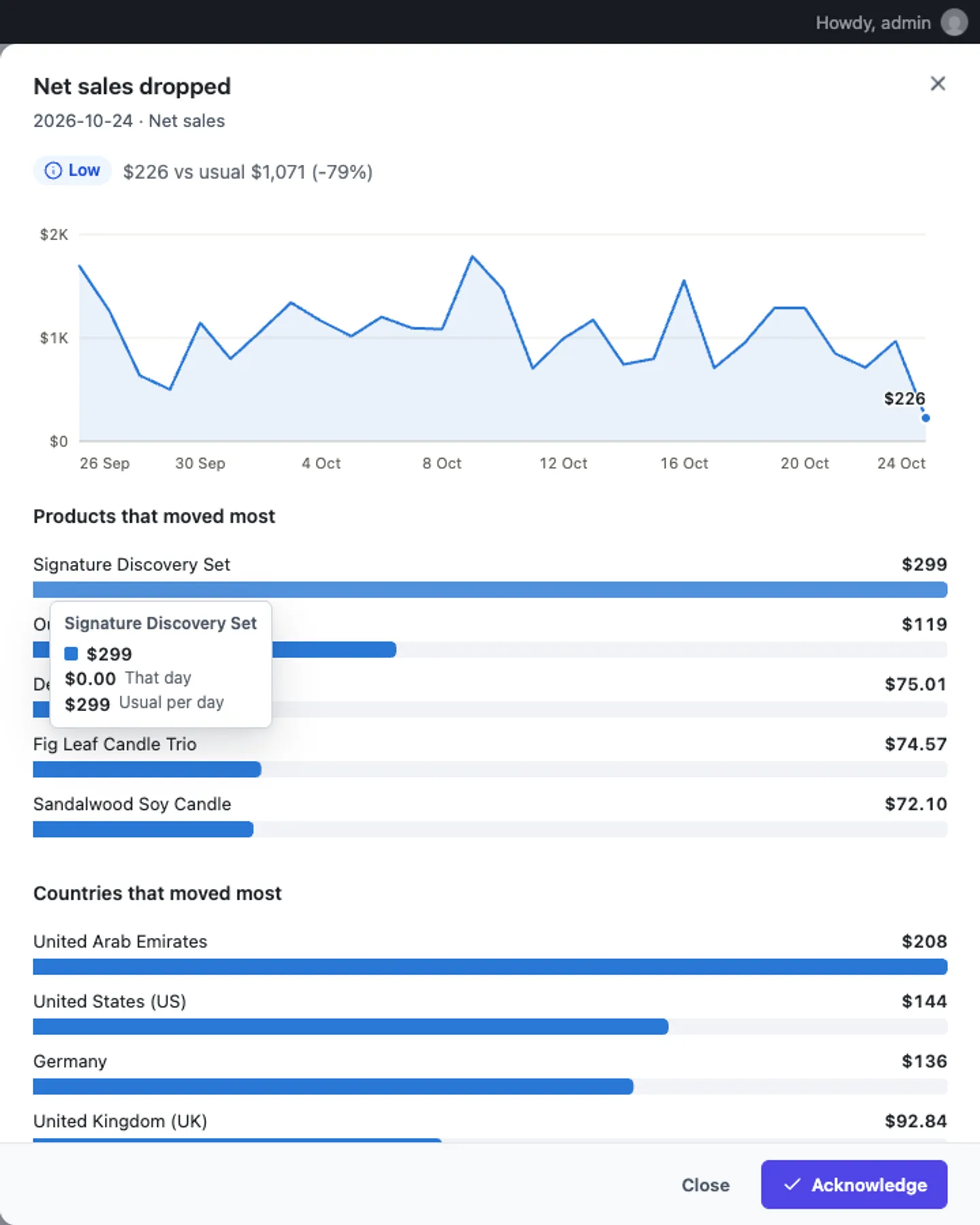
An alert drill-down: the day against its baseline and the biggest movers.
Now to the engineering problem behind "Ask".

Illustration: a plain-English question about the store turning into charts.
The shape of the problem
A store owner's question has three parts: what to measure, over which period, and for which slice of the store. Almost every question we collected while writing the spec fitted that mould: a report type, a metric, a period, an optional comparison and up to five filters. If the useful questions are a small set of parameterised reports, the model's job is not to write code. It is to translate English into a function call, and function calling exists for exactly that.
A library of reports, described as functions
Query\Library holds the catalogue: store_summary, sales_trend, top_products, top_categories, sales_by_location, customer_segments, top_customers, refunds, cohorts, stock_status and top_coupons. Each entry has a label, a description written for the model, the list of parameters it accepts and a PHP callable that runs it. Parameters are defined once and shared:
'limit'    => array(
	'type'        => 'int',
	'min'         => 1,
	'max'         => 50,
	'default'     => 10,
	'description' => 'How many rows (top N).',
),
'location' => array(
	'type'        => 'string',
	'max'         => 80,
	'description' => 'Only orders from this place: a country name or ISO code, a state/region/emirate name, or a city (e.g. "Dubai", "Germany", "California").',
),
(condensed from Library::params)
The same catalogue produces three things. Library::declarations() turns it into Gemini function declarations: enums become STRING with an enum list, integers become INTEGER with the range appended to the description. Library::catalogue() turns it into the form that powers Explore, the manual report builder. And Library::sanitize() uses it to validate calls. Because all three read the same definitions, the model, the UI and the validator can't drift apart. A PHPUnit test asserts the 11 names in order, that every property is STRING or INTEGER with a non-empty description, and that top_products has no product filter, because filtering the best-seller list to a single product makes no sense.
Metrics are per-function enums too. A model that asks for "profit" gets the function's default metric, and the answer card shows exactly what ran.
Asking the model
Asker::plan_ai() sends the question with the declarations, tool_mode: 'ANY' (so the model must answer with a function call, never prose) and temperature 0. The system prompt is short and mostly context the model can't know:
'You map a WooCommerce store owner\'s question to one of the provided report functions. Always answer with a function call; never write SQL or prose.',
'Dates: today is ' . $ctx['today'] . ' in ' . $ctx['timezone'] . '; weeks start on ' . $ctx['week_starts'] . '. Prefer the preset periods. ...',
'Locations: put a city, emirate/state or country in "location" exactly as the user wrote it (e.g. "Dubai"). Product categories go in "category".',
'Categories in this store: ' . implode( ', ', $ctx['categories'] ) . '.',
'Cities with orders: ' . implode( ', ', $ctx['cities'] ) . '.',
(condensed from Prompts::plan_system)
The model copies locations exactly as written, because the plugin resolves them itself (more on that below), and the store's real categories and cities are listed. The prompt carries no table names, columns or order rows.
The model may return up to two calls, for questions such as "top products and top countries". Anything beyond MAX_CALLS is ignored, and each call goes through the validator:
foreach ( array_slice( (array) $result['function_calls'], 0, self::MAX_CALLS ) as $call ) {
	$clean = Library::sanitize( $call['name'] ?? '', $call['args'] ?? array() );
	if ( ! is_wp_error( $clean ) ) {
		$calls[] = $clean;
	}
}
(condensed from Asker::plan_ai)
If nothing survives, or the API is down, or there's no key, Asker::ask() falls back to Rule_Parser, which understands the common phrasings on its own. The answer records which path produced it, so the UI can say "answered with the built-in rules" instead of failing.
The validator never trusts a field

Illustration: the model sets options on ready-made reports and never touches the database directly.
Library::sanitize() is where the model's output stops being model output. Its rules are simple and absolute:
switch ( $spec['type'] ) {
	case 'enum':
		$value      = is_scalar( $value ) ? sanitize_key( (string) $value ) : '';
		$out[ $id ] = in_array( $value, $spec['values'], true ) ? $value : $spec['default'];
		break;
	case 'int':
		$value      = is_numeric( $value ) ? (int) $value : (int) $spec['default'];
		$out[ $id ] = max( (int) $spec['min'], min( (int) $spec['max'], $value ) );
		break;
	case 'date':
		$value = is_scalar( $value ) ? Period::clean_date( $value ) : '';
		if ( '' !== $value ) {
			$out[ $id ] = $value;
		}
		break;
	default:
		$value = is_scalar( $value ) ? trim( sanitize_text_field( (string) $value ) ) : '';
		$value = mb_substr( $value, 0, isset( $spec['max'] ) ? (int) $spec['max'] : 80 );
		if ( '' !== $value ) {
			$out[ $id ] = $value;
		}
}
(condensed from Library::sanitize)
- Unknown functions are errors.
drop_tablesorsqlreturns aWP_Error, not a best guess. - Unknown keys are dropped. The loop walks the function's parameter specs, not the arguments, so an extra
sqlkey never even gets read. - Enums fall back, numbers clamp. A metric of
DROPbecomesrevenue; a limit of 999 becomes 50;months: -4on the cohort report becomes 3. - Custom periods need two valid dates.
2026-02-30failsPeriod::clean_date(), and a custom period without both dates becomes the last 30 days.
One AskTest case feeds all of that at once, plus a 200-character location ending in '; DROP TABLE wp_users; --. The result has limit 50, metric revenue, period last_30_days, a location cut to 80 characters and no sql key. Another test sends the full mocked function-calling round trip: the model returns a valid top_products call with limit: 500 plus a call to not_a_function. The plan that runs has one call, with a limit of 50.
The same validator runs on every path, not just AI: Explore, saved questions, dashboard cards and the CSV export all go through Library::run(), which sanitises again after applying any period override.
From validated options to prepared SQL
Sanitised strings are still user text. "Dubai' OR '1'='1" is a perfectly valid 80-character location. So the second rule lives in Query\Builder: nothing from a request becomes SQL text. The class docblock states it plainly: callers pass whitelisted metric ids, trusted fragments written in the plugin, and values that always go through $wpdb->prepare().
Metrics are a constant map from id to expression, with one map for order-level rows and one for line items:
const METRICS = array(
	'orders' => array(
		'net_sales'    => 'SUM(s.net_total)',
		'orders'       => 'SUM(CASE WHEN s.parent_id = 0 THEN 1 ELSE 0 END)',
		'refunds'      => 'SUM(CASE WHEN s.parent_id > 0 THEN -s.total_sales ELSE 0 END)',
		'refund_count' => 'SUM(CASE WHEN s.parent_id > 0 THEN 1 ELSE 0 END)',
	),
	'items'  => array(
		'net_sales' => 'SUM(p.product_net_revenue)',
		'orders'    => 'COUNT(DISTINCT CASE WHEN s.parent_id = 0 THEN p.order_id END)',
	),
);
(condensed from Builder::METRICS)
The parent_id tests matter. WooCommerce Analytics writes refunds into wc_order_stats as their own rows with negative totals and the parent order's id. So orders are rows with parent_id = 0, refunds are the negated rows with parent_id > 0, and AOV and refund rate are derived afterwards in PHP, never by the model.
Filters add WHERE fragments with placeholders, and their values go into a separate list. The constructor starts with the store's excluded statuses (WooCommerce → Settings → Analytics), so a failed or cancelled order never counts:
$statuses = Store::excluded_statuses();
$this->where( 's.status NOT IN (' . implode( ',', array_fill( 0, count( $statuses ), '%s' ) ) . ')', $statuses );
(from Builder::__construct)
Category and product filters become IN (%d, …) lists of ids resolved by the plugin, and run against line items, so "sales of fragrance" counts only fragrance lines, not every order that happened to contain a perfume. At the end, select() joins the fragments and hands the SQL and the values to $wpdb->prepare() in one call.
One argument does reach SQL text: top_products uses the metric alias in its HAVING clause. That is safe only because metric is an enum, so it can only be revenue, quantity or orders by then.
The hostile-strings test runs the real query: top_products with the location Dubai' OR '1'='1 and the category x') OR 1=1 -- . The result is an empty list of rows, which is correct because no city has that name, and the users table has the same row count afterwards.
"In Dubai" on two order storages
Location turned out to be the hardest filter. WooCommerce Analytics' lookup tables don't store the order's address at all. On a store using High-Performance Order Storage (HPOS), the address lives in wc_order_addresses. On legacy storage it's three postmeta rows per order. Plugins that assume one or the other break when a store migrates, so Store::location_sql() asks WooCommerce which storage is authoritative and returns the right join:
$id = 'IF(s.parent_id > 0, s.parent_id, s.order_id)';
if ( self::hpos() ) {
	return array(
		'join'    => "LEFT JOIN {$t['addresses']} la ON la.order_id = {$id} AND la.address_type = '{$basis}'",
		'country' => 'la.country',
		'state'   => 'la.state',
		'city'    => 'la.city',
	);
}
return array(
	'join'    => "LEFT JOIN {$pm} lc ON lc.post_id = {$id} AND lc.meta_key = '_{$basis}_country' LEFT JOIN {$pm} ls ON ...",
	'country' => 'lc.meta_value',
	'state'   => 'ls.meta_value',
	'city'    => 'lt.meta_value',
);
(condensed from Store::location_sql)
The IF(s.parent_id > 0, …) makes a refund inherit its parent order's address, so refunds land in the same city as the sale. $basis is billing or shipping from a setting that can only hold those two values. hpos() calls OrderUtil::custom_orders_table_usage_is_enabled(), and the result is memoised per request.
The model's "Dubai" is then resolved by Store::resolve_location(), not trusted. A two-letter ISO code or an alias such as "UAE" or "UK" becomes a country. A name is matched against WooCommerce's own country list, then against the state lists of countries that actually have orders (Dubai is an emirate code there), and the text is always added as a city match too. The builder ORs those conditions together and adds a note, "Location: Dubai", which the answer card shows so the owner can see what matched.
test_location_join_works_on_both_order_storages seeds the same orders with HPOS data sync on, then runs sales by location twice: once with HPOS forced on and once forced off. Both runs must report $300 for the United Arab Emirates and $120 for Germany, and a Germany-filtered summary must count exactly one order.
What the AI still does
The model's remaining jobs are low-risk. It interprets the question, shown as editable chips, and explains the result from a compact payload of at most 15 rows. Customer names become "Customer 1, 2…" unless the owner allows names, and a test asserts that a seeded customer's email never appears in the request. If the explanation fails, a template writes one from the numbers.
Trade-offs
- Only questions the library covers. Something like "sales by payment method" has no function, so the model picks the closest one or the plugin says it can't map the question. The
dev3si_query_functionsfilter lets a developer add a report with its own runner, which joins the same catalogue, validator and UI. - Analytics lag. The lookup tables are filled in the background by WooCommerce. The data-health check counts orders missing from
wc_order_statsand offers a background import, but a brand-new order can take a moment to appear. - No currency conversion. Totals are summed at face value, so a multi-currency store sees mixed currencies added together. That's a known gap in v1.0.
- Live quality not measured yet. The AI paths were tested with mocked Google Gemini API responses. How often a live model picks the best report for unusual phrasings is the next thing to measure.
Conclusion
The suite behind this has 51 PHPUnit test methods (66 cases with the 16-question rule-parser data set) and 37 Jest tests. The pattern is what carries over: when the useful questions fit a small set of parameterised reports, give the model those reports as functions, validate every argument against the same definitions the UI uses, and keep values out of SQL text. The model gets to be helpful with language, and the database only ever runs queries you wrote. DEV3 AI Store Insights ships in the DEV3 AI WooCommerce Plugins Bundle on the DEV3 marketplace, alongside 20 other WooCommerce plugins, and is being prepared for CodeCanyon. The case study covers the rest of the plugin, including pinned dashboards, digests and anomaly alerts.