Web Scripts & Software
DEV3 Online Ruler (Actual Size, cm & Inches) — Source Code (React + Tailwind)
from $20$29
Loading…
Everyday tool
Free, no sign-up. Runs in your browser; nothing is uploaded. Buy the source code: $29 Regular / $69 Extended
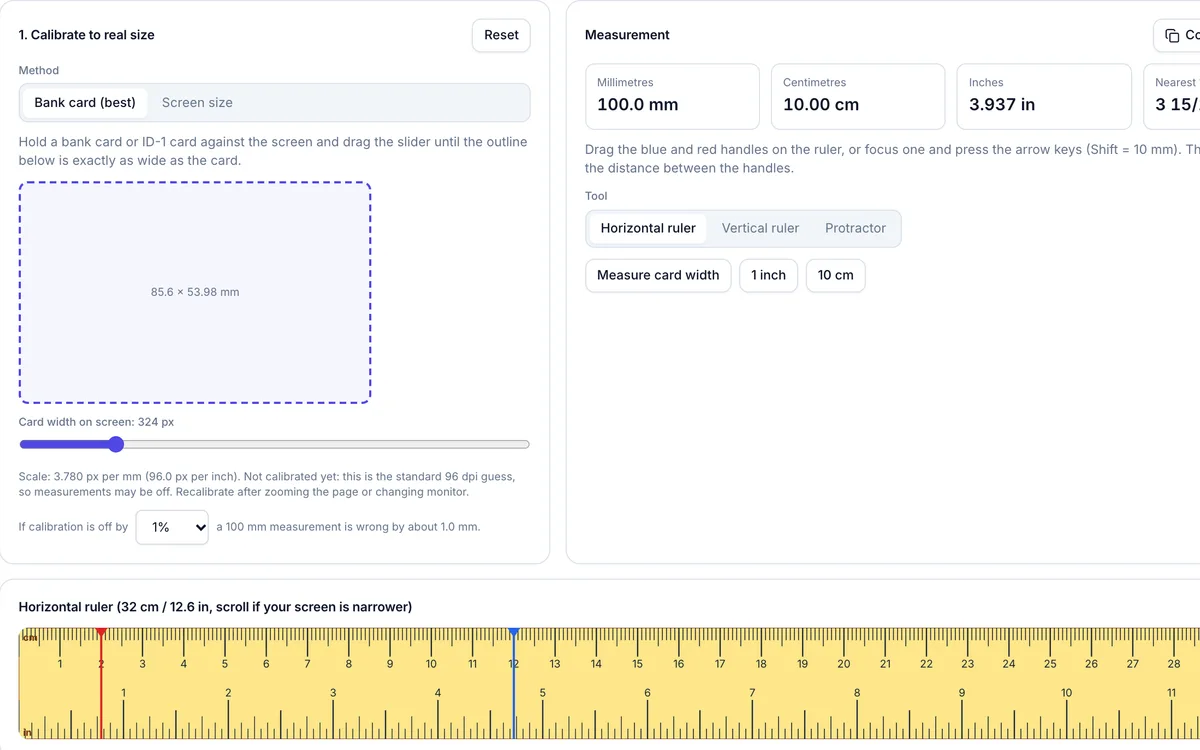
Hold a bank card or ID-1 card against the screen and drag the slider until the outline below is exactly as wide as the card.
Scale: 3.780 px per mm (96.0 px per inch). Not calibrated yet: this is the standard 96 dpi guess, so measurements may be off. Recalibrate after zooming the page or changing monitor.
Drag the blue and red handles on the ruler, or focus one and press the arrow keys (Shift = 10 mm). The numbers show the distance between the handles.
The PDF has a cm scale, an inch scale in sixteenths, a bank card outline and a 50 mm check square. Print at 100% (Actual size) and measure the square: if it is 50 mm the ruler is exact. This is more accurate than any screen. See also the cm to inches converter, the screen resolution checker and the ring size finder. A screen ruler is an aid, not a certified instrument.
Need Online Ruler (Actual Size, cm & Inches) as a full mobile or web app? We build it in about a week. Built in about a week, from $99. Send your requirements or SOW; you get a fixed quote and a delivery date.
The online ruler (actual size, cm & inches) stays free to use online. If you want the code to run, edit and ship in your own project, get the full source from the DEV3 Marketplace. Instant download, 6 months of support.
Get the full app behind this tool. Buy once, own the source, and try each one live first.
Web Scripts & Software
from $20$29
Web Scripts & Software Mobile app
from $69$99
Enterprise SaaS Starters
from $69$99
Enterprise SaaS Starters
from $69$99
Web Scripts & Software
from $69$99
Web Scripts & Software Mobile app
from $69$99
Web Scripts & Software Mobile app
from $69$99
Web Scripts & Software Mobile app
from $69$99
Most online rulers are wrong because a website cannot know the physical size of your pixels. This one asks you to calibrate it once against something you can measure, so its centimetres and inches match real ones.
Your setting is saved in your browser, so you only do this once per device. If you zoom the page or move the window to another monitor, calibrate again.
Download the PDF for A4 or Letter. It carries a cm scale, an inch scale, a bank card outline and a 50 mm square. Print at 100 percent, then measure the square with a real ruler. If it is exactly 50 mm the printed ruler is exact, which is the more accurate route for long items.
A calibration error of 1 percent means 1 mm over 10 cm. The page shows this in the accuracy note. For critical work, such as parts, jewellery or medical use, use a physical ruler. For everyday jobs, such as checking a photo print, a screw or a ring, an on-screen ruler is quick and good enough.
After calibrating with a real bank card it is usually within about 1 percent, so a 10 cm measurement is correct to roughly a millimetre. Browser zoom, display scaling and external monitors change the scale, so recalibrate if you change them.
Hold a bank card, driving licence or any ID-1 card against the screen and drag the slider until the card outline on screen matches the real card edge to edge. Cards are 85.60 mm wide. You can instead enter your screen diagonal.
Browsers report a standard 96 pixels per inch, but real screens vary. The default is therefore only a starting guess. Calibrate once, and the page remembers it in your browser for next time.
Yes. Download the PDF for A4 or Letter, print at 100 percent with no fit to page, and check that the printed 50 mm square really measures 50 mm. Then the printed cm and inch scales are exact.
Drag either arm of the protractor and read the angle between the arms in degrees. Turn on snapping to jump to whole degrees or 5 degree steps. Use arrow keys to nudge a selected arm.
No. The ruler is drawn in your browser and the only thing stored is your calibration number, in your own browser storage.