Enterprise SaaS Starters
DEV3 Tolldeck – Developer API Portal with OpenAPI Docs, Try-it Console, API Keys, Usage Plans & Metering (Next.js)
from $69$99
Loading…
Developer tool
Free, no sign-up. Runs in your browser; nothing is uploaded. Buy the source code: $29 Regular / $69 Extended
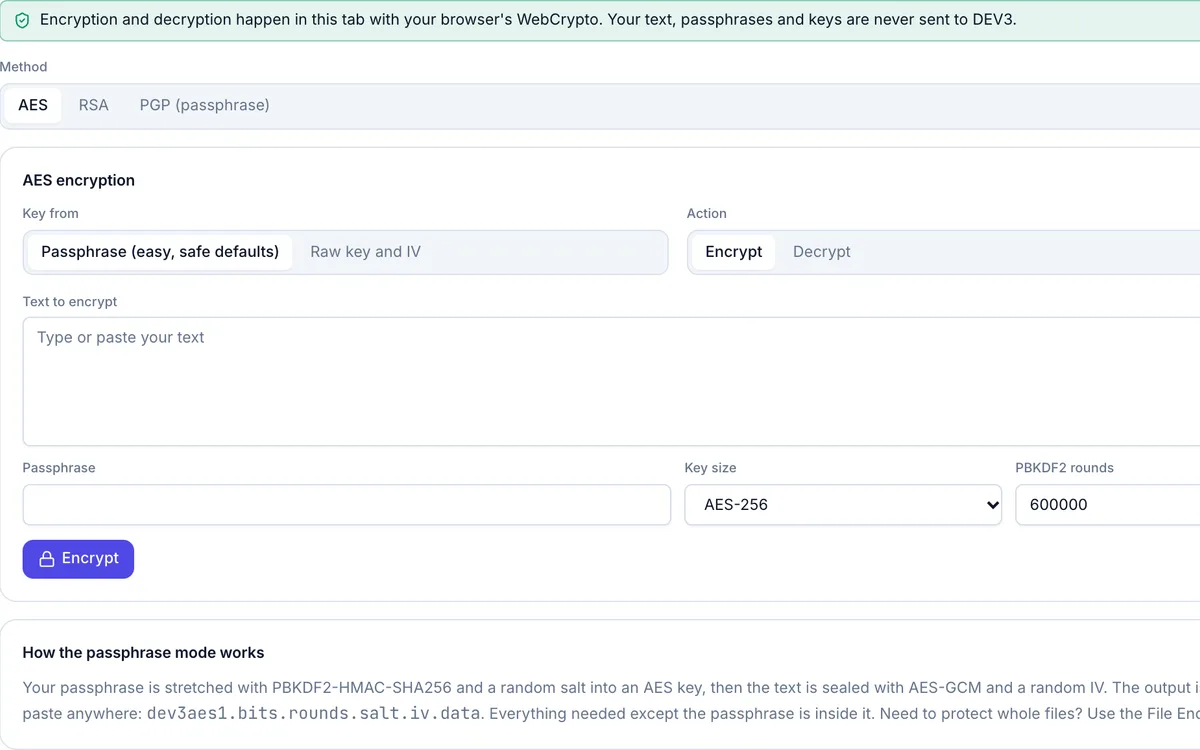
Your passphrase is stretched with PBKDF2-HMAC-SHA256 and a random salt into an AES key, then the text is sealed with AES-GCM and a random IV. The output is one line you can paste anywhere: dev3aes1.bits.rounds.salt.iv.data. Everything needed except the passphrase is inside it. Need to protect whole files? Use the File Encryption tool.
Need AES, RSA and PGP Encryption Tool built into your own product? We build it as a full app, API and admin included. Built in about a week, from $99. Send your requirements or SOW; you get a fixed quote and a delivery date.
The aes, rsa and pgp encryption tool stays free to use online. If you want the code to run, edit and ship in your own project, get the full source from the DEV3 Marketplace. Instant download, 6 months of support.
Skip the build: ready-made apps with the code included. Buy once, own the source, and try each one live first.
Enterprise SaaS Starters
from $69$99
Web Scripts & Software
from $20$29
Enterprise SaaS Starters
from $69$99

Enterprise SaaS Starters
from $69$99
Enterprise SaaS Starters
from $69$99
Enterprise SaaS Starters
from $69$99
Enterprise SaaS Starters
from $69$99
Enterprise SaaS Starters
from $69$99
This page covers the three encryption jobs developers meet most: symmetric AES for secrets and configuration, RSA for sharing data with a key pair, and OpenPGP messages that work with gpg. It runs entirely in your browser using the standard WebCrypto API.
dev3aes1 that holds the salt, IV and ciphertext.Choose Raw key and IV when you need to match another system. Select GCM, CBC or CTR, enter the key and IV as hex or Base64, or press Generate random key and IV. Always use a fresh IV for each message with the same key.
The PGP tab creates and opens passphrase-protected OpenPGP messages in ASCII armor. Save the output as message.asc and run gpg --decrypt message.asc to confirm it works.
Your text, passphrases and keys are processed by your browser's own WebCrypto engine and are never sent to a server. Even so, avoid pasting production private keys into any website. Generate throwaway keys for testing, and keep real keys in a password manager or hardware module.
Use GCM. It encrypts and also authenticates, so any change to the data is detected. CBC and CTR only hide the content, offer no tamper check and are provided for compatibility with older systems. Never reuse an IV with the same key.
RSA-OAEP can only encrypt a message slightly shorter than the key: 190 bytes for a 2048-bit key with SHA-256. For longer text this tool creates a random AES-256 key, encrypts the text with it and encrypts only that small key with RSA. This is how real systems do it.
Yes for the PGP tab. It writes the standard OpenPGP symmetric format, so gpg --decrypt reads it, and it can read messages created with gpg --symmetric. Encrypting to a recipient's PGP public key is not supported in the browser yet.
Use at least four random words or 16 characters. The passphrase is stretched with 600,000 PBKDF2 rounds, which slows attackers, but cannot rescue a short or common phrase.
Encryption hides a message so only the key holder can read it. A signature proves who sent a message and that it was not altered; the message stays readable. Sign with your private key, and anyone with your public key can verify.