Every WooCommerce store owner knows the feeling. The cart is full, the shopper is on the checkout page, and then the tab closes. The usual answer is an exit-intent popup with a code like SAVE10, and it works for a week. Then the code turns up on a coupon site, shoppers who were going to buy anyway start using it, and you're giving away 10% on orders you would have won at full price.
The opposite mistake is just as common: you're so worried about margin that you never offer anything, and the hesitant shoppers leave. What you want sits in between. This guide walks through setting that up with DEV3 AI Smart Coupons & Dynamic Discounts.
What a good cart-saving offer looks like
A well-run abandonment offer has five properties:
- It only goes to shoppers who are actually about to leave, not to everyone who visits the cart.
- It's personal and single use, so it can't be shared or posted online.
- It never takes a product below cost plus your margin. A discount on a thin-margin item should be smaller, or skip that item entirely.
- It has a daily ceiling, so a busy day can't turn into an expensive one.
- It's easy to accept. One click, with a clear time limit.
DEV3 AI Smart Coupons is built around those rules. It watches for exit intent, idle time and tab switches, scores the cart's abandonment risk from 0 to 100, and when the score passes your threshold (55 by default) shows a personal offer with a one-click Apply button and a countdown. The offer can be a percentage off, a fixed amount off or free shipping. With a Google Gemini key, the AI picks the incentive and writes the copy. Without one, the plugin makes rules-based offers. Either way, your rules always clamp the offer on the server.
Step-by-step setup
1. Install and (optionally) connect the AI
You need WordPress 6.0+, PHP 7.4+ and WooCommerce 7.6+. Both the classic and block cart and checkout are supported. Upload the zip under Plugins → Add New → Upload Plugin and activate it. The DEV3 AI Smart Coupons menu appears in the admin sidebar.
To turn on AI offers, create a free key in Google AI Studio, paste it in DEV3 AI Smart Coupons → API Config and click Validate & save. You can skip this and come back later.
2. Set your guardrails before anything else
Go to Rules. This is the most important screen, so take your time:
- Allowed incentive types. Percentage, fixed amount, free shipping, or a mix.
- Minimum and maximum discount. For example, a ceiling on the percentage and on the fixed amount.
- Minimum spend. Small carts don't get offers.
- Margin protection. Enter the product meta key where your cost price lives (for example
_wc_cog_costif you use a cost-of-goods plugin) and your minimum margin over cost. No product is discounted below cost plus that margin, and products with no room are left out of the coupon. - Exclusions. Products, categories and sale items that should never be discounted.
- Daily discount budget. The total the plugin may give away in a day. It resets at midnight.
3. Test with the simulator
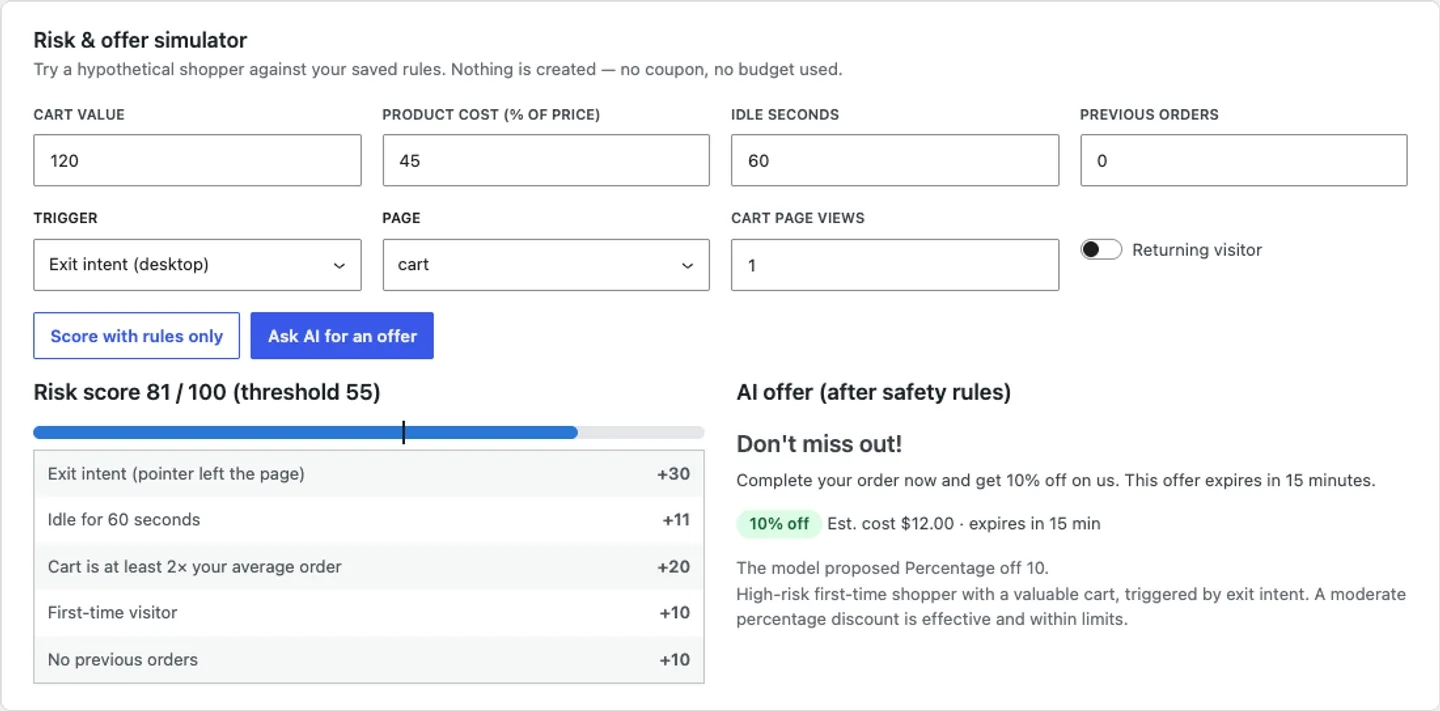
At the bottom of Rules, the Risk & offer simulator shows what a given cart would score and what offer it would get. The score isn't a black box: it's a weighted model of exit intent, idle time, cart value against your average order, new or returning visitor, order history and repeated cart views, and the simulator explains every point.
Try a few realistic carts: a small first-time cart, a large returning-customer cart, a cart with your lowest-margin product. If the offers look too generous, tighten the rules, not the AI.
4. Choose triggers and privacy options
In Triggers, pick the signals (exit intent, mobile exit signals, idle time) and the pages the tracker runs on. You can require a consent cookie and respect Do Not Track. With consent required, the storefront script does nothing until consent is given.
5. Design the banner
In Banner design, choose a bottom bar, top bar, corner card, modal or inline offer on cart and checkout. Set colours and your brand voice, and check the live preview. Banners support keyboard use and screen readers, and they don't cause layout shift.
6. Free shipping offers need one extra step
If you allow free shipping, add a Free shipping method that requires A valid free shipping coupon to your zones under WooCommerce → Settings → Shipping. Without it, the coupon has nothing to unlock.
What stops the code from leaking
Each offer becomes a real WooCommerce coupon with a unique code, a usage limit of 1, an expiry that matches the countdown, and your exclusions and minimum spend mirrored onto it. It's restricted to the shopper's email when known, can be set to individual use, and only works in the shopping session it was issued to. Shoppers also get at most one offer per day. Expired, unused coupons are cleaned up in the background, so your coupon list doesn't fill up with junk.
The AI request contains anonymous cart context only: currency, subtotal, item count, up to 8 category names, your average order value, the risk reasons and your limits. No name, email, IP address, product name or coupon code is sent.
Tips and pitfalls
- Set the budget conservatively at first. Watch Analytics for a couple of weeks (offers shown, applied and redeemed, revenue from offered carts and total discount cost) before you raise it.
- Fill in cost prices. The margin floor only protects products that have a cost in the meta key you chose. Developers can also supply costs with the
dev3sc_product_costfilter. - Page caching is fine. Cached pages contain only public settings. Each shopper's offer is fetched when a trigger fires and printed inline only on cart and checkout.
- Don't fight the copy rules. AI copy that contains numbers, currency symbols, links or markup is replaced by your template, so the banner always states the real, clamped offer. Write a good template and the fallback looks just as polished.
- Use flash sales for planned urgency. Flash sales schedule site-wide countdown bars, and Generate copy with DEV3 AI writes them. Keep those separate from abandonment offers.
Who it's for
This suits WooCommerce stores with real cart abandonment and margins worth protecting: fashion, homeware, beauty, gifts, anything with a mix of high- and low-margin products. It's especially useful if you've been burned by a shared code before, or if your finance person asks "how much did that popup cost us?". The case study shows the exit-intent offer, the risk simulator and the analytics screen.
Get started
DEV3 AI Smart Coupons & Dynamic Discounts comes in the DEV3 AI WooCommerce Plugins Bundle. Set your caps and margin floor first, test a few carts in the simulator, then switch on the banner. If you want AI features like this built into your own store or platform, talk to our AI implementation team.